1
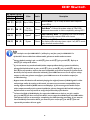
DIP Switch
DIP Switch Position1
Pin-1
Pin-2
Pin-3
Pin-4
Video
Audio
Description
OFF [©]
OFF [©]
Up to 1080p
Stereo2
Default Mode3 – Up to 1080p & stereo audio output for
most HDTVs
OFF [©]
ON [ª]
Up to
720p/1080i
Stereo
Safe Mode4 – Enforce the system output at 720p/1080i
video and stereo audio for basic compatibility among HDTV
ON [ª]
OFF [©]
Bypass5
Bypass5
EDID Learning6 Mode – for learning EDID from the display
while playing any received HDMI audio format
ON [ª]
ON [ª]
Bypass
Stereo
EDID Learning6 & Stereo Mode – for learning EDID from
the display while enforcing stereo output if any HDTV cannot
play surround sound normally
Note
1
Pin-1 and pin-2 are for HDMI INPUT 1; while pin-3 and pin-4 are for HDMI INPUT 2
2
If the HDTV shows video but without audio, please set audio mode to stereo.
3
Factory default setting is pin-1 at OFF[©], pin-2 at OFF[©], pin-3 at OFF[©] & pin-4 at
OFF[©] for 1080p with stereo.
4
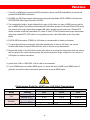
If you encounter any unsolved audio/video output problem during system installation,
please dial the DIP switch to pin-1 at OFF[©], pin-2 at ON[ª], pin-3 at OFF[©], & pin-4 at
ON[ª] for safe mode to enforce the most compatible 720p stereo output for system check.
However, the safe mode cannot be initiated if your HDMI sources are set to enforce 1080p
output. In this case, please reconfigure your HDMI source to all resolution output for
troubleshooting.
5
Bypass means this device will maintain playing the original format of HDMI signals in video
and perhaps audio. By setting at this mode, the users may encounter compatibility issue
among different kinds of HDMI sources and displays. If you cannot get the audio and/or
video output normally at the system installation, please change the DIP switch setting to
default mode or even safe mode to verify the functionality of the device.
6
To learn the EDID of HDMI display for respective HDMI source devices, set (pin-1 and/or
pin-3) at ON[ª] first then connect the HDTV sets to respective HDMI inputs via HDMI cables.
Then please wait for 20 seconds for completing the EDID learning procedure. If you want to
learn the EDID from another HDTV, you must set pin-1 and/or pin-3) at OFF[©] first and
repeat this procedure all over again.
6