1
Please unplug the device power cable and then shutdown the device before you
install the Micro SD card.
Please make sure the wire between power panel and device motherboard is firm,
otherwise may cause abnormity.
Please put the enclosure back and fasten the screws tightly to prevent dust.
Step 1
Please refer to Step 1 in chapter 2.2 to open the device protection enclosure.
Step 2
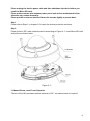
Please find the “SD” mark inside the device according to Figure 2- 3. Insert Micro-SD card
and put the enclosure back.
Figure 2- 3
2.4 Manual Zoom Lens Focus Operation
The lens of the HD panorama network camera is 180°, no manual zoom is required.
6