1
5.2 Troubleshooting
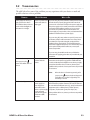
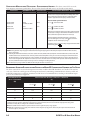
The table below lists some of the problems you may experience with your device or mask and
possible solutions to those problems.
Problem
Why It Happened
What to Do
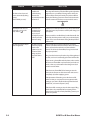
Nothing happens when you
apply power to the device.
The audible indicator does not
sound and the backlights on
the buttons do not light.
There’s no power at the
outlet or the device is
unplugged.
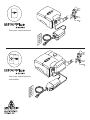
If you are using AC power, check the outlet power and verify
that the device is properly plugged in. Make sure the AC
power cord is connected correctly to the power supply and
the power supply cord is securely connected to the device’s
power inlet. If the problem continues to occur, contact
your home care provider. Return both the device and
power supply to your provider, so they can determine if the
problem is with the device or power supply.
If you are using DC power, make sure your DC power cord
and battery adaptor cable connections are secure. Check
your battery. It may need recharged or replaced. If the
problem persists, check the DC cord’s fuse following the
instructions supplied with your DC cord. The fuse may need
to be replaced. If the problem still occurs, contact your
home care provider.
If you are using a humidifier, make sure you follow the
instructions for applying power that are provided with your
humidifier.
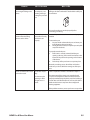
The device does not operate
when you press the
button. The airflow does not
turn on.
There may be a
problem with the
blower.
Make sure the device is powered correctly, following the
instructions on the previous page. If the audible indicator
sounds and the button backlights turn on when you apply
power, but the airflow does not turn on, there may be a
problem with your device. Contact your home care provider
for assistance.
Note:
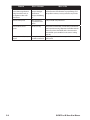
The device’s display is erratic.
BiPAP Plus M Series User Manual
The device or
power supply has
been dropped or
mishandled, or the
device or power supply
is in an area with
high Electromagnetic
Interference (EMI)
emissions.
When the device is functioning correctly, after
you press the
button, the device beeps and
the airflow turns on after a slight delay. This
brief delay is normal.
Unplug the device and the power supply. Reapply power to
the device. If the problem continues, relocate the device to
an area with lower EMI emissions (e.g., away from electronic
equipment such as cellular phones, cordless phones,
computers, TVs, electronic games, hair dryers, etc.).
If the problem still occurs, contact your home care provider
for assistance.
5-3