1
Chapter 1 Introducing the LCD TV
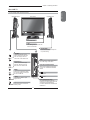
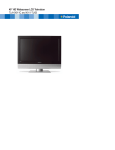
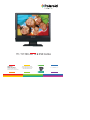
Your LCD TV
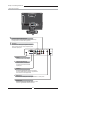
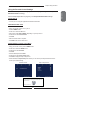
Front View
Right Side View
Left Side View
IR
Infrared Receiver
LED
The LED light indicates when the
LCD TV is activated.
HEADPHONE
Connects to the external headphone
for private listening.
VOLUME+Adjusts the volume up and
down. Selects the main-menu
item and change values for
items when in the OSD mode.
USB
Allows access to digital content stored
on a USB storage : MP4/JPEG
CHANNEL▲▼
Scans up and down through
channels. Selects sub-menu
item when in the OSD mode.
BUILT-IN SD CARD READER
MENU
Press once to display the OSD
(on screen display), press again
to turn the OSD off.
PLAY/PAUSE
Allows access to digital content stored
on a SD card : JPEG/MPEG1/MPEG2/
MPEG4
/
/
INPUT
Chooses from different input
signal sources.
STOP/EJECT
SLOT-TYPE DVD PLAYER
Any of the following disc types can
be played on the DVD player: DVD/VCD/
CD/CD-R/CD-RW/JPEG/KODAK
PICTURE CD/WMA/DVD+R/RW/DVD-R/
RW/MPEG-4
Turns the LCD TV on and into
standby mode.
11
ENGLISH
Front/Left /Right Side View and Controls