1
PocketITP Version 1.2
User Manual
Thomas Sapiano, B.Eng
March 24, 2005
Contents
Licence . . . . . . . . . . . . . . . . . . . . . . . . . . . . . . . . .
Introduction . . . . . . . . . . . . . . . . . . . . . . . . . . . . . . .
I
Getting Started
iv
v
1
1 Installing this Software
1.1 System Requirements . . . . . . . . . . . . . . . . . . . . . . .
1.2 Installation . . . . . . . . . . . . . . . . . . . . . . . . . . . .
1.3 Uninstallation . . . . . . . . . . . . . . . . . . . . . . . . . . .
2
2
2
3
II
4
Basic Setup and Use
2 Introduction
2.1 Opening Screen . . . . . . . . . . . . . . . . . . . . . . . . . .
3 Adding and Editing Users
3.1 Creating Your First User .
3.2 Creating Additional Users
3.3 Editing Existing Users . .
3.4 Removing Existing Users .
.
.
.
.
.
.
.
.
.
.
.
.
.
.
.
.
.
.
.
.
.
.
.
.
.
.
.
.
.
.
.
.
.
.
.
.
.
.
.
.
.
.
.
.
.
.
.
.
.
.
.
.
.
.
.
.
.
.
.
.
.
.
.
.
.
.
.
.
.
.
.
.
.
.
.
.
5
6
7
. 7
. 10
. 11
. 11
4 The Camera Hostnames List
12
4.1 Adding and Editing Hosts . . . . . . . . . . . . . . . . . . . . 12
5 Server Configuration
14
5.1 Root Folder . . . . . . . . . . . . . . . . . . . . . . . . . . . . 14
5.2 Failover Folder . . . . . . . . . . . . . . . . . . . . . . . . . . 15
5.3 Start Server Automatically . . . . . . . . . . . . . . . . . . . . 16
i
5.4
Equivalence Threshold . . . . . . . . . . . . . . . . . . . . . . 16
6 Configuring your Camera
17
6.1 Creating your First Profile . . . . . . . . . . . . . . . . . . . . 17
6.2 Loading Profiles into your Camera . . . . . . . . . . . . . . . . 19
7 Using the Server
21
7.1 Device Power . . . . . . . . . . . . . . . . . . . . . . . . . . . 21
7.2 Starting and Stopping the Server . . . . . . . . . . . . . . . . 23
7.3 Uploading Files . . . . . . . . . . . . . . . . . . . . . . . . . . 23
III
Advanced Configuration
25
8 Additional Controls and Monitoring
26
8.1 Monitoring Subsystem . . . . . . . . . . . . . . . . . . . . . . 26
8.2 One-Handed Monitoring . . . . . . . . . . . . . . . . . . . . . 29
9 Variables
30
10 Tips
10.1 Multiple Shooter, Single Directory . . . .
10.2 Multiple Shooter, Individual Directories
10.3 Chronological Directory Tree . . . . . . .
10.4 Chronological Tree with User Directories
10.5 Summary . . . . . . . . . . . . . . . . .
34
34
35
36
37
37
IV
.
.
.
.
.
.
.
.
.
.
.
.
.
.
.
.
.
.
.
.
.
.
.
.
.
.
.
.
.
.
.
.
.
.
.
.
.
.
.
.
.
.
.
.
.
.
.
.
.
.
.
.
.
.
.
.
.
.
.
.
Important Considerations
38
11 Battery Life
39
12 Storage Media
40
13 Security
13.1 The FTP Protocol . . . . . . . . . . . . . . . . . . . . . . . .
13.2 Weak Passwords . . . . . . . . . . . . . . . . . . . . . . . . . .
13.3 Measures Taken by the Server . . . . . . . . . . . . . . . . . .
41
41
42
42
ii
14 Unsupported Features
14.1 Directory Listings . . . . . . .
14.2 File Downloads . . . . . . . .
14.3 Block and Compressed Modes
14.4 Record and Page Structures .
V
.
.
.
.
.
.
.
.
.
.
.
.
.
.
.
.
.
.
.
.
.
.
.
.
.
.
.
.
.
.
.
.
.
.
.
.
.
.
.
.
.
.
.
.
.
.
.
.
.
.
.
.
.
.
.
.
.
.
.
.
.
.
.
.
.
.
.
.
.
.
.
.
Appendicies
45
A Troubleshooting
A.1 I can’t connect to the server
A.2 I am unable to log in . . . .
A.3 I am unable to transfer files
A.4 Files that I send aren’t there
B Development Cycle
B.1 Alpha and Beta Versions
B.2 Release Candidates . . .
B.3 Release . . . . . . . . . .
B.4 Stable . . . . . . . . . .
43
43
44
44
44
.
.
.
.
.
.
.
.
.
.
.
.
.
.
.
.
C Support
.
.
.
.
.
.
.
.
.
.
.
.
.
.
.
.
.
.
.
.
.
.
.
.
.
.
.
.
.
.
.
.
.
.
.
.
.
.
.
.
.
.
.
.
.
.
.
.
.
.
.
.
.
.
.
.
.
.
.
.
.
.
.
.
.
.
.
.
.
.
.
.
.
.
.
.
.
.
.
.
.
.
.
.
.
.
.
.
.
.
.
.
.
.
.
.
.
.
.
.
.
.
.
.
.
.
.
.
.
.
.
.
.
.
.
.
.
.
.
.
.
.
.
.
.
.
.
.
.
.
.
.
.
.
.
.
.
.
.
.
46
46
46
47
47
.
.
.
.
48
48
49
49
49
50
iii
Licence
Copyright 2005 Thomas Sapiano. All Rights Reserved.
Please carefully read this licence agreement, as it sets the terms by which
you are being granted licence to use this software. By using and/or distributing this software you agree to be bound by the terms of this agreement.
This software and all accompanying files, data and materials are distributed as is and with no warrantees of any kind, whether express or implied. The user must assume all responsibility for the entire risk of using
this software whether to their property or to the property of others. The
author does not accept any liability relating to the use of this software, this
is to be assumed by the individual or organization making use of the package.
You may redistribute this package to others directly, however you MUST
distribute the installation package as a whole and you are forbidden from
distributing independent portions of it. When distributing this package, you
are responsible for ensuring that any third parties are made aware of this
agreement and understand and agree to its terms. You may NOT redistribute this package for commercial gain of any kind without explicit written
consent of the author.
All rights of any kind in this package that are not expressly granted by
this agreement are entirely and exclusively reserved to the author. The user
may not reverse engineer, decompile, disassemble or create derivative works
based on this product.
This agreement shall be governed by the laws of the Province of Ontario.
Exclusive jurisdiction and venue for all matters relating to this agreement
and software shall be in courts located in the Province of Ontario, and by
accepting this agreement you consent to this jurisdiction and venue.
iv
Introduction
Thank you for downloading PocketITP version 1.2! This manual provides
instructions on the administration and use of this package, as well as tips on
how to maximize the benefit that it can provide you. This package provides
you with a FTP server containing features specifically tailored to improve
the workflow of photographers. Aside from the basic features, it also offers
the capability to rename files and dynamically build directory structures as
files are uploaded - this provides the user with the ability to have their files
sorted immediately after receipt.
This version is being supplied as freeware, meaning that it may be used
without any payment. If there is sufficient interest, commercial versions will
follow with additional functionality. If this package is helping you to make
money, please consider making a contribution to help with future development.
v
Part I
Getting Started
1
Chapter 1
Installing this Software
1.1
System Requirements
This software will run on any PocketPC that is capable of running the Microsoft .NET Compact Framework (see www.microsoft.com for further information). To be functional, the machine will need an available network
connection that can accept incoming connections. If you meet those requirements, the program will only need approximately 450KB of free space for the
program files as well as sufficient room to store received files. The program
uses approximately 2.5MB of RAM when idle, however it may require more
to cache files when under heavy load.
1.2
Installation
To install this program on a PDA with the Compact Framework already
installed, simply copy the CAB file to your PDA and run it through File
Explorer. Alternately, you can also download the file directly in Pocket
Internet Explorer and it will automatically ask you if you want to install the
program. At this point, the application will be installed and ready to go simply go to your programs menu and tap the PocketITP icon and it will
start up immediately.
Windows Mobile 2003 PDAs come with the framework installed as part
of the OS, however prior versions may require manual installation. If you
2
do not yet have the compact framework installed, you may download it directly from Microsoft’s web site and follow their documentation. Unlike the
desktop version this will not be performed automatically due to the nature
of PocketPC installation routines. Once you have the framework installed,
follow the instructions above and you will be ready to go.
1.3
Uninstallation
This program was written to remain as non-intrusive as possible, as such, the
installation program will only place files in three locations by default. The
application itself is installed in /Program Files/PocketITP/ - all executable,
configuration and log files are installed here. A shortcut to the program is
added to your Programs folder to allow easy access to the program itself.
Finnally, the server will create a folder named /My Documents/Images/ the
first time it is run as the default location to store uploaded files. In order
to remove this program, simply go to the Settings:System:Remove Programs
item, select PocketITP and tap remove and all files will be removed from
your system. Alternately, you can simply remove the program by deleting
the files in the PocketITP directory and the shortcut, however this will leave
the entry in ’Remove Programs’. This program does NOT access the registry
or place files outside of the specified folders unless explicitly told to do so by
the user, so these removal mechanisms should completely remove all traces
of the application from your system.
If you wish to relocate the program to a memory card, the program will
run fine from any location however you will need to make a new shortcut
to the new location. Additionally, moving the program files may make the
remove programs action not work, so you will need to uninstall the program
manually.
3
Part II
Basic Setup and Use
4
Chapter 2
Introduction
Before anyone will be able to access the server, you will have to create one
or more user accounts that will be used to log into the server. After doing
this, it is recommended that you examine the server and hosts settings to
configure the server to behave in the manner that you require. Note that this
package was specifically designed to aid photographers, and as such careful
configuration will result in significant improvements in your workflow. Please
read this section carefully, as it provides a detailed explanation of all of the
various features. Also consider reading the tips section (chapter 10), as it
provides several suggested configurations that could be useful to you.
You will have to perform several setup tasks prior to making use of the
server. Upon installation, there are no user accounts so it is impossible to log
into the server until these administrative tasks are completed. It is important
to take a few minutes to configure all of these parameters to ensure that the
server runs the way that you want it to and in such a way that it will be
protected from potential attackers. The following section will cover the basics
of the user interface as well as the basic options, the more advanced features
will be passed over at this time and covered in following sections.
If you already have a working ITP package on your desktop computer, you
can copy all of the settings and user accounts by simply copying the ’hosts.cfg’
and ’.usr’ files from it’s root directory to /Program Files/PocketITP/ on your
PDA. These files are compatable between the two versions and as such will
allow you to transplant a working solution from ITP to PocketITP with
minimal effort.
5
Figure 2.1: The screen presented upon running PocketITP
2.1
Opening Screen
Upon launching this program, you will be presented with a window showing
crtical information about the server as well as several buttons that allow you
to control many of the aspects of it’s opperation. The area at the top of
the screen provides core information about the current status of the server
including it’s current status, the IP Address of the PDA, the number of
connected clients and the ammount of space left on the drive containing the
root folder. If your PDA supports it, this display will also show the ammount
of battery life remaining (not shown here).
At this point, we are interested more with the controls at the bottom
of the screen. The start and stop buttons at the centre of the screen allow
you to suspend or resume listening for new clients, while the four icons to
their left and right allow various administrative tasks. At this point, the ones
that we are interested in are ’Users’, ’Hosts’ and ’Server’. These allow you
to configure the server as you would like, hence preparing the software for
actual use.
6
Chapter 3
Adding and Editing Users
3.1
Creating Your First User
The first task that a new system needs performed is the addition of a list of
users that will be using the system. To do this, tap the ’Users’ icon on the
main window, and you will be presented with edit users page. This window
allows an adminstrator to modify the local users, however at this point we
have no existing users so we will have to create the first one ourselves. Simply
tap the ’Add...’ button and you will be presented with another window
allowing you to enter all of the critical details.
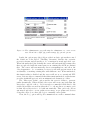
At this point, we are presented with the set of pages shown in figures 3.1
and 3.2 with the default settings dialed-in. The first page (fig 3.1a) provides
the identification information for this user, composed of the username and
password. These are the credentials used to authenticate a user when they
log into the FTP server, and as such it is important that you carefully select
them. The ’Visible Password Entry’ box determines if the password will be
shown as you enter it - this has no effect on the stored user. As with the other
pages in this window, the small ? buttons will provide a brief description of
the setting adjacent to it in the lower block.
The second page (fig 3.1b) covers the home folder and specifies where the
files that are uploaded by this user will be stored relative to the root folder
(we’ll get back to this). This entry can contain static text entries, or it can
make use of the variable system by using the buttons on the lower portion
of this page. We will return to the topic of variables in a later chapter, as
7
Figure 3.1: The administrative pages allowing the administrator to create a new
user. From left to right, (a) identification information, (b) home directory.
they are an advanced topic. It is recommended that if you want to work the
username into this path, you use the %user% variable as is the default setting
- this will allow you to copy users without having to modify this setting.
The three buttons directly bellow the text entry panel are there to make
entry simpler. The far left button will remove one level of directory from
the page, whereas the centre button simply acts as a backspace. The far
right button adds the directory delimiter, and is merely there to reduce
the number of taps required on the input panel. These functions can be
performed manually, however they are there for your convenience.
Similar to the home page, the prefix settings (fig. 3.2a) provides a very
similar interface. The prefix setting controls a string that can replace the
’DSC ’ portion of digital camera files (eg if the prefix was set to ’prefix’,
DSC 0001.JPG would become prefix0001.JPG after upload). If you wish to
use this feature, click the ’Enable’ checkbox and you will be able to enter a
value that will be used by the server. The ’Force’ checkbox allows you to
prevent manual override by the user if so desired, this will be covered in more
detail in later chapters. As with the home directory, variables can be used.
8
Figure 3.2: The administrative pages allowing the administrator to create a new
user. From left to right, (a) prefix settings, (b) general options.
Lastly, the options page (fig 3.2b) provides four basic options that control
the behaviour of the server. Checking ’Overwrite’ disables the overwrite
protection feature and allows files to be overwritten by newly uploaded ones.
When left unchecked (the default) the server will automatically rename files
that are uploaded with the same name as an existing files AND are distinct
files. The server will automatically detect retransmissions, and allow the
older fragments to be overwritten, however it will still prevent users from
accidentally overwriting existing files with different ones. When unchecked,
this functionality is disabled and the server will act as a conventional FTP
server. It is strongly recommended that this remain unchecked, as this feature
provides significant protection from unintentional destruction of files.
The ’Autocreate Paths’ option enables the server’s ability to generate
paths dynamically. When checked, the server will create any path that the
user tries to upload a file to. It is strongly recommended that this be left
enabled if variables are used in either the root or home directory entries, as it
is what allows directories to be built automatically. This option also allows
automated uploads to create paths as necessary, as programs and devices
doing this often do not have the logic to manually create paths.
Next, the ’Log’ option will log all communications on the command chan9
nel between the server and this user. The log file will contain login times
and dates, as well as a transcript of the exchanges made by the user. This
allows administrators to monitor the usage patterns of their users, as well as
catch unauthorized use or figure out problems that they are having. The log
is stored in the program directory with the filename ’username.log’ (where
username is the individual user’s login name). Note that these files are NOT
limited in size by the server, so it is recommended that administrators periodically delete the log files to ensure they do not grow too large.
Finally, for Canon WFT-E1 users there is an option to disable the folder
structure created by the camera. Under normal behaviour (when ’WFT-E1
Folders’ is checked) the camera places images in ’/A/DCIM/xxxEOS1D/’ in some circumstances you may not want this, so PocketITP offers you the
option to disable this. When this box is unchecked, files will be stored on the
PocketPC without this file structure. If you are using software that watches
the output folder this feature can be useful to ensure that files are placed in
predictable locations. Note that this option has no effect on other cameras.
When you are finished setting up your first user, simply click the ’ok’
button on the top-right of the window and the new user will be created
immediately. You will be returned to the administration window and your
new user should be shown in the list of users. At this point, the user would
be able to log into the server without further action. However, at this point
it is recommended that you look over the other settings before trying this
out.
3.2
Creating Additional Users
Once you have added your first user, you can add additional users with the
above steps quickly and easily. However, if you need to add a large number of
users the ’Clone’ button allows you to streamline the process. To perform this
action, simply select a user from the list (such as the one you just created)
and tap the ’Clone’ button. The user editor will appear as before, however
all of the fields except for the username will be copied from the selected
user. As such, all you need to do is set the username and password for each
additional user and the settings will follow the template you setup for the
first user. If you used the %user% variable instead of the username in the
path or prefix settings, this value will automatically change with each user
so you don’t need to manually adjust it.
10
3.3
Editing Existing Users
Once you have a list of existing users, you may wish to modify their settings
from time to time. To do so, you merely have to select the user from the
list and then tap the ’Edit...’ button. The edit user window will reappear
with all of the user’s current settings. At this point, you can modify these
settings as desired and then click the ’ok’ button to apply them. This task
is performed in the same manner as it is for the above two modes.
3.4
Removing Existing Users
Periodically, a user will no longer need access to a server and as such you
will want to remove them from the accesslist. As such, the final option in
the user editor is ’Remove’ - taping on a user and then taping this button
will immediately remove this user from the system and prevent them from
logging in. Note that if a user is currently online, the removal will not take
place until their session is complete.
11
Chapter 4
The Camera Hostnames List
The local host list is a system that assigns written names to numeric IP
Addresses of the machines that you will commonly be working with. It
allows you to assign a less cryptic moniker to any IP Address, whether it is
internet accessible or simply an address on a local subnetwork. The primary
benefit of this system is to allow the dynamic renaming system to use a
plaintext name for each uploading device if so desired, making it easy to
organize files based on which machine (or camera) they came from without
having to manually remember their individual IP Addresses. This list is easy
and quick to modify, so if your network settings change routinely you can
easily keep this list up to date without the hassles that DNS entries would
require.
4.1
Adding and Editing Hosts
The local hosts list can be accessed either from the main window by clicking
the ’Cameras’ entry, or if you are still in the ’Server Administration’ window
you can simply tap the ’Cameras’ tab at the bottom of the window. This
will provide the interface displayed in figure 4.1. This will provide you with
the current list of assigned hosts, and allow you to add, edit or remove any
entries you like.
Simply tap the add button to create a new hostname and the new window
will allow you to specify a hostname and an IP Address. Each hostname entry
contains only two parameters, a name and an IP Address - to create a new
12
Figure 4.1: The administrative pages allowing the administrator to control the list
of local hostname assignments. Shown here is a sample setup.
entry, type in the desired name and the IP Address that you want to assign to
that name and click ’Save’. If you wish to cancel your changes, simply click
the ’Cancel’ button and the list will remain as it was. To edit an existing
hostname, simply select it from the list and use the same procedure as above
to change it.
The hostname parameter can be of any length and can include any characters except for equals (’=’) or carriage returns. The hostname cannot
contain any variables, and must only be static characters. Remember that
this string will be what replaces the %host% variable, so any leading or trailing whitespace characters will also be included as they are entered here. The
IP Address must be in dotted quad notation (eg 192.168.0.1) or it will not
be recognised. Note that these values will NOT be applied until you click
the ’ok’ button on the ’Server Administration’ window.
13
Chapter 5
Server Configuration
The server configuration settings can be accessed by simply clicking on the
’Server’ icon in the main window. This provides the administrator with access
to a number of basic parameters that control the operation of the server,
which will only be applied during a server restart. If the server is currently
running, it will have to be closed and reopened to make these changes take
effect. It is strongly suggested that a new user look over these settings prior
to putting the server into opperation, as it can effect the filesystem that will
be used.
5.1
Root Folder
The root folder is the directory that all of the users’ home directories will be
made relative to. If the users’ home paths are relative, this directory forms
the parent to all of the users and helps to keep all of the uploaded files in
one place. As such, if it is necessary to begin recording files to a different
path one can simply adjust this parameter and all users will conform to the
changes. Note that for users without automatic directory creation enabled,
you will have to recreate their home directories if this value is changed.
If this parameter is specified as a relative path, it will be used relative to
the directory in which the server was installed. If specified as an absolute
path, it will be stored as specified. This field can also contain variables as
required, so it can be used to generate dynamic paths - however it is typically
recommended that variables be left to home directories.
14
Figure 5.1: The administrative pages allowing the administrator to control the
basic parameters of the server’s opperation.
5.2
Failover Folder
The failover folder is an optional secondary path that the server will attempt
to switch to if the primary root volume becomes full. When an upload
recognises that there is insufficient space, the failover folder will be polled
and if it has more room the portion of the file that has already been uploaded
will be copied to it and the upload will continue there. Any future uploads
will also occur on the failover drive, allowing the user to have a backup if
their mass storage medium runs out of room.
By default, this feature is not enabled - you have to check the associated
checkbox and enter an alternate path before it will be enabled. Note that
this option will not do any good unless the second path is on a different
volume from the main root folder - this feature is only useful if you have one
or more memory cards to work with.
15
5.3
Start Server Automatically
When checked (the default), the server will start accepting connections immediately after the server is started. When unchecked, the user of the machine
simply has to tap the green ’start’ button to begin to accept new users. Regardless of the choice, the user can also use the red ’Stop’ button to manually
stop service whenever necessary so this option merely controls behaviour at
startup.
5.4
Equivalence Threshold
This is one of the more complex options available to the server and has to
do with the overwrite protection feature. When a file is uploaded with the
same name as another, it will be renamed immediately. Upon completion of
the upload, the contents of the file will be compared to all of the previous
files of the same name and if an older try contains the same data, it will
be overwritten. By default, the server will compare the entire contents of
whichever file is shorter until it hits a difference. For retransmission attempts,
this means that the server needs to read both files all the way to the end
and if the server is under heavy load can unnecessarily consume bandwidth
to the hard drives.
If this is a problem, the user can configure the server to stop comparing
files after a certain number of bytes. If this count is hit prior to reaching
the end of the file, and the contents to this point are identical the old file
will be determined to be a fragment of the newer version and the server will
be allowed to overwrite it. If you wish to make use of this feature, click the
second radio button and enter an integer count of bytes into the provided
field. As with the other settings in this window, this setting will not take
effect until the server is closed down and reopened. It is important that you
are careful with this setting, as if it is set too low it could potentially only
reach the header of a file and allow a different file to overwrite an older one.
Unless you are having a specific issue related to this parameter it is strongly
recommended that the user not play around with it - however if performance
is a problem it can potentially be a solution.
16
Chapter 6
Configuring your Camera
Since version 1.1, PocketITP has had the capacity to assist you in the configuration of your wireless transmitter. In its current version, PocketITP can automatically configure the Nikon WT-1/WT-1A and Canon WFT-E1/WFTE1A transmitters by generating configuration files that can be loaded through
the camera. To simplify this process, PocketITP automatically extracts networking details and prepares a working configuration for the user. As long
as the PocketPC is properly setup, the user can usually simply save the profile with its default settings, load it into the camera and it will work. This
process vastly simplifies the process of setting up the camera and removes a
number of common sources of problems from the setup process.
6.1
Creating your First Profile
To access this feature, tap the Cameras icon on the main window and then
’Configure WT-1/WFT-E1’ to load the configurator. The Configurator’s
profile list will be shown (fig. 6.1), allowing you to manage your library of
different settings for different venues. Since this is the first time you have run
the configurator, the list will be empty. Tap the ’Add...’ button to begin the
process. If there is more than one suitable network adapter in the PocketPC
you will be prompted to select your adapter - otherwise you will be taken to
the profile editor (fig 6.2).
17
Figure 6.1: The main configurator window allows you to manage a library of profiles for various venues. Using this list you can manipulate your profiles
as well as prepare memory cards to load the settings into your camera.
Figure 6.2: The profile editor allows you to modify the settings that will be used
by the camera to transmit images. PocketITP automatically extracts
the necessary details from the system and fills the form in a functional
setup by default.
18
The defaults entered in the profile editor are automatically extracted from
the device’s networking setup. If the PocketPC has been configured properly,
and you are not using encryption the settings that are automatically dialled in
will typically work in your transmitter without further modification. When
using WEP or WPA encryption, you will simply be required to manually
enter the key into the profile. If necessary, all of the fields can be manually
edited. Once you are done, tap the save button and enter a profile name - the
new profile will be added to the list. Repeat this process for each network
configuration you will be using and build up your library.
6.2
Loading Profiles into your Camera
When you want to load these settings into your camera, begin by inserting
a memory card into your PocketPC. Load the configurator and then select
the desired profile from the library and the memory card you would like to
use. Once complete, press the ’Send’ button and both WT-1 and WFT-E1
profiles will be saved onto the selected card. You can then place the card into
your camera and use its methods to load the settings into its memory. Once
that is done, the camera should begin transmitting images to the PocketPC.
If there are any problems, double check the configuration of the PocketPC the configurator extracts its details from those settings and if there are errors
they will be reflected in the settings.
It is important to note that the Nikon WT-1/WT-1A does not support
WPA encryption. If the profile you select from the library uses this option,
the camera will not be configured properly and will be unable to connect
to PocketITP. If using the Nikon transmitter, you must either switch off
encryption or use WEP instead. When using the Canon WFT-E1 you can
use this form of encryption without any problems.
19
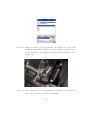
Figure 6.3: When you want to load a profile into your camera, you can do this
quickly from the main configurator window. Simply select the desired
profile and storage card then tap the Send button and it will be loaded
on the card.
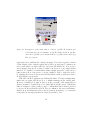
Figure 6.4: Place the memory card containing the profile into your camera and
follow the directions provided in your manual.
20
Chapter 7
Using the Server
Now that you know how to navigate the basic configuration dialogs of the
program, you should perform several tasks prior to starting the server. Primarily, you should add at least one user so that you can log into the FTP
server from a remote station. Secondly, you should specify the root folder
(in the ’Server’ settings) if you do not want to use the default path. Finally,
if you want to add any host entries in the hostlist, they should be added at
this point. When you are done all of these tasks, you are ready to actually
begin using the server.
7.1
Device Power
One important factor is that users have to be careful NOT to switch off the
PocketPC while the server is in use. Doing so will switch off any network
adapters, and as such will sever any active connections immediately. When
device power is switched back on, the server will opperate properly again,
however some connections may remain resident in memory until they time
out. While this server is running, it will automatically prevent any automatic
shutdown timers from switching off the device on it’s own, however there is
nothing that can prevent the user from doing this. This is a very important
consideration, and one that you have to be careful not to do.
In order to conserve battery reserves, this package contains the facility to
switch off the power to the PocketPC’s display (note that not all PocketPC’s
support this feature). At the top right corner there are two buttons, the one
21
2 3
1
4
5
6
Figure 7.1: Description of the main window controls: (1) The IP Address and
socket that the server is running on, (2) The LCD-off button, (3) The
exit button, (4) The server status indicator, (5) The start button, (6)
The stop button.
represented by a small monitor (item 2 in figure 7.1) can be tapped to switch
off the display. Once clicked a quick dialog will be popped up to confirm your
action and when you click ’OK’ the screen should switch off. If you get a
screen saying ’sleep mode’ it tells you that your device does not support this
function. To return to normal functionality, simply press the 5-way selector
button just bellow your screen - you also might be able to wake the device
by tapping the screen, however most PDAs switch off the touchscreen sensor
along with the screen itself.
Like all PocketPC applications, clicking the white ’X’ button simply minimizes the program and allows it to continue running in the background.
However, a small red ’x’ button placed on the top-right of the main window
(item 3 in figure 7.1) will allow you to fully shut down the server. When this
button is tapped, a dialog will pop up to confirm that this is what is desired
to protect from accidental selection. If you confirm it, the server will immediately drop all clients and remove the program from memory - be careful in
doing this, as any uploads that are in progress will be lost.
22
7.2
Starting and Stopping the Server
In order to manually start and stop the server without closing it, you can
return to the main window and use the green start and red stop buttons
(items 5 and 6 respectively in figure 7.1). The status of the server will be
displayed in the status display in the top centre of the screen (item 4 in
figure 7.1). When the server is running, the ’Start’ option will be disabled
and hence have no effect, and when stoped the ’Stop’ option will similarly be
disabled. Pressing start will cause the server to immediately begin accepting
new connections, allowing remote users to upload files to this machine using
the usernames that you added in earlier steps.
Pressing stop will cause the server to stop accepting new connections,
however it will NOT drop the currently active users until they log out this allows a soft shutdown so that users can gracefully exit their sessions
rather than being abruptly kicked. If you want to drop the current users,
you will need to use the ’Monitor’ option that will be explained in later
sections. Exiting the server (as explained above) will stop the server and
drop all users immediately, as well as remove the server from memory to save
resources when not necessary.
7.3
Uploading Files
Now that you have successfully mastered the basic administration of the
server, you can move on to actually making use of it. To do so, you simply
have to configure your client devices with the IP Address of your PocketPC.
The PDA’s primary IP address is provided at the top of the status display
(item 4 in figure 7.1), if the PDA has multiple adapters, you may have to
check the ’Monitor’ option to get a list of all of the adapters the device has.
Once you have connected, enter a username and password that you setup
earlier and you will be able to upload files directly to your home directory.
If you have enabled the create paths option for this user, you can enter any
path you would like (including any variables you wish) and the necessary
path will be built when you upload a file. If it is not enabled, you will have
to enter paths that already exist on the server. Once you have entered the
required path, you simply have to upload files as you normally would and they
will be placed in the proper path and renamed automatically. When using
automatic upload devices such as the Nikon WT-1, simply add the username
23
and password as above and set the starting path as required, with whatever
variables that you wish. The server will do the rest, and the device will only
think that it is uploading to a static path. This behaviour is completely
transparent to the user. Regardless of the settings, the user will NOT be
able to escape to a directory at a higher level than their home path, so the
user will never be able to work outside of the directory structure setup for it.
Note that the server will only provide dumby directory listings and will
not allow you to download files from the server. These features are not
necessary for the automatic uploaders that will typically use this server,
and the lack of these features provide an extra measure of security. An
unauthorized user will not be able to explore your local directory structure
(especially if create paths is enabled, as the server will always accept all
change directory commands regardless if there is a directory or not) and not
be able to probe for existing files. If overwrite is disabled, they will also be
unable to overwrite any existing files. With GUI FTP servers you will have
to manually enter directory change requests, as the file and directory lists
will not be accurate.
As an additional feature, you can overload the prefix setting (if it hasn’t
been forced) by postfixing your username with a forward slash (’/’) followed
by the prefix that you would like to use. For example, if the username was
’jim’, entering a username of ’jim/pfx’ would login with the username of ’jim’
and use the prefix ’pfx’ instead of the one specified in the user’s profile. This
potentially allows one user to specify different prefixes for various different devices that they are using - for example, if the user ’jim’ was using WT-1s with
a number of cameras he could place a different configuration script on each
with the usernames ’jim/D2H1 ’, ’jim/D2H2 ’, etc. The resulting files from
each of the memory cards would be ’D2H1 0001.NEF’, ’D2H2 0001.NEF’,
etc., allowing jim to sort his files quite easily. Additionally, as with normal
prefixes this field CAN contain variables, so it could also use a combination
of the hostname and camera numbers.
24
Part III
Advanced Configuration
25
Chapter 8
Additional Controls and
Monitoring
8.1
Monitoring Subsystem
The ’Monitor’ item in the main window provides a powerful extension to
your ability to administer your server. Primarily, it provides a real-time
self-updating list of connected clients, as well as allowing you to extract
detailed information of what they are doing. It also allows the administrator
to selectively drop users if so desired, allowing you to disconnect hostile users
or devices that are spinning out of control. For each active user, you will be
given their session’s serial number, the name of the logged in user and the
remote IP Address/socket they are connecting from.
Secondly, this dialog provides a list of IP Addresses and the socket number
that this server is listening on. This provides you with the information that
you require to connect to the server even if this is dynamically assigned by
your current network. If your PDA has multiple network adapters, this will
provide a list of all available IP Addresses for this device. If the address
listed on the main window does not work with your device try the other
addresses as your device may be connecting on a secondary adapter. If you
want updated information click the refresh button, however under normal
circumstances the window should update itself whenever anything changes.
You can also drop a user by selecting their name then tapping the ’Drop’
26
Figure 8.1: The main monitoring window, allowing administrators to watch users
that are currently connected.
button - the connection to the user will be immediately severed and any
current transfers will be lost.
If more information on a client is required, one can select a user from the
list and tap the ’Info’ or ’Monitor’ buttons to get further information. The
info window (left image in figure 8.2) provides additional textual information
about each user that is updated in real time. The path will change as the user
issues ’cd’ commands, and the large indicator will note when file transfers
are in progress. The ’Monitor’ window (right image in figure 8.2) will show
you JPEG images as they are uploaded, allowing you to quickly verify the
integrity of the uploaded files.
27
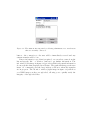
Figure 8.2: The monitoring windows showing detailed information about each connected user.
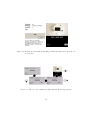
Figure 8.3: The process of using the single-handed monitoring system.
28
8.2
One-Handed Monitoring
Sometimes it is convenient to use your PDA with only one hand, so that
you don’t need to put down other equipment (like your camera) to perform
basic tasks. PocketITP offers the ability to access basic monitoring features
using the directional pad on the main window, without the need for the
stylus. Figure 8.3 shows the basic methods that can be performed using this
method.
Pressing up and down toggles between the server info screen and the user
monitoring screens, allowing you to access the information that you want
quickly and easilly. When in the monitoring mode the left and right buttons
move through all of the currently active clients, displaying basic information
on each. Finnally, when a user is being displayed, pressing the centre of
the directional button activates the monitoring mode for the user - showing
images as they are uploaded.
29
Chapter 9
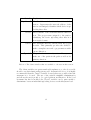
Variables
Variables provide a host of capabilities that are beyond what a basic FTP
server is capable of, allowing the system to dynamically build directory trees
and rename files based on various factors. Primarily, this system allows the
server to organize files from multiple cameras and users immediately after
being uploaded. This improves workflow, allowing users to focus on getting
the job done rather than file management. These variables can be used in
anything that effects the final filename, including the root or home directory,
the prefix or the path that the user manually navigates to once logged in.
The available variables in this version are broken into two basic sets, client
variables and date variables. The client variables provide information and
settings about the currently connected users, allowing the path to be built
based on who is logged on and from what device. The date variables provide
various formats of adding the date into the path. The variables available in
this version are enumerated in tables 9.1 and 9.2. Detailed descriptions of
key variables are provided bellow.
30
Variable
%ipaddress%
Explaination
The IP Address of the client that initiated this
session. Represents the network address of the
station and uniquely identifies which device is uploading these files.
%host%
The hostname of the client that initiated this session. The proper name assigned to the station,
identifying the device uploading these files in a
non-cryptic format.
%user%
The username that the current client has logged
in with. This primarily provides the ability to
make a template user and copy parameters without modification.
%prefix%
The prefix that is currently active. Allows you to
make use of the prefix in the path as well as it’s
primary function.
Table 9.1: The client variables that are available to the user in this version.
The client variables are pretty much self-explanatory, so the above table
should cover their functionality pretty well. As mentioned above, it is highly
recommended that the %user% variable be used wherever possible when the
username is to be used. The use of the variable simplifies administration
and allows the user’s profile to be copied without modification. If the local
hostname list has been filled, the %host% variable can be quite useful to
discriminate between individual uploading devices at the filesystem level.
31
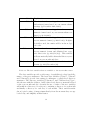
Variable
Explaination
%date%
The date that the user logged into the server, in
full written format based on your current culture
settings (eg December 20th, 2003).
%daten%
The date that the user logged into the server, in
numeric format based on your current culture settings (eg 20-12-2003).
%datern%
The date that the user logged into the server, in
reverse numeric format (eg 2003-12-20). If alphabetically sorted, the entries will be in chronological order.
%datetree%
The date that the user logged into the server, in
reverse numeric format and delimited into separate directories (eg 2003/12/20/). This variable
will automatically build a hierarchal directory tree
based on year, month and date.
%datetreelong%
Same as above, but with the month in written
format (eg 2003/December/20).
Table 9.2: The date variables that are available to the user in this version.
The date variables provide a wide range of capabilities for date-based filenames or directory structures. The basic date variables (%date%, %daten%
and %datern%) provide date strings for filenames or single-level directory
structures. The date tree variables (%datetree% and %datetreelong%) provide the user with the ability to build a three-level directory structures based
on the year, month and day. As such, the use of either of the tree variables
will result in a directory for each year, containing a directory for each month
and finally a directory for each day of each month. These variables make
chronological sorting of images immediately from the moment they are uploaded easy, and simplify archival issues.
32
Combined with the client variables, this server can easily provide a comprehensive directory structure from sorting images from multiple shooters
and on multiple dates and keeping everything structured. The variable system is designed to simplify workflow, and while complex allows users to build
a system that suits their individual method of working. Future versions of
this software will extend the capability of this system significantly, so this is
only the foundation of a much more powerful system.
33
Chapter 10
Tips
The variable system provides an extremely powerful mechanism for automatically organizing received files, however it can make the initial setup somewhat
complex. Recognising this, this chapter will cover several different suggested
configurations that could be used to provide certain final directory structures. Aside from providing direct instructions, these examples demonstrate
the capacity of the system and what it is capable of.
10.1
Multiple Shooter, Single Directory
One potential requirement is a system that places the images shot by a group
of photographers into a single working directory, allowing an onsite editor
to see all uploaded images in a single working folder but still maintaining
separation of each shooter’s take.
The best way to do this is to make use of the prefix feature, by adding the
user or device name to the beginning of each file, the files will be distinct while
coexisting in the same folder. Additionally, the administrator can organize
files in the order they were uploaded (by sorting based on the time & date)
as well as by user (by sorting based on the filename). If each shooter has
multiple cameras that also need to be tracked, the prefix override can be used
to easily identify this in the same way.
If you just want to sort by username, you can simply set the prefix in
the user profile to %user% and the username will form the first part of each
filename. If you want to separate the product of several devices used by
34
the user, you can either use the %host% feature with the profile’s prefix (ie
prefix=”%user%.%host%.”) or you can use the prefix override and enter the
specific prefix when you log in (ie username=”bob/Bob.Camera1.”).
All of these methods will provide you with filenames that contain information on both the source of the files and the local numbers. If using the
”%user%.%host%.” prefix, for example, a file uploaded as DSC 0001.NEF
would be stored as ”Username.DeviceName.0001.NEF”. As such, files could
easily be sorted based on who shot them and which camera was used. This
also makes it easier to quickly determine where the originals are in the case
that you are only uploading processed images (eg if you were shooting NEFs
and used the WT-1 to upload JPEG copies).
10.2
Multiple Shooter, Individual Directories
For further separation when using several photographers, you can drop their
files into their own private directories. By simply using the ”images/%user%/”
variable as their home directory, all files will be stored in a folder with the
name of the user that is uploading the files. For example, if photographer
Jane logged in and uploaded images they would be dropped in the directory ”images/jane/”. An editor using a conventional editing program would
have to navigate to the various directories, however it would maintain more
separation and could maintain the original filenames.
If each photographer had several cameras, this could further be added
to the path by using the home path ”images/%user%/%host%/” and if
Jane uploaded the file from ”Camera 1” the files would be stored in ”images/jane/Camera 1/”. Alternately, the prefix override feature could also
be used here - using the first suggested home directory, if Jane logged in as
”Jane/MC1 ” a file by the name of ”DSC 0001.NEF” would be stored as
”images/jane/MC1 0001.NEF”. The later scenario would maintain a single
directory for all of Jane’s images, but would still make it easy to determine
the source of the files.
Note that these paths will require a specific directory tree to be created.
Since this suggested configuration is somewhat static, it could be manually
constructed - however it is still easier to enable the ”Create Paths” option
for the user. Using this system the user’s directory tree will automatically
be built when they try to upload their first file.
35
10.3
Chronological Directory Tree
Many disciplines of photography require that files be archived in a manner
that will make it easy to find shots based on the date that they were taken.
As such, it is often convenient to have the server configured to drop uploaded
files into a date-based hierarchy in the background - simplifying workflow,
and improving file organization from the moment the files are loaded. Such
a system can easily coexist with the scenario listed in section 10.1, allowing
the working directory to simply be the current date.
The simplest method of achieving this is the %datetree% variable. This
creates a hierarchal directory structure with levels for the year, the month
and the day - making later access intuitive and efficient. If you want this
to be your policy for all users, you can use the variable directly in the root
parameter and all users will immediately start in the appropriate day’s folder.
This can simplify administration tasks, as if any changes are necessary there
is only one parameter that needs to be changed.
Alternately, if you want some users to NOT use this path you can also
specify this variable in their individual user profiles. This allows you to
configure individual users with different directory methodologies that best
suit their particular needs. Either way, the appropriate path would simply
be set to something like ”images/%datetree%/” - when, for example, the file
DSC 0001.NEF was uploaded on December 13th, 2003 it would be stored
as ”images/2003/12/13/DSC 0001.NEF”. All of the files shot on that day
would be stored in the same directory, allowing you to look back at a later
time for all images shot on this date.
This method will require a complex directory tree whose path with change
every day. Attempting to manually create this tree would be very complex
and error prone, so it is very strongly recommended that whenever using
ANY date variables the user’s ”Create Paths” option be enabled. This will
build a directory for every day a shot is filed on its own, and will have the
added feature of not creating unnecessary directories for days that you were
not using the system.
36
10.4
Chronological Tree with User Directories
The systems used in sections 10.2 and 10.3 can be combined to create a datebased directory tree that contains individual folders for each user. By using
a home directory such as ”images/%datetree%/%user%/”, the server will
generate individual directories for every user that uploads files on a specific
day. This allows the best of both worlds, and helps with the organization of
files in larger publications.
10.5
Summary
Sec
Settings
Resultant Upload of DSC 0001.NEF
10.1
Prefix=”%user% ”
Username 0001.NEF
10.1
Prefix=”%user%.%host%.”
Username.Hostname.0001.NEF
10.2
Home=”images/%user%/”
images/Username/DSC 0001.NEF
10.2
Home=”images/%user%/%host%/”
images/Username/Hostname/DSC 0001.NEF
10.2
Home=”images/%user%/”
images/Username/Hostname0001.NEF
Prefix=”%host%”
10.2
Home=”images/%user%/”
images/Username/UserPrefix0001.NEF
Login=”Username/UserPrefix”
10.3
Home=”images/%datetree%/”
images/2003/12/13/DSC 0001.NEF
10.4
Home=”images/%datetree%/%user%/”
images/2003/12/13/Username/DSC 0001.NEF
10.4
Home=”images/%datetree%/%user%/”
images/2003/12/13/Username/Hostname0001.NEF
Prefix=”%host%”
Table 10.1: Quick reference to common parameter settings and their results.
37
Part IV
Important Considerations
38
Chapter 11
Battery Life
Due to the nature of this package, it requires that not only the PocketPC
remain on, but any networking electronics as well. When using IEEE802.11b
(which is the expected use of this package) this is even more of an issue
as these wireless transcievers consume a good ammount of energy on their
own. This is a significant draw on the battery life of these devices and
such it is extremely important that you take power into consideration when
planning your deployment. The easiest way to handle this situation is to use
the display disactivation button on the main window - the LCD is one of
the largest consumers of power in the device, and by switching it off when
unnecessary it can increase battery life considerably. Additionally, setting
the backlight to the lowest possible level will also save energy when you do
need the display to be active.
Selecting mass-storage devices based on their power consumption can
make a considerable difference as well - solid-state memory typically consumes considerably less power than magnetic storage media (such as Microdrives or Toshiba 1.8” HDDs) so sticking with flash memory can save precious
battery life. Additionally, simply exiting the server when you are not using
it will allow the PDA to go to sleep (if so configured) and allow you to safely
switch it off.
Finnally, adding optional extended batteries for your PDA will naturally
increase the ammount of energy available to be used. For extended use,
there are aftermarket solutions for many makes of PocketPC that allow you
to use external batteries. Since PDAs use considerably less power than most
laptops, large offboard batteries can provide considerable usage time.
39
Chapter 12
Storage Media
Due to their form factor, PDAs typically have a limited number of massstorage options. As a FTP server, this application may require considerable
disc space so this is an extremely important consideration for any potential
users. The simplest mechanism is to use CompactFlash cards - most modern
PocketPCs contain at least one CF slot, and cards are available in capacities up to 10GB. For simple applications one can use Secure Digital cards,
however with the largest cards only storing 1GB their utility is limited.
Alternately, users of HP/Compaq iPaq 3000 and 5000-series PocketPCs
can use expansion sleeves providing them with as much expansion as Dual
PCMCIA slots - allowing the use of a pair of Toshiba 5GB PCMCIA HDDs
or high-capacity CF cards. Additionally, there are a number of PCMCIAbased offboard HDD solutions that can be used with this to rig laptop HDDs
for the iPaq’s use. Some of Toshiba’s units and upcomming PocketPCs from
other manufacturers can also be equipped with USB host ports - allowing
them to do the same thing through USB.
As mentioned in the previous chapter, it is however important to consider
the power consumption of the mass-storage media that you select. When
deploying your solution, you must find the balance of storage capacity versus
battery life for your specific application.
40
Chapter 13
Security
One important thing to remember is that this server is designed to allow
remote devices to write files onto your PDA, and as such security is an important consideration. Security was one of the key considerations in designing
this package, and every effort was made to make it as tightly sealed as possible. However, any security system is only as strong as its configuration
and simple things like weak passwords can easily break holes in the strongest
firewall.
13.1
The FTP Protocol
The FTP protocol which this server makes use of will transmit packets in
plain text. Any files transmited over this protocol can be intercepted and
their contents examined, so keep this in mind when deciding what to transmit. Additionally, usernames and passwords are also not encrypted, so do
not use the same password for the FTP server as you do for other things.
This issue cannot be rectified as encryption is not part of the protocol, so any
existing FTP clients would not be able to communicate with a server that
tried to force such features. These issues are especially important when using FTP devices over wireless networks, as potential attackers can eavesdrop
without leaving any traces. As such, it is strongly advised that you configure any and all security features that the wireless network and the various
devices can employ.
41
13.2
Weak Passwords
While it is often attractive to use simple passwords to make it easier for
users to remember them, it also makes it easier for a third party to gain
access to the server. As such, it is strongly recommended that you ensure
that all users utilize strong passwords and change them often to protect from
this risk. A good password should be eight characters or longer, contain a
mixture of letters (ideally using iMprOpeR cAsES), numbers and symbols
(!,@,#,$,etc.) and NOT contain any dictionary words or common names. It
is also beneficial to consider using pass-phrases instead of passwords (ie use
a short phrase rather than a single word) - the server does not impose an
upper limit on the size of a password so as long as it can be remembered it is
acceptable. This server will NOT force the user to utilize strong passwords,
as such features can make the software harder to use and in some cases where
the system will be used on a closed wired network are not necessary.
13.3
Measures Taken by the Server
The above weaknesses will be inherent to any FTP server, however due to
the targeted nature of this server it offers several features that can mitigate
the risk created by these issues. Primarily, since the server will not provide
directory listings or allow file downloads, it limits the ability of a hostile user
to do any damage. Without these features, even if they gain access to the
server the individual will not be able to explore your local file system or read
any confidential information. Additionally, if the ”Create Paths” option is
enabled, the server will always respond affirmatively to a change directory
request, so they will not be able to indirectly determine paths. Finally, if the
overwrite protection feature is enabled (ie overwrite is unchecked) no attacker
will ever be able to corrupt any existing files - limiting the maximum possible
damage to creating a bunch of new files.
Additionally, this program was written in a type-safe language that precludes the possibility of many common bugs (eg buffer-overrun) that can
allow a skilled attacker to break the security of the server. Naturally it is
impossible to say that anything is invulnerable to attacks, however this measure provides an extra level of protection over and above what is typically
in place. Internally, the server has been designed from the ground up in an
attempt to maximize the protection offered without getting in the way.
42
Chapter 14
Unsupported Features
Since the intent of this server was to allow automated upload programs and
devices to upload to the server, several components of the FTP protocol
were intentionally left out. As such, this server provides a subset of the fullFTP protocol. Leaving these features out allows the server to have a smaller
footprint, and in several cases maintains a higher level of security. Some of
these features will be added in later versions of the software, however the
core functionality is present. This chapter goes over the significant features
that are either unsupported or act in irregular fashion.
14.1
Directory Listings
One of the key functions which may come up is the fact that the server will
not provide real directory listings to a connected client. For compatibility
reasons, the server will dump a dumby list that contains a message telling
a user that the feature is disabled. This was implemented to reduce the
capability of an unauthorized user to explore the local file system, it was also
deemed to be unnecessary for devices that perform automatic uploading,
as the machine should already know the path. This could potentially pose
a problem with GUI-based FTP clients as the directory and file lists will
always remain empty. At this stage if a client is using one of these packages
and they want to leave the home directory, they will have to specify the
path manually. Future versions may offer administrators the ability to allow
directory listings.
43
14.2
File Downloads
This server does not have the capability to allow clients to retrieve files from
the system, it is souly intended to act as a dropbox where files can be sent to.
As above, this is intended as a security feature as it will not allow an attacker
to get anything from your computer. Additionally, a device that automatically uploads files will typically not have any purpose for downloading, and
as such it is a frivolous feature and would otherwise be a waste of resources.
With that said, it could potentially be useful for allowing files to be pulled
from remote stations so it may be included in future versions (however, as
above it will have to be enabled by an administrator).
14.3
Block and Compressed Modes
Only the default ’Stream’ mode is offered in this version of the server, the
’Block’ and ’Compressed’ modes are currently not supported. This should
not be a major issue for the devices that are commonly used with this server,
and the FTP specification does not require their presence. Future versions
will implement the block mode, however the compressed mode will remain
unsupported unless there is a specific need - image files are typically heavily
compressed already, so the utility of this mode is limited.
14.4
Record and Page Structures
These structures were added to the FTP specification primarily for legacy
mainframe computers, since these types of machines will likely never be used
as clients for this server these will not be implemented unless there is a
specific requirement for them. This should not be an issue for users.
44
Part V
Appendicies
45
Appendix A
Troubleshooting
A.1
I can’t connect to the server
Check to make sure that the server is running. When actively accepting
connections, the server will display ’Running’ in the main display. If the
main display shows ’Stopped’, simply tap the green ’Start’ button and the
server should begin to accept clients immediately. If this happens repeatedly,
verify that the ’Auto-Start Server’ option is checked in the Server settings.
If it does not respond to these commands, something else may be currently
using socket 21 - try to determine what that is and close it so that you can
use this server.
A.2
I am unable to log in
Check to make sure that your username and password line up with an account
that you have created. If you have not yet created a user, refer to section 3.1
for information on how to do so - you will not be able to use the server until
at least one user is available. Note that any whitespace characters (spaces,
tabs, etc.) are considered part of these parameters, so if there are any leading
or trailing spaces they will be required.
46
A.3
I am unable to transfer files
Check to make sure that the home directory and path exist if the ’Create
Paths’ option is not enabled. If the directory does not exist and the settings
forbid the server from creating it, it will not be able to store the file and all
transfers will fail. If this is a common problem, it is strongly recommended
that ’Create Paths’ be enabled by the administrator, as it will permanently
resolve this problem.
A.4
Files that I send aren’t there
Look for the files using the computer itself, and not over the FTP server. The
server does not provide real directory listings as a security feature. Clients
will show only a file called ”Directory Listings Disabled” in every path, this
is only to signal the user that the directory list is not accurate. Files sent
to the server will appear in the local filesystem, but will NOT be accessable
via a FTP connection. If the files aren’t where you expect them to be,
carefully examine the home and root paths and make sure that they are not
being placed somewhere else. If you are still having trouble, contact us for
support.
47
Appendix B
Development Cycle
As this package will be released in several different versions and stages, it is
important for users to understand the basics of the development cycle and
what the various designations actually mean. This section describes the cycle
that I will be using for freeware editions of this software and should give you
an impression of what the various stages mean.
B.1
Alpha and Beta Versions
In these stages, the software will be tested by a private group of testers
that will extensively test the software to identify any bugs, usability issues,
etc. These testers will provide important feedback in the development of the
program, and help to mold it to suit it’s user base. Durring these phases,
the feature set may change and releases will be quite common. The User
Interface may also not have the refinement of later versions. These versions
will not be available to the public.
If you are interested in becoming a beta tester, contact the author with
information about yourself, what you use the software for and what hardware
you have available to you. If you are an organization you can also request
beta versions to allow staff to evaluate upcoming versions and be prepared to
train employees when later versions are announced. Note that beta testers
will have to agree to a confidentiality agreement.
48
B.2
Release Candidates
These will be the first releases provided to the public. These are not release
versions, however they will basically represent the final product and have a
locked down feature set. The first release candidate will only be available
when the development is basically complete and the author is convinced that
the code is stable and ready for public consumption. To reach this state, the
recent beta releases will have to have been problem free and the UI will have
to be fully developed. The software will remain in this state until a full week
has passed with no reports of outstanding issues and the author is confident
that the package is bug-free. If necessary, new releases will be provided to
fix any issue found by the public at large. People using these versions are
strongly advised to report any problem as soon as it happens.
B.3
Release
When a Release Candidate has prooven itself, it will be moved to the release
status that indicates that it is considered to be completely finished and ready
for heavy use. At this stage it has been heavily tested by both private testers
and the public at large, so it will not have any outstanding issues. The release
version will by definition be identical to the final release candidate.
B.4
Stable
After a version has been in the release status and no bugs or issues have been
reported for three months, it will be elevated to the stable status. Stable
versions may not be the most recent, however they have been prooven in
industrial use and should be considered for applications that require absolute
stability. You will not have the absolute latest features, but you will have
something that has been tried and tested through time.
49
Appendix C
Support
As freeware, this package is provided on an as-is basis and hence without any
formal support structure. However, I am committed to ensure the quality of
this software is high so please feel free to contact me by email or on various
fora and I will do my best to help you. Additionally, I am always interested
in the opinions of users and any potential feature that you would like to
see - feel free to forward suggestions, feature requests or complaints about
the program so that I can rectify any standing issues. If there is sufficient
interest, I will offer a commercial package that will offer extended features
that will have a formal support infrastructure however at the time of writing
this I can’t say what will happen.
50