1
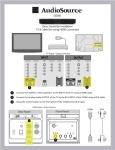
Quick Start Guide EM39T We Are Here To Help! Front and Rear View 1 2 3 4 5 6 7 8 9 1 Power Indicator & Remote Sensor AC Power In Power / Input Select Button * USB Port HDMI Side Audio Out (Headphone) Optical Audio Out HDMI-1 Component/Composite Video 10 Component/Composite Audio In, Music Port 11 DTV / Cable Antenna Input * Click to select TV input source, press and hold to power off TV Before Returning the Product 3 Call Our Customer Service at 2 4 1-855- 868 1928 5 6 We can help you with Damaged Package Missing Parts Technical Support 7 8 192513015350 9 4 1 10 11 Quick Start Guide Step 1: EM39T | 39” 1080p LED TV Check materials inside the package Step 3: Make connections to TV Connect to Power Step 2: Assemble the TV base Step 4: TV setup Carefully place TV face down on a flat and clean surface. It is recommended to place the TV cover or protection sheet between the TV and the flat surface 1. Attach stand to TV and Fasten four (4) screws provided 2. Attach base to stand and Fasten three (3) screws provided 1 2 The Setup Wizard appears when you turn on the TV for the first time. You can also run the Setup Wizard any time. Refer to user manual for detailed operation Make sure batteries are inserted to the TV remote control Follow the TV on-screen instruction and use the remote to choose Menu language TV mode Time Zone Channel Scan