1
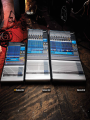
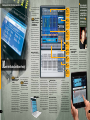
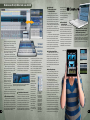
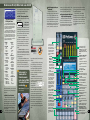
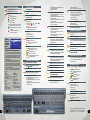
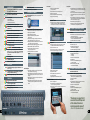
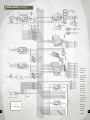
StudioLive 24.4.2, 16.4.2 and new 16.0.2 31-band graphic equalizer 31-band graphic equalizer stereo multi-effects processor quad gate quad gate quad gate quad gate quad gate quad filter or parametric quad filter or parametric dual 4-band semi-parametric EQ dual 4-band semi-parametric EQ dual 4-band semi-parametric EQ dual 4-band semi-parametric EQ dual 4-band semi-parametric EQ dual 4-band semi-parametric EQ dual 4-band semi-parametric EQ dual 4-band semi-parametric EQ dual 4-band semi-parametric EQ dual 4-band semi-parametric EQ dual 4-band semi-parametric EQ quad compressor / limiter quad compressor / limiter quad compressor / limiter quad compressor / limiter quad compressor / limiter FAT C H AN N EL The StudioLive Fat Channel packs the equivalent of two hefty racks of outboard signal processors. Hit a channel’s Select button and use the Fat Channel to dial in the sound you want. Note that we’ve tossed 31-band graphic EQs and a stereo reverb/delay processor into our drawing, which technically aren’t part of the Fat Channel … but you’d still have to buy them to get the full processing power of StudioLive. big, bright meter display. The master section comes complete with Talkback, Monitor, Cue, and a choice of controlroom sources—looks just like the master section on an analog board but with far more power and flexibility. Bottom line: If you’ve ever used an analog mixer, you’ll be right at home with a StudioLive. And even if you’ve never used a mixer before, you’ll quickly be able to create professional mixes and recordings. A gigantic console in a small package —– thanks to the Fat Channel. 8 If StudioLive 16.4.2 were an analog console, it would have 4-foot-long channel strips packed with knobs and buttons or it would require a massive outboard rack of expensive signal processors! That’s because each channel has its own studio-grade compressor, basic limiter, gate/expander, 4-band semi-parametric EQ, and high-pass filter. In all, we’ve packed 31 compressors, 31 limiters, 31 gates, 16 high-pass filters, 2 stereo reverbs/delays, and more into one remarkable Fat Channel. The StudioLive 24.4.2 ups the ante with 4-band fully parametric equalization; a truly studio-grade gate with Key Filter and Key Listen; and a limiter with variable Threshold. The StudioLive 16.0.2 may be compact, but its Fat Channel is loaded with a high-pass filter on every channel and aux (16 total), phase reverse for each channel strip (12), and a downward expander, compressor, limiter, and 3-band parametric EQ for every channel, aux output, FX bus, and main output (19 of each). Engaged by pressing any Select button, the Fat Channel features extensive equalization and dynamics for every input channel, every aux output, every subgroup output (16.4.2 and 24.4.2), and the main outputs. The high-pass filter and EQ algorithms deliver extremely musical results. Also included in the Fat Channel are limiters, plus compressors and gates modeled after PreSonus’ highly respected ACP88, providing complete dynamics control. To let you get the most from all of this processing power without descending into menu purgatory, we designed the Fat Channel with clearly labeled, physical knobs; an ingenious, multifunction, 16-ladder LED display; an in-your-face Selected Channel display; and even a separate horizontal pan display. It’s easy to instantly access any function and get clear, visible feedback. Not just effects. Effects you’d expect from a $600 standalone processor. You get two programmable, 32-bit floating point, stereo DSP effects engines, loaded with 50 reverb, delay, and time-based effects presets that you can really use (see sidebar on page 12). The Scribble strips. Although good penmanship is preferred. Polarity Reverse switch. High Pass control. Send selected channel’s processed signal to the FireWire output. Gate controls. Turns Gate on and off for selected channel. Pan display and control. reverbs are so rich and detailed that you feel like you’re there. Delays are precise. Slap echo sounds like old-skool tape effects. All 50 effects have easy-to-use parameter adjustment, tap tempo, and store and recall selection for the ultimate in creative flexibility. The StudioLive 16.4.2 sports a stereo 31-band graphic equalizer on the main outputs, so you can compensate for room acoustics and speaker response, plus 6 mono 31-band graphic EQs that are assigned to the 6 aux sends. The new 24.4.2 provides even more flexibility, with 4 dual-mono 31-band graphic equalizers that can be applied to the main, subgroup, and aux outputs. Whether StudioLive’s 94+ signal processors and 50 DSP effect presets were on gigundo channel strips, in a whopping rack of outboard gear, or neatly condensed into our Fat Channel, they have a lot of settings to remember and reset at every performance. That’s where the power of digital comes in: StudioLive never forgets. Stereo-Links one channel to another, copying Fat Channel settings. Compressor section with Auto mode and Soft Knee option. Limiter switch. These three buttons make it easy to Copy and Paste parameters among channels or Load them from memory. What was then is now: complete store and recall. Two factors work against getting that Perfect Mix with an analog mixer. First, the Perfect Mix can be hard to reproduce a week, day, or hour after you perfect it. And second, a good mix for a complete performance should be dynamic: levels, effects, and EQ tailored to each song or segment of the show, service, or presentation. Selects Low Shelf or peak equalization. Any channel can be assigned to any of the Sub Group outputs or Mains using these buttons. Low Mid and High Mid equalizer bands can be switched between normal (0.55) and Hi (2.0) Q. StudioLive solves this problem by letting you save all of your digital settings for quick setup and recall. Save Scenes that include every setting on the mixer. Save just the Fat Channel settings. Copyand-paste settings across multiple channels. Save individual DSP effects for ultimate ease, speed, and control. This means that for fixed applications like clubs, churches, and auditoriums, you can always count on the same sound. It means that you can fine-tune Scenes for different songs and call them up instantly. And it lets rank amateur volunteers run the StudioLive and achieve pro-quality sound. We’ve included a whole library of individual channel settings as starting points for optimizing the sound of instruments, vocals, and spoken word. And an Automatic AutoStore feature regularly saves your current settings in case the power fails. Shows input channel selected for Fat Channel dynamics processing and EQ. Selects High Shelf or peak equalization. Get instant visual feedback when you make dynamics and EQ adjustments. Other brands of compact digital mixers relegate this information to a not-so-big LCD screen. Dedicated adjustment knobs you can get your hands on quickly. Beware of digital mixers with just a row of multi-purpose encoders. During a live show, there’s nothing like a real touchy-feely knob that has just one function. Virtual StudioLive: The magic of computer control. Extensive I/O and high-quality processing are just the beginning. We’ve greatly enhanced StudioLive by providing tightly integrated control software. Written exclusively for StudioLive mixers, Virtual StudioLive (VSL) provides a complete visual representation of the mixer, allowing you to control the features with a mouse, trackpad, or trackball. You can see and control the mostused mixer parameters all at once Capture 1.1 lets you record with two mouse clicks. This multi-track recording application for Mac and PC is included with all StudioLive-family mixers. 9