1
5
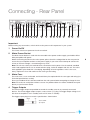
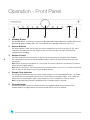
RS232 Port
The RS232 port allows external serial control of the Audiant DP32 for custom install use. A full
command set is available on the Perreaux website. This port can also be used by Perreaux service
personnel for software updates.
6
USB Input
The USB input allows connection to a computer and supports high resolution asynchronous USB
Audio up to 24-bit/192kHz.
Note: Using the asynchronous USB input with Windows operating systems requires installation of a
USB Audio driver. Instructions on how to download and install the driver can be found on the Perreaux
website (http://www.perreaux.com/downloads/files/drivers/perreaux_usb_audio_driver_install.html).
Mac users using OSX 10.6.3 or above do not need to install USB Audio drivers. If using an earlier
version of OSX please upgrade to 10.6.3 or later.
7
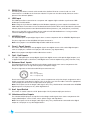
AES/EBU Input
The AES/EBU input accepts digital signals from a source component with an AES/EBU digital output.
The pin assignments of the AES/EBU XLR input connector is:
Note: Use a proper 110 ! AES/EBU digital audio cable for best results.
8
Coax1, Coax2 Inputs
The Coax1 and Coax2 inputs accept digital signals from digital sources with coaxial digital outputs
such as CD players, network music players and streamers (e.g. Squeezebox).
Note: Use a proper 75! digital audio cable for best results.
9
7
Opt1, Opt2 Inputs
The Opt1 and Opt2 inputs accept digital signals from digital sources with optical digital outputs such
as Apple AirPort Express, televisions, DAB digital tuners and set-top boxes (e.g. Sky, Freeview, Tivo).
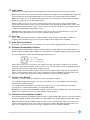
10 Balanced Aux1 Inputs
The balanced (XLR) inputs accept line level analogue audio signals from source components with
balanced outputs such as high-end CD players and phono stages.
The pin assignments of the balanced XLR input connectors are:
Pin 1: Shield
Pin 2: +ve signal (hot)
Pin 3: -ve signal (cold)
Please refer to the owner’s manual of your source component to verify that the pin assignments of the
output connectors correspond as above. If this is not the case, wire the cables so that the appropriate
source output pin connects to the equivalent DP32 input pin.
Note: These inputs are for analogue audio signals only. They should not be connected to the AES/EBU
digital output of a CD player or any other digital device.
11 Aux1 Input Switch
This switch is used to select the ‘XLR’ (balanced) or ‘RCA’ (unbalanced) inputs for Aux1.
12 Unbalanced Aux1 Inputs
The unbalanced (RCA) inputs accept line level analogue audio signals from source components with
single-ended outputs such as iPods, tuners, phono stages and tape decks.
Note: These inputs are for analogue audio signals only. They should not be connected to the digital
output of a CD player or any other digital device.