1
DS3000 Operation
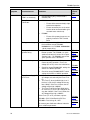
Table 3: Walk Repeat Selection
DSW2 - 2
DSW2 - 1
Off
Off
Off
On
On
Off
On
On
Condition
Auto-Repeat Walk 1 sound until Walk signal has terminated or the Max Walk
Sound Timer has expired, whichever occurs first.
Play Walk 1 sound ONCE (on Push Button (Pole locator speaker only), then
Walk 2 sound until Walk signal has terminated or the Max Walk Sound Timer
has expired, whichever occurs first.
Play Walk 1 sound TWICE (on Push Button (Pole locator speaker only), then
Walk 2 sound until Walk signal has terminated or the Max Walk Sound Timer
has expired, whichever occurs first.
Play Walk 1 sound 3 TIMES (on Push Button (Pole locator speaker only),
then Walk 2 sound until Walk signal has terminated or the Max Walk Sound
Timer has expired, whichever occurs first.
In all cases, if the Max Walk Timer expires prior to the completion of the Walk
signal, the APS shall play the Pedestrian Clearance sound or Push Button locator
sound for the remaining Walk signal time, unless the push button is pressed (refer
to sec 5.1).
7.4
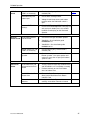
Maximum Walk Timer (Switch DSW2-6, -7, -8)
The Maximum Walk Timer allows the duration of the Walk sound output to be
played for the full duration of the Walk signal (all switches in the Off position,
default setting) or adjusted from 6-18 seconds. Max Walk Timer is selected via
Switches #8, 7 and 6 on DSW2.
Table 4: Max Walk Timer Settings
Max Walk Sound Timer Set-Up
Document: MAN000094
Sec's
DSW2-8
DSW2-7
DSW2-6
No Max
6
Off
Off
Off
Off
Off
On
8
10
12
14
16
18
Off
Off
On
On
On
On
On
On
Off
Off
On
On
Off
On
Off
On
Off
On
11