1
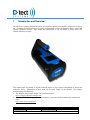
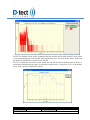
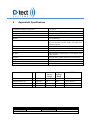
rad-ID User's Manual | Version 3.0 |October 2010 LAURUS Systems, Inc. - Ph: 410-465-5558 - Fax: 410-465-5257 - www.LaurusSystems.com Changes to Operator’s Manual Version 3.0 The American National Standards Institute (ANSI) has passed a standard on isotope identification equipment since the initial release of the rad-ID. The following changes have been added to the rad-ID software and manual to comply with the ANSI standard. Changes to the Manual (documenting changes to the firmware): Time and date are now shown on the display screen. The energy range of the rad-ID sensors has been added to the manual in Appendix B. The energy full-width half maximum of the rad-ID sensors has been added to the manual in Appendix B. In addition to identifying the specific radioactive isotope, the rad-ID now informs the user the category of the isotope (discussed further in Section 2.7) NORM (Naturally Occurring Radioactive Material) Medical Industrial SNM (Special Nuclear Material) A confidence bar has been added to the display during an identification, showing the User the confidence the rad-ID has in the current identification. As more information about an isotope is measured, the confidence generally increases The current list of identified isotopes is listed in Appendix C. The list of calibrations performed on each rad-ID before it leaves the factory has been added to the manual in Section 4.0. The rad-ID now collects information on an isotope for at least 20 seconds before an identification is displayed. Document Number: V013186_03_rad-ID_ manual.docx Date: 10/12/2010 Page: 2 of 30 D-tect Systems 11814 South Election Rd. Suite 200, Draper, UT 84020 (801) 495-2310 FAX (801) 495-2255 Quick Start Instructions These instructions allow operation of the rad-ID immediately without reading the entire manual. 1. Turn unit on with butterfly switch under the handle. After boot up (30 seconds), the unit starts out in Detect mode. Press the center button (labeled “Next Page”) to display alternate detection screens. 2. If instructed by the unit, calibrate the NaI sensor before performing any identification (see directions below). 3. To identify isotope(s), point the front of the unit in the direction of maximum radiation counts, and press the Handle Button. 4. The rad-ID is now measuring radiation. The “Next Page” button cycles through the CZT and NaI histogram display. 5. The rad-ID will display detected isotope(s) when enough photons are measured. 6. Press the Handle Button to return to “Detect” mode. The identification data is saved in non-volatile memory and can be viewed under the “Menu” button. Batteries The rad-ID uses 3 D-cell batteries. The battery door is in the back of the unit. Batteries go in positive side first. Battery life is a day or more, depending on duty cycle (time spent identifying vs. time spend just detecting), LCD brightness, and LCD keep awake time. NaI Calibration When instructed, please calibrate the NaI sensor. 1. Press the “menu” button and step down and select “NaI calibration shortcut.” Press “Select Item.” 2. Hold the “NaI Calibration” box to the right side of the unit under the green button, half way down the side. 3. Press “Next Page.” The unit will notify you when the calibration is completed (about 30 to 60 seconds). Document Number: V013186_03_rad-ID_ manual.docx Date: 10/12/2010 Page: 3 of 30 D-tect Systems 11814 South Election Rd. Suite 200, Draper, UT 84020 (801) 495-2310 FAX (801) 495-2255 Table of Contents 1 2 3 4 5 6 7 8 Introduction and Overview ...................................................................................................... 5 1.1 Operating Modes ............................................................................................................. 6 1.2 Controls ........................................................................................................................... 6 1.3 Display ............................................................................................................................ 6 1.4 Sensors ............................................................................................................................ 7 Operating the rad-ID ................................................................................................................ 8 2.1 Turning on the rad-ID ..................................................................................................... 8 2.2 Detection Mode ............................................................................................................... 8 2.3 Detection Alarms .......................................................................................................... 10 2.4 Detecting Neutrons ....................................................................................................... 10 2.5 Identification ................................................................................................................. 11 2.6 Confidence Bar ............................................................................................................. 12 2.7 Isotope Categories ......................................................................................................... 12 2.8 Displaying the Measured Spectra ................................................................................. 13 2.9 Shielding ....................................................................................................................... 15 2.10 Masking......................................................................................................................... 16 2.11 Storing Identifications ................................................................................................... 16 2.12 Batteries ........................................................................................................................ 16 2.13 NaI Calibration.............................................................................................................. 17 Communicating with a PC ..................................................................................................... 18 3.1 PC User Software .......................................................................................................... 18 3.2 How to Establish a Bluetooth Connection on Your PC ................................................ 19 3.3 Updating the rad-ID Firmware ...................................................................................... 22 Factory Calibration ................................................................................................................ 22 Appendix A: Menu Tree ........................................................................................................ 23 Appendix B: Specifications ................................................................................................... 26 Appendix C : Isotope Identification Library.......................................................................... 27 Appendix D: Limited Warranty for D-Tect Products ............................................................ 28 Document Number: V013186_03_rad-ID_ manual.docx Date: 10/12/2010 Page: 4 of 30 D-tect Systems 11814 South Election Rd. Suite 200, Draper, UT 84020 (801) 495-2310 FAX (801) 495-2255 1 Introduction and Overview The rad-ID is a complex radiation laboratory in a small box that has been carefully designed to be easy to use. It contains four different types of sensors, each designed to allow an operator to detect, locate, and identify radioactive isotopes. This manual will explain how to use the rad-ID to detect, locate, and identify radioactive isotopes. This manual does not attempt to explain radiation physics or the complex relationships of atoms and radioactive decay. Information in these areas can be easily found via the internet. We strongly recommend two excellent sites: The Berkeley Labs Isotope Project is an excellent resource: http://ie.lbl.gov/education/isotopes.htm Idaho National Laboratory gamma-ray spectrometry center has excellent information, tutorials and links: http://www.inl.gov/gammaray/ Document Number: V013186_03_rad-ID_ manual.docx Date: 10/12/2010 Page: 5 of 30 D-tect Systems 11814 South Election Rd. Suite 200, Draper, UT 84020 (801) 495-2310 FAX (801) 495-2255 1.1 Operating Modes The rad-ID has only two modes, Detection and Identification. When the rad-ID is first turned on it will measure the background radiation for 30 seconds, and then start with the Detection Mode Summary screen. When the Handle Button is pressed, the rad-ID will go into Identification mode. If the Handle Button is pressed in Identification mode, it will return to Detection Mode. 1.2 Controls The rad-ID controls consist of: o an on/off switch, located on the top panel under the handle o three lit buttons under the LCD display, and o a button on the tip of the handle. These three buttons change functions in different menus and are always labeled above the buttons, at the bottom of the display. The button in the handle is referred to as the Handle Button. The primary purpose of the Handle Button is to shift the rad-ID between Detection and Identification modes. A secondary purpose is that the Handle Button will always take the operator to the top of the menu tree, no matter how deep in submenus the operator is. This shortcut can be very convenient. Pressing the Handle Button anywhere in the Menus will return you to the top-level Detection or Identification display 1.3 Display The rad-ID display is a 65,000 color, 320 x 240 pixel liquid crystal display, backlit for easy reading in bright sunlight or dark rooms. It is not a touch screen, and is protected from scratches by a plastic window. The brightness of the display can be adjusted to the preference of the operator. The display backlight can be set to turn off (by using “Keep Awake Time” in the menu) after a selected period of time to save power. This can considerably lengthen battery life. The backlight will only turn off in Detection mode, and only after the rad-ID has not been touched for the selected go-to-sleep duration. To turn the backlight on again, just press any button. A button pressed while the backlight is off will not activate any function other than to turn the backlight back on. The backlight will automatically turn on if an alarm level (operator selectable) is reached. Document Number: V013186_03_rad-ID_ manual.docx Date: 10/12/2010 Page: 6 of 30 D-tect Systems 11814 South Election Rd. Suite 200, Draper, UT 84020 (801) 495-2310 FAX (801) 495-2255 1.4 Sensors The rad-ID uses four different sensors to detect and analyze radiation: 1. A single large crystal of Sodium Iodide (NaI) doped with Thallium (1.125” diameter x 1.5” long) 2. Eight Cadmium Zinc Telluride (CZT) crystals, (5 mm x 5mm x 5mm each) 3. A Geiger-Mueller (GM) sensor 4. A large Helium-3 (He3) sensor. The CZT array is located in the front of the rad-ID. The NaI sensor is located on the right side, under the right-most button. The GM sensor is located in the center. The He3 tube is located on the left side. Specifications for these sensors are located in Appendix B. These four sensors are used in the Detection and Identification modes in the following ways: Detection Mode The NaI sensor is extremely efficient and sensitive at detecting gamma radiation and high-energy Xrays. In the Detection mode, the NaI provides the highest sensitivity of radiation detection. The GM is not very sensitive, and is therefore good at measuring high radiation environments where the NaI is too sensitive. Basically, it takes over measuring radiation when the NaI sensor starts to be saturated and loses accuracy. The He3 sensor detects low-energy neutrons. It is surrounded by a polyethylene moderator to increase the number of neutrons detected. Identification Mode The NaI sensor is very sensitive and efficiently measures a wide range of gamma photon energies, but does not have extremely high-energy accuracy. The NaI sensor is used to measure the spectrum of energies from 3000 keV down to several hundred keV. It uses a dedicated 4096-channel analyzer to measure the spectrum of a radiation source. The CZT sensor measures low-energy gamma photons extremely accurately (much more than the NaI), and is critical to quickly and accurately identifying medical isotopes and nuclear weapon materials. The CZT array uses its own dedicated 4096-channel analyzer to measure the spectrum of a radiation source. Document Number: V013186_03_rad-ID_ manual.docx Date: 10/12/2010 Page: 7 of 30 D-tect Systems 11814 South Election Rd. Suite 200, Draper, UT 84020 (801) 495-2310 FAX (801) 495-2255 2 Operating the rad-ID 2.1 Turning on the rad-ID The rad-ID is turned on using the rocker switch on the top panel underneath the base of the handle. ON and OFF are printed on the switch. When the rad-ID is first turned on, it measures the background radiation for a period of 30 seconds. This background is used to set the alarm levels that the rad-ID will use to inform the operator that radiation dose or neutron levels above natural background levels have been detected. The rad-ID will start in the Detection mode. 2.2 Detection Mode After the rad-ID is turned on and finishes measuring the background radiation for 30 seconds, the Detection Mode Summary Screen, shown below, will appear. This page summarizes the information available from the individual sensor pages. Current Dose Rate Mode Bluetooth Connected Date/Time Battery power remaining NaI Gamma Count GM Gamma Count Neutron Count Gamma Alarm Level Setting Current Button Definitions The small red vertical line that appears on the NaI, GM, and Neutron Count bars is the measured background. The black in the NaI and GM bars shows the average radiation measured over the last 30 Document Number: V013186_03_rad-ID_ manual.docx Date: 10/12/2010 Page: 8 of 30 D-tect Systems 11814 South Election Rd. Suite 200, Draper, UT 84020 (801) 495-2310 FAX (801) 495-2255 seconds. The count numbers on the left are also the running 30 second averages. The yellow bar on the NaI gamma count bar shows the number of gammas it measured in the last second. Pressing the Next Page button from the Summary Detection screen will cycle through the following individual sensor pages. These charts scroll in time from right to left. The line furthest right on the screen is the current measurement, with the previous measurements marching slowly to the left. These screens allow the operator to use the rad-ID to quickly track down and identify radiation sources. By moving the rad-ID among packages, vehicles, or people, the operator can quickly identify where the source of radiation is. The signal strength gets large (i.e. lines get taller) when approaching a source, and drop down when moving away. This allows a very efficient hot/cold technique of tracking. The NaI Counts in the top center show the count level detected in the last second. “Bkg” shows the measured background level. The 30 second NaI screen is the most used standard radiation detection screen. NaI counts, last 30 seconds, updated every quarter second Neutron counts, last 5 minutes, updated every second NaI counts, last 5 minutes, updated every second GM counts, last 5 minutes, updated every second Document Number: V013186_03_rad-ID_ manual.docx Date: 10/12/2010 Page: 9 of 30 D-tect Systems 11814 South Election Rd. Suite 200, Draper, UT 84020 (801) 495-2310 FAX (801) 495-2255 2.3 Detection Alarms The rad-ID has several different types of alarms to alert the operator. The rad-ID will alarm if: 1. gamma or x-ray radiation is detected above an operator-selected dose rate 2. neutrons are detected at higher than natural background levels 3. batteries start getting too low 4. the NaI sensor needs to be calibrated to ensure accurate identifications Under alarm, an alarm banner will appear, and a unique audio alert for each alarm type will go off (unless the sound is turned off). The alarm can be muted at any time by pressing the Mute button (right button). 2.4 Detecting Neutrons When a neutron alarm goes off, use the Neutron Detection window to track down where the neutrons are coming from. When the source of the neutrons (such as a vehicle or package) is identified, put the rad-ID as close as possible and put it into Identify Mode. Be advised that neutron sources cannot be casually shipped and should be accompanied by complete transport documentation. The neutron background is very altitude-dependent. If the rad-ID measures the neutron background at sea level, it will be in a much lower neutron environment than at 35,000 ft on an airliner. To adjust to a higher neutron environment, turn the rad-ID off and on again after significantly changing altitudes (1000 ft or more). The rad-ID will measure the new background level and reset the alarm threshold. Document Number: V013186_03_rad-ID_ manual.docx Date: 10/12/2010 Page: 10 of 30 D-tect Systems 11814 South Election Rd. Suite 200, Draper, UT 84020 (801) 495-2310 FAX (801) 495-2255 2.5 Identification After a radiation source is detected, the rad-ID can be used to identify the radioactive isotope. To identify a radiation source 1. Point the front of the rad-ID in the direction of the highest radiation count (the NaI Detection display showing the last 30 seconds is very good for this) 2. Get as close to the radiation as possible, or until the rad-ID is collecting several thousand counts per second. If the source is very weak (less than 1000 counts per second), the identification could take several minutes. 3. Press the button on the end of the handle. The first display shown when identifying The display after an identification is made The rad-ID is now measuring the energy of each photon it detects. This initial identification will take at least 20 seconds, and may take longer until the rad-ID collects enough photons to make an identification. The rad-ID continues to perform identifications even after some isotopes have been identified and will not stop identifying until it is put back into detection mode (by pressing the Handle Button again). When an identification is made, the identified isotope, the category of the isotope, and the confidence bar will be displayed. Document Number: V013186_03_rad-ID_ manual.docx Date: 10/12/2010 Page: 11 of 30 D-tect Systems 11814 South Election Rd. Suite 200, Draper, UT 84020 (801) 495-2310 FAX (801) 495-2255 2.6 Confidence Bar When an isotope is identified, a confidence bar (made up of little colored rectangles) appears beside it on the right. The longer the bar, the higher the confidence of identification. The length of the confidence bar depends on the number of radiation peaks detected and the consistency of the radiation. Initial Identification of Barium-133 shows a medium confidence bar The Confidence Bar gets longer as more measurements are taken over time 2.7 Isotope Categories Isotopes are categorized into 4 areas: INDUSTRIAL –isotopes typically used in industry MEDICAL - isotopes typically used on people for various medical purposes NORM – Naturally Occurring Radioactive Material. These isotopes are often present in detectible quantities as part of large shipments of goods (such as Radium-226, Potassium-40) SNM –Isotopes typically associated with nuclear power or nuclear weapons (such as Uranium-235 or Plutonium-239). Document Number: V013186_03_rad-ID_ manual.docx Date: 10/12/2010 Page: 12 of 30 D-tect Systems 11814 South Election Rd. Suite 200, Draper, UT 84020 (801) 495-2310 FAX (801) 495-2255 2.8 Displaying the Measured Spectra Press the Next Page button at any time in Identification mode to cycle through the energy histograms of the CZT sensor and NaI sensor. These histograms show the spectra of the measured isotope in a plot of energy (on the bottom axis) by the number of photons measured at that energy (vertical axis). The CZT sensor histogram shows the photon energy from 20 keV to 700 keV (left to right), with each yellow line demarcating 100 keV intervals. The NaI sensor histogram shows photon energy from 50 keV to 3000 keV (left to right), with the yellow line marking each 500 keV interval. The height of the peaks shows the number of photons counted at each energy level. The height scale is labeled on each height line on the right size of the display. Linear or Logarithmic height displays can be selected in the Menu (Menu – Settings – Processing Options). Spectra measured by the CZT sensor – logarithmic plot Same spectra measured by the CZT sensor – linear plot Spectra measured by the NaI sensor – logarithmic plot Same spectra measured by the NaI sensor – linear plot Document Number: V013186_03_rad-ID_ manual.docx Date: 10/12/2010 Page: 13 of 30 D-tect Systems 11814 South Election Rd. Suite 200, Draper, UT 84020 (801) 495-2310 FAX (801) 495-2255 How long does an identification take? For most sources, identification will only take the minimum 20 seconds. For very weak sources (below 1000 counts per second), identification can take several minutes. There are three main factors associated with the speed of identification: 1. Intensity of radiation source The strength of the radiation source sets the pace for how many photons the rad-ID can analyze per second. If radiation is emitted from a source very slowly, then it will take longer for the radID to collect enough counts to make an identification. 2. Distance from Radiation Source Radiation sources emit photons in all directions in approximately straight lines. As the photons get further away from the source, they spread out and get less dense (fewer photons per area). The closer the rad-ID is to the source, the greater the density of photons that impact the rad-ID’s sensors, and the faster the identification. 3. Shielding Material between the rad-ID and the radiation source will block some of the photons emitted from the source. Dense metal is an especially good radiation shield. The greater the amount of shielding, the more photons are blocked, and the slower the identification Shielding can also change the energy signature of the isotope (see the next section on shielding and masking). Document Number: V013186_03_rad-ID_ manual.docx Date: 10/12/2010 Page: 14 of 30 D-tect Systems 11814 South Election Rd. Suite 200, Draper, UT 84020 (801) 495-2310 FAX (801) 495-2255 2.9 Shielding Shielding can be used to smuggle unregistered isotopes through security checkpoints. Shielding means enclosing a radioactive isotope with dense material to reduce or eliminate any emissions through the shielding, thereby lowering the chance of being detected. Shielding can also make identification more difficult by modifying the radiation signature of an isotope. In this example, a small Cadmium-109 sample is shielded. Because part of the Cadmium radiation signature is blocked, the rad-ID will not make an identification. However, if the Display Potential Detections option is turned on (Menu – Settings – Processing Options), the rad-ID will display that the partially detected signature could be either Cadmium-109 or Radium-226 (Radium also has a strong 88 keV peak and an even stronger peak that could be hidden by the shielding). 25 keV 88 keV This unshielded Cadmium-109 source is detected normally The unshielded signature shows two clear peaks at 25 keV and 88 keV Behind 1 cm of Aluminum Shielding, the 25 keV peak has been masked and the 88 keV peak has much fewer counts With the Display Potential Identifications option turned on, the rad-ID provides the operator with a list of isotopes that could potentially be hidden by shielding Document Number: V013186_03_rad-ID_ manual.docx Date: 10/12/2010 Page: 15 of 30 D-tect Systems 11814 South Election Rd. Suite 200, Draper, UT 84020 (801) 495-2310 FAX (801) 495-2255 The Display Potential Detection Option provides more information to the operator in many situations, but the information displayed is not as simple as a single standard identification. The confidence bar for Potential Detections is always low. Even with the Display Potential Detection option off, the rad-ID will list the number of potential identifications under the normal identification list. Note that shielding tends to be heavy. In a small package it is hard to hide the weight of the shielding. Heavy radioactive packages with poor transport paperwork may be suspicious. Car trunks and truck trailer walls may also provide some shielding. If the situation warrants detailed inspection, opening vehicle doors and/or getting closer to the suspicious package may be useful. 2.10 Masking Masking is a technique where one isotope is hidden within an isotope with legitimate transfer documents. The theory is that the legitimate isotope will be found by simple radiation detectors, the transfer documents will be checked and approved by security. The rad-ID is excellent at identifying multiple isotopes in a single identification. The rad-ID CZT sensor has the resolution to simultaneously identify large numbers of isotopes. However, if a radiation signature of a hidden isotope is completely masked by the signature of a legitimate isotope, the rad-ID will not be able to see the hidden isotope. The Display Potential Detection option will show the operator what isotopes in the rad-ID database could be hidden behind the signature of an identified isotope. This is calculated information, not measured, so it is displayed with a low confidence. This feature can provide addition information to the operator in situations that are suspicious. 2.11 Storing Identifications The rad-ID automatically stores all identifications in non-volatile memory. The memory will stay intact even if the power is off or the batteries are removed. The last 50 identifications are continually stored in a large memory loop. This data can be transferred to a PC using the rad-ID PC User software, using either a wireless Bluetooth or serial IRDA datalink. 2.12 Batteries The rad-ID operates on 3 D-cell batteries. The life of the batteries depends on ambient temperature (batteries don’t last as long in cold conditions), how long the backlight stays on, how bright the display is, and how much time is spent in Detection Mode versus Identification Mode. Typically the rad-ID will go through multiple 8-hour shifts before it needs a battery change. The battery door is in the back of the unit. Just rotate to open. Batteries go in positive side first (nipple first). The battery door must be aligned to the correct slots to rotate close. Document Number: V013186_03_rad-ID_ manual.docx Date: 10/12/2010 Page: 16 of 30 D-tect Systems 11814 South Election Rd. Suite 200, Draper, UT 84020 (801) 495-2310 FAX (801) 495-2255 2.13 NaI Calibration The rad-ID will ask to be calibrated. When the “Calibrate NaI” alert message is displayed, follow these steps: 1. Press the “menu” button 2. Step down and select “NaI calibration shortcut” and press “Select item.” 3. Hold the container labeled “NaI Calibration” containing the Cs-137 and Co-60 disks to the right side of the unit under the Right Button, half way down the side. Holding the isotopes close to the NaI crystal speeds up the calibration. 4. Press “Next Page”. 5. The unit will say when the calibration is completed (30 to 60 seconds). Once a rad-ID is warmed-up, the calibration will last until the temperature of the rad-ID changes significantly. Hold Calibration Sources Here for Fastest Calibration Document Number: V013186_03_rad-ID_ manual.docx Date: 10/12/2010 Page: 17 of 30 D-tect Systems 11814 South Election Rd. Suite 200, Draper, UT 84020 (801) 495-2310 FAX (801) 495-2255 3 Communicating with a PC The rad-ID has a built in Bluetooth wireless communication radio and an IRDA infrared port. The rad-ID can talk with a Bluetooth-equipped PC up to 100 meters away (USB Bluetooth adapters for PCs are available at most major computer stores for about $40). The rad-ID can also communicate with a PC that uses a serial IRDA device (an IRDA plug-in dongle), but not an IRDA device embedded in the computer. The difference is that internal IRDAs are controlled by Microsoft Windows via their IRDA Protocol Stack. Serial IRDAs use their own drivers that come with the devices, and do not use the Windows IRDA protocol stack. The rad-ID IRDA communicates only with serial IRDA devices. With the rad-ID User software loaded on the PC, the rad-ID can upload any or all of its stored identification data files. The datalink can also be used to update the firmware of the rad-ID. The rad-ID Bluetooth or IRDA must be turned on by the operator (Menu – Communications – Communications Port). Once turned on, the communication port stays on until turned off in the menu system. 3.1 PC User Software The rad-ID PC User Software allows any or all the identification data stored in the rad-ID to be uploaded to a PC. The identification data can then be reviewed or analyzed on the PC and saved as rad-ID data files or Microsoft Excel CSV files (Comma Separated Values). These files can be emailed anywhere in the world. The email recipient must have a copy of the rad-ID User software to read rad-ID data files, or a copy of Microsoft Excel to read CSV files. All rad-ID files are named by date and time. To use the rad-ID User Software: 1. Turn on the rad-ID Bluetooth or IRDA link (Menu – Communications – Communications Port). 2. Establish a Connection with your PC (see below). Microsoft Windows will tell you which comm. ports is has assigned. 3. Start the rad-ID User Software 4. Enter in the outgoing (or slave) comm. port provided my Windows 5. Press the Connect button. 6. If a passcode is required, the passcode is 00000000 (eight zeros). Document Number: V013186_03_rad-ID_ manual.docx Date: 10/12/2010 Page: 18 of 30 D-tect Systems 11814 South Election Rd. Suite 200, Draper, UT 84020 (801) 495-2310 FAX (801) 495-2255 3.2 How to Establish a Bluetooth Connection on Your PC 1. On the computer, ensure that the Bluetooth antenna is correctly inserted and installed (antenna and software included in rad-ID kit) 2. In the Bluetooth properties dialog box on computer (Bluetooth Configuration in Control Panel, can also be on the Desktop as Bluetooth Devices or My Bluetooth Places), change the discoverability to ON. 3. On the computer Bluetooth window menu, click New (or Search for Devices) to launch a search for Bluetooth-enabled devices. You should see the rad-ID with serial number. Select it and hit Continue. 4. When prompted for a passkey, select No Passkey [in Windows SP2 you will have to use a password when connecting – this will always be 00000000 (8 zeros)]. 5. You now have a Bluetooth connection with your device. And the corresponding COM Port to the rad-ID will be reflected under the “Com Ports” tab. It should also be displayed when you connect to the rad-ID. The primary rad-ID User Software display is shown below. Select the Com Port to the Bluetooth or IRDA device in the PC (typically COM3 or COM5) and click the “Connect” button. When the light next to the “Connect” button turns green, the rad-ID User Software is in communication with a rad-ID. Click the “Update List” button to download the file names of all datasets stored in the rad-ID. Click the file desired to upload and display the identification dataset. Document Number: V013186_03_rad-ID_ manual.docx Date: 10/12/2010 Page: 19 of 30 D-tect Systems 11814 South Election Rd. Suite 200, Draper, UT 84020 (801) 495-2310 FAX (801) 495-2255 Once an identification dataset is uploaded, the histograms of the CZT sensor and NaI sensor can be viewed, as shown below. The data can then be saved by clicking either the “Save to File” button to save it as a rad-ID file, or “Save as CSV” to view it in Microsoft Excel. To view a dataset saved on a PC, just open the rad-ID User Software application, click “Load from File” and select the dataset to view. Document Number: V013186_03_rad-ID_ manual.docx Date: 10/12/2010 Page: 20 of 30 D-tect Systems 11814 South Election Rd. Suite 200, Draper, UT 84020 (801) 495-2310 FAX (801) 495-2255 The PC User Software can be used to synchronize the time and date of the rad-ID to the PC clock (which is easier than changing the time and date in the rad-ID menu tree). Just click on the “Reset” button and the rad-ID will synchronize with the PC time and date. The PC User Software can also be used to monitor the real-time NaI sensor radiation count (if the PC is connected by Bluetooth and in range), as shown by the graph below. Just go into “View” in the toolbar, select “Plots” and select “Radiation Counters”. Document Number: V013186_03_rad-ID_ manual.docx Date: 10/12/2010 Page: 21 of 30 D-tect Systems 11814 South Election Rd. Suite 200, Draper, UT 84020 (801) 495-2310 FAX (801) 495-2255 3.3 Updating the rad-ID Firmware Users of the rad-ID will be notified when new firmware builds are available to improve the performance of the rad-ID. Usually these builds add new features or improve the isotope identification library. The rad-ID can be easily upgraded using the following instructions. To update the firmware, select the “Update Firmware” menu command under the “File” menu in the PC User Software. A browser window will open and ask you to locate the new firmware file. Once selected, the firmware will update automatically. When the upgrade is completed, the rad-ID will reboot. The default communication port setting is off, so you will need to turn the communication port back on to resume communication with the PC User Software. 4 Factory Calibration Each rad-ID is extensively tested and calibrated before it is released to the field. A Calibration Data Set of 9 plots is shipped with each rad-ID. It includes calibration plots of each CZT sensor (there are 8) and the NaI sensor. The CZT calibration curves are generated using a 10 uCi Cesium-137 source and a 10 uCi Barium-133 source held in proximity to each CZT crystal for 60 minutes. The NaI calibration plot is generated using 1 uCi of Cesium-137 and 1 uCi of Cobalt-60 held in proximity to the NaI sensor for 60 minutes. Document Number: V013186_03_rad-ID_ manual.docx Date: 10/12/2010 Page: 22 of 30 D-tect Systems 11814 South Election Rd. Suite 200, Draper, UT 84020 (801) 495-2310 FAX (801) 495-2255 5 Appendix A: Menu Tree This section shows the operator-changeable parameters available in the rad-ID menus. 1. Detect Mode 1.1. Menu 1.1.1. Settings 1.1.1.1. Processing Options 1.1.1.1.1. Dose Rate Alarm Level Adjusts alarm level from 0.05 mrem/hr to 1000 mrem/h. 1.1.1.1.2. Show Dose Rate by Value or Category Dose rate in the upper left hand corner of the display can be shown by numerical units or by category (very low, low, etc.). 1.1.1.1.3. Dose Rate Units Select mrem/h, urem/h, or uSv/h. 1.1.1.1.4. Show Detected Peaks Displays vertical strobes on the identification histograms showing which peaks have been detected and considered in the current identification pass. 1.1.1.1.5. Show Potential Identifications Displays on the Identification Display any potentially shielded or masked isotopes. This is for advanced users. 1.1.1.1.6. Spectrum Plot Scaling Displays Identification histograms by Linear or Logarithmic plots. 1.1.1.2. Display 1.1.1.2.1. Keep Awake Time Selects how long the rad-ID will sit untouched before the backlight turns off. Having the backlight on constantly will adversely affect battery life. 1.1.1.2.2. Display Brightness Selects the brightness of the display. The lower the brightness, the longer the battery life. 1.1.1.3. Communication 1.1.1.3.1. Communications port Activate Bluetooth wireless communication, IRDA (infrared), or turn all communication off. When the Bluetooth or IRDA are turned on, they can synchronize with any computer in range. The Bluetooth or serial IRDAequipped PC will need to operate the rad-ID User software in order to communicate with the rad-ID. 1.1.1.3.2. Upgrade Firmware Newer versions of the rad-ID PC software automatically perform this function. In older versions, it places the rad-ID in a ready state so that the firmware can be updated by the rad-ID PC Software. Once activated, the operator is locked-out of the rad-ID until the update is complete and Document Number: V013186_03_rad-ID_ manual.docx Date: 10/12/2010 Page: 23 of 30 D-tect Systems 11814 South Election Rd. Suite 200, Draper, UT 84020 (801) 495-2310 FAX (801) 495-2255 verified. If this function is activated unintentionally, just turn the rad-ID off and then on to restore normal operation. 1.1.1.4. Time Resets the rad-ID internal clock. When the correct time and date is selected, select “Change Clock Now” to implement. Correct local time can also be uploaded using the PC User Software. 1.1.2. Saved Datasets Allows the operator to look through the previous 50 identifications. If the rad-ID is in communication with a PC, it also allows the operator to upload selected datasets to the PC. The words “Saved Datasets” are always displayed at the top center of the screen. 1.1.2.1. Next Dataset Displays Saved Datasets starting with the last identification and cycling backwards in time. 1.1.2.2. Next Page Once an identification file is displayed, pressing the Next Page button (Middle button) will flip through the CZT and NaI histograms associated with that identification 1.1.2.3. Options Access to various Saved Datasets functions including: 1. Exit the “Saved Dataset” section (which can also be exited to the summary Detection mode display by pressing the Handle Button). 2. Switch back to the most recent identification data. 3. Upload selected all to a PC in communication with the rad-ID. 4. Delete selected dataset. 1.1.3. Calibration 1.1.3.1. NaI Calibration Allows NaI calibration. Refer to the NaI Calibration section. 1.1.3.2. CZT Calibration Allows CZT calibration. Only calibrate if directed by D-tect Systems personnel. 1.1.4. NaI Calibration Shortcut. Allows NaI calibration 1.2. Next Page (refer to the Detection Section for more information) 1.2.1. Screen 1: Detection Summary Screen 1.2.2. Screen 2: NaI Counts, last 30 seconds 1.2.3. Screen 3: NaI Counts, last 5 minutes 1.2.4. Screen 4: GM Counts, last 5 minutes 1.2.5. Screen 5: Neutron Count, last 5 minutes 1.3. Mute. Toggles the sound on and off. Document Number: V013186_03_rad-ID_ manual.docx Date: 10/12/2010 Page: 24 of 30 D-tect Systems 11814 South Election Rd. Suite 200, Draper, UT 84020 (801) 495-2310 FAX (801) 495-2255 2. Identify Mode 2.1. Menu 2.1.1. Same as Detect Screen Menu 2.2. Next Page (refer to the Identification Section for more information) 2.2.1.1.1. Identification Summary Screen 2.2.1.1.2. Screen 2: CZT Histogram 2.2.1.1.3. Screen 3: NaI Histogram 2.3. Mute Toggles the sound on and off. Document Number: V013186_03_rad-ID_ manual.docx Date: 10/12/2010 Page: 25 of 30 D-tect Systems 11814 South Election Rd. Suite 200, Draper, UT 84020 (801) 495-2310 FAX (801) 495-2255 6 Appendix B: Specifications Temperature Range of Operation Relative Humidity Precipitation Emissions Battery Battery Life 5º to 130º F 0-100% condensing Driving Rain per Mil-STD-810 FCC certified 3 D-cell batteries 1 to 3 8-hour shifts, depending on the duty cycle between detection and ID modes. ID mode uses much more power. 7.5” tall, 5.3” wide, 11.2” long 7.4 lbs, with batteries Bluetooth (Class 1, 100 meter range) or IRDA High resolution, 65,000 color, 3.6 inch display (320 x 240), backlit Dose rate level, gamma detection level, neutrons mrem/h, urem/h, uSv/h 4096 channels 4096 channels Dimensions Weight PC Comm link Display Alarms Radiation units CZT Multi-channel Analyzer NaI Multi-channel Analyzer Sensor Cadmium Zinc Telluride Sodium Iodine (Tl) Helium-3 Geiger-Mueller # 8 1 1 1 Volume 5 mm3 24.4 cm3 83 cm3 Lower Energy Range 20 300 Thermal 50 Higher Energy Range 400 3000 14 MeV 2000 FWHM 3% @ 122 keV 7.5% @ 662 keV counter counter Document Number: V013186_03_rad-ID_ manual.docx Date: 10/12/2010 Page: 26 of 30 D-tect Systems 11814 South Election Rd. Suite 200, Draper, UT 84020 (801) 495-2310 FAX (801) 495-2255 7 Appendix C : Isotope Identification Library These isotopes are identified by the rad-ID: Sodium-22 Potassium-40 Scandium-46 Calcium-47 Chromium-51 Manganese-52 Manganese-54 Cobalt-55 Manganese-56 Cobalt-57 Cobalt-58 Iron-59 Cobalt-60 Zinc-62 Gallium-64 Zinc-65 Gallium-67 Copper-67 Arsenic-72 Arsenic-74 Selinium-75 Bromine-75 Bromine-77 Yttrium-88 Zirconium-95 Niobium-96 Technetium-96 Molybdenum-99 Technetium-99m Palladium-103 Ruthenium-103 Rhodium-106 Cadmium-109 Palladium-109 Silver-110m Indium-111 Tin-117m Antimony-124 Iodine-123 Iodine-124 Antimony-125 Iodine-125 Iodine-126 Antimony-127 Xenon-127 Iodine-131 Xenon-131m Tellurium-132 Iodine-132 Barium-133 Iodine-133 Xenon-133 Xenon-134m Cesium-134 Iodine-134 Iodine-135 Xenon-135 Cesium-137 Cerium-139 Barium-140 Cerium-141 Cerium-144 Praseodymium-144 Samarium-145 Neodymium-147 Terbium-149 Europium-152 Gadolinium-153 Samarium-153 Europium-155 Dysprosium-165 Ytterbium-169 Thulium-170 Lutetium-177 Hafnium-181 Tantalum-182 Rhenium-186 Rhenium-188 Iridium-192 Thallium-201 Lead-203 Bismuth-207 Radium-226 Thorium-230 Thorium-232 Uranium-233 Uranium-235 Neptunium-237 Uranium-238 Plutonium-239 Plutonium-240 Americium-241 Californium-251 Document Number: V013186_03_rad-ID_ manual.docx Date: 10/12/2010 Page: 27 of 30 D-tect Systems 11814 South Election Rd. Suite 200, Draper, UT 84020 (801) 495-2310 FAX (801) 495-2255 8 Appendix D: Limited Warranty for D-Tect Products 1. What this Warranty Covers and for How Long D-tect Systems (“D-tect Systems”) warrants this device (the "Product") against defects in materials and workmanship under normal use for a period of two years from the date of purchase. This warranty extends to the first end-user purchaser only, and is not transferable. This warranty does not extend to other ancillary and/or consumable products including but not limited to batteries, calibration sources, straps, and shipping cases. D-tect Systems, at its option, will at no charge either repair, replace or refund the purchase price of any Products that do not conform with this warranty. Repair may include the replacement of parts with functionally equivalent reconditioned or new parts. Replacement may include providing a functionally equivalent Certified Reconditioned/Pre-owned or a new Product. Products that have been repaired or replaced are warranted for the balance of the original warranty period or for 90 days from the date that the repaired or replaced Product is received by you, whichever is longer. All Products for which replacements have been provided will become D-tect Systems property. 2. Other Warranty Conditions This warranty is D-tect Systems’ complete warranty for the Product. D-tect Systems assumes no obligation or liability for changes to this warranty unless made in writing and signed by an officer of Dtect Systems. If D-tect Systems agrees to perform services requested and approved by the customer that are not included in either the Limited or Extended Warranty, these services will be billed to the customer at Dtect Systems’ standard prices and terms. D-tect Systems does not warrant any installation, maintenance, or service that it did not perform. SERVICE WORK PERFORMED BY SERVICE CENTERS NOT AUTHORIZED BY D-TECT SYSTEMS TO PERFORM SUCH WORK WILL VOID THIS WARRANTY. 3. What This Warranty Does Not Cover a. Defects or damage resulting from: collision of the Product with hard surfaces, contact with water, rain or extreme humidity, contact with sand, dirt or the like, contact with extreme heat or cold, spills of food or liquid, improper testing, operation, maintenance, installation, adjustment; or any alteration or modification of any kind. b. Normal “wear and tear” of the Product such as scratches, scuffs, and marks on the LCD, case and other external features. c. Cracked or broken displays, buttons, or damage to other externally exposed parts caused by abnormal use and/or abuse of the Product. Document Number: V013186_03_rad-ID_ manual.docx Date: 10/12/2010 Page: 28 of 30 D-tect Systems 11814 South Election Rd. Suite 200, Draper, UT 84020 (801) 495-2310 FAX (801) 495-2255 d. Products disassembled or repaired in such a manner as to adversely affect performance or prevent adequate inspection and testing to verify any warranty claim. e. Products on which serial numbers or date tags have been removed, altered or obliterated. 4. How to Get Warranty Service To get warranty service, please contact your distributor or D-tect Systems at www.dtectsystems.com. You will receive directions on how to mail the Product to D-tect Systems. All Products shipped to D-tect Systems must be shipped with freight and insurance prepaid. Along with the Product you must include a receipt, bill of sale, or some other comparable proof of purchase, a written description of the problem and, most importantly, your address and telephone number. If additional information is needed, please contact D-tect Systems at the web address indicated above. 5. General Provisions THIS IS THE COMPLETE WARRANTY FOR THIS PRODUCT BY D-TECT SYSTEMS AND SETS FORTH YOUR EXCLUSIVE REMEDIES. THIS WARRANTY IS GIVEN IN LIEU OF ALL OTHER EXPRESS WARRANTIES. IMPLIED WARRANTIES, INCLUDING WITHOUT LIMITATION THE IMPLIED WARRANTIES OF MERCHANTABILITY AND FITNESS FOR A PARTICULAR PURPOSE, ARE GIVEN ONLY IF SPECIFICALLY REQUIRED BY APPLICABLE LAW. OTHERWISE, THEY ARE SPECIFICALLY EXCLUDED. IN NO EVENT SHALL D-TECT SYSTEMS BE LIABLE FOR DAMAGES IN EXCESS OF THE PURCHASE PRICE OF THE PRODUCT OR FOR ANY INDIRECT, INCIDENTAL, SPECIAL OR CONSEQUENTIAL DAMAGES ARISING OUT OF THE USE OR INABILITY TO USE THE PRODUCT, TO THE FULL EXTENT THESE DAMAGES MAY BE DISCLAIMED BY LAW. 6. Patent and Software Provisions D-tect Systems will defend at its own expense, any suit brought against you to the extent that it is based on a claim that the Products infringe a United States patent. D-tect Systems will pay those costs and damages finally awarded against you in any such suit which is attributable to any such claim. The defense and payments by D-tect Systems are conditioned on the following: (a) that you will notify D-tect Systems promptly in writing any notice of the claim; and (b) that D-tect Systems will have sole control of the defense of the suit and all negotiations for its settlement or compromise; and (c) should the Products become, or in D-tect System’s opinion be likely to become, the subject of a claim of infringement of a United States patent, that you will permit D-tect Systems, at its option and expense, either: to procure for you the right to continue using the Products or parts; to replace or modify them so that they become noninfringing; or to grant you a credit for such Products or parts as depreciated and accept their return. The depreciation will be an equal amount per year over the lifetime of the Products, accessories, battery or parts as established by D-tect Systems. Document Number: V013186_03_rad-ID_ manual.docx Date: 10/12/2010 Page: 29 of 30 D-tect Systems 11814 South Election Rd. Suite 200, Draper, UT 84020 (801) 495-2310 FAX (801) 495-2255 D-tect Systems will have no liability to you with respect to any claim of patent infringement which is based upon the combination of the Products or parts furnished under this limited warranty with software, apparatus or devices not furnished by D-tect Systems. D-tect Systems will have no liability for the use of ancillary or peripheral equipment or software not furnished by D-tect Systems which is attached to or used in connection with the Products. The foregoing states the entire liability of D-tect Systems with respect to infringement of patents by the Products, accessories, batteries or any parts of them. Laws in the United States and other countries preserve for D-tect Systems certain exclusive rights for copyrighted D-tect Systems software such as the exclusive rights to reproduce in copies and distribute copies of the D-tect Systems software. D-tect Systems software may be copied into, used in and redistributed with only the Products associated with such D-tect Systems software. No other use, including without limitation disassembly, of such D-tect Systems software or exercise of exclusive rights in such D-tect Systems software is permitted. Contact D-tect Systems at: D-tect Systems Group Visionary Products Inc. 11814 South Election Road, Suite 200 Draper, UT 84020 www.dtectsystems.com (801) 495-2310 Document Number: V013186_03_rad-ID_ manual.docx Date: 10/12/2010 Page: 30 of 30 D-tect Systems 11814 South Election Rd. Suite 200, Draper, UT 84020 (801) 495-2310 FAX (801) 495-2255