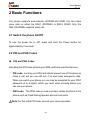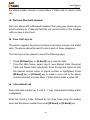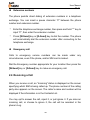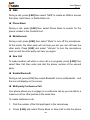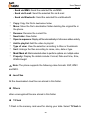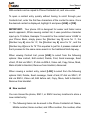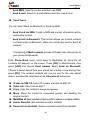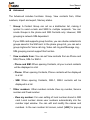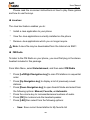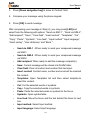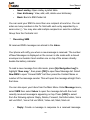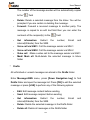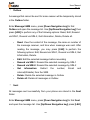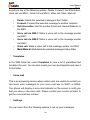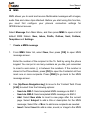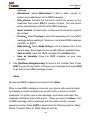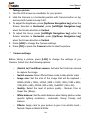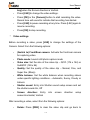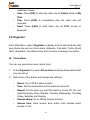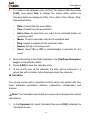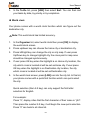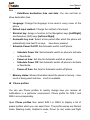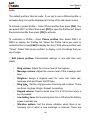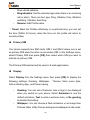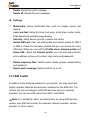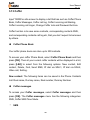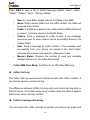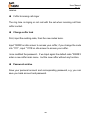
1
bolt User Manual bolt User Manual Ver. 1.0 The information contained in this User Manual is written for the NGM Supreme model. The contents of this document are provided ―as is‖. Except as required by applicable law, no warranties of any kind, either express or implied, including, but not limited to, the implied warranties of merchantability and fitness for a particular purpose, are made in relation to the accuracy, reliability or contents of this document. NGM Ltd. reserves the right to make changes and improvements to the products and any of the features of the products described in this document without prior notice. Under no circumstances will NGM be held responsible for any loss of data or income or any special, incidental, consequential or indirect damages howsoever caused. Note: Some services and functions in this User Manual may not be supported by all networks, such as 112, the international emergency call number. Please contact the network operator or service provider for clarifications on how to use specific services/functions. The availability of particular products may vary by region. Please check with the NGM dealer nearest to you. This device may contain commodities, technology or software subject to export laws and regulations from the US and other countries. Diversion contrary to law is prohibited. When using the features in this device, obey all laws and respect privacy and legitimate rights of others. Please read ―Important Safety Information‖ and ―Limited Warranty‖ chapters prior to the use of the mobile phone. 2 bolt User Manual Ver. 1.0 Contents IMPORTANT SAFETY INFORMATION..................................................... 5 1 GETTING STARTED .......................................................................... 9 1.1 SIM CARD AND BATTERY ..................................................................... 9 1.2 CHARGING THE BATTERY ................................................................... 12 1.3 INSTALLING THE MEMORY CARD ........................................................ 13 1.4 YOUR PHONE .................................................................................... 15 1.5 DEFINITION OF BUTTONS ................................................................... 16 1.6 STATUS ICONS .................................................................................. 20 2 BASIC FUNCTIONS ............................................................................. 23 2.1 SWITCH THE PHONE ON/OFF ............................................................. 23 2.2 PIN AND PUK CODES ....................................................................... 23 2.3 MAKING A CALL ................................................................................. 24 2.4 RECEIVING A CALL ............................................................................ 26 2.5 REJECT CALLS .................................................................................. 27 2.6 IN-CALL OPTIONS.............................................................................. 27 2.7 IN-CALL OPTIONS (VIDEO CALL) ........................................................ 29 3 IDLE MODE AND MAIN MENU............................................................ 32 3.1 MY FILES .......................................................................................... 33 3.2 PHONE BOOK ................................................................................... 37 3.3 LOG.................................................................................................. 42 3.4 ENTERTAINMENT ............................................................................... 44 3.5 MESSAGE ......................................................................................... 49 3.6 VIDEO CALL ...................................................................................... 68 3.7 CAMERA ........................................................................................... 68 3.8 ORGANIZER ...................................................................................... 72 3.9 SETTINGS ......................................................................................... 77 3 bolt User Manual Ver. 1.0 3.10 CONNECTIVITY ................................................................................ 88 3.11 INTERNET ....................................................................................... 93 3.12 SIM TOOLKIT .................................................................................. 95 3.13 COFFER.......................................................................................... 96 4 REFERENCE INFORMATION .............................................................. 99 5 ACCESSORIES .................................................................................. 101 6 TROUBLESHOOTING........................................................................ 103 7 CARE AND MAINTENANCE.............................................................. 106 8 DECLARATION OF CONFORMITY (R&TTE) ................................... 109 9 SAR CERTIFICATION INFORMATION.............................................. 111 4 bolt User Manual Ver. 1.0 Important Safety Information ◆ Emergency Services To make an emergency call in any country Ensure that your phone is switched on and in service. Press 112 followed by the Send key. Follow the instructions and do not end the call until told to do so. Tell the operator which service you require: Police, Ambulance, Fire Brigade, Coastguard or Mountain Rescue Service. Give your location and, if possible, remain where you are to maintain contact. The 112 emergency number service is available on every digital network service. Due to the nature of the cellular system, connection to emergency calls cannot be guaranteed. ◆ Safety The use of mobile phones is not allowed in some radiation-sensitive areas, such as hospitals, research centers and aircraft. Ensure that you switch off your phone in these areas. If in doubt, remove the battery. ◆ Aircraft safety Switch off your phone and remove its battery when inside or near an aircraft. The use of phones in aircraft is illegal. It may be dangerous to the operation of the aircraft and it may interfere with aircraft‘s equipment. Failure to observe this instruction may lead to suspension or denial of 5 bolt User Manual Ver. 1.0 mobile network services to the offender or legal action or both. Do not use the phone on the ground without the permission of the ground staff. ◆ Hospital safety Switch off your phone and remove its battery in areas where the use of phones is prohibited. Follow the instructions given by the respective medical centre regarding the use of mobile phones on their premises. ◆ General safety Observe ―Turn off mobile‖ signs, such as those near petrol stations, chemicals or explosives and switch off your phone. If you have a heart condition, be careful with the call vibration or tone volume settings. Do not allow children to play with the phone, charger or batteries. Do not allow children to touch the small fittings. Otherwise, suffocation or gullet jam can be caused if children swallow the small fittings. Keep all SIM cards out of the reach of small children. Do not use the phone where blasting is in progress. The operation of some medical electronic devices, such as hearing aids and pacemakers, may be affected if you use a mobile phone next to them. Observe any warning signs and the manufacturer's recommendations. Your phone contains metal which may cause a skin irritation, a rash or eczema. Do not place sharp metal objects such as pins near the earpiece. The earpiece may attract these objects and hurt you when you are using 6 bolt User Manual Ver. 1.0 the wireless device. Do not turn on or off the wireless device when it is near your ear to avoid negative impact on your health. If you feel uncomfortable (such as falling sick or qualm) after playing games on your wireless device for a long time, please go to see a doctor immediately. On a thunder stormy day, do not use your wireless device outdoors. The wireless device may interfere nearby TV sets and radios. ◆ Road safety You must exercise proper control of your vehicle at all times. Give your full attention to driving. Observe all local safety regulations regarding the use of mobile phones while driving. Pull off the road and park before making or answering a call. You must not stop on the hard shoulder of a motorway to answer or make a call, except in an emergency. Switch off your phone at a refueling point, such as a petrol station, even if you are not refueling your own car. Do not store or carry flammable or explosive materials in the same compartment as a radio transmitter. Electronic vehicle systems, such as anti-lock brakes, speed control and fuel injection systems are not normally affected by radio transmissions. The manufacturer of such equipment can advise if it is adequately shielded from radio transmissions. If you suspect vehicle problems caused by radio transmissions, consult your dealer and do not switch on the phone until it has been checked by qualified installers. Check if local laws and/or regulations restrict the use of phones while driving. 7 bolt User Manual Ver. 1.0 ◆ Vehicles equipped with an airbag An airbag inflates with great force. Do not place objects, including either installed or portable wireless equipment, in the area over the airbag or in the airbag deployment area. If vehicle wireless equipment is improperly installed and the airbag inflates, serious injury could result. ◆ Third party equipment The use of third party equipment, batteries, cables or accessories, not made or authorized by NGM may invalidate the warranty of your phone and also adversely affect the phone's operation. ◆ Service The phone, batteries and charger contain no user-serviceable parts. We recommend that your phone is serviced or repaired by a NGM authorized service center. Please contact your service provider for more information. ◆ Efficient use The phone has an internal antenna. For optimum performance with minimum power consumption, please do not cover the internal antenna area with your hand. Covering the internal antenna affects call quality, may cause the phone to operate at higher power levels than needed and may shorten talk and standby times. 8 bolt User Manual Ver. 1.0 1 Getting started 1.1 SIM card and Battery The Service Provider supplies you with a SIM card on which you can store your important phone numbers and other personal data. Note: When inserting or removing the SIM card, you must disconnect the handset with the power adapter. ◆ Inserting the SIM card 1. Remove the back cover of the phone –press the lock at the bottom of the phone and then lift the back cover up as shown in Fig. 1; Fig. 1 9 bolt User Manual Ver. 1.0 2. Remove the battery by lifting it up from the bottom part as shown in Fig. 2; Fig. 2 3. Insert SIM card into any of the two slots with the gold-colored part touching the SIM contacts of the phone as shown in Fig. 3; Fig. 3 10 bolt User Manual Ver. 1.0 4. Insert the battery with the label side up. Align the tabs and metal contacts at the top of the battery with the tabs and contacts on the back of the phone. Slide into place and press down as shown in Fig. 4; Fig. 4 5. Insert the back cover starting from the top part then press the bottom part until it clicks into place as shown in Fig. 5. Fig. 5 11 bolt User Manual Ver. 1.0 Note: The SIM card and its contacts can easily be damaged by scratches or bending, so be careful when handling, inserting, or removing the card. ◆ Battery Performance and Maintenance Your phone is powered by a Li-Ion rechargeable battery. Your new battery will achieve its maximum performance after about three hours full charge-discharge cycles. The battery can be charged and discharged thousands of times until it wears out. When talk time and standby time are noticeably shorter than normal, it is time to replace the battery. Do not leave your phone connected to the charger for over a day as overcharging can shorten the battery‘s service life A fully charged battery will gradually discharge when the phone is not in use. Use only batteries approved by NGM and recharge your battery using only chargers approved by NGM. 1.2 Charging the battery ◆ Charging the battery 1. You must charge the battery for at least 4 hours before using the phone for the first time. 2. Open the cover of the mini USB connector located at the right side of the phone. Plug in the charger connector to the phone and then plug the other end of the charger to the AC outlet. 3. Your phone can be charged while switched on or off. 12 bolt User Manual Ver. 1.0 4. If the phone is charged while turned off, an animated battery charging icon will appear on the screen. When the battery is fully charged, the battery full icon will appear. 5. If the phone is charged while turned on, a battery icon will flash on the screen with battery capacity level indicator gradually increasing. The battery icon will stop flashing when the battery is already fully charged. 6. Unplug the charger from the AC outlet, and then unplug the charger connector from the phone. 1.3 Installing the Memory Card This phone uses T-Flash memory card. You can install the memory card to save images, media clips, music, and other data on your phone. You can find the memory card slot at the right side of the phone. Note: Use only compatible T-flash cards or microSD cards with this device. Other memory cards, such as Reduced Size MultiMediaCards cards, do not fit in the memory card slot and are not compatible with this device. Using an incompatible memory card may damage the memory card as well as the device, and data stored on the incompatible card may be corrupted. To insert the memory card: 1. Open the memory card slot cover and insert the memory card with the label side facing down. 2. Insert the memory card all the way until it clicks. 3. Close the memory card slot cover. 13 bolt User Manual Ver. 1.0 Removing the memory card: 1. Open the memory card slot cover and slightly push the card so it pops out. 2. Remove the card and close the cover. Note: Do not remove the memory card in the middle of an operation when the card is being accessed. Removing the card in the middle of an operation may damage the memory card as well as the device, and data stored on the card may be corrupted. 14 bolt User Manual Ver. 1.0 1.4 Your phone Volume keys Power key Earpiece MicroSD card slot Front camera lens Camera key 15 Earphone connector Mini USB connector Rear camera lens Loudspeaker bolt User Manual Ver. 1.0 1.5 Definition of Buttons Right Navigation key Up Navigation key key OK key Right Selection Key [RSK] Left Navigation key GSM Send key [G-Send key] Left Selection Key [LSK] Clear key Return key Numeric keys WCDMA Send key [W-Send key] Hash key (#) Down Navigation key Asterisk key (*) 16 bolt User Manual Ver. 1.0 Selection keys (Each key can be assigned with a function) Left Selection Key [LSK] Idle mode: Performs the function shown directly above the button Long press to lock keypad Menu mode: Press to enter the menu list of the LSK Editing mode: Press to enter the menu list of the LSK Right Selection Key [RSK] Idle mode: Performs the function shown directly above the button Menu mode: Press to go back to previous screen Editing mode: Press to go back to previous screen OK key Navigation keys (Each key can be assigned with a function) Idle mode: Press to open Main Menu Menu mode: Press to select a function or command Call Mode: Press to open the hand free Up navigation key Idle mode: Press to open the function assigned to the button Menu mode: Move upward to highlight a menu item Editing mode: Move cursor upward in a text field Down navigation key Idle mode: Press to open the function assigned to the button Menu mode: Move downward to highlight a menu item Editing mode: Move cursor downward in a text field 17 bolt User Manual Ver. 1.0 Left navigation key Right navigation key WCDMA Send key [W-Send key] GSM Send key [G-Send key] Idle mode: Press to open the function assigned to the button Editing mode: Move cursor to the left in a text field Idle mode: Press to open the function assigned to the button Editing mode: Move cursor to the right in a text field Idle mode: Press to open SIM-1 All calls list function Dialing and incoming call mode: Dial or Accept calls of SIM-1 Idle mode: Press to open SIM-2 All calls list function Dialing and incoming-call mode: Dial or Accept calls of SIM-2 Power key Idle mode: Press and hold to switch on and off the phone Quick press to open Phone mode Clear key Editing mode: Clears the character to the left of the cursor View file list mode: Deletes a selected file Return key Back to Idle Screen Numeric keys Idle mode: Press to enter numbers and characters Call Mode: Press and Hold [Number 18 bolt User Manual Ver. 1.0 keys 2 to 9] to fast dial the phone number which you have set in settings application. Number key 1 is reserved for Voice Mail access via Primary SIM Press and hold[Number key 0] to input ―+‖ and start dialing an international number Menu mode: Press to enter into the corresponding menu option Editing mode: Press to enter numbers, letters, or symbols * key Idle mode: Press it to input ―*‖, Press and hold to insert pause ―P‖ character for special dialing Edit mode: Press to change the text input mode # key Idle mode: Press to input ―#‖, and hold to exchange the phone profiles between "Normal mode" and "Meeting mode". Editing mode: Press to display list of symbols, Press and hold to line feet. 19 bolt User Manual Ver. 1.0 Volume key Control the volume of the earpiece and loudspeaker. This can be done during a call or a when a volume control view is displayed. Camera key Idle mode: Launch Camera mode 1.6 Status Icons (1) (2) (3) (4) (5) (6) (7) (8) (9) (10) (11) SN Meaning Simple description ⑴ Strength of network signal (SIM at WCDMA slot) No service or No SIM card inserted in WCDMA slot Signal strength of WCDMA network Signal strength of GSM network ⑵ ⑶ Strength of network signal (SIM at GSM slot) No service or No SIM card inserted in GSM slot Battery status Low power Signal strength of GSM network Battery charge level Charging status 20 Icon bolt User Manual Ver. 1.0 ⑷ Line attach Internet connected, but no data transfer Keypad lock Keypad lock Packet data connected Packet data connected Roaming Roaming SMS status Unread Coffer SMS Unread SMS ⑸ Unsent SMS SMS Inbox is full ⑹ [7] MMS status Unread MMS Push messages Push messages Mobile phone full MMS Inbox is full Incoming call transfer All Incoming calls of WCDMA are diverted to a defined number All Incoming calls of GSM are diverted to a defined number All Incoming calls of WCDMA and GSM are diverted to a defined number [8] USB connection USB cable connected Music playing background Music playing background FM radio playing background FM radio playing background SHF connected SHF connected 21 bolt User Manual Ver. 1.0 [9] Bluetooth status Bluetooth power on Bluetooth headset connected ⑽ Display the Phone profiles for WCDMA slot Meeting mode, WCDMA slot is Primary SIM Outdoor mode, WCDMA slot is Primary SIM Driver mode, WCDMA slot is Primary SIM Meeting mode, WCDMA slot is Secondary SIM Outdoor mode, WCDMA slot is Secondary SIM Driver mode, WCDMA slot is Secondary SIM ⑾ Display the Phone profiles for GSM slot Meeting mode, GSM slot is Primary SIM Outdoor mode, GSM slot is Primary SIM Driver mode, GSM slot is Primary SIM Meeting mode, GSM slot is Secondary SIM Outdoor mode, GSM slot is Secondary SIM Driver mode, GSM slot is Secondary SIM 22 bolt User Manual Ver. 1.0 2 Basic Functions Your phone supports dual-network, WCDMA and GSM. You can make voice calls on either the SIM-1 (WCDMA) or SIM-2 (GSM). Only the SIM-1(WCDMA) supports video call. 2.1 Switch the phone On/Off To turn the power On or Off, press and hold the Power button for approximately 3 seconds. 2.2 PIN and PUK Codes ◆ PIN and PIN2 Codes Activating the PIN code protects your SIM card from unauthorized use. PIN code: Locking your SIM card should prevent use of the phone to make a call, but you can still turn it on and make emergency calls. When you switch your phone on, you may be prompted for your PIN1 password (4 to 8 digits), which you must enter correctly before you can use your phone. PIN2 code: The PIN2 code is used to protect certain functions in the phone such as Fixed Dialing Number and call cost limits. Note: For the initial PIN code, consult your service provider. 23 bolt User Manual Ver. 1.0 ◆ PUK Code and PUK2 Code If the PIN is entered incorrectly 3 times, the SIM card will be locked. Enter the 8-digit PUK (Personal Unlock Key) provided by the service provider with the SIM card in accordance with the instructions. If the PUK is lost or forgotten, please contact your service provider. If the PUK is entered incorrectly for 10 times, the SIM card will be permanently locked. Note: Your phone supports PIN and PUK codes for both WCDMA and GSM SIM cards. 2.3 Making a Call ◆ From Numeric Keypad Enter the phone number by pressing the number keys, then choose which SIM would make the outgoing call by pressing either [W-Send] or [G-Send] key. The screen would show if the SIM-1 or the SIM-2 is making the call. ◆ Fast Dialing Up to 8 phone numbers from the Contacts List memory (either handset or SIM) can be assigned for one-key dialing. Press and hold any of number keys [2-9] and the phone number saved in the Fast Dial list will be dialed via Primary SIM. Number key 1 is reserved for Voice Mail access and cannot be changed. ◆ From Phone Book Scroll through the list in the Phone Book until the contact you desire is highlighted. Press [W-Send] key or [G-Send] key to make a voice call to 24 bolt User Manual Ver. 1.0 the phone number chosen; or press Menu > Video Call to make a video call. ◆ Dial from Bluetooth Headset Pair your phone with a Bluetooth headset. Dial using your phone as you would normally do. Press and hold the call control button of the headset until you hear a short tone. ◆ From Call Log List The phone registers the phone numbers of received, missed, and dialed calls. The phone stores the last 20 calls in each of these categories. The Call Log can be opened in one of the following ways: Press [W-Send] key or [G-Send] key to view All Calls From the Main Menu, select Log to view Missed Calls, Received Calls, and Dialed Calls individually. Scroll through the Calls List until the desired contact name or phone number is highlighted. Press [W-Send] key or [G-Send] key to make a voice call to the phone number selected; or press Menu > Video Call to make a video call. ◆ International call Press and hold number key 0 until a ―+‖ sign (international dialing prefix) is displayed. Enter the Country Code, followed by the Area Code (drop the leading zero) and the phone number then press [W-Send] or [G-Send] key. 25 bolt User Manual Ver. 1.0 ◆ Extension numbers The phone permits direct dialing of extension numbers in a telephone exchange. You can insert a pause character ―P‖ between the phone number and extension number. Enter the telephone exchange number, then press and hold ―*‖ key to input ―P‖, then enter the extension number. Press [W-Send] key or [G-Send] key to dial the number. The phone will automatically dial the extension number after connecting to the telephone exchange. ◆ Emergency call Calls to emergency service numbers can be made under any circumstances, even if the phone, and/or SIM card is locked. Dial the Emergency number appropriate for your location then press the [W-Send] key or [G-Send] key to make an emergency call. 2.4 Receiving a Call When you receive a call, an ―Incoming‖ status is displayed on the screen specifying which SIM is being called up. The phone number of the calling party also appears on the screen. The caller‘s name and number will be displayed if the information is in the Contacts List. You may opt to answer the call, reject it, or just ignore it. If you miss an incoming call, or choose to ignore it, the call will be recorded in the phone‘s Log. 26 bolt User Manual Ver. 1.0 To answer an incoming call, press the [LSK] or press either the [W-Send] key or [G-Send] key. While the phone is ringing and vibrating, press [OK] to silence the ring tone and disable the vibrator. 2.5 Reject Calls Press [RSK] to reject incoming calls. 2.6 In-Call Options Note: Some functions depend on the support of network service provider and whether you have registered the function. Your phone has additional functions available while a call is in progress. Press [LSK] to display a list of common in-call functions such as Hold, SMS, Phonebook, Mute/Unmute, New call, Enable Bluetooth. ◆ Hold This function allows you to make a second call by putting the current call on hold. During a call, press [LSK] then select ―Hold.‖ and then the current call will be put on hold. Press [LSK] and select Phone Book or New Call to dial the phone number of the second party. When the second call is established, press [LSK] and select ―Switch‖ to swap between the two calls. 27 bolt User Manual Ver. 1.0 ◆ SMS During a call, press [LSK] then select ―SMS‖ to create an SMS or access the Inbox, Sent Items, or Drafts folder etc. ◆ Phone Book During a call, press [LSK] then select Phone Book to search for the phone number in the Contacts List. ◆ Mute/Unmute During a call, press [LSK] then select ―Mute‖ to turn off the microphone. At this mode, the other party will not hear you but you can still hear the other party. Press [LSK] and select ―Unmute‖ to turn the microphone back on and the other party can hear you again. ◆ New Call To make another call while a voice call is in progress, press [LSK] then select New Call then enter and dial the phone number of the second party. ◆ Enable Bluetooth During a call, press [LSK] then select Bluetooth to turn on Bluetooth,and the icon will display on the screen. ◆ Multi-party Conference Call Your phone allows you to engage in a conference call so you can talk to a maximum of five other parties at the same time. To create conference call: 1. Dial the number of the first participant in the normal way. 2. Press [LSK] and select Phone Book or New Call to dial the phone 28 bolt User Manual Ver. 1.0 number of the second party. The first call is automatically put on hold. 3. When the second call is established, press [LSK] and select ―Create conference call.‖ This joins the first participant into the conference call. 4. To add more participants, repeat steps 2 and 3, then select Create conference call... Note: The conference call feature is a network service. Check with your network operator if this service is supported. ◆ Private Conversation During Conference Call 1. During a conference call, press [LSK] and select ―Conference list‖; 2. Select one or more participants who you want to talk privately. 3. Press [LSK] to select ―Split call‖ This will put the conference call on hold while you talk to the selected participants. The remaining participants can talk still continue talking to each other. 4. Press [LSK] and select ―Create conference call‖ to return to the conference call. 5. To drop a participant from the conference call, press [LSK] and select ―Conference call List‖ and then select ―End.‖ 6. Press ‗End‖ to terminate the conference call Note: Do not hold the device near your ear when the loudspeaker is in use, because the volume may be extremely loud. 2.7 In-Call Options (Video Call) Note: Video phone feature is only available in UMTS network. Only 29 bolt User Manual Ver. 1.0 the SIM-1 of the phone supports Video Call. ◆ Front camera/ Rear camera The phone has two camera lenses, one in front and the other at the rear. During a Video Call, press [LSK] to enter the Video In-Call menu to select ―Front camera‖ or ―Rear camera‖ to send video to the other party. ◆ SMS During a video call, press [LSK] then select ―SMS‖ to create an SMS or access the Inbox, Sent Items, or Drafts folders etc. ◆ Phone book You can search for a phone number while Video Call is in progress. Press [LSK] then select ―Phone book‖ to search the phone number or create a new contact. ◆ Mute/Unmute During a video call, press [LSK] select Mute to turn off the microphone. Press [LSK] and select Unmute to turn the microphone back on. ◆ Screen Mode Press [LSK] then select Screen Mode to zoom in or out your image or display a one-way or two-way video between you and the recipient of the call. ◆ Video Settings You can send live video, an image or a video clip to the other party. Press [LSK] then select ―Video Settings‖ then choose Live video/Substituted picture or Substituted video 30 bolt User Manual Ver. 1.0 ◆ Image quality Press [LSK] then select Image quality to adjust the image quality of the caller and the calling party. ◆ Enable Bluetooth During a call, press [LSK] then select Bluetooth to turn on Bluetooth,and the icon will display on the screen. 31 bolt User Manual Ver. 1.0 3 Idle Mode and Main Menu In idle mode, the screen displays lots of useful information, such as Missed calls, New messages Alarms and Schedule. The Main Menu screen allows you to access any of your phone‘s features. These are displayed in a grid or list format. In idle mode, press [OK] key to access the Main Menu and press the navigate keys to browse the icons and lists, or press number key 1-9, 0, *, and # to access the functions directly. The following table shows the twelve functions of the Main Menu where icons appear in the same order on the screen. 32 bolt User Manual Ver. 1.0 My Files Phone Book Log Entertainment Message Videophone Camera Organizer Settings Connectivity Internet SIM Toolkit 3.1 My Files Use My Files to manage files such as pictures, sound, videos and others applications stored in the phone memory or memory card. To access My Files, press [OK] to open the Main Menu, select My Files, and then press [OK]. Another way to access My Files is to simply press [Number key 1] while the Main Menu is open ◆ Pictures All photos and images are stored in this folder including Images/Preset wallpapers. Press [OK] to preview pictures or Press [LSK] for the options in handling your picture files. For embedded pictures, some options below should not display. 33 bolt User Manual Ver. 1.0 Delete: Delete current files Send: - Send via MMS: Send the selected file via MMS - Send via E-mail: Send the selected file via E-mail - Send via Bluetooth: Send the selected file via Bluetooth Copy: Copy the file to destination folder Move: Move the file to destination folder and deleting the original file in the phone Rename: Rename for the picture New folder: New folder Open in sequence: Display all file automatically in full screen status orderly Use image: Use image to relevant applications Type of view: Arrange the selection according to titles or thumbnails Sort: Arrange the files according to name, size. date and type Mark/ Mark all: Mark selected pictures to perform options on multiple pictures Property: Display current file details include: Format, Date and time, Size, Width×Height Note: The phone supports the following image formats JPEG, GIF, WBMP, BMP, and PNG. The phone also supports picture files of up to 2048x1536 pixels or up to 100 frames for GIF files. ◆ Sound (Music) All your audio files are stored in this folder including Music/Recordings/Preset ringtones. Press [OK] to Play/pause the file. ress [LSK] for options in handling your audio files. 34 bolt User Manual Ver. 1.0 Delete: Delete the current file Send: - Send via MMS: Send the selected file via MMS - Send via E-mail: Send the selected file via E-mail - Send via Bluetooth: Send the selected file via Bluetooth Copy: Copy the file to destination folder Move: Move the file to destination folder deleting the original file in the phone Rename: Rename the current file New folder: New folder Set as ring tone: Set audio to voice call ring, video call ring or message ring. Add to playlist: Add the music to playlist Type of view: Arrange the selection according to titles or thumbnails Sort: Arrange the files according to name, size, date or type Mark/ Mark all: Mark selected sound to perform options on multiple sound Property: Display file details include: Format, Date and time, Size, Artist, Album Note: The phone supports the following audio formats: AMR, SMF (MIDI), SMAF, WAV, AAC, MP3, QCP, and MMF. ◆ Videos All video clips are stored in this folder. Press [OK] to Play/ pause the file or Press [LSK] for options in handling your video. Delete: Delete the current file Send: 35 bolt User Manual Ver. 1.0 - Send via MMS: Send the selected file via MMS - Send via E-mail: Send the selected file via E-mail - Send via Bluetooth: Send the selected file via Bluetooth Copy: Copy the file to destination folder Move: Move the file to destination folder deleting the original file in the phone Rename: Rename the current file New folder: New folder Open in sequence: Display all file automatically in full screen status orderly Add to playlist: Add the video to playlist Type of view: View the selection according to titles or thumbnails Sort: Arrange the files according to name, size, date or type Mark/ Mark all: Mark selected video to perform options on multiple video Property: Display file details include: Format, Date and time, Size, Width×Height Note: The phone supports the following video formats: 3GP, WMV and MP4. ◆ Java Files All the downloaded Java files are stored in this folder. ◆ Others other unrecognized files are stored in this folder. ◆ T-Flash T-Flash is the memory card used for storing your data. Select T-Flash to 36 bolt User Manual Ver. 1.0 view all the files stored in the memory card. Press [LSK] for the options in handling the files. ◆ Management This function helps you check the memory status of your phone or memory card. Storage type: Set the phone or T-Flash as memory storage Format T-flash: Clear all the data in memory card Memory status: Displays the available storage locations on phone and T-flash. 3.2 Phone Book The Phone Book contains all contact information stored in your phone memory, SIM-1, and SIM-2. Your phone can store up to 900 contact names, 4500 contact numbers, 1800 E-mail addresses. To access your Phone Book, press [OK] to open the Main Menu then select Phone Book and then press [OK]. A quicker way to access your Phone Book is to simply press [Number key 2] while Main Menu is opened. Then all your current contacts will be displayed in a list, in alphabetical order. You can use the [Navigation key] to scroll through the entries then press [OK] to display detailed information of the contact. You can make a call and send SMS, MMS messages directly from the Contacts List. Press [W-send] to dial the contact by SIM-1or press [G-send] to dial the contact by SIM-2. 37 bolt User Manual Ver. 1.0 SIM contacts can be copied to Phone Contacts List, and vice-versa. To open a contact entry quickly without having to scroll through your Contacts List, enter the first few characters of the contact‘s name. Once the desired contact is displayed, highlight it and press [LSK] or [OK]. IMPORTANT: Your phone OS is designed for easier and faster name search approach, While viewing contact list, it uses predictive character input up to 10 letters, Example: To search for the contact name ‗JOHN‘ in your Phone Book, simply press the [Number key 5] once for ‗J‘, the [Number key 6] once for ‗O‘, the [Number key 4] once for ‗H‘, and the [Number key 6] once for ‗N‘ This equates to just for 4 presses instead of the 8 presses for the same name search in the traditional Multi-tap way. When viewing Contact List, press [LSK] to select from the following options: New contact, Edit contact, Delete, Find, Send message, Send vCard, IP dial via SIM-1, IP dial via SIM-2, Video call, Copy, Move, Mark, Mark all,Add to blacklist, Remove from blacklist, Advanced When viewing a contact entry, select [LSK] to select from the following options: Edit, Delete, Send message, Send vCard, IP dial via SIM-1, IP dial via SIM-2, Video call, Edit before call, Copy, Move, Add to blacklist, Remove from blacklist. ◆ New contact You can choose the phone, SIM-1, or SIM-2 memory locations to store a new contact entry. The following items can be saved in the Phone Contacts List: Name, Mobile number, Home number, and Office number, Fax number, other 38 bolt User Manual Ver. 1.0 number, Email 1/2, Reject call On/Off, Portrait, Ring, Home page, Memo, Address, ZIP, City and Country. The following items can be saved in the SIM-1 Contacts List: Name, Number/Two-Number, and Email. (Only 3G SIM support Two-Number and Email) The following items can be saved in the SIM-2 Contacts List: Name, Number. ◆ Edit contact/Delete You can edit/delete current highlighted contact. ◆ Find You can find contacts by the following methods: Find by name: Enter the first few letters of a name (using Multi-tap method if input method is set to ‗abc‘) in the text editing window, then press [OK] to display the contact names that match with the letters entered. Find by number: Enter the first few numbers in the number editing window, then press [OK] to display the phone numbers that match with the numbers entered. Find by group: Select a group, search for all contact records of this group. ◆ Send message You can select send SMS, MMS, E-mail. Send SMS: Select a number and then new SMS. 39 bolt User Manual Ver. 1.0 Send MMS: Select a number and then new MMS. Send E-mail: Select an E-mail address and then new E-mail. ◆ Send Vcard You can select Send via Bluetooth or Send via SMS. Send Vcard via SMS: Create a SMS and contact information will be inserted the content. Send Vcard via Bluetooth: This function allows you to send contacts in vCard format via Bluetooth, either one contact per send or Send all contacts. Transferring of Multi-contacts (include all fields) from other phone to your phone via Bluetooth. Enter Phone Book menu, scroll down to Mark/Mark all, Once the All Contacts list appears on the screen. Press [OK] to Mark/Unmark, then press [LSK] and choose Send marked. Select Send via Bluetooth. Choose a paired device from your paired list or setup a new pairing then press [OK]. The marked contacts will now be sent to the new paired device, provided the other device has a Receive all feature too. ◆ ◆ ◆ ◆ IP dial via SIM-1/2: Select IP number and dial via SIM-1/2. Video call: Video call via SIM-1 Copy: Copy the contact to designated position Move: Move the contact to designated position and deleting the original contact ◆ Mark/Mark all: Mark selected contact to perform options on multiple contacts ◆ Add to blacklist: Add selected record to blacklist ◆ Remove from blacklist: Remove selected record from blacklist 40 bolt User Manual Ver. 1.0 ◆ Advanced The Advanced includes functions: Group, View contacts from, Other numbers, Import and export, Memory status. Group: A Contact Group can act as a distribution list, making it quicker to send e-mails and SMS to multiple recipients. You can create Groups in the phone and SIM Contacts only. However, SIM grouping is network SIM dependent. If your SIM card supports group function, you can divide contacts into groups saved in the SIM card. In the phone group list, you can set a group ringtone for Voice call ring, Video call ring and Message ring, SIM grouping cannot support this function. View contacts from: You can set View contacts from as Phone and SIM, Phone, SIM-1or SIM-2. - Phone and SIM: When opening Contacts, all your current contacts will be displayed in a list - Phone: When opening Contacts, Phone contacts will be displayed in a list - SIM: When opening Contacts, SIM-1, SIM-2 contacts will be displayed in a list Other numbers: Other numbers include View my number, Service number and Fixed number. - View my number: For user setting of local number stored in SIM card. Local number stores user numbers automatically into the number input window. You can edit and modify the names and numbers. In the own number list screen, select [LSK] for pop-up 41 bolt User Manual Ver. 1.0 menu, press [Direction navigation key] to select: * Edit: Edit the selected item * Send vCard via Bluetooth: Transfer the selected item as vCard by Bluetooth * Delete: Delete the selected item - Service number: The Service number phone book contains customer service, hotline service numbers, etc. The contents are defined by your network service provider. - Fixed number: Outgoing calls can be restricted to certain numbers. When this function is activated, you may only dial the numbers that are in the fixed dialing list. Note: Not all SIM cards support fixed dialing feature. Memory status: This function shows you the number of used and available storage locations in the Contact List of the phone and SIM. 3.3 Log The phone‘s Log feature allows you to view information about phone and data calls you have made and received. The Log records and monitors your missed calls, received calls, dialed calls, all calls, Call duration, and Packet data counter. ◆ Missed calls Displays the last 20 calls made to the phone that were missed or ignored 42 bolt User Manual Ver. 1.0 ◆ Received calls Displays the last 20 calls that the phone has received ◆ Dialed calls Displays the last 20 calls made from the phone ◆ All calls Displays the last 60 calls that were total missed calls, received calls and dialed calls. Each entry in the list contains the Name, Number, Type (from SIM-1 or SIM-2), Time, Date, and Call Duration (Besides Missed calls). You can highlight an entry in the Call Log List then press [LSK] to select from the following functions: Save, IP dial via SIM-1, IP dial via by SIM-2, Voice call by SIM-1, Voice Call by SIM-2, Video Call, Send SMS, Send MMS, Edit before call, Add to blacklist, Delete and Delete all. ◆ Call duration This feature provides you with detailed information regarding the total length of your incoming and/or outgoing calls via SIM-1 and SIM-2. ◆ Packet data counter This allows you to confirm the number of data (in kilobytes) sent and received during packet data connections via SIM-1 and SIM-2. Note: The actual invoice for calls and services from your service 43 bolt User Manual Ver. 1.0 provider may vary, depending on network features, rounding off for billing, taxes, and so forth. 3.4 Entertainment Note: Listen to music or radio at a moderate level. Continuous exposure to high volume may damage your hearing. Do not hold the device near your ear when the loudspeaker is in use, because the volume may be extremely loud. ◆ Music player With the Music player you can play audio files stored in the phone memory or memory card. This phone feature allows you to play music while using other functions of the phone. From Entertainment menu, select Music player then press [OK] to open the Music player then press [LSK] to select from the following options: Playing list: Open to view all current playlists Open Playing list or press [Up navigation key] to view current playlist, and then press [LSK] to select the options below: - Add content: Open Gallery to select audio file Change order: Change the order of current audio files in playlist Set as ring tone: Set the playing audio file as ringtone for voice call ring, video call ring or message ring Send: Send the selected audio file via MMS/E-mail/Bluetooth Remove: Remove current audio file from playlist Remove all: Remove all files from playlist 44 bolt User Manual Ver. 1.0 - Property: View the property of the current audio file My play list: From here you can load, create, change and delete playlists as needed. Open My play list, then openress [LSK] to select from the following options: - Play: Open Music player to play current playlist Rename: Edit the name of current playlist New: Add a new playlist. Delete: Delete current playlist Delete all: Delete all playlists Play mode: Set the play mode to Once, Repeat track, Original play, Repeat all and Random Equalizer: Set the equalizer to Normal, Pop, Rock, Jazz, Classic, Define1, Define2 or Define3 play modes. The Define1, Define2 and Define3 can be edited among them. Visual effects: Set the visual effects to none (standard), Spectrum analysis, or Night vision Minimize: Hide the Entertainment but will continue to play in the background while in other applications Set as ring tone: Set the playing audio file as ringtone for voice call ring, video call ring or message ring Send: Send the selected audio file via MMS/E-mail/Bluetooth Property: Open to view the property of music file being played 45 bolt User Manual Ver. 1.0 ◆ Video player With the Video player you can play video files stored in the phone memory or memory card. From Entertainment menu, select Video player then press [OK] to open the Video player then press [LSK] to select from the following options: Playing list: Open to view all current playlists Open Playing list or press [Up navigation key] to view current playlist,press [LSK] to select the options below: - Add content: Open Gallery to select audio file Change order: Change the order of current audio files in playlist Send: Send the selected audio file via Bluetooth/MMS/E-mail Remove: Remove current audio file from playlist Remove all: Remove all files from playlist Property: View the property of the current video file My play list: From here you can load, create, change and delete playlists as needed. Open My play list, then openress [LSK] to select from the following options: - Play: Open Video player to play current playlist Rename: Edit the name of current playlist New: Add a new playlist. Delete: Delete current playlist Delete all: Delete all playlists 46 bolt User Manual Ver. 1.0 Full screen: Full screen player video Play mode: Set the play mode to Once, Repeat track, Original play, Repeat all and Random Mute audio: Set Mute/Unmute audio. When the Status is Mute audio, it should display Unmute audio, otherwise it should display Mute audio. Send: Send the selected audio file via MMS/E-mail/Bluetooth Property: Open to view the property of Video file being played ◆ Voice recorder From Entertainment, select Voice recorder then press [OK] to open the voice recorder screen then press [LSK] to select from the following options: Record time: Set record time, when overtime or press [OK] to shop, the recording will save automatically My recordings: Open Gallery to view recordings ◆ Games Your phone comes with two built-in games: Boxman and Colored ball. Boxman: The object of the game is to push boxes to the target locations. When all boxes are stored at the target places, you then advance to the next level. Colored ball: The object of the game is to move the ball with same color to the same line. When five balls or more are in the same line, said line will be cleared. When the balls fill up the screen, the game is over. 47 bolt User Manual Ver. 1.0 Please read the on-screen instructions on how to play these games and how to use the keys. ◆ Java box The Java box feature enables you to: Install a Java application to your phone View the Java applications currently installed on the phone Remove Java applications which you no longer require Note: A Java file may be downloaded from the Internet via SIM-1 ◆ FM Radio To listen to the FM Radio on your phone, you must first plug in the stereo headset included in this package. From Main Menu, select Entertainment, and then select FM Radio Press [Left/Right Navigation key] to scan FM stations in sequential order. Press [Up Navigation key] to display a list of previously saved stations. Press [Down Navigation key] to open Search Mode and select from the following options: Manual, Favorite, or Automatic. Press the volume key to increase/decrease loudness of audio. Press [OK] to mute/unmute the headset speaker. Press [LSK] then select from the following options: - Save: Save current tuned station to My favorite list 48 bolt User Manual Ver. 1.0 - My favorites: Create your own list of most listened to FM stations. Press [LSK] to select from the following options: * Listen: Listen to the selected station * Add New: Enter the station name and frequency then save to My favorite list * Edit : Change station name and frequency * Delete: Delete the current tuned station from My favorite list * Delete all: Delete all channels from My favorite list - Search Mode: Set channel selection to Manual, Favorite, or Automatic Shortcut key setting: Assign any key in the phone keypad as shortcut to frequently tuned FM Stations Minimize: return to idle mode or use other applications while the FM radio continues playing as background music The FM radio is automatically muted when there is an active call and will resume playing after ending the call. 3.5 Message Your phone allows you to send and receive Text Messages (SMS), Multimedia (MMS), and E-mail. ◆ SMS Select [Message] from Main Menu, then press SMS to open a list of default Message folders: ―New‖, ―Inbox‖, ―Drafts‖, ―Outbox‖, ―Sent‖, ―Templates‖, ―Voice Mail‖, 49 bolt User Manual Ver. 1.0 ―Settings‖, SMS counter and ―Memory status‖. Creating and Sending SMS 1. From Message, select SMS then select New. 2. Enter the number of the recipient in the ‗ ‘ field using the phone keypad. If the number is stored in the Contacts List or used recently or log or contact group, press [OK] then enter Recently used, Contacts, All calls and Contact group list screen then open Recently used, Contacts, All calls or Contact group to mark one or more receiver to send the message to, and then press [LSK] to confirm the selected items and back to the SMS message screen. (Pls. refer to IMPORTANT note on the next paragraph.) Alternatively, you can also press [LSK] enter Recently used, Contacts, All calls and Contact group list screen then open Recently used, Contacts, All calls or Contact group to mark one or more receiver to send the message to, and then press [LSK] to confirm the selected items and back to the SMS message screen. IMPORTANT: Your phone OS is designed for easier and faster name search approach (does not apply in Find feature). While viewing contact list, it uses predictive character input up to 4 letters. Example: To search for the contact name ‗JOHN‘ in your Phone Book, simply press the [Number key 5] once for ‗J‘, the [Number key 6] once for ‗O‘, the [Number key 4] once for ‗H‘, and the [Number key 6] once for ‗N‘. This equates to just for 4 presses instead of the 8 presses for the same name search in the traditional Multi-tap way. 50 bolt User Manual Ver. 1.0 3. Press [Down navigation key] to move to Content: field 4. Compose your message using the phone keypad. 5. Press [OK] to send message. After composing your message in Step (4), you may press [LSK] and select from the following edit options: ―Send via SIM-1‖ , ―Send via SIM-2‖, ―Add recipient‖, ―Save‖, ―Clear field‖, ―Insert contact‖, ―Templates‖, ―Cut‖, ―Copy‖, ―Paste‖, ―Symbols‖, ―Line feed‖, ―Input method‖ ―Input language‖, ―Insert smiley‖, ―User dictionary‖ and ―Back“. - Send via SIM-1 : When ready to send your composed message via SIM-1. Send via SIM-2 : When ready to send your composed message via SIM-2. Add recipient: When ready to add the message recipient(s). Save: Current message will be stored into Drafts folder. Clear field: Clear all content and number that had input. Insert contact: Contact name, number and email will be inserted the content. Templates: Open Templates list and then select template.to insert the content. Cut: Cut the selected words or symbols. Copy: Copy the selected words or symbols. Paste: Paste the selected words or symbols to the focus. Symbols: Open symbol table. Line feed: Move the focus and the text behind the focus to next line. Input method: Select Input method Input language: Select input language 51 bolt User Manual Ver. 1.0 - Insert smiley: Open smiley symbol table User dictionary: View, add, edit, delete user dictionary Back: Back to SMS folder list You can send your SMS to more than one recipient at one time. You can enter as many numbers in the To: field with each entry separated by a semi-colon (;). You may also add multiple recipients or send to a defined Group from the Contacts List. Receiving SMS All received SMS messages are stored in the Inbox. Your phone will notify you when a new message is received. The number of New Messages is displayed on the screen in idle mode with a closed envelope icon beside it and another one on top of the screen directly beside the battery indicator. To read a new message from idle mode, press [Up Navigation key] to highlight ―New msg.―, then press [OK] to open New Message list. Select New SMS to open ―Unread SMS‖ List then press the Contact Name or number of the message sender. This will open the message straight from the Inbox. You can also open your Inbox from the Main Menu. Enter Message menu, select SMS then select Inbox to open the message list with the most recently received message/s appearing on top. Press [LSK] to select from the following options: Reply, Delete, Forward, Get Information, Voice call via SIM-1, Voice Call via SIM-2, Video call, Mark, Mark all. - Reply: Create a message in response to a received message. 52 bolt User Manual Ver. 1.0 The number of the message sender will be automatically copied to the ― - ‖ field Delete: Delete a selected message from the Inbox. You will be prompted if you are certain in deleting the message. Forward: Forward a received message to another party. The message is copied to an edit text field then you can enter the number/s of the recipient(s) to the ― - ‖ field Get information: Extract the number, Email and internet(Website) from the SMS Voice call via SIM-1: Call the message sender via SIM-1 Voice call via SIM-2: Call the message sender via SIM-2 Video call : Make a video call to the message sender via SIM-1 Mark/ Mark all: Multi-delete the selected message in Inbox folder Drafts All unfinished or unsent messages are stored in the Drafts folder. Enter Message>SMS menu, press [Down Navigation key] to find Drafts folder and open the message list. Press [OK] to edit the selected message or press [LSK] to perform any of the following options: - Edit: Edit message content before sending Send: Edit message recipient before sending Get information: Extract the number, Email internet(Website) from the SMS Delete: Delete the selected message in the Drafts folder Delete all: Delete all messages in the Drafts folder 53 and bolt User Manual Ver. 1.0 Outbox A message that cannot be sent for some reason will be temporarily stored in the Outbox folder. Enter Message>SMS menu, press [Down Navigation key] to find Outbox and open the message list. Use [Up/Down Navigation key] then press [LSK] to perform any of the following options: Read, Edit, Resend via SIM-1, Resend via SIM-2, Get Information, Delete, Delete all. - - Read: View the content of the message, the name or number of the message receiver, and time when message was sent. After reading the message, you may press [LSK] to perform the following options: Edit, Resend via SIM-1, Resend via SIM-2, Get Information, Delete. Edit: Edit the selected message before resending Resend via SIM-1: Resend the selected message by SIM-1 Resend via SIM-2: Resend the selected message by SIM-2 Get information: Extract the number, Email and internet(Website) from the SMS Delete: Delete the selected message in Outbox Delete all: Delete all messages in Outbox Sent All messages sent successfully from your phone are stored in the Sent folder. Enter Message>SMS menu, press [Down Navigation key] to find Sent and open the message list. Use [Up/Down Navigation key] press [LSK] 54 bolt User Manual Ver. 1.0 to perform any of the following options: Delete, Forward, Get Information, Voice call via SIM-1, Voice Call via SIM-2, Video call, Mark, Mark all. - Delete: Delete the selected message in Sent folder Forward: Forward the selected message to another recipient Get information: Get the number Email and internet(Website) in the SMS Voice call via SIM-1: Make a voice call to the message sender via SIM-1 Voice call via SIM-2: Make a voice call to the message sender via SIM-2 Video call: Make a video call to the message sender via SIM-1 Mark/ Mark all: Multi-delete the selected message in Inbox folder Templates In the SMS folder list, select Templates to view a list of predefined text templates for user. You can also create your own text template and save it to this folder. Voice mail This is an answering service where callers who are unable to contact you can leave voice messages on your voice mail box on SIM-1 or SIM-2. Your phone will display a voice mail indicator on the screen to notify you that you have a new voice mail. Please contact your service provider to get the voice mail box number. Settings You can select from the following options to set up your messages. 55 bolt User Manual Ver. 1.0 - - - - Service center: Your messages are delivered to your phone via a message center number defined and preset by your service provider for SIM-1 and SIM-2. Expire period: This indicates the number of hours or days for which a message you send may remain undelivered to the recipient. If the recipient cannot be reached within the set period, the message is removed from the message service center. Validity period can be set at 1 hour, 6 hours, 1 day, 3 days, 1 week or network maximum. Delivery reports: When set to On, you will receive a status report from the message center to inform you that the recipient has received your message. Save sent: When set to On, the message had sent successfully will be stored in the Sent folder Storage type: Select whether you want new messages to be automatically stored to the Phone SMS Inbox or SIM card. Broadcast: Cell broadcast allows you to receive information of various topics sent by your service provider. Cell broadcast messages are stored in the Inbox when received, and can be viewed as a normal SMS message. Contact your service provider to get the available topics via Cell Broadcast. SMS counter Statistics have already receiving and sending SMS Memory status: Displays the number of used and available storage locations on the phone, SIM-1, and SIM-2 56 bolt User Manual Ver. 1.0 ◆ MMS MMS allows you to send and receive Multimedia messages with images, audio files and video clips attached. Before you start using this function, you must first configure your phone‘s connection settings for GPRS/Internet access. Select Message from Main Menu, and then press MMS to open a list of default MMS folders: New, Inbox, Drafts, Outbox, Sent, Folders, Templates and Settings. Create a MMS message 1. From MMS folder list, select New, then press [OK] to open MMS message screen. Enter the number of the recipient in the To: field by using the phone keypad. You can put in as many numbers as you like, just remember to insert a semi-colon (;) in between the numbers. If the number is stored in the Phone Book, press [OK] to open the Contacts List then mark one or more recipients. Press [RSK] to go back to the MMS message screen. 2. Use [Up/Down Navigation key] to move to the ‗Content‘ field. Press [LSK] to select from the following options: - Send via SIM-1: Send completed MMS message via SIM-1 - Send via SIM-2: Send completed MMS message via SIM-2 - Add: Select New slide to insert a new page after the current page. Select Subject to add a title or description for the MMS message; Select Cc: of Bcc: to add more recipients as needed - Insert: Select Insert to add a video, sound, or image to the MMS 57 bolt User Manual Ver. 1.0 3. message. - Attachment: Select Attachment to add a video, sound, or picture as an attachment to the MMS message. - Take picture: Activate the Camera to select the screen as the viewfinder then press [OK] to capture a photo. The new photo will be automatically inserted to the MMS message. - Insert contact: Contact name, number and email will be inserted the content. - Preview:Select Preview to check the appearance of your MMS message before sending it. Send your completed MMS message via SIM-1 or SIM-2. - Slide timing:Select Slide timing to set the display time of the current page. Each page can be set with different display timing. - Save as draft: Save the MMS message to the Drafts folder - Save as template: Save the MMS message as your own template Use [Up/Down Navigation key] to move to the ‗Content‘ field. Press [OK] to open the text editor. Compose your message then press [OK] to go back to the MMS message screen. Inbox All received MMS messages are stored in the Inbox. When a new MMS message is received, your phone will sound an alarm and display a closed envelope icon as well as the number of unread messages. To quickly view a new message, scroll down and select the message notification area in idle mode. When you open the Inbox, a list of MMS messages will be displayed with the most recently received appearing on top. Press [LSK] to select from the following options: Reply, Delete, Forward, Move to, Mark, Mark all, Sort by. 58 bolt User Manual Ver. 1.0 - Reply: Edit the MMS then send a reply to the message sender Delete: Delete selected MMS messages in Inbox Forward: Edit the MMS then send to one or more recipients Move to: Move MMS to Folders Mark/Mark all: delete selected Sort by: Arrange MMS messages according to Date/Time, Subject or Read/Unread In opening an MMS Notification, you can select from the following options: - Download: Download the content of the received MMS messages. Delete: Delete selected MMS messages in Inbox Reject: Reject the MMS. The message service center will delete the received messages Mark/Mark all: delete selected Sort by: Arrange MMS messages according to Sender, Date/Time, Subject, or Read/Unread Note: Exercise caution when opening messages. Multimedia message objects may contain malicious software or otherwise be harmful to your device or PC. Drafts All unsent or unfinished MMS messages are saved in Drafts From the Drafts message list, press [LSK] to open and then select from the following options: Edit, Delete, Delete all or Sort by. 59 bolt User Manual Ver. 1.0 Outbox: MMS message is temporarily placed in Outbox while sending is in progress. From the Outbox message list, press [LSK] to open and then select from the following options: Resend via SIM-1, Resend via SIM-2, Delete, Delete all or Sort by. Sent Store MMS messages successfully sent from your phone From the Sent Items message list, press [LSK] to open and then select from the following options: Delete, Forward, Move to, Mark, Mark all or Sort by. Read a MMS Message Note: Exercise caution when opening messages. Multimedia message objects may contain malicious software or otherwise be harmful to your device or PC. In the MMS folder list, select Inbox then [OK] to open the MMS message. Press [LSK] to select from the following options: Reply, Reply to all, Delete, Forward,Move to, Attachments, Message Details, Get information, Call via SIM-1, Call via SIM-2 or Video call In the MMS folder list, select Outbox then [OK] to open the MMS message. Press [LSK] to select from the following options: Delete,Forward,Attachments, 60 bolt User Manual Ver. 1.0 Message details or Get information In the MMS folder list, select Sent then [OK] to open the MMS message. Press [LSK] to select from the following options: Delete, Forward, Move to, Attachments, Message details or Get information Folders In the MMS folder list, select Folders to open a list of folders that you have created. Select the folder that you wish to open, save, or delete your MMS message. Templates In the MMS folder list, select Templates to view a list of predefined message templates. You can also create your own message template and save it to this folder. Settings Your phone must be configured to the network settings in order to use the MMS feature. You can make the following MMS settings: - - Profile: Select SIM-1or SIM-2 and then set Profile name, Type, Security, Proxy address, Proxy port number, Login name, Password, Relay server URL, Secure relay server Send: Set Delivery confirmation, Save sent items, Send Mode, Receive: Home retrieval mode, Roaming retrieval mode, Advertisements. Edit: Slide timing, Creation mode 61 bolt User Manual Ver. 1.0 - View mode: Set view mode as Auto or Manual ◆ E-mail You can use your phone to send and receive E-mail messages which may also have attached items such as photos, audio and video clips. Before you start sending and receiving E-mail messages, your phone must be configured to the network settings in order to connect to an E-mail server. Select Message from Main Menu, then select E-mail to open a list of default E-mail folders: New, Inbox, Drafts, Outbox, Sent, Settings and Accounts. Creating an E-mail Message From E-mail folder list, select New then press [OK] to open E-mail message screen. 1. Enter the E-mail address of the recipient in the ‗To:‘ field using the phone keypad. You can key in as many E-mail addresses as you like, just remember to insert a semi-colon (;) in between each one. If the E-mail address is stored in the Phone Book, press [OK] or [LSK] to open the Contacts List then mark one or more recipients. Press [LSK] to go back to the ‗To:‘ field and press [LSK] again to select from the following options: - - Send: Send an E-mail message Add contact: Enter Phone book contact list to select E-mail addresses of the recipients that you wish to send your message to Save as draft: Save unfinished or unsent E-mail message in 62 bolt User Manual Ver. 1.0 - - Drafts Cancel message: Discontinue the message and then return to E-mail folder list Add Cc: Add more recipients if needed Add Bcc: Add confidential recipients if needed Send options: You can set Read confirmation to On to receive a confirmation that the E-mail message was read by the recipient. You can also set the level of importance of an E-mail message to Low, Normal or High. Add file: Enter My Files to select files that you wish to attach to your message 2. Use [Up/Down Navigation key] to move to Subject field. Press [OK] to open text editor then type the title of your E-mail message. Press [OK] to go back to the Subject field. 3. Use [Up/Down Navigation key] to move to Content: field. Press [OK] to open text editor then compose your E-mail message. Press [OK] to go back to the Content field. You may press [LSK] to perform the following options: Send, Save as draft, Cancel Message, Send options or Add file. 4. Use [LSK] then select Add file to open My Files. Select a video, audio, or picture file then press [OK] to attach to your E-mail message. You may press [LSK] to carry out the following options: - Send: Send the E-mail message Add file: Open My Files to select another file to attach Remove file: Remove the selected file 5. Press [LSK] and select Send menu item to send completed E-mail message. 63 bolt User Manual Ver. 1.0 6. The E-mail message will be temporarily placed in Outbox while sending is in progress. If sending is unsuccessful, the message will be left in the Outbox with the status ―Failed‖. Inbox All received E-mail messages are stored in the Inbox. To access your E-mail messages, you must first set up your E-mail account and create a Mailbox. - Retrieve: You can choose ―Only headers‖ or ―Header and body‖ retrieve the E-mail. Delete: Delete a selected E-mail from Inbox. Mark/Mark all: delete selected Sort by: Set the sorting method of E-mail list, you can sort E-mail by Date/Time or Sender Message details: Enter message details screen to view details information: Subject, From, Date, Size, etc. Drafts Store the e-mails not sent or saved In the E-mail list, when you select an e-mail, press [LSK] pop-up menu for operation below: - Delete: Delete the selected E-mail from Drafts folder Delete all: Delete all e-mails in Drafts folder Outbox 64 bolt User Manual Ver. 1.0 Store the e-mails sent unsuccessfully or in progress In the E-mail list, when you select an e-mail, press [LSK] pop-up menu for operation below: - Resend: Send this E-mail again Delete: Delete the selected E-mail in Outbox Delete all: Delete all e-mails in Outbox Sent Store the E-mail sent successfully In the E-mail list, when you select an e-mail, press [LSK] pop-up menu for operation below: - Delete: Delete the selected E-mail from Sent folder Mark/Mark all: delete selected Sort by: Set the sorting method of E-mail list, you can sort E-mail by Date/Time or recipients Read E-mail Note: Exercise caution when opening messages. E-mail messages may contain malicious software or otherwise be harmful to your device or PC. In the read E-mail of Inbox screen, press [LSK] pop-up menu for operation below: - Expand: If there are multiple contacts in the e-mail, expand all contacts of this e-mail 65 bolt User Manual Ver. 1.0 - - - - Delete: Delete the selected E-mail from Inbox Reply: Automatically adds the sender mailbox address to the receiver column in the E-mail editing interface Reply to all: Automatically add the sender and receiver mailbox address to the receiver column in the E-mail editing interface Reply include original: Automatically add the sender mailbox address to the receiver column and add the original content to editor column in the E-mail editing interface Reply to all include original: Automatically add the sender and receiver mailbox address to the receiver column and add the original content to editor column in the E-mail editing interface Forward: Forward the E-mail to other parties View attachments: Enter attachments list screen, you can view or save the attachments of this e-mail Get information: Show the E-mail address of this e-mail, you can save the location to phone book or send E-mail to the location HTML view: Turn to HTML view mode In the read E-mail of Outbox screen, press [LSK] pop-up menu for operation below: - Resend: Send this E-mail again Delete: Delete the selected E-mail from Sent/Outbox Forward: Forward the E-mail to other parties View attachments: Enter attachments list screen, you can view or save the attachments of this e-mail Get information: Enter Save contact screen and save the selected item to phone book. In the read E-mail of Sent screen, press [LSK] pop-up menu for operation 66 bolt User Manual Ver. 1.0 below: - Delete: Delete the selected E-mail from Sent/Outbox Forward: Forward the E-mail to other parties View attachments: Enter attachments list screen, you can view or save the attachments of this e-mail Get information: Enter Save contact screen and save the selected item to phone book Settings In the settings screen, you can edit, rename, delete and create account. When in edit account, you can set the following items of account: - User information: Name, E-mail address, User ID, Password, Signature Connection: * Outgoing server: SMTP server name, SMTP server port, Use SSL/TLS, Authentication * Incoming server: Server type, Server name, Server port, Use SSL/TLS - Preferences: Download mode, Maximum message size, Leave copy on server (POP3), Save sent, Download limit, Add signature Accounts The terminal could store several accounts and you can select one as activated. 67 bolt User Manual Ver. 1.0 3.6 Video Call You can use your phone to make and receive video calls. Select [Video Call] to make a video call or carry out video call settings. ◆ Start video call You can press this menu item to activate dial panel, then input number or entry contact list and press [OK] key to make a video call. The video call is active when you see two video images, and hear the sound through the phone‘s loudspeaker. 3.7 Camera Your phone comes with a built-in digital Camera that allows you to take pictures and record videos wherever you are. Video clips and images can be saved in Videos or Pictures folders in My Files menu. You can send images and video clips via MMS, as an E-mail attachment, or by using Bluetooth connectivity. The Camera produces JPEG images while video clips are recorded in 3GP file format. Note: When taking and using images or video clips, obey all laws and respect local customs as well as privacy and legitimate rights of others. To activate the Camera, press the Camera button at the right side of your phone. Another way to activate the Camera is from Main Menu select Camera. ◆ Camera 68 bolt User Manual Ver. 1.0 Taking a picture 1. Use the LCD screen as viewfinder for your picture. 2. Hold the Camera in a horizontal position with Camera button on top and use both hands to keep it still. 3. To adjust the brightness, press [Up/Down Navigation key] when the Screen direction is Horizontal, press [Left/Right Navigation key] when the Screen direction is Vertical. 4. To adjust the focus, press [Left/Right Navigation key] when the Screen direction is Horizontal, press [Up/Down Navigation key] when the Screen direction is Vertical. 5. Press [LSK] to change the Camera settings. 6. Press [OK] or press the Camera button to take the picture. Camera settings Before taking a picture, press [LSK] to change the settings of you Camera. Select from the following options: - - - (Switch to) Front/Rear camera: Activate the front/rear camera to capture the image Switch camera: Select Photo/Video mode to take photo/ video Image size: Set the size of the image that will be captured QXGA (2048 x 1536), UXGA (1600 x 1200), XGA (1280 x 960), VGA (640 x 480), QVGA (320 x 240), SubQCIF (128 x 96). Quality: Select the level of picture quality - Normal, Fine or Super fine (Sharp) White balance: Set the white balance when taking photos under specific lighting conditions - Automatic, Sunny, Cloudy, and Indoors. Effects: Apply color to your picture to give it an artistic touch Normal, Sepia or Black & White 69 bolt User Manual Ver. 1.0 - Night mode: Set to On when taking a photo under low lighting conditions Shutter sound: Entry into Shutter sound setup screen and set the shutter sound-On, Off Shooting mode: Select to take one or a sequence of shots Normal, Continuous, and Self-timer Screen direction: Entry into screen direction setup screen-Horizontal, Vertical My photos: Entry My files to view photo. After taking a picture, select from the following options: - Delete: Press [RSK] and [LSK] to clear the picture and then go back to viewfinder mode Save: Press [OK] to store the picture to Pictures folder of My Files Send: Press [LSK] to send the picture via MMS, E-mail or Bluetooth. ◆ Video Recording a video To launch the Video, press the [Camera] button at the right side of the phone; this will open the viewfinder on the screen. Press [LSK] to open a list of options, then select Video mode. You can also activate your Video by selecting Camera from Main Menu, then select Video. - Hold the Camera in a horizontal position To zoom in or out, press [Left/Right Navigation key]. To adjust the brightness, press [Up/Down Navigation key] when the Screen direction is Horizontal, press [Left/Right Navigation 70 bolt User Manual Ver. 1.0 - key] when the Screen direction is Vertical. Press [LSK] to change the video settings. Press [OK] or the [Camera] button to start recording the video. Record tone will sound to indicate that recording has started. Press [LSK] to pause recording at any time. Press [LSK] again to resume recording. Press [OK] to stop recording. Video settings Before recording a video, press [LSK] to change the settings of the Camera. Select from the following options: - - (Switch to) Front/Rear camera: Activate the front/rear camera for capturing video Photo mode: Launch still photo capture mode Video size: Set the size of the video clip – QCIF (176 x 144) or SubQCIF (128 x 96) Quality: Set the quality of the video clip – Normal, Fine, and Super fine (Sharp) White balance: Set the white balance when recording videos under specific lighting conditions – Automatic, Sunny, Cloudy or Indoors Shutter sound: Entry into Shutter sound setup screen and set the shutter sound-On, Off Screen direction: Entry into screen direction setup screen-Horizontal, Vertical After recording a video, select from the following options: - Delete: Press [RSK] to clear the video clip and go back to 71 bolt User Manual Ver. 1.0 - viewfinder screen. Save: Press [OK] to store the video clip to Videos folder of My Files. Play: Press [LSK] to immediately play the video clip just recorded. Send: Press [LSK] to send video clip via MMS, E-mail or Bluetooth. 3.8 Organizer From Main Menu, select Organizer to display a list of extra features that your phone has such as Clock alarm, Schedule, Calculator, To-Do, World clock, Stopwatch, Countdown timer and Currency exchange (converter). ◆ Clock alarm You can use your phone as an alarm clock. 1. 2. In the Organizer list, select Clock alarm to display three alarms that you can set up Select one of the alarms and change the settings: - - Status: On or Off the alarm function Time: Set the desired time for the alarm to sound off Repeat: Set the days you want the alarm to sound off. You can select Everyday, Once, Monday, Tuesday, Wednesday, Thursday, Friday, Saturday and Sunday Snooze status: On or Off the Snooze function Snooze time: Input snooze time within 2-60 minutes when snooze is ―On‖ 72 bolt User Manual Ver. 1.0 - Ring: Change the alert tone Rename: Change the name of alarm Select Status then select On to save and enable the alarm settings. An alarm indicator will then be displayed at idle mode. If you want to disable the alarm, select Status then select Off. Press [RSK] to return to Organizer list. When the alarm sounds off, press [RSK] to turn it off. You may also press [LSK] or press any key to make the alarm snooze for a few minutes. The alarm will sound off even if your phone is switched off. ◆ Schedule Use Schedule to keep a calendar of your meetings, appointments, and other important events. You can set an alarm to remind you of upcoming events. 1. In the Organizer list, select Schedule and the screen will show you the current month. Press [LSK] to open a list of schedule options: New, Select date, List, Memory Status - New: Create a new calendar entry Select date: To move to a calendar date that is months away from the current date List: Display a list of appointments and events arranged according to date Memory status: Display the number of used and free storage locations for calendar entries 73 bolt User Manual Ver. 1.0 2. To create a new calendar entry, scroll to the desired date then press [LSK], next select New to display the memo editor where the following fields are displayed: Date, Time, Alarm Time, Memo, Ring, Repeat and Alarm. - 3. 4. 5. Date: At what date the event starts Time: At what time the event starts Alarm time: At what time you want to be reminded before an upcoming event Memo: Create a reminder note for the specified date Ring: Assign a ringtone for the reminder alarm Repeat: Set up a recurring event Alarm: Select On or Off to enable/disable a reminder for the event Enter information in the fields displayed. Use [Up/Down Navigation key] to scroll between fields. Press [LSK] to save the calendar entry. In the month view of the calendar, the date will be enclosed in a green box with reminder notes displayed under the calendar. ◆ Calculator Your phone comes with a calculator function which can perform the four basic arithmetic operations: addition, subtraction, multiplication and division. Note: This calculator has limited accuracy and is designed for simple calculations. 1. In the Organizer list, select Calculator then press [OK] to display the calculator screen. 74 bolt User Manual Ver. 1.0 2. Keypad operation for calculator is as follows: - 3. Use [0-9] numeric keys to enter a number Press [*] key to enter a decimal point Press [#] key to make a number ‗+‗ or ‗-‗ Press [OK] to display result of calculation Press [W-send] and [G-send] for grouping operation ‗( )‘ Press [c] key to clear a number or an operation Press and hold [c] key to clear the previous computation Press [RSK] to close Calculator function and go back to Organizer list. ◆ To-Do Your phone allows you to keep track of your tasks that need to be done. 1. 2. In the Organizer list, select To-Do then press [OK] to display a list of your tasks. To create a new task, press [LSK] then select New to open a memo editor where the following fields are displayed: Date, Time, Priority, Memo, Ring, and Completion. - Date: The date the task will start Time: The time the task will start Priority: Select whether the task has High, Medium or Low priority Memo: Enter the description of the task Ring: Set the ringtone for the reminder alarm Completion: Select Completion date to set the date the task is expected to be completed or select Uncompleted if the task is not yet completed. 75 bolt User Manual Ver. 1.0 3. In the To-Do list, press [LSK] then select Sort. You can then sort your tasks by date, by priority or by completion. ◆ World clock Your phone comes with a world clock function which can figure out the destination city. Note: This world clock has limited accuracy. 1. 2. 3. 4. 5. In the Organizer list, select world clock then press [OK] to display the world clock screen. Press up/down key can choose the home city or destination city. Press left/right key can change the city on city map. If user press Up/Down key to change highlight city, the cross point in map area should be changed synchronously. If user press OK key when the highlight is on Home city location, the city which cross is located at will be set as Home city. If user press OK key when the highlight is on Destination city location, the city which cross is located at will be set as Destination city. In the world clock screen, press [LSK] can into the city list. In this list, your phone comes with a quick find function which can quick select the city. Quick selection (Num 2-9 key) can only support the first letter selection for English. For example: Press ―5‖, display cities that the first character of their name is ―j/k/l‖. Then press the number 2-9 key, it will begin the new quick selection. Press ―0‖ can back to all cities list. 76 bolt User Manual Ver. 1.0 6. Press [RSK] to close world clock function and go back to Organizer list. ◆ Stopwatch In the Organizer list, select Stopwatch to open the timing device, press [OK] to begin timekeeping, then each press [OK] can keep a record, you can record the total number of records is nine. ◆ Countdown timer In the Organizer list, select Countdown timer then press [Numeric keys] to set time, After setting press [OK] entry edit homologous memo, press [OK] once again and the countdown begin. When the time is out you will hear the sound of bells. Countdown can be in the background, in other words, in the process of time you can use the phone's other functions. ◆ Currency exchange (converter) You can use your phone to convert from one currency to another. 1. In the Organizer list, select Currency exchange (converter) then press [OK] to open the currency converter. 2. Set the base currency in the ‗From:‘ field then set the other currency in the ‗To:‘ field. Input the exchange rate in the ‗Rate:‘ field. 3. Enter the amount to be converted. 4. Press [OK] to get the result of the conversion. 3.9 Settings You can customize your phone by changing its settings in order to suit the 77 bolt User Manual Ver. 1.0 way you use it. From idle mode, press [OK] to open Main Menu. Scroll to select Settings then press [OK] to display Settings menu. The Settings menu has the following categories: 1. Dual SIM Setting; 2. Phone; 3. Phone profiles; 4. Primary SIM; 5. Display; 6. Calls; 7. Security; 8. Network; 9. Video phone; 10. Data profiles; 11. Reset settings; 12. Clear all ◆ Dual SIM Setting You can select double card on-line or off-line. ◆ Phone Select Phone to display the following settings: Time and date: Use the settings to change the time and the date, as well as the format in which time and date are displayed. Select from the following settings: - Set local time: At this, you can adjust the time and select digital clock or analogue clock. Set date: Adjust the date Set time format: Select if time will be formatted to 12-hour or 24-hour clock Set date format: Select how the date will be formatted * Set DST: Select on/off to on or off daylight saving time * Hide/Show local time and date: You can set hide or show local 78 bolt User Manual Ver. 1.0 time * Hide/Show destination time and date: You can set hide or show destination time Language: Change the language to be used in every menu of the phone Default input method: Change the method of text input Shortcut key: Assign a function to the Navigation keys [Left/Right] and Selection (Soft) keys [Left and Right] Automatic key lock: Select a time period after which the phone will automatically lock itself if no keys have been pressed Schedule Power On/Off: Set Automatic switch on/off phone - Schedule Power On: Set Automatic switch on phone to Activate or Deactivate. Power on time: Set time for Automatic switch on phone Schedule Power Off: Set Automatic switch off phone to Activate or Deactivate. Power off time: Set time for Automatic switch off phone Memory status: Shows information about the phone‘s memory – how much is being used and how much is available ◆ Phone profiles You can use Phone profiles to quickly change how you receive all notifications in a particular environment. Phone profile for SIM-1 and SIM-2 are set separately. Open Phone profiles then select SIM-1 or SIM-2 to display a list of preset profiles which you can select from. The profile names are Normal mode, Meeting mode, Outdoor/s mode, Driver (In car) mode and flight 79 bolt User Manual Ver. 1.0 mode. The default profile is Normal mode. If you opt to use a different profile, a corresponding icon will be displayed at the top of the idle mode screen. To activate a preset Profile— Select Phone profiles then press [OK]. You can select SIM-1 or SIM-2 then press [OK] to open the Profiles list. Select the preferred profile then press [OK] to activate. To customize a Profile— Open Phone profiles then select SIM-1 or SIM-2 to display the Profiles list. Select the Profile name you want to customize then press [LSK] to display two item: ―Edit phone profiles‖ and ―Timed‖, Select ―Edit phone profiles‖ to display a list of settings that you can change. Edit phone profiles: Personalized settings, in line with their own habits. - Ring volume: Adjust the volume level of the ringtone Message volume: Adjust the volume level of the message alert tone Ringtone: Assign a ringtone each for voice call, video call, message alert and Power On/Off tone Ring type:Set the ring type when incoming call or alarm. There are three ring type: Single, Repeat, Ascending. Keypad volume: Select volume level 0 to 9 of the tone when a key is pressed Low battery tone: Set a warning tone On or Off when the battery power is already low Vibration pattern: Set the phone vibration when there is an incoming call or when a new message is received. There are 80 bolt User Manual Ver. 1.0 - - three vibrate patterns. Ring/vibration: Set the reminder type when there is an incoming call or alarm. There are four type: Ring, Vibration Only, Vibration and Ring, Vibration then Ring. Rename: Edit Profile name. Timed: Mack the Profiles effectively in a particular time, you can set the time (Within 24 hours), when the time out, the profile will return to current profiles. ◆ Primary SIM Your phone supports two SIM cards, SIM-1 and SIM-2 where one is set as primary SIM while the other as secondary SIM. In the Settings menu, select Primary SIM then press [OK] then select which SIM you want to activate as primary SIM. The Primary SIM selected will be used in E-mail applications. ◆ Display Select Display from the Settings menu then press [OK] to display the following settings: Greeting, Wallpaper, , Themes, Main menu style, Active stand by App., and Power saving - - Greeting: You can set a Welcome note or logo to be displayed when you switch on your phone. Select Animation to use the default animation, Text to write a welcome note, or No greeting to disable this setting. Wallpaper: You can choose a flash animation or an image from Pictures folder of My Files as background wallpaper at idle mode. 81 bolt User Manual Ver. 1.0 - Themes: Select a preset theme to change the display color and background Main menu style: Set the layout of the Main menu in a list or grid format. Active stand by App.: Set the shortcut menu App on below of idle screen. Power saving: Set the backlight lightness and backlight time. ◆ Calls In Calls, you can change the settings which affect how calls are made and received. Call settings for SIM-1 and SIM-2 can be done separately. SIM-1 - Voice call divert: Use the call divert settings to set a phone number to divert voice calls to, for example, your voice call divert. Open Voice call divert to display the following options: * Divert always: Divert all incoming voice calls * On busy: Divert all incoming voice calls if a call is currently active * No reply: Divert incoming voice calls after the phone has rung after a length of time * Unreachable: Divert incoming calls when the phone is switched off, or out of network coverage * Cancel all: Disable call divert function - Video call divert: Use the call divert settings to set a phone number to divert video calls - Fax call divert: Use the call divert settings to set a phone number to divert fax calls 82 bolt User Manual Ver. 1.0 - All call types divert: Use the call divert settings to set a phone number to divert all calls - Call waiting: Call waiting is a network service which informs you if a new call comes in while another call is active - Voice call barring: You can restrict the types of call that your phone can make and receive. When you open Voice call barring, a list of options will be displayed: * Outgoing calls: Bar all outgoing calls * International calls: Bar all calls with international numbers * Intl. except to home: Bar all calls to international numbers except the country you are in/from * Incoming calls: Bar all incoming calls * Incoming when roaming: Bar all incoming international calls when you are abroad * Cancel all: Enter call barring password to cancel all restrictions * Change password: change old call barring password to a new one - - Video call barring: You can restrict the types of video calls that your phone can make and receive. Video call barring has the same list of options as Voice call barring. Caller ID: This network service allows you to select whether your phone number should be displayed or hidden from the person who you are calling. SIM-2 Since SIM-2 supports GSM network only, the Call settings are the same with SIM-1 but with the exclusion of Video call settings. 83 bolt User Manual Ver. 1.0 Further options for both SIMs are described below: - - - Any key answer– Set to On enables you to answer an incoming call by pressing any key Fast dial– Set to On and the phone numbers assigned to the fast dialing keys (2-9) can be dialed by pressing and holding the key Auto redial– Set to On and your phone will make a maximum of seven attempts to re-dial a number after an unsuccessful call attempt Headset auto answer– Set to On to enable your phone so that incoming calls are automatically answered after five seconds (e.g. if you are using a headset) IP number setting– You can create a list of prefix numbers used for international access codes and area codes Alert tone– Open Alert tone to display two options: * Connection: Set to On and the phone will sound when the recipient picks up your call * Minute alert: Set to On and the phone will remind you of your talk time by beeping after every minute - Firewall: Firewall include blacklist, whitelist, Mode. * Blacklist/Whitelist: You can view, edit, add from phone book, delete, delete all the record * Mode: if set ―Blacklist‖ mode to on, the number of Blacklist is banned incoming; if set ―Whitelist― mode to on, the number not in Whitelist is banned incoming; if set ―Block not in phonebook‖ mode to on, the number of not stored in the phone/SIM is banned incoming; if set ―Block Anonymous‖ mode to on, numbers with private ID are banned incoming; if set ―Block Anonymous & Black list‖ mode to on, numbers in black list and 84 bolt User Manual Ver. 1.0 numbers with private ID are banned incoming; if set ―Block not in phon. & Black list‖ mode to on, numbers in black list and numbers not stored in phonebook are banned incoming; set off to turn off firewall. ◆ Security Use the security settings to protect your phone and both SIMs from possible unauthorized use. - - - - - PIN activate: Switching this setting to On means that every time you switch the phone on, you will be required to enter your PIN (Personal Identification Number) code before you can use the phone (except when making an emergency call). Change PINs: Change your (4 to 8 digit) PIN code for SIM-1 and SIM-2. PIN1 code protects your SIM card against unauthorized use. Your default PIN1 code should be provided with the SIM card. PIN2 code on the other hand is used to access certain network services. Power on lock: Set to on and every time you switch on your phone, you will be asked for your lock code. Phone lock: From 4-digit to 8-digit code used to lock the phone to stop others from using it, or to prevent keys from being pressed accidentally. Change security code: First, input the existing code, then the new codes twice. Fixed numbers: This allows you to restrict outgoing calls to certain phone numbers only Privacy guard: If activated, the phone will ask for a password before you can access Phonebook, Log, SMS, My Files, MMS, E-mail, Schedule, Notes, and To-Do. SIM1/2 binding: Switching this setting to On means that if you 85 bolt User Manual Ver. 1.0 - switch the SIM1/2, you will be required to enter your lock code before you switch the phone on; if input error code, the phone still can be used, but a SMS that content IMEI from current SIM will be automatic sent to Number List‘s number. Number List: You can save five record, ◆ Network In Network, the following options are displayed: SIM selection, Search type, New search, Preferred network and SIM-1 network mode. - - - SIM selection– Select Automatic and the phone will automatically register to both networks after power On. Set to Manual and the phone will automatically register to network of the selected SIM after power On. Search type– You can set your phone to perform automatic or manual selection of available networks while roaming. New search– Select SIM-1 or SIM-2 to search for an available network and manually select the network you want to use. Preferred network– The list of networks in your SIM card defines the order of preference in which your phone will select a network in automatic mode. Enter the individual networks in your own preferred order and store them in your SIM card. SIM-1 network mode– You can change the type of network your phone will detect at any given time. SIM-1 can be set in any of the following options: * Automatic: The phone will automatically switch between WCDMA (3G) and GSM (2G-2.75G) networks, whichever has the stronger network coverage * 3G (WCDMA) only: The phone will register on WCDMA (3G) 86 bolt User Manual Ver. 1.0 networks only * GSM only: The phone will register on GSM (2G-2.75G) networks only ◆ Videophone - - - Screen mode: You can set the phone to switch the placement of video images on the display. You can also set the phone to fully display your video image or of the remote party. Image quality: You can adjust the quality of the video or image from Normal, Better picture (Fine), or Faster movement (Fast Motion). Color mode: You can adjust the color of the image or video from Default, Sepia, or Black & white. Video settings: You can send your live video, an image, or a video clip to the remote party. Voice auto switch: Setting the function of voice auto switch on/off ◆ Data Profile Internet profile: To edit and select network profile for Internet and MMS, - Wed Browser profile: To refer menu->Internet->Setting->Browser Profile‖ MMS profile: To refer menu->Messages->MMS->Setting->Profile‖ ―Main ―Main Data profile: MMS, Java box, Internet, E-mail and Streaming for some networks have already been preset on your phone. 87 bolt User Manual Ver. 1.0 - Edit data profile: You can edit the data profile following: * Name– Gives a descriptive name for the connection * APN– Access Point Name. This is required to set up a connection to the network. Obtain this from your service provider * IP– The IP address of the browser gateway * Primary DNS– The IP address of the Domain Name Server * Secondary DNS– The IP address of the secondary Domain Name Server * Security– Set the security for network, including None, PAP and CHAP; - Select date profile: You can select date profile for MMS, Java box, Internet, E-mail and Streaming including In the interface of Select active data profile, you can select profile of MMS, Java box, Internet, E-mail or Streaming application. For each application, you can select one of the 16 modes for network access services. ◆ Reset settings Select this setting to restore your phone‘s default factory settings. ◆ Clear all Select this option to delete all data and cancel all settings previously done on your phone. It is important to backup your data to the memory card or your computer if clear all has to be performed. 3.10 Connectivity 88 bolt User Manual Ver. 1.0 ◆ Bluetooth Bluetooth is a technology that allows electronic devices such as mobile phones, personal computers and accessories to connect wirelessly, using radio signals, in order to exchange data. You can connect your phone in this way to any device which is Bluetooth enabled, within a range of 10 metres. The connection is disconnected automatically once data has been exchanged. Unlike infrared, Bluetooth does not need have to be a clear line of sight between the connected devices. Before you can use Bluetooth, you must set up your phone to enable a Bluetooth connection. There may be restrictions on using Bluetooth technology in some locations. Check with your local authorities or service provider. Features using Bluetooth technology, or allowing such features to run in the background while using other features, increase the demand on battery power and reduce the battery life. From Main menu, select Connectivity. Next, select Bluetooth then press [OK] to display the following list of Bluetooth settings: Bluetooth status, Paired devices, Active device info, My phone‘s visibility, Own device info. - Bluetooth status– Select On to enable Bluetooth. If this setting is set to Off, no Bluetooth connections can be made Paired devices– Pairing is a way of setting up a secure and trusted connection with another Bluetooth device. When you pair your phone with another device, you agree on a shared password for both devices to use. Your phone stores all the pairings that you have set up, so that paired devices will be recognized the next time they connect again. 89 bolt User Manual Ver. 1.0 Note: You may not be able to exchange data with some devices via Bluetooth connection, without pairing with them first. 1. 2. 3. 4. From the Bluetooth settings, select Paired devices then press [OK] then select Search for device. Your phone will then search for all Bluetooth enabled devices within the 10 metre range, and display a list of devices found. Select a device you want to pair with then press [OK]. You will be prompted to enter a password. Using the numeric keypad, enter a numeric password of up to 16 digits. The same pass code may also be needed on the device which you are pairing with. The other device is now added to the paired devices list, which is displayed when you open the paired devices list. Active device info: This screen displays the information of the connecting device. - Device name: Shows the name of the connecting device Bluetooth address: Shows the address of the connecting device Device type: Shows the type of connecting device such as Phone, Computer, Voice or others Service name: Shows the service name that the connecting device supports My Phone's visibility – When Bluetooth is activated, your phone is discoverable by other devices. - Shown to all: Allows other Bluetooth devices to discover your phone 90 bolt User Manual Ver. 1.0 - Hidden: Bluetooth is activated, however disallows detection/visibility by other Bluetooth devices Own device info – contains the properties of your phone‘s Bluetooth Once you have set up your phone to enable Bluetooth connections, you are ready to send data such as photos, video clips, sound clips, documents, contact details, and more. To send data via Bluetooth connection: 1. 2. 3. 4. 5. Select the data item that you want to send. Press select [LSK] Options then select Send, and then Send via Bluetooth. Your phone will search for and then display a list of Bluetooth enabled devices within a 10 meter range. Select the device you want to send data to. If the selected device has not been paired with your phone, you will be asked to do so, by entering a pairing password. After connection is made, the message ‗Sending data‘ is displayed on the screen. When your phone receives data via Bluetooth connection, you are prompted whether you want to accept the incoming data. If Yes is selected, the item will save in My Files, like any other type of new message. You can then open it in the normal way. For transferring (sending/receiving) of contacts via Bluetooth, please check Chapter 3.2 Phone Book under Send vCard via Bluetooth. ◆ Packet data connection 91 bolt User Manual Ver. 1.0 You can select When needed or Always online. ◆ PC synchronization You can connect your phone to your PC and use the PC Suite/Tools software provided on the Companion CD and perform the following: - Synchronize your phone's calendar, contacts and SMS with your PC. Copy files to and from your phone. Back up files and information from your phone to your PC. Dialing-up to internet. Before connecting to your PC, you should install the PC Suite/Tools software. Please follow the on-screen guide on your PC when installing the PC Suite/Tools software. After install the PC Suite/Tools software, you can connect your phone to your PC. Before running the PC Suite/Tools software, your phone must enter PC synchronization screen (Except the dialing-up to internet function, dialing-up to internet can be running by SIM-1 on phone any screen). You can open the Main Menu and select Connectivity, then select PC synchronization to enter screen ―Waiting for connection with PC…‖, only on this screen, the PC Suite/Tools software can run normally. ◆ USB data cable Your phone is supplied with a USB cable which is used to provide a physical connection to your PC. Normal mode – In this mode, your phone can perform the following 92 bolt User Manual Ver. 1.0 functions: - Run PC Suite/Tools applications Transfer files between your device and a compatible PC Operate as a dial up modem to connect to the Internet by SIM-1 USB - Drive mode– In this mode, your phone will allow the memory card to be used as a USB flash drive. ◆ Backup to T-Flash Backup user data, including contacts, SMS, MMS, Email, gallery, etc. ◆ Restore from T-Flash Restore the backup data on the user‘s phone. 3.11 Internet Prior to using the Internet, the following settings must be carried out first: Apply for WAP services; contact your network service provider for specifics of WAP services. Check the availability of these services, pricing, tariffs, and instructions with your service provider. Make necessary WAP settings on your mobile phone by referring to the data and proxy settings Note: Use only services that you trust and that offer adequate security 93 bolt User Manual Ver. 1.0 and protection against harmful software. Activate WAP browsing webpage: In the idle screen, press [OK] key to open the menu, press [Direction navigation key] to scroll to Internet, then press [OK] for confirmation to access WAP application. ◆ Home You can access Internet via a home page using an assigned URL. ◆ Bookmarks The bookmark can store interesting websites, and can be configured freely for easy recall. When the cursor is in a web page, select the menu in the interface to pop up the options below: Details: Displays name and URL Edit: Edits the title and address of the web page Change order: Change the order of web page in list Delete: Delete the web page ◆ HistoryDisplay the address list of web pages recently browsed. When the cursor is in a web page, select the menu in the interface to pop up the options below: Delete: Delete the web page Delete all: Delete all web pages ◆ Push Messages– Store received Push messages and browse them When the cursor is in a push message, select the menu in the interface to pop up the options below: 94 bolt User Manual Ver. 1.0 Delete: Delete the push message Delete all: Delete all push messages ◆ Settings Multimedia: Setup multimedia files such as images sound and objects Look and feel: Setup font size, text warp, scroll step, render mode, flash speed and complete page display Security: Setup secure prompt, cookies and cache Select SIM card: User can edits profile and selects profile for SIM-1 or SIM-2. There are 5 browser profiles that you can choose for every SIM card. When you can edit the Profile name, Internet profile and Home URL. About the Internet profile, you can edit web protocol, proxy address, proxy port number, login name and password. Delete temporary files: Delete cache, delete cookies, delete history and delete all Reject push message: Select on/off to on or off 3.12 SIM Toolkit In addition to the features installed on your phone, you may also have certain operator features and services contained on the SIM card. The content will vary according to what SIM services that your operator provides. You can see STK menu from SIM-1 and SIM-2. Note: For availability, rates, and information on using SIM services, contact your SIM card vendor, for example, network operator, service provider, or other vendor. 95 bolt User Manual Ver. 1.0 3.13 Coffer Input *0000# on idle screen to display a list that has such as Coffer Phone Book, Coffer Messages, Coffer call log, Coffer Incoming call Barring, Coffer Incoming call ringer, Change Coffer lock and Password Archive. Coffer function is to save some contacts, corresponding contacts SMS, and corresponding contacts call log etc, that you don‘t expect to be known by others. ◆ Coffer Phone Book Your coffer phone book can store up to 200 contacts. To access your coffer Phone Book, select Coffer Phone Book and then press [OK]. Then all your current coffer contacts will be displayed in a list, press [LSK] to select from the following options: New contact, Edit contact, Delete, Find, Send SMS, IP dial via SIM-1, IP dial via SIM-2, Video call, Setting. New contact: The following items can be saved in the Phone Contacts List: Real name, Dummy name, Real number, Dummy Number. ◆ Coffer messages To access your Coffer messages, select Coffer messages and then press [OK]. The Coffer messages menu has the following categories: SMS, Coffer SMS Tone Mode. SMS 96 bolt User Manual Ver. 1.0 Select SMS to open a list of default Message folders: ―New‖, ―Inbox‖, ―Drafts‖, ―Outbox‖, ―Sent‖, ―Memory States‖, - - - New: For new SMS, please refer to 3.5 [New] of the SMS Inbox: When receive SMS from the coffer contact, the SMS will be saved Inbox folder. Drafts: If a SMS be created in the coffer and the SMS unfinished or unsent, it is being stored in the Drafts folder. Outbox: Send a message to coffer contact, if the message cannot be sent for some reason will be temporarily stored in the Outbox folder. Sent: Send a message to coffer contact, if the message sent successfully from your phone are stored in the Sent folder, moreover the receiver has saved in coffer phone book Memory States: Displays the number of used and available storage locations on the coffer phone book Coffer SMS Tone Mode: On/Off to On or Off Coffer SMS ring. ◆ Coffer Call Log The Coffer Call Log records and monitors all calls with coffer contacts. It can also be saved in normal call log. The difference between Coffer Call Log entry and normal call log entry is that the former is the Real name, Real number while the latter is spoken the Dummy name, Dummy number. ◆ Coffer incoming call barring You can restrict the coffer contacts of call that your phone can make and 97 bolt User Manual Ver. 1.0 receive. ◆ Coffer Incoming call ringer The ring tone is ringing or not rest with the set when incoming call from coffer contact. ◆ Change coffer lock First, input the existing code, then the new codes twice. Input *0000# on idle screen to access your coffer, if you change the code into ―1111‖, input *1111# on idle screen to access your coffer. Once modified the password,if we Input again the default code *0000# it enter a new coffer main menu,but the new coffer without any function. ◆ Password archive Save your personal account and corresponding password, e.g. you can save you bank account and password. 98 bolt User Manual Ver. 1.0 4 Reference Information Input mode You can enter text and numbers on your phone using the keypad. Your phone supports some input modes for entering text and numbers: T9 mode Abc 123 T9 predictive text input mode Multi-tap input mode Numeric input mode When you select a field that requires text or numeric entry, the phone automatically defaults to the appropriate input mode. The status indicator on the title bar shows the input mode you are currently using. To switch input modes: Press the [*] asterisk key to switch between numeric and text input modes. Long press the [*] asterisk key to open the input method list. In text editor field, do a short press on the [Number key 1] input some symbols. In the text editor field, press [#] key to switch to symbol input mode, select from the symbols table by pressing [Up/Down Navigation key]. To select, highlight the symbol and then press [OK] or by pressing the numeric key that corresponds to the symbol. To insert a space in Multi-tap or T9 mode:Press [Number key 0] key To start a new line:Press and hold [#] key. 99 bolt User Manual Ver. 1.0 ◆ Entering Text and Numbers ABC ABC is multi-tap text input method. You press each key as many times as needed to show the letter you want. For example: If you want to input ―c‖, you should press [Number key 2] three times. Input letters by number keys on the keypad, the letters will be displayed on the cursor and press [Number key 0] to confirm your choice and then a space is inserted automatically123 Press [*] repeatedly to switch to Numeric mode and then just press the number(s) you want to enter on the keypad. T9 mode This is a built-in dictionary feature which suggests words by the sequence of letters that you type. In using T9, you only have to press each key once. The letters change as you type, so it is important that you ignore what is displayed on the screen until you have finished typing completely. Press [Number key 0] to confirm your choice and then a space is inserted automatically. Press [OK] to confirm your choice. 100 bolt User Manual Ver. 1.0 5 Accessories ◆ Charger It will charge the Li-Ion battery quickly and completely. The charge duration varies subject to the capacity of battery. ◆ Li-Ion batteries For GSM and WCDMA dual mode, the Li-ION battery (1030mAh) can provide standby time of up to 103 hours and talk time of up to 3 hours (WCDMA) and 3.5 hours (GSM). Specific standby and talk times shall be determined subject to the actual condition of use. Note: The use of other types of chargers, batteries or any accessories other than those recommended by NGM will invalidate the manufacturer‘s warranty of the phone. ◆ USB data cable In order to synchronize data or communicate between your phone and the compatible PC, you can connect them through a USB data cable. ◆ Headset It provides a Send/End button. You can use the button to pick up or hang up incoming and outgoing calls. 101 bolt User Manual Ver. 1.0 ◆ PC Suite/Tools CD It is the PC synchronization software found in the companion CD that comes with your phone. You can synchronize contacts (all data fields), schedule, notes, pictures or videos between your phone and PC after installing the PC synchronization software. 102 bolt User Manual Ver. 1.0 6 Troubleshooting Thank you for using the SUPREME Dual SIM mobile phone. In case of any problem regarding mobile phone usage, please contact our local distributor or any of our NGM authorized service centers/partners in your locality. To inquire about the list of authorized service centers or partners, please contact NGM or visit us at http:// www.ngm-mobile.com Common problems Potential causes Solution Screen displays “No SIM” Dirty contact pad of SIM card with the phone or the SIM card has broken. Gently clean the contact pad of SIM card or change a right SIM card. Short battery life Backlight setting is set on High for a long period of time Re-configure backlight mode to Medium or Low. No sound on headset Possibly minimum volume is set Adjust the volume by up/down volume keys Vibrating without ringtone during an incoming call Meeting mode might be set Reconfigure Phone profile to Normal mode. Incorrect WAP settings Reset WAP Connection setting in Phone settings, or contact network service provider. Fail to access WAP network 103 bolt User Manual Ver. 1.0 Function of phone lock is activated Input correct phone code; Go to Settings->Security to turn off if necessary. Input PIN code PIN checkout is activated Input correct PIN code; Go to Settings->Security to deactivate if necessary. Input PUK code Input incorrect PIN code three times Input PUK code provided by operator. Phone lock 1. Press W-Send or G-Send key 1. Didn‘t press Send key Fail to make a call after input number 2. No signal 3. Outgoing calls barring maybe on 4. Fixed numbers may be on Fail to receive incoming call 1. Phone is powered off. 2. Incoming calls barring maybe on 104 2. Go near the windows or corridors. 3. Go to Settings->Calls->V oice/Video call barring to check configure. 4. Go to Settings->Security>Fixed numbers to check configure. 1. Powered on the phone 2. Go to Settings->Calls->V oice/Video call bolt User Manual Ver. 1.0 barring to check configure. 1. Go near the windows or corridors. 1. Weak signals No sound in other side Can’t power on 2. Too distant from transmitter Battery is empty 105 2. Make the transmitter near your mouth. The transmitter is located on the bottom of your phone. Charge the battery or replace with new one. bolt User Manual Ver. 1.0 7 Care and maintenance A phone contains delicate electronic circuitry, magnets and battery systems. You should treat it with care and pay attention to the following: This phone is fitted with an internal battery that can only be replaced by a qualified service engineer. There is a risk of explosion if the battery is replaced with an incorrect battery type. Dispose of the used battery in accordance with the manufacturer's instructions. Do not allow the phone, battery or accessories to come into contact with liquids or moisture at any time. Do not immerse in liquid. Do not paint the phone. Do not drop, throw or subject the phone to rough treatment. Do not place the phone alongside computer disks, credit cards, travel cards and other magnetic media. The information contained on disks or cards may be affected by the phone. Do not leave the phone or the battery in places where the temperature could exceed 60°C, e.g. on a car dashboard or a window sill, behind glass in direct sunlight, etc. Do not remove the battery while the phone is switched on. Take care not to allow metal objects, such as coins or key rings to contact or short-circuit the battery terminals. Do not dispose of batteries in fire. Dispose of Li-Ion batteries at a Li-Ion recycling point. Do not put the battery in your mouth, as battery electrolytes may be toxic if swallowed. Do not attempt to dismantle the phone or any of its accessories. Do not put the battery into a microwave oven, dryer or high-pressure container. 106 bolt User Manual Ver. 1.0 Do not let the battery come into direct contact with an electric outlet or cigarette lighter charger. Use only authorized charger units. Do not pierce the battery with a sharp object such as a needle. When the battery is thrown away, be sure it is non-conducting by applying vinyl tape to the (+) and (-) terminals. Do not disassemble or modify the battery. Do not solder the battery directly. Stop using the battery if you detect any abnormalities, such as odor, discoloration or heat during use, charge or storage. Do not use the phone with a damaged or deformed battery. In the unlikely event of a battery leak, take care to keep the battery discharge away from your eyes or skin. If the leakage does come into contact with the eyes or skin, please flush thoroughly in clean water and consult a doctor. Remove a worn out battery immediately. The handset itself may become warm when the handset is used for an extended period of time or when the video functions is used. Also, it may become warm while the battery is being charged. When a phone is set to Vibration mode, the vibration can sometimes cause your phone to move. Be careful not to place the phone near heat sources (such as a heater) or too close to the edge of the table. Before you clean or maintain the wireless device, disconnect your wireless device from your PC and turn off the PC. Otherwise, electric shock or short-circuit may be caused. Use an anti-static cloth to clean the phone. Do not use an ordinary dry cloth or electrostatically charged cloth. Do not use chemical or abrasive cleaners as these could damage the case. Do not scratch the shell of the wireless device. Otherwise, the shed coating may cause skin allergy. Once it happens, stop using the wireless device at once and go to see a doctor. Remember to recycle the cardboard packaging supplied with this 107 bolt User Manual Ver. 1.0 phone. Remember to make backup copies of all important data on your phone. Do not leave the battery pack empty or disconnected for a long time, otherwise some data may be initialized. Take care not to put your phone in your back pocket and then sit on it. Also, do not put your phone at the bottom of a bag where it may be subjected to excessive weight or pressure. Doing so may damage the LCD and camera lens and cause them to malfunction. Hold the phone away from your ear when you - Play video/music on the MultiEntertainment - Play the ring tune through the speaker. - It may damage, or irritate your ears. 108 bolt User Manual Ver. 1.0 8 Declaration of Conformity (R&TTE) We NGM Italia declare under our sole responsibility that the product identified as: Bolt conforms to the following standards and specifications: Health Safety EMC Radio EN 50360 EN 60950-1+A11 EN 301 489-1/-7/-17 EN 301 511 EN 300 328 EN 301 908-1/-2 We declare that [all the series of fundamental radio test have been conducted and that] the aforesaid product meets all the essential requirements of the Directive 1999/5/EC. The conformity assessment procedure referred to in Article 10 and detailed in Annex IV of Directive 1999/5/EC has been followed with the involvement of the following notified bodies: Bay Area Compliance Laboratories Corp. 1274 Anvilwood Aveune, Sunnyvale, CA 94089,USA Technical documentation preserved at: NGM Italia S.r.l. Available Upon Request. 109 CЄ 1313 bolt User Manual Ver. 1.0 (Legal representative in EU) NGM Italia S.r.l. Via L. Da Vinci, 7 – Ponticelli 56020 Santa Maria a Monte (Pi) 110 bolt User Manual Ver. 1.0 9 SAR certification information (Specific Absorption Rate) This phone meets European Union (EU) requirements concerning exposure to radio waves coming from telecommunication and radio devices. The exposure standard for mobile phones employs a unit of measurement known as SAR (Specific Absorption Rate). The SAR limit recommended by the EU Council is 2.0 W/kg averaged over ten grams of body tissue. The highest SAR value for this model phone when tested for use at the ear was 0,731 watt /kg. Although the SAR is determined at the highest certified power level, the actual SAR of the phone while operating can be well below the maximum value. This is because the phone is designed to operate at multiple power levels so as to use only the power required to reach the network. In general, the closer you are to a base station, the lower the power output of the phone. The Declaration of Conformity here above proves that the designated product is in compliance with the essential requirements and other relevant provisions of the R&TTE Directive (European Radio & Terminal Telecommunications Equipment)1999/5/EC. 111