1
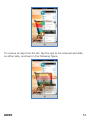
Swipe left or right on the home screen to view the next extended home screen. Your A089 has five home screens including one center home screen and four extended home screens. Also, there will be five launcher icons in the bottom pane of the home screen. Tap the launcher icon at the bottom of the screen to view all inbuilt and installed applications. Apart from the launcher icon, you can add or remove other launcher icons, as required. LAUNCHER ICONS There are total five launcher icons that will be present on the home screen of your A089. Apart from the launcher icon, you can add, remove, or move other launcher icons from the home screen. The phone also provides you with Context menus and Options menus for accessing the features in an intuitive way. CONTEXT MENU You can open context menu related to some sections (some screens do not have context menu) by taping the button on any screen. A089 24