1
Operation and use
Ensure that you have correctly inserted
correct batteries (2 x AA cells). Move the
power switch into the “On” position.
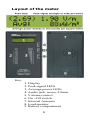
The LEDs should at once display a
moving pattern across all LEDs and the
LCD should briefly display
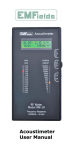
“Acoustimeter, © EMFields 2009”
changing to readings after a short time.
Hold the bottom of the instrument in
one hand at least 30cm from your body
as close proximity to your body will
affect the readings. Keep your hands
away from the top of the instrument as
this contains the antenna which is
located inside the case at the rear
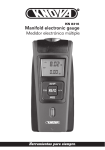
towards the top. The Acoustimeter can
be placed upon a stable surface, but
movements nearby can still affect the
RF/microwave levels.
Adjust the volume to an appropriate
level (usually somewhere about midvolume is best; only use maximum when
monitoring weak signals).
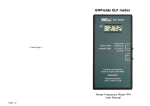
The instrument will display the peak
signal strength and the average power
on both the LEDs and the LCD. Slowly
turn the instrument around in all
directions. Stop moving the instrument
and hold it still to take a reading.
Bear in mind that even moving the
meter small distances can result in
7