1
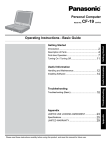
OPERATING INSTRUCTIONS
Personal Computer
Model No.
CF-19 series
Useful Information
On-screen Manual .................................................... 18
Handling and Maintenance ....................................... 19
Reinstalling Software ................................................ 21
Troubleshooting
Troubleshooting (Basic) ............................................ 23
Useful Information
Introduction ................................................................. 2
Read Me First ............................................................. 3
(Precautions)
Description of Parts .................................................. 11
First-time Operation .................................................. 14
Troubleshooting
Getting Started
Getting Started
Contents
For further information about the computer, you can refer to the on-screen
manual.
To access the on-screen manual
page 18 “On-screen Manual”
LIMITED USE LICENSE AGREEMENT ................... 27
Contrat de licence d’usage limité.............................. 28
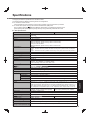
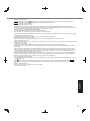
Specifications ........................................................... 29
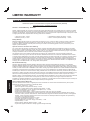
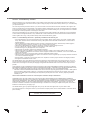
LIMITED WARRANTY .............................................. 32
Please read these instructions carefully before using this product and save this manual for future use.
Appendix
Appendix
Introduction
Thank you for purchasing this Panasonic product. For optimum performance and safety, please read these instructions
carefully.
Terms and illustrations in these instructions
CAUTION :
NOTE :
Enter :
Fn + F5 :
(Start) - [All Programs] :
:
:
Getting Started
Conditions that may result in minor or moderate injury.
Useful and helpful information.
Press [Enter] key.
Press and hold [Fn] key, and then press [F5] key.
Click
(Start), and then click [All Programs].
Page in these Operating Instructions or in the Reference Manual.
Reference to the on-screen manuals.
Some illustrations are simplified to help your understanding and may look different from the actual unit.
If you do not log on as an administrator, you cannot use some functions or cannot display some screens.
Refer for the latest information about optional products to the catalogs, etc.
In these instructions, the names and terms are referred as follows.
®
®
“Genuine Windows 7 Professional 32-bit Service Pack 1” and “Genuine Windows 7 Professional 64-bit Service
Pack 1” as “Windows” or “Windows 7”
DVD MULTI drive as “CD/DVD drive”
Circular media including DVD-ROM and CD-ROM as “discs”
Disclaimer
Computer specifications and manuals are subject to change without notice. Panasonic Corporation assumes no liability for damage incurred directly or indirectly from errors, omissions or discrepancies between the computer and the
manuals.
Trademarks
Microsoft®, Windows®, Windows 7, and the Windows logo are registered trademarks of Microsoft Corporation of the
United States and/or other countries.
Intel, Core, Centrino and PROSet are either registered trademarks or trademarks of Intel Corporation.
SDXC Logo is a trademark of SD-3C, LLC.
Adobe, the Adobe logo and Adobe Reader are either registered trademarks or trademarks of Adobe Systems Incorporated in the United States and/or other countries.
Bluetooth™ is a trademark owned by Bluetooth SIG, Inc., U.S.A. and licensed to Panasonic Corporation.
Names of products, brands, etc., appearing in this manual are trademarks or registered trademarks of their respective
own companies.
2
Read Me First
Important Safety Instructions / Importantes Mesures De Sécurité
19-E-1
Certaines mesures de sécurité doivent être prises pendant l’utilisation de matérial téléphonique afin de réduire
les risques d’incendie, de choc électrique et de blessures.
En voici quelquesunes:
1. Ne pas utiliser l’appareil près de l’eau, p.ex., près d’une
baignoire, d’un lavabo, d’un évier de cuisine, d’un bac à
laver, dans un sous-sol humide ou près d’une piscine.
2. Éviter d’utiliser le téléphone (sauf s’il s’agit d’un appareil
sans fil) pendant un orage électrique. Ceci peut présenter un risque de choc électrique causé par la foudre.
3. Ne pas utiliser l’appareil téléphonique pour signaler
une fuite de gaz s’il est situé près de la fuite.
4. Utiliser seulement le cordon d’alimentation et le type de
piles indiqués dans ce manual. Ne pas jeter les piles
dans le feu: elles peuvent exploser. Se conformer aux
règlements pertinents quant à l’élimination des piles.
CONSERVER CES INSTRUCTIONS
Getting Started
When using your telephone equipment, basic safety
precautions should always be followed to reduce the risk
of fire, electric shock and injury to persons, including the
following:
1. Do not use this product near water, for example, near
a bath tub, wash bowl, kitchen sink or laundry tub, in a
wet basement or near a swimming pool.
2. Avoid using a telephone (other than a cordless type)
during an electrical storm. There may be a remote risk
of electric shock from lightning.
3. Do not use the telephone to report a gas leak in the
vicinity of the leak.
4. Use only the power cord and batteries indicated in this
manual. Do not dispose of batteries in a fire. They may
explode. Check with local codes for possible special
disposal instructions.
SAVE THESE INSTRUCTIONS
19-F-1
Information to the User
<Only for model with wireless LAN/Bluetooth>
This product and your Health
This product, like other radio devices, emits radio frequency electromagnetic energy. The level of energy
emitted by this product however is far much less than the
electromagnetic energy emitted by wireless devices like
for example mobile phones.
Because this product operates within the guidelines found
in radio frequency safety standards and recommendations, we believe this product is safe for use by consumers. These standards and recommendations reflect the
consensus of the scientific community and result from
deliberations of panels and committees of scientists who
continually review and interpret the extensive research
literature.
In some situations or environments, the use of this product may be restricted by the proprietor of the building or
responsible representatives of the organization. These
situations may for example include:
Using this product on board of airplanes, or
In any other environment where the risk of interference
to other devices or services is perceived or identified
as harmful.
If you are uncertain of the policy that applies on the use
of wireless devices in a specific organization or environment (e.g. airports), you are encouraged to ask for authorization to use this product prior to turning on the product.
Regulatory Information
We are not responsible for any radio or television interference caused by unauthorized modification of this product.
The correction of interference caused by such unauthorized modification will be the responsibility of the user. We
and its authorized resellers or distributors are not liable
for damage or violation of government regulations that
may arise from failing to comply with these guidelines.
26-M-1
Informations destinées aux utilisateurs
<Uniquement les modèles avec réseau local sans fil et/ou
Bluetooth>
Ce produit et votre santé
Ce produit, comme tout autre appareil radio, émet de
l’énergie radioélectrique. Toutefois, la quantité d’énergie
émise par ce produit est beaucoup moins importante que
l’énergie radioélectrique émise par des appareils sans
fil tels que les téléphones portables. L’utilisation de ce
produit ne comporte aucun risque pour le consommateur
du fait que cet appareil opère dans les limites des directives concernant les normes et les recommendations de
sécurité sur les fréquences radio. Ces normes et recommandations reflètent le consensus de la communauté
scientifique et résultent de délibérations de jurys et comités de scientifiques qui examinent et interprètent continuellement les nouveautés de la vaste littérature sur les
recherches effectuées. Dans certaines situations ou environnements, l’utilisation de ce produit peut être restreinte
par le propriétaire du bâtiment ou par les représentants
responsables de l’organisation. Ces situations peuvent
être les suivantes par exemple :
A bord d’un avion, ou
Dans tout autre environnement où les risques d’interférence sur d’autres appareils ou services sont perçus
ou identifiables comme dangereux.
Si vous n’êtes pas sûr de la réglementation applicable à
l’utilisation d’appareils sans fil dans une organization ou
un environnement spécifique, (par exemple dans un aéroport) nous vous invitons à demander l’autorisation
d’utiliser ce produit avant sa mise en marche.
Informations concernant la réglementation
Nous déclinons toute responsabilité pour toute interférence radio ou télévision causée par des modifications non
autorisées apportées à ce produit. La correction
d’interférences causées par de telles modifications non
autorisées sera la seule responsabilité de son utilisateur.
Nousmêmes, les revendeurs officiels et les distributeurs
ne sommes pas responsable de tout dégât ou de toute
violation des règlements de l’État pouvant découler du
non-respect de ces directives.
26-F-1
3
Read Me First
Lithium Battery / Pile au lithium
Lithium Battery!
This computer contains a lithium battery to enable the
date, time, and other data to be stored. The battery should
only be exchanged by authorized service personnel.
Warning!
A risk of explosion from incorrect installation or misapplication may possibly occur.
15-E-1
Pile au lithium!
Le micro-ordinateur renferme une pile au lithium qui
permet de sauvegarder certaines données, notamment la
date et l’heure. La pile ne doit être remplacée que par un
technicien qualifié.
Danger ! Risque d’explosion en cas de non respect de
cette mise en garde!
15-F-1
Getting Started
Information for Users on Collection and Disposal of Old Equipment and used
Batteries
These symbols are only valid in the European Union.
If you wish to discard this product, please contact your local authorities or dealer and ask
for the correct method of disposal.
53-M-1
Camera Light
<For model with camera>
CAUTION
Camera Light
- This equipment uses LED (Light Emitting Diode) technology that complies with IEC60825-1:1993+A1:1997+A2:2001
- CLASS 1 LED PRODUCT
- The light from the LED is strong and can injure human eyes. Do not look directly at the LEDs with naked eyes.
- Caution-Use of controls or adjustments or performance of procedures other than those specified herein may result in
hazardous radiation exposure.
Specification
- Max Power
0.873 mW
57-E-1
Safety Precautions
<Only for model with wireless WAN>
The following safety precautions must be observed during all phases of the operation, usage, service or repair of any
Personal Computer or Handheld Computer incorporating wireless WAN modem. Manufacturers of the cellular terminal are advised to convey the following safety information to users and operating personnel and to incorporate these
guidelines into all manuals supplied with the product. Failure to comply with these precautions violates safety standards of design, manufacture and intended use of the product. Panasonic assumes no liability for customer failure to
comply with these precautions.
When in a hospital or other health care facility, observe the restrictions on the use of mobiles. Switch Personal Computer or Handheld Computer incorporating wireless WAN modem off, if instructed to do so by the
guidelines posted in sensitive areas. Medical equipment may be sensitive to RF energy.
The operation of cardiac pacemakers, other implanted medical equipment and hearing aids can be affected
by interference from Personal Computer or Handheld Computer incorporating wireless WAN modem placed
close to the device. If in doubt about potential danger, contact the physician or the manufacturer of the device to verify that the equipment is properly shielded. Pacemaker patients are advised to keep their Personal
Computer or Handheld Computer incorporating wireless WAN modem away from the pacemaker, while it is
on.
Switch off Personal Computer or Handheld Computer incorporating wireless WAN modem before boarding
an aircraft. Make sure it cannot be switched on inadvertently. The operation of wireless appliances in an aircraft is forbidden to prevent interference with communications systems. Failure to observe these instructions
may lead to the suspension or denial of cellular services to the offender, legal action, or both.
4
Do not operate Personal Computer or Handheld Computer incorporating wireless WAN modem in the presence of flammable gases or fumes. Switch off the cellular terminal when you are near petrol stations, fuel
depots, chemical plants or where blasting operations are in progress. Operation of any electrical equipment
in potentially explosive atmospheres can constitute a safety hazard.
Your Personal Computer or Handheld Computer incorporating wireless WAN modem receives and transmits radio frequency energy while switched on. Remember that interference can occur if it is used close to
TV sets, radios, computers or inadequately shielded equipment. Follow any special regulations and always
switch off Personal Computer or Handheld Computer incorporating wireless WAN modem wherever forbidden, or when you suspect that it may cause interference or danger.
Getting Started
Road safety comes first! Do not use a Personal Computer or Handheld Computer incorporating wireless
WAN modem while driving a vehicle. Do not place the computer with wireless WAN modem in an area where
it could cause personal injury to the driver or passengers. It is recommended to stow the unit in the boot or
secure stowage area while driving.
Do not place the computer with wireless WAN modem in an area over an air bag or in the vicinity where an
air bag may deploy.
Air bags inflate with great force and if the computer with wireless WAN modem is placed in the air bag deployment area may be propelled with great force and cause serious injury to occupants of the vehicle.
IMPORTANT!
Personal Computer or Handheld Computer incorporating wireless WAN modem operate using radio signals
and cellular networks cannot be guaranteed to connect in all conditions. Therefore, you should never rely
solely upon any wireless device for essential communications, for example emergency calls.
Remember, in order to make or receive calls, Personal Computer or Handheld Computer incorporating wireless WAN modem must be switched on and in a service area with adequate cellular signal strength.
Some networks do not allow for emergency calls if certain network services or phone features are in use (e.g.
lock functions, fixed dialing etc.). You may need to deactivate those features before you can make an emergency call.
Some networks require that a valid SIM card be properly inserted in Personal Computer or Handheld Computer incorporating wireless WAN modem.
27-1-2
Models for U.S.A.
Federal Communications Commission Radio Frequency Interference Statement
Note: This equipment has been tested and found to comply with the limits for a Class B digital device, pursuant
to Part 15 of the FCC Rules. These limits are designed
to provide reasonable protection against harmful interference in a residential installation. This equipment generates, uses and can radiate radio frequency energy and, if
not installed and used in accordance with the instructions,
may cause harmful interference to radio communications.
However, there is no guarantee that interference will not
occur in a particular installation. If this equipment does
cause harmful interference to radio or television reception, which can be determined by turning the equipment
off and on, the user is encouraged to try to correct the
interference by one or more of the following measures:
Reorient or relocate the receiving antenna.
Increase the separation between the equipment and
receiver.
Connect the equipment into an outlet on a circuit different from that to which the receiver is connected.
Consult the Panasonic Service Center or an experienced radio/TV technician for help.
Warning
To assure continued compliance, use only shielded interface cables when connecting to a computer or peripheral.
Also, any changes or modifications not expressly approved by the party responsible for compliance could void
the user’s authority to operate this equipment.
FCC RF Exposure Warning:
This equipment is provided with PC Card slot that could
be used with wireless transmitters, which will be specifically recommended when they become available.
Other third-party wireless transmitters have not been
RF exposure evaluated for use with this computer and
may not comply with FCC RF exposure requirements.
<Only for model with wireless LAN/wireless WAN/Bluetooth>
This equipment complies with FCC radiation exposure
limits set forth for an uncontrolled environment.
This equipment has been approved for portable operation, and does not require any minimum spacing be
provided between antennas and all person’s body.
If provided with wireless WAN transmitter, requires LCD
side panel spacers to provide minimum 1.5 cm spacing
between antenna located within the LCD side panel,
and all person’s body (excluding extremities of hands,
wrist and feet) during wireless modes of operation.
This equipment may not be co-located or operated
with any other antenna or transmitter.
<Optional Car Mounter / Port Replicator>
This equipment is provided with external antenna
connector(s) for connection to optional Car Mounter or Port Replicator for mobile external mounted
antenna(s). External antenna(s) must be professionally installed and cannot exceed recommended maximum antenna gain as described in individual provided
supplement instructions for wireless transmitters.
For WLAN, the Car Mounter should be used with Radiall/Larsen WLAN whip antenna, type NMO5E2400BKTNC with 5 dBi antenna gain or less. Also, user must
maintain minimum 20 cm spacing between external
antenna(s) and all person’s body (excluding extremities of hands, wrist and feet) during wireless modes of
operation.
25-M-1
5
Read Me First
<Only for model with wireless LAN>
This product is restricted to indoor use due to its operation
in the 5.15 to 5.25 GHz frequency range. FCC requires this
product to be used indoors for the frequency range 5.15 to
5.25 GHz to reduce the potential for harmful interference
to co-channel Mobile Satellite systems. High power radars
are allocated as primary users of the 5.25 to 5.35 GHz and
5.65 to 5.85 GHz bands. These radar stations can cause
interference with and/or damage this product.
25-M-W-1
Getting Started
This device complies with Part 15 of the FCC Rules.
Operation is subject to the following two conditions:
(1) This device may not cause harmful interference, and
(2) This device must accept any interference received, including interference that may cause undesired operation.
Responsible Party: Panasonic Corporation of North America
One Panasonic Way
Secaucus, NJ 07094
Tel No:1-800-LAPTOP5
(1-800-527-8675)
6-M-1
FCC Regulation Notice for modem
This equipment contains a FCC approved modem.
1. This equipment complies with CFR47 Part 68 rules. On
the computer is a label that contains, among other information, the FCC registration number and ringer equivalence number (REN) for this equipment. If required, this
information must be provided to the telephone company.
2. An FCC compliant telephone cord and modular plug is
provided with this equipment. This equipment is designed
to be connected to the telephone network or premises
wiring using a compatible modular jack which is Part 68
compliant. See Installation Instructions for details.
3. The REN is used to determine the quantity of devices
which may be connected to the telephone line. Excessive RENs on the telephone line may result in the
devices not ringing in response to an incoming call. In
most, but not all area, the sum of RENs should not exceed five (5.0). To be certain of the number of devices
that may be connected to a line, as determined by the
total RENs, contact the local telephone company.
4. If your telephone equipment cause harm to the telephone network, the telephone company will notify you
in advice that temporary discontinuance of service
may be required. But if advice notice isn’t practical, the
telephone company will notify the customer as soon as
possible. Also, you will be advised of your right to file a
complaint with the FCC if you believe it is necessary.
5. The telephone company may take changes in its facilities, equipment, operations or procedures that could
affect the operation of the equipment. If this happens
the telephone company will provide advance notice
in order for you to make necessary modifications to
maintain uninterrupted service.
6. If trouble is experienced with this equipment, for repair
or warranty information, please contact Panasonic
Corporation of North America at DIAL TOLL FREE
1-800-LAPTOP5 (1-800-527-8675). If the equipment is
causing harm to the telephone network, the telephone
company may request that you disconnect the equipment until the problem is resolved.
7. There are no user serviceable parts contained in this
equipment.
6
8. This equipment may not be used on coin service provided by the telephone company. Connection to party
lines is subject to state tariffs.
9. The Telephone Consumer Protection Act of 1991
makes it unlawful for any person to use a computer
or other electronic device to send any message via a
telephone fax machine unless such message clearly
contains in a margin at the top or bottom of each transmitted page or on the first page of the transmission,
the date and time it is sent and an identification of the
business or other entry, or other individual sending the
message and the telephone number of the sending
machine or such business, other entity, or individual.
In order to program this information into your fax software, you should refer to the manual of the Fax software being used.
10. According to the FCC’s electrical safety advisory, we
recommend that you may install an AC surge arrestor
in the AC outlet to which this equipment is connected.
Telephone companies report that electrical surges,
typically lightning transients, are very destructive to
customer terminal equipment connected to AC power
sources and that this is a major nationwide problem.
“Caution : To reduce the risk of fire, use only No.26 AWG or
larger (e.g., 24 AWG) UL listed or CSA certified telecommunication line cord.”
“ATTENTION : Pour réduire le risque d’incendie, utiliser
uniquement des conducteurs de télécommunications 26
AWG ou de section supérieure (p.ex. 24 AWG) UL énumérés ou CSA certifié.”
16-M-1
USA Only: Disposal may be regulated in your community
due to Environmental considerations. For disposal or recycling information, please visit Panasonic website: http://
www.panasonic.com/environmental or call 1-888-769-0149
65-M-2
<For USA-California Only>
This product contains a CR Coin Cell Lithium Battery which
contains Perchlorate Material - special handling may apply.
See www.dtsc.ca.gov/hazardouswaste/perchlorate/
38-M-1
For Used in Motor Vehicle /Pour L’utilisation Dans Un
Véhicule Motorisé
Warning: Notebook Computer may be installed in a motor vehicle and visible to the driver only if used to support
vehicle related functions such as vehicle information,
system control, rear or side observation and navigation.
If used for entertainment purpose, such as television
reception or video play, it must be installed to the rear of
the driver’s seat where it will not be visible, directly or indirectly, to the operator of the motor vehicle. Check with
individual state/provincial laws to determine lawful use of
this product while operating within a motor vehicle.
Avertissement : L’ordinateur bloc-notes peut être installé
dans un véhicule motorisé et dans le champ de vision du
conducteur uniquement en tant que dispositif d’aide aux
fonctions du véhicule, comme par exemple pour fournir des
informations sur le véhicule, comme dispositif de contrôle
de système, pour l’observation à l’arrière ou sur les côtés
du véhicule, ainsi que pour fournir de l’information routière.
Pour toute utilisation à fin de divertissement, comme par
exemple pour regarder la télévision ou jouer à des jeux vidéo, il doit être installé à l’arrière du siège du conducteur, en
un emplacement où il ne sera pas visible, ni directement ni
indirectement, pour le conducteur du véhicule motorisé. Vérifiez les lois fédérales et nationales qui régissent l’utilisation
légale de cet appareil à l’intérieur d’un véhicule motorisé.
35-M-1
External Antenna
FCC RF Exposure Warning:
This equipment is provided with external antenna connector(s)
for connection to optional Car Mounter or Port Replicator for
mobile external mounted antenna(s). External antenna(s)
must be professionally installed and cannot exceed recommended maximum antenna gain as described in individual
provided supplement instructions for wireless transmitters.
The maximum allowable antenna gain for the external WWAN
base whip antenna is 7.5 dBi for the Cellular band, 3 dBi for
the PCS band, 5.5 dBi for LTE Band 4, 9 dBi for LTE Band
17, and 10.17 dBi for LTE Band 13. Also, user must maintain
minimum 20 cm spacing between external antenna(s) and all
person’s body (excluding extremities of hands, wrist and feet)
during wireless modes of operation.
32-M-1-1
Models for Canada
rations ou de modifications effectuées par l’utilisateur ou
à cause de mauvais fonctionnement.
Pour sa propre protection, l’utilisateur doit s’assurer que tous
les fils de mise à la terre de la source d’énergie électrique, des
lignes téléphoniques et des canalisations d’eau métalliques, s’il
y en a, sont raccordés ensemble. Cette précaution est particulièrement importante dans les régions rurales. Avertissement:
L’utilisateur ne doit pas tenter de faire ces raccordements
lui-même; il doit avoir recours à un service d’inspection des
installations électriques, ou à un électricien, selon le cas.”
“AVIS: L’indice d’équivalence de la sonnerie (IES) assigné à chaque dispositif terminal indique le nombre maximal de terminaux qui peuvent être raccordés à une interface. La terminaison d’une interface téléphonique peut
consister en une combinaison de quelques dispositifs, à
la seule condition que la somme d’indices d’équivalence
de la sonnerie de touts les dispositifs n’excède pas 5.”
IES: Voir sous le fond de l’ordinateur
Getting Started
Industry Canada (IC) Notice for modem
This equipment contains an Industry Canada approved
modem unit.
The Industry Canada label is affixed on the modem unit.
EQUIPMENT ATTACHEMENT LIMITATIONS
“NOTICE: The Industry Canada label identifies certified
equipment. This certification means that the equipment
meets telecommunications network protective, operational and safety requirements as prescribed in the appropriate Terminal Equipment Technical Requirements
document(s). The Department does not guarantee the
equipment will operate to the user’s satisfaction.
Before installing this equipment, users should ensure that
it is permissible to be connected to the facilities of the
local telecommunications company. The equipment must
also be installed using an acceptable method of connection. The customer should be aware that compliance with
the above conditions may not prevent degradation of
service in some situations.
Repairs to certified equipment should be coordinated by a
representative designated by the supplier. Any repairs or alterations made by the user to this equipment, or equipment
malfunctions, may give the telecommunications company
cause to request the user to disconnect the equipment.
Users should ensure for their own protection that the electrical
ground connections of the power utility, telephone lines and
internal metallic water pipe system, if present, are connected
together. This precaution may be particularly important in
rural areas. Caution: Users should not attempt to make such
connections themselves, but should contact the appropriate
electric inspection authority, or electrician, as appropriate.”
“NOTICE: The Ringer Equivalence Number (REN) assigned to each terminal device provides an indication of
the maximum number of terminals allowed to be connected to a telephone interface. The termination on an interface may consist of any combination of devices subject
only to the requirement that the sum of the Ringer Equivalence Numbers of all the devices does not exceed 5.”
REN: See bottom of the computer
RESTRICTIONS CONCERNANT LE RACCORDEMENT
DE MATÉRIEL
“AVIS: L’étiquette d’Industrie Canada identifie le matériel
homologué. Cette étiquette certifie que le matériel est
conforme aux normes de protection, d’exploitation et de
sécurité des réseaux de télécommunications, comme
le prescrivent les documents concernant les exigences
techniques relatives au matériel terminal. Le Ministère
n’assure toutefois pas que le matériel fonctionnera à la
satisfaction de l’utilisateur.
Avant d’installer ce matériel, l’utilisateur doit s’assurer qu’il est
permis de le raccorder aux installations de l’entreprise locale
de télécommunication. Le matériel doit également être installé
en suivant une méthode acceptée de raccordement.
L’abonné ne doit pas oublier qu’il est possible que la
conformité aux conditions énoncées ci-dessus n’empêche
pas la dégradation du service dans certaines situations.
Les réparations de matériel homologué doivent être coordonnées par un représentant désigné par le fournisseur.
L’entreprise de télécommunications peut demander à
l’utilisateur de débrancher un appareil à la suite de répa-
17-Ca-1
Canadian ICES-003
This Class B digital apparatus complies with Canadian
ICES-003.
Cet appareil numérique de la classe B est conforme à la
norme NMB-003 du Canada.
7-M-2
<Only for model with wireless LAN/Bluetooth>
Industry Canada
This product complies with RSS210 Industry Canada.
Operation is subject to the following two conditions;
(1) this device may not cause interference, and
(2) this device must accept any interference, including interference that may cause undesired operation of the device.
<Ne s’applique qu’aux modèles avec technologie Bluetooth/LAN sans fil>
Industrie Canada
Cet équipement est conforme à la norme CNR-210
d’Industrie Canada. Son fonctionnement est soumis aux
deux conditions suivantes :
(1) ce dispositif ne peut produire de brouillage, et
(2) ce dispositif doit accepter le brouillage, y compris le
brouillage pouvant entraîner le fonctionnement non
désiré de l’appareil.
30-Ca-1-1
<Only for model with wireless LAN>
This product (local network devices) for the band 51505250 MHz is only indoor usage to reduce potential for
harmful interference to co-channel Mobile Satellite systems.
High power radars are allocated as primary users (meaning they have priority) of 5250-5350 MHz and 56505850 MHz and these radars could cause interference
and/or damage to LELAN devices.
<Ne s’applique qu’aux modèles avec technologie LAN
sans fil>
Cet appareil (pour réseaux locaux radioélectriques) dans
les bandes de fréquences 5150-5250 MHz est réservé à
une utilization à l’intérieur afin de réduire le risque d’interférence avec les systèmes satellites mobiles bicanaux.
Les radars forte puissance sont désignés comme étant
7
Read Me First
les premiers utilisateurs (c’est-à-dire qu’ils ont la priorité)
des bandes de fréquences 5250-5350 MHz et 56505850 MHz. Ces stations radars peuvent provoquer des
interférences et/ou des dommages à ce périphérique.
30-Ca-2-1
This device has been designed to operate with the Radiall/Larsen whip antenna, type NMO5E2400BKTNC
WLAN antenna having a maximum gain of 5 dB. A WLAN
Antenna having a higher gain is strictly prohibited per
regulations of Industry Canada. The Required antenna
impedance is 50 ohms.
To reduce potential radio interference to other users, the
antenna type and its gain should be so chosen that the
equivalent isotropically radiated power (EIRP) is not more
than that required for successful communication.
Getting Started
Cet appareil est conçu pour opérer avec l’antenne-fouet
Radiall/Larsen, type WLAN NMO5E2400BKTNC, ayant
un gain maximum de 5 dB. Les règlements d’Industrie
Canada interdisent l’utilisation d’une antenne WLAN dont
le gain serait supérieur à cette limite. L’antenne doit avoir
une impédance de 50 ohms.
Afin de réduire le risque d’interférence radioélectrique
aux autres utilisateurs des bandes de fréquences, le type
d’antenne et son gain doivent être tels que la puissance
isotrope rayonnée équivalente (PIRE) n’est pas plus élevée que le niveau requis pour assurer la communication.
25-Ca-1-1
<Only for model with wireless LAN/wireless WAN/Bluetooth>
This computer complies with Industry Canada radiation exposure limits set forth for an uncontrolled environment.
This PC with WLAN and/or Bluetooth transmitters installed, has been approved for portable operation and
does not require any minimum spacing be provided
between antennas and all person’s body.
<Ne s’applique qu’aux modèles avec technologie Bluetooth/LAN sans fil/WAN sans fil>
Cet équipement est conforme aux limites d’exposition
aux rayonnements d’Industrie Canada établies pour
un environnement non contrôlé.
Ce PC avec émetteurs WLAN et/ou Bluetooth a été
approuvé à des fins d’opération mobile; aucun espace
minimum entre les antennes et le corps de l’utilisateur
n’est requis.
FOR USE WITH MODEL NO. : CF-AA6503A2 or
CF-AA5713A
POUR UTILISER AVEC MODÈLE : CF-AA6503A2 ou
CF-AA5713A
20-Ca-1
External Antenna
<For Canada>
This device has been designed to operate with the WWAN antenna having a maximum gain of 7.5 dBi for the Cellular band,
3 dBi for the PCS band, and 5.5 dBi for LTE Band 4. WWAN
Antenna having a higher gain is strictly prohibited per regulations of Industry Canada. The Required antenna impedance is
50 ohms.
To reduce potential radio interference to other users, the antenna type and its gain should be so chosen that the equivalent
isotropically radiated power (EIRP) is not more than that required for successful communication.
<Utilisation au Canada>
Cet appareil est conçu pour opérer avec une antenne WWAN
(réseau étendu sans fil) dont le gain maximum est fixé à 7.5 dBi
pour la bande cellulaire, 3 dBi pour la bande PCS et 5.5 dBi
pour la bande LTE Band 4. Les règlements d’Industrie Canada
interdisent l’utilisation d’une antenne WWAN dont le gain serait
supérieur à cette limite. L’antenne doit avoir une impédance de
50 ohms.
Afin de réduire le risque d’interférence radioélectrique aux
autres utilisateurs des bandes de fréquences, le type d’antenne
et son gain doivent être tels que la puissance isotrope rayonnée
équivalente (PIRE) n’est pas plus élevée que le niveau requis
pour assurer la communication.
32-Ca-1-1
Models for Australia
For Used in Motor Vehicle
Warning: Notebook Computer may be installed in a motor
vehicle and visible to the driver only if used to support
vehicle related functions such as vehicle information, system control, rear or side observation and navigation. If the
Notebook Computer is to be used for work or entertainment purposes, such as television reception, video play
or other work programs, it must be installed in a position
where it will NOT:
(a) be visible, directly or indirectly, to the operator of the
motor vehicle; or
(b) cause distraction to drivers of other motor vehicles.
Check with individual state laws to determine lawful use
of this product while operating within a motor vehicle. If
the visual display unit is, or is part of, a driver’s aid, above
rule is not applied. «Driver’s aid» includes closed-circuit
television security cameras, dispatch systems, navigational or intelligent highway and vehicle system equipment,
rear view screens, ticket-issuing machines and vehicle
monitoring devices.
35-A-1
Models for India
For the purpose of recycling to facilitate effective utilization of resources, please return this product to a
nearby authorized collection center, registered dismantler or recycler, or Panasonic service center when disposing of this product.
Please see the Panasonic website for further information on collection centers, etc.
http://www.panasonic.co.in/wps/portal/home
8
Precautions
*1
*2
AIRCRAFT COCKPIT EQUIPMENT/SYSTEMS include
Class2 Electrical Flight Bag (EFB) Systems and Class1
EFB Systems when used during critical phases of flight
(e.g., during take-off and landing) and/or mounted on to
the aircraft. Class1 EFB Systems and 2 EFB Systems are
defined by FAA: AC (Advisory Circular) 120-76A or JAA:
JAA TGL (Temporary Guidance Leaflets) No.36.
As defined by the European Medical Device Directive
(MDD) 93/42/EEC.
Panasonic cannot guarantee any specifications, technologies, reliability, safety (e.g. Flammability/Smoke/Toxicity/
Radio Frequency Emission, etc) requirements related to
aviation standards and medical equipment standards that
differ from the specifications of our COTS (CommercialOff-The-Shelf) products.
Panasonic cannot guarantee any specifications, technologies, reliability, safety (e.g. Flammability/Smoke/Toxicity/Radio Frequency Emission, etc) requirements related
to aviation standards that exceed the specifications of our
COTS (Commercial-Off-The-Shelf) products.
39-E-1
This computer is not intended for use in medical equipment
including life-support systems, air traffic control systems, or
other equipment, devices or systems that are involved with
ensuring human life or safety. Panasonic cannot be held responsible in any way for any damages or loss resulting from
the use of this unit in these types of equipment, devices or
systems, etc.
The CF-19 was developed based on thorough research into
the real-world portable computing environments. Exhaustive
pursuit of usability and reliability under harsh conditions led
to innovations such has the magnesium alloy exterior, vibration damped hard disk drive and floppy disk drive, flexible
internal connections. The CF-19’s outstanding engineering
has been tested using the strict MIL-STD- 810F (for vibration
and shock) and IP (for dust and water) based procedures.
As with any portable computer device precautions should be
taken to avoid any damage. The following usage and handling procedures are recommended.
Before putting the computer away, be sure to wipe off any
moisture.
If a Malfunction or Trouble Occurs, Immediately Stop Use
If a Malfunction Occurs, Immediately Unplug the AC Plug
and the Battery Pack
This product is damaged
Foreign object inside this product
Smoke emitted
Unusual smell emitted
Unusually hot
Continuing to use this product while any of the above conditions are present may result in fire or electric shock.
If a malfunction or trouble occurs, immediately unplug the
AC plug and remove the unit from this product. Then, contact your technical support office for repair.
Do Not Touch This Product In a Thunderstorm If Connected with the AC Cable or Any Other Cables
Electric shock may result.
Do Not Connect the AC Adaptor to a Power Source
Other Than a Standard Household AC Outlet
Otherwise, a fire due to overheating may result. Connecting
to a DC/AC converter (inverter) may damage the AC adaptor. On an airplane, only connect the AC adaptor/charger to
an AC outlet specifically approved for such use.
Do Not Do Anything That May Damage the AC Cord, the
AC Plug, or the AC Adaptor
Do not damage or modify the cord, place it near hot tools, bend,
twist, or pull it forcefully, place heavy objects on it, or bundle it tightly.
Continuing to use a damaged cord may result in fire, short circuit, or
electric shock.
Do Not Pull or Insert the AC Plug If Your Hands Are Wet
Electric shock may result.
Clean Dust and Other Debris of the AC Plug Regularly
If dust or other debris accumulates on the plug, humidity, etc.
may cause a defect in the insulation, which may result in a fire.
Pull the plug, and wipe it with a dry cloth.
Pull the plug if the computer is not being used for a long
period of time.
Insert the AC Plug Completely
If the plug is not inserted completely, fire due to overheating
or electric shock may result.
Do not use a damaged plug or loose AC outlet.
Close the Connector Cover Tightly When Using This Product
Where Is a Lot of Water, Moisture, Steam, Dust, Oily Vapors, etc.
The entry of foreign matter may cause a fire or electric shocks.
If foreign matter has found its way inside, immediately turn
the power off and unplug the AC cord, and then remove the
battery pack. Then contact your technical support office.
Do Not Disassemble This Product
The high-voltage areas inside may give you an electric
shock, or foreign matter may enter and result in a fire.
Keep SD Memory Cards Away from Infants and Small Children
Accidental swallowing will result in bodily injury.
In the event of accidental swallowing, see a doctor immediately.
Do Not Place This Product on Unstable Surface
If balance is lost, this product may fall over or drop, resulting
in an injury.
Avoid Stacking
If balance is lost, this product may fall over or drop, resulting
in an injury.
Do Not Leave This Product in High Temperature Environment for a Long Period of Time
Leaving this product where it will be exposed to extremely
high temperatures such as near fire or in direct sunlight may
deform the cabinet and/or cause trouble in the internal parts.
Continued use in such a resulting condition may lead to
short-circuiting or insulation defects, etc. which may in turn
lead to a fire or electric shocks.
Hold the Plug When Unplugging the AC Plug
Pulling on the cord may damage the cord, resulting in a fire
or electric shock.
Do Not Move This Product While the AC Plug Is Connected
The AC cord may be damaged, resulting in fire or electric shock.
If the AC cord is damaged, unplug the AC plug immediately.
Use Only the Specified AC Adaptor With This Product
Using an AC adaptor other than the one supplied (supplied
with the unit or one sold separately as an accessory) may
result in a fire.
Do Not Subject the AC Adaptor to Any Strong Impact
Using the AC adaptor after a strong impact such as being
dropped may result in electric shock, short circuit, or fire.
Take a Break of 10-15 Minutes Every Hour
Using this product for long periods of time may have detrimental health effects on the eyes or hands.
Getting Started
THIS PRODUCT IS NOT INTENDED FOR USE AS, OR
AS PART OF, NUCLEAR EQUIPMENT/SYSTEMS, AIR
TRAFFIC CONTROL EQUIPMENT/SYSTEMS, AIRCRAFT
COCKPIT EQUIPMENT/SYSTEMS*1, MEDICAL DEVICES
OR ACCESSORIES*2, LIFE SUPPORT SYSTEMS OR
OTHER EQUIPMENTS/DEVICES/SYSTEMS THAT ARE
INVOLVED WITH ENSURING HUMAN LIFE OR SAFETY.
PANASONIC WILL NOT BE RESPONSIBLE FOR ANY
LIABILITY RESULTING FROM THE USE OF THIS PRODUCT ARISING OUT OF THE FOREGOING USES.
9
Getting Started
Read Me First
Do Not Turn the Volume Up to Loud When Using Headphones
Listening at high volumes that overstimulate the ear for long
periods of time may result in loss of hearing.
Use the Modem with a Regular Telephone Line
Connection to an internal phone line (on-premise switches)
of a company or business office, etc. or to a digital public
phone or use in a country or area not supported by the computer may result in a fire or electric shocks.
Do Not Connect a Telephone Line, or a Network Cable
Other Than the One Specified, into the LAN Port
If the LAN port is connected to a network such as the ones
listed below, a fire or electric shock may result.
Networks other than 1000BASE-T, 100BASE-TX or 10BASE-T
Phone lines (IP phone (Internet Protocol Telephone), Telephone lines, internal phone lines (on-premise switches),
digital public phones, etc.)
Do Not Use with Exposing the Skin to This Product for a
Long Period of Time
Using this product with exposing the skin to the heat source
of this product or AC adaptor for a long period of time can
cause a low-temperature burn.
Do Not Expose the Skin to This Product When Using the
Product In a Hot or Cold Environment.
Burns, low-temperature burns or frostbite may result.
• When it is necessary to expose the skin to this product
such as to scan a fingerprint, perform the operation in the
shortest time possible.
Do not place the computer near a television or radio receiver.
Keep the computer away from magnets. Data stored on
the hard disk may be lost.
This computer is not intended for the display of images for
use in medical diagnosis.
This computer is not intended for a use with connection of
medical equipment for the purpose of medical diagnosis.
Panasonic shall not be liable for loss of data or other incidental
or consequential damages resulting from the use of this product.
Precautions (Battery Pack)
Do Not Use with Any Other Product
The battery pack is rechargeable and was intended for the
specified product. If it is used with a product other than the
one for which it was designed, electrolyte leakage, generation of heat, ignition or rupture may result.
Do Not Charge the Battery Using Methods Other Than
Those Specified
If the battery is not charged using one of the specified methods, electrolyte leakage, generation of heat, ignition or rupture may result.
Do Not Throw the Battery Pack into a Fire or Expose It
to Excessive Heat
Generation of heat, ignition or rupture may result.
Avoid Extreme Heat (Near the Fire, in Direct Sunlight, for Example)
Electrolyte leakage, generation of heat, ignition or rupture may result.
Do Not Insert Sharp Objects into the Battery Pack, Expose It to Bumps or Shocks, Disassemble, or Modify It
Electrolyte leakage, generation of heat, ignition or rupture may result.
If this product is subjected to a strong impact, stop using it
immediately.
Do Not Short the Positive (+) and Negative (-) Contacts
Generation of heat, ignition or rupture may result.
Do not place the battery pack together with articles such
as necklaces or hairpins when carrying or storing.
Do Not Use This Product with a Battery Pack Other Than
the One Specified
Use only the specified battery pack ( page 11) with your
product. Use of battery packs other than those manufactured
and supplied by Panasonic may present a safety hazard
(generation of heat, ignition or rupture).
When the battery pack has become degraded, replace it
with a new one
Continued use of a damaged battery pack may result in heat
generation, ignition or battery rupture.
Do not touch the terminals on the battery pack. The battery pack may no longer function properly if the contacts
are dirty or damaged.
Do not expose the battery pack to water, or allow it to become wet.
If the battery pack will not be used for a long period of
time (a month or more), charge or discharge (use) the
battery pack until the remaining battery level becomes
30% to 40% and store it in a cool, dry place.
This computer prevents overcharging of the battery by
recharging only when the remaining power is less than
approx. 95% of capacity.
The battery pack is not charged when the computer is
first purchased. Be sure to charge it before using it for
the first time. When the AC adaptor is connected to the
computer, charging begins automatically.
10
Should the battery leak and the fluid get into your eyes, do not
rub your eyes. Immediately flush your eyes with clear water
and see a doctor for medical treatment as soon as possible.
CAUTION:
Risk of Explosion if Battery is replaced by an Incorrect Type.
Dispose of Used Batteries According to the Instructions.
58-E-1
ATTENTION:
Il y a risque d’explosion si la batterie est remplacée par une
batterie de type incorrect.
Mettre au rebut les batteries usagées conformément aux instructions.
58-F-1
NOTE
The battery pack may become warm during recharging or normal use. This is completely normal.
Recharging will not commence if internal temperature
of the battery pack is outside of the allowable temperature range (0 °C to 50 °C {32 °F to 122 °F}).
(
Reference Manual “Battery Power”) Once the
allowable range requirement is satisfied, charging begins
automatically. Note that the recharging time varies based
on the usage conditions. (Recharging takes longer than
usual when the temperature is 10 °C {50 °F} or below.)
If the temperature is low, the operating time is shortened. Only
use the computer within the allowable temperature range.
This computer has a high temperature mode function
that prevents the degradation of the battery in high temperature environments. (
Reference Manual “Battery Power”) A level corresponding to a 100% charge
for high temperature mode is approximately equivalent
to an 80% charge level for normal temperature mode.
The battery pack is a consumable item. If the amount
of time the computer can be run by using a particular
battery pack becomes dramatically shorter and repeated recharging does not restore its performance,
the battery pack should be replaced with a new one.
When transporting a spare battery inside a package,
briefcase, etc., it is recommended that it be placed in
a plastic bag so that its contacts are protected.
Always power off the computer when it is not in use.
Leaving the computer on when the AC adaptor is not
connected will exhaust the remaining battery capacity.
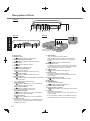
Description of Parts
<Model without WWAN Antenna>
A: Wireless LAN Antenna
<Only for model with wireless LAN>
Reference Manual “Wireless LAN”
The wireless LAN switch may turn off depending on
the reception.
B: Bluetooth Antenna
<Only for model with Bluetooth>
Reference Manual “Bluetooth”
C: Stylus/Digitizer pen Holder
D: Touch Pad
E: LED Indicator
: Wireless ready
This indicator lights when Wireless LAN, Bluetooth, and/or Wireless WAN are connected and
ready. It does not necessarily indicate the On/Off
condition of the wireless connection.
Reference Manual “Disabling/Enabling
Wireless Communication” “Wireless WAN”
: Wireless WAN status
<Only for model with Wireless WAN>
Refer to the instruction manual of the wireless
device.
: Caps lock
: Numeric key (NumLk)
: Scroll lock (ScrLk)
: Hard disk drive status
F: Tablet Buttons
Reference Manual “Tablet Buttons”
G: LCD
<Only for model with touchscreen>
<Only for model with dual touch>
Reference Manual “Screen Input Operation”
<Model with WWAN Antenna for North America>
H: Display Release Latch
page 13 “Switching to the Tablet mode”
I: Speaker
Reference Manual “Key Combinations”
J: Ambient Light Sensor
Backlight will be turned off with a bright environment
so the battery operation time becomes long. It doesn’t
function when concealing.
Reference Manual “Setup Utility”
K: Function Key
Reference Manual “Key Combinations”
L: Keyboard
M: Hard Disk Drive
N:
O:
P:
Q:
Getting Started
Q
Reference Manual “Hard Disk Drive”
Battery Pack
Specified Battery pack: CF-VZSU48U
Power Switch
LED Indicator
: Battery status
Reference Manual “Battery Power”
: Power status
(Off: Power off/Hibernation, Green: Power on,
Blinking green: Sleep, Blinking green rapidly:
Cannot power on or resume due to low temperature.)
Wireless WAN Antenna
<Only for model with Wireless WAN>
Reference Manual “Wireless WAN”
A lithium ion battery that is recyclable powers the product you have purchased.
Please call 1-800-8-BATTERY for information on how to recycle this battery.
L’appareil que vous vous êtes procuré est alimenté par une batterie au lithium-ion.
Pour des renseignements sur le recyclage de la batterie, veuillez composer le
1-800-8-BATTERY.
48-M-1
11
Description of Parts
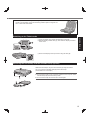
Left side
Getting Started
Rear side
U
Bottom
R S T
<Only for model
with Camera>
K L
M N
O
P
Q
<Only for model
without Camera>
A: DC-IN Jack
B: USB Port (3.0)
Reference Manual “USB Devices”
C: IEEE 1394 Interface Connector
Reference Manual “IEEE 1394 Devices”
D: Modem Port
Reference Manual “Modem”
E: LAN Port
Reference Manual “LAN”
F: SD Memory Card Indicator
(Blinking: During access)
Reference Manual “SD Memory Card”
G: SD Memory Card Slot
Reference Manual “SD Memory Card”
H: Wireless Switch
Reference Manual “Disabling/Enabling Wireless
Communication”
I: <For model without Smart Card Slot>
PC Card Slot (PC)
Reference Manual “PC Card / ExpressCard”
<For model with Smart Card Slot>
Smart Card Slot (SCR)
Reference Manual “Smart Card”
J: <For model without Smart Card Slot>
ExpressCard Slot (EX)
Reference Manual “PC Card / ExpressCard”
<For model with Smart Card Slot>
PC Card Slot (PC)
Reference Manual “PC Card / ExpressCard”
K: Headphone Jack
You can connect headphones or amplified speakers.
When they are connected, audio from the internal
speakers is not heard.
12
L: SIM Card Slot
<Only for model with wireless WAN>
Insert the SIM card into the SIM card slot with the
contact side facing down and the cut corner facing
forward.
Reference Manual “Wireless WAN”
M: Microphone Jack
A condenser microphone can be used. If other types
of microphones are used, audio input may not be possible, or malfunctions may occur as a result.
N: USB Port (2.0)
Reference Manual “USB Devices”
O: Security Lock
A Kensington cable can be connected.
For further information, read the manual that comes
with the cable.
P: External Display Port (VGA)
Reference Manual “External Display”
Q: Serial Port
R: RAM Module Slot
<For model without Camera>
Reference Manual “RAM Module”
S: External Antenna Connector
T: Expansion Bus Connector*1
Reference Manual “Port Replicator / Car Mounter”
U: Camera
<For model with Camera>
Remove the protection seal on the camera before using the camera.
*1
If you connect this computer to CF-VEB181 series or
CF-WEB182 series, you cannot use a keyboard port.
This computer contains a magnet and magnetic products at the locations
circled in the illustration at right. Avoid leaving metallic object or magnetic media in contact with these areas.
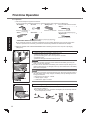
A Lift up the display so it stands perpendicular to the body.
B Slide the display release latch (A), and rotate the display clockwise
until it clicks.
Getting Started
Switching to the Tablet mode
C Close as the display faces up and fix it using the latch (B).
Attaching the hand strap and the shoulder strap (option)
Attach the hand strap to any two of the corners (A) using the screws.
You can connect the shoulder strap (B) to the hand strap.
(The illustration is an example.)
CAUTION
Do not use the strap to carry a heavier weight than the computer. Otherwise the strap may become loose by itself.
Do not use the strap if it becomes worn or damaged.
13
First-time Operation
Preparation
A Check and identify the supplied accessories.
If you do not find the described accessories, contact Panasonic Technical Support ( page 33).
• AC Cord . . . . . . . 1
• Battery Pack . . . 1
<Only for model with touchscreen>
• AC Adaptor. . . . . 1
• Stylus . . . . . . . . . . . . . . . . . . . 1
Model No: CF-AA6503A*1 or
CF-AA5713A
• Tether . . . . . . . . . 1
Model No: CF-VZSU48U
• Soft Cloth . . . . . . 1
Model No: CF-VNP003U
<Only for model with dual touch>
• Digitizer pen . . . . . . . . . . . . . . 1
Getting Started
Model No: CF-VNP012U
Reference Manual “Screen Input Operation”
• OPERATING INSTRUCTIONS (This book) . . . . . . . . . . . . . . . . . . . 1
For model with dual touch, the tether and digitizer pen are already attached to the computer at purchase.
When a replacement is necessary, purchase the commercially available CF-AA6503A2 AC Adaptor.
*1
B Read the LIMITED USE LICENSE AGREEMENT before breaking the seal on the computer’s packaging
( page 27).
1
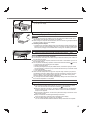
Inserting the Battery Pack
A Slide the latch (A) to the right to unlock the cover.
B Slide the latch (A) down, and open the cover.
C Insert the battery pack until it securely fits the connector.
D Close the cover.
E Slide the latch (B) to the left to lock the cover.
CAUTION
Make sure the latch is securely locked. Otherwise the battery pack may fall
when you carry the computer.
Do not touch the terminals of the battery pack and the computer. Doing so can
make the terminals dirty or damaged, and may cause malfunction of the battery
pack and the computer.
NOTE
Note that the computer consumes electricity even when the computer power is
off. If the battery pack is fully charged, the battery will fully discharge in the following period of time:
• When power is off: Approx. 4 weeks
• In sleep: Approx. 4 days
• In hibernation: Approx. 2 weeks
2
2
Attaching the stylus to the computer
Use the tether to attach the stylus to the computer so you will not lose it. There
are holes (A) to attach it.
For model with dual touch, the tether and digitizer pen are already attached
to the computer at purchase.
14
3
Opening the Display
A Pull up the part (A) and release the latch.
B Lift open the display.
4
Connect your computer to a power outlet.
The battery charging starts automatically.
Do not disconnect the AC adaptor and do not switch the wireless switch to on
until the first-time operation procedure is completed.
When using the computer for the first time, do not connect any peripheral device
except the battery pack and AC adaptor.
Handling the AC adaptor
Problems such as sudden voltage drops may arise during periods of thunder and
lightning. Since this could adversely affect your computer, an uninterruptible power
source (UPS) is highly recommended unless running from the battery pack alone.
5
Getting Started
CAUTION
Turn on the computer.
A Slide and hold the power switch (B) until the power indicator
lights.
CAUTION
Do not slide the power switch repeatedly.
The computer will forcibly be turned off if you slide and hold the power switch for
four seconds or longer.
Once you turn off the computer, wait for ten seconds or more before you turn on
the computer again.
turns off.
Do not perform the following operation until the hard disk drive indicator
Connecting or disconnecting the AC adaptor
Sliding the power switch
Touching the keyboard, touch pad, tablet buttons, touchscreen (only for model
with touchscreen), dual touch (only for model with dual touch) or external mouse
Closing the display
Turn on/off the wireless switch
When the CPU temperature is high, the computer may not start up to prevent
overheating of the CPU. Wait until the computer cools down, and then turn the
power on again. If the computer does not power on even after cooling down,
contact Panasonic Technical Support ( page 33).
Any changes from the default setting of the Setup Utility must not be made until
the First-time Operation is completed.
6
Setup Windows.
Follow the on-screen instructions.
The computer restarts several times. Do not touch the keyboard or touch
has turned off.
pad, and wait until the hard disk drive indicator
After the computer is turned on, the screen remains black or unchanged for
a while, but this is not a malfunction. Wait for a moment until the Windows
setup screen appears.
During setup of Windows, use the touch pad and clicking to move the cursor
and to click an item.
Setup of Windows will take approximately 20 minutes.
Go to the next step, confirming each message on the display.
“Join a wireless network” screen may not appear.
You can set the Wireless Network after the setup of Windows is complete.
15
First-time Operation
CAUTION
You can change the user name, password, image and security setting after
setup of Windows.
Remember your password. If you forget the password, you cannot use Windows. Creating a password reset disk beforehand is recommended.
Do not use the following words for user name: CON, PRN, AUX, CLOCK$, NUL,
COM1 to COM9, LPT1 to LPT9, @. In particular, if you create a user name (account name) that includes the “@” mark, a password will be requested at the
log-on screen, even if no password has been set. If you try to log on without entering a password, “The user name or password is incorrect.” may be displayed
and you will not be able to log on to Windows ( page 24).
7
Perform the touchscreen calibration.
Getting Started
<Only for model with touchscreen>
Before performing the calibration, close Tablet PC Input Panel
Calibration by an administrator
NOTE
At first, log on to Windows as an administrator, and perform this calibration.
Return the rotated display to [Primary Landscape] before the touchscreen calibration.
(Start) - [Control Panel] - [Hardware and Sound] - [Tablet PC SetA Click
ting].
B Click [Calibrate].
C Using the stylus, touch each of the “+” target marks one by one.
Calibration by a standard user
NOTE
Perform the following calibration for each user.
(Start) - [Control Panel] - [Hardware and Sound] - [Tablet PC SetA Click
ting].
B Click [Calibrate].
C Using the stylus, touch each of the “+” target marks one by one, and then
click [Yes].
Perform the calibration for the orientation to be used.
<Only for model with Dual Touch>
NOTE
Perform these calibration for each user.
If you cannot touch the desired position, perform Digitizer Calibration again and
restart the computer.
A Run [Calibration Utility].
Click
(Start) - [All Programs] - [Panasonic] - [Calibration Utility].
B Select [Touch input].
To calibrate more accurate, add a check mark for [Advanced calibration].
C Using the digitizer pen, touch each of the “+” target marks one by one.
Perform the calibration for the orientation to be used.
8
Restart the computer.
NOTE
PC Information Viewer
This computer periodically records the management information of the hard disk, etc. The maximum data volume
for each record is 1024 bytes.
This information is only used for estimating the cause when the hard disk goes down by any possibility. They are
never sent to outside via network nor used for any other purpose except for the purpose described the above.
To disable the function, add the check mark for [Disable the automatic save function for management information
history] in [Hard Disk Status] of PC Information Viewer, and click [OK].
(
Reference Manual “Checking the Computer’s Usage Status”)
16
Precaution against Starting Up/Shutting Down
Do not do the following
Connecting or disconnecting the AC adaptor
Sliding the power switch
Touching the keyboard, touch pad, touchscreen, dual touch or external mouse
Closing the display
Turn on/off the wireless switch
NOTE
To change the partition structure
You can shrink a part of an existing partition to create unallocated disk space, from which you can create a new partition. This computer has a single partition in the default setting.
(Start) and right-click [Computer], then click [Manage].
A Click
A standard user needs to enter an administrator password.
B Click [Disk Management].
C Right-click the partition for Windows (“c” drive in the default setting), and click [Shrink Volume].
The partition size depends on the computer specifications.
D Input the size in [Enter the amount of space to shrink in MB] and click [Shrink].
You cannot input a larger number than the displayed size.
To select [Reinstall to the first 3 partitions.] in reinstalling Windows 7 ( page 22), 30000 MB or more is necessary for [Total size after shrink in MB].
E Right-click [Unallocated] (the shrunk space in the step D) and click [New Simple Volume].
F Follow the on-screen instructions to make the settings, and click [Finish].
Wait until formatting is completed.
Getting Started
To conserve power, the following power saving methods are set at the time of purchase.
minutes of inactivity.
The screen automatically turns off after 10
*2
The computer automatically enters sleep after 20 minutes of inactivity.
*2
Refer to
Reference Manual “Sleep and Hibernation Functions” about resuming from sleep.
NOTE
You can create an additional partition using remaining unallocated space or newly creating unallocated space.
To delete a partition, right-click the partition and click [Delete Volume] in the step C.
17
On-screen Manual
You can access the following manuals on the computer screen.
Reference Manual
The Reference Manual contains the practical information to help you fully enjoy the computer’s performance.
To access the Reference Manual:
Double-click
on the desktop.
Alternatively click
(Start) - [All Programs] - [Panasonic] - [On-Line Manuals] - [Reference Manual].
Important Tips
The Important Tips will provide you with the battery information so that you can use the battery pack in the optimum
condition to obtain longer operation time.
To access the Important Tips:
Double-click
on the desktop.
Useful Information
Alternatively click
18
(Start) - [All Programs] - [Panasonic] - [On-Line Manuals] - [Important Tips].
Handling and Maintenance
Operation environment
Place the computer on a flat stable surface not subject to shock, vibration, and danger of dropping. Do not place the
computer upright or turn it over. If the computer is exposed to an extremely strong impact, it may become damaged.
Operating environment
Temperature: Operation : -10 °C to 50 °C {14 °F to 122 °F} (IEC60068-2-1, 2)*1
Storage : -20 °C to 60 °C {-4 °F to 140 °F}
Humidity:
Operation : 30% to 80% RH (No condensation)
Storage : 30% to 90% RH (No condensation)
Even within the above temperature/humidity ranges, operation for a long time in extreme environments, smoking
nearby, or operation in places where oil is used or where there is a lot of dust will result in the product deterioration
and will shorten the product life.
*1
Do not expose the skin to this product when using the product in a hot or cold environment. ( page 10)
If the computer is wet in temperatures of 0 °C {32 °F} or below, freeze damage may occur. Make sure to dry off the
computer in such temperatures.
Do not place the computer in the following areas, otherwise the computer may be damaged.
Near electronic equipment. Image distortion or noise may occur.
In extremely high or low temperature.
As the computer can become hot during operation, keep it away from items that are sensitive to heat.
This computer is designed to minimize shock to parts such as the LCD and the hard disk drive and equipped with a
drip-proof keyboard, but no warranty is provided against any trouble caused by shock. Be extremely careful when handling the computer.
When carrying the computer:
Turn off the computer.
Remove all external devices, cables, PC Cards and other protruding objects.
Do not drop or hit the computer against solid objects.
Do not leave the display open.
Do not grip the display part.
Do not put anything (e.g., a piece of paper) between the display and keyboard.
When you board an airplane, take the computer with you and never put it in your checked luggage. When using the
computer on airplane, follow the airline’s instructions.
When carrying a spare battery, put it in a plastic bag to protect its terminals.
The touch pad is designed to be used by a finger tip. Do not place any object on its surface and do not press down
strongly with sharp-pointed or hard objects that may leave marks (e.g., nails, pencils and ball point pens).
Avoid any harmful substances such as oil from getting into the touch pad. The cursor may not work correctly.
Be careful not to get injured by dropping or getting hit when carrying the computer.
Use only the included stylus/digitizer pen to touch the touchscreen. Do not place any object on its surface and do
not press down strongly with sharp-pointed or hard objects that may leave marks (e.g., nails, pencils and ball point
pens).
Do not use the touchscreen when dust or dirt (e.g., oil) is on the screen. Otherwise foreign particles on the screen/
stylus/digitizer pen can scratch the screen surface or obstruct the stylus/digitizer pen operation.
Use the stylus/digitizer pen only for touching the screen. Using it for any other purpose may damage the stylus/digitizer pen and result in scratches on the screen.
<Only for model with dual touch>
The dual touch uses electromagnetic induction and may not work properly near strong electrical field or magnetic
field such as:
Near AM radio base station or relay station antennas
Near CRT displays that generate strong electromagnetic field noise
Move the dual touch away from such locations so it will work properly.
The cursor cannot follow the digitizer pen movement if you move the digitizer pen too quickly.
The tip of the digitizer pen (A) is equipped with a sensor. Continued
A
applied pressure to the tip may result in its malfunction or degradation.
Make sure excessive pressure is not applied to the tip when storing the
digitizer pen.
Useful Information
Handling cautions
19
Handling and Maintenance
When using peripheral devices
Follow these instructions and the Reference Manual to avoid any damage to the devices. Carefully read the instruction
manuals of the peripheral devices.
Use the peripheral devices conforming to the computer’s specifications.
Connect to the connectors in the correct direction.
If it is hard to insert, do not try forcibly but check the connector’s shape, direction, alignment of pins, etc.
If screws are included, fasten them securely.
Remove the cables when you carry the computer. Do not pull the cables forcibly.
Preventing your computer from unauthorized use via wireless LAN/Bluetooth/Wireless WAN
<Only for model with wireless LAN/Bluetooth/Wireless WAN>
Before using wireless LAN/Bluetooth/Wireless WAN, make the appropriate security settings such as data encryption.
Useful Information
Battery Recalibration
The battery recalibration may take a long time due to the large battery capacity. This is not a malfunction.
<When performing “Battery Recalibration” after shutting down Windows>
Full charge: Approximately 3.5 hours
Complete discharge: Approximately 4.0 hours
When performing “Battery Recalibration” without shutting down Windows, it may take more time to charge / discharge.
Maintenance
To clean the LCD panel
If drops of water or other stains get on the surface of the LCD panel, wipe them off immediately. Failure to do so may
result in staining.
Use the soft cloth included with the computer. (For further information, refer to “Suggestions About Cleaning the LCD
Reference Manual “Screen Input Operation”.)
Surface”
To clean areas other than the LCD panel
Wipe with a soft dry cloth such as gauze. When using detergent, dip a soft cloth in water-diluted detergent and wring it
thoroughly.
CAUTION
Do not use benzene, thinner, or rubbing alcohol since it may adversely affect the surface causing discoloration, etc.
Do not use commercially-available household cleaners and cosmetics, as they may contain components harmful to
the surface.
Do not apply water or detergent directly to the computer, since liquid may enter inside of the computer and cause
malfunction or damage.
20
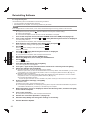
Reinstalling Software
Reinstalling software will return the computer to the default condition. When you reinstall the software, the hard disk
data will be erased.
Back up important data to other media or an external hard disk before reinstallation.
Hard Disk Recovery
CAUTION
Do not delete the partitions with boot files on the hard disk.
The disk space in the partition is not available to store data.
Hard disk
HDD Recovery partition
Recovery partition
Area usable by Windows
Preparation
Remove all peripherals.
Connect the AC adaptor and do not remove it until reinstallation is complete.
1
Turn on the computer, and press F2 or Del while [Panasonic] boot screen is displayed.
2
Write down all of the contents of the Setup Utility and press F9.
3
Press F10.
4
Press F2 or Del while [Panasonic] boot screen is displayed.
5
6
Select the [Exit] menu, then select [Recovery Partition] and press Enter .
Click [Reinstall Windows] and click [Next].
7
8
Click [Yes, I agree to the provisions above and wish to continue!] and click [Next].
Select the settings and click [Next].
The Setup Utility starts up.
If the password is requested, enter the Supervisor Password.
At the confirmation message, select [Yes] and press Enter.
Useful Information
At the confirmation message, select [Yes] and press Enter.
Computer will restart.
The Setup Utility starts up.
If the password is requested, enter the Supervisor Password.
The License Agreement screen appears.
[Reinstall Windows to the whole Hard Disk to factory default.]
Select this option when you want to reinstall Windows to the factory default. After reinstallation, you can create
a new partition. For how to create a new partition, refer to “To change the partition structure” ( page 17).
*1
[Reinstall to the System and OS partitions.]
Select this option when the hard disk has already been divided into several partitions. For how to create a
new partition, refer to “To change the partition structure” ( page 17).
You can keep the partition structure.
*1
This does not appear if Windows cannot be reinstalled to the partition containing boot files and the area usable by Windows.
9
10
11
At the confirmation message, click [OK].
Select OS (32bit or 64bit) and click [OK].
At the confirmation message, click [OK].
12
When termination screen is displayed, click [OK] to turn off the computer.
13
Turn on the computer.
Reinstallation starts according to the instructions on the screen.
Do not interrupt reinstallation, for example by turning off the computer. Otherwise reinstallation may become
unavailable as Windows may not start up or the data may be corrupted.
If the password is requested, enter the Supervisor Password.
14
Perform the “First-time Operation” ( page 15).
15
Start the Setup Utility and change the settings as necessary.
16
Perform Windows Update.
21
Reinstalling Software
Using Recovery Disc
Use the Recovery Disc for reinstallation in the following conditions.
You have forgotten the administrator password.
Reinstallation is not complete. The recovery partition may be broken.
NOTE
To change OS from 32 bit to 64 bit, or vice versa, reinstall OS using the recovery partition in the hard disk.
Preparation
Reference Manual “Recovery Disc Creation Utility”)
Prepare the Recovery Disc (
Remove all peripherals.
Connect the AC adaptor and do not remove it until reinstallation is complete.
1
2
Turn off the computer and connect the CD/DVD drive to the USB port ( page 12).
Turn on the computer, and press F2 or Del while [Panasonic] boot screen is displayed.
The Setup Utility starts up.
If the password is requested, enter the Supervisor Password.
3
Write down all of the contents of the Setup Utility and press F9.
At the confirmation message, select [Yes] and press Enter.
4
Press F10.
Useful Information
At the confirmation message, select [Yes] and press Enter.
Computer will restart.
5
Press F2 or Del while [Panasonic] boot screen is displayed.
The Setup Utility starts up.
If the password is requested, enter the Supervisor Password.
6
7
8
Set the Recovery Disc into the CD/DVD drive.
Select the [Exit] menu, then select your CD/DVD drive.
Press Enter .
The computer will restart.
9
Click [Reinstall Windows] and click [Next].
The License Agreement screen appears.
10
11
Click [Yes, I agree to the provisions above and wish to continue!] and click [Next].
Select the settings and click [Next].
[Reinstall Windows to the whole Hard Disk to factory default.]
Select this option when you want to reinstall Windows to the factory default. After reinstallation, you can create
a new partition. For how to create a new partition, refer to “To change the partition structure” ( page 17).
[Reinstall to the first 3 partitions.]*2
Select this option when the hard disk has already been divided into several partitions. For how to create a
new partition, refer to “To change the partition structure” ( page 17).
You can keep the partition structure.
*2
12
This does not appear if Windows cannot be reinstalled to the partition containing boot files and the area usable by Windows.
At the confirmation message, click [YES].
Reinstallation starts.
According to the screen, replace the Recovery Disc.
Do not interrupt reinstallation, for example by turning off the computer. Otherwise reinstallation may become
unavailable as Windows may not start up or the data may be corrupted.
13
When termination screen is displayed, remove the Recovery Disc, and then click [OK]
to turn off the computer.
14
Turn on the computer.
If the password is requested, enter the Supervisor Password.
15
Perform the “First-time Operation” ( page 15).
16
Start the Setup Utility and change the settings as necessary.
17
Perform Windows Update.
22
Troubleshooting (Basic)
Follow the instructions below when a problem has occurred. There is also an advanced troubleshooting guide in the
“Reference Manual”. For a software problem, refer to the software’s instruction manual. If the problem persists, contact
Panasonic Technical Support ( page 33). You can also check the computer’s status in the PC Information Viewer
Reference Manual “Troubleshooting (Advanced)”).
(
Starting Up
Cannot start up.
The power indicator or battery indicator is not lit.
Connect the AC adaptor.
Insert a fully charged battery.
Remove the battery pack and the AC adaptor, then connect them again.
The power is turned on but
“Warming up the system”
appears.
The computer is warming up before start up. Wait for the computer to start up (the maximum waiting time will be displayed on the screen). If, “Cannot warm up the system” is
displayed, the computer failed to warm up and does not start. In this case, turn off the
computer, leave it in an environment of 5 °C {41 °F} or higher temperature for about an
hour, and then turn on the power again.
If a device is connected to the USB port, disconnect the device, or set [USB Port] or
[Legacy USB Support] to [Disable] in the [Advanced] menu of the Setup Utility.
If a device is connected to the ExpressCard slot, disconnect the device, or set
[ExpressCard Slot] to [Disable] in the [Advanced] menu of the Setup Utility.
Press Fn + F8 to turn off the concealed mode.
Cannot turn on the computer. Leave it in an environment of 5 °C {41 °F} or higher temperature for about an hour, then
turn on the power again.
The computer does not resume from sleep.
(The power indicator blinks
quickly in green.)
Slide and hold the power switch for four seconds or longer to shut down the computer
The computer does not
forcibly. (Data not saved will be lost.) Then disable the screen saver.
enter sleep mode while the
screen saver is running. (The
screen stays black.)
Administrator password:
If you have a password reset disk, you can reset the administrator password. Set the
disk and enter any wrong password, then follow the on-screen instructions and set a
new password.
If you do not have a password reset disk, reinstall ( page 21) and set up Windows,
and then set a new password.
A floppy disk is in the drive and it does not contain system startup information. Remove
“Remove disks or other
the floppy disk and press any key.
media. Press any key to
restart” or a similar message If a device is connected to the USB port, disconnect the device, or set [USB Port] or
[Legacy USB Support] to [Disable] in the [Advanced] menu of the Setup Utility.
appears.
If a device is connected to the ExpressCard slot, disconnect the device, or set
[ExpressCard Slot] to [Disable] in the [Advanced] menu of the Setup Utility.
Troubleshooting
You have forgotten the pass- Supervisor Password or User Password: Contact Panasonic Technical Support
( page 33).
word.
If the problem persists after removing the disk, it may be a hard disk failure. Contact
Panasonic Technical Support ( page 33).
Windows startup and opera- Press F9 in the Setup Utility (
Reference Manual “Setup Utility”) to return the
Setup Utility settings (excluding the passwords) to the default values. Start the Setup
tion is slow.
Utility and make the settings again. (Note that the processing speed depends on the application software, so this procedure may not make Windows faster.)
If you installed a resident software after purchase, turn off the residence.
Disable the pop-up menu and Input Panel Tab.
A Open the Input Panel, and click [Tools] - [Options] - [Opening].
B Remove the check mark of [Show Input Panel sliding open from the tab] and click
[OK].
The date and time are incor- Make the correct settings.
Click
(Start) - [Control Panel] - [Clock, Language, and Region] - [Date and Time].
rect.
If the problem persists, the internal clock battery may need to be replaced. Contact
Panasonic Technical Support ( page 33).
When the computer is connected to LAN, check the date and time of the server.
The 2100 A.D. or later year will not be correctly recognized on this computer.
[Executing Battery Recalibration] screen appears.
The Battery Recalibration was canceled before Windows was shut down last time. To
start up Windows, turn off the computer by the power switch, and then turn on.
23
Troubleshooting (Basic)
Starting Up
Select [Enabled] in [Password On Resume] in the [Security] menu of the Setup Utility
[Enter Password] does not
( Reference Manual “Setup Utility”).
appear when resuming from
The Windows password can be used instead of the password set in the Setup Utility.
sleep/hibernation.
A Click
(Start) - [Control Panel] - [User Accounts and Family Safety] - [Add or re-
Troubleshooting
move user accounts] and select the account, and set the password.
B Click
(Start) - [Control Panel] - [System and Security] - [Power Option] - [Require
a password when the computer wakes] and add a check mark for [Require a password].
Cannot resume.
One of the following operations may have been carried out.
In sleep mode, the AC adaptor or battery pack was disconnected, or a peripheral was
connected or disconnected.
The power switch was slid for four seconds or longer to forcibly turn off the computer.
Slide the power switch to turn on the computer. Data not saved will be lost.
An error may occur when the computer automatically enters the sleep or hibernation
mode while the screensaver is active. In this case, turn off the screensaver or change
the pattern of the screensaver.
Other startup problems.
Reference Manual “Setup Utility”) to return the
Press F9 in the Setup Utility (
Setup Utility settings (excluding the passwords) to the default values. Start the Setup
Utility and make the settings again.
Remove all peripheral devices.
Check to see if there was a disk error.
A Remove all peripheral devices including an external display.
B Click
(Start) - [Computer] and right-click [Local Disk (C:)], and click [Properties].
C Click [Tools] - [Check Now...].
A standard user needs to enter an administrator password.
D Select the option in [Check disk options] and click [Start].
E Click [Schedule disk check] and restart the computer.
Start the computer in Safe Mode and check the error details. When the [Panasonic] boot
screen disappears*1 at startup, press and hold F8 until the Windows Advanced Options
Menu is displayed. Select the Safe Mode and press Enter .
*1
When [Password on boot] is set to [Enabled] in the [Security] menu of the Setup Utility,
[Enter Password] appears after the [Panasonic] boot screen disappears. As soon as you
enter the password and press Enter , press and hold F8.
Entering Password
Even after entering the pass- The computer may be in ten-key mode.
If the NumLk indicator
lights, press NumLk to disable the ten-key mode, and then
word, password input screen
input.
is displayed again.
The computer may be in Caps Lock mode.
If the Caps Lock indicator
lights, press Caps Lock to disable the Caps Lock
mode, and then input.
Cannot log on to Windows.
(“The user name or password is incorrect.” is displayed.)
The user name (account name) includes an “@” mark.
- If another user account name exists:
Log on to Windows using another user account name, and delete the account name
that includes “@”. Then create a new account name.
- If no other account name exists:
You need to reinstall Windows ( page 21).
Shutting down
Windows does not shut
down.
24
Remove the USB device and the ExpressCard.
Wait one or two minutes. It is not a malfunction.
Display
No display.
The external display is selected. Press Fn + F3 or
The screen is dark.
The screen is darker when the AC adaptor is not connected. Press Fn + F2 and adjust
the brightness. As you increase the brightness, battery consumption increases.
You can separately set the brightness for when the AC adaptor is connected and when
not connected.
+ P to switch the display. Wait
until the display has been switched completely before pressing Fn + F3 or
+P
again.
When using an external display,
Check the cable connection.
Turn on the display.
Check the settings of external display.
The display is turned off by the power-saving function. To resume, do not press the
direct selection keys, but press any other key like Ctrl .
The computer entered sleep or hibernation by the power-saving function. To resume,
press the power switch.
Press Fn + F8 to turn off the concealed mode.
The screen is disordered.
Changing the number of display colors and resolution may affect the screen. Restart the
computer.
Connecting/disconnecting an external display may affect the screen. Restart the computer.
During Simultaneous display, When using the Extended Desktop, use the same display colors for the external display
as those used by the LCD.
one of the screens becomes
If you continue to experience problems, try changing the display.
disordered.
The external display does
not work normally.
If the external display does not support the power saving function, it may not work normally when the computer enters the power saving mode. Turn off the external display.
<Only for model with GPS>
The cursor cannot be controlled properly.
Operate the following steps.
A Set [GPS] to [Disabled] in the [Advanced] - [Serial Port Settings] of the Setup Utility.
B Press F10 and select [Yes] at the confirmation message, and press Enter .
The computer will restart.
C Log on to Windows as an administrator.
D Click (Start) and input “c:\util\drivers\gps\GPS.reg” in [Search programs and files],
and press Enter .
E Click [Yes], click [Yes] and click [OK].
Then restart the computer.
F Press F2 while [Panasonic] boot screen is displayed.
G Set [GPS] to [Enabled] in the [Advanced] - [Serial Port Settings].
H Press F10 and select [Yes] at the confirmation message, and press Enter .
Troubleshooting
Simultaneous display cannot be used until Windows startup is complete (during Setup
Utility, etc.).
Touch Pad / Touchscreen (only for model with touchscreen)/Dual Touch (only for model with dual touch)
The cursor does not work.
When using the external mouse, connect it correctly.
Restart the computer using the keyboard.
Press
and press two times, and press to select [Restart] and press Enter .
If the computer does not respond to keyboard commands, read “No response”
( page 26).
Cannot input using the touch Set [Touch Pad] to [Enable] in the [Main] menu of the Setup Utility.
The drivers for some mice may disable the touch pad. Check your mouse’s operating
pad.
instructions.
<Only for model with touchscreen>
Cannot input using the
touchscreen.
Set [Touchscreen Mode] to [Auto] or [Tablet Mode] in the [Main] menu of the Setup Utility.
25
Troubleshooting (Basic)
Touch Pad / Touchscreen (only for model with touchscreen)/Dual Touch (only for model with dual touch)
Cannot point the correct
position using the included
stylus/digitizer pen.
<Only for model with touchscreen>
Perform the touchscreen calibration ( page 16).
<Only for model with dual touch>
Perform the digitizer calibration and Touchscreen calibration ( page 16).
Use the included digitizer pen.
On the Windows logon screen or the Welcome screen, you may not be able to point the
correct position using the included digitizer pen. Use the keyboard or the touch pad to
log on.
On-screen Document
The document of PDF format is not displayed.
Install Adobe Reader.
A Log on to Windows as an administrator.
B Click
(Start) and input “c:\util\reader\AdbeRdr1001_en_US.exe” in [Search programs and files] then press Enter .
C Update Adobe Reader to its latest version.
If your computer is connected to the internet, start up Adobe Reader and click [Help]
- [Check for Updates...].
Others
Troubleshooting
No response.
26
Press Ctrl + Shift +Esc to open Task Manager and close the software application
that is not responding.
An input screen (e.g., password input screen at startup) may be hidden behind another
window. Press Alt + Tab to check.
Slide the power switch for four seconds or longer to shut down the computer, and then
slide the power switch to turn it on. If the application program does not work normally,
uninstall and reinstall the program. To uninstall, click
(Start) - [Control Panel] - [Program]
- [Uninstall a program].
LIMITED USE LICENSE AGREEMENT
THE SOFTWARE PROGRAM(S) (“PROGRAMS”) FURNISHED WITH THIS PANASONIC PRODUCT (“PRODUCT”)
ARE LICENSED ONLY TO THE END-USER (“YOU”), AND MAY BE USED BY YOU ONLY IN ACCORDANCE WITH
THE LICENSE TERMS DESCRIBED BELOW. YOUR USE OF THE PROGRAMS SHALL BE CONCLUSIVELY
DEEMED TO CONSTITUTE YOUR ACCEPTANCE OF THE TERMS OF THIS LICENSE.
Panasonic Corporation has developed or otherwise obtained the Programs and hereby licenses their use to you. You
assume sole responsibility for the selection of the Product (including the associated Programs) to achieve your intended results, and for the installation, use and results obtained therefrom.
LICENSE
A. Panasonic Corporation hereby grants you a personal, non-transferable and non-exclusive right and license to use
the Programs in accordance with the terms and conditions stated in this Agreement. You acknowledge that you are
receiving only a LIMITED LICENSE TO USE the Programs and related documentation and that you shall obtain
no title, ownership nor any other rights in or to the Programs and related documentation nor in or to the algorithms,
concepts, designs and ideas represented by or incorporated in the Programs and related documentation, all of
which title, ownership and rights shall remain with Panasonic Corporation or its suppliers.
B. You may use the Programs only on the single Product which was accompanied by the Programs.
C. You and your employees and agents are required to protect the confidentiality of the Programs. You may not distribute or otherwise make the Programs or related documentation available to any third party, by time-sharing or otherwise, without the prior written consent of Panasonic Corporation.
D. You may not copy or reproduce, or permit to be copied or reproduced, the Programs or related documentation for
any purpose, except that you may make one (1) copy of the Programs for backup purposes only in support of your
use of the Programs on the single Product which was accompanied by the Programs. You shall not modify, or attempt to modify, the Programs.
E. You may transfer the Programs and license them to another party only in connection with your transfer of the single
Product which was accompanied by the Programs to such other party. At the time of such a transfer, you must also
transfer all copies, whether in printed or machine readable form, of every Program, and the related documentation,
to the same party or destroy any such copies not so transferred.
F. You may not remove any copyright, trademark or other notice or product identification from the Programs and you
must reproduce and include any such notice or product identification on any copy of any Program.
YOU MAY NOT REVERSE ASSEMBLE, REVERSE COMPILE, OR MECHANICALLY OR ELECTRONICALLY TRACE
THE PROGRAMS, OR ANY COPY THEREOF, IN WHOLE OR IN PART.
YOU MAY NOT USE, COPY, MODIFY, ALTER, OR TRANSFER THE PROGRAMS OR ANY COPY THEREOF, IN
WHOLE OR IN PART, EXCEPT AS EXPRESSLY PROVIDED IN THE LICENSE.
TERM
This license is effective only for so long as you own or lease the Product, unless earlier terminated. You may terminate this license at any time by destroying, at your expense, the Programs and related documentation together with
all copies thereof in any form. This license will also terminate effective immediately upon occurrence of the conditions
thereof set forth elsewhere in this Agreement, or if you fail to comply with any term or condition contained herein. Upon
any such termination, you agree to destroy, at your expense, the Programs and related documentation together with all
copies thereof in any form.
YOU ACKNOWLEDGE THAT YOU HAVE READ THIS AGREEMENT, UNDERSTAND IT AND AGREE TO BE BOUND
BY ITS TERMS AND CONDITIONS. YOU FURTHER AGREE THAT IT IS THE COMPLETE AND EXCLUSIVE STATEMENT OF THE AGREEMENT BETWEEN US, WHICH SUPERSEDES ANY PROPOSAL OR PRIOR AGREEMENT,
ORAL OR WRITTEN, AND ANY OTHER COMMUNICATIONS BETWEEN US, RELATING TO THE SUBJECT MATTER OF THIS AGREEMENT.
Appendix
IF YOU TRANSFER POSSESSION OF ANY COPY OF ANY PROGRAM TO ANOTHER PARTY, EXCEPT AS PERMITTED IN PARAGRAPH E ABOVE, YOUR LICENSE IS AUTOMATICALLY TERMINATED.
GOVERNMENT RESTRICTED RIGHTS.
The Software is provided with “RESTRICTED RIGHTS.” Use duplication or disclosure by the government is subject
to restrictions as set forth in FAR52.227-14 and DFAR252. 227-7013 et seq. or their successors.
Use of the Software by the government constitutes acknowledgement of Intel’s proprietary rights therein.
Contractor or Manufacturer is Intel Corporation, 2200 Mission College Blvd., Santa Clara, CA 95052.
27
Contrat de licence d’usage limité
Le(s) logiciel(s) (les “Logiciels”) fournis avec ce produit Panasonic (le “Produit”) sont exclusivement concédés en
licence à l’utilisateur ultime (“vous”), et ils ne peuvent être utilisés que conformément aux clauses contractuelles cidessous. En utilisant les logiciels, vous vous engagez de manière définitive à respecter les termes, clauses et conditions
des présentes.
Panasonic Corporation a mis au point ou obtenu les Logiciels et vous en concède l’utilisation par les présentes. Vous
assumez l’entière responsabilité du choix de ce Produit (y compris des Logiciels associés) pour obtenir les résultats
escomptés, ainsi que de l’installation, de l’utilisation et des résultats obtenus.
Licence
A. Panasonic Corporation vous octroie par les présentes le droit et la licence personnels, non cessibles et non exclusifs d’utiliser les Logiciels conformément aux termes, clauses et conditions de ce contrat. Vous reconnaissez ne
recevoir qu’un droit limité d’utiliser les Logiciels et la documentation les accompagnant et vous vous engagez à
n’obtenir aucun droit de titre, propriété ni aucun autre droit vis-à-vis des Logiciels et de la documentation les accompagnant ni vis-à-vis des algorithmes, concepts, dessins, configurations et idées représentés par ou incorporés
dans les Logiciels et la documentation les accompagnant, dont les titres, propriété et droits resteront tous à
Panasonic Corporation ou à leurs propriétaires.
B. Vous ne pouvez utiliser les Logiciels que sur le Produit unique qui est accompagné par les Logiciels.
C. Vous et vos employés ou agents êtes requis de protéger la confidentialité des Logiciels. Vous ne pouvez ni distribuer ni mettre les Logiciels et la documentation les accompagnant à la disposition d’un tiers, par partage de
temps ou de quelque autre manière que ce soit, sans l’autorisation écrite préalable de Panasonic Corporation.
D. Vous ne pouvez ni copier ni reproduire ni permettre la copie ni la reproduction des Logiciels ni de la documentation les accompagnant pour quelque fin que ce soit, à l’exception d’une (1) copie des Logiciels à des fins de sauvegarde uniquement pour soutenir votre utilisation des Logiciels sur le Produit unique qui est accompagné par les
Logiciels. Vous ne pouvez ni modifier ni tenter de modifier les Logiciels.
E. Vous ne pouvez céder les Logiciels et en octroyer la licence à une autre partie qu’en rapport avec votre cession du
Produit unique qui est accompagné par les Logiciels à cette autre partie. Au moment de cette cession, vous devez
céder également toutes les copies, que ce soit sous forme imprimée ou lisible par la machine, de tous les Logiciels
ainsi que de la documentation les accompagnant, à la même partie ou détruire les copies non cédées.
F. Vous ne pouvez retirer aucune marque de droits d’auteur, marque de commerce ou autre ni aucune identification
de produit des Logiciels et vous devez reproduire et inclure toutes ces notices ou identifications de produit sur
toutes les copies des Logiciels.
Vous ne pouvez assembler en sens inverse, compiler en sens inverse ni retracer les Logiciels ni aucune de leurs copies, de façon électronique ou mécanique, en tout ou en partie.
Vous ne pouvez utiliser, copier, modifier, altérer ni céder les Logiciels ni aucune de leurs copies, en tout ou en partie, à
l’exception de ce qui est expressément stipulé dans ce contrat.
Appendix
Si vous cédez la possession de toute copie ou de tout Logiciel à une autre partie, à l’exception de ce qui est autorisé
au paragraphe E ci-dessus, votre licence est automatiquement résiliée.
Termes, clauses et conditions
Cette licence n’est effective que pour la durée de possession ou de crédit-bail du Produit, à moins d’une résiliation antérieure. Vous pouvez résilier cette licence à tout moment en détruisant, à vos frais, les Logiciels et la documentation
les accompagnant avec toutes leurs copies, sous quelque forme que ce soit. Cette licence sera également résiliée,
avec application immédiate, si les conditions de résiliation définies ailleurs dans ce contrat se sont réalisées ou si vous
ne respectez pas les termes, clauses et conditions qui y sont contenues. Au moment de la résiliation, vous acceptez
de détruire, à vos frais, les Logiciels et la documentation les accompagnant avec toutes leurs copies, sous quelque
forme que ce soit.
Vous reconnaissez avoir lu ce contrat, en avoir compris toute la substance et avoir accepté de respecter ses termes,
clauses et conditions. Vous reconnaissez en outre qu’ils sont la description complète et exclusive du contrat conclu
entre nous, contrat qui remplace et annule toute proposition ou contrat précédent, écrit ou oral, et toute autre communication entre nous, relativement à l’objet du présent contrat.
28
Specifications
This page provides the specifications for the basic model.
The model number is different according to the unit configuration.
To check the model number:
Check the bottom of the computer or the box the computer came in at the time of purchase.
To check CPU speed, memory size and the hard disk drive (HDD) size:
Reference Manual “Setup Utility”) and select [Information] menu.
Run the Setup Utility (
[CPU Speed]: CPU speed, [Memory Size]: Memory size, [Hard Disk]: Hard disk drive size
Main Specifications
Model No.
CF-191HYAXDM
®
CF-191DYAXDM
CPU
Intel Core™ i5-3320M Processor (3 MB cache, up to 3.3 GHz) with Intel® Turbo Boost
Technology
Chipset
Mobile Intel® QM77 Express Chip set
Memory*1*2
4 GB (8 GB Max.)*3
Video Memory*1*4
<Only for model with 32bit>
UMA 1416 MB Max. (When memory is either 4 GB or 8 GB)*5
UMA 1544 MB Max. (When memory is either 4 GB or 8 GB)*6
<Only for model with 64bit>
UMA 1696 MB Max. (When memory is either 4 GB or 8 GB)
Hard Disk Drive*7
500 GB
Approx. 10 GB is used as a partition with HDD recovery tools. (Users cannot use this partition.)
Approx. 300 MB is used as a partition with recovery tools. (Users cannot use this partition.)
Display Method
10.1 XGA type (TFT)
Internal LCD*8
65,536/16,777,216 colors (800 × 600 dots/1024 × 768 dots)
External Display
*9
65,536/16,777,216 colors (800 × 600 dots/1024 × 768 dots/1280 × 768 dots/1280 × 1024 dots)
*10
page 30
BluetoothTM *11
page 30
*12
GPS
Chip: SiRF starIII
Accuracy: 10 m (2DRMS), 5 m (2DRMS, SBAS)
Protocol message: GGA, GSA, GSV, RMC, VTG
Wireless WAN*13
Sierra™ Wireless High-speed module
LAN
IEEE 802.3 10Base-T, IEEE 802.3u 100Base-TX, IEEE 802.3ab 1000Base-T
Modem
Data: 56 kbps (V.92) FAX: 14.4 kbps
Sound
WAVE and MIDI playback, Intel® High Definition Audio subsystem support, Monaural speaker
Security Chip
TPM (TCG V1.2 compliant)*14
Card Slot
Type I or Type II x 1 (3.3 V: 400 mA, 5 V: 400 mA)
PC Card
ExpressCard
*15
ExpressCard/34 or ExpressCard/54 x 1
Smart Card*16
x1
*17
SD Memory Card
x1
RAM Module Slot
DDR3L SDRAM, 204-pin, 1.35 V, SO-DIMM PC3L-10600 Compliant*3
Interface
USB port 2.0 x 1, 3.0 x 1*18, Serial Port (Dsub 9-pin male), Modem port (RJ-11), LAN port (RJ45), External display port (VGA) (Mini Dsub 15-pin female), Expansion Bus Connector (Dedicated 100-pin female), External Antenna Connector (Dedicated 50 coaxial connector) x 2,
IEEE 1394a Interface Connector (4-pin x 1), Microphone Jack (Miniature jack, 3.5 DIA, Stereo), Headphone Jack (Miniature jack, 3.5 DIA, Impedance 32 , Output Power 4 mW x 2)
Keyboard / Pointing Device
82 keys / Touch Pad / Touchscreen (AntiReflection, Stylus (included) touch capable)
Power Supply
AC adaptor or Battery pack
AC Adaptor
*19
Input: 100 V to 240 V AC, 50 Hz/60 Hz, Output: 16.0 V DC, 5.0 A
Li-ion 10.65 V, 5.7 Ah (typ.), 5.4 Ah (min.)
Battery Pack
Operating Time
82 keys / Touch Pad / Dual Touch (Anti-Reflection, Stylus (included) touch capable)
Appendix
Wireless LAN
*1
*20
Approx. 10 hours
Charging Time*21
Coin type lithium battery 3.0 V
Clock Battery
Power Consumption
Approx. 9.5 hours
Approx. 3.5 hours
*22
Approx. 30 W*23 / Approx. 90 W (maximum when recharging in the ON state)
Physical Dimensions (W × H × D) 271 mm × 49 mm × 216 mm {10.7 × 1.93 × 8.5}
(excluding the hand strap/shoulder strap)
29
Specifications
Main Specifications
Weight
Approx. 2.30 kg {Approx. 5.06 lb.}
(excluding the hand strap/shoulder strap)
Operation Environment
Temperature: -10 °C to 50 °C {14 °F to 122 °F} (IEC60068-2-1, 2)*24
Humidity: 30% to 80% RH (No condensation)
Storage Environment
Temperature: -20 °C to 60 °C {-4 °F to 140 °F}
Humidity: 30% to 90% RH (No condensation)
Operating System
Genuine Windows® 7 Professional 32-bit Service Pack 1 / Genuine Windows 7 Professional
64-bit Service Pack 1
Utility Programs*25
Adobe Reader, PC Information Viewer, Wireless Switch Utility, Hotkey Settings, Battery
Recalibration Utility, Hand Writing Utility, Display Rotation Tool, Infineon TPM Professional
Package*26, Wireless Connection Disable Utility*26, Wireless Manager Mobile Edition 5.5f*27,
Dashboard for Panasonic PC, Aptio Setup Utility, PC-Diagnostic Utility, Recovery Disc
Creation Utility, Power Plan Extension Utility, Quick Boot Manager,Hard Disk Data Erase
Utility*28, GPS Viewer*12, Software Keyboard, Table button Manager, Camera Utility*29, System
Interface Manager
Wireless LAN <Only for model with wireless LAN>
Data Transfer Rates
IEEE802.11a : 54/48/36/24/18/12/9/6 Mbps (automatically switched)*30
IEEE802.11b : 11/5/2/24/1 Mbps (automatically switched)*30
IEEE802.11g : 54/48/36/24/18/12/9/6 Mbps (automatically switched)*30
IEEE802.11n : (HT20) 144/130/117/115/104/86/78/65/58/57/52/43/39/28/19/14/13/6 Mbps
(automatically switched)*30
(HT40) 300/270/243/240/216/180/162/130/120/117/108/104/90/81/78/60/54/52/
39/30/27/26/13 Mbps (automatically switched)*30
Standards Supported
IEEE802.11a / IEEE802.11b / IEEE802.11g / IEEE802.11n
Transmission method
OFDM system, DSSS system
Wireless Channels Used
IEEE802.11a : Channels 36/40/44/48/52/56/60/64/100/104/108/112/116/132/136/140/149/153/
157/161/165
IEEE802.11b / IEEE802.11g : Channels 1 to 11
IEEE802.11n : Channels 1-11/36/40/44/48/52/56/60/64/100/104/108/112/116/132/136/140/149/
153/157/161/165
RF Frequency Band
IEEE802.11a : 5.18 GHz - 5.32 GHz, 5.5 GHz - 5.58 GHz, 5.66 GHz - 5.7 GHz, 5.745 GHz 5.825 GHz
IEEE802.11b / IEEE802.11g : 2.412 GHz - 2.462 GHz
IEEE802.11n : 2.412 GHz - 2.462 GHz, 5.18 GHz - 5.32 GHz, 5.5 GHz - 5.58 GHz, 5.66 GHz 5.7 GHz, 5.745 GHz - 5.825 GHz
BluetoothTM <Only for model with Bluetooth>
Bluetooth Version
Version 4.0
Transmission method
FHSS system
Wireless Channels Used
Channels 1 to 79 / Channels 0 to 39
RF Frequency Band
2.402 GHz - 2.480 GHz
Appendix
Classic mode / Low Energy mode
*1
*2
*3
*4
*5
*6
*7
*8
*9
*10
*11
*12
*13
30
1 MB = 1,048,576 bytes/1 GB = 1,073,741,824 bytes
You can physically expand the memory up to 8192 MB, but the total amount of usable memory available will be less depending
on the actual system configuration.
<Only for model with camera>
The memory cannot be increased.
A segment of the main memory is allotted automatically depending on the computer’s operating status. The size of the Video
Memory cannot be set by the user.
Only for model with Express Card slot
Only for model with Smart Card slot
1 GB = 1,000,000,000 bytes. Your operating system or some application software will report as fewer GB.
A 16,777,216 color display is achieved by using the dithering function.
Maximum resolution depends on the specifications of the external display. Display may be impossible using some connected
external displays.
Only for model with wireless LAN
Only for model with Bluetooth
Only for model with GPS.
Only for model with wireless WAN
The specifications may differ depending on the model.
*15
*16
*17
*18
*19
*20
*21
*22
*23
*24
*25
*26
*27
*28
*29
*30
Only for model with TPM.
For information on TPM, click
(Start) and input “c:\util\drivers\tpm\index.hta” in [Search programs and files] and press
Enter , and refer to the Installation Manual of “Trusted Platform Module (TPM)”.
Only for model with ExpressCard slot
Only for model with Smart Card slot
SD Memory Cards that support high-speed transfer rates can be used. Windows ReadyBoost function is also supported.
Operation has been tested and confirmed using Panasonic SD Memory Cards and SDHC Memory Cards with a capacity of up
to 32 GB, and Panasonic SDXC Memory Card with a capacity of up to 64 GB.
Operation on other SD equipment is not guaranteed.
Does not guarantee operation of all USB-compatible peripherals.
The AC adaptor is compatible with power sources up to 240 V AC adaptor.
The unit for North America (identified by the suffix ‘M’ on the model number) is supplied with a 125 V AC compatible AC cord.
2
20-M-1-1
Measured at LCD brightness: 60 cd/m
Varies depending on the usage conditions, or when an external device is attached.
Varies depending on the usage conditions.
Approx. 0.9 W when the battery pack is fully charged (or not being charged) and the computer is OFF.
<When using with 115 V AC>
Even when the AC adaptor is not connected to the computer, power is consumed (Max. 0.2 W) simply by having the AC adaptor
plugged into an AC outlet.
Rated power consumption 23-E-1
Do not expose the skin to this product when using the product in a hot or cold environment. ( page 10)
When using in hot or cold environment, some peripherals may fail to work properly. Check the operation environment of the
peripherals.
Using this product continuously in a hot environment will shorten the product life. Avoid use in these types of environments.
When using in low temperature environment, startup may become slow or battery operation time may become short. The computer consumes power when the hard disk is warming up during startup. Therefore, if you are using battery power and the
remaining power is low, the computer may not start up.
When reinstalling Windows using the data of the recovery area on the hard disk, you can select the OS to be installed (either
Windows 7 (32-bit) or Windows 7 (64-bit)). An OS that has been installed at the time of purchase or an OS that has been installed using the hard disk recovery function or the recovery disc can be supported.
You need to install to use the feature.
For information on Wireless Manager, refer to the “Supplementary Instructions for Wireless Manager mobile edition 5.5” by the
following procedure.
(Start) and input “c:\util\wlprjct\Supplementary Instructions.pdf” in [Search programs and files] and press Enter .
Click
Perform on the recovery partition. (If this software can not be performed on the recovery partition, perform from the recovery
disc)
Only for model with Camera.
It does not correspond to IEEE802.11a+b+g+n standards.
Actual speeds may differ.
Appendix
*14
31
LIMITED WARRANTY
For U.S.A.
Panasonic System Communications Company of North America (PSCNA)
Computer Products - Worldwide Warranties
Section 1: Limited Warranty - Hardware
PSCNA, referred hereafter as “Panasonic” will repair the products listed below with new or rebuilt parts, free of charge in a Global
Panasonic designated service location for the period specified below from the date of original purchase in the event of a defect in
materials or workmanship. These warranties are extended solely to the original purchaser. A purchase receipt or other proof of date
of original purchase will be required before warranty performance is rendered.
• Laptop PC (CF-##) – 3 Years
• Tablet PC (FZ-A#) – 3 Years
• Ultra-Mobile (CF-U#/CF-H# Series) – 3 Years
• PDRC - LCD & Keyboard Assembly – 3 Years
Battery Warranty
Batteries supplied with the product are covered under the warranty for one (1) year from date of purchase, except as excluded
in Section 3. Batteries purchased separately are covered under the warranty for one (1) year from the date of purchase. A
replacement battery furnished under the product warranty is covered for the remaining period of the one year warranty on the
original or purchased battery.
Optional: Panasonic “Protection Plus” Warranty
Any unit for which the Panasonic “Protection Plus” warranty has been purchased will receive additional coverage for any failure
that occurs due to accidental damage. All other terms and conditions of the standard warranty apply and this additional coverage
will exist for the duration of the standard warranty period of the unit. If an extended Protection Plus warranty program is purchased,
coverage is extended to the end of the last year of extended coverage purchased.
This warranty does not cover failures or defects that are caused by fire, intentional acts, loss, theft, improper maintenance,
modification or service by anyone other than the Panasonic National Service Center or a Panasonic Authorized Service Provider,
or damage that is attributable to acts of God. Cosmetic damage that does not affect functionality is not covered. Cosmetic damage
on units with hardware failures will be repaired in accordance with the warranty terms. This warranty is extended solely to the
original purchaser on the unit serial number for which it was purchased. Complete unit replacement fulfills the full obligation and is
at the discretion of Panasonic and is limited to once during the coverage term. Maximum benefit is limited to one replacement per
coverage year of the Motherboard, LCD, Storage Drive, and Keyboard.
Wireless Module Warranty
Panasonic approved wireless modems installed in Panasonic brand computers and integrated by Panasonic or an Authorized
Panasonic Wireless Integrator are covered under the warranty for the remaining warranty period of the device in which the modem is
installed. For devices with less than three (3) months remaining on the unit warranty, the wireless modem will be covered for a period
of three (3) months from the date of installation of the modem, covering only modem replacement or modem installation related issues.
All modems must be approved by the wireless carrier prior to use. Any use or attempted use of a wireless modem not approved and
activated by the carrier for use on their network is strictly prohibited and is not sanctioned or warranted by Panasonic and may result in
legal action. In addition, all modems must be approved by Panasonic as compatible with the device hardware before installation or use.
Panasonic’s sole responsibility for the warranty or technical support of the software required to install or operate the modem is
defined in Section 2 (Limited Software Warranty). Any attempted software installation by anyone other than a Panasonic Authorized
Wireless Integrator is not covered under warranty and may result in service charges to re-image or replace the hard drive.
Installation or attempted installation by any party other than Panasonic or an Authorized Panasonic Wireless Integrator is strictly not
covered under the warranty and may void the computer warranty if damage results.
Appendix
Options and Accessories Warranties
The below listed Panasonic brand or supplied options and accessories are covered under this limited warranty for the period
specified from the date of purchase or as specifically stated:
•
•
•
•
•
•
•
•
•
•
•
•
•
32
AC Adaptor / Power Cord – 3 Years
Memory Expansion Card (Panasonic Brand) – 3 Years
Car Mount - Docking Station PCB or Vehicle Docking Station – 3 Years
Desktop Port Replicator, I-O Box, Docking Cradle (like CF-U1) – 3 Years
Antenna Pass-through Cable – 3 Years
Backlit or Full-sized keyboard - 3 Years or assumes warranty of the unit in which it is installed
Integrated Panasonic supplied options and kits including, but not limited to Wireless Modems, Media Bay Drives (Floppy,
CD, DVD, Combo), Camera, GPS, Bluetooth, Smartcard Reader, Magnetic Card Reader, Barcode Scanner, and Fingerprint
Reader - 3 Years or assumes warranty period of the unit in which it is installed provided the integration was performed by
Panasonic or an Authorized Integrator.
Hard Drive / Solid State Drive (Internal) - 3 Years
Separately purchased 2nd Hard Drive – 1 Year
External USB Drives (CD / DVD / Floppy / Hard Drive) – 1 Year
Optional Battery – 1 Year
Battery Charger / Multi-Bay Battery Charger – 1 Year
Stylus Pens, Digitizer & Standard - 90 Days (physical damage excluded)
Section 2 - Limited Warranty - Software
Panasonic warrants to you only that the disk(s) or other media on which the Programs are furnished will be free from defects in
material and workmanship under normal use for a period of sixty (60) days from the date of delivery thereof to you, as evidenced by
your purchase receipt..
This is the only warranty Panasonic makes to you. Panasonic does not warrant that the functions contained in the Programs will
meet your requirements or that the operation of the Programs will be uninterrupted or error free. Panasonic shall have no obligation
for any defects in the disk(s) or other media on which the Programs are furnished resulting from your storage thereof, or for defects
that have been caused by operation of the disk(s) or other media
Panasonic’s entire liability and your exclusive remedy under this warranty shall be limited to the replacement, in the United States
or other Panasonic designated location, of any defective disk or other media which is returned to Panasonic’s Authorized Service
Center, together with a copy of the purchase receipt, within the aforesaid warranty period.
Section 3 - Limited Warranty Exclusions - Specifically excluded from the warranty are:
• All consumable items; such as screen protection films, logo badges, labels, cleaning cloths, carry cases, manuals, cables,
straps, belts, holsters, tethers, and harnesses and any other options and accessories not listed above or covered under a
separate warranty.
• Failures related to the product operating system, hard drive or solid state drive image, software setup, software program,
virus, other program(s) or file(s) on any drive or in any computer memory location.
• Failures due to BIOS settings or changes, as well as any cosmetic or physical damage to the unit.
• Any unit or device with a missing or altered model number or serial number label
• Cosmetic damage or any damage which occurs in shipment
• Failures which are caused by products not supplied by Panasonic
• Failures which result from alteration, accident, misuse, introduction of liquid or other foreign matter into the unit, abuse,
neglect, installation, maladjustment of consumer controls, improper maintenance or modification, use not in accordance with
product use instructions
• Failures due to service by anyone other than a Panasonic Authorized Service Provider
• Failures caused by improper installation of options or accessories or due to integration by any company other than Panasonic
or a Panasonic Authorized Integrator
• Damage, failure, or loss due to the unit being stolen, lost, misplaced, or used by anyone other than the original purchaser
• Damage that is attributable to acts of God
This limited warranty only covers failures due to defects in materials or workmanship which occur during normal use. If a unit is
sent to a Panasonic Authorized Service Center and no hardware failure is found, the customer will be billed for labor to correct a
software issue or reimage the hard drive plus shipping and applicable administrative fees at the current rates set by the service
provider.
THIS PRODUCT IS NOT INTENDED FOR USE AS OR PART OF NUCLEAR EQUIPMENT/SYSTEMS, AIR TRAFFIC CONTROL
EQUIPMENT/SYSTEMS, OR AIRCRAFT COCKPIT EQUIPMENT/SYSTEMS*1. PANASONIC WILL NOT BE RESPONSIBLE FOR
ANY LIABILITY RESULTING FROM THE USE OF THIS PRODUCT ARISING OUT OF THE FOREGOING USES.
*1 AIRCRAFT COCKPIT EQUIPMENT/SYSTEMS include class 2 Electronic Flight Bag (EFB) Systems and Class 1 EFB Systems
when used during critical phases of flight (e.g., during take-off and landing) and/or mounted onto the aircraft. Class 1 EFB
Systems and 2 EFB Systems are defined by FAA: AC (Advisory Circular) 120-76A or JAA: JAA TGL (Temporary Guidance
Leaflets) No. 36.
PANASONIC SHALL NOT BE LIABLE FOR LOSS OF DATA OR OTHER INCIDENTAL OR CONSEQUENTIAL DAMAGES
RESULTING FROM THE USE OF THIS PRODUCT, OR ARISING OUT OF ANY BREACH OF THIS WARRANTY. ALL EXPRESS
AND IMPLIED WARRANTIES, INCLUDING THE WARRANTIES OF MERCHANTABILITY AND FITNESS FOR A PARTICULAR
PURPOSE ARE LIMITED TO THE APPLICABLE WARRANTY PERIOD SET FORTH ABOVE. Some states do not allow the
exclusion or limitation of incidental or consequential damages, or limitations on how long an implied warranty lasts, so the above
limitations or exclusions may not apply to you.
This limited warranty gives you specific legal rights, and you may also have other rights which vary from state to state.
For technical support or to arrange for service on your Panasonic computer product, call our toll-free hotline at 1-855-PSC-TECH
(855-772-8324).
Appendix
Other Limits and Exclusions: There are no other express warranties except as listed above.
DIAL TOLL FREE: 1-855-PSC-TECH (855-772-8324)
Web Site : www.panasonic.com/toughbook
33
LIMITED WARRANTY (GARANTIE LIMITÉE)
For Canada
PANASONIC COMPUTER AND PERIPHERALS LIMITED WARRANTY
Coverage – Panasonic Canada Inc. (“PCI”) warrants to you, the first end user customer, this computer product (excluding software
media), when purchased from PCI or from a PCI authorized reseller, to be free from defects in materials and workmanship under
normal use, subject to the terms set forth below, during the period of warranty coverage specified.
Scope of Coverage
Period of Coverage
Type of Failure Coverage
• Laptop Computers (except Battery) and AC Adaptor
Three (3) Years from Date of
• Factory/PCI installed options including Wireless WAN, GPS, Original End User Customer
Bluetooth, Finger print reader, Backlit keyboard, Memory Card Purchase
and Media Bay Drives (Floppy, CD/DVD)
• Mobile Wireless Display
• PDRC – LCD and Keyboard Assemblies
• Port Replicator
Defective Materials or Workmanship
•
•
•
•
•
Defective Materials or Workmanship
Hand-held Computers
Battery
Battery charger
Auto Adaptor
External USB Drives
• Digitizer pen or stylus
One (1) Year from Date of
Original End User Customer
Purchase
Ninety (90) Days from Date of Defective Materials or WorkOriginal End User Customer
manship
Purchase
• All consumable items including protection film, cleaning cloth, No Coverage
carry case, tether and harness
Remedy – In the event of a warranty claim, contact PCI’s representatives within the applicable warranty period, identifying the
nature of the defect claimed, at 1-800-668-8386 between 9:00 A.M. and 5:00 P.M., Eastern Time Zone, Mon. – Fri. (excluding
holidays) for instructions on how to obtain service. A purchase receipt or other proof of date of original purchase is required before
warranty service is performed. Defective parts covered by this Limited Warranty will be repaired or replaced with new or comparable
rebuilt parts on an exchange basis. Warranty replacement or repair is subject to the terms of this Limited Warranty for the balance
of the original period of warranty coverage.
No Coverage – This Limited Warranty does not cover products purchased outside Canada. Neither does it cover damage to, failure
of, or defects in a product or accessory through mishandling, improper installation, abnormal use, misuse, neglect, accident, introduction of liquid or other foreign matter into the product, alteration or servicing by anyone not authorized by PCI, or act of God.
THIS PRODUCT IS NOT INTENDED FOR USE AS, OR AS PART OF, NUCLEAR EQUIPMENT/SYSTEMS, AIR TRAFFIC CONTROL EQUIPMENT/SYSTEMS, OR AIRCRAFT COCKPIT EQUIPMENT/SYSTEMS*2. PANASONIC WILL NOT BE RESPONSIBLE
FOR ANY LIABILITY RESULTING FROM THE USE OF THIS PRODUCT ARISING OUT OF THE FOREGOING USES.
*2
AIRCRAFT COCKPIT EQUIPMENT/SYSTEMS include Class2 Electrical Flight Bag (EFB) Systems and Class1 EFB Systems
when used during critical phases of flight (e.g., during take-off and landing) and/or mounted on to the aircraft. Class1 EFB Systems and 2 EFB Systems are defined by FAA: AC (Advisory Circular) 120-76A or JAA: JAA TGL (Temporary Guidance Leaflets)
No.36
IF YOU SHIP THE PRODUCT FOR WARRANTY SERVICE
Carefully pack the product, preferably in the original carton. Include details of defect claimed and proof of date of original purchase. No liability is assumed for loss or damage to the product while in transit, if you chose your own transportation carrier.
Appendix
SOFTWARE MEDIA LIMITED WARRANTY
Coverage – PCI warrants to you, the first end user customer, that the disk(s) or other media on which software program(s) is/are
supplied will be free from defects in materials and workmanship under normal use in Canada for a period of sixty (60) days from
date of receipt as evidenced by your purchase receipt for your Panasonic Computer product.
THIS IS THE ONLY WARRANTY THAT PCI MAKES RESPECTING THE SOFTWARE MEDIA. PCI does not warrant the software.
Please refer to the software licensor’s written warranty (accompanying the copy of the software) for any software warranty claim.
Claim Procedure – In the event of a defect in material or workmanship in the media during the sixty (60) day warranty period, and
you return it, transportation costs prepaid, to Panasonic Canada Inc., Computer Products Marketing, 5770 Ambler Drive, Mississauga, Ontario L4W 2T3, within the warranty period, together with a copy of your purchase receipt, and an explanation of the suspected
defect, PCI will replace in Canada the defective disk(s) or other media.
Remedy – PCI’s entire liability, and your only remedy for any breach of this software media warranty is limited to replacement of the
media only. It does not cover any other damages, including, but not limited to, loss of use or profit loss, or special, indirect or consequential damages, or other claims, whether or not of similar character.
No Coverage – This limited warranty does not apply if the disk(s) or other media has been used in other than a Panasonic product,
or in environmental conditions other than those specified by PCI or the manufacturer, or if subjected to misuse, neglect, mishandling, modification or attempted modification of the program, or if damaged by accident or act of God. PCI is not responsible for
damage to or loss of any program, data or removable storage media.
GENERAL
NO OTHER WARRANTIES – PCI DISCLAIMS ALL OTHER WARRANTIES, EITHER EXPRESS OR IMPLIED, INCLUDING, BUT
NOT LIMITED TO, IMPLIED WARRANTIES OF MERCHANTABILITY AND FITNESS FOR A PARTICULAR PURPOSE, WITH RESPECT TO THE SOFTWARE, SOFTWARE MEDIA, COMPUTER PRODUCT, OPTIONS AND ACCESSORIES.
NO LIABILITY FOR CONSEQUENTIAL DAMAGES – IN NO EVENT SHALL PCI BE LIABLE FOR ANY SPECIAL, INDIRECT OR
CONSEQUENTIAL DAMAGES ARISING FROM ANY BREACH OF THE LIMITED WARRANTIES SET OUT IN THIS DOCUMENT,
OR FROM THE USE OF THE COMPUTER PRODUCT, INCLUDING, WITHOUT LIMITATION, LOSS OF DATA, BUSINESS, PROFIT OR GOODWILL.
IN ANY EVENT, PCI’S MAXIMUM LIABILITY FOR ANY BREACH SHALL NOT EXCEED THE AMOUNT ACTUALLY PAID BY YOU
FOR THE COMPUTER PRODUCT.
NO ACTION, REGARDLESS OF ITS BASIS, MAY BE BEGUN AGAINST PCI MORE THAN TWO (2) YEARS AFTER THE CAUSE
OF ACTION AROSE.
Statutory Warranties – Some jurisdictions do not allow these limitations or exclusions, so they may not apply to you.
34
Pour le Canada
GARANTIE LIMITÉE – ORDINATEURS ET PÉRIPHÉRIQUES PANASONIC
Couverture – Panasonic Canada Inc. (« PCI ») garantit à l’acheteur original que ce produit informatique (à l’exclusion des supports des
logiciels) est, au moment de sa vente par PCI ou d’un revendeur agréé par PCI, exempt de défauts de pièces et de fabrication dans les
conditions normales d’utilisation, et ce, pendant la période de couverture de la garantie, sous réserve des modalités décrites ci-dessous.
Éléments couverts
Durée de couverture
Type de couverture
• Ordinateurs blocs-notes (sauf batteries) et adaptateur secteur Trois (3) ans à partir de la
• Options installées en usine/par PCI incluant : WAN sans fil,
date d’achat original.
GPS, Bluetooth, lecteur d’empreintes digitales, clavier rétroéclairé, carte mémoire et lecteurs (disquettes, CD/DVD)
• Écran mobile sans fil
• Ensembles PDRC – ACL et clavier
• Duplicateur de port
Défauts de pièces et de fabrication
•
•
•
•
•
Défauts de pièces et de fabrication
Ordinateurs de poche
Batterie
Chargeur de batterie
Adaptateur pour voiture
Périphériques USB
Un (1) an à partir de la date
d’achat original.
• Stylo pointeur standard ou pour numériseur graphique
Quatre-vingt-dix (90) jours à
Défauts de pièces et de fabricapartir de la date d’achat original. tion
• Tous les articles consommables incluant les pellicules protectrices, Aucune couverture
chiffons de nettoyage, étuis de transport, longes et sangles
Recours – Pour obtenir des informations sur la marche à suivre dans le cas où une réclamation en vertu de la garantie deviendrait
nécessaire, communiquez par téléphone avec un représentant de PCI au 1-800-668-8386, entre 9h00 et 17h00 (heure de l’Est) du lundi
au vendredi (sauf les jours fériés), avant l’échéance de la garantie applicable, en prenant soin d’identifier la nature de la défaillance.
Un reçu ou toute autre pièce justificative de la date d’achat original sera exigé avant toute réparation. Toute pièce défectueuse couverte
par la présente garantie limitée sera réparée ou remplacée par une pièce neuve ou remise à neuf. Le remplacement ou la réparation
sera fait conformément aux modalités de la présente garantie limitée pendant la durée restante de la période originale de la garantie.
Produits non couverts – La présente garantie limitée ne couvre pas les produits achetés à l’extérieur du Canada. Elle ne couvre
pas non plus les dommages, la défaillance ou les défauts attribuables à une manutention inadéquate, une mauvaise installation,
une utilisation anormale ou abusive, de la négligence, un accident, un déversement ou la pénétration d’un objet étranger, une modification, un cas fortuit ou une réparation effectuée par une personne non agréée par PCI.
CE PRODUIT N’EST PAS DESTINÉ À ÊTRE UTILISÉ, EN TOUT OU EN PARTIE, COMME SYSTÈME/ÉQUIPEMENT NUCLÉAIRE, SYSTÈME/ ÉQUIPEMENT DE CONTRÔLE DU TRAFFIC AÉRIEN OU SYSTÈME/ÉQUIPEMENT DE POSTE DE PILOTAGE D’AVION*3.
PANASONIC DÉCLINE TOUTE RESPONSABILITÉ CONCERNANT L’UTILISATION DE CE PRODUIT DANS LES CAS SUSMENTIONNÉS.
*3
Les SYSTÈMES/ÉQUIPEMENTS DE POSTE DE PILOTAGE D’AVION sont dotés de systèmes OEPP (organiseur électronique
de poste de pilotage) de classe 2 et de classe 1 utilisés pendant des phases critiques de vol (par exemple, pendant le décollage et l’atterrissage) et(ou) montés sur l’avion. Les systèmes OEPP de classe 1 et de classe 2 sont définis par le circulaire
d’information FAA: AC (Advisory Circular) 120-76A ou le feuilet n° 36 JAA: JAA TGL (Temporary Guidance Leaflets) No 36.
EXPÉDITION DU PRODUIT POUR SERVICE SOUS GARANTIE
Emballez soigneusement le produit, de préférence dans son emballage d’origine. Joignez une description de la défaillance de
même qu’une pièce justificative de la date d’achat. Panasonic Canada Inc. ne peut être tenue responsable pour tout dommage ou
perte subi pendant le transport si vous avez choisi le transporteur.
Appendix
GARANTIE LIMITÉE – SUPPORTS DES LOGICIELS
Couverture – Panasonic Canada Inc. (« PCI ») garantit à l’acheteur original que la ou les disquettes ou tout autre support sur
lequel le ou les programmes sont fournis sont exempts de défauts de pièces et de fabrication dans des conditions normales
d’utilisation au Canada, et ce, pour une période de soixante (60) jours suivant la date de réception indiquée sur la preuve d’achat.
LA PRÉSENTE GARANTIE EST LA SEULE OFFERTE PAR PCI COUVRANT LES SUPPORTS DE LOGICIELS. PCI ne garantit
pas les logiciels. Reportez-vous à la garantie écrite du concédant de licence d’utilisation du logiciel (qui accompagne la copie du
logiciel) pour toute réclamation en vertu de la garantie.
Réclamation – marche à suivre – Panasonic Canada Inc. remplacera toute disquette ou support défectueux si l’article en question est
retourné, port payé, à son service de Marketing – produits informatiques, 5770 Ambler Drive, Mississauga (Ontario) L4W 2T3, dans les soixante (60) jours suivant la date d’achat original. Joignez à votre envoi une pièce justificative de votre achat et une description du problème.
Recours – La responsabilité de PCI - et votre seul recours - dans le cas de toute défaillance couverte par la garantie sur ce support de
logiciel est limitée au seul remplacement du support. Elle ne couvre aucun autre dommage, y compris, mais non exclusivement, la perte
d’usage ou de profits, ni aucun dommage spécial, indirect ou consécutif, ni aucune autre réclamation de nature similaire ou autre.
Produits non couverts – La présente garantie limitée ne s’applique pas si la ou les disquettes ou autre support ont été utilisés dans un
produit d’une marque autre que Panasonic ou dans des conditions environnementales autres que celles spécifiées par PCI ou le fabricant,
ou soumis à une mauvaise utilisation, à la négligence, à une manutention inadéquate ou encore si le programme a été modifié ou subi une
tentative de modification ou des dommages attribuables à un accident ou à un cas fortuit. De plus, PCI n’assume aucune responsabilité
pour toute perte de, ou tout dommage à, un programme, des données ou un support de sauvegarde amovible.
GÉNÉRALITÉS
PCI NE RECONNAÎT AUCUNE AUTRE GARANTIE, EXPLICITE OU IMPLICITE, Y COMPRIS, MAIS NON EXCLUSIVEMENT, LES
GARANTIES IMPLICITES DE VALEUR COMMERCIALE ET D’UTILITÉ À UNE FIN QUELCONQUE, À L’ÉGARD DU LOGICIEL,
SUPPORTS DE LOGICIELS, PRODUITS INFORMATIQUES, PÉRIPHÉRIQUES ET ACCESSOIRES.
SOUS AUCUNE CIRCONSTANCE PCI NE POURRA ÊTRE TENUE RESPONSABLE DES DOMMAGES SPÉCIAUX, INDIRECTS
OU CONSÉCUTIFS ATTRIBUABLES À UN MANQUEMENT AUX GARANTIES LIMITÉES DÉCRITES DANS LE PRÉSENT DOCUMENT OU À L’UTILISATION DU PRODUIT INFORMATIQUE, Y COMPRIS, SANS RESTRICTION, LA PERTE DE DONNÉES,
D’AFFAIRES, D’ACHALANDAGE OU DE PROFIT.
DANS TOUS LES CAS, LA RESPONSABILITÉ MAXIMALE DE PCI POUR TOUT MANQUEMENT NE POURRA EXCÉDER LE
PRIX DE VENTE DU PRODUIT INFORMATIQUE.
AUCUNE RÉCLAMATION, SANS ÉGARD À SES MOTIFS, NE POURRA ÊTRE FAITE AUPRÈS DE PCI PLUS DE DEUX (2) ANS
APRÈS LES FAITS INVOQUÉS À LA BASE D’UNE TELLE RÉCLAMATION.
Garantie statutaires – Certaines juridictions interdisent de telles limitations ou exclusions; aussi, pourraient-elles ne pas s’appliquer.
35
LIMITED WARRANTY
For Australia
Personal / Notebook Computers - 36 Month Warranty from Date of Purchase
1.
Subject to the conditions of this warranty Panasonic or it’s Authorised Service Centre will perform necessary service on the product
without charge for parts or labour, if in the opinion of Panasonic, the product is found to be faulty within the warranty period.
2. This warranty only applies to Panasonic products purchased in Australia and sold by Panasonic Australia or its Authorised
Distributors or Dealers and only where the products are used and serviced within Australia or it's territories. Warranty cover only
applies to service carried out by a Panasonic Authorised Service Centre and only if valid proof of purchase is presented when
warranty service is requested.
3. This warranty only applies if the product has been installed and used in accordance with the manufacturer’s recommendations
(as noted in the operating instructions) under normal use and reasonable care (in the opinion of Panasonic). The warranty covers
normal domestic use only and does not cover damage, malfunction or failure resulting from use of incorrect voltages, incorrect
installation, accident, misuse, neglect, build-up of dirt or dust, abuse, maladjustment of customer controls, mains supply problems,
thunderstorm activity, infestation by insects or vermin, tampering or repair by unauthorised persons (including unauthorised
alterations), exposure to abnormally corrosive conditions or any foreign object or matter having entered the product.
4. This warranty does not cover the following items unless the fault or defect existed at the time of purchase: Software
5. Warranty on Toughbook accessories (stylus, pens, AC charger, combo drive, etc) is 12 Months from the date of purchase &
3 months for batteries.
6. To claim warranty service, when required, you should:
Check the Panasonic web site for latest warranty contact http://www.panasonic.com.au/toughbook, use the Service Centre
Locator and call the National Service Centre number indicated.
Prepare purchase receipt as proof of purchase date and system serial number which will be required by the Authorised Service
Centre.
7. The Warranty excludes 3 or less faulty pixels on screen.
8. The Warranty includes the repair or exchange of faulty parts within the product with items that are functionally equivalent to that
as originally supplied or better – including new or refurbished parts or units – solely at Panasonic’s discretion.
9. It is the customer’s responsibility to backup all data from the hard disk drive before sending equipment for repair. If a problem
is related to the hard disk drive, or the hard disk drive has to be replaced, Panasonic will only reload the factory pre-installed
software for the product onto the replacement drive.
10. Panasonic will arrange free pick up and return for approved warranty repairs within 50 km of capital city locations. Please
ensure your unit is properly packed for return to the service location.
11. The warranties hereby conferred do not extend to, and exclude, any costs associated with the installation, de-installation or
re-installation of a product, including costs related to the mounting, demounting or remounting of any screen, (and any other
ancillary activities), delivery, handling, freighting, transportation or insurance of the product or any part thereof or replacement
of and do not extend to, and exclude, any damage or loss occurring by reason of, during, associated with, or related to such
installation, de-installation, re-installation or transit.
In addition to your rights under this warranty, Panasonic products come with consumer guarantees that cannot be excluded under
the Australian Consumer Law. If there is a major failure with the product, you can reject the product and elect to have a refund or to
have the product replaced or if you wish you may elect to keep the goods and be compensated for the drop in value of the goods.
You are also entitled to have the product repaired or replaced if the product fails to be of acceptable quality and the failure does not
amount to a major failure.
Appendix
If there is a major failure in regard to the product which cannot be remedied then you must notify us within a reasonable period by
contacting the Panasonic Customer Care Centre. If the failure in the product is not a major failure then Panasonic may choose to
repair or replace the product and will do so in a reasonable period of time from receiving notice from you.
THIS PRODUCT IS NOT INTENDED FOR USE AS OR AS PART OF NUCLEAR EQUIPMENT/SYSTEMS, AIR TRAFFIC CONTROL
EQUIPMENT/SYSTEMS, OR AIRCRAFT COCKPIT EQUIPMENT/SYSTEMS*4. PANASONIC WILL NOT BE RESPONSIBLE FOR
ANY LIABILITY RESULTING FROM THE USE OF THIS PRODUCT ARISING OUT OF THE FOREGOING USES.
*4
AIRCRAFT COCKPIT EQUIPMENT/SYSTEMS include Class 2 Electronic Flight Bag (EFB) Systems and Class 1 EFB Systems
when used during critical phases of flight (e.g., during take-off and landing) and/or mounted onto the aircraft. Class 1 EFB Systems
and 2 EFB Systems are defined by FAA: AC (Advisory Circular) 120-76A or JAA: JAA TGL (Temporary Guidance Leaflets) No.36.
THIS WARRANTY CARD AND THE PURCHASE DOCKET (OR SIMILAR PROOF OF PURCHASE)
SHOULD BE RETAINED BY THE CUSTOMER AT ALL TIMES
If you require assistance regarding warranty conditions or any other enquiries, please visit the
Panasonic Australia website www.panasonic.com.au/toughbook or
contact by phone on 1300 132 463
Panasonic Australia Pty. Limited
ACN 001 592 187 ABN 83 001 592 187
PRO-031-F05 Issue: 4.0
36
1 Innovation Road, Macquarie Park NSW 2113
www.panasonic.com.au
11-11-2011
MEMO
37
MEMO
38
39
As an ENERGY STAR® Partner, Panasonic Corporation has determined that this
product meets the ENERGY STAR® guidelines for energy efficiency. By enabling
available power management settings, Panasonic computers enter a low-power sleep
mode after a period of inactivity, saving the user energy.
<Only for U.S.A.>
To learn more about power management, please visit the web site:
www.energystar.gov/index.cfm?c=power_mgt.pr_power_management
Outline of the International ENERGY STAR® Office Equipment Program
The international ENERGY STAR® Office Equipment Program is an international program that promotes energy
saving through the use of computers and other office equipment. The program backs the development and dissemination of products with functions that effectively reduce energy consumption. It is an open system in which
business proprietors can participate voluntarily. The targeted products are office equipment such as computers,
displays, printers, facsimiles, and copiers. Their standards and logos are uniform among participating nations.
<Only for U.S.A.>
For information about ENERGY STAR®, refer to the following web site:
Web Site: www.energystar.gov
22-E-1
Panasonic System Communications
Company of North America
3 Panasonic Way, Panazip 2F-5,
Secaucus, NJ 07094
© Panasonic Corporation 2012
Printed in Japan
Panasonic Canada Inc.
5770 Ambler Drive, Mississauga,
Ontario L4W 2T3
HS0512-0
DFQW5646ZA