1
Network/cont
Network/cont: DDNS:
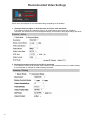
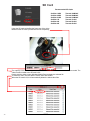
This IP camera supports DDNS (Dynamic DNS) service.
Select “Enabled” to enable the DDNS service.
For viewing the cameras over the internet while using a dynamic (rotating) IP address, there
are many services available online.
1. Enable the service
2. Key in the DynDNS server name, username, and password
3. Set up the IP update refresh rate
4. Click “Apply”
5. If it updates to often, the IP will be blocked by DynDNS
Channel Vision recommends you set it to update once per day (1,440 minutes)
21