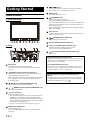
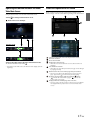
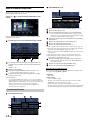
1
FOR CAR USE ONLY/NUR FÜR AUTOMOBIL GEBRAUCH/POUR APPLICATION AUTOMOBILE UNIQUEMENT/PARA USO EN AUTOMÓVILES/SOLO PER L’UTILIZZO IN AUTOMOBILE/ENDAST FÖR BILBRUK/ALLEEN VOOR GEBRUIK IN DE AUTO/ТОЛЬКО ДЛЯ ИСПОЛЬЗОВАНИЯ В АВТОМОБИЛЯХ/DO UŻYCIA TYLKO W SAMOCHODZIE EN DE 8-INCH ADVANCED NAVI STATION X801D-U FR 7-INCH ADVANCED NAVI STATION X701D/INE-W997D ES IT • OWNER’S MANUAL Please read before using this equipment. • ANVÄNDARHANDLEDNING Innan du använder utrustningen bör du läsa igenom denna användarhandledning. • BEDIENUNGSANLEITUNG Lesen Sie diese Bedienungsanleitung bitte vor Gebrauch des Gerätes. • GEBRUIKERSHANDLEIDING Lees deze aanwijzingen aandachtig alvorens dit toestel te gebruiken. • MODE D’EMPLOI Veuillez lire avant d’utiliser cet appareil. • РУКОВОДСТВО ПО ЭКСПЛУАТАЦИИ Прочтите настоящее руководство перед началом использования оборудования. • MANUAL DE OPERACIÓN Léalo antes de utilizar este equipo. • INSTRUKCJA OBSŁUGI Prosimy zapoznać się z tą instrukcją przed przystąpieniem do użytkowania urządzenia. SE NL RU • ISTRUZIONI PER L’USO Si prega di leggere prima di utilizzare il attrezzatura. PL ALPINE ELECTRONICS MARKETING, INC. 1-7, Yukigaya-Otsukamachi, Ota-ku, Tokyo 145-0067, JAPAN Phone: 03-5499-4531 ALPINE ELECTRONICS OF AMERICA, INC. 19145 Gramercy Place, Torrance, California 90501, U.S.A. Phone 1-800-ALPINE-1 (1-800-257-4631) ALPINE ELECTRONICS OF AUSTRALIA PTY. LTD. 161-165 Princes Highway, Hallam Victoria 3803, Australia Phone 03-8787-1200 ALPINE ELECTRONICS GmbH Wilhelm-Wagenfeld-Str. 1-3, 80807 München, Germany Phone 089-32 42 640 ALPINE ELECTRONICS OF U.K. LTD. Alpine House Fletchamstead Highway, Coventry CV4 9TW, U.K. www.alpine.co.uk ALPINE ELECTRONICS France S.A.R.L. 184 allée des Erables CS 52016 – Villepinte 95 945 Roissy CDG cedex FRANCE Phone : + 33(0)1 48 63 89 89 ALPINE ITALIA S.p.A. Viale Cristoforo Colombo 8, 20090 Trezzano sul Naviglio MI, Italy Phone +39 02 484781 ALPINE ELECTRONICS DE ESPAÑA, S.A. Portal de Gamarra 36, Pabellón, 32 01013 Vitoria (Alava)-APDO 133, Spain Phone 945-283588 68-29530Z15-A For X801D-U/X701D/INE-W997D For Optional DVE-5300X ENGLISH Contents Operating Instructions PRECAUTIONS IMPORTANT INFORMATION, PLEASE READ CAREFULLY BEFORE USING THIS PRODUCT. ........................................................ 7 WARNING Points to Observe for Safe Usage ........................ 7 WARNING ...................................................... 7 CAUTION ....................................................... 9 NOTICE .......................................................... 9 Features Favourite Function .............................................. 11 About Swiping the Touch Screen ...................... 11 Switching the Audio Sources Screen to a Dedicated Screen ............................................. 12 About Dual Screen .............................................. 13 Dual Screen Display Position ......................... 13 Getting Started Location of Controls ........................................... 14 Turning Power On or Off .................................. 15 Turning the System On ...................................... 15 Initial System Start-Up ....................................... 15 Adjusting the Volume ......................................... 15 Lowering Volume Quickly ................................. 15 Touch Screen Operation .................................... 16 Switching Sources ................................................ 16 Operating the Function Button on the Audio/ Video Main Screen .......................................... 17 About Basic Operation for List Screen ............. 17 About the Shortcut Setup Screen ...................... 18 Sound Setup Function ..................................... 18 Rear Seat Entertainment Function ................ 19 About the Menu Screen ...................................... 19 Edit Menu ......................................................... 20 About the Indicator Display .............................. 21 Opening screen Customisation ......................... 21 How to Input Characters and Numbers (Keypad) ........................................................... 22 Favourite Function Using the Favourite Function ............................ 23 Editing the Favourite Screen ............................. 23 Registering Items ............................................. 23 Changing Item Names .................................... 24 Changing Icons (only the Shortcut Dialing and Navigation icons) ......................................... 24 Changing the Layout ....................................... 25 Deleting Items .................................................. 25 Applying Alpine TuneIt App Adjusting the sound via the Smartphone ........ 26 Facebook Notification Function ....................... 26 Setup Setup Operation .................................................. 28 Wireless (Bluetooth) Setup Bluetooth Setup ................................................... 29 Displaying Bluetooth Information ................ 29 Registering the Bluetooth Device .................. 29 iPhone Auto Pairing Setting .......................... 30 Phone Setup ......................................................... 30 Setting the Passcode ........................................ 30 Changing the Character Code of the Phone Book ............................................................... 30 Selecting the Output Speaker ......................... 30 Setting the Microphone Select (X801D-U/INE-W997D only) ................... 30 General Setup Sounds Setup ........................................................ 31 Setting the Balance/Fader/Rear Speaker/ Subwoofer ..................................................... 31 Setting the Media Xpander (MX HD) .......... 32 Equalizer Presets .............................................. 33 Adjusting the Parametric Equalizer Curve (Dual HD EQ) .............................................. 33 Adjusting the Crossover Settings (X-OVER) ..................................................... 34 Adjusting the Time Correction (TCR) ......... 34 Setting Defeat ................................................... 34 Setting the Volume for Each Source ............. 35 Adjusting the Caller Level .............................. 35 Adjusting the Microphone Level ................... 35 3-EN Adjusting the Ring Tone Level ...................... 35 Volume Setting ................................................ 35 Auto Volume Setting ...................................... 35 Setting Audio Mute On/Off while Backing up ................................................................... 35 Default Sound Settings ................................... 35 About the Crossover ........................................... 36 About Time Correction ...................................... 36 Visual Setup ......................................................... 37 Selecting the Visual EQ Mode (Factory’s setting) ........................................ 37 Adjusting Brightness ....................................... 38 Adjusting Colour of Picture ........................... 38 Adjusting Tint of Picture ............................... 38 Adjusting Image Contrast .............................. 38 Adjusting Picture Quality .............................. 38 Saving and calling the adjusted picture quality ............................................................ 38 Screen Setup ......................................................... 38 Screen/Lighting Customise ............................ 38 Switching the Display Colour ........................ 39 Switching the Illumination Colour (X801D-U/INE-W997D only) ................... 39 Setting the Text Scroll ..................................... 39 Switching the Artwork Position .................... 39 General Setup ....................................................... 39 Setting the Menu Language ........................... 39 Format settings ................................................ 39 Setting Security code ....................................... 40 About X801D-U/INE-W997D ...................... 40 Setting Demo mode to Off/On ...................... 40 Car Setup .............................................................. 41 Setting the Vehicle type .................................. 41 Installation Setup ............................................. 41 Audio Setup Radio Setup .......................................................... 42 PI SEEK Setting ............................................... 42 Receiving RDS Regional (Local) Stations .... 42 Switching the Display Language of PTY (Programme Type) ...................................... 42 Setting PTY31 (Emergency Broadcast) Reception ...................................................... 42 Setting the TUNER (FM) Tone Quality (Tuner Condition) ....................................... 42 DAB Setting ......................................................... 43 Setting Alarm (Emergency Broadcast) Reception ...................................................... 43 Setting Announcement Reception ................ 43 Setting the FM Linking ON/OFF (Service Following) ...................................... 43 Setting the DAB Antenna ON/OFF .............. 43 4-EN AUX Setup ........................................................... 44 Setting the AUX Mode ................................... 44 Setting the Auxiliary (AUX) Name ............... 44 Setting Direct Touch Operation .................... 44 Switching the Visual Input Signal System ........................................................... 44 HDMI Setup ........................................................ 44 System Setup Camera Setup ....................................................... 45 Setting the Camera Input ............................... 45 Setting the Camera Signal Input ................... 45 Switching Video Patterns for Rear Camera & Front Camera ............................................... 45 Adjusting the Rear/Front Camera Guide ..... 46 Camera Interrupt Setting (Power OFF Mode) ..................................... 46 CAN-I/F Setup .................................................... 47 Setting the Default Vehicle Screen (X701D only) ................................................ 47 Setting the Climate Interrupt Time .............. 47 Setting the Parking Sensor Interrupt On/Off ........................................................... 47 Rear Seat Entertainment Setup ......................... 47 Remote Sensor Setting .................................... 47 Unit Setup ............................................................ 48 Setting the External AP ................................... 48 Setting the Additional AUX BOX ................. 48 Application Setup ................................................ 48 Radio/RDS Radio Basic Operation Listening to the Radio ........................................ 50 Presetting Stations Manually ............................. 50 Presetting Stations Automatically ..................... 50 Tuning to Preset Stations ................................... 50 Inputting Frequency Directly and Receiving the Radio Station .................................................... 51 RDS Operation Turning AF (Alternative Frequencies) On or Off ...................................................................... 51 Interruption Function ........................................ 51 Receiving Traffic Announcement ................. 52 News Programme Interruption ..................... 52 Receiving Traffic Information Manually ......... 52 Selecting the Receivable PTY ............................ 52 Displaying Radio Text ........................................ 52 DAB/DAB+/DMB Listening to DAB/DAB+/DMB ......................... 53 Presetting Service ................................................ 54 Tuning to Preset Service .................................... 54 Service Component/PTY Search Function ..... 54 Service Search Function ................................. 54 PTY Search Function ...................................... 54 Interruption Function ........................................ 55 Receiving Traffic Announcement ................. 55 News Programme Interruption ..................... 55 Inputting Channel Number Directly and Receiving the Broadcasts ................................ 55 Switching to Secondary Service Components ..................................................... 55 Displaying DAB Text .......................................... 56 About DAB/DAB+/DMB .................................. 56 USB Flash drive (Optional) Playback ................................................................ 57 Repeat Play ........................................................... 57 Random Play ........................................................ 58 Searching for a Desired Song ............................. 58 iPod/iPhone (Optional) CD/MP3/WMA/AAC/WAV Playback ................................................................ 66 Stopping Playback ............................................... 66 Repeat Play ........................................................... 66 MIX (Random Play) ........................................... 67 File/Folder Name Search (Concerning MP3/WMA/AAC/WAV) ....... 67 Selecting Folders (Concerning MP3/WMA/AAC/WAV) ....... 67 Info Mode Function ............................................ 67 DVD Playing a Disc ...................................................... 68 If a Menu Screen Appears .............................. 69 Numeric Keypad Input Operations .............. 69 Displaying the Top Menu Screen .................. 69 Displaying the Menu Screen .......................... 69 Playing Still Frames (Pausing) .......................... 69 Stopping Playback ............................................... 70 Fast-forwarding/Fast-reversing ........................ 70 Finding the Beginnings of Chapters/Tracks/ Files .................................................................... 70 Forward/Reverse frame-by-frame Playback .... 70 Playback ................................................................ 60 Repeat Playback ................................................... 70 Searching for a Music File .................................. 60 Quick Search Mode ......................................... 60 Full Search Mode ............................................. 61 Searching for a Desired Video File ................... 61 Searching by Title Number ................................ 71 Alphabet Search Function ................................. 61 Switching the Subtitles (Subtitle Language) .... 71 Repeat Play ........................................................... 62 Info Mode Function ............................................ 71 Random Play (Shuffle) ....................................... 62 Switching Display Modes ................................... 71 Switching Display Modes (During Video File Play Back) ....................... 62 HDMI Device (Optional) DVD Player Operation Inserting/Ejecting a Disc .................................... 63 Inserting the Disc ............................................ 63 Removing the Disc .......................................... 63 DVD Player SETUP ............................................ 63 System Setup .................................................... 63 DVD Contents Setup ...................................... 64 CD Contents Setup ......................................... 65 Audio Setup ...................................................... 65 Searching Directly by Chapter Number .......... 71 Switching the Angle ............................................ 71 Switching the Audio Tracks .............................. 71 HDMI Operation Bluetooth Operation Setup Before Using .............................................. 73 About Bluetooth .............................................. 73 About the Hands-free Phone ......................... 73 Before Using Bluetooth .................................. 73 Hands-free Phone Control Answering a Call ................................................. 74 Hanging up the Telephone ................................ 74 Call Waiting Function ........................................ 74 Calling ................................................................... 75 Calling by Favourite Function ....................... 75 5-EN Making a phone call using the Phone Menu ............................................................. 75 Using Voice Recognition function ................... 76 Using Siri .......................................................... 76 Voice Dial Function ........................................ 76 Operations During a Conversation .................. 77 Adjusting the Speech Volume ....................... 77 Changing the Voice Output ........................... 77 DTMF (Touch-Tone) Function .................... 77 Phone Book Function ......................................... 77 Synchronising the Phone Book ..................... 77 Adding the Phone Book ................................. 77 Deleting the Phone Book Entries .................. 78 Searching in the Phone Book ......................... 78 Bluetooth Audio Playback ................................................................ 79 Repeat Play ........................................................... 79 Random Play ........................................................ 79 Search Function ................................................... 79 Connecting a Bluetooth Device ........................ 80 Disconnecting the Bluetooth Connection ... 80 Changing the connecting Bluetooth Device ............................................................ 80 Auxiliary Device (Optional) Operating Auxiliary Devices (Optional) .......... 81 Operating an AUX, AUX DVD, GAME or USB Player .................................. 81 Operating an External DVD Player .............. 81 Operating an External DVD Changer .......... 82 Operating the Mobile Digital TV Receiver (DVB-T) ........................................................ 82 Operating a TV ................................................ 83 Camera Operation (Optional) Rear Camera Operation ..................................... 84 Displaying the Rear Camera Image from the Menu screen ................................................. 84 Displaying the rear view video while the car is in reverse ........................................................... 84 Switching the Image Pattern for the Rear Camera .......................................................... 84 Guide Display ON/OFF Setting .................... 84 Adjusting the Caution Display Location ...... 84 About the Rear Camera Guide .......................... 85 Front Camera Operation ................................... 86 Displaying the Front Camera image from the Menu screen. ................................................ 86 Switching the Image Pattern for the Front Camera .......................................................... 86 6-EN About the adjustment of guide display ON/OFF setting and adjustment of Caution display location .......................................................... 86 About Vehicle Interlock Function Vehicle Info mode (X701D only) ..................... 87 Function Screen Examples ................................. 87 About Remote Control Operation (X701D with DVE-5300X only) When Using the Remote Control ..................... 89 Battery Replacement ........................................... 89 Operating the DVD Player ................................ 90 Information Product Software Update ................................... 91 Cautions about Discs (X701D with DVE-5300X only) .................... 91 Discs Playable on This Unit (X701D with DVE-5300X only) .................... 92 About the Supported Formats ........................... 93 About MP3/WMA/AAC/FLAC .................... 93 About WAV (Disc) ......................................... 94 About DVDs .................................................... 95 List of Language Codes ...................................... 96 In Case of Difficulty ............................................ 97 If this Message Appears ...................................... 98 Specifications ..................................................... 100 END USER LICENSE AGREEMENT (HERE) ............................................................ 102 Operating Instructions PRECAUTIONS IMPORTANT INFORMATION, PLEASE READ CAREFULLY BEFORE USING THIS PRODUCT. This product is intended to safely provide turn-by-turn instructions to get you to a desired destination. Please read the following precautions to ensure that you use this navigation system correctly. • This product is not a substitute for your personal judgement. Any route suggestions made by this navigation system should never supersede any local traffic regulations or your personal judgement and/or knowledge of safe driving practises. Do not follow route suggestions if the navigation system instructs you to perform an unsafe or illegal manoeuvre, places you in an unsafe situation, or routes you into an area which you consider unsafe. • Glance at the screen only when necessary and safe to do so. If prolonged viewing of the screen is necessary, stop in a safe and legal manner and location. • Do not input destinations, change settings, or access any functions requiring a prolonged view of the monitor while you are driving. Stop in a safe and legal manner and location before attempting to access the system. • When using the navigation system to find/route to an emergency service, please contact the facility to validate and verify availability, prior to driving to it. Not all locations of emergency service providers such as police and fire stations, hospitals, and clinics are contained in the database. Please use your own judgement and your ability to ask for directions in these situations. • The map database contained within the media (SD memory card) in which it is stored is the most recent map data available at the time of production. Because of changes in streets and neighbourhoods, there may be situations where the navigation system may not be able to route you to your desired destination. In these cases, use your own personal judgement. • The map database is designed to provide you with route suggestions, it does not take account of the relative safety of a suggested route, or of factors which may affect the time required to reach your destination. The system does not reflect road closures or construction, road characteristics (i.e. type of road surface, slope or grade, weight or height restrictions, etc.), traffic congestion, weather conditions, or any other factors which may affect the safety or timing of your driving experience. Use your personal judgement if the navigation system is unable to provide you with an alternate route. • There may be situations where the navigation system may display the vehicle’s location erroneously. Use your own driving judgement in this situation, taking into account current driving conditions. Please be aware that in this situation, the navigation system should correct the vehicle’s position automatically; however, there may be times where you may have to correct the position yourself. If this is the case, stop in a safe and legal manner and location before attempting operation. • Make certain that the volume level of the unit is set to a level which still allows you to hear outside traffic and emergency vehicles. Driving while unable to hear outside sounds could cause an accident. • Please make certain that any other person who intends on using this navigation system reads these precautions and the following instructions carefully. If there is anything in the manual about the operation of the navigation system which you are uncertain about, please contact your local Alpine authorised navigation dealer before using the navigation system. WARNING Points to Observe for Safe Usage • Read this manual carefully before using this disc and the system components. They contain instructions on how to use this product in a safe and effective manner. Alpine cannot be responsible for problems resulting from failure to observe the instructions in this manual. • This manual uses various pictorial displays to show you how to use this product safely and to alert you to potential dangers resulting from improper connections and operation. Following are the meanings of these pictorial displays. It is important to fully understand the meanings of these pictorial displays in order to use this manual and the system properly. WARNING • Operation of the system while driving is dangerous. Users should stop vehicle before operating the software. • Road conditions and regulations take precedence over information contained on the map display: observe actual traffic restrictions and circumstances while driving. • This software is designed for use exclusively in the unit. It cannot and may not be used in conjunction with other hardware. WARNING This symbol means important instructions. Failure to heed them can result in serious injury or death. 7-EN INSTALL THE PRODUCT CORRECTLY SO THAT THE DRIVER CANNOT WATCH TV/VIDEO UNLESS THE VEHICLE IS STOPPED AND THE EMERGENCY BRAKE IS APPLIED. It is dangerous for the driver to watch TV/Video while driving a vehicle. Installing this product incorrectly enables the driver to watch TV/Video while driving. This may cause a distraction, preventing the driver from looking ahead, thus causing an accident. The driver or other people could be severely injured. USE THIS PRODUCT FOR MOBILE 12V APPLICATIONS. Use for other than its designed application may result in fire, electric shock or other injury. MAKE THE CORRECT CONNECTIONS. Failure to make the proper connections may result in fire or product damage. DO NOT WATCH VIDEO WHILE DRIVING. BEFORE WIRING, DISCONNECT THE CABLE FROM THE NEGATIVE BATTERY TERMINAL. Watching the video may distract the driver from looking ahead of the vehicle and cause an accident. Failure to do so may result in electric shock or injury due to electrical shorts. DO NOT OPERATE ANY FUNCTION THAT TAKES YOUR ATTENTION AWAY FROM SAFELY DRIVING YOUR VEHICLE. DO NOT ALLOW CABLES TO BECOME ENTANGLED IN SURROUNDING OBJECTS. Any function that requires your prolonged attention should only be performed after coming to a complete stop. Always stop the vehicle in a safe location before performing these functions. Failure to do so may result in an accident. Arrange wiring and cables in compliance with the manual to prevent obstructions when driving. Cables or wiring that obstruct or hang up on places such as the steering wheel, gear lever, brake pedals, etc. can be extremely hazardous. DO NOT FOLLOW ROUTE SUGGESTIONS IF THE NAVIGATION SYSTEM INSTRUCTS YOU TO PERFORM AN UNSAFE OR ILLEGAL MANEUVER, OR PLACES YOU IN AN UNSAFE SITUATION OR AREA. DO NOT SPLICE INTO ELECTRICAL CABLES. This product is not a substitute for your personal judgement. Any route suggestions by this system should never supersede any local traffic regulations or your personal judgement or knowledge of safe driving practice. KEEP THE VOLUME AT A LEVEL WHERE YOU CAN STILL HEAR OUTSIDE NOISES WHILE DRIVING. Excessive volume levels that obscure sounds such as emergency vehicle sirens or road warning signals (train crossings, etc.) can be dangerous and may result in an accident. LISTENING AT LOUD VOLUME LEVELS IN A CAR MAY ALSO CAUSE HEARING DAMAGE. Never cut away cable insulation to supply power to other equipment. Doing so will exceed the current carrying capacity of the wire and result in fire or electric shock. DO NOT DAMAGE PIPE OR WIRING WHEN DRILLING HOLES. When drilling holes in the chassis for installation, take precautions so as not to contact, damage or obstruct pipes, fuel lines, tanks or electrical wiring. Failure to take such precautions may result in fire. DO NOT USE BOLTS OR NUTS IN THE BRAKE OR STEERING SYSTEMS TO MAKE GROUND CONNECTIONS. Bolts or nuts used for the brake or steering systems (or any other safety-related system), or tanks should NEVER be used for installations or ground connections. Using such parts could disable control of the vehicle and cause fire etc. MINIMIZE DISPLAY VIEWING WHILE DRIVING. Viewing the display may distract the driver from looking ahead of the vehicle and cause an accident. DO NOT INSTALL IN LOCATIONS WHICH MIGHT HINDER VEHICLE OPERATION, SUCH AS THE STEERING WHEEL OR SHIFT LEVER. DO NOT DISASSEMBLE OR ALTER. Doing so may obstruct forward vision or hamper movement etc. and results in serious accident. Doing so may result in an accident, fire or electric shock. USE ONLY IN CARS WITH A 12 VOLT NEGATIVE GROUND. (Check with your dealer if you are not sure.) Failure to do so may result in fire, etc. KEEP SMALL OBJECTS SUCH AS SCREWS OUT OF THE REACH OF CHILDREN. Swallowing them may result in serious injury. If swallowed, consult a physician immediately. USE THE CORRECT AMPERE RATING WHEN REPLACING FUSES. Failure to do so may result in fire or electric shock. DO NOT BLOCK VENTS OR RADIATOR PANELS. Doing so may cause heat to build up inside and may result in fire. 8-EN CAUTION This symbol means important instructions. Failure to heed them can result in injury or material property damage. NOTICE Product Cleaning Use a soft dry cloth for periodic cleaning of the product. For more severe stains, please dampen the cloth with water only. Anything else has the chance of dissolving the paint or damaging the plastic. HALT USE IMMEDIATELY IF A PROBLEM APPEARS. Temperature Failure to do so may cause personal injury or damage to the product. Return it to your authorized Alpine dealer or the nearest Alpine Service Center for repairing. Be sure the temperature inside the vehicle is between +45°C (+113°F) and 0°C (+32°F) before turning your unit on. Maintenance HAVE THE WIRING AND INSTALLATION DONE BY EXPERTS. The wiring and installation of this unit requires special technical skill and experience. To ensure safety, always contact the dealer where you purchased this product to have the work done. If you have problems, do not attempt to repair the unit yourself. Return it to your Alpine dealer or the nearest Alpine Service Station for servicing. Protecting the USB connector USE SPECIFIED ACCESSORY PARTS AND INSTALL THEM SECURELY. Be sure to use only the specified accessory parts. Use of other than designated parts may damage this unit internally or may not securely install the unit in place. This may cause parts to become loose resulting in hazards or product failure. ARRANGE THE WIRING SO IT IS NOT CRIMPED OR PINCHED BY A SHARP METAL EDGE. Route the cables and wiring away from moving parts (like the seat rails) or sharp or pointed edges. This will prevent crimping and damage to the wiring. If wiring passes through a hole in metal, use a rubber grommet to prevent the wire’s insulation from being cut by the metal edge of the hole. • Only an iPod/iPhone or USB flash drive can be connected to the USB connector on this unit. Correct performance using other USB products cannot be guaranteed. • If the USB connector is used, be sure to use only the supplied connector cable with the unit. A USB hub is not supported. • Depending on the connected USB flash drive, the unit may not function or some functions may not be performed. • The audio file format that can be played back on the unit is MP3/WMA/AAC/FLAC. • Artist/song name, etc., can be displayed. Certain, special characters may not be correctly displayed. DO NOT INSTALL IN LOCATIONS WITH HIGH MOISTURE OR DUST. Avoid installing the unit in locations with high incidence of moisture or dust. Moisture or dust that penetrates into this unit may result in product failure. 9-EN Commonness CAUTION Alpine accepts no responsibility for lost data, etc., even if data, etc., is lost while using this product. On Handling USB Flash drive • This unit can control a memory storage device that supports the USB Mass Storage Class (MSC) protocol. Playable audio file formats are MP3, WMA, AAC and FLAC. • USB Flash drive function is not guaranteed. Use USB flash drive according to the terms of agreement. Read the USB flash drive Owner’s Manual thoroughly. • Avoid usage or storage in the following locations: Anywhere in the car exposed to direct sunlight or high temperatures. Anywhere the possibility of high humidity or corrosive substances are present. • Fix the USB flash drive in a location where driver operation will not be hindered. • USB Flash drive may not function correctly at high or low temperature. • Use only certified USB flash drive. Note that even certified USB flash drive, may not function correctly depending on its type or state. • Depending on the settings of the USB flash drive type, memory state or encoding software, the unit may not play back or display properly. • USB Flash drive may take time to start playback. If there is a particular file other than audio in the USB flash drive, it may take considerable time before the file is played back or searched. • The unit can play back “mp3,” “wma” or “m4a” file extensions. • Do not add the above extensions to a file other than audio data. This non-audio data will not be recognised. The resulting playback may contain noise that can damage speakers and/or amplifiers. • It is recommended to back up important data on a personal computer. • Do not remove the USB device while playback is in progress. Change SOURCE to something other than USB, then remove the USB device to prevent possible damage to its memory. 10-EN • Windows Media, and the Windows logo are trademarks, or registered trademarks of Microsoft Corporation in the United States and/or other countries. • iPhone, iPod, iPod classic, iPod nano and iPod touch are trademarks of Apple Inc., registered in the U.S. and other countries. • “Made for iPod,” and “Made for iPhone,” mean that an electronic accessory has been designed to connect specifically to iPod, or iPhone, respectively, and has been certified by the developer to meet Apple performance standards. Apple is not responsible for the operation of this device or its compliance with safety and regulatory standards. Please note that the use of this accessory with iPod, or iPhone may affect wireless performance. • Android is a trademark of Google Inc. • The Bluetooth® word mark and logos are registered trademarks owned by the Bluetooth SIG, Inc. and any use of such marks by Alpine Electronics, Inc. is under license. • The terms HDMI and HDMI High-Definition Multimedia Interface, and the HDMI Logo are trademarks or registered trademarks of HDMI Licensing, LLC in the United States and other countries. • MPEG Layer-3 audio coding technology licensed from Fraunhofer IIS and Thomson. Supply of this product only conveys a license for private,non-commercial use and does not convey a license nor imply any right to use this product in any commercial (i.e. revenuegeneration) real time broadcasting (terrestrial, satellite, cable and/ or any other media), broadcasting/streaming via internet, intranets and/or other networks or in other electronic content distribution systems, such as pay-audio or audio-on-demand applications. An independent license for such use is required. For details, please visit http://www.mp3licensing.com • ©1987-2014 HERE. All rights reserved. X701D with DVE-5300X • This item incorporates copy protection technology that is protected by U.S. patents and other intellectual property rights of Rovi Corporation. Reverse engineering and disassembly are prohibited. • Manufactured under license from Dolby Laboratories. Dolby and the double-D symbol are trademarks of Dolby Laboratories. • Windows Media and the Windows logo are trademarks, or registered trademarks of Microsoft Corporation in the United States and/or other countries. • For DTS patents, see http://patents.dts.com. Manufactured under license from DTS Licensing Limited. DTS, the Symbol, & DTS and the Symbol together are registered trademarks, and DTS Digital Surround is a trademark of DTS, Inc. ©DTS, Inc. All Rights Reserved. • is a trademark of DVD Format/Logo Licensing Corporation. Features The screen design used in the Owner’s Manual may differ from the actual screen. Favourite Function Frequently used functions such as the Audio source or Navigation are easily recalled. Register them to the Favourite screen. For details, see “Favourite Function” (page 23). Favourite screen example • Frequently used functions and useful functions can be customised for your convenience. • You can register up to 54 functions. • You cannot register a function more than once. About Swiping the Touch Screen You can change a screen or a page by swiping the touch screen vertically or horizontally with your finger. For details, see “Touch Screen Operation” (page 16). Swipe the display with your finger lightly. 11-EN Switching the Audio Sources Screen to a Dedicated Screen You can switch the Audio Sources screen to a dedicated screen by touching the icon on one of the four edges of the screen, or by swiping vertically or horizontally. For details on how to swipe the screen, see “Touch Screen Operation” (page 16). Shortcut Setup Screen (page 18) Dual Screen (page 13) You can set the Sound Setup or Rear Seat Entertainment System. You can switch between the displayed screens on the Dual Screen. <Audio Sources Screen> (USB Audio) Preset button or Quick Search mode Screen *1 Menu Screen *2 (page 19) You can make settings on the Menu Screen. *1 The Search mode differs depending on the audio source. For details, see the operating instructions of the audio source. *2 The screen also switches by pressing the Menu button. 12-EN About Dual Screen Dual Screen allows you to display the Navigation and Audio/Visual screens simultaneously. Audio full Screen Touch [ ], or swipe to the right. Touch [ ], or swipe to the left. Touch [ ], or swipe to the right. Touch [ the left. Dual Screen ], or swipe to Navigation full Screen * Touch [ ], or swipe to the left to switch to the Navigation menu screen. For details of navigation operations, refer to “Navigation System OM” in the CD-ROM. Dual Screen Display Position You can switch the left/right positions of the Audio/Visual screen and Navigation screen. Each time you touch , the positions of Audio/Visual screen and Navigation screen switch. • When is not displayed, touch [ ]. 13-EN Getting Started / button Press to seek down/up a station in radio mode or down/up a track, chapter, etc., in other audio/visual sources. RESET switch Location of Controls The system of this unit is reset. For X801D-U/INE-W997D Recalls the navigation map screen. Press again to switch to Navigation menu screen. Press and hold this button for at least 2 seconds to change to Go Home route screen. (If Home is not set yet, it will change to the Home setting screen.) For details of navigation operations, refer to “Navigation System OM” in the CD-ROM. (NAVI/NAV) button Remote Sensor Point the remote control transmitter towards the remote sensor within a range of 2 meters. (CAMERA) button (X701D only) Use to display the camera image. Disc Slot (X701D with DVE-5300X only) Rotary encoder/MUTE button (X701D only) For X701D Adjust the volume by turning to the left or right. Press to activate /deactivate MUTE mode. (Eject) button (X701D with DVE-5300X only) Ejects a disc. Optional Remote Control Interface Box This unit is operable using the vehicle’s secondary radio controls. An Alpine Remote Control Interface Box (optional) is required. For details, contact your Alpine dealer. Microphone Controllable with Remote Control Used for Hands-free or Voice Control modes. For X701D, the microphone is built into the left side of the monitor. This unit can be controlled with an optional Alpine remote control. For details, consult your Alpine dealer. Point the optional remote control transmitter at the remote control sensor. (AUDIO)/ (Voice Recognition mode) button Displays the Audio/Visual screen. If the Audio/Visual screen is already displayed, changes the source. When a hands-free phone with Voice Recognition is connected, press and hold for at least 2 seconds to switch to the Voice Recognition mode. (MUTE) button (X801D-U/INE-W997D only) Press to activate/deactivate the mute mode. / (DOWN/UP) button (X801D-U/INE-W997D only) Press to adjust the volume. (Favourite) button Recalls the Favourite screen. • Press and hold this button for at least 2 seconds to switch to the Climate screen. (displayed only on the X801D-U/INEW997D when connected to the optional CAN Interface box .)* • Press and hold this button for at least 2 seconds to switch to Vehicle info mode. (X701D only)* * For details, see “About Vehicle Interlock Function” (page 87). MENU/ (Power Off) button Recalls the Menu screen. Press and hold this button for at least 5 seconds to turn the power off. 14-EN About the button descriptions used in this Owner’s Manual The buttons found on the face of the unit are expressed in bold (e.g. MENU). The buttons found on the touch-screen display are shown in bold within brackets, [ ] (e.g. [ ]). Turning Power On or Off Initial System Start-Up Some of this unit’s functions cannot be performed while the vehicle is in motion. Be sure to stop your vehicle in a safe location and apply the parking brake, before attempting these operations. Be sure to press the RESET switch when using the unit for the first time, after changing the car battery, etc. 1 Turn the ignition key to the ACC or ON position. The system turns on. • When turned on, the system displays the last screen that was displayed before the ignition key was turned off. For example, if the unit is in radio mode when ignition is turned off, it will remain in radio mode when ignition is turned back on. 2 1 2 Turn off the unit power. Press the RESET switch with a ballpoint pen or similar pointed object. For X801D-U/INE-W997D Press and hold the MENU/ (Power Off) button for at least 5 seconds to turn the power off. • The unit can be turned on by pressing any button. • The unit is a precision device. Careful handling of the unit should provide you with years of trouble-free operation. RESET switch For X701D Turning the System On With the Alpine system, when the ignition key is turned to ACC or ON, the opening screen will be automatically displayed. When the system is used for the first time, the language selection menu is displayed. Swipe the Language list screen vertically, then touch your choice from the list of 23 languages. RESET switch Adjusting the Volume For X801D-U/INE-W997D Adjust the volume by pressing or . Volume decreases/increases continuously by pressing and holding or . Volume: 0 - 35 For X701D Rotate the Rotary encoder until the desired sound level is obtained. Volume: 0 – 35 • Some of this unit’s functions cannot be performed while the vehicle is in motion. Be sure to stop your vehicle in a safe location and apply the parking brake before attempting these operations. Lowering Volume Quickly Audio Mute function instantly lowers the volume level to 0. For X801D-U/INE-W997D 1 Press the (MUTE) button to activate the MUTE mode. The audio level will be 0. 2 Pressing the (MUTE) button again will bring the audio back to its previous level. For X701D 1 Press the Rotary encoder to activate MUTE mode. The audio level will be 0. 2 Pressing the Rotary encoder again will bring the audio back to its previous level. 15-EN Touch Screen Operation Switching Sources You can operate the system by using the touch panel on the screen. Press the • Be sure to touch the onscreen button lightly with the pad of your finger to avoid scratching the display. Switching sources using the Touch operation During audio/visual playback, press the (AUDIO) button repeatedly to switch to the desired source. Touch a button or list item on the screen lightly. (AUDIO) button to change the source. Radio DAB USB/iPod*1 1 Radio Bluetooth Audio* (AUDIO) button HDMI*1, 2 AUX*2, 3 *1 When no USB flash drive/iPod/HDMI device/Smartphone/Bluetooth compatible device is connected, this option is not available. *2 The name set for “HDMI Setup (page 44)/AUX Setup” is displayed. *3 When AUX is set to “Off,” this option is not available. (page 44) Switching Sources from the Menu screen 1 Press the MENU button. The menu screen is displayed. • You can also display the menu screen by touching [ ] on the lower part of the Audio source screen or by swiping upward. • If you touch a button and there is no reaction, remove your finger. • Onscreen buttons that cannot be operated are dimmed. The Audio source selecting area Swipe operation Move your finger lightly with a swipe. 2 Drag & Drop operation Touch and hold the desired item, then drag it to its new location by moving your finger, then release your finger to place the item. • It is not possible to narrow the screen with two fingers (pinch in) or spread the screen (pinch out). 16-EN Touch your desired source in the Audio source selecting area. • In the menu screen, you can change the Audio source directly or change the order in which sources change. For details, see “About the Menu Screen” (page 19). Operating the Function Button on the Audio/ Video Main Screen Using the Function button on the Audio/Visual main screen. Touch [ About Basic Operation for List Screen Basic operations on the Setup list screen and the Search list screen. How to display on the list screen differs depending on the selected item. ] to change to the Function mode. Radio main screen example Function mode Swipe to the right or left to change to the Function mode. To close the Function mode, touch [ ]. • Depending on the Audio source, the Function mode displays from the beginning. Switches to the menu screen or the previous screen. Item select button Closes the window. Displays the next list page. • When the next selection item does not exist, the list item is not displayed. Lists items for selection • When there are more than five list items, the page can be changed by swiping vertically. Returns to the list screen of the page that you touched. • The list screens that can be displayed are up to the 2 previous pages. If you touch [ ], you can recall your desired page. Changes the page of the Item select button • “ ” indicates the total number of pages, “ location of the current page. above. ” indicates the Displays when the next list page does not exist. • Touch or swipe to the left to return to the previous screen that has not displayed the list yet (the menu screen or the Audio main screen). 17-EN About the Shortcut Setup Screen BASS ENGINE SQ mode Displaying the Sound Setup screen, or the Shortcut Setup screen of the Rear Seat Entertainment System screen. Touch [ screen. ] or swipe downward in the Audio source Button for changing the BASS ENGINE SQ mode screen Balance/Fader Image area*1 Rear Seat Entertainment Function screen switch button The Sound Setup screen or the Rear Seat Entertainment System Setup Screen is displayed. Sound Setup screen (Tone Adjustment mode) example • When Setting the Rear Seat Entertainment is “Off,” you cannot change the screen. For details on Rear Seat Entertainment setting, see “Rear Seat Entertainment Setup” (page 47). Buttons for switching between Front/Rear when adjusting Bass/Treble*2 Buttons for adjusting Bass Level/Treble Level*3, 4 Buttons for adjusting Media Xpander *1, 3 Buttons for adjusting Subwoofer Level *1, 3, 5 *1 You can perform a more detailed set up in “Sounds Setup” (page 31). *2 You cannot switch when Front/Rear Sync in “Adjusting the Parametric Equalizer Curve (Dual HD EQ)” (page 33) is “On.” *3 When you switch to the BASS ENGINE SQ mode, the value you have set is ignored. *4 When the Defeat setting is “On,” you cannot perform the set up. *5 If the Subwoofer setting is “Off,” the setting cannot be changed. See “Turning Subwoofer ON/OFF” (page 32). Button for changing the Tone Adjustment mode screen You can adjust the attention tone (Ding) before the voice navigation starts and Navi voice interrupt volume (Navi Guide). Volume: 0 - 35 Button for Display Off * Displays the registered Bluetooth Device List screen. • See “Registering the Bluetooth Device” (page 29). Touch this or swipe upward to change to the currently playing source screen. * Display Off mode - To cancel Display Off mode, touch the screen or press any button. - Display Off mode is canceled when the power or ACC is turned off. - When the gear lever is shifted to the reverse (R) position and the rear camera is connected, the rear camera image is displayed. - When a call is received on a Bluetooth-connected phone, the incoming call screen is displayed. Sound Setup Function Tone Adjustment mode 18-EN • If changing to the Tone Adjustment mode, BASS ENGINE SQ mode will be disabled. Buttons for adjusting the BASS ENGINE Level*4 Buttons for selecting the BASS ENGINE type *4 Adjusting Bass Level/Treble Level Bass Level and Treble Level can be set for each front seat and for each rear seat by touching [Front] or [Rear]. Setting item: Bass / Treble Setting contents: -14 to +14 (Initial setting: 0) • When the Sound Setup of the Shortcut Setup is selected to “BASS ENGINE SQ,” you cannot perform the set up. • Adjustment cannot be performed when Defeat is set to “On.” • The Bass adjusted setting value is interlinked with Band2 of Dual HD EQ, and the Treble adjusted setting value is interlinked with Band8. Setting the BASS ENGINE SQ Setting the BASS ENGINE Type Creating the ideal Bass impact for your musical taste using BASS ENGINE SQ. Setting contents: Standard (Initial setting) / Punch / Rich / Mid Bass / Low Bass Standard: Punch: Rich: Mid-Bass: Low-Bass: Mild low-end boost with mid-range focus for frontcentre staging. Mid-bass punched up with mid-range impact. Accented highs and mid-bass giving outstanding balance for all types of music. Strong high frequency emphasis with mid-bass boost for more low-end attack. Strong, low-bass boost with extended highs for a very dynamic sound. Adjusting the BASS ENGINE Level You can adjust the BASS ENGINE Level. Setting item: BASS ENGINE Level Setting contents: 0 to 6 (Initial setting: 3) • The BASS ENGINE Level 0 of the BASS ENGINE SQ is common to all the types. About setup when the external power amplifier is connected In order to optimise the BASS ENGINE SQ mode, we recommend the following procedure to set up the power amplifier. Use your favourite music to make the following amplifier adjustment. 1) 2) Set GAIN of the power amplifier to “MIN.” Set the Crossover Mode Sector switch to “OFF.” • If the switch has no “OFF” position, set as near as possible to full range. 3) 4) Set the BASS ENGINE Level to “03.” Play a song of the genre you frequently listen to, and adjust GAIN of the power amplifier. Rear Seat Entertainment Function Button for changing to the Sound Setup screen. Visual source selection area that is displayed on the Rear monitor.*1, 2 Touch the source icon displayed on the Rear monitor. Auto: The image and sound of the same visual source as the unit are output. Off: Stops output to the Rear monitor. Illumination Colour button*3 The colour coordination select button of the Rear monitor: White/Blue/Green/Amber/Red/Purple/Skyblue/Off (This function is depended on Over Head Monitor) Remote Sensor You can set whether the sensor on Rear monitor receives remote control operation, or the unit receives it. *1 The visual source that can be output to the Rear monitor is “HDMI/ DVD,” “iPod Video,” and “AUX.” When the unit plays back the visual source, you can only select the same visual source as the unit. *2 When selecting AUX and iPod video source selection, the “Additional AUX BOX” setup (page 48) is set to “On” and an optional external AUX distribution box is required. *3 When the Illumination Colour in “Setting the Rear Seat Entertainment System” (page 47) is set to “Off,” the Illumination Colour button is not displayed. • If the same visual source is being output to both the unit and the Rear monitor when an incoming/outgoing call is made, the visual/audio output to the Rear monitor is interrupted temporarily depending on the source. If different visual sources are being output to the unit and the Rear monitor, visual/audio output to the Rear monitor continues without interrupting playback. About the Menu Screen In the menu screen, you can select the audio source and perform various setups or operations on the unit. Press the MENU button. The menu screen is displayed. • You can also display the menu screen by touching [ ] on the lower part of the Audio source screen or by swiping upward. The Rear Seat Entertainment function independently routes different sources to the front and the rear side of the car. For example, while listening to the radio or other audio sources in the front, HDMI can be enjoyed at the rear with optional rear monitors and headphones. Rear Seat Entertainment System Setup screen The screen changes to the menu screen. 19-EN Menu screen example Edit Menu In the Edit Menu screen, you can change the audio source order or set the display/hide settings. 1 Touch the desired source icon in the Menu screen for at least 2 seconds. A checkbox ( or ) is displayed on the upper left area of the source icon and switches to the edit mode. Displays the currently playing audio source. Touch or swipe downward to return to the Audio source screen. Displays the total number of the audio sources that can be selected. Also displays the current position, counting from the leftmost audio source. Audio source select area • The source icon displayed in the Edit Menu screen is displayed only when usable setup and conditions of each Audio source are fulfilled. For details on setup and conditions of each audio source, see “Switching Sources” (page 16). Touch your desired source icon to change the audio source. • Swiping to the right or left in the Audio source select area, you can change one audio source at a time. Moreover, swiping to the right or left outside the Audio source select area (upper and lower sides), you can change pages of the Audio source select area. • The source icon displayed in the Audio source select area is the one checked on the Edit menu screen. For details on how to display/ hide the source icon, see “Edit Menu” (page 20). Changing the order of Audio source Drag and drop the source icon to the desired location. Hiding/Displaying Audio source Place a check in the checkbox ( ) to display the Audio source icon. Uncheck the checkbox ( ) to hide it. • You cannot hide the icon of a source that is currently playing. Displays Preset No, and information of the Search mode, etc., located in the middle of the Audio source select area. • Touch the desired preset number or the Search mode to change the audio source directly. • The displayed information differs depending on the audio source. Some sources are not displayed. Notification List button*1 Use to display the Facebook Notification List on the connected smartphone via this unit. (page 27) Camera button*2 Displays camera images. (page 84) Setup button Displays the Setup screen. (page 28) Vehicle Info button (X701D only) Displays the Vehicle Info mode screen. (page 87) Phone button*3 Displays the Phone menu screen. (page 73) *1 Displays when TuneIt is set to “USB (iPhone)” or “Bluetooth (Android),” and when a smartphone with TuneIt App installed is connected. (page 26) *2 Displays when the Camera Select is set to “Front,” “Rear,” or “Other.” (page 45) *3 Displays when the Bluetooth setting is set to “On.” (page 29) 20-EN 2 Touch [Done]. The editing content is confirmed, and returns to the menu screen. • Editing here is reflected in the order of (AUDIO) button touching and change of the Audio source. (page 16) About the Indicator Display Opening screen Customisation The Indicator Bar at the bottom of the screen displays various types of information, like the current time. You can set a BMP image that is stored on a USB flash drive as the opening screen. This setting requires the following image format, folder name and file name. Usable file format: - BMP image - Image size: 800 × 480 pixels (RGB 24 bit or less/number of colour bit: 24, 8, 1 bit) - Compression format: non-compressed - Folder name*1: OPENINGFILE - File name*2: openingfile.bmp 1 Connect the USB flash drive to the USB extension cable. A message confirming the opening screen change is displayed. 2 : Bluetooth connection to audio device 3 : Bluetooth connection to Hands Free Phone Blinks while reconnecting. Indicates the battery level of the connected Bluetooth device*. Battery Level Level 3 Level 2 Level 1 No Battery Icon This may not be displayed depending on the connected Bluetooth device. Whenever one battery level decreases, the alarm sounds. Indicates the signal strength level of the connected Bluetooth compatible device. Displayed when Bluetooth setting is ON. 0 1 2 3 No Service Touch [OK]. An update indicator “ (Loading)” is displayed, and update for the opening screen starts. Lights up when connected to a Bluetooth compatible device. (Does not display when connection is set to OFF.) After the update is complete, the following message is displayed.*3 “Customisation succeeded. Please remove USB memory and press ”OK.” 4 After removing the USB flash drive, touch [OK]. The opening screen setting is complete. *1 Be sure to save the folder to the first layer of the USB flash drive. *2 Only one BMP image can be set as the opening screen. *3 If “Customisation failed,” is displayed, touch [OK] and then check that the folder name, file name and file format are correct. • Do not perform the following actions during the update. - Do not turn off the ACC to the car. - Do not unplug the USB flash drive. - Do not turn off or operate the unit. • To return the opening screen to its original image, you must Clear All Settings. Be careful of this operation, as your other settings are also initialised. For details, see “Initializing the System” (page 40). The clock display You can switch between the 12 hour display and 24 hour display options. For details of the clock display settings, refer to “Navigation System OM” in the CD-ROM. BLUETOOTH devices Name 21-EN How to Input Characters and Numbers (Keypad) The displayed screens and procedures may vary slightly depending on the function used, but the basic input method is the same. Input screen area. Cursor position alteration switch Cancel Keypad mode finishes. (Delete) Returns to the previous character and erases it. Touching here for more than 2 seconds will erase all input characters. Input number is confirmed. Character keypad Space Special character selector switch The Alphanumeric/Special characters/Symbols selection popup is displayed. Touch the desired character type. 22-EN Favourite Function Editing the Favourite Screen 1 Touch [ ] (Edit). A checkbox is displayed on the upper left area of the registration icon and it changes to Edit mode. Using the Favourite Function This unit enables you to recall functions easily by registering frequently used items such as the Audio source, the navigation search function, etc. to the Favourite screen. You can recall any of these items easily. 1 Press the (Favourite) button. The Favourite screen is displayed. Favourite screen example Setting item: Item registration / Item name change / Icon change / Layout change / Item deletion 2 3 4 Changes to the Edit screen used for registering items or changing names. Favourite registration item Swipe to the left and right to change the pages. You can add up to 6 pages. Indicates the location of the currently displayed Favourite screen. Swipe to the left and right to change the pages. You can add up to 6 pages. 2 After editing is complete, touch [ ]. After the caption for the confirmation is displayed, touch [OK]. Editing is complete and the screen switches to the Favourite screen. • If you touch [ ] (Cancel) while editing, the screen switches to the previous Favourite Edit screen. Registering Items 1 Touch [ ] (Add). The items to be added (categories) are displayed. 2 Touch the desired item to be added (category). 3 Choose the desired item to be added. Touch your desired Favourite registered item. The desired item is displayed. • When making a phone call by choosing shortcut dialing, after the message of confirmation of outgoing phone calls is displayed, touch [Call]. For details, see “Calling by Favourite Function” (page 75). • You can add up to 54 items. • You cannot register an item more than once. 23-EN Audio Changing Item Names [Radio]*1 / [DAB]*2 / [USB/iPod] / [HDMI] / [AUX] / [Bluetooth Audio] *1 You can choose the frequency from Preset 1 - 12, registered into each FM1/FM2/MW/LW band of Radio. *2 You can choose a channel registered to Presets 1 - 18. • You can also register directly by touching [ screen. 1 Touch the text area of the registered item. ] in the Audio source The Input User Name screen (Keypad) is displayed. 2 However, if it is already registered, [ ] is not displayed. Navigation [Specific Place]: You can display places registered in Favourite and set your destination. [Quick Place search]: Displays the address search keypad. [Help Nearby]: Displays the nearby search screen. [POI category]: Displays the selected POI category list. Input the name and touch [OK]. • For details on how to input characters using the keypad, see “How to Input Characters and Numbers (Keypad)” (page 22). Changing Icons (only the Shortcut Dialing and Navigation icons) You can change the icons of Shortcut Dialing and Navigation category. The following example explains how to change the Shortcut Dialing icon. Perform the same procedure to change the Navigation category icon. 1 Touch the icon that you want to change. • For details on navigation operations, refer to “Navigation System OM” in the CD-ROM. Phone (Shortcut Dialing)*3 You can register the user’s shortcut dialing stored in the Phone Book. • If multiple phone numbers are stored, select a number you want to register. • You can register directly by touching [ ] of the Contacts list. (page 73) • You can change the icon you registered. (page 24) *3 You can only select Phone when a mobile phone is connected. For details on how to register a mobile phone and downloading Phone Book, see “Bluetooth Operation” (page 73). The icon list is displayed. 2 Touch the icon you want to change from the icon list. The icon is changed to the selected icon. 24-EN Changing the Layout Drag and drop the item to the desired location. The item location is changed. • When you move to other pages, switch pages, or when you make a new page and move to another, drag to the end of the screen, and lift your finger after the page changes. Deleting Items When deleting a selected item 1 Touch the checkbox at the left of the item you want to delete and place a check ( ) in it. 2 Touch [ ] (Delete). The selected item will be deleted. When deleting all items Touch [ ] (Delete All). All items are deleted. 25-EN Applying Alpine TuneIt App This unit’s sound tuning is programmable from a connected Smartphone. It is also possible to download specific parameters for certain vehicles from Alpine’s TuneIt database stored in the Cloud. Using the Alpine TuneIt App, customised parameters can also be uploaded for others to share and rate. Through this unit, it is also possible to receive and respond to information from Alpine’s Social Network Service (SNS) available through the connected Smartphone. The installed Alpine TuneIt App should be launched on the Smartphone before connection to the head unit. Alpine TuneIt App, is downloadable from Apple’s App Store; the Android user can download it from Google Play. For details, consult your Alpine dealer. Before these operations, set TuneIt to USB (iPhone) or Bluetooth (Android) depending on the connected Smartphone. For details, see “Application Setup” (page 48). • The application programme and related specifications and data may be deleted or terminated without notice. • Some Alpine TuneIt App functions may not be available if the Smartphone is not in a service area or receives no signal. Adjusting the sound via the Smartphone After setting the above procedure, you can adjust the unit’s sound function on the Smartphone. 1 2 Make sure the unit is powered on. Launch the Alpine TuneIt App on the Smartphone. Adjust the unit’s sound accordingly on the Smartphone. • Volume level cannot be adjusted via the Smartphone. • The setting cannot be done on both the Smartphone and this unit at the same time. While the sound function of this unit is set via Smartphone, the sound function settings on the unit will be displayed as “Sound APP Connected.” • In some situations, such as the unit is powered off or during a call, etc., sound setting cannot be done via the Smartphone. • This function may not be available depending on the paired Smartphone. • Please obey all local traffic laws while using this function. • When “Setting the External AP” (page 48) is “On,” this function is not available. Facebook Notification Function Some functions may be available in a future version of Alpine TuneIt App. • Depending on the paired Smartphone, the following functions may not be available even though the Alpine TuneIt App version is updated. • Text information and Facebook screen are not displayed while driving. Receiving Notification When the smartphone connected to the unit receives new notifications from Facebook, the unit emits a notification sound or displays the notification screen. Set this up in the Alpine TuneIt App settings. 26-EN Notification Incoming screen example Poster’s picture Display poster’s picture. (Provided from Alpine TuneIt App on Smartphone, displayed with a default image when invalid.) Touch here to switch to Facebook screen. Poster’s name Display poster’s name. (Provided from Alpine TuneIt App on Smartphone, not displayed when invalid.) Touching here can also switch to Facebook screen. TTS play (Text To Speech play/stop) button Touch to play received notification (Depending on the status, operation may not be available). During play mode, touch [TTS Stop] to stop play. Like button For “Like” operation. (Valid when Wall Posts or Comments is received) Notifications List button Touch to switch to Notifications List screen. Close button Close the notification screen. Touch the desired button to operate. • A new received Notification prompt will last for 15 seconds. If there is no operation within 15 seconds, the unit will return to normal mode. • Touching Audio/Video screen will close the notification screen. • Volume adjustment during TTS play can be adjusted by / or the Rotary encoder (0-35). Settings will be reflected at the next TTS reproduction. • The TTS volume is output via the car’s front right and left speakers. • While you play a Notification by TTS during iPod video mode, the TTS volume is the same as the iPod video source. The adjusted TTS volume will be reflected on the iPod video source. • While you play a Notification by TTS during iPod video mode, the iPod VIDEO extension cable should be connected correctly. Otherwise, you will not be able to hear the TTS. Displaying Facebook Screen During Notification incoming or Notification List screen, you can switch to Facebook screen. Facebook screen example Message content Poster’s photo Close button: Close the Facebook screen. Touch Poster’s picture or Poster’s name to switch to Facebook screen. The detailed information of Notification is displayed. • Touch [ ] to return to previous screen. • Depending on the status, contents of message and photo may not be displayed. • In some situations, such as the unit is powered off or during a call, etc., Notification of the Smartphone will not be prompted by this unit. Displaying Notification List You can view the received Notification from Facebook in the connected Smartphone via this unit. Notification List screen example Poster’s Name and Message Touch [TTS All Play]/[TTS All Stop] to play/stop all Notifications. • • • • • You can switch to the Notification List screen from the Menu screen. Touch [ ] to return to Current screen. Depending on the status, some functions may not be available. When there is no Notification, “No Notifications.” will be displayed. The displayable amount of the Notification list depends on the connected Smartphone. 27-EN Setup Wireless (Bluetooth) Setup [Wireless] is selected on the Setup main screen in step 3. See “Setup Operation” (page 28). As the X701D is for specialised vehicles, its initial settings differ from the values shown in this manual. Wireless Setup Menu screen Setup Operation 1 Press the MENU button. The Menu screen is displayed. • You can also display the menu screen, by touching [ ] on the lower part of the Audio source screen or by swiping upward. <Setting items> Bluetooth Bluetooth Information* Set Bluetooth Device* iPhone Auto Pairing* Phone Passcode Change Default Phonebook Encoding [Setup] button Phone Speaker 2 Selection Microphone (X801D-U/INE-W997D only) Touch [Setup]. The Setup main screen is displayed. * This setting is only available when “Bluetooth” is set to “On” ( ). The following steps 1 to 3 are common to each “Setting item” of Wireless Setup. See each section for details. 1 2 Select the desired item. To switch the setting, touch [ ], [ ], [ ], [ ], or mark the checkboxes “Off”( ) or “On”( ). • If “ ” appears, there is a further hierarchy. Touch the desired item. 3 Touch the required setting icon on the upper part of the Setup main screen or swipe the list area vertically, then touch the setting item. Setting items: Wireless: See “Wireless (Bluetooth) Setup” (page 28). General: See “General Setup” (page 31). Audio: See “Audio Setup” (page 41). System: See “System Setup” (page 45). 28-EN 3 Touch [ ] to return to the main source screen. • To return to the previous List screen, touch [ ] or [ ] in the previous page. For details, see “About Basic Operation for List Screen” (page 17). 2 Bluetooth Setup Touch [ ] (Audio), [ ] (Hands-free) or [ ] (Both) of the device you want to connect from the list. [Bluetooth] is selected on the Wireless Setup Menu screen in step 1. See “Wireless (Bluetooth) Setup” (page 28). You can register and set up Bluetooth compatible devices. Audio: Sets for use as an Audio device. Hands-free: Sets for use as a Hands Free Device. Both: Sets for use as both an Audio device and Hands Free Device. • You can register up to 5 Bluetooth compatible mobile phones. 3 Setting item: Bluetooth Setting contents: Off / On (Initial setting) Off: On*: Bluetooth function is not used. Select when you would like to pair your Bluetooth compatible phone with this unit. * Turn this setting “On” to automatically connect a registered Bluetooth device whenever this unit is turned ON. See “Registering the Bluetooth Device” if no device is registered. When the device registration is complete, a message appears and the device returns to normal mode. • The Bluetooth registration process differs depending on the device version and SSP (Simple Secure Pairing). If a 4 or 6 character Passcode appears on this device, enter the Passcode using the Bluetooth compatible device. If a 6 character Passkey appears on this device, make sure the same passkey is displayed on the Bluetooth compatible device and touch “Yes.” • If all 5 devices have been registered, you cannot register a 6th device. To register another device, you need to delete one of the other 5 devices first. Setting the Bluetooth Device Select one of 5 paired Bluetooth compatible devices that you previously registered. Touch [ ] (Audio) or [ ] (Hands free) of the device you want to connect from the Paired Device list. Displaying Bluetooth Information Make sure the “Bluetooth” setting is “On” ( ). See “Bluetooth Setup” (page 29). You can display the Bluetooth device name and device address of this unit. Setting item: Bluetooth Information Registering the Bluetooth Device Make sure the “Bluetooth” setting is “On” ( ). See “Bluetooth Setup” (page 29). The Bluetooth device is used when a connectable Bluetooth compatible device is searched and connected from this unit, or a new Bluetooth compatible device is registered. Setting item: Set Bluetooth Device 1 Touch [ Deleting a Bluetooth Device from the list You can delete the information of a previously connected Bluetooth compatible device. 1 Touch [ ] (Delete) of the Bluetooth compatible device to delete from the Paired Device list. 2 Touch [OK]. • Touching [Cancel] will cancel the setting. ] (Search) of “No Device.” 29-EN iPhone Auto Pairing Setting Make sure the “Bluetooth” setting is “On” ( ). See “Bluetooth Setup” (page 29). When an iPhone is connected via USB and it is not on the Registered Device list, it will be paired automatically. Setting item: iPhone Auto Pairing Setting contents: On / Off (Initial setting) On: Off: Performs iPhone Auto Pairing setting. Does not perform iPhone Auto Pairing setting. • This setting supports iPhones with iOS Ver.5.5 or later. • When more than 5 Bluetooth devices are registered, Auto Pairing does not start. Phone Setup [Phone] is selected on the Wireless Setup Menu screen in step 1. See “Wireless (Bluetooth) Setup” (page 28). You can make various settings for a Bluetooth compatible device. Changing the Character Code of the Phone Book You can select the character code that is used when transferring the phone book or history from a mobile phone. If unreadable characters appear in the transferred data, select the correct character code. Setting item: Default Phonebook Encoding Setting contents: Latin-1 / Latin-9 (Initial setting) / Russian / Chinese / Thai / Arabic / UTF-8 / UTF-16LE / UTF-16BE Latin-1: Latin-9: Russian: Chinese: Thai: Arabic: UTF-8 UTF-16LE UTF-16BE ISO 8859-1 ISO 8859-15 ISO 8859-5 GB18030 CP874 CP1256 Selecting the Output Speaker You can select which speaker in the car will output the audio from the phone. Setting item: Phone Speaker Setting contents: All (Initial setting) / Front Left / Front Right / Front Left & Right All: Front Left: Front Right: Front Left & Right: Setting the Passcode You can set the code for connecting with a Bluetooth compatible device. Setting item: Passcode Change Enter a 4-digit passcode, and then touch [OK]. • The initial number is 0000. • For details on how to input the numeric keypad, see “Numeric Keypad Input Operations” (page 69). The sound is output from all speakers in car. The sound is only output from the front left speaker. The sound is only output from the front right speaker. The sound is output from the front left and front right speakers. • The setting cannot be adjusted during a phone call. Adjust the setting before placing a call. • This option is not available when “External AP” (page 48) is set to On. Setting the Microphone Select (X801D-U/INEW997D only) You can select the built-in microphone or the supplied microphone as a Hands-Free Microphone. Setting item: Selection Microphone Setting contents: Built-in (Initial setting) / Add-on Built-in: Add-on: 30-EN Use the built-in microphone. Use the supplied microphone. General Setup [General] is selected on the setup main screen in step 3. See “Setup Operation” (page 28). General Setup Menu screen *1 You can make this setting in the Sound Setup screen of the Shortcut Setup. For details, see “Sound Setup Function” (page 18). *2 You can also make the setting in the Bal./Fad. screen. For details on how to adjust, see “Setting the Balance/Fader/Rear Speaker/Subwoofer” (page 31). *3 This setting is only available when “Subwoofer” is set to “On” ( ). *4 When the Defeat setting is “On,” you cannot perform the set up. *5 When the Sound Setup of the Shortcut Setup is selected to ”BASS ENGINE SQ,” you cannot perform the set up. *6 “Video” can be selected while a video is playing. *7 The camera names are not displayed when Camera Select (page 45) is set to “Off.” *8 You can make this setting only when the optional CAN Interface box is connected. The following steps 1 to 3 are common to each “Setting item” of General Setup. See each section for details. <Setting item> Sounds 1 2 Balance / Fader *1 Subwoofer Level*1, 2, 3, 5 Subwoofer Phase*2, 3, 5 MX HD*1, 4, 5 EQ Presets*4, 5 To switch the setting, touch [ ], [ ], [ ], [ ], or mark the checkboxes “Off” ( ) or “On” ( ). • If “ ” appears, there is a further hierarchy. Touch the desired item. Rear Speaker*2 Subwoofer*2 Select the desired item. 3 Touch [ ] to return to the main source screen. • To return to the previous List screen, touch [ ] or [ ] in the previous page. For details, see “About Basic Operation for List Screen” (page 17). Dual HD EQ*4, 5 X-OVER*5 Sounds Setup Time Correction (TCR) Defeat Source Volume Setup Caller Level [Sounds] is selected on the General Setup Menu screen in step 1. See “General Setup” (page 31). You can set up items related to the sound quality. Microphone Level Ring Tone Level Key Sound Auto Volume Mute while backing up Default Sound Settings Visual Video*6 Camera*7 Navigation Screen Screen/Lighting Screen Colour Illumination Colour (X801D-U/INE-W997D only) Text Scroll Artwork Position General Language Format Sel. Security Code About Setting the Balance/Fader/Rear Speaker/ Subwoofer Set Balance/Fader/Rear Speaker/Subwoofer/Subwoofer Level/ Subwoofer Phase in the Bal./Fad. screen. Setting item: Balance / Fader / Rear Speaker / Subwoofer* / Subwoofer Level* / Subwoofer Phase* * When the Sound Setup of the Shortcut Setup is selected to “BASS ENGINE SQ,” you cannot perform the set up. • When selecting either of the above setting items, the Bal./Fad. screen is displayed. Demo Mode Car Vehicle Type*8 Installation Status 31-EN Fad./Bal. screen Setting the Media Xpander (MX HD) Media Xpander (MX HD) makes vocals or instruments sound distinct regardless of the music source. The Radio (FM)/DAB, USB Flash drive and iPod/iPhone, will be able to reproduce the music clearly even in cars with a lot of road noise. Setting item: MX HD • When the Defeat setting is “On,” you cannot perform the set up. • When the Sound Setup of the Shortcut Setup is selected to “BASS ENGINE SQ,” you cannot perform the set up. • The MX HD setting can be performed only when a source is currently selected. Adjustable source (media) and setting value Enables you to change to each setting screen. Balance/Fader Image area FM/DAB: Off (Initial setting) / Level1 / Level2 / Level3 The medium to high frequencies become more clear, and produces well balanced sound in all the bands. Setting the Balance/Fader Touch the desired point within the image area. Or touch [ [ ] [ ] [ ]. Balance: L15 to R15 Fader: F15 to R15 Rear Speaker Setting Setting item: Rear Speaker Setting contents: On (Initial setting) / Off • The effectiveness increases as the MX HD setting value increases Level1 Level2 Level3. • You can set this for each source. • iPod/iPhone/USB Audio/Bluetooth Audio correspond to Compressed Media. Turning Subwoofer ON/OFF If an optional subwoofer is connected to the unit, make the following setting. Setting item: Subwoofer Setting contents: On / Off (Initial setting) Adjusting the Subwoofer Level You can set the Subwoofer level when a Subwoofer is connected. Setting item: Subwoofer Level Setting contents: 0 to 15 (Initial setting: 0) ). Setting the Subwoofer Phase The subwoofer output phase is toggled Subwoofer Normal (0°) or Subwoofer Reverse (180°). Setting item: Subwoofer Phase Setting contents: 0° (Initial setting) / 180° 32-EN (Movie) The dialog portion of the video is reproduced more clearly (Music) This disc contains a large quantity of data such as music clip. MX uses this data to reproduce the sound accurately. You can set the rear speaker output to “Off.” • This setting is only available when “Subwoofer” is set to “On” ( Compressed Media: Off (Initial setting) / Level1 / Level2 / Level3 This corrects information that was omitted at the time of compression. This reproduces a well-balanced sound close to the original. HDMI/AUX: Off (Initial setting) / Compressed Media / Movie / Music Choose the MX HD mode (Compressed Media, Movie, or Music) that corresponds to the media connected. • To reset to the initial setting (Balance: 0, Fader: 0), touch [Centre]. • This setting is only available when “Subwoofer” is set to “On” ( ] ). Adjusting the Frequency Equalizer Presets 10 typical equalizer settings are preset at the factory for a variety of musical source material. Setting item: EQ Presets Setting contents: FLAT (Initial setting) / POP / ROCK / NEWS / JAZZ / ELECTRONIC / HIP HOP / EASY LISTENING / COUNTRY / CLASSICAL Touch [ ] or [ ] of “Frequency” to adjust the frequency of the selected band. Adjustable frequency bands: 20 Hz to 20 kHz (in 1/3 octave steps) Band1: Band2: Band3: Band4: Band5: Band6: Band7: Band8: Band9: • Only one type can be set to ON. • When Equalizer Presets is set, the linked Dual HD EQ settings are also changed. We recommend storing Dual HD EQ settings in a Preset in advance. • The Equalizer Presets setting can be configured when Defeat is “Off.” Adjusting the Parametric Equalizer Curve (Dual HD EQ) 20 Hz~100 Hz (63 Hz) 63 Hz~315 Hz (125 Hz) 125 Hz~500 Hz (250 Hz) 250 Hz~1 kHz (500 Hz) 500 Hz~2 kHz (1 kHz) 1 kHz~4 kHz (2 kHz) 2 kHz~7.2 kHz (4 kHz) 5.8 kHz~12 kHz (8 kHz) 9 kHz~20 kHz (16 kHz) Adjusting the Level Touch [ ] or [ ] of “Level” to adjust the level of selected band. Parametric Equalizer (Dual HD EQ) can adjust the centre frequency/Q Adjustment (bandwidth)/level in the front seats and the rear seats, respectively. You can adjust only to the approximate frequency zone, but can then compensate by performing advanced correction of the sound. Setting contents: -14 to +14 (Initial setting: 0) Setting item: Dual HD EQ Setting contents: Wide (Initial setting) / Medium / Narrow • When the Defeat setting is “On,” you cannot perform the set up. • When the Sound Setup of the Shortcut Setup is selected to “BASS ENGINE SQ,” you cannot perform the set up. 2 To adjust another band, repeat step 1, and adjust all bands. 3 To store the adjusted setting value, touch and hold [Preset 1], [Preset 2], or [Preset 3] for at least 2 seconds. 1 Adjust the Dual HD EQ to your preference. Setting the Bandwidth Touch [ ] or [ ] of “Q Adjustment” to select the bandwidth. • Band2 and Band8 are the same as the Bass and Treble controls. • For details on setting Bass and Treble, see “Adjusting Bass Level/Treble Level” (page 18). • Settings exceeding the frequency of adjacent bands are not available. • While adjusting the Dual HD EQ, you should consider the frequency response of the connected speakers. • When the Dual HD EQ is adjusted, the Equalizer Presets are overridden. • When Equalizer Presets is set, the linked Dual HD EQ settings are also changed. We recommend storing Dual HD EQ settings in a Preset in advance. • Touch [Flat] to initialise all values. Front/Rear speaker switching button Not displayed when Front/Rear Sync is ”On” ( ). Calling the Dual HD EQ adjusted value Front/Rear speaker interlock button Calling the pre-set Dual HD EQ adjusted value. On: Touch [Preset 1], [Preset 2], or [Preset 3] on the Dual HD EQ screen. Off: When you want the Front and Rear speakers to have the same setting, set to ”On” ( ). When you want to set the Front and Rear speakers independently, set to ”Off” ( ). The setting stored in the Preset will be recalled. Adjusting the Band Touch [Band] to select the band to be adjusted. Band1 Band2 ••• Band8 Band9 Band1 • You can select a band directly by touching the screen. 33-EN Adjusting the Crossover Settings (X-OVER) Adjusting the Time Correction (TCR) Before performing the following procedures, see “About the Crossover” (page 36). Before performing the following procedures, see “About Time Correction” (page 36). Setting item: X-OVER Setting item: Time Correction • When the Sound Setup of the Shortcut Setup is selected to “BASS ENGINE SQ,” you cannot perform the set up. 1 Touch [Channel] to select the channel. Each time you touch, the channel switches. Correction mode 1 Touch the Correction mode button. The pop up screen for selecting the correction mode is displayed. • The channel being adjusted is displayed in red. Front HPF Rear HPF Subw. LPF 2 Front HPF 2 The selected mode is displayed on the Correction mode button. Adjust the crossover to your preference. Selecting the Cut-Off Frequency 3 Touch [ ] or [ ] of “Frequency,” and then select the cut-off frequency. Touch [ ] or [ ] of “Slope,” and then adjust the HPF or LPF slope. Setting contents: 0 (Initial setting) / 6 / 12 / 18 / 24 dB/oct. Adjusting the Level Touch [ ] or [ ] of “Level,” and then adjust the HPF or LPF level. Touch [ ] or [ ] for each speaker to adjust the time or distance. 0.0 msec to 9.9 msec (0.1 msec/step) 0.0 cm (0.0 inch) to 336.6 cm (132.7 inch) (3.4 cm/step) All speaker setting values are adjustable in the range of 15 ms or 510 cm. Setting contents: 20 / 25 / 31.5 / 40 / 50 / 63 / 80 (Initial setting) / 100 / 125 / 160 / 200 Hz Adjusting the Slope Touch [ms], [cm] or [inch] to select the mode for making adjustments. 4 To store the adjusted setting value, touch and hold [Preset 1], [Preset 2], or [Preset 3] for at least 2 seconds. • Touch [Flat] to set all values to 0.0. • If the Rear Speaker setting is “Off,” the Rear Speaker setting cannot be edited (page 32). • If the Subwoofer setting is “Off,” the Subwoofer setting cannot be edited (page 32). Calling the Time Correction Value Setting contents: -12 to 0 dB (Initial setting: 0) Calling the pre-set time correction value. 3 Touch [Preset 1], [Preset 2], or [Preset 3] on the time correction screen. 4 Repeat steps 1 to 2 to make adjustment to the other channels. To store the adjusted setting value, touch and hold [Preset 1], [Preset 2], or [Preset 3] for at least 2 seconds. • Touch [Flat] to initialise all values. • If the Rear Speaker setting is “Off,” the Rear Speaker setting cannot be edited (page 32). • If the Subwoofer setting is “Off,” the Subwoofer setting cannot be edited (page 32). • While adjusting the X-OVER you should consider the frequency response of the connected speakers. Calling the X-OVER adjusted value Calling the pre-set X-OVER adjusted value. Touch [Preset 1], [Preset 2], or [Preset 3] on the X-OVER screen. The setting stored in the Preset will be recalled. 34-EN The setting stored in the Preset will be recalled. Setting Defeat If Defeat is “On,” MX HD, Equalizer Presets and Dual HD EQ functions are turned Off. This disables any settings made for these functions. Setting item: Defeat Setting contents: Off (Initial setting) / On Setting the Volume for Each Source Setting item: Source Volume Setup Radio / DAB / Compressed Media*1 / iPod Music / iPod Video or AUX*2,3 / HDMI*3 / Bluetooth Audio Setting contents: -14 to +14 (Initial setting: 0) *1 Compressed Media is the music data in a USB flash drive (MP3/ WMA/AAC/FLAC). *2 The item selected in AUX Source Select (iPod Video or AUX) is displayed. For details, see “Setting the AUX Mode” (page 44). *3 The source name set in “HDMI Setup” (page 44) and “Setting the Auxiliary (AUX) Name” (page 44) is displayed. Setting Audio Mute On/Off while Backing up The sound can be muted when the shift gear lever is set to the reverse (R) position enabling you to easily hear sensors, etc., while reversing your car. Setting item: Mute while backing up Setting contents: Off / On (Initial setting) Off: On: Does not mute. Mutes when the shift gear lever is set to the reverse (R) position. • Settable source differs depending on the connected device and settings. Default Sound Settings Adjusting the Caller Level You can adjust the volume of the incoming call. Setting item: Caller Level Setting contents: 1 to 11 (Initial setting: 5) Adjusting the Microphone Level You can adjust the transmit volume, during the call. You can restore the Dual HD EQ*/X-OVER*/Time Correction*/MX HD Level/Rear Speaker/Subwoofer/Subwoofer Level/Subwoofer Phase to factory settings. Setting item: Default Sound Settings Touch [Set], and the confirmation message appears. To initialise, touch [OK]. * The setting values that are stored in Preset 1 to Preset 3 cannot be initialised. Setting item: Microphone Level Setting contents: 1 to 11 (Initial setting: 5) Adjusting the Ring Tone Level You can adjust the receive volume, during the call. Setting item: Ring Tone Level Setting contents: 1 to 6 (Initial setting: 3) Volume Setting You can change the volume of the sound heard when a button is touched. Setting item: Key Sound Setting contents: 0 to 6 (Initial setting: 3) Auto Volume Setting The volume of the sound heard is raised automatically according to the noise level by detecting engine noise and road noise. Setting item: Auto Volume Setting contents: Off (Initial setting) / Low / Middle / High • The increasing rate of volume becomes large in this order: Low Middle High. 35-EN About the Crossover About Time Correction Crossover (X-OVER): The distance between the listener and the speakers in a car vary widely due to the complex speaker placement. This difference in the distances from the speakers to the listener creates a shift in the sounds image and frequency characteristics. This is caused by the time delay between the sound reaching the listener’s right versus the left ear. To correct this, this unit is able to delay the audio signal to the speakers closest to the listener. This effectively creates a perception of increased distance for those speakers. The listener can be placed at an equal distance between the left and right speakers for optimum staging. The adjustment will be made for each speaker in 3.4 cm steps. This unit is equipped with an active crossover. The crossover limits the frequencies delivered to the outputs. Each channel is controlled independently. Thus, each speaker pair can be driven by the frequencies for which they have been optimally designed. The crossover adjusts the HPF (high pass filter) or LPF (low pass filter) of each band, and also the slope (how fast the filter rolls off the highs or lows). Adjustments should be made according to the reproduction characteristics of the speakers. Depending on the speakers, a passive network may not be necessary. If you are unsure about this point, please consult your authorized Alpine dealer. Cut-off frequency (1/3 octave steps) HPF LPF ---- 20 Hz 200 Hz Rear speaker (HPF) 20 Hz 200 Hz ---- Front speaker (HPF) 20 Hz 200 Hz ---- Subwoofer (LPF) Slope HPF Level Example 1. Listening Position: Front Left Seat Adjust the time correction level of the front left speaker to a high value and the rear right to zero or a low value. LPF FLAT, –6, 0 to –12, –18, –12 dB –24 dB/oct. ---FLAT, –6, –12, –18, –24 dB/oct. FLAT, –6, –12, –18, –24 dB/oct. ---- 0 to –12 dB ---- 0 to –12 dB Low range High range Slope adjusting Output frequency range Slope FLAT Output frequency range Subwoofer Rear speaker Level adjusting (0 to –12 dB) 20 Hz (Different from actual display) Front speaker 200 Hz LPF cut-off frequency HPF cut-off frequency • HPF (high pass filter): Cuts the lower frequencies and allows the higher frequencies to pass. • LPF (low pass filter): Cuts the higher frequencies and allows the lower frequencies to pass. • Slope: The level change (in dB) for a frequency change of one octave. • The higher the slope value, the steeper the slope becomes. • Adjust the slope to FLAT to bypass the HP or LP filters. • Do not use a tweeter without the HPF on or set to a low frequency, as it may cause damage to the speaker due to the low frequency content. • Adjustment should be made according to the recommended crossover frequency of the connected speakers. Determine the recommended crossover frequency of the speakers. Adjusting to a frequency range outside that recommended may cause damage to the speakers. For the recommended crossover frequencies of Alpine speakers, refer to the respective Owner’s Manual. We are not responsible for damage or malfunction of speakers caused by using the crossover outside the recommended value. 36-EN The sound is not balanced because the distance between the listening position and the various speakers is different. The difference in distance between the front left speaker and the rear right speaker is 1.75 m (68-7/8"). Here we calculate the time correction value for the front left speaker in the diagram on the above. Conditions: Farthest Speaker – listening position : 2.25 m (88-9/16") Front left speaker – listening position : 0.5 m (19-11/16") Calculation: L = 2.25 m – 0.5 m = 1.75 m (68-7/8") Time correction = 1.75 ÷ 343* × 1,000 = 5.1 (ms) * Speed of sound: 343 m/s (765 mph) at 20°C In other words, giving the front left speaker a time correction value of 5.1 ms makes it seem as if its distance from the listener is the same as the distance to the farthest speaker. Time correction eliminates the differences in the time required for the sound to reach the listening position. The time of the front left speaker is corrected by 5.1 ms so that its sound reaches the listening position at the same time as the sound of other speakers. Example 2. Listening Position: All Seats Visual Setup Adjust the time correction level of each speaker to almost the same level. 1 Sit in the listening position (driver’s seat, etc.) and measure the distance (in meters) between your head and the various speakers. 2 Calculate the difference between the distance correction value to the farthest speaker and the other speakers. [Visual] is selected on the General Setup Menu screen in step 1. See “General Setup” (page 31). You can set up items related to an image. L = (distance to farthest speaker) – (distance to other speakers) These values are the time correction values for the different speakers. Setting these values to make each sound reach the listening position at the same time as the sound of other speakers. Time Correction Value List Distance (cm) Distance (inch) 0.0 0.0 Time Difference (msec) 5.1 0.1 3.4 1.3 0.2 6.8 2.7 0.3 10.2 0.4 Time Difference (msec) 0.0 Distance (cm) Distance (inch) 173.4 68.3 5.2 176.8 69.7 5.3 180.2 71.0 4.0 5.4 183.6 72.4 13.6 5.4 5.5 187.0 73.7 0.5 17.0 6.7 5.6 190.4 75.0 0.6 20.4 8.0 5.7 193.8 76.4 0.7 23.8 9.4 5.8 197.2 77.7 0.8 27.2 10.7 5.9 200.6 79.1 0.9 30.6 12.1 6.0 204.0 80.4 1.0 34.0 13.4 6.1 207.4 81.7 1.1 37.4 14.7 6.2 210.8 83.1 1.2 40.8 16.1 6.3 214.2 84.4 1.3 44.2 17.4 6.4 217.6 85.8 1.4 47.6 18.8 6.5 221.0 87.1 1.5 51.0 20.1 6.6 224.4 88.4 1.6 54.4 21.4 6.7 227.8 89.8 1.7 57.8 22.8 6.8 231.2 91.1 1.8 61.2 24.1 6.9 234.6 92.5 1.9 64.6 25.5 7.0 238.0 93.8 2.0 68.0 26.8 7.1 241.4 95.1 2.1 71.4 28.1 7.2 244.8 96.5 2.2 74.8 29.5 7.3 248.2 97.8 2.3 78.2 30.8 7.4 251.6 99.2 2.4 81.6 32.2 7.5 255.0 100.5 2.5 85.0 33.5 7.6 258.4 101.8 2.6 88.4 34.8 7.7 261.8 103.2 2.7 91.8 36.2 7.8 265.2 104.5 2.8 95.2 37.5 7.9 268.6 105.9 2.9 98.6 38.9 8.0 272.0 107.2 3.0 102.0 40.2 8.1 275.4 108.5 3.1 105.4 41.5 8.2 278.8 109.9 3.2 108.8 42.9 8.3 282.2 111.2 3.3 112.2 44.2 8.4 285.6 112.6 3.4 115.6 45.6 8.5 289.0 113.9 3.5 119.0 46.9 8.6 292.4 115.2 3.6 122.4 48.2 8.7 295.8 116.6 3.7 125.8 49.6 8.8 299.2 117.9 3.8 129.2 50.9 8.9 302.6 119.3 3.9 132.6 52.3 9.0 306.0 120.6 4.0 136.0 53.6 9.1 309.4 121.9 4.1 139.4 54.9 9.2 312.8 123.3 4.2 142.8 56.3 9.3 316.2 124.6 4.3 146.2 57.6 9.4 319.6 126.0 4.4 149.6 59.0 9.5 323.0 127.3 4.5 153.0 60.3 9.6 326.4 128.6 4.6 156.4 61.6 9.7 329.8 130.0 4.7 159.8 63.0 9.8 333.2 131.3 4.8 163.2 64.3 9.9 336.6 132.7 4.9 166.6 65.7 5.0 170.0 67.0 Settable items differ depending on the application. [Video] (Video media)*1: Visual EQ / Brightness / Colour / Tint / Contrast / Sharpness [Camera]*2: Brightness / Colour / Contrast [Navigation]: Brightness / Contrast *1 “Video” can be selected while a video is playing. *2 The camera names are not displayed when “Off ” is set (page 45). Selecting the Visual EQ Mode (Factory’s setting) You can select a mode suitable for the subject image. Setting item: Visual EQ Setting contents: Off (Initial setting) / Night / Soft / Sharp / Contrast Off: Night: Soft: Sharp: Contrast: Initial Setting Suitable for movies in which dark scenes frequently appear. Suitable for CGs and animated films. Suitable for old movies where images are not clearly shown. Suitable for recent movies. • To return to the default video settings, set this function to Off. Any Visual EQ selection or changes made are reset their initial settings. 37-EN Adjusting Brightness Setting item: Brightness Setting content: -15 to +15 (Initial setting: 0) Screen Setup [Screen] is selected on the General Setup Menu screen in step 2. See “General Setup” (page 31). You can set up the brightness, colour, display, etc., of the screen. You can adjust the brightness between MIN (-15) and MAX (+15). When it reaches the minimum or maximum point, the display shows “MIN” or “MAX” respectively. Adjusting Colour of Picture Setting item: Colour Setting content: -15 to +15 (Initial setting: 0) You can adjust the colour between MIN (-15) and MAX (+15). When it reaches the minimum or maximum point, the display shows “MIN” or “MAX” respectively. Adjusting Tint of Picture Setting item: Tint Setting content: R15 to G15 (Initial setting: 0) Adjust the Colour from R15 to G15. Adjusting Image Contrast Setting item: Contrast Setting content: -15 to +15 (Initial setting: 0) You can adjust the contrast between MIN (-15) and MAX (+15). When it reaches the minimum or maximum point, the display shows “LOW” or “HIGH” respectively. Adjusting Picture Quality Setting item: Sharpness Setting content: -5 to +5 (Initial setting: 0) Picture quality adjustment range is -5 to +5. “SOFT” and “HARD” appear as the minimum and maximum values specified. Saving and calling the adjusted picture quality When adjusting audio (video media), you can store the settings made for “Adjusting Brightness, Colour, Tint, Contrast and Sharpness.” Setting item: Preset 1 / Preset 2 1 After completing “Adjusting Brightness, Colour, Tint, Contrast and Sharpness” (page 38), touch and hold [Preset 1] or [Preset 2] to save the settings. 2 Touch [Preset 1] or [Preset 2] to call the saved settings. 38-EN Screen/Lighting Customise 1 Touch [Screen/Lighting] in the Display/Key Setup Menu screen. The Screen/Lighting setup screen appears. Setting item: Dimmer / Key Illumination Level / Screen Dimmer Level Setting the Brightness of the Backlighting Backlighting is provided by LEDs light built into the liquid crystal panel. The illumination control adjusts the brightness of the backlighting based on the car ambient lighting for easier viewing. Setting item: Dimmer Setting contents: Auto (Initial setting) / On / Off Auto: On: Off: Adjust the brightness of the background illumination of the monitor automatically to the brightness of the car interior. Keep the background illumination of the monitor dark. Deactivate Auto Dimmer mode to keep the background illumination of the monitor bright. • When “On” is set, the setting is also applied for the button lighting in “Adjusting the Dimmer of Button Lighting at Night” (page 38), and “Adjusting the Minimum Level of Backlight” (page 39). Adjusting the Dimmer of Button Lighting at Night You can adjust the brightness of the button lighting at night with the dimmer. Setting item: Key Illumination Level Setting level: -2 to +2 (Initial setting: 0) • This setting is only available when “Dimmer” is set to “On.” Adjusting the Minimum Level of Backlight You can adjust the brightness of the backlight. This function could be used, for instance, to change the screen brightness while travelling at night. Setting item: Screen Dimmer Level Setting content: -15 to +15 (Initial setting: 0) General Setup [General] is selected on the General Setup Menu screen in step 1. See “General Setup” (page 31). You can set up items related to the language, etc. You can adjust the level between MIN (-15) and MAX (+15). When it reaches the minimum or maximum point, the display shows “MIN” or “MAX” respectively. • This setting is only available when “Dimmer” is set to “On.” Switching the Display Colour You can choose from 8 different display colours. Setting item: Screen Colour Setting contents: Blue (Initial setting) / Light blue / Aqua blue / Red / Green / Amber / Yellow / White Switching the Illumination Colour (X801D-U/ INE-W997D only) Setting the Menu Language The Setup menu, feedback information, etc. for this unit can be changed to appear in the selected language. Setting item: Language Setting contents: You can choose the colour of the Front Panel button from one of 7 colours. Setting item: Illumination Colour Setting contents: Blue (Initial setting) / Light blue / Aqua blue / Red / Green / Amber / Yellow Format settings Setting the Text Scroll Scroll display is available if folder name, file name or tag information is entered. Setting item: Text Scroll Setting contents: Off / On (Initial setting) Off: On: Turns off the scroll mode. Turns on the Auto scroll mode. Scroll display is repeated as long as the mode is turned on. Switching the Artwork Position The character code to be used for tag text information displayed on the screen can be selected from 7 character codes. Setting item: Format Sel. Setting contents: Latin-1 / Latin-9 (Initial setting) / Russian / Chinese / Thai / Arabic / Hebrew Latin-1: Latin-9: Russian: Chinese: Thai: Arabic: Hebrew: ISO 8859-1 ISO 8859-15 ISO 8859-5 GB18030-2005 CP874 CP1256 CP1255 You can set the artwork position to the centre or the left. Setting item: Artwork Position Setting contents: Center / Left (Initial setting) 39-EN Initializing the System Setting Security code You can set the system to be unusable without entering a password. When you turn this setting to “On” and set a password, password input is required when the system is connected to a battery and turned on for the first time. Setting item: Security Code Setting contents: Off (Initial setting) / On ) of the Security Code. After the confirmation message appears, touch [OK]. Touch [OK]. ] for at Enter the same password again, then touch [OK]. Clearing the password Touch the checkbox “On” ( ) of the Security Code. The password setting screen is displayed. Enter the password you have set, then touch [OK]. The password is cleared and the system returns to the General Setup Menu screen, then the checkbox of the Security Code is set to “Off” ( ). • Input numbers are displayed as “*.” About X801D-U/INE-W997D [About] enables you to check the Serial Number, Firmware Version, Model Name, and to initialise various settings. Displaying the Product Information You can view the version information of this product. Make note of this information and refer to it whenever you contact Alpine Tech Support or an Alpine-authorized dealer. Setting contents: Serial Number / Firmware Version / Model Name 40-EN • Do not turn on/off the power, change the ignition key position or remove the screen panel until system restart is completed. This unit has a Demonstration feature for the display. When you install and use the unit for the first time, the unit will enter demo mode automatically. To quit demo mode, set Demo mode to Off. • If you forget a registered password, you can not use this unit. In this case, service will be required. 2 After the confirmation message appears, touch [OK]. Setting Demo mode to Off/On Enter a password, then touch [OK]. The password is set and the system returns to the General Setup Menu screen, then the checkbox of the Security Code is set to “On” ( ). 1 Touch [Reset] of “Clear All Settings.” The system starts initialisation. Touch the checkbox “Off” ( • Enter the 6-digit number. • Input numbers are displayed as “*.” • Touch [ ] to delete an entered number. To delete all the numbers you have entered, touch [ least 2 seconds. 4 1 2 3 The password setting screen is displayed. 3 Setting item: Clear All Settings The confirmation screen appears again. Setting the password 1 2 You can initialise all data, to restore the factory settings. Remove the USB flash drive, etc. from the system before operation Setting item: Demo mode Setting contents: Off / On (Initial setting) • If you perform an operation during the Demo mode, the demonstration is temporarily stopped. Car Setup [Car] is selected on the General Setup Menu screen in step 1. See “General Setup” (page 31). Audio Setup [Audio] is selected on the Setup main screen in step 3. See “Setup Operation” (page 28). Audio Setup Menu screen Setting the Vehicle type You can choose the type of your vehicle by this setting. The Park sensor screen will provide more accurate information based on your vehicle type. Setting item: Vehicle type Setting contents: Saloon (Initial setting) / Hatchback / Pickup • You can make this setting only when the optional CAN Interface box is connected. Installation Setup <Setting items> Radio Vehicle Setup enables you to check the connection status of Reverse Lead/Parking Brake Lead. PI Seek Setting item: Installation Status PTY Language RDS Regional PTY31 FM Tuner Setting The Installation check screen is displayed. DAB Alarm Announcement Mode FM Linking DAB Antenna Power AUX AUX Source Select* AUX Name* Direct Touch* Signal HDMI * This setting is only available when “AUX” is set to “On” ( ). The following steps 1 to 3 are common to each “Setting item” of Audio Setup. See each section for details. 1 2 Select the desired item. To switch the setting, touch [ ], [ ], [ ], [ ], or mark the checkboxes “Off” ( ) or “On” ( ). • If “ ” appears, there is a further hierarchy. Touch the desired item. 3 Touch [ ] to return to the main source screen. • To return to the previous List screen, touch [ ] or [ ] in the previous page. For details, see “About Basic Operation for List Screen” (page 17). 41-EN Radio Setup [Radio] is selected on the Audio Setup Menu screen in step 1. See “Audio Setup” (page 41). You can set up the items related to the radio reception sensitivity, etc. Setting PTY31 (Emergency Broadcast) Reception PTY31 (Emergency Broadcast) reception can be set to On/Off. Setting item: PTY31 Setting contents: On (Initial setting) / Off • The unit automatically gives priority to an emergency broadcast whenever it begins, and interrupts the programme you are currently listening to when PTY31 is set to “On”. • The unit will show “Alarm” in the display during PTY31 reception. • This setting works with the Alarm (Emergency Broadcast) of DAB. Setting the TUNER (FM) Tone Quality (Tuner Condition) PI SEEK Setting Setting item: PI Seek Setting contents: Auto / Off (Initial setting) Receiving RDS Regional (Local) Stations When Off is selected, the unit automatically keeps receiving the local RDS station. Setting item: RDS Regional Setting contents: On (Initial setting) / Off Switching the Display Language of PTY (Programme Type) Setting item: PTY Language Setting contents: ENG (Initial setting) / GER / FRE / SPA / POR / ITA / DUT / DAN / FIN / NOR / SWE / RUS ENG: GER: FRE: SPA: POR: ITA: DUT: DAN: FIN: NOR: SWE: RUS: 42-EN English German French Spanish Portuguese Italian Dutch Danish Finnish Norwegian Swedish Russian This unit can set your preferred tone quality for FM radio source. Setting item: FM Tuner Setting Setting contents: Normal (Initial setting) / HiFi / Stable Normal: HiFi: Stable: Standard setting High-quality setting Control noise • Noise may be more noticeable when HiFi is set, depending on the reception status. In this case, the Normal setting is recommended. DAB Setting [DAB] is selected on the Audio setup menu in step 1. Refer to “Audio Setup” (page 41). Setting Announcement Reception You can select your desired station from 8 announcement types. If “On” is set, when the selected announcement is received, the unit will switch to the DAB source screen automatically and will receive the broadcast. Setting item: Announcement Mode Transport News / Warning/Service / Area Weather News / Event Announcement / Special Event / Program Information / Sport News / Financial News Setting contents: Off (Initial setting) / On Setting the FM Linking ON/OFF (Service Following) Setting Alarm (Emergency Broadcast) Reception Turn Alarm (Emergency Broadcast) reception On/Off. Setting item: Alarm Setting contents: Off / On (Initial setting) Off: On: This unit provides FM Linking function which can switch the source from DAB+/DMB to FM radio when the digital signal is weak. Setting item: FM Linking Setting contents: Off / On (Initial setting) Off: On: Emergency Broadcasts will not be received. Emergency broadcasts are received regardless of source. • This setting works with PTY31 (Emergency Broadcast) of RDS. • When an emergency broadcast is received, the volume level will be automatically changed to the memorised level in the traffic information mode. For details, see “Receiving Traffic Announcement” (page 55). Keep receiving the digital signal, even when the digital signal is weak. If the digital signal is weak, this unit will switch to receive the analogue FM radio signal automatically. When receiving an analogue FM radio signal, the “FM Link” indicator is displayed. Setting the DAB Antenna ON/OFF You can choose whether to supply power to DAB Antenna Connector by this setting. Confirm the type of DAB Antenna (sold separately) before installing the DAB antenna. If an active antenna that needs power supply from this unit is used, set DAB Antenna Power to On; if a passive antenna that does not need power supply from this unit is used, make sure to set DAB Antenna Power to Off, otherwise, a malfunction may occur. Setting item: DAB Antenna Power Setting contents: Off (Initial setting) / On Off: On: When no DAB Antenna is connected or the connected DAB Antenna does not need power supply from this unit. When the connected DAB Antenna needs power supply from this unit. • If the “DAB Antenna error.” message is displayed on the unit, this setting becomes invalid. For details on what to do if “DAB Antenna error,” is displayed, see “If this Message Appears” (page 98). 43-EN Setting the Auxiliary (AUX) Name AUX Setup Make sure the AUX is set to “On” ( [AUX] is selected on the Audio Setup Menu screen in step 1. See “Audio Setup” (page 41). You can set up the items related to the Auxiliary device. ). See “AUX Setup” (page 44). Setting item: AUX Name Setting contents: AUX (Initial setting) / AUX DVD / GAME / External DVD / DVD Changer / DVB-T / TV / USB Player Setting Direct Touch Operation If DVB-T is set as the AUX Name, this setting is available. Setting item: Direct Touch Setting contents: On (Initial setting) / Off On: Off: Setting item: AUX Setting contents: Off / On (Initial setting) Off: On: AUX source is not displayed. AUX source is displayed. Setting the AUX Mode Make sure the AUX is set to “On” ( ). See “AUX Setup” (page 44). Connection with external input devices is available through the AUX Input connector. An optional adapter cable is required (standard RCA to 3.5ø mini-phono plug or 3.5ø to 3.5ø mini phono plug). You can also play back video connecting with an optional AV cable (4-pole mini AV plug to 3-RCA). Setting item: AUX Source Select Setting contents: iPod Video / AUX (Initial setting) iPod Video: AUX: Set when connected to an iPod or iPhone. Set when connected to an external input device. Direct Touch operation is available on the DVB-T screen. Direct Touch operation is not available on the DVB-T screen. Switching the Visual Input Signal System You can make this setting only when AUX is set to “On” ( Setup” (page 44). ). See “AUX Setting item: Signal Setting contents: Auto (Initial setting) / NTSC/PAL Auto: NTSC/PAL: The video input signal type (NTSC or PAL) will be automatically selected. Choose the video input signal type manually. HDMI Setup [HDMI] is selected on the Audio Setup Menu screen in step 1. See “Audio Setup” (page 41). You can set the name of an external device connected via HDMI. • When an iPod video is selected or the current source is AUX, this setting cannot be adjusted. Usable 4-pole mini AV plug The unit accepts the following 4-pole mini AV plug pin-out: Audio L (White) Audio R (Red) Ground Video (Yellow) Setting item: HDMI Setting contents: HDMI (Initial setting) / DVD • Please check pin-out carefully before use of this product. Depending on the cable, there may be no picture and/or sound. 44-EN HDMI: DVD: Set when a smartphone is connected via HDMI. Set when an external DVD player is connected. System Setup [System] is selected on the Setup main screen in step 3. See “Setup Operation” (page 28). System Setup Menu screen <Setting items> Camera Camera Select Camera Signal*1 Guide Adjustment*2 Camera Setup [Camera] is selected on the System Setup Menu screen in step 1. See “System Setup” (page 45). You can set up items related to the Camera. Setting the Camera Input Setting item: Camera Select Setting contents: Off (Initial setting) / Front / Rear / Other Front: Rear: Other: Interrupt (Power OFF)*3 CAN-I/F*4 Front camera Rear camera Side camera, Room camera, etc. Default Vehicle Screen (X701D only) Climate screen interrupt time Parking sensor interrupt Rear Seat Entertainment Rear Seat Entertainment Remote Sensor Unit External AP Setting the Camera Signal Input When the camera is connected, the video input signal type can be chosen. Further setting item: Camera Signal Setting contents: NTSC (Initial setting) / PAL Additional AUX BOX Application Alpine TuneIt App*5 *1 *2 *3 *4 When Camera Select is set to “Off,” you cannot select this item. You can select this item only when Camera Select is “Front” or “Rear.” You can select this item only when Camera Select is “Rear.” You can make this setting only when the optional CAN Interface box is connected. *5 Set this setting after closing the Alpine TuneIt App. The following steps 1 to 3 are common to each “Setting item” of System Setup. See each section for details. 1 2 Select the desired item. To switch the setting, touch [ ], [ ], [ ], [ ], or mark the checkboxes “Off” ( ) or “On” ( ). Switching Video Patterns for Rear Camera & Front Camera The video pattern can be changed when connected to HCE-C252RD/ HCE-C257FD. When Camera Select is set to “Off,” you cannot select this item. Setting item: Guide Adjustment 1 Touch [Guide Adjustment]. The camera guide adjustment screen is displayed. 2 Touch [Back], [Panorama], [Corner], or [Top]. The view will change to the selected view. • [Back] will not appear for the Front camera. • For an explanation of video patterns, see the camera Owner’s Manual. • If “ ” appears, there is a further hierarchy. Touch the desired item. 3 Touch [ ] to return to the main source screen. • To return to the previous List screen, touch [ ] or [ ] in the previous page. For details, see “About Basic Operation for List Screen” (page 17). 45-EN Adjusting the Rear/Front Camera Guide If you select “Rear” or “Front,” you can adjust the camera guide position. Adjusting Guides Simultaneously (for Rear camera only) 1 The 3 vertical guides of the currently-selected guide link together, allowing them to be adjusted simultaneously. Setting item: Guide Adjustment 1 Touch [Link]. Touch [Guide Adjustment]. The camera guide adjustment screen is displayed. • If the video pattern is set to “Corner,” the camera guide will not be displayed. 2 Touch [Adjust]. • If [Adjust] does not appear, proceed to step 3. 3 Touch the guide you intend to adjust. Guide line can also be selected by touching [ ][ ]. Rear Camera screen example • Note on the yellow guide line “ ” in the centre The yellow guide line “ ” in the centre is controlled by a system that locates it in the centre of the two yellow guide lines, “ ” and “ ” on the left and right, or the green line “ ” on the top and red guide line “ ” below. Therefore you cannot move it manually. Turning Guide Display On/Off Turning the selected guide off. 1 Touch [On/Off]. The currently selected guide will turn off. 2 • You cannot adjust the position of the yellow guide line “ ” in the centre independently. It is controlled by a system to be the centre of the two yellow guide lines “ ” and “ ” on the left and right, or the central green line “ ” and red guide line “ ”. Front Camera screen example To turn the guide on, touch [On/Off] again. • Guides that are turned off are still adjustable. Returning Guides to Default 1 Touch [Default]. A message window will appear. 2 Touch [OK]. Adjusted values will return to default settings. Camera Interrupt Setting (Power OFF Mode) You can set whether to display the rear camera image when the gear lever is moved to the reverse (R) position while the unit is turned off. You can select this item only when Camera Select is “Rear.” 4 Touch [ guide. ], [ ], [ ] or [ ] to adjust the position of the • Touching [Clear] clears adjustments and returns to the setting before guide line alteration. 5 After the adjustment is completed, touch [Set]. 46-EN Setting item: Interrupt (Power OFF) Setting contents: On (Initial setting) / Off On: Off: The rear camera image is displayed The rear camera image is not displayed CAN-I/F Setup Rear Seat Entertainment Setup [CAN-I/F Setup] is selected on the System Setup Menu screen in step 1. See “System Setup” (page 45). You can make this setting only when an CAN Interface box is connected. [Rear Seat Entertainment] is selected on the System Setup Menu screen in step 1. See “System Setup” (page 45). Setting the Default Vehicle Screen (X701D only) Press and hold the (Favourite) button for at least 2 seconds or touch the Menu screen (page 20) to display the Info mode screen, and then set the following. Setting item: Default Vehicle Screen Setting contents: Climate / Oil Level / Park sensor / Last mode (Initial setting) • For details on the Vehicle Info mode screen, see “About Vehicle Interlock Function” (page 87). Setting the Climate Interrupt Time You can set the time displayed in the Climate screen. Setting item: Climate screen interrupt time Setting contents: None / 5 sec (Initial setting) / 10 sec / Continuous display The Climate screen is not displayed when you adjust the air conditioner, etc., but you can display the Climate screen by pressing the (Favourites) button for at least 2 seconds. 5 sec/10 sec*: The screen is displayed for 5 seconds/10 seconds, then returns to the previous screen. Continuous The Climate screen is continuously displayed. display: When a Rear monitor equipped with HDMI input is connected to this unit, change this setting to “On.” You can output images to the Rear monitor. For details, see “Rear Seat Entertainment Function” (page 19). Setting item: Rear Seat Entertainment Setting contents: Off (Initial setting) / On • When this setting is “On,” you can use this unit to switch the Illumination of a Rear monitor with the Illumination function. Setting the Rear Seat Entertainment System Make sure the Rear Seat Entertainment is set to “On” ( Seat Entertainment Setup” (page 47). ). See “Rear Setting item: Illumination Colour Setting contents: Off (Initial setting) / On • For details on adjusting Illumination, see “Rear Seat Entertainment Function” (page 19). • When the Rear Seat Entertainment setting is set to “Off,” you cannot select this item. • Set the coordination colour controls on the Rear monitor to “Navi.” When set to “Rear monitor,” you cannot operate them from this unit. None: Remote Sensor Setting Make sure the Rear Seat Entertainment is set to “On” ( ). See “Rear Seat Entertainment Setup” (page 47). For remote control operation, the remote sensor of the external device (Rear monitor, etc.) can be switched, as you prefer. * If you set the air conditioner, etc., while the Climate screen is displayed, the screen will continuously be displayed. • For details, see “About Vehicle Interlock Function” (page 87). Setting the Parking Sensor Interrupt On/Off Set to “On” to display the Parking Assist screen if a vehicle detects an obstacle. Setting item: Parking sensor interrupt Setting contents: Off / On (Initial setting) • For details, see “About Vehicle Interlock Function” (page 87). Setting item: Remote Sensor Setting contents: Front (Initial setting) / Rear Front: Rear: The remote sensor of this unit is effective. The remote sensor of Rear monitor is effective. • You can also control this setting from the Rear Seat Entertainment System Setup screen. For details, see “Rear Seat Entertainment Function” (page 19). 47-EN Unit Setup Application Setup [Unit] is selected on the System Setup Menu screen in step 1. See “System Setup” (page 45). Make this setting when you use an external audio processor or AUX distribution box. [Application] is selected on the System Setup Menu screen in step 1. See “System Setup” (page 45). Set TuneIt to USB (iPhone) when an iPhone is connected, or set to Bluetooth (Android) when an Android Smartphone is paired. Setting the External AP When using an external audio processor, set to “On” ( ). Setting item: External AP Setting contents: Off (Initial setting) / On • When this setting is “On,” the Volume level is fixed at 10. Also, Balance/ Fader/Subwoofer Level/Subwoofer Phase/Bass/Treble/MX HD/EQ Presets/Dual HD EQ/X-OVER/Time Correction/Defeat/Phone Speaker/Default Sound Settings are set to “Off ” or “Flat” and cannot be adjusted. • Use the external AP to adjust volume. Setting the Additional AUX BOX When displaying an AUX image in the rear monitor, you need an external AUX distribution box. When using an external AUX distribution box, set to “On” ( ). Setting item: Additional AUX BOX Setting contents: Off (Initial setting) / On 48-EN Setting item: Alpine TuneIt App Setting contents: Off / USB (iPhone) (Initial setting) / Bluetooth (Android)* Off: No Smartphone is connected. USB (iPhone): When an iPhone is connected to the unit’s USB port, you can programme the unit’s sound tuning parameters, or communicate with SNS. Bluetooth Set this when an Android Smartphone is paired with this (Android): unit via Bluetooth technology. And after Bluetooth Audio is connected, you can programme the unit’s sound tuning parameters, or communicate with SNS. • Set this setting after closing the Alpine TuneIt App. • After the above setting, turn the ignition key off (ACC OFF) and on again (ACC ON). • For this function to work properly, specific applications must be installed on your Smartphone before connection. Consult your Alpine dealer or the Alpine website for details. • Only the iPhone and certain Android Smartphones support this function. * Not displayed when Bluetooth is set to Off. For details, see “Bluetooth Setup” (page 29). Radio/RDS MW/LW band main screen example RDS (FM1/FM2) main screen example Function mode Function mode Band display Displays the band of the signal currently being received. Frequency display Preset mode button Touch or swipe to the right when you use the Preset mode screen. Source Title/Band display Preset mode screen example Displays the band of the signal currently being received. RDS indicator Info area Station Info. Mode: PTY / Frequency or PS / Artist Name / Song Name / Album Name Radio Text Mode: Frequency / Radio Text • For details on switching the display of the Radio text, see “Displaying Radio Text” (page 52). Preset mode button Touch or swipe to the right when you use the Preset mode screen. Preset mode screen example Preset button Swipe vertically in the list to change pages. Preset button Swipe vertically in the list to change pages. PTY list button Swipe to the right when you use the PTY list screen. 49-EN Radio Basic Operation Presetting Stations Manually 1 Tune in a desired radio station you wish to store in the preset memory by manual or automatic seek tuning. 2 Touch the Preset number you want to store, for at least 2 seconds. Listening to the Radio 1 Press the (AUDIO) button to select radio mode. The display shows the radio mode screen. • You can select and change the source from the Menu screen (page 19) or the Favourite screen (page 23). 2 Touch [ The selected station is stored. 3 ]. To use this procedure for other bands, simply select the desired band and repeat the procedure. The radio band select pop up screen is displayed. • [ ] button displays the current selected band. (e.g. [FM1]) 3 4 ]. The tuning mode selection popup is displayed. • [ ] button displays the current selected mode. (e.g. [DX Seek]) 5 A total of 48 stations can be stored in the preset memory (12 stations for each band; FM1, FM2, MW or LW). Select the desired band from FM1/FM2/MW/LW. Touch [ Repeat the procedure to store up to 11 other stations onto the same band. • For details on switching to the Preset mode screen, see in “MW/LW band main screen example” (page 49). • If a preset memory has already been set in the same preset number, it will be cleared and the new station will be memorised. Touch the desired tuning mode. The radio frequency up or down button changes depending on the tuning mode. DX Seek Local Seek Manual Presetting Stations Automatically The tuner can automatically seek and store 12 strong stations in the selected band in order of signal strength. PTY Preset • There are two modes you can select for auto tuning, DX and Local: - DX Seek (Distance) mode; Both strong and weak stations will be tuned in. - Local Seek mode; Only strong stations will be tuned in. The initial setting is DX. - Manual mode; The frequency is manually tuned in steps - PTY Seek mode (RDS FM Radio Mode only); The currently selected programme type station will be tuned. - Preset (Preset UP/DN) mode; You can directly switch preset stations. 6 Select the desired band then touch and hold [ Memory). ] (Auto The tuner automatically seeks and stores 12 strong stations into the preset buttons in order of signal strength. When automatic storing has completed, the station stored in the preset 1 is selected. • If no stations are stored, the tuner will return to the original station you were listening to before the automatic storing procedure began. • You can cancel this process by touching [ ] (Auto Memory) while the tuner is automatically seeking stations. Canceling will return the tuner preset to the previous setting. Tuning to Preset Stations Touch [ ], [ ] or [ ], [ ] to change the radio frequency up or down respectively. You can tune in the preset stations in memory on either band using its preset number. In manual mode, touch and hold to change the frequency continuously. 1 • The , Touch [ ]. The radio band select pop up screen is displayed. • [ ] button displays the current selected band. (e.g. [FM1]) buttons provide the same functions above. 2 3 Select the desired band from FM1/FM2/MW/LW. Touch any one of the Preset numbers you have already stored in the Preset mode screen. The preset station is received. • For details on switching to the Preset mode screen, see in “MW/LW band main screen example” (page 49). • You can also switch the preset station by touching [ ] or [ ] when the tuning mode of “Preset” is chosen. 50-EN Inputting Frequency Directly and Receiving the Radio Station RDS Operation You can input a frequency of the same band directly and receive the radio station. Turning AF (Alternative Frequencies) On or Off 1 The RDS (Radio Data System) is a radio information system using the 57 kHz subcarrier of regular FM broadcasts. The RDS allows you to receive a variety of information such as traffic information, station names, and to automatically re-tune to a stronger transmitter that is broadcasting the same programme. Touch [ ] (Direct Tune). The numeric keypad input mode screen appears. 2 Touch a desired number. Touch [ ] (AF) to select the AF (Alternative Frequency) ON or OFF mode. In AF ON mode, the “AF” Indicator lights up. • RDS mode is not be displayed for the MW or LW band. • When the AF ON mode is selected, the unit automatically tunes to a strong signal station in the AF list. • Use the AF OFF mode when automatic re-tuning is not required. Tips Touch [ ] to delete an entered number. Touch [Delete All] to delete all entered numbers. 3 Touch [Enter] on the numeric keypad mode screen to confirm your selection. Touch [ ] to hide the keypad display. • The RDS digital data includes the following: PI Programme Identification PS Programme Service Name AF List of Alternative Frequencies TP Traffic Programme TA Traffic Announcement PTY Programme Type EON Enhanced Other Networks • Refer to page 42 about “PI SEEK Setting,” “Receiving RDS Regional (Local) Stations,” “Switching the Display Language of PTY (Programme Type)” and “Setting PTY31 (Emergency Broadcast) Reception.” Interruption Function If the Interruption Function is enabled, when the following broadcast is received, the unit switches to the Radio source screen automatically, and will receive broadcasts. - PTY31 (Emergency Broadcast)*1, 2 - TA (Traffic Announcement)*3 - News programme*2 *1 Set PTY31 to “On” in “Setting PTY31 (Emergency Broadcast) Reception” (page 42). *2 Not interrupted during the DAB broadcast reception. *3 The Interruption Function for Traffic Announcements works with DAB broadcasts. Therefore, even if the current source is RDS, a Traffic Announcement by DAB broadcast may interrupt. • “RDS Alarm”/”RDS T.Info”/”RDS News” is displayed in the Band display section during each respective broadcast reception. • To cancel the Interruption function, touch the RDS main screen or press any of the following buttons. (AUDIO)/ (Favourite)/MENU/ / / (NAVI/NAV) • When the interruption broadcast is over, the unit returns to the previous screen. • Does not interrupt during Hands-free phone talk. During camera image display, only the sound may be interrupted. • The volume level will be memorised if the volume is adjusted during interruption broadcast reception. When an interruption broadcast is received the next time, the volume level is automatically adjusted to the memorised level. 51-EN 2 Receiving Traffic Announcement Touch [ • The “TP” indicator lights up during standby mode off in a condition other than radio source to indicate that the unit is receiving the traffic announcement. • If the traffic announcement broadcast signal falls below a certain level, the unit remains in the receiving mode for 1 minute. If the signal remains below a certain level for over 70 seconds, “TA” will blink in the display. News Programme Interruption Touch [ PTY Seek starts and the receivable programme type is received. If no PTY station is found, “No PTY.” will be displayed. ] (TA). The “TA” indicator lights up and the unit switches to standby mode for the traffic announcement. When the traffic announcement is received, the “TP” indicator lights up and the unit switches to the radio source screen to receive it. ] (News). Select the desired programme type in the PTY list screen. • Touch [ ] or [ ] to select the same programme type station as the currently selected programme type after switching the tuning mode to PTY (PTY Seek) mode. Displaying Radio Text Text messages from a radio station can be displayed. 1 2 Tune in a radio station that transmits text messages. Touch [ ] (Info) in the FM radio mode repeatedly to switch to the desired display. Station Info.Mode The “NEWS” indicator lights up and the unit switches to standby mode for the News programme. When the News programme is received, the unit switches to the radio source screen to receive it. 1 Touch [ mode. ] (TA) to turn on the Traffic Information The “TA” indicator lights up. 2 Touch [ ] or [ ]. Seeks the broadcast station which is broadcasting the traffic information. • You can seek the traffic information in DX Seek mode or Local Seek mode. Selecting the Receivable PTY You can select and receive the currently receivable stations in the PTY list screen. 1 Touch the PTY list button. The Select PTY list screen is displayed. • For details on switching to the PTY list screen, see mode screen example” (page 49). PTY list screen example 52-EN in “Preset Station Info.Mode Station Info. Mode PTY/Frequency or PS/Artist Name/Song Name/Album Name Radio Text Mode Frequency/Radio Text Receiving Traffic Information Manually Radio Text Mode Preset mode screen example DAB/DAB+/DMB DAB main screen example Preset button Swipe vertically in the list to change pages. Full Search mode button (All Service list, Current Ensemble list or PTY list is displayed) Swipe to the right when you use the Full Search mode screen. Function mode Source Title/Announcement DAB indicator (Signal Strength/Service Component/FM Linking) Info area Station Info Mode Frequency, Channel No./Ensemble Label/Service Label/PTY Name Dynamic Label Mode Dynamic Label (Displaying the information related to the current receiving station) • For details on switching the display, see “Displaying DAB Text” (page 56). Slide Show • Displays the programme information, artist photos, and advertisements that are synchronised with the Service component currently being received.* • You can change the artwork position. For details, see “Switching the Artwork Position” (page 39). Preset mode button Touch or swipe to the right when you use the Preset mode screen. * They may not be displayed, depending on the Service component currently being received. • Confirm the type of DAB antenna (sold separately) before using the DAB/DAB+/DMB function. If an active antenna that needs power supply from this unit is used, set DAB Antenna Power to On; if a passive antenna that does not need power supply from this unit is used, make sure to set DAB Antenna Power to Off, otherwise, a malfunction may occur. See “Setting the DAB Antenna ON/OFF” (page 43). • When FM Linking is set to On, if the digital signal is weak, this unit will switch to receive the analogue FM radio signal automatically and the source icon for Radio displays as FM Linking. For details, see “Setting the FM Linking ON/OFF (Service Following)” (page 43). • This product does only support the “Receiver Profile 1 - Standard Audio Receiver” according to the official classification of WorldDMB Forum. Listening to DAB/DAB+/DMB 1 Press the (AUDIO) button to select DAB mode. The display shows the DAB mode screen. • You can select and change the source from the Menu screen (page 19) or the Favourite screen (page 23). 2 Touch [ ]. The tuning mode selection popup is displayed. • [ ] button displays the current selected mode. (e.g. [Ensemble Seek]) 3 Touch the desired tuning mode. Ensemble Seek Service Ensemble Manual PTY Preset - Ensemble Seek mode; Receivable ensembles will be tuned in automatically. - Ensemble Manual mode; Each ensemble is tuned in one step at a time manually. - PTY Seek mode; Service (Primary Component) of the selected PTY will be tuned in. - Service (Service Up/Down) mode; Service Components in the All Service list will be switched. - Preset (Preset UP/DN) mode; The Preset station will be tuned in directly. 53-EN 4 Touch [ ] / [ ], [ ]/[ ] or [ ]/[ ] to change the Service or Ensemble up or down respectively. Service Component/PTY Search Function Touch and hold to change the Service or Ensemble continuously. • The , buttons provide the same functions above. Presetting Service 1 2 You can select your favourite Service Component from the All Service list, Current Ensemble Service list or PTY Search list. Service Search Function 1 Select the band and ensemble, and then tune in a desired service you wish to store in the preset memory. Touch the preset number you want to store, for at least 2 seconds. 2 • A total of 18 services can be stored in the preset memory. • If you store a service in a preset memory which already has a service, the current service will be cleared and replaced with the new service. • For details on switching to the Preset mode screen, see in “DAB main screen example” (page 53). Tuning to Preset Service You can tune in the preset stations in memory on either band using its preset number. Touch any one of the preset buttons that has a service stored to it. The preset service is received. • For details on switching to the Preset mode screen, see main screen example” (page 53). Touch [ ] (All) or [ ] (Current Ensemble). The All Service list or Current Ensemble list in the Full Search mode screen is displayed. ALL: All the currently available Service Component (Primary/ Secondary) lists are displayed. Current Selectable Service Component (Primary/Secondary) lists Ensemble: from the Ensemble currently being received are displayed. Repeat the procedure to store up to 17 other stations onto the same band. To use this procedure for other bands, simply select the desired band and repeat the procedure. ] (Search). • You can also touch the Full Search mode button in the Preset mode screen or swipe to the right to display. The selected station is stored. The display shows the service label or channel number memorised. 3 Touch [ 3 Touch the desired Service component. The Selected service component is received. • A Secondary Service list that was derived from the Primary Services is displayed in the Service Component list. • The TP indicator is displayed in the Service Component (Primary) list currently being received. • The PTY is displayed in the Service Component (Primary) list currently being received. • You can also narrow down the options and search the Service name using the alphabet search function. (Primary Component only) For details, see “Alphabet Search Function” (page 61). PTY Search Function 1 Touch [ ] (PTY Search). A programme type list that was derived from the Primary Services currently being received as Service components is displayed. • You can also touch the Full Search mode button in the Preset mode screen or swipe to the right to display. • When the All Service list or Current Ensemble list screen is being displayed, touch [ ] (PTY). in “DAB 2 Touch the desired programme type. The Service Component list that corresponds with the selected programme type is displayed. 3 Touch the desired Service Component. The selected Service Component is received. List Update Function You can update each list while it is being displayed. Touch [ ] (List Update). The list is updated to the currently available list. 54-EN Interruption Function If Interruption Function is enabled, when the following broadcast is received, the unit switches to the DAB source screen automatically, and will receive broadcasts. - Alarm (Emergency Broadcast)*1, 2 - TA(Traffic Announcement)*4 - Announcement*2, 3 - News Announcement*2 *1 Set Alarm to “On” in “Setting Alarm (Emergency Broadcast) Reception” (page 43). *2 Not interrupted during the RDS broadcast reception. *3 Select the Announcement type received in “Setting Announcement Reception” (page 43), then set the Announcement setting to “On.” *4 The Interruption Function for Traffic Announcements works with RDS broadcasts. Therefore, even if the current source is DAB, a Traffic Announcement by RDS broadcast may interrupt. • “DAB Alarm”/”DAB T.Info”/”DAB News” is displayed respectively on the Source title section during each broadcast reception. The display differs during announcement reception depending on the announcement type set in “Setting Announcement Reception” (page 43). • To cancel the Interruption function, touch the DAB main screen or press any of the following buttons. (AUDIO)/ (Favourite)/MENU/ / / (NAVI) • When the interruption broadcast is over, the unit returns to the previous screen. • Does not interrupted during Hands-free phone talk. During camera image display, only the sound may be interrupted. • The volume level will be memorised if the volume is adjusted during interruption broadcast reception. When an interruption broadcast is received the next time, the volume level is automatically adjusted to the memorised level. Receiving Traffic Announcement Touch [ ] (TA). The “TA” indicator lights up and the unit switches to standby mode for the traffic announcement. When the traffic announcement is received, the “TP” indicator lights up and the unit switches to the DAB source screen to receive it. • The “TP” indicator lights up during standby mode off in a condition other than the DAB source to indicate that the unit is receiving the traffic announcement. • This setting works interlocked with the traffic announcement (Emergency Broadcast) of RDS. News Programme Interruption Touch [ Inputting Channel Number Directly and Receiving the Broadcasts You can receive your desired station by inputting the channel number directly. 1 Touch [ ] (Direct Tune). The numeric keypad input mode screen appears. 2 Input the desired channel number. You can enter channel numbers of up to three digits. Each time you enter a number, receivable channels will be narrowed down. • Touch [ ] to delete an entered number. To delete all the numbers you have entered, touch [ ] for at least 2 seconds. 3 Touch [OK]. Switching to Secondary Service Components When the current Service Component includes Secondary Service components, the Function mode switch [ ] (Sub.Ch) becomes available. Touch [ ] (Sub.Ch). The Primary indicator switches to the Secondary indicator, and the Secondary Service Component is received. • When the Secondary Service Component finishes, the unit automatically switches to the Primary Service Component. • Touch [ ] (Sub.Ch) again to switch to the Primary Service Component while receiving the Secondary Service Component. • If there are more than one Secondary Service Component, each time you touch [ ] (Sub.Ch) the indicator changes in the order of Secondary1 Secondary2 … Primary. ] (News). The “NEWS” indicator lights up and the unit switches to standby mode for the News announcement. When the News announcement is received, the unit switches to the DAB source screen to receive it. • This setting works interlocked with the News announcement (Emergency Broadcast) of RDS. 55-EN Displaying DAB Text Text messages from a DAB station can be displayed. 1 2 Tune in a DAB station that transmits text messages. Touch [ ] (Info) in the DAB mode repeatedly to switch to the desired display. Station Info Mode Mode Dynamic Label Mode Station Info Station Info Mode Frequency, Channel No./Ensemble Label/Service Label/PTY Name Dynamic Label Mode Dynamic Label (Displays the information related to the current receiving station) About DAB/DAB+/DMB What is DAB? DAB (Digital Audio Broadcasting) is the third generation broadcasting technology following the traditional analogue technologies such as FM. The advantages of DAB include being more robust with regard to noise, interference, instability, etc., during radio signal transmission. Also, it can provide stereo CD-quality sound and digital information, and it can resist multipath interference guaranteeing high-quality reception for fixed, portable and mobile devices. What is DAB+? WorldDMB, the organisation in charge of the DAB standards, announced DAB+, a major upgrade to the DAB standard in 2006, when the HE-AAC v2 audio codec (also known as eAAC+) was adopted. The new standard, which is called DAB+, has also adopted the MPEG Surround audio format and stronger error correction coding in the form of Reed-Solomon coding. DAB+ has been standardised as ETSI TS 102 563. What is DMB? DMB (Digital Multimedia Broadcasting) is a future-orientated, new generation broadcasting system based on DAB (Digital Audio Broadcasting). Where DAB upgraded the traditional analogue sound of FM to a CD-quality level, DMB advances simple sound broadcasting to the multimedia arena, striving to provide a visual service while transmitting high-quality sound. Users include entertainment programmes, intellectual traffic navigation, electronic newspapers and magazines, information provided by financial markets, the Internet, and integrated city information. It can be widely used by mobile carriers such as buses, taxis, light railways, underground railways, trains, ferries, airports, and by all kinds of people in the home and office. 56-EN USB Flash drive (Optional) You can play back music files (MP3/WMA/AAC/FLAC) stored in a USB flash drive on the internal player of this system. USB Audio main screen example Playback 1 Press the (AUDIO) button to select USB mode. The display shows the USB mode screen. • You can select and change the source in the Menu screen (page 19) or Favourite screen (page 23). 2 Touch [ ] or [ ] or to select the desired track (file). Returning to the beginning of the current (or previous) track (file): Touch [ ]. Fast reverse : Touch and hold [ ]. Advancing to the beginning of the next track (file) : Touch [ ]. Fast forward : Touch and hold [ • The 3 • You can change the artwork position. For details, see “Switching the Artwork Position” (page 39). Current track no./Total song no. Artist title Song title Album title Elapsed time Quick Search button Touch or swipe to the right to use the Quick Search mode. To pause playback, touch [ / ]. • The playback time may not be correctly displayed when a VBR (Variable Bit Rate) recorded file is played back. • If there is tag information, artist name/album name/track name is displayed. • ID3 tag/WMA tag If an MP3/WMA/AAC/FLAC file contains ID3 tag/WMA tag information, the ID3 tag/WMA tag information is displayed. (e.g., song name, artist name, and album name) Repeat Play 1 Touch [ ]. The Repeat mode select pop up screen is displayed. • The [ ] button displays the currently selected mode. Quick Search mode screen example Swipe vertically in the list to change pages. buttons provide the same functions above. Touching [ / ] again will resume playback. During playback, the [ ] indicator is displayed in Audio main screen. During a pause, the [ ] indicator is displayed in the Audio main screen. Function mode Artwork display , ]. 2 Select your desired Repeat mode. Folder : Only files in a folder are repeatedly played back. File : Only the file currently playing is repeatedly played back. OFF : Repeat mode Off. Full Search mode button Swipe to the right when you use the Full Search mode screen. 57-EN Random Play 1 Touch [ ]. The Random Play mode select pop up screen is displayed. • The [ ] button displays the currently selected mode. 2 Select your desired Random Play mode. ALL : Folder OFF : All songs in the USB flash drive are played back in random sequence. Any one song does not play back again until all songs have been played back. : A Folder is selected randomly and songs in the Folder are played back in order. After all songs are played in a Folder, the next Folder is selected randomly. Random mode Off. • If the Random Play mode is activated during Repeat playback, the Repeat Play mode will be canceled. • If you select a track by using the search mode, the Random Play mode will be canceled. Searching for a Desired Song You can search for your desired song by using one of two modes; the Quick Search mode and the Full Search mode. Quick Search mode Touch your desired Folder name or File name. The selected Folder*1 or File is played. *1 The first file in the selected folder is played back. • For details on switching to the Quick Search mode, see Audio main screen example” (page 57). in “USB Full Search mode Touch your desired Folder name*2 or File name. When you select a File name, the selected song is played. When you select a Folder name, repeat the same procedure to select another Folder name or File name. *2 When you touch the [ ] by a Folder name, the unit plays from the first song in the Folder. • For details on switching to the Full Search mode, see in “Quick Search mode screen example” (page 57). • To switch the displayed list or return to the previous page in the Full Search mode, see “About Basic Operation for List Screen” (page 17). 58-EN iPod/iPhone (Optional) A separately sold USB iPod/iPhone AV cable (KCU-461iV) or a separately sold Lightning to USB cable (KCU-471i) is required depending on the type of iPod/iPhone. When the unit is connected by the above cable, the controls on the iPod are disabled. • This unit does not support video playback from iPhone 5, etc., which uses Apple’s Lightning Connector. • Internet or telephone functions, etc., of the iPhone or iPod touch are not controllable from the unit, but these functions can be controlled using the iPhone or iPod touch itself. • To watch the video screen of the file in the iPod/iPhone, the parking brake must be engaged. • For automatic transmission vehicles, place the transmission lever in the Park position. WARNING It is dangerous for the driver to watch video while driving the vehicle. The driver may be distracted from looking ahead and an accident could occur. Install the unit correctly so that the driver cannot watch a video unless the car is stopped and the parking brake is applied. If the unit is not installed correctly, the driver will be able to watch a video while driving and may be distracted from looking ahead and cause an accident. The driver or other people could be severely injured. iPod/iPhone main screen example Audio mode About iPod/iPhone models usable with this unit • The following devices have been tested and shown to work with this unit. Correct function of earlier versions cannot be guaranteed. iPod touch 5th generation 32GB/64GB: Ver.7.1.1 iPod touch 4th generation 8GB/32GB/64GB: Ver.6.1.3 iPod touch 3rd generation 32GB/64GB: Ver.5.1.1 iPod touch 2nd generation 8GB/16GB/32GB: Ver.4.2.1 iPod touch 1st generation 8GB/16GB/32GB: Ver.3.1.3 iPod nano 7th generation 16GB: Ver.1.0.2 iPod nano 6th generation 8GB/16GB: Ver.1.2 iPod nano 5th generation (video camera) 8GB/16GB: Ver.1.0.2 iPod nano 4th generation (video) 8GB/16GB: Ver.1.0.4 iPod nano 3rd generation (video) 4GB/8GB: Ver.1.1.3 iPod classic (Late2009) 160GB: Ver.2.0.4 iPod classic 120GB: Ver.2.0.1 iPod classic 80GB/160GB: Ver.1.1.2 • The following devices have been tested and shown to work with this unit. Correct function of earlier versions cannot be guaranteed. Function mode Video mode iPhone 5S 16GB/32GB/64GB: Ver.7.1.1 iPhone 5C 16GB/32GB/64GB: Ver.7.1.1 iPhone 5 16GB/32GB/64GB: Ver.7.1.1 iPhone 4S 16GB/32GB/64GB: Ver.7.1.1 iPhone 4 16GB/32GB: Ver.7.1.1 iPhone 3GS 8GB/16GB/32GB: Ver.6.1.3 iPhone 3G 8GB/16GB: Ver.4.2.1 iPhone 4GB/8GB/16GB: Ver.3.1.3 • For clarity in identifying your model of iPod, please see Apple’s own document “Identifying iPod models” at http://support.apple.com/kb/HT1353. Artwork display • You can change the artwork position. For details, see “Switching the Artwork Position” (page 39). : During audio-only playback of a video file in a Playlist, the Video icon is displayed. Current song no./Total song no. 59-EN Artist title/Release Date* Song title/Episode title* Album title/Podcast title* Total time for playing Elapsed time Quick Search button Touch or swipe to the right when using Quick Search mode. : During audio-only playback of a music file in a video Playlist, the Music icon is displayed. Info mode switching button (Video mode only) Info mode display * Podcast mode. 3 To pause playback, touch [ / ]. • If a song is playing on the iPod/iPhone before it is connected to the unit, it will continue playing when it is connected. • An episode may have several chapters. The chapter can be changed by touching [ ] or [ ]. • If the artist, album or song name, created in iTunes, has too many characters, songs may not be played back when connected to the unit. Therefore, a maximum of 64 characters is recommended. The maximum number of characters for the unit is 64. • Some characters may not be correctly displayed. Searching for a Music File Quick Search mode screen example Swipe vertically in the list to change pages. An iPod/iPhone can contain thousands of songs. For this reason, this unit can make various searches using the search function as shown below. Using the Playlist/Artist/Album/Podcast/Audiobook/Genre/Composer/ Song search mode’s individual hierarchy, you can narrow down your search as shown in the table below. <MUSIC Search Menu> Hierarchy 1 Full Search button Swipe to the right when using Full Search mode. The iPod/iPhone operation screen display during video file playback Touch the screen while the iPod/iPhone playback screen is displayed. The iPod/iPhone operation screen is displayed. • The operation screen changes to the visual screen in the iPod mode for 5 seconds after an operation has been performed. Playback 1 Press the (AUDIO) button to select iPod mode. Touch [ ] or [ ] or to select the desired track (file). Returning to the beginning of the current (or previous) track (file): Touch [ ]. Fast reverse the current track : Touch and hold [ ]. Advancing to the beginning of the next track (file) : Touch [ ]. Fast forward the current track : Touch and hold [ ]. • The 60-EN Hierarchy 3 Hierarchy 4 Playlists Songs — — Artists Albums Songs — Albums Songs — — Songs — — — Podcasts Episodes — — Genres Artists Albums Songs Composers Albums Songs — Audiobooks — — — Quick Search Mode In Quick Search mode, the list from the previous search mode is displayed. For example, if the last time you searched for songs was is in Albums, the Album list is displayed. If you have not used the search mode, the list is not displayed in the Quick Search mode. In this case, go to the Full Search mode. In Quick Search mode, touch the desired list (for example, Album list). The display shows the iPod mode screen. • You can select and change the source in the Menu screen (page 19) or Favourite screen (page 23). 2 Hierarchy 2 , buttons provide the same functions above. The selected Album is played. • To switch into Quick Search mode, see in “iPod/iPhone main screen example” (page 59). • To search within an Album, go to the Full Search mode. Full Search Mode For example: Searching by Artist name The following example explains how an Artists search is performed. Another search mode can be used for the same operation, although the hierarchy differs. For example: Searching by Movie The following example explains how a Movie search is performed. Another search mode can be used for the same operation, although the hierarchy differs. 1 Touch the [Video] icon in the Full Search mode screen. The Video search screen is displayed. • To switch into Full Search mode, see in “Quick Search mode screen example” (page 60). • If the Video icon is not displayed, touch [More] to change the Search mode. 2 Touch [Movies]. The Movies search screen is displayed. 3 Touch the desired movie. The selected movie is played back. 1 Touch [Artists] in the Full Search mode screen. The Artists search screen is displayed. • To switch into Full Search mode, see screen example” (page 60). 2 in “Quick Search mode Select the desired artist. To play back the Artist directly 1 Touch [ ] of the artist’s name. All songs of the selected artist are played back. Alphabet Search Function The unit is provided with an alphabet search function for effective searching. When you use this function in the search mode, you can quickly search an artist or a song, etc. This is an example of how to search Artist Name for names beginning with “R”. 1 Touch “O-U” of the alphabet group. To search for the Album of the Artist 1 Touch the selected artist name. The Albums search screen of the selected artist is displayed. 2 Touch [ ] of the desired album’s name. All songs of the selected album are played back. To search for a Song in the Album of the Artist 1 Touch the desired artist’s name. All albums of the selected artist are displayed. 3 “O P Q R S T U” of the alphabet group “O - U” is displayed. Touch the desired album’s name. All songs of the selected album are displayed. 4 2 Touch “R” you want to search. Artist names beginning with “R” are displayed. Touch the desired song’s name. The selected song is played back. • Touching [ ] of “All” will play back all songs in the list. • Touching “All” will display the search list in the next hierarchy. • An alphabet skip function is available. See “Alphabet Search Function” (page 61). • To switch the displayed list or return to the previous page in the Full Search mode, see “About Basic Operation for List Screen” (page 17). Searching for a Desired Video File You can select a movie, music video, etc., from the list screen. • Video search mode depends on the iPod/iPhone. If the specification of the iPod/iPhone is changed, the search mode on this unit will also be changed. 3 Touch your desired artist name. • If there are no names in the list beginning with that letter, the next letter of the alphabet is searched. For example: If there are no names beginning with “R,” the search list begins with “S.”. Examples for the video search mode • Video Playlists • Movies • Music Videos, etc. 61-EN CINEMA mode Repeat Play Touch [ ] to repeatedly play back the currently track. The tracks (files) will be played repeatedly. Touch [ ] again to deactivate Repeat play. Track Repeat OFF Track Repeat Random Play (Shuffle) 1 Touch [ ]. The Random Play mode select pop up screen is displayed. • The [ ] button displays the currently selected mode. 2 In CINEMA mode, the monitor displays a normal picture by stretching out the picture horizontally and vertically. This mode is good for displaying a cinema type picture at the 16:9 ratio. NORMAL mode Select your desired Random Play mode. The selected Random Play mode changes the button. Song : Album : Songs OFF All files in the iPod are played back in random sequence. The songs on each album are played back in proper order. Upon completing of all the songs on the album, the next album is selected randomly. This continues until all albums have been played. Song shuffle randomly plays back songs within a selected category (playlist, album, etc.). The songs within the category are played just once until all songs have been played. Random mode Off. : : Switching Display Modes (During Video File Play Back) You can switch the Display Mode while playing a Video File. 1 Touch [ ]. The Display Mode select pop up screen is displayed. • The [ ] button displays the currently selected mode. (e.g. [NORMAL]) 2 Select your desired Display Mode. WIDE mode In WIDE mode, the monitor displays a normal picture wider to fit in a wide-screen monitor by evenly stretching out the picture horizontally. 62-EN In NORMAL mode, the monitor displays a normal picture at the centre of the screen with a vertical black band at each side. HDMI Device (Optional) Devices supporting HDMI can connect and play back through this unit (for example, an optional DVE-5300 (DVD Player), iPhone or other Smartphones). When making HDMI connections, you need to set HDMI on the unit suitable for the connected device. For details, see “HDMI Setup” (page 44). • The HDMI/MHL connecting cable differs depending on the connected device corresponding to HDMI. Prepare optional HDMI/MHL connecting cable sets suitable for your device. When you connect an optional DVE-5300 (DVD Player), you can operate it from the unit. For details on how to operate the DVD player, see “DVD Player Operation” (page 63). For details on how to operate iPhones and Smartphones, see “HDMI Operation” (page 72). • Before inserting or removing the disc, always turn the ignition key to ACC or ON. • You cannot remove or insert the disc with the ignition key turned to OFF. Removing the Disc Press (Eject) button. When the disc has been ejected part way, take it out. • Press the [ ] (Eject) button on the front panel of the optional DVD Player (DVE-5300). • If the disc cannot be ejected by pressing [ ] (Eject), press and hold [ ] (Eject) again for at least 2 seconds. DVD Player SETUP You can setup only when a disc is not inserted or playback pauses. 1 Touch [ ] (Setup). The Setup main screen is displayed. • The HDMI connector is for use exclusively with a standard DVD Player. Other HDMI devices (i.e. iPhone, etc.) cannot be used. DVD Player Operation You can operate discs using the Remote Control unit supplied with the DVE-5300 (DVD Player). For detailed notes on handling and operating the Remote Control unit, see “About Remote Control Operation (X701D with DVE-5300X only)” (page 89). • For precautions concerning the use of discs, usable discs, and formats, see “Cautions about Discs (X701D with DVE-5300X only)” (page 91) and “About the Supported Formats” (page 93). Inserting/Ejecting a Disc Inserting the Disc Setting items: System Setup / DVD Contents Setup / CD Contents Setup / Audio Setup 2 3 4 Touch [ ] or [ ] to select the setting item. Touch [Enter] , then touch [ ], [ ], [ change the setting item. Touch [ ] or [ ] to ] to return to the main source screen. • Touch [ ] (Return) to return to the previous display. Insert the disc with the label side facing up. For X701D with DVE-5300X System Setup Switching the Bar Colour Select the colours (8) used for highlighting items in the System Setup screen. For X801D-U/INE-W997D (DVE-5300) Setting items: Bar Color Setting contents: Blue / Green / Light blue / Amber (Initial setting) / Aqua blue / Yellow / Red / White Insert the disc until it is automatically pulled into the unit. • Do not touch the surface of the disc directly with your fingers. 63-EN Setting the TV Screen Mode Returning to the Initial Setting Setting item: TV Screen Aspect Setting contents: 16:9 (Initial setting) / 4:3LB / 4:3PS You can return the contents you previously set to the initial factory settings. • For some discs, the picture may not be set to the selected screen size. (For details, refer to the explanation on the disc’s jacket.) • You can also switch the TV Screen mode by touching [ ] (Display Mode) on the display of this unit. For details, see “Switching Display Modes (During Video File Play Back)” (page 62). 4:3 LETTER BOX: Select this when connected to a conventional 4:3 size (normal TV aspect ratio) monitor. There may be black stripes visible at the top and bottom of the screen (when playing a 16:9 size movie). The width of these stripes will depend upon the original aspect ratio of the theatrical release of the movie. Setting item: Setup Initialize Setting contents: Yes / No (Initial setting) Yes: No: Returns to the initial setting. Does not returns to the initial setting. DVD Contents Setup Setting the language The audio language, subtitle language and menu language can be set according to your preferences. Once set, this becomes the default language. This function is convenient when you always want to listen in English. (Not all discs allow changing the default language. If not, the factory default language applies.) Setting item: Languages Setting contents: Audio / Subtitle / Menu Audio: Subtitle: 4:3 PAN-SCAN: Select this when connected to a conventional 4:3 size monitor. The picture will fill the entire TV screen. However, due to the mismatch in aspect ratio, parts of the movie at the extreme left and right sides will not be visible (when playing a 16:9 size movie). Menu: Further Setting contents: Auto (Initial setting) / Off (Subtitle only) / English / French / Japanese / Italian / German / Swedish / Spanish / Chinese / Russian / Others Auto: Off: Others: 16:9 WIDE: Select this when connected to a wide screen TV. This is the factory setting. Delaying Image Output Use this function when an external audio processor is connected. Depending on the connected audio processor, the audio and image currently played back may not be output at the same time. In this case, you can output an image delayed by 0.1 second by setting to On. Setting item: Video Delay Setting contents: Off (Initial setting) / On On: Output image is delayed by 0.1 second. • If a disc with a high compression rate is played back, the image and audio may be distorted. 64-EN Set the audio track language. Set the language of the subtitles displayed on the screen. Set the language used for the menus (title menu, etc.). The disc is played with the audio language or subtitle language set as the priority language for the disc. Subtitles are not displayed. (Subtitle only) Set this to play the disc with a language other than one of the languages displayed. Touch [Enter], then use the numeric keypad (“0” to “9”) to input the 4-digit language code. Then touch [Enter] again. For the language codes, refer to “List of Language Codes” (page 96). • If you change the language setting when the disc is in the unit, the setting is decided with one of the following operations. - Disc eject. - Turn OFF the main unit. - Switch the source on the head unit. • To temporarily change the language of the current disc, either do so from the DVD menu or using the operation described in the section “Switching the Audio Tracks” (page 71). • If the disc does not include the selected language, the disc’s default language is set. • Languages set upon shipment from the factory: Audio language : Auto Subtitle language : Auto Menu language : Auto • Touch [ ] (Return) to return to the previous display. CD Contents Setup Digital audio output Disc Playing MP3/WMA/AAC/WAV Data Setting item: CD Play Mode Setting contents: CD-DA / Compress (Initial setting) This unit can play back CDs containing both CD and MP3/WMA/AAC/ WAV data (created in Enhanced CD (CD Extra) format). CD-DA: Compress: Format Audio recording format Fs Q 48/96kHz 16/20/ 24bit 44.1kHz 16bit LPCM (DVD, CD) Bitstream Only CD data can be played back. Only MP3/WMA/AAC/WAV data can be playedback. Setting the Video CD Play Mode PBC On: PBC Off: Dolby Digital (DVD) 48kHz 16/18/ 20bit 16/20/ 24bit DTS (DVD, CD) 16/20/ 24bit Off: 16bit LPCM MPEG1 (DVD, Video CD) When playing a CD/MP3/WMA/AAC/WAV file, you can choose to display the Disc Status (track number, etc.) automatically. The Disc Status is displayed automatically while playing back. Disc Status is not displayed automatically while playing back. LPCM Bitstream 48kHz On: LPCM Bitstream 44.1kHz • You can set PBC On or Off directly by pressing MENU. Setting item: Audio Display Setting contents: Off / On (Initial setting) LPCM Bitstream 48/96kHz The PBC menu is displayed. The PBC menu is not displayed. Displaying the Disc Status Automatically (CD/MP3/WMA/ AAC/WAV only) LPCM Bitstream When playing a Playback Control (PBC) enabled video CD, you can choose to set PBC On or Off. Setting item: VCD Play Mode Setting contents: PBC On (Initial setting) / PBC Off Optical digital audio output Digital audio (when a digital output (HDMI output) audio processor is connected) Bitstream — LPCM 2ch LPCM 2ch Down mix LPCM Down mix (48kHz/16bit) (48kHz/16bit) Digital output setting Bitstream 44.1kHz 16bit MPEG2 (DVD) 48kHz 16bit MP3/ WMA/ AAC 8/11.025/ 12/16/ 22.05/24/ 32/44.1/ 48kHz 16bit WAV 44.1kHz 16bit LPCM Bitstream LPCM Bitstream LPCM Bitstream Audio Setup LPCM LPCM 2ch (44.1kHz/16bit) Bit stream (Max 7.1ch) — LPCM 2ch (44.1kHz/16bit) — LPCM Encode 2ch Down mix (48kHz/16bit) Bit stream (Max 6.1ch) LPCM Encode 2ch Down mix (48kHz/16bit) LPCM Encode 2ch Down mix (48kHz/16bit) Bit stream (Max 5.1ch) LPCM Encode 2ch Down mix (48kHz/16bit) LPCM Encode 2ch Down mix (44.1kHz/16bit) Bitstream (Max 5.1ch) LPCM Encode 2ch Down mix (48kHz/16bit) Bit stream LPCM Encode 2ch Down mix (44.1kHz/16bit) LPCM Encode 2ch (44.1kHz/16bit) Bit stream (Max 5.1ch) LPCM Encode 2ch Down mix (48kHz/16bit) LPCM Encode 2ch (32kHz, 44.1kHz or 48kHz/16bit) LPCM Encode 2ch (44.1kHz/16bit) — — — LPCM Encode 2ch Down mix (48kHz/16bit) — LPCM Encode 2ch (44.1kHz/16bit) — LPCM Encode 2ch Down mix (48kHz/16bit) — LPCM Encode 2ch (32kHz, 44.1kHz or 48kHz/16bit) — LPCM Encode 2ch (44.1kHz/16bit) Setting the Digital Output Setting the Downmix Mode Use the following procedure to set the digital audio signal output from the DVE-5300 (DVD Player). This function applies to Dolby Digital, DTS stream sound. Setting item: Digital Out Output Modes: Dolby D / DTS Setting item: Downmix Mode Setting contents: Stereo (Initial setting) / Surround Encoded Setting contents: Bitstream / LPCM (Initial setting) Bitstream: LPCM: Select “Bitstream” when you want to connect a digital audio processor to play Dolby Digital or DTS audio. When “Bitstream” is selected, the HDMI audio will be muted. The DVE-5300 (DVD Player) optical output must be used for the external processor. The audio signal recorded on the disc is converted to 48 kHz/16 bit (for DVDs) or 44.1 kHz (for video CDs and CDs) linear PCM audio signals for output. Stereo: Surround Encoded: Stereo Downmix. Surround compatible Downmix. • Touch [ ] (Return) will return to the previous screen. • Set to “LPCM” to connect to the unit. 65-EN CD/MP3/WMA/AAC/WAV MP3/WMA/AAC main screen example Playback 1 Press the (AUDIO) button to select DVD (CD) mode. The display shows the DVD (CD) mode screen. • You can also select and change from the Menu screen (page 19) or Favourite screen (page 23). Info mode When a disc is inserted into the disc slot of this unit, with the label side facing up, the unit starts playback of the disc. 2 Touch [ ] or [ ] to select the desired track (file). Returning to the beginning of the current (or previous) track (file): Touch [ ]. Fast reverse : Touch and hold [ ]. Advancing to the beginning of the next track (file) : Touch [ ]. Fast forward : Touch and hold [ ]. Function mode • The 3 Current song no. Total song no. Album title Song title Artist title Elapsed time • If there is no CD text, the message “No Text” appears. , buttons provide the same functions above. To pause playback, touch [ / ]. • The unit can play back MP3/WMA/AAC/WAV files saved to CD or DVD. For further information about playing or storing MP3/WMA/AAC/ WAV files, see pages 93 and 94 before using the unit. • Any file protected by DRM (Digital Rights Management) copy protection, cannot be played back on this unit. • If a disc contains both audio data and MP3/WMA/AAC/WAV data, this unit plays back only the audio data. • The track display for CD audio data playback shows the track numbers recorded on the disc. • If an MP3/WMA/AAC/WAV disc with many files and folders is played, it may take longer than normal to start playback. • The playback time may not be correctly displayed when a VBR (Variable Bit Rate) recorded file is played back. Stopping Playback Touch [ ] during playback. “STOP” indicator is displayed, and playback stops. • Playback starts from the beginning when [ playback is stopped. / ] is touched while Repeat Play Touch [ ] to repeatedly play back. The tracks (files) will be played repeatedly. The repeat mode switches every time the button is touched. CD: Track Repeat Off Track Repeat MP3/WMA/AAC: Repeat File Repeat Folder* Off Repeat File * Only files in a folder are repeatedly played back. • If the Repeat Play mode is activated during MIX playback, the MIX mode will be canceled. 66-EN DVD MIX (Random Play) Touch [ ] during playback. The tracks (files) on the disc will be played back in a random sequence. The MIX mode switches every time [ DVD Video main screen example ] is touched. CD: MIX Off MIX MP3/WMA/AAC: MIX Folder*1 MIX Disc*2 Off MIX Folder*1 *1 Only files in a folder are played back in random sequence. *2 All files on the disc will be played back in a random sequence. • If the MIX mode is activated during Repeat playback, the Repeat Play mode will be canceled. • If you select a track by using the search mode, the MIX play mode will be canceled. File/Folder Name Search (Concerning MP3/ WMA/AAC/WAV) 1 Touch [ Function mode Info mode ] (Search) during playback. The search mode is activated. The mode is changed to the search mode, and the list select panel appears. 2 Touch [ ] or [ ] in the list select panel to select Folder or File, then touch [Enter]. When selecting Folder, select File following same procedure, then touch [Enter]. • When there are 9 or more names on the list, a page number is displayed. Touch [ ] or [ ] to change the page. • Touch [ ] or [ ] to change the list select panel location from right to left or vice-versa. • To return to the previous hierarchy, touch [ ]. Title no./Chapter no. Audio signal output/Subtitle/Angle Elapsed time Video CD main screen example Selecting Folders (Concerning MP3/WMA/AAC/ WAV) Touch [ folder. ] (Folder Down) or [ ] (Folder Up) to select the Info Mode Function You can display the DISC information. 1 Function mode During playback, touch [ ] (Display). The playback status is displayed. 2 The playback status display closes when [ is touched. ] (Display) • For details on the display example, see Info mode in “MP3/WMA/AAC main screen example” (page 66). 67-EN Info mode Playing a Disc WARNING It is dangerous for the driver to watch the DVD/TV/Video while driving the vehicle. The driver may be distracted from looking ahead and an accident could occur. Install the unit correctly so that the driver cannot watch DVD/TV/Video unless the vehicle is stopped and the emergency brake is applied. Current track no. Playback control (PBC)/Current audio status Elapsed time Disc types that can be used for each heading are represented by the following marks. DVD Commercial Video discs (used for the distribution of movies, etc.) or a DVD-R/DVDRW, DVD+R/DVD+RW recorded in a video mode can be used. Video-CD discs can be used. The DVD operation screen display Touch the screen while the DVD playback screen is displayed. The DVD operation screen is displayed. If the unit is not installed correctly, the driver will be able to watch DVDs/TV/Videos while driving the vehicle and may be distracted and could cause an accident. The driver or other people could be severely injured. CAUTION • Not all functions will operate for every DVD. See the individual DVD’s instructions for details on the features supported. • Fingerprints on a disc may adversely affect playback. If a problem occurs, remove the disc and check for fingerprints on the playback side. Clean the disc if necessary. • If you switch the power or Ignition key OFF or change sources during playback, playback will continue where you left off when you resume playback. • If you try to perform an invalid operation (based on the type of disc being played), the following mark is displayed on the monitor screen: • Play Position Memory Function Even if you turn power off or switch the Ignition key to OFF during playback or change the source, playback will continue from the point where playback stopped when the power is turned ON again. • The operation screen changes to the visual screen in the DVD mode for 5 seconds after an operation has been performed. • If you try to activate the DVD while driving, the display will show the warning-Picture off for your safety. • Some operations cannot be carried out depending on the disc or playback screen. 1 Press the (AUDIO) button to select DVD (CD) mode. The display shows the DVD (CD) mode screen. When a disc is inserted into the disc slot of this unit, with the label side facing up, the unit starts playback of the disc. • The reverse side of a double-sided DVD will not be played automatically. Remove the disc, turn it over, and reinsert it. • DO NOT insert discs containing maps for the navigation system. Doing so could result in damage. 68-EN If a Menu Screen Appears Numeric Keypad Input Operations On DVD mode, menu screens may appear automatically. If this happens, perform the operation described below to start playback. 1 Direct Menu Operations 2 1 Touch [key] again in the menu operation mode. The numeric keypad input mode screen appears Touch a desired number. Touch the screen while the DVD menu is being displayed. Directly touch operation switches displayed on the screen to operate. • To display the operation screen, touch [Control]. 2 Touch the DVD menu directly. • Some operations cannot be performed depending on the disc. Menu Operations 1 Touch [ Touch [ ] to delete an entered number. To delete all the numbers you have entered, touch [ least 2 seconds. ] (Menu Control). The menu operation mode will be displayed. 3 ] for at Touch [Enter] on the numeric keypad input mode screen to confirm your selection. Touch [ ] to hide the keypad display. Displaying the Top Menu Screen When a DVD contains two or more titles, the top menu screen appears. Touch [ 2 Touch [Key]. The Key panel is displayed. Touch [Return] to return to the previous display. 3 Select a desired menu item by touching [ [ ]. ] (Top Menu). The top menu screen appears. • To perform necessary operations, see “If a Menu Screen Appears” (page 69). ], [ ], [ ] or Displaying the Menu Screen With a DVD having two or more menus, a menu screen will appear for the programmes available, in addition to the main programmes. Touch [ ] (Menu). The Root menu screen appears. • To perform necessary operations, see “If a Menu Screen Appears” (page 69). Playing Still Frames (Pausing) • Touch [ ] or [ ] to change the Key panel location from right to left or vice-versa. • Touching [ ] in the operation panel returns to the screen in step 1. • Touching [Key] displays the numeric keypad input mode screen. For details of the numeric keypad input mode screen, see “Numeric Keypad Input Operations” (page 69). 4 Touch [Enter] to confirm the selected item. 1 2 During playback, touch [ Touch [ / ]. / ] to resume playback. • No sound is played during the still frame mode. • The image or sound may stop temporarily when playback starts from the pause mode. This is not a malfunction. 69-EN Stopping Playback Forward/Reverse frame-by-frame Playback Touch [ ] during playback. “ ” indicator is displayed, and playback stops. • Playback starts from the beginning when [ playback is stopped. / ] is touched while Fast-forwarding/Fast-reversing 1 During playback, touch and hold [ ] (Fast-reverse) or touch and hold [ ] (Fast-forward). Touch and hold for more than 1 second to forward/reverse at double speed. Every time you touch [ ]/[ ] during fast- reverse/fastforward, the speed changes as follows: 2x 8x 32x 2x. 2 Touch [ / ] to return to normal playback. • No sound is played back during fast-forwarding/fast-reversing. • On DVD mode, the menu screen may reappear during fast-forwarding/ fast-reversing. • This operation may not be possible on certain discs. 1 In the pause mode, touch [ ] or [ ]. The picture advances by one frame each time the button is touched. 2 Touch [ / ] to return to normal mode. • No sound is output during forward frame-by-frame playback. • You can only execute reverse frame-by frame playback when playing DVD-V. Repeat Playback Use this function to play the disc’s titles, chapters or tracks, etc., repeatedly. Touch [ ] to repeatedly play back. The repeat mode switches every time the button is touched. DVD Video Chapter Finding the Beginnings of Chapters/Tracks/Files Title During playback, touch [ ] or [ : : Touch this to start playback from the beginning of the following chapter, track or file. Touch this to start playback from the beginning of the current chapter, track or file. • Some DVDs do not have chapters. • Be sure to turn PBC off before starting the search. See “Setting the Video CD Play Mode” (page 65). Supplementary explanations “Chapters” are divisions of movies or musical selections on DVDs. “Tracks” are divisions of movies or musical selections on Video CD. 70-EN Off ]. The chapter/track/file switches each time the button is touched, and playback of the selected chapter/track/file starts. The chapter is played repeatedly. The title is played repeatedly. Playback returns to normal mode. • The Repeat mode is always turned off when [ ] is touched and held for at least 2 seconds. • Only discs containing a Playlist can be displayed. Video CD Track The track is played repeatedly. Off The disc is played repeatedly. • Display may vary depending on the connected devices. • The track/disc repeat modes cannot be used on Video CDs with playback control (PBC). These modes can be carried out after turning PBC off. See “Setting the Video CD Play Mode” (page 65). • For some discs it is not possible to switch the repeat mode. Searching by Title Number Switching the Audio Tracks Use this function to easily find positions on the DVD using the DVD’s titles. Perform operations while playback is stopped. DVDs with multiple audio tracks or languages allow switching the sound during playback. 1 Touch [ 2 3 Touch [ ] (Menu Control). The sound switches between the alternate audio tracks recorded on the disc every time the button is touched. Touch [Key] again in the menu operation mode. • The alternate track selected becomes the default setting every time the power is turned on or the disc is replaced. If the disc does not include that track, the disc’s default language is selected instead. • Not all discs will allow changing the alternate audio tracks during playback. In these cases, select audio tracks from the DVDs menu. • There may be a delay before the selected alternate track begins to play. Enter a desired title by touching its number. See page 69 for operation of the numeric keypad. 4 ] (Audio). The menu operation mode screen appears. Touch [Enter]. Playback will start from the number selected. 5 Video CDs with multiplex audio Touch [ ]. Touch [ • This function cannot be used on discs on which no title numbers are recorded. • Some disc may not accept any operation. Searching Directly by Chapter Number Use this function to easily move to the beginnings of the chapters on the disc. Perform operations during playback, during PRE-STOP or while playback is paused. 1 Touch [ ] (Menu Control). The menu operation mode screen appears. 2 3 Touch [Key] again in the menu operation mode. Touch and enter the chapter number you want to play. See page 69 for operation of the numeric keypad. 4 Touch [Enter] to confirm your selection. Playback will start from the selected chapter. 5 Touch [ ]. • This function is not available for a disc on which chapters are not stored. Switching the Angle On DVDs in which scenes have been filmed from multiple angles, the angle can be switched during playback. Touch [ ] (Angle). The angle switches between the angles recorded on the disc every time the button is touched. • Some time may be required for the angle to change. • Depending on the disc, the angle may switch in one of two ways. - Seamless: The angle switches smoothly. - Non-seamless: When the angle is switched, a still picture is displayed first, after which the angle switches. ] (Audio). The left and right channels will be output as shown below, each time the button is touched. Audio: LL Audio: RR Audio: LR Audio: LR Switching the Subtitles (Subtitle Language) With DVDs on which multiple subtitle languages are recorded, the subtitle language can be switched during playback; moreover, subtitles can be hidden. Touch [ ] (Sub Title). Touching this button repeatedly selects sequentially the subtitle languages recorded on the disc, and then turns the subtitles OFF. • There may be a delay before the selected subtitle appears. • Not all discs will allow changing the subtitles during playback. In these cases, select subtitles from the DVDs menu. • The subtitle language selected becomes the default setting every time the power is turned on or the disc is replaced. If the disc does not include that language, the disc’s default language is selected instead. However, the subtitle language may differ depending on the disc. • For some discs, the subtitles will be displayed even when this is set to OFF. However, the subtitle language may differ depending on the disc. Info Mode Function You can display the DISC information. 1 During playback, touch [ ] (Display). The playback status is displayed. 2 The playback status display closes when [ is touched. ] (Display) • For details on the display example, see Info mode in “DVD Video/Video CD main screen example” (pages 67, 68). Switching Display Modes You can switch the Display Mode by touching [ ] (Display Mode). For details, see “Switching Display Modes (During Video File Play Back)” (page 62). 71-EN HDMI Operation iPhone, Smartphone, etc. The output of your electronic device will be mirrored on this unit through the HDMI connector. Control from this unit is not possible. • The electronic device must possess an HDMI output interface. • Not all devices with an HDMI output interface can be recognised by this unit. • Use only the Alpine Special HDMI connection cable. 1 Press the (AUDIO) button to select HDMI mode. The display shows the HDMI mode screen. • You can select and change the source in the Menu screen (page 19) or Favourite screen (page 23). 2 In HDMI player mode, the screen of the device displays the content of electronic equipment by mirror image. You can select Display Mode. For details, see “Switching Display Modes (During Video File Play Back)” (page 62). 72-EN Bluetooth Operation Setup Before Using About Bluetooth Bluetooth is a wireless technology allowing communication between a mobile device or personal computer over short distances. This enables a hands-free call or data transmission between Bluetooth compatible devices. Bluetooth transmission is available in the unlicensed 2.4 GHz spectrum if the distance between devices is within 10 meters. For details, refer to the Bluetooth website (http://www.Bluetooth.com/). • Depending on the Bluetooth version, a Bluetooth compatible device may not be able to communicate with this unit. • Proper function of this unit with all Bluetooth compatible devices is not guaranteed. For handling of the Bluetooth compatible device, consult your Alpine dealer or Alpine website. • Depending on the surroundings, Bluetooth wireless connection may be unstable. • When you place a call, or perform setup operations, be sure to stop your car in a safe place. • Depending on the connected Bluetooth compatible device(s), the function may differ. Also refer to the Owner’s Manual of the connected device(s). Before Using Bluetooth Before using the hands-free phone/audio function, the following settings need to be made. 1 2 Set “Bluetooth” to “On” ( ). Register a Bluetooth device in this unit (page 29). • See “Bluetooth Setup” (page 29). • You can search for this unit using a Bluetooth compatible device, and then connect that Bluetooth compatible device to this unit. The device name of this unit is “ALPINE NAVI” and the initial number of the passcode is “0000.” Also refer to the Owner’s Manual of the connected device(s). Hands-free Phone Control Touch [Phone] in the Menu screen to display the Phone menu screen (page 73). About the Hands-free Phone Hands-free calls are possible when using a HFP (Hands-Free Profile) compatible mobile phone with this unit. • Avoid performing a hands-free call in heavy traffic or on narrow or winding streets. • Close the windows while calling to reduce background noise. • If both calling parties are using hands-free devices, or the call is made in a noisy location, difficulty hearing the other person’s voice is normal. • Depending on telephone line conditions or certain mobile devices used, voices may sound unnatural. • When using a microphone, speak as directly as you can into the microphone to obtain the best sound quality. • Certain mobile phone features are dependent on the capabilities and settings of your service provider’s network. Additionally, certain features may not be activated by your service provider, and/or the provider’s network settings may limit the feature’s functionality. Always contact your service provider about feature availability and functionality. All features, functionality, and other product specifications, as well as the information contained in the Owner’s Manual are based upon the latest available information and are believed to be accurate at the time of printing. Alpine reserves the right to change or modify any information or specifications without notice or obligation. [Phone] button Phone menu screen example Recent Events list You can display up to 60 items, such as phone numbers of the most recent incoming calls, missed calls and outgoing calls, and contact names that are registered in the Phone Book. When 60 items exist in the list, the oldest item is deleted when a further item is to be added. Contacts list You can make a phone call from the Phone Book, or edit the Phone book. Keypad screen Use to type a phone number. Edit Use to edit the Contacts list. 73-EN Answering a Call Call Waiting Function Incoming calls are announced by the received call ring tone and a displayed message (PHONE No., etc.). If a call comes in from another phone during a call, a notice is displayed on the screen. This function can only be used if the connected mobile phone has a call waiting function service included. 1 An incoming call triggers the ringtone and an incoming call display. Incoming call notification screen Second incoming call during a conversation in the call info area Second incoming call notification screen 2 Touch incoming call notification screen. The call starts. Call info area • During a call, the audio for the current mode on the unit is muted. After calling, playback will resume. • When the caller’s number is transmitted to the system, if the caller’s name is stored in the phone book, the name is displayed. If the name is not stored, the number is displayed. When neither the name or the number is unavailable, “Unknown” is displayed. • Touch [ ] (Decline) to reject an incoming call. • By touching the call info area during phone call, you can change to the Phone Operation screen and adjust the speech volume, etc. For details, see “Operations During a Conversation” (page 77). • Touch [ ] during a conversation to hide the call info area. To display it again, Touch or swipe downward on [ ] on the upper part of the screen. Hanging up the Telephone 1 Touch [ ] (End Call). The call finishes. 74-EN By touching the second incoming call notification screen, you can put the current call on hold and answer the second call. On-hold screen • To switch a party, touch the on-hold screen. • To finish a call, touch [ ] (End Call). Second incoming call during a conversation in the Phone Operation screen • The display or operation may differ depending on the connected mobile phone or the caller’s mobile phone. 2 Touch the Short Cut icon. A contact’s name, phone number, and a confirmation message of the phone number are displayed. 3 Second incoming call notification screen Touch [Call]. The phone call is started. Making a phone call using the Phone Menu Making a phone call from the Recent Events list 1 Touch [ screen. ] (Recents) to change to the Recent Events list By touching the second incoming call notification screen, you can put the current call on hold and answer the second call. Call On Hold screen Dialled history: Names or Numbers/Date Received history: Names or Numbers/Date Missed Incoming history: Names or Numbers/Date 2 • To switch a party, touch the on-hold screen. • To finish a call, touch [ ] (End Call). • This unit supports only the Call Waiting function of a mobile phone. The second call function and three-way calling function of a mobile phone cannot be operated from this unit. Also the screen display may malfunction. The Detail info screen is displayed. 3 Calling by Favourite Function Touch [ ]. The phone call is started. Calling from the Contacts list (Phone Book) 1 Calling Touch the name of the contact you want to call. 2 Touch [ screen. ] (Contacts) to change to the Contacts list Touch the name of the contact you want to call. The Phone Operation screen is displayed. You can make a phone call using the Short Cut function of numbers that have been registered in Favourite. For details, see “Favourite Function” (page 23). 1 Press the (Favourite) button. The Favourite screen is displayed. Favourite screen 3 Touch [ ]. The phone call is started. 75-EN Entering a Phone Number to Make a Call 1 Touch [ 2 Speak into the microphone supplied with this unit. • If no speech is detected, the unit may pause depending on version of the connected iPhone. In that case, touch the microphone icon [ ] in the centre of the Voice Control mode screen. You can continue to use the Voice Control mode. ] (Keypad). The number input screen (Keypad) appears. 3 To finish the Voice Control mode, touch [ ] or press and hold the (AUDIO) button for at least 2 seconds. • Depending on the iPhone, the Siri function may finish automatically. Adjusting the volume Adjust the speaker/microphone volumes in Voice Control mode. Perform the same procedure to adjust the speaker/microphone volumes of hands-free phone. Touch [ ] to delete an entered number. Touch [Delete All] to delete all entered numbers. 2 Enter the phone number you wish to call. • You can enter up to 31 digits. 3 Touch [ ] (Call). A confirmation message of the phone number appears. 4 Touch [ ] or [ ]. Adjust the speaker and microphone volumes. Stopping input to the microphone If the surrounding sound (road noise, etc.) is loud, you may wish to cut input to the microphone for 3 seconds. Touch [ ]. Touch [Call]. Voice Dial Function The phone call is started. You can make a telephone call by using voice operation. Using Voice Recognition function You can use Siri function of your iPhone or make a telephone call by using voice operation of your smartphone. • Connect your smartphone to the unit via Bluetooth, then set to “Handsfree” or “Both” (page 29). 1 Press and hold the seconds. (AUDIO) button for at least 2 Using Siri You can use the Siri function of your iPhone. To use this function, set the Siri setting of your iPhone to ON. • Connect your iPhone to the unit via Bluetooth, then set to “Hands-free” or “Both” (page 29). • The available functions differ depending on the connected iPhone. • Ask Siri to play a track from the music library applies only to USB source. • Siri and other streaming services are enabled by connecting to compatible smartphones that are able to receive data. Please ensure that cellular data and/or Wi-Fi is turned on in the smartphone to enjoy these features. • Extensive use of Siri or other streaming services may increase your phone’s data usage. Please check with your phone company to ensure you have an appropriate Data plan. 1 Press and hold the seconds. (AUDIO) button for at least 2 The Voice Dial mode screen is activated. 2 Say the telephone number* or name* you want to call, into the microphone. * The number and name depend on the voice dial information stored in the smartphone. 3 To finish the Voice Dial mode, touch [ ] or press and hold the (AUDIO) button for at least 2 seconds. • You can perform this operation only when a voice dial compatible smartphone is connected. • The Voice Dial function performance depends on the recognition range of the smartphone and mounting location of the microphone. Note when the microphone is mounted. • Voice dial operation depends on the function being available on the smartphone. For details, refer to the owner’s manual of the smartphone. • Depending on the smartphone, the Voice Dial operation may finish automatically. The Voice Control mode screen is displayed. 76-EN Adjusting the volume Adjust the speaker/microphone volume in Voice Dial mode. Perform the same procedure to adjust the speaker/microphone volume of handsfree phone. Phone Book Function Phone Book screen example Touch [ ] or [ ]. Adjust the speaker and microphone volumes. Stopping input to the microphone If the surrounding sound (road noise, etc.) is loud, you may wish to cut input to the microphone for 3 seconds. Touch [ ]. Operations During a Conversation Phone Operation screen Use to search by directly inputting a name or phone number with the Keypad. For details, see “How to Input Characters and Numbers (Keypad)” (page 22). Displayed when multiple phone numbers are registered. Touch [ ] to display the registered phone number list. Use to narrow down your search for names, etc. For details, see “Alphabet Search Function” (page 61). Touch [ ] to register as Favourite. Synchronising the Phone Book Name and phone number • If registered with a Group, the Group Name is also displayed. Although, depending on the connected mobile phone, it may not be displayed. Conversation time Adjusting the Speech Volume You can adjust Caller Level and Mic. Level (Microphone Level) during a phone call. Touch [ ] or [ ]. You can adjust the volume in 11 levels. Changing the Voice Output The voice output for calls is switchable between car speakers and the mobile phone speaker. Touch [ ]. You can synchronise the system’s phone book with the mobile phone’s phone book. 1 2 3 Transmits a DTMF (Touch-Tone) during a call. 1 Touch [ ] (Keypad). ] (Edit). Touch [Download]. Touch [SYNC]. Synchronisation of the phone books starts. • You can store up to 1,000 registered name in the phone book. • You can store up to 5 phone numbers by one person’s name. Adding the Phone Book 1 2 3 Touch [ ] (Edit). Touch [Download]. Touch [Add]. Stays on standby for connection of the mobile phone. • Touch [Cancel] to cancel the standby mode. • Depending on the mobile phone, this operation may not be possible. DTMF (Touch-Tone) Function Touch [ 4 The mobile phone accesses this unit and then transfers the phone book from the mobile phone to this unit. • Mobile phone connection is canceled while the phone book is being transferred. The number input screen (Keypad) appears. 2 Input number. • You can transmit a Touch-Tone signal during a call. 77-EN Deleting the Phone Book Entries Deleting One Entry from the Phone Book 1 2 Touch [ ] (Edit). Touch the checkbox [ ] of the contact name (or phone number) you want to delete. A tick ( ) appears in the checkbox. Bluetooth Audio If a Bluetooth compatible mobile phone, portable player, etc. is connected by wireless, you can play back a song (operation is controllable from the unit). • Operation may vary, depending on the Bluetooth compatible device. Bluetooth Audio main screen example • You can choose up to 10 names and numbers at a time. 3 Touch [ ] (Delete). The confirmation screen is displayed. If multiple phone numbers are registered, they are all deleted. 4 Touch [OK]. The selected number is deleted. Deleting All Entries from the Phone Book 1 2 Touch [ ] (Edit). Touch [ ] (Delete All). The confirmation screen is displayed. 3 Touch [OK]. Function mode All entries of the phone book are deleted. Searching in the Phone Book You can make a call using the phone book search function. 1 Touch [ ] (Search). The Input User Name screen (Keypad) is displayed. 2 Input the string of letters of the name that you want to search, then touch [OK]. A list of names beginning with the string of letters you entered is displayed. 3 Current track no./Total song no. Artist title Song title Album title Elapsed time Touch or swipe to the right to use the Quick Search mode and Full Search mode. Quick Search mode screen example Swipe vertically in the list to change pages. Touch the name you want to call. The Phone Operation screen is displayed. 4 Touch [ ]. The phone call is started. • For details of how to input characters using the keypad, see “How to Input Characters and Numbers (Keypad)” (page 22). • If there are fewer than five registered items in the phone book, you cannot use the phone book search function. Full Search button Swipe to the right when using Full Search mode. • The displayed onscreen buttons may differ depending on the AVRCP version. • Song title/Artist title/Album title/Elapsed time do not display for AVRCP Ver. 1.0. 78-EN • To play back audio, a mobile phone or a portable player conforming to A2DP (Advanced Audio Distribution Profile) or AVRCP (Audio/Video Remote Control Profile) is required. Not all functions work with all devices. • During a call, sound on the Bluetooth audio source is paused. Compatible AVRCP versions: 1.0, 1.3, 1.4, 1.5 Random Play Available for AVRCP Ver. 1.3, 1.4 and 1.5 only. 1 • Available functions may differ depending on the AVRCP version. 1 2 Select your desired Random Play mode. The selected Random Play mode changes the button. Press the mode. (AUDIO) button to select Bluetooth Audio All Track The display shows the Bluetooth Audio mode screen. • You can also select and change the source in the Menu screen (page 19) or the Favourite screen (page 23). Group Touch [ Off ] or [ ] to select the desired track (file). Returning to the beginning of the current file: Touch [ ]. The Random Play mode select pop up screen is displayed. • The [ ] button displays the currently selected mode. 2 Playback Touch [ ]. : : All songs in the BLUETOOTH compatible devices are played back in random sequence. Any one song does not play back again until all songs have been played back. : A Group is selected randomly and songs in the Group are played back in order. After all songs are played in the Group, the next Group is selected randomly. Random mode Off. • Operations may differ depending on the connected Bluetooth compatible device. Fast backward the current file: Touch and hold [ ]. Advance to the beginning of the next file: Touch [ ]. Fast forward the current file: Touch and hold [ • The 3 , ]. buttons provide the same functions above. To pause playback, touch [ / ]. Search Function Available for AVRCP Ver. 1.4 and 1.5 only. The displayed list differs with the connected Bluetooth device. You can search for your desired song by using one of two modes; the Quick Search mode and the Full Search mode. Quick Search mode Touch your desired Group name or File name. The selected Group*1 or file is played back. Repeat Play *1 The first file in the selected Group is played back. Available for AVRCP Ver. 1.3, 1.4 and 1.5 only. 1 Touch [ Select your desired Repeat mode. The selected Repeat mode changes the button. All Track Group : Single Track Off : in “Bluetooth Audio main ]. The Repeat mode select pop up screen is displayed. • [ ] displays the currently selected mode. 2 • To switch into Quick Search mode, see screen example” (page 78). : Once all of the songs have finished playing, play back is repeated, starting with the first song. Only files in a group are repeatedly played back. : Only the track currently playing is repeatedly played back. Repeat mode Off. • Operations may differ depending on the connected Bluetooth compatible device. Full Search mode Touch your desired Group name*2 or File name. When you select a File name, the selected song is played. When you select a Group name, repeat the same procedure to select another Group name or File name. *2 When you touch the [ ] by a Group name, the unit plays from the first song in the Group. • To switch into Full Search mode, see in “Quick Search mode screen example” (page 78). • To switch the displayed list or return to the previous page in the List screen, see “About Basic Operation for List Screen” (page 17). 79-EN Connecting a Bluetooth Device Registering a Bluetooth device in the unit enables automatic connection. If it does not connect automatically, run through the connection procedure again. 1 Touch [ ] (Phone Setting). The Device Setting select pop up screen is displayed. 2 Touch [Reconnect]. Bluetooth connection will start. Disconnecting the Bluetooth Connection 1 Touch [ ] (Phone Setting). The Device Setting select pop up screen is displayed. 2 Touch [Disconnect]. The Bluetooth connection is disconnected. Changing the connecting Bluetooth Device If multiple Bluetooth devices are registered in this device, you can change the connection among the registered devices. 1 2 3 Touch [ ] (Phone Setting). Touch [Change Phone]. Touch [ device. ] (Audio) or [ ] (Hands-free) of the selected The connection will transfer to the selected device. 80-EN Auxiliary Device (Optional) Operating an AUX, AUX DVD, GAME or USB Player Example for AUX, AUX DVD, GAME, USB Player mode display Operating Auxiliary Devices (Optional) To operate devices connected to the AUX terminals of the unit, follow the procedure described below. • Set AUX to “On.” See “AUX Setup” (page 44). • Depending on the connected unit, the onscreen buttons may not work, or their operation may differ. WARNING It is dangerous (and illegal in many states) for the driver to watch TV/video while driving the vehicle. The driver may be distracted from looking ahead and an accident could occur. Install the unit correctly so that the driver cannot watch TV/video unless the car is stopped and the parking brake is applied. [ ] (Display Mode) For details, see “Switching Display Modes (During Video File Play Back)” (page 62). Operating an External DVD Player External DVD player display example If the unit is not installed correctly, the driver will be able to watch TV/video while driving and may be distracted from looking ahead and cause an accident. The driver or other people could be severely injured. • If you try to activate the auxiliary device while driving, the display will show the warning-Picture off for your safety. Press the (AUDIO) button to select Auxiliary (AUX)* mode. The display shows the Auxiliary (AUX) mode screen. * The name which is given as the mode name in “Setting the Auxiliary (AUX) Name” (page 44) is displayed. • You can select and change the source in the Menu screen (page 19) or Favourite screen (page 23). • For details on the connected auxiliary device, refer to its owner’s manual. AUX Operation Screen Display During Video File Playback Touch the screen. The Auxiliary (AUX) operation screen is displayed. • The operation screen changes to the visual screen in the Auxiliary (AUX) mode for 5 seconds after an operation has been performed. To hide the Auxiliary (AUX) operation screen, touch the video display area. [ ] Touch the switch to go back to the beginning of the current chapter/track/file. Touch the switch once more to find the beginning of the previous chapter/track/file. Touch and hold to fast reverse. [ ] Touch the switch to advance to the beginning of the next chapter/track/file. Touch and hold to fast forward. [ / ] Switches between play and pause. [ ] Touching during play initiates a pre stop. Touching again stops play. [ ] Starts/Stop repeat play. [ ] Starts/Stop M.I.X. play. [ ] (Top Menu) Calls up the Top Menu screen. 81-EN [ ] (Menu) External DVD changer screen example Calls up the Menu screen. [ ] (Menu Control) Calls up the menu operation mode. [ ] Switches the program/playlist/folder down. [ ] Switches the program/playlist/folder up. [ ] (Display Mode) You can set the Display Mode. For details, see “Switching Display Modes (During Video File Play Back)” (page 62). [ ] (Angle) Switches angle. [ ] (Audio) Switches audio. [ ] (Sub Title) Switches sub titles. [Disc1]-[Disc6] Selects a Disc. • Touch the left side of the operation screen or swipe the operation screen to the right to display the Disc selection screen. Menu operation mode screen example Operating the Mobile Digital TV Receiver (DVB-T) Menu operation mode screen example [Key] The menu operation mode will be displayed. [ ], [ ] Moves key panel location. [ ] Closes menu operation mode. [ ] Closes key panel. [ ], [ ], [ ], [ ] Moves menu cursor. [Enter] Determines the selected item. [ [Return] Switches the Channel number / Favourite channel number down. Returns to the previous item/screen. [ Operating an External DVD Changer The DVD-CHG operation mode screen and the Menu operation mode screen are the same as the external DVD player operation screen. See “Operating an External DVD Player.” ] ] Switches the Channel number / Favourite channel number up. [ ] (Tune) (Channel or Favourite) Switches between the Channel mode and the Favourite channel mode. [ ] (EPG) Call up the Electronic Program Guide (EPG). [ ] (Menu) Call up the menu screen. [ ] (Menu Control) Call up the menu operation mode. [ ] (A/V) Switches the source. [ ] (Scan) Touch the switch to start the scan procedure. [ ] (Display Mode) You can set the Display Mode. For details, see “Switching Display Modes (During Video File Play Back)” (page 62). 82-EN • If the setting for “Setting Direct Touch Operation” (page 44) is set to “On”, the direct touch operation is possible. Directly touch operation switches displayed on the screen to operate. To display the operation screen, touch [Control]. Operating a TV Menu operation mode screen example [ ], [ ] Switches the Channel number / Preset channel down. [ ], [ ] Switches the Channel number / Preset channel up. [ ] (Band) Switches the band. [ ] (Tune) (Channel or Preset or Manual) Switches amongst Channel mode, Preset mode, and Manual mode. [ ] (Auto Memory) The tuner automatically seeks and stores stations. [ ] (Display Mode) You can set the Display Mode. For details, see “Switching Display Modes (During Video File Play Back)” (page 62). 83-EN Camera Operation (Optional) When an optional camera is connected, the view video of camera can be output to the monitor. Front camera or Rear camera can be connected to this unit. Make the Camera Select setting (Front, Rear or Other) according to your connected camera. For details, see “Setting the Camera Input” (page 45). Front camera: When the HCE-C257FD is connected, conditions in front of the vehicle, such as objects, people and other hazards, can be seen. Rear camera: If an HCE-C127D/HCE-C157D/HCE-C252RD camera is connected, when the vehicle is reversed, the rear camera view (guide marks for vehicle width and available distance) is displayed automatically on the screen of this unit. Displaying the rear view video while the car is in reverse 1 Shift the gear lever to the reverse (R) position. The rear view image is displayed while the car remains in reverse. 2 If you shift the gear lever to a position other than reverse (R), the monitor returns to the previous screen. • Never depend solely on the camera when backing up. Always turn and look and only use the camera for additional assistance. • This function is effective when the reverse wire is properly connected. • You can perform a Guide Adjustment. For details, see “Adjusting the Rear/Front Camera Guide” (page 46). Switching the Image Pattern for the Rear Camera Other camera: If the camera has a view switch function, the Direct Change switch is displayed. Set when connecting to a camera other than the Front camera or Rear camera, such as a room camera and side camera. 1 You can adjust the quality of the camera image. Setting items: Brightness / Colour / Contrast See “Visual Setup” (page 37). The operation screen is displayed on the screen. • After a 5-second time-out, the operation screen returns to the camera display screen. 2 Touch [Back], [Panorama], [Corner] or [Top]. The image pattern changes. Rear Camera Operation [Back]: Rear View [Panorama]: Panorama View [Corner]: Corner View [Top]: Ground View Displaying the Rear Camera Image from the Menu screen 1 Touch the screen when the image from the rear camera is displayed. Press the MENU button. The menu screen is displayed. • For detailed information about image patterns, see the camera Owner’s Manual. • You can perform a Guide Adjustment. For details, see “Adjusting the Rear/Front Camera Guide” (page 46). Guide Display ON/OFF Setting 1 Touch the screen when the image from the camera is displayed. The operation screen is displayed on the screen. • After a 5-second time-out, the operation screen returns to the camera display screen. 2 • You can also display the menu screen by touching [ ] on the lower part of the Audio source screen or by swiping upward. 2 Touch [Camera]. The Rear Camera view is displayed. • Touch the screen while the camera image is being displayed, and touch [ ] or [ ] to return to the main source screen or previous screen. • You can perform a Guide Adjustment. For details, see “Adjusting the Rear/Front Camera Guide” (page 46). Touch [Guide Off] on the Rear camera display screen. The guide disappears, and then the [Guide Off] switch changes to [Guide On]. [Camera] button 3 Touch [Guide On] to turn on the guide. Adjusting the Caution Display Location 1 Touch the screen when the image from the camera is displayed. The operation screen is displayed on the screen. • After a 5-second time-out, the operation screen returns to the camera display screen. 2 Touch [ Caution]. • For each touch, the caution location moves to the top or bottom of the screen. 84-EN Distance guidance mark About the Rear Camera Guide To display the guide, set “Guide Display ON/OFF Setting” (page 84) to On. Also, to adjust the guide, see “Adjusting the Rear/Front Camera Guide” (page 46). You can also turn off the guide in the Rear camera display screen. Indication mark meaning The distance guides represent the ground level distance from the rear bumper. It is difficult to accurately estimate the distance to objects above ground level. In the following example, the distance to A is 0.5 m and the distance to B is 1 m. <Screen> When the car is put into reverse gear, the monitor switches to the rear view camera image. Guides appear to help visualise the car’s width and distance from the rear bumper. C B A (about 0.5 m) <Positions of A, B and C> about 1 m Car width extension marks (red, yellow and green in order of distance) If properly calibrated, the marks indicate the car’s width. This helps guide the car’s path when backing up in a straight line. The marks represent the distance from the rear of the car (from the rear end of the bumper). • The marks do not move in synchronisation with the steering wheel. • Set the marks to suit the car’s width. Distance guidance marks The marks represent the distance from the rear of the car (from the rear end of the bumper). • The marks do not move in synchronisation with the steering wheel. • We recommend that you measure the actual distance to the marks when parked on a level surface. • Depending on the condition of the car or road surface, the range of vision may vary. • The camera has a limited range of vision. Objects at extreme angles to the camera (e.g. under the bumper or at opposite ends of the bumper) may not be in the its field-of-vision. • The rear camera image may have a tint which is different from the actual surroundings. • Depending on the car, the guidance may deviate to the right or left. This is not a malfunction. In the screen, according to the distance guidance marks, the truck seems to be parked about 1 m away (at the position B). In actual fact, however, if you reversed to position A, you would collide with the truck. In the screen, positions A, B and C seem to be located in order of proximity. However, in actual fact, the position A and C are the same distance, and B is farther away than positions A and C. • The car width extension mark represents the distance to the road surface. The distance to an object on the road is not accurately represented by the guides. Error between the screen and the actual road surface In the following conditions, errors are produced between the screen guidance and the actual road surface. (The illustrations represent a case when the camera is installed in the standard position.) When there is a steep upward slope behind the car (example) <Screen> Distance guidance marks 85-EN <Situation of the car> Actual distances Front Camera Operation Displaying the Front Camera image from the Menu screen. 1 Press the MENU button. The menu screen is displayed. Error Error The distance guidance mark represents the distance to a flat road surface. Therefore in the case of an upward slope behind the car, the distance guides are displayed closer to the rear bumper than the actual distance. For example, if there is an obstacle on the upward slope, it may appear farther away than its actual position. Also, an error may occur between the guidance and the actual path of the car on the road surface. [Camera] button When there is a steep downward slope behind the car (example) • You can also display the menu screen by touching [ ] on the lower part of the Audio source screen or by swiping upward. <Screen> 2 Touch [Camera]. The Front Camera view is displayed. • Touch the screen while the camera image is being displayed, and touch [ ] or [ ] to return to the main source screen or previous screen. • You can perform a Guide Adjustment. For details, see “Adjusting the Rear/Front Camera Guide” (page 46). Switching the Image Pattern for the Front Camera <Situation of the car> If the camera has a view switch function, the Direct Change switch is displayed. 1 Touch the screen when the image from the front camera is displayed. The operation screen is displayed on the screen. • After a 5-second time-out, the operation screen returns to the camera display screen. Error Error 2 Touch [Panorama], [Corner] or [Top]. The image pattern changes. In the case of a downward slope behind the car, the distance guides are displayed farther from the rear bumper than the actual distance. If there is an obstacle on the downward slope, it seems closer than its actual position. Also, an error may occur between the guidance and the actual path of the car on the road surface. [Panorama]: Panorama View [Corner]: Corner View [Top]: Ground View • For detailed information about image patterns, see the camera Owner’s Manual. • You can perform a Guide Adjustment. For details, see “Adjusting the Rear/Front Camera Guide” (page 46). About the adjustment of guide display ON/ OFF setting and adjustment of Caution display location As with the rear camera, the front camera guide display ON/OFF setting and Caution display location can be adjusted. See “Guide Display ON/ OFF Setting” (page 84) and “Adjusting the Caution Display Location” (page 84) for the operations. 86-EN About Vehicle Interlock Function Communication between your vehicle and the unit allows you to set and display various functions of your vehicle, as well as enable operation of the steering remote control. Available functions differ depending on your vehicle. For details, refer to your vehicle’s instruction manual. This function requires the CAN Interface box (sold separately). Function Screen Examples The screens that can be displayed on this unit differ, depending on the type of vehicle. Climate screen example The Climate screen turns on when you adjust the air conditioning in your vehicle. The icons of adjusted items are high lighted. Available Main Functions For X701D • • • • • You can check the air conditioner settings on the Climate screen.*1, 2 You can check the remaining oil level on the Oil Level screen. You can check for obstacles on the Parking Sensor screen.*1 You can adjust various settings for your vehicle from the unit. You can enable the operation of a standard equipped steering remote control for Audio sources. For X801D-U/INE-W997D Oil Level screen example (X701D only) The oil level is displayed on a 9-point scale, from 0 (MIN) to 8 (MAX). You can also see a message about the remaining amount of oil. • You can check the air conditioner settings on the Climate screen.*1, 2 • You can check for obstacles on the Parking Sensor screen.*1 • You can enable the operation of a standard equipped steering remote control for Audio sources. *1 When the Interruption function is set to “On,” the screen changes automatically when you adjust the air conditioner or the unit detects an obstacle. For details on the Interruption setup, see “CAN-I/F Setup” (page 47). *2 When the “Setting the Climate Interrupt Time” (page 47) is set to “None,” you can also display it by pressing the (Favourite) button for at least 2 seconds. Vehicle Info mode (X701D only) You can check the Climate screen, Oil Level screen and Parking Assist screen from the Menu screen of the unit. For how to display the Menu screen, see “About the Menu Screen” (page 19). 1 Touch [ ] (Vehicle Info) on the Menu screen. The Vehicle Info mode screen is displayed. 2 Touch the desired tab on the upper part of the screen. The Climate screen, Oil Level screen or Parking Assist screen is displayed. • By touching [ ] (Car Setting) on the Vehicle Info mode screen, you can use the unit to turn various settings related to your vehicle On/Off, set display formats, etc. For details on what functions you can set, refer to your vehicle’s instruction manual. 87-EN Parking Sensor screen The Parking sensor screen turns on when the front or rear sensor on your vehicle detects an obstacle within a certain distance. Parking Sensor Full screen example When the front or rear sensor detects an obstacle within a certain distance, the Parking Sensor screen is displayed, and the indicator ( ) that corresponds with that area lights up. Indicator colours when an obstacle is detected. Red: close distance Orange: medium distance Yellow: long distance • Depending on the speed of the vehicle, when moving faster than a certain speed, the Parking Sensor screen may not be displayed. • Vehicles that do not have the obstacle detection sensor cannot use this function. * [ ] is displayed only when the Front camera or Rear camera is interlocked. Parking Sensor Camera interlock screen example (Rear camera) You can check for obstacles through an interlocked camera image by connecting a Front or Rear Camera. • Touch the Camera image area to switch to the Camera full screen. (While displaying the Camera full screen, touch the Camera screen, then touch [Sensor] to return to the Parking Sensor Camera interlock screen.) • Touch the car icon to switch to the Parking sensor full screen. (Touch [ ] on the Parking Sensor full screen to return to the Parking Sensor Camera interlock display.) • To use this function, set the Camera Select setting to “Front/Other” or “Rear.” For details, see “Setting the Camera Input” (page 45). 88-EN - About Remote Control Operation (X701D with DVE5300X only) Battery Replacement Battery type: CR2025 battery or equivalent. 1 Opening the battery case Slide out the battery cover while firmly pressing in the direction of the arrow. 2 Replacing the battery Put the battery in the case with the (+) indication upward as shown in the illustration. When Using the Remote Control • When you first use the remote control, please remove the insulation sheet in the battery case. • Point the remote control at the remote sensor within about 2 metres. • It may not be possible to operate the remote control if the remote control sensor is exposed to direct sunlight. • The remote control is a small, lightweight precision device. To avoid damage, short battery life, operational errors and poor response, observe the following. - Do not subject the remote control to excessive shock. - Do not put in a trouser pocket. - Keep away from food, moisture and dirt. - Do not place in direct sunshine. • Placing a battery in backwards way may cause a malfunction. 3 Closing the cover Slide the cover as illustrated until a click is heard. WARNING DO NOT OPERATE ANY FUNCTION THAT TAKES YOUR ATTENTION AWAY FROM SAFELY DRIVING YOUR VEHICLE. Any function that requires your prolonged attention should only be performed after coming to a complete stop. Always stop the vehicle in a safe location before performing these functions. Failure to do so may result in an accident. 89-EN Operating the DVD Player DVD/Video CD mode: • Move to the desired position on the disc. • During playback, press and hold for more than 1 second to reverse the disc at double speed. Hold for more than 5 seconds to reverse the disc at 8 times the normal speed. Hold for more than 10 seconds to reverse the disc at 32 times the normal speed. • The picture is reversed by one frame each time the button is pressed in the pause mode (DVD only). / button Switches between play and pause. MENU button Video CD: Switches between PBC ON and OFF. DVD: Displays the DVD menu. SETUP button Displays the SETUP (initial setting) screen. button Selects MP3/WMA/AAC/WAV folders. RETURN button button Returns to the selection screen just prior to the current screen. Recalls the Menu screen. , DISP. button , , buttons Selects the items displayed on the screen. Displays playback status on the screen. M.I.X. button ENT. button M.I.X. play for CDs and MP3/WMA/AAC/WAV. Determines the selected item. Numeric Keypad REPEAT button Inputs numbers. Repeats playback. LIST button button MP3/WMA/AAC/WAV Folder and File Search. Selects MP3/WMA/AAC/WAV folders. button AUDIO button Video CD: Switches the audio output. DVD: Switches the audio language. SUBTITLE button Switches the subtitle. CLR (ALL CLR) button Removes numbers (one character at a time) that have been selected and input. Press and hold for 2 seconds. All the characters which were selected and input are erased. ANGLE button Switches the angle (DVD only). button CD mode: Press the button to go back to the beginning of the current track. Press and hold to fast reverse. MP3/WMA/AAC/WAV mode: Press the button to go back to the beginning of the current file. Press and hold to fast reverse. 90-EN CD mode: Press the button to advance to the beginning of the next track. Press and hold to fast forward. MP3/WMA/AAC/WAV mode: Press the button to advance to the beginning of the next file. Press and hold to fast forward. DVD/Video CD mode: • Move to the desired position on the disc. • During playback, press and hold for more than 1 second to forward the disc at double speed. Hold for more than 5 seconds to forward the disc at 8 times the normal speed. Hold for more than 10 seconds to forward the disc at 32 times the normal speed. • The picture is forwarded by one frame each time the button is pressed in the pause mode. TOP M. button Displays the Top Menu. button Stops the playback. Information Irregular Shaped Discs Be sure to use round shaped discs only for this unit and never use any special shaped discs. Use of special shaped discs may cause damage to the mechanism. Product Software Update This product use software that can be updated through a USB flash drive. Download the software from the Alpine website and update the product using the USB flash drive. Updating this product Check the Alpine website for details on updating. http://www.alpine-europe.com Important information on the software About the software license of the product The software installed in the product contains open-source software. See the following Alpine website for details on the open source software. http://www.alpine.com/e/oss/download New Discs To prevent the disc from jamming, “Disc error” is displayed if discs with irregular surfaces are inserted or if discs are inserted incorrectly. When a new disc is ejected immediately after initial loading, use your finger to feel around the inside of the centre hole and outside edge of the disc. If you feel any small bumps or irregularities, this could inhibit proper loading of the disc. To remove the bumps, rub the inside edge of the hole and outside edge of the disc with a ballpoint pen or other such instrument, then insert the disc again. Centre Hole Cautions about Discs (X701D with DVE-5300X only) Centre Hole New Disc Outside (Bumps) Bumps Moisture Condensation You may notice the disc playback sound wavering due to condensation. If this happens, remove the disc from the player and wait about an hour for the moisture to evaporate. Damaged Disc Do not attempt to play cracked, warped, or damaged discs. Playing a bad disc could severely damage the playback mechanism. Never Attempt the Following Do not grip or pull out the disc while it is being pulled back into the player by the automatic reloading mechanism. Do not attempt to insert a disc into the unit when the unit power is off. Installation Location Make sure the unit will not be installed in a location subjected to: • • • • Direct sun and heat High humidity and water Excessive dust Excessive vibrations Correct Handling Do not drop the disc while handling. Hold the disc so you will not leave fingerprints on the surface. Do not affix tape, paper, or gummed labels to the disc. Do not write on the disc. CORRECT INCORRECT CORRECT Inserting Discs Your player accepts only one disc at a time for playback. Do not attempt to load more than one disc. Make sure the label side is facing up when you insert the disc. “Disc error” will be displayed on your player if you insert a disc incorrectly. If “Disc error” continues to be displayed even though the disc has been inserted correctly, push the RESET switch with a pointed object such as a ballpoint pen. Playing a disc while driving on a very bumpy road may result in skips, but this will not scratch the disc or damage the player. Disc Cleaning Fingerprints, dust, or soil on the surface of the disc could cause the DVD player to skip. For routine cleaning, wipe the playing surface with a clean, soft cloth from the centre of the disc to the outer edge. If the surface is heavily soiled, dampen a clean, soft cloth in a solution of mild neutral detergent before cleaning the disc. 91-EN Disc Accessories Video CDs There are various accessories available on the market for protecting the disc surface and improving sound quality. However, most of them will influence the thickness and/or diameter of the disc. Using such accessories can cause operational problems. We recommend not using these accessories on discs played in Alpine DVD players. This DVD unit is compatible with playback control (PBC) compatible video CDs (version 2.0). “PBC” is a function by which you can use menu screens recorded on the disc to find the scene you want to watch and view various types of information in dialog style. Using compact discs (CD/CD-R/CD-RW) Transparent Sheet Disc Stabiliser Discs Playable on This Unit (X701D with DVE5300X only) Playable Discs The discs listed below can be played on this unit. Mark (logo) Recorded Content Disc size DVD Video Audio + Video 12 cm* Music CD Audio 12 cm If you use unspecified compact discs, correct performance cannot be guaranteed. You can play CD-Rs (CD-Recordables)/CD-RWs (CDReWritables) which have been recorded only on audio devices. You can also play CD-Rs/CD-RWs containing MP3/WMA/AAC/ WAV formatted audio files. • Some of the following discs may not play on this unit: Flawed discs, discs with fingerprints, discs exposed to extreme temperatures or sunlight (e.g., left in the car or this unit), discs recorded under unstable conditions, discs on which a recording failed or a re-recording was attempted, copy-protected CDs which do not conform to the audio CD industry standard. • Use discs with MP3/WMA/AAC/WAV files written in a format compliant with this unit. For details, see pages 93 and 94. To customers using CD-R/CD-RW • If a CD-R/CD-RW cannot be played back, make sure the last recording session was closed (finalised). • Finalise the CD-R/CD-RW if necessary, and attempt playback again. Tips for making your own discs The unit plays DVD Video, Video CD, Audio CD and has a built in MP3/WMA/AAC decoder. Video CD Audio + Video 12 cm * Two-layer DVD disc compatible Discs that cannot be played DVD-ROMs, DVD-RAMs, CD-ROMs (excluding MP3/WMA/ AAC/WAV files), photo CDs, etc. DualDisc This unit is not compatible with DualDisc. Using a DualDisc may cause unit malfunction, and may cause disc damage when the disc is inserted/ejected. DVD region number (playable region number) This DVD player will play back any disc whose region number is 2 (or All). DVDs with a region number other than those listed below, cannot be played on this DVD player. 92-EN The following information is designed to help you create your own music CDs (either Audio CD or MP3/WMA/AAC encoded CD-R/ RW files). What is the difference between an Audio and MP3/WMA/AAC CD? An Audio CD is the same format as the commercial CDs you buy in the store (also known as CD-DA). MP3 (MPEG Audio Layer 3)/ WMA (Windows Media Audio)/AAC (Advanced Audio Coding) is a data file that uses a compression scheme to reduce the size of the music file*. * If the first session on a disc containing both CD-DA data and MP3/WMA/AAC data is a CD-DA file, only CD-DA files will be played. Multisession CD-R/RW: Once a recording has been stopped, this is considered one session. If the disc is not closed (finalised), additional data may be added. Once this additional data has been recorded, this becomes a “multisession” CD. Properly formatted MP3/WMA/AAC Discs: Use ISO9660 formatting to insure proper playback. You may use standard ISO naming Level 1 (8.3 DOS standard), Level 2 (32 characters) or Joliet (Windows or Macintosh long filenames) file naming conventions*. * Please consult the Owner’s manual for additional information. What is MP3? On handling compact discs (CD/CD-R/CD-RW) • • • • • • Do not touch the surface. Do not expose the disc to direct sunlight. Do not affix stickers or labels. Clean the disc when it is dusty. Make sure that the disc is smooth and flat. Do not use commercially available disc accessories. Do not leave the disc in the car or the unit for a long time. Never expose the disc to direct sunlight. Heat and humidity may damage the disc and you may not be able to play it again. MP3, whose official name is “MPEG Audio Layer 3,” is a compression standard prescribed by the ISO, the International Standardisation Organisation and MPEG which is a joint activity institution of the IEC. MP3 files contain compressed audio data. MP3 encoding is capable of compressing audio data at extremely high ratios, reducing the size of music files to as much as one-tenth their original size. This is achieved while still maintaining near CD quality. The MP3 format realises such high compression ratios by eliminating the sounds that are either inaudible to the human ear or masked by other sounds. What is WMA? WMA, or “Windows Media™ Audio,” is compressed audio data. WMA is similar to MP3 audio data. What is AAC? Using DVD-Rs/DVD-RWs/DVD+Rs/DVD+RWs • This unit is compatible with discs recorded in the standard DVD-Video format. • Note that discs not finalised (processed to enable to play on playback-only DVD players) cannot be played on this DVD player. • Some discs may not play back, depending on the recording device and disc format. • Discs or files utilising copy protection, may not be playable. Some recording systems may not properly format copied files to enable proper playback. • In the following cases, the disc may not play on this unit: discs recorded by certain DVD recorders, certain irregular discs, flawed discs, dirty discs, when the pickup lens of this DVD player is dirty, or when moisture condensation has occurred inside the unit. • Be sure to follow all cautions included with your DVD-Rs/ DVD-RWs/DVD+Rs/DVD+RWs discs. • Do not put stickers, seals, or tape on the label side of DVD-Rs/ DVD-RWs/DVD+Rs/DVD+RWs. • Compared to the regular discs, DVD-Rs/DVD-RWs/DVD+Rs/ DVD+RWs are more affected by heat, moisture, and direct sunlight. If left in a car, etc., damage may occur and it might not play on this unit. • The operable temperature range for disc playback is as follows: DVD-R/DVD-RW: 25 to +70°C DVD+R/DVD+RW: +5 to +55°C AAC is the abbreviation for “Advanced Audio Coding,” and is a basic format of audio compression used by MPEG2 or MPEG4. What is FLAC? FLAC (Free Lossless Audio Codec) is an audio file codec for lossless compression, developed and offered as open source software. Codecs with lossy compression forms, such as MP3 and AAC, reduce part of the data to improve compression efficiency. However, FLAC can reconstruct compressed data to be an identical copy of the original data by performing lossless compression. The compression ratio of FLAC is about 50%. Method for creating MP3/WMA/AAC/FLAC (USB Flash drive) files Audio data is compressed using software with MP3/WMA/AAC/FLAC (USB Flash drive) codecs. For details on creating MP3/WMA/AAC/ FLAC (USB Flash drive) files, refer to the user’s manual for that software. MP3/WMA/AAC/FLAC (USB Flash drive) files that are playable on this device have the file extensions. MP3: “mp3” WMA: “wma” AAC: “m4a” FLAC: ”flac”/”fla” WMA is not supported for the following files, Windows Media Audio Professional, Windows Media Audio 10 std or Windows Media Audio 10 Pro Lossless. There are many different versions of the AAC format. Confirm that the software being used conforms to the acceptable formats listed above. It’s possible that the format may be unplayable even though the extension is valid. Playback of AAC files encoded by iTunes is supported. Supported playback sampling rates and bit rates About the Supported Formats About MP3/WMA/AAC/FLAC CAUTION Except for private use, duplicating audio data (including MP3/WMA/AAC/FLAC data) or distributing, transferring, or copying it, whether for free or for a fee, without permission of the copyright holder is strictly prohibited by the Copyright Act and by international treaty. MP3 (USB Flash drive/Disc) Sampling rates: 48 kHz, 44.1 kHz, 32 kHz, 24 kHz, 22.05 kHz, 16 kHz, 12 kHz, 11.025 kHz, 8 kHz Bit rates: 8 - 320 kbps WMA (USB Flash drive/Disc) Sampling rates: 48 kHz, 44.1 kHz, 32 kHz, 22.05 kHz, 16 kHz, 11.025 kHz, 8 kHz Bit rates: 48 - 320 kbps AAC (USB Flash drive/Disc) Sampling rates: 48 kHz, 44.1 kHz, 32 kHz, 24 kHz, 22.05 kHz, 16 kHz, 12 kHz, 11.025 kHz, 8 kHz Bit rates: 16 - 320 kbps FLAC (USB Flash drive) Sampling rates: 96kHz, 88.2kHz, 48kHz, 44.1kHz, 32kHz, 24kHz, 22.05kHz, 16kHz, 8kHz Channel number: 1ch, 2ch This device may not play back correctly depending on sampling rates. 93-EN ID3 tags/WMA tags Terminology This device supports ID3 tag v1.0, v1.1, v2.2, v2.3, v2.4, and WMA tag Ver.1.x. If tag data is in an MP3/WMA/AAC file, this device can display the title (track title), artist name, and album name ID3 tag/WMA tag data. For non-supported characters, “?” is displayed. The number of characters may be limited, or not correctly displayed, depending on the tag information. Playing back MP3/WMA/AAC/FLAC MP3/WMA/AAC files are prepared, then written to a USB flash drive. • Maximum numbers of playable files/folders USB Flash drive: 10,000 files/folders (including Root Folder) • Largest playable file size: 512 MB Playback may not be performed if a disc exceeds the limitations described above. If a file/folder name is long, the maximum possible number of files may decrease. • Both Audio and Video files are counted if their formats are playable on this unit. Bit rate This is the “sound” compression rate specified for encoding. The higher the bit rate, the higher the sound quality, but also the larger the files. Sampling rate This value shows how many times per second the data is sampled (recorded). For example, music CDs use a sampling rate of 44.1 kHz, so the sound is sampled (recorded) 44,100 times per second. The higher the sampling rate, the higher the sound quality, but also the larger the volume of data. Encoding Converting music CDs, WAVE (AIFF) files, and other sound files into the specified audio compression format. Tag Song information such as track titles, artist names, album names, etc., written into MP3/WMA/AAC/FLAC (USB flash drive) files. Root folder Media supported The media that this device can play back a USB flash drive. Corresponding File Systems The root folder (or root directory) is found at the top of the file system. The root folder contains all folders and files. It is created automatically for all burned discs. This device supports FAT 16/32. The maximum nested folder depth is 8 (including the root directory). File names are limited to 256 characters (including the extension). Valid characters for folder/file names are letters A-Z (all caps), numbers 0-9, and ‘_’ (underscore). Order of files Files are played back in the order that the writing software writes them to the disc. Therefore, the playback order may not be what’s expected. Verity the writing order in the software’s documentation. The playback order of the folders and files is as follows. (The following numbers may differ from actually displayed numbers.) Root Folder Folder 94-EN MP3/WMA/AAC/FLAC/ WAV File About WAV (Disc) WAV, whose official name is “WAVE FORMAT” is a standard format of Windows® audio file. Extension: “.wav” Sampling rate: 44.1 kHz Quantization bit number: 16 Channel number: up to 2ch Format: PCM only About DVDs Music CDs and DVDs have grooves (tracks) in which the digital data is recorded. The data is represented as microscopic pits recorded into the track – these pits are read by a laser beam to play the disc. On DVDs, the density of the tracks and pits is twice that of CDs, so DVDs can contain more data in less space. CDs Minimum pit length 0.9 µm 1.2 mm Track pitch 1.6 µm DVDs Minimum pit length 0.9 µm 0.6 mm 0.6 mm Track pitch 0.74 µm A 12 cm disc can contain one movie or about four hours of music. In addition, DVDs provide sharp picture quality with vivid colours thanks to a horizontal resolution of over 500 lines (compared to less than 300 for VHS tape). In addition, DVDs offer a variety of functions. Multiple audio* (page 71) Movies can be recorded in up to eight languages. The desired language can be selected from the unit. Subtitles function* (page 71) Movies can include subtitles in up to 32 languages. The desired subtitle language can be selected from the unit. Multi angle function* (page 71) When the DVD contains a movie shot from multiple angles, the desired angle can be selected from the unit. Multi story function* With this function, a single movie includes various story lines. You can select different story lines to view various versions of the same movie. Operation differs from disc to disc. Story line selection screens including instructions appear during the movie. Just follow the instructions. * These functions differ from disc to disc. For details, refer to the disc’s instructions. 95-EN List of Language Codes (For details, see page 64.) 96-EN In Case of Difficulty If you encounter a problem, please turn the power off, then on again. If the unit is still not functioning normally, please review the items in the following checklist. This guide will help you isolate the problem if the unit is at fault. Otherwise, make sure the rest of your system is properly connected, or then consult your authorized Alpine dealer. Basic No function or display. • Vehicle’s ignition is off. - If connected according to the instructions, the unit will not operate with the vehicle’s ignition off. • Improper power lead connections. - Check power lead connections. • Blown fuse. - Check the fuse on the battery lead of the unit; replace with the proper value if necessary. • Internal micro-computer malfunctioned due to interference noise, etc. - Press the RESET switch with a ballpoint pen or other pointed article. No sound or unnatural sound. • Incorrect setting of volume/balance/fader controls. - Readjust the controls. • Connections are not properly or securely made. - Check the connections and firmly connect. Screen not displayed. • Brightness/Contrast control is set at the minimum position. - Adjust the Brightness/Contrast control. • Temperature in the vehicle is too low. - Increase the vehicle’s interior temperature to operation temperature range. • Connections to the Auxiliary Device are not securely made. - Check the connections and firmly connect. • The Parking Brake Lead is not connected. • The Parking Brake is not engaged. - Connect the Parking Brake Lead, then engage the Parking Brake. Movement of displayed picture is abnormal. • Temperature in the vehicle is too high. - Allow the vehicle’s interior temperature to cool. The optional remote control is inoperative. • The remote control sensor setting of “Remote Sensor Setting” (page 47) is not set to this unit (“Front”). - Set for “Front”. Radio Unable to receive stations. • No antenna, or open connection in the antenna cable. - Make sure the antenna is properly connected; replace the antenna or cable if necessary. Unable to tune stations in the seek mode. • You are in a weak signal area. - Make sure the tuner is in DX mode. • If the area you are in is a primary signal area, the antenna may not be grounded and connected properly. - Check your antenna connections; make sure the antenna is properly grounded at its mounting location. • The antenna may not be the proper length. - Make sure the antenna is fully extended; if broken, replace the antenna with a new one. Broadcast is noisy. • The antenna is not the proper length. - Extend the antenna fully; replace it if it is broken. • The antenna is poorly grounded. - Make sure the antenna is grounded properly at its mounting location. • The station signal is weak and noisy. - If above solution does not work, tune in another station. USB Audio Unit does not operate. • Condensation. - Wait a while (about 1 hour) for the condensation to dry. Picture is unclear or noisy. • Vehicle’s battery power is weak. - Check the battery power and wiring. (The unit may malfunction if the battery power is under 11 volts with a load applied.) Rear Seat Entertainment System DVD sound is not being output from the rear monitor headphones. • The external audio processor and DVD Player (DVE-5300) are optically connected. - Set the Audio Out of the DVD Player to “LPCM.” Disc Disc playback sound is wavering. • Moisture condensation in the disc module. - Allow enough time for the condensation to evaporate (about 1 hour). Disc insertion not possible. • A disc is already in this unit. - Eject the disc and remove it. • The disc is being improperly inserted. - Insert the disc correctly. (See page 63) Unable to fast forward or backward the disc. • The disc has been damaged. - Eject the disc and discard it; using a damaged disc in your unit can cause damage to the mechanism. 97-EN Disc playback sound skips due to vibration. • Improper mounting of the unit. - Securely re-mount the unit. • Disc is very dirty. - Clean the disc. • Disc has scratches. - Change the disc. • The pick-up lens is dirty. - Do not use a commercially available lens cleaner disc. Consult your nearest Alpine dealer. Disc playback sound skips without vibration. • Dirty or scratched disc. - Clean the disc; a damaged disc should be replaced. CD-R/CD-RW/DVD-R/DVD-RW/DVD+R/DVD+RW playback not possible. • Close session (finalisation) has not been performed. - Perform finalisation and attempt playback again. Error displays. • Mechanical error. - Press . After the error indication disappears, insert the disc again. If the above-mentioned solution does not solve the problem, consult your nearest Alpine dealer. MP3/WMA/AAC is not played back. • Writing error occurred. The CD format is not compatible. - Make sure the CD has been written in a supported format. Refer to “About MP3/WMA/AAC” (pages 93 to 94), then rewrite in the format supported by this device. Unit does not operate. • Condensation. - Wait a while (about 1 hour) for the condensation to dry. Playback does not start. • Disc is loaded upside-down. - Check the disc and load it with the labelled side facing upward. • Disc is dirty. - Clean the disc. • A disc not able to play back with this unit is loaded. - Check if the disc is able to be played back. • Parental lock is set. - Cancel the parental lock or change the rating level. Picture is unclear or noisy. • Disc is being fast-forwarded or fast-reversed. - The picture may be slightly disturbed, but this is normal. • Vehicle’s battery power is weak. - Check the battery power and wiring. (The unit may malfunction if the battery power is under 11 volts with a load applied.) If this Message Appears Various messages are displayed on the screen during operation. In addition to the messages telling you the current status or providing guidance for the next operation, there are also the following error messages. If one of these error messages is displayed, carefully follow the instructions in the solution column. System If you are driving, please pull over before using this function. • A setup operation, etc., was carried out while the vehicle was running. - Move the vehicle to a safe location, stop, and engage the parking brake, then carry out this operation. USB current error. • Abnormal current is run to the USB connector device. - Turn the ignition key off, and then set to ON again. - Attempt to connect another iPod/iPhone/USB Flash drive. USB HUB is not supported. • A USB flash drive with a hub is connected. - You cannot play back from a USB flash drive with a hub. USB hub connections are also not supported. Audio/Visual Connected USB device is not supported. • An iPod/iPhone that is not supported by the unit is connected. - Connect an iPod/iPhone that is supported by the unit. - Reset the iPod. • A USB device that is not supported by the unit is connected. - Attempt to connect another USB flash drive. • Communication error. - Turn the ignition key off, and then set to ON again. - Check the display by reconnecting between the iPod/iPhone and the unit, using the iPod/iPhone cable. - Check the display by reconnecting between the USB flash drive and the unit. • Caused by the iPod/iPhone Software Version not being compatible with this unit. - Update the iPod/iPhone Software Version to be compatible with this unit. • The iPod/iPhone is not verified. - Change to another iPod/iPhone. Image stops sometimes. • Disc is scratched. - Replaced with a non-scratched disc. No data. • There are no data in the iPod/iPhone. - Download data to the iPod/iPhone and connect to the unit. • There are no data in the USB flash drive. - Download data to the USB flash drive and connect to this unit. Navigation The Navigation cannot work properly. • Reset Navigation system. - Reinsert the SD card and turn the ignition key off, and then set to ON again. Un-readable song was skipped. • A copy-protected WMA file has been detected. - You can only play back non-copy-protected files. • A sampling rate/bit rate not supported by the unit is used. - Use a sampling rate/bit rate supported by the unit. DAB Antenna error • The DAB antenna cable is either damaged or not connected correctly to the product. - Check that the antenna cable is not kinked or otherwise damaged. Replace the antenna if necessary. 98-EN • Abnormal current is run to the DAB Antenna. - Connect the antenna properly to a car with a 12 volt negative ground. Bluetooth Please connect Bluetooth audio device. • The Bluetooth audio device was not connected correctly. - Check the settings for the unit and the Bluetooth audio device and reconnect. Unable to download phonebook. • Phonebook failed to read due to mobile phone disconnection, etc. - Check the mobile phone connection, and then conduct synchronising and adding again. (See page 77) • The connected mobile phone does not support synchronising of its phone book. - Connect the mobile phone that supports synchronising the phone book, then synchronise again. (See page 77) X701D with DVE-5300X DISC ERROR • Mechanism error. 1) Press and eject the disc. If the disc does not eject, press again for at least 3 seconds and eject the disc. If the disc still does not eject, consult your Alpine dealer. 2) When the error indication remains after ejecting, press again. If the error indication still does not turn off after pressing a few times, consult your Alpine dealer. LO-TEMP • The temperature in the car is too low. - Raise the temperature in the car to normal temperature. NO DISC • No disc is inserted. - Insert a disc. • Although a disc is inserted, “NO DISC” is displayed and the unit does not start to play or eject the disc. - Remove the disc by pressing again for at least 3 seconds. HDMI HDMI communication error, Please check your device and operate it again. • Communication error. - Turn the ignition key off, and then set to ON again. - Check the display by reconnecting between the HDMI and the unit, using the HDMI cable. - Check the display by reconnecting between the HDMI device and the unit. HDMI current error, Please Connect your device again. • Abnormal current is run to the HDMI connector device. - Turn the ignition key off, and then set to ON again. - Disconnect the HDMI device from the unit, and then reconnect it. HDMI monitor communication error. Please check the connection or ACC off / on. • HDMI device communication error. - Turn the engine (ACC) OFF/ON. Or, check the HDMI cable where it connects to the HDMI monitor. Monitor connect via HDMI has been exceeded. Please check the connection. • More than 4 HDMI monitors are connected. • A cascade connection using more than 2 distributors is made. - Use one distributor and less than 4 HDMI monitors when connecting. CAN Interface CAN Communication Error • Communication error. - Check the CAN Interface box connection. REGIONAL CODE VIOLATION • Disc does not match regional code number. - Load a disc that matches the regional code number. HI-TEMP • Protective circuit is activated at high temperature. - The indicator will disappear when the temperature returns to within operation range. - Leave the power OFF until the temperature decreases and then turn the power ON again. LOADING ERROR EJECT ERROR • Mechanism error. 1) Press and eject the disc. If the disc does not eject, press c again for at least 3 seconds and eject the disc. If the disc still does not eject, consult your Alpine dealer. 2) When the error indication remains after ejecting, press again. If the error indication still does not turn off after pressing a few times, consult your Alpine dealer. PROTECTED • A copy-protected WMA file was played back. - You can only play back non-copy-protected files. UNSUPPORTED • A sampling rate/bit rate not supported by the unit is used. - Use a sampling rate/bit rate that is supported by the unit. ILLEGAL FORMAT • A disc with an unsupported region code or other copyright infringement has been inserted. - Change to another disc. 99-EN READ ERROR • The unit cannot read a disc's TOC because the disc has many scratches or is very dirty. - Clean the dirty disc, and insert it again. Damaged discs should be replaced. Specifications MONITOR SECTION Screen Size Navigation The vehicle’s position is erroneous. • The GPS reception is poor. - Drive the vehicle in an area of good GPS reception to allow the unit to recalibrate itself. Move to a location where strong GPS reception is possible. No operation • Moisture condensation - Allow enough time for the condensation to evaporate (about 1 hour). • Ambient Temperature - Make sure the temperature inside the vehicle is between 0°C and 45°C (32°F and 113°F). 8” (X801D-U) 7” (X701D/INE-W997D) LCD Type Transparent type TN LCD Operation System TFT active matrix Number of Picture Elements 1,152,000 pcs. (800 × 480 × 3 (RGB)) Effective Number of Picture Elements 99% or more Illumination System LED FM TUNER SECTION Tuning Range Mono Usable Sensitivity 50 dB Quieting Sensitivity Alternate Channel Selectivity Signal-to-Noise Ratio Stereo Separation Capture Ratio 87.5 – 108.0 MHz 8.1 dBf (0.7 µV/75 ohms) 12 dBf (1.1 µV/75 ohms) 80 dB 65 dB 35 dB 2.0 dB MW TUNER SECTION Tuning Range Usable Sensitivity 531 – 1,602 kHz 25.1 μV/28 dBf LW TUNER SECTION Tuning Range Sensitivity (IEC Standard) 153 – 281 kHz 31.6 μV/30 dBf USB SECTION USB requirements Max. Power Consumption USB Class File System Number of Channels Frequency Response*1 Total Harmonic Distortion Dynamic Range Signal-to-Noise Ratio Channel Separation USB 2.0 1,500 mA (CDP Support) USB (Play From Device)/ USB (Mass Storage Class) FAT16/32 2-Channels (Stereo) 5 – 20,000 Hz (±1 dB) 0.008% (at 1 kHz) 95 dB (at 1 kHz) 100 dB 85 dB (at 1 kHz) *1 Frequency response may differ depending on the encoder software/bit rate. HDMI SECTION Input Format Output Format 720p/480p/VGA 480p GPS SECTION GPS Reception frequency GPS Reception sensitivity 100-EN 1,575.42 ±1 MHz -130 dB max. Bluetooth SECTION Bluetooth Specification Output Power Profile X701D with DVE-5300X Bluetooth V2.1+EDR +4 dBm Max. (Power class 2) HFP (Hands-Free Profile) OPP (Object Push Profile) PBAP (Phone Book Access Profile) A2DP (Advanced Audio Distribution Profile) AVRCP (Audio/Video Remote Control Profile) SPP (Serial Port Profile) GENERAL Power Requirement Operating temperature Maximum Power Output Weight Audio output level Preout (Front, Rear): Preout (Subwoofer): 14.4 V DC (11–16 V allowable) -4°F to +140°F (-20°C to + 60°C) 50 W × 4 2.9 kg (X801D-U) 2.7 kg (INE-W997D) 4V/10k ohms (max.) 4V/10k ohms (max.) CHASSIS SIZE Width Height Depth 178 mm 100 mm 164 mm NOSE SIZE Width Height Depth 190 mm (X801D-U) 170 mm (INE-W997D) 121 mm (X801D-U) 96 mm (INE-W997D) 22 mm (X801D-U) 17 mm (INE-W997D) CD/DVD SECTION Frequency Response Wow & Flutter (% WRMS) Total Harmonic Distortion Dynamic Range Channel Separation Horizontal resolution Video output level Video S/N ratio Audio S/N ratio CD: 5 – 20,000 Hz (± 1 dB) Below measurable limits 0.02 % (at 1 kHz) 95 dB (at 1 kHz) 65 dB (at 1 kHz) 500 lines or greater 1Vp-p (75 ohms) DVD: 60 dB 95 dB PICKUP Wave length Laser power DVD: 665 nm CD: 800 nm CLASS II REMOTE CONTROL Battery Type Width Height Depth Weight CR2025 battery 42 mm 90 mm 11.6 mm 50 g (battery excluded) CAUTION CLASS 1 LASER PRODUCT (Bottom side of player) CAUTION-Laser radiation when open, DO NOT STARE INTO BEAM • Due to continuous product improvement, specifications and design are subject to change without notice. • The LCD panel is manufactured using an extremely high precision manufacturing technology. Its effective pixel ratio is over 99.99%. This means that there is a possibility that 0.01% of the pixels could be either always ON or OFF. (Bottom side of player) 101-EN END USER LICENSE AGREEMENT (HERE) PLEASE READ THIS END USER LICENSE AGREEMENT CAREFUL BEFORE USING THE HERE DATABASE NOTICE TO THE USER THIS IS A LICENSE AGREEMENT - AND NOT AN AGREEMENT FOR SALE - BETWEEN YOU AND HERE B.V. FOR YOUR COPY OF THE HERE NAVIGABLE MAP DATABASE, INCLUDING ASSOCIATED COMPUTER SOFTWARE, MEDIA AND EXPLANATORY PRINTED DOCUMENTATION PUBLISHED BY HERE (JOINTLY ”THE DATABASE”). BY USING THE DATABASE, YOU ACCEPT AND AGREE TO ALL TERMS AND CONDITIONS OF THIS END USER LICENSE AGREEMENT (“AGREEMENT”). IF YOU DO NOT AGREE TO THE TERMS OF THIS AGREEMENT, PROMPTLY RETURN THE DATABASE, ALONG WITH ALL OTHER ACCOMPANYING ITEMS, TO YOUR SUPPLIER FOR A REFUND. OWNERSHIP The Database and the copyrights and intellectual property or neighboring rights therein are owned by HERE or its licensors. Ownership of the media on which the Database is contained is retained by HERE and/or your supplier until after you have paid in full any amounts due to HERE and/or your supplier pursuant to this Agreement or similar agreement(s) under which goods are provided to you. LICENSE GRANT HERE grants you a non-exclusive license to use the Database for your personal use or, if applicable, for use in your business’ internal operations. This license does not include the right to grant sublicenses. LIMITATIONS ON USE The Database is restricted for use in the specific system for which it was created. Except to the extent explicitly permitted by mandatory laws (e.g. national laws based on the European Software Directive (91/250) and the Database Directive (96/9)), you may not extract or reutilize substantial parts of the contents of the Database nor reproduce, copy, modify, adapt, translate, disassemble, decompile, reverse engineer any portion of the Database. If you wish to obtain interoperability information as meant in (the national laws based on) the European Software Directive, you shall grant HERE reasonable opportunity to provide said information on reasonable terms, including costs, to be determined by HERE. TRANSFER OF LICENSE You may not transfer the Database to third parties, except when installed in the system for which it was created or when you do not retain any copy of the Database, and provided that the transferee agrees to all terms and conditions of this Agreement and confirms this in writing to HERE. Multi-disc sets may only be transferred or sold as a complete set as provided by HERE and not as subset thereof. 102-EN LIMITED WARRANTY HERE warrants that, subject to the warnings set out below, for a period of 12 months after acquisition of your copy of the Database, it will perform substantially in accordance with HERE’s Criteria for Accuracy and Completeness existing on the date you acquired the Database; these criteria are available from HERE at your request. If the Database does not perform in accordance with this limited warranty, HERE will use reasonable efforts to repair or replace your nonconforming copy of the Database. If these efforts do not lead to performance of the Database in accordance with the warranties set out herein, you will have the option to either receive a reasonable refund of the price you paid for the Database or to rescind this Agreement. This shall be HERE’s entire liability and your sole remedy against HERE. Except as expressly provided in this section, HERE does not warrant nor make any representations regarding the use of results of the use of the Database in terms of its correctness, accuracy, reliability, or otherwise. HERE does not warrant that the Database is or will be error free. No oral or written information or advice provided by HERE, your supplier or any other person shall create a warranty or in any way increase the scope of the limited warranty described above. The limited warranty set forth in this Agreement does not affect or prejudice any statutory legal rights that you may have under the legal warranty against hidden defects. If you did not acquire the Database from HERE directly, you may have statutory rights against the person from whom you have acquired the Database in addition to the rights granted by HERE hereunder according to the law of your jurisdiction. The above warranty of HERE shall not affect such statutory rights and you may assert such rights in addition to the warranty rights granted herein. LIMITATION OF LIABILITY The price of the Database does not include any consideration for assumption of risk of consequential, indirect or unlimited direct damages which may arise in connection with your use of the Database. Accordingly, in no event shall HERE be liable for any consequential or indirect damages, including without limitation, loss of revenue, data, or use, incurred by you or any third party arising out of your use of the Database, whether in an action in contract or tort or based on a warranty, even if HERE has been advised of the possibility of such damages. In any event HERE’s liability for direct damages is limited to the price of your copy of the Database. THE LIMITED WARRANTY AND LIMITATION OF LIABILITY, SET FORTH IN THIS AGREEMENT, DO NOT AFFECT OR PREJUDICE YOUR STATUTORY RIGHTS WHERE YOU HAVE ACQUIRED THE DATABASE OTHERWISE THAN IN THE COURSE OF A BUSINESS. WARNINGS The Database may contain inaccurate or incomplete information due to the passage of time, changing circumstances, sources used and the nature of collecting comprehensive geographic data, any of which may lead to incorrect results. The Database does not include or reflect information on - inter alia - neighborhood safety; law enforcement; emergency assistance; construction work; road or lane closures; vehicle or speed restrictions; road slope or grade; bridge height, weight or other limits; road or traffic conditions; special events; traffic congestion; or travel time. GOVERNING LAW This Agreement shall be governed by the laws of the jurisdiction, in which you reside at the date of acquisition of the Database. Should you at that moment reside outside the European Union or Switzerland, the law of the jurisdiction within the European Union or Switzerland where you acquired the Database shall apply. In all other cases, or if the jurisdiction where you acquired the Database cannot be defined, the laws of the Netherlands shall apply. The courts competent at your place of residence at the time you acquired the Database shall have jurisdiction over any dispute arising out of, or relating to this Agreement, without prejudice to HERE’s right to bring claims at your then current place of residence. 103-EN