1
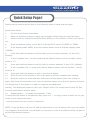
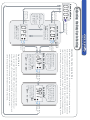
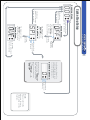
Setup Menu
The display will scroll
“
” which stands
for Over boost Setting.
Light Off
【Activate
Button1】
gizzmo
ELECTRONICS
Light Off
【Activate
Button1】
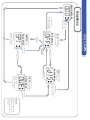
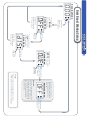
Over Boost Waring Setup
Running Mode
0. 0 0
【Hold down
Button1 for
two seconds】
The display will
scroll “
”
which stands for
Duty Cycle Off Set.
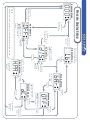
Setup Menu
【Hold down
Button1 or Button2
for two seconds】
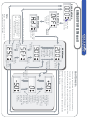
Setup Menu
The display will scroll
“
” which stands
for Display Setting.
【Hold down
Button1 or Button2
for two seconds】
【Activate Both
Button1 And
Button2】
Light Off
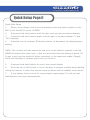
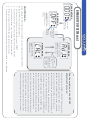
Note:
Use Button1 or Button2 to
select the over Boost Level.
The Setting Range is from
0~3.5 Bar .
Warning Menu
off
Caution:
The over boost pressure will be
display in the same format as
the display pressure, and if the
overboost limit is exceeded the
MS-2 will attempt to reduce
the boost level.
【Activate Both
Button1 And
Button2】
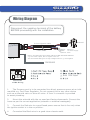
Please refer to the glossary for more
information on the functions on this page.