1
CHAPTER 2
Keyboard Shortcuts and Special Characters
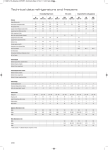
Cursor movements
0
®
Palm OS Shortcut
Universal Wireless Keyboard
Pocket PC Shortcut
Action
Fn+up arrow
Fn+up arrow
Scrolls up (Palm OS)
Page up (Pocket PC)
Fn+down arrow
Fn+down arrow
Scrolls down (Palm OS)
Page down (Pocket PC)
None
Fn+left arrow
Home
None
Fn+right arrow
End
Ctrl+left arrow
None
Moves cursor left (back) one word
Ctrl+right arrow
None
Moves cursor right (forward) one word
Ctrl+Shift+left arrow
None
Selects the word to the left of the cursor
Ctrll+Shift+right arrow
None
Selects the word to the right of the cursor
None
Tab
Tabs forward to the next field (may not work
in some applications)
None
Shift+Tab
Tabs backward to the previous field (may
not work in some applications)
15