1
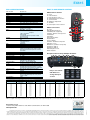
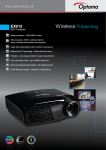
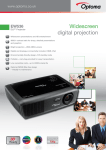
www.optoma.uk EX615 DLP Projector ® Bright projection – 3500 ANSI Lumens XGA resolution, 3000:1 contrast ratio for sharp, detailed presentations and graphics Digital and Analogue connectivity includes: HDMI, dual VGA Cable free presentations with wireless convenience Networking – RJ45 control and monitoring Environmentally friendly design <1W standby mode Portable – carry bag provided for easy transportation Low ownership costs – up to 4000hrs lamp life 10W speaker – all-in-one multimedia set-up � DLP® filter-free design – Virtually no maintenance 5 5 High Performance projector for Business presenting EX615 Bright Projection Leave the lights on with the bright EX615 whilst projecting in boardrooms, lecture theatres or meeting rooms. Installed or on the move, the versatile EX615 incorporates network & optional wireless capabilities, extensive connectivity and a powerful 10W stereo speaker. The environmentally friendly EX615 has energy saving features including <1W standby mode. Long lamp-life of 4000hrs combined with our unique Optoma Colour guarantee saves you both time and money whilst ensuring hassle-free, long lasting projection. PROJECTOR CONTROL AND MANAGEMENT Networking Projectors can be controlled and monitored over a network (LAN) using a web browser. Manage up to 99 projectors at the same time (via master PC) Control and alter the projector settings using a simple web browser page Instant onscreen display of messages to all projectors Set up email alerts for warning messages Ideal for large installations in both in the educational and business environments. 1 2 EXTENSIVE CONNECTIVITY This native XGA projector accepts a wide variety of computer and video input signals. Connectivity includes: HDMI, dual VGA–Wireless/SCART/ Component, S-Video, Composite, VGA-Out, RS232 and RJ45. Three audio inputs for individual PC and video connections enable the EX615 to function as an audio switcher and volume controller, thereby eliminating complicated and costly additional audio hardware and cabling. AUDIO CAPABILITY Built-in 10W speaker offers excellent audio support. The EX615 is easy to set up without the need for costly external speakers. 3 Control The extensive RS232 command set makes it simple and easy to control the EX615 with any control system. AMX Compatibility 2 1 – Dynamic Discovery 4 Protocol is incorporated into the EX615. This feature allows for easy3 installation with AMX control systems. Wireless Presenting Making presentations couldn’t be easier using the optional wireless features of the EX615. Cable free presenting saves time and facilitates 1 2 3 effortless switching between presentations from different sources. Simply download the software and start presenting instantly. Wireless (optional extra) WPS-Dongle, lets you connect and display presentation material wirelessly. 2 1 4 3 EX615 Clear, Focused Images DarkChip3™ technology from Texas Instruments produces a stunning 3000:1 contrast ratio for pin sharp graphics and crystal clear text. Crisper whites, ultra-rich blacks makes images come alive and text easier to read - ideal for business and education presentations. Maintenance FREE = Lower Total Cost of Ownership (TCO) DLP® technology ensures lower cost of ownership, longer life and improved reliability compared to other technologies. The filter-free projector design means no more regular filter cleaning or replacements, saving you time and money. o read 1000:1 contrast ratio 3000:1 contrast ratio Simulated Image ‡ AMAZING COLOURs The EX615 incorporates BrilliantColor™ technology to produce stunningly bright images with perfectly balanced life-like colours. Colour Guarantee We are so confident that the EX615 image colour quality will remain as good as the day you bought it that Optoma will guarantee it for five years. 5 Environmentally FRIENDLY The EX615 incorporates energy saving features to conserve power and extend the lamp life: The timer control functions can automatically switch the projector off to standby mode <1W, conserving power and extending the lamp life to an astonishing 4000hrs**. It takes less than 10 seconds for the projector to power up and shutdown, saving both time and energy. FEATURES 6 preset display modes Security bar and password protection for added security Easy to use remote with laser pointer, mouse control and direct source selecting Direct power on Customised start-up logo +12v Trigger - electric screen control Enjoy big bright pictures in the office, classroom day or night EX615 EX615 Specifications Easy to use remote control Native Resolution Compressed Resolution Brightness - BRIGHT mode Contrast Noise Level Lamp Life** Projection Lens Throw Ratio Projection Distance Image Size Display Technology EX615 Remote Control XGA 1024 x 768 UXGA (1600 x 1200) 3500 ANSI Lumens 3000:1 28dB 4000/3000 (STD/BRIGHT mode) F/2.41~2.66; f=18.2~21.8mm, 1.2x Manual Zoom 1.6 - 1.92:1 (Projection Distance:Image Width) 1.2 - 12m 0.78 – 9.38m (30.79” - 369.43”) Diagonal 4:3 Single 0.55” XGA DC3 DMD chip DLP® Technology by Texas Instruments Weight / Dimensions (W x D x H) 2.9 kg / 324 x 234 x 97mm Remote Control Full function remote with laser pointer, mouse control and direct source selecting INPUTS HDMI (HDCP) - audio supported 2 x 15 Pin D-Sub VGA (Wireless/SCART/Component via adaptor) S-Video 4 Pin Mini Din Composite RCA 3 x 3.5mm Audio Mini Jack (Selectable via OSD) USB (remote mouse) CONTROL RS232 - 9 Pin D-sub RJ45 OUTPUT 15 Pin D-Sub VGA 3.5mm Audio Mini Jack +12v Trigger Audio 10W Speaker Aspect Ratio 4:3 Native, 16:9 Compatible Keystone Correction ± 40° Vertical On Screen Display 19 Languages: English, German, French, Italian, Spanish, Portuguese, Polish, Dutch, Russian, Finnish, Swedish, Greek, Norwegian, Danish, Hungarian, Czech, Turkish, Farsi & Arabic Video Compatibility PAL SECAM 576i/p, NTSC 480i/p, HD 720p/1080i/1080p Uniformity 85% Displayable Colours 1.07 Billion Horizontal Scan Rate 15 - 91kHz Vertical Scan Rate 25 - 85Hz Power Supply 100 - 240V, 50 - 60Hz Power Consumption 298W BRIGHT mode < 1W Standby mode 247W STD mode < 1W Standby mode Operating Conditions Operating: 5 - 40˚C, 85% Humidity (Max), 3000m Altitude (Max) Security Security Bar, Kensington Lock Port, Password Protection Standard Accessories Soft Carry Bag, Lens Cover, AC Power Cord, VGA Cable, USB Cable, Full Function Remote, Batteries x 2, Quick Start Guide, CD User Manual, Warranty Card, WEEE Card Optional Accessories Wireless Dongle, SCART & Component adapter, Ceiling Mount RoHS Compliant Lamp Warranty 6 months or 1000 hours - whichever comes sooner Warranty Warranty may vary by country. Please see www.optomaeurope.com or ask your local supplier for details Colour Guarantee* 5 Years 1 2 3 4 5 6 7 8 Laser Remote Mouse Page Up/Down control Vertical Keystone Correction Volume Control Brightness Adjustment AV Mute Direct Input Source Selection 1 2 EX615 Connections 3 9 RJ45 10 USB (Remote Mouse) 11 HDMI (audio supported) 12 VGA 1- Wireless & Component 13 VGA Out 14 S-Video 15 Composite Video 16 Audio Out 17 +12v Trigger 18 VGA 2- SCART & Component 19 RS232 - 9 Pin 20 Audio In (S-Video & Composite) 21 Audio In (VGA 1) 22 Audio In (VGA 2) 23 Kensington™ Lock 24 Security Bar 5 4 6 7 8 Exceptional Connectivity / Multiple Terminals 9 10 11 12 13 18 14 15 19 16 17 20 21 22 23 24 Easy to use remote with buttons to change the input sources EX615 Projection Distance 1.2 - 12m (4:3 Aspect Ratio) Projection Distance (m) 1.20 2.00 2.50 3.00 4.00 5.00 6.00 7.00 8.00 9.00 10.00 11.00 12.00 Max. Horizontal Image Size (m) 0.75 1.25 1.56 1.88 2.50 3.13 3.75 4.38 5.00 5.63 6.25 6.88 7.50 Min. Horizontal Image Size (m) 0.63 1.04 1.30 1.56 2.08 2.60 3.13 3.65 4.17 4.69 5.21 5.73 6.25 Max. Vertical Image Size (m) Min. Vertical Image Size (m) Max Diagonal Image Size (m) 0.56 0.94 1.17 1.41 1.88 2.35 2.82 3.29 3.76 4.23 4.70 5.17 5.64 0.47 0.78 0.98 1.17 1.57 1.96 2.35 2.74 3.13 3.52 3.92 4.31 4.70 0.94 1.56 1.95 2.35 3.13 3.91 4.69 5.47 6.26 7.04 7.82 8.60 9.38 Max Diagonal Image Size (inch) 36.94 61.57 76.96 92.36 123.14 153.93 184.71 215.50 246.29 277.07 307.86 338.64 369.43 Max. Image Offset (m) 0.08 0.14 0.18 0.21 0.28 0.35 0.42 0.49 0.56 0.63 0.70 0.78 0.85 For guide purposes only EX615 is capable of 16:9 aspect ratio projection. When projecting a 16:9 image the image sizes, screen height and offset information will differ from the above. Optoma Europe Ltd. 42 Caxton Way, Watford Business Park, Watford, Hertfordshire, UK. WD18 8QZ www.optoma.uk V2 - 11/05/12 *Optoma guarantees that in normal use, Optoma DLP® colour quality will be indistinguishable from when new. Exclusions: (a) Guarantee is voided if the projector is subject to damage through misuse. (b) Guarantee may be void in industrial or commercial entertainment environments where dust or smoke is excessive (c) Guarantee will not apply if lamp brightness is below 50% due to wear or if the projector is not working due to other faults. (d) Over time worn lamps within all projector types will show a slight colour variance. **Typical lamp life achieved through testing. Will vary according to operational use and environment conditions. Copyright © 2012, Optoma Europe Ltd. All other product names and company names used herein are for identifications purposes only and may be trademarks or registered trademarks of their respective owners. Errors and omissions excepted, all specifications are subject to change without notice. DLP®, BrilliantColor™ and the DLP logo are registered trademarks of Texas Instruments. All images of products are for representation purposes only. Whilst every care is taken to provide accurate images of our products, actual products may differ slightly. Some product images may have been digitally altered by us to add an Optoma logo to the front panel. Optoma reserves the right to amend or alter actual product or product images without notice. Some images may be simulated.