1
844-E Sprayer Control
Chapter 4 - Operating Instructions
Sprayer Checkout
Before spraying, check all connections related to the Sprayer Control
assembly. Particular attention should be given to the speed sensor to
be sure the sensor and magnets are in line, and properly secured.
WARNING: W
henever you are working around a sprayer or farm
chemicals, be sure to wear protective clothing and eye
wear.
Partially fill the sprayer tank with water to flush the system and to make
a visual check of the spray tips to be sure all tips are delivering a good
spray pattern.
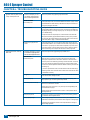
Follow these steps, in sequence, being sure the Master Boom Switch is
in its “off” position:
1. Be sure the tank shut-off valve is open.
2. Start the engine, engage pump, and set the rpm to that which will
be used when spraying.
3. Switch the computer on by pressing the Program key
on the
display panel.
4. Ensure that the spray tips being used match those pre
programmed.
5. Turn “on” the toggle switches for each of the spray booms on your
sprayer.
6. Press the Auto/Manual key so that the red LED light indicates
“MAN” mode.
7. Now, toggle the Master boom switch to “on.”
8. Adjust the pressure with the Plus key
and/or Minus key .
9. While spraying, adjust the pressure with the
key to the system’s
minimum point.
10.Now press the Plus key
for three (3) seconds. This will move
the regulating valve to its middle position.
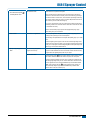
11. Manually adjust the system pressure using a throttle valve in the
supply line or a manual shutoff valve on a bypass line. Adjust the
system pressure so that it is close to what your operating pressure
will be for your application.
12.This ensures a maximum range of automatic adjustment while
spraying in Auto mode.
At this point, the sprayer will be activated and spray tip performance
can be visually checked. The pressure adjust keys can be used to raise
or lower your spraying pressure. To stop spraying, toggle the Master
boom switch to “off”.
The Spraying Operation
You have filled the sprayer tank and have thoroughly mixed the
chemical(s).Your application rate has been determined as well as the
spray tip you will be using, with the sprayer data programmed into the
computer.
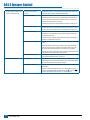
1. Switch the computer on by pressing the Program key
on the
display panel.
2. Toggle the boom switches to their “on” position, for each of the
booms on your sprayer.
3. Take note of the “numbered” booms on each side of the sprayer, so
that the appropriate boom can be toggled “off” as necessary.
4. The Auto/Manual key should be switched to “AUTO.”
5. In the Auto mode, when the master boom switch is “off”, the target
application rate as well as the target symbol
will be displayed
in the console display. When the master boom switch is “on”, the
will no
actual rate will be displayed and the target symbol
longer appear.
6. On flow based models, the lower right corner of the display will
alternate displays of the application area
(“Ac” for acres or “Ha” for hectares) and the total volume applied.
The display will alternate approximately every three seconds.
7. While spraying with the master boom switch “on”, the display
window will always display the actual application rate, vehicle
speed, pressure and application area covered/total volume applied
simultaneously.
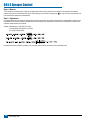
As you enter the field to the point where you will begin spraying,
turn the MASTER boom switch to “on” position. This will activate the
spraying operation. Maintain your usual vehicle speed for spraying.
Moderate changes in vehicle speed will not affect your application
rate, because such changes are compensated by automatic pressure
increases or decreases.
If for any reason you need to stop, turn the MASTER boom switch to
“off.”
Alarm warnings can occur momentarily while the pressure regulating
valve is searching for a new setting after the closing of a boom section
or other change in normal operation. However, if the alarm stays on for
a longer time, the valve may have reached its limit and your system will
be unable to regulate flow beyond the limit.
The above steps provide a quick way to check out your sprayer and
computerized control system.
NOTE: It is recommended that you calibrate your sprayer to prepare
the unit for operation, and to diagnose spray tip wear. Worn
tips can contribute to costly chemical waste, and inaccurate
spraying regardless of your use of a sprayer control. Calibration
is important and necessary to obtain the benefits associated
with a computerized sprayer control.
98-70006-ENUS R4
23