1
11. Appendix
11. Appendix
11
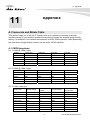
A. Frame-rate and Bitrate Table
This section helps you to set the IP Camera with your network environment to access
Internet, basing on your network upload environment to choose the suitable Image-Quality
setting. For example, if the network environment is ADSL 256Kb (upload) / 2Mb (download),
the most fluent Image-Quality needs to set up under 256 Kb situation.
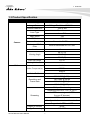
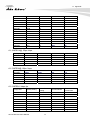
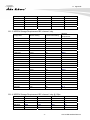
A.1 CMOS Mega Model
A.1.1 H.264 @ 15fps / kbps
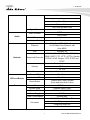
Quality
Excellent
Detailed
Good
Standard
Medium
1280*1024
2800
1700
1300
800
600
1280*720
1900
1300
900
600
450
640*480
300
200
170
150
130
320*240
90
75
60
55
45
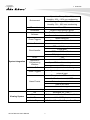
1280*720
1400
900
650
450
350
640*480
250
180
160
130
120
320*240
70
60
55
50
40
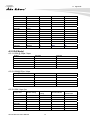
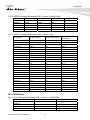
A.1.2 H.264 @ 10fps / kbps
Quality
Excellent
Detailed
Good
Standard
Medium
1280*1024
1900
1200
900
650
450
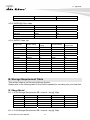
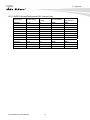
A.1.3 H.264 / kbps, fps
Image-Size
Bitrate Setting
1280*1024
1280*1024
1280*1024
1280*1024
1280*1024
1280*1024
1280*720
1280*720
1280*720
6144
6144
2048
2048
512
512
6144
6144
2048
Frame-Rate
Setting
15
10
15
10
15
10
15
10
15
47
Current Bitrate
6300
6300
2200
2200
550
550
6300
6300
2200
Current
Frame-Rate
15
10
15
10
15
10
15
10
15
AirLive DM-720User’Manual