1
overview
General information.����������������������������������������������������������������������������������������������������������������������������������������������������������������������2
Introduction.�����������������������������������������������������������������������������������������������������������������������������������������������������������������������������������2
Purpose of the manual.������������������������������������������������������������������������������������������������������������������������������������������������������������������2
Identification of manufacturer and equipment.�������������������������������������������������������������������������������������������������������������������������������3
Requesting technical assistance.���������������������������������������������������������������������������������������������������������������������������������������������������3
Safety information.�������������������������������������������������������������������������������������������������������������������������������������������������������������������������3
Technical information.�������������������������������������������������������������������������������������������������������������������������������������������������������������������4
Technical specifications.����������������������������������������������������������������������������������������������������������������������������������������������������������������4
Main parts.�������������������������������������������������������������������������������������������������������������������������������������������������������������������������������������5
Installation and unpacking.�����������������������������������������������������������������������������������������������������������������������������������������������������������6
Unpacking.�������������������������������������������������������������������������������������������������������������������������������������������������������������������������������������6
Installation.�������������������������������������������������������������������������������������������������������������������������������������������������������������������������������������6
Installation of charging base.���������������������������������������������������������������������������������������������������������������������������������������������������������6
Positioning the robot in the charging base.����������������������������������������������������������������������������������������������������������������������������������10
Use and operation.�����������������������������������������������������������������������������������������������������������������������������������������������������������������������11
Requirements for use.������������������������������������������������������������������������������������������������������������������������������������������������������������������11
Navigation.�����������������������������������������������������������������������������������������������������������������������������������������������������������������������������������11
Settings - programming mode.�����������������������������������������������������������������������������������������������������������������������������������������������������12
Setting - working times.����������������������������������������������������������������������������������������������������������������������������������������������������������������13
Settings - language options.��������������������������������������������������������������������������������������������������������������������������������������������������������13
Settings - diagnostics.������������������������������������������������������������������������������������������������������������������������������������������������������������������13
Settings - statistics.����������������������������������������������������������������������������������������������������������������������������������������������������������������������13
Set up.������������������������������������������������������������������������������������������������������������������������������������������������������������������������������������������13
Using the communication box.�����������������������������������������������������������������������������������������������������������������������������������������������������14
Ordinary cleaning.������������������������������������������������������������������������������������������������������������������������������������������������������������������������14
Prolonged inactivity and restarting.����������������������������������������������������������������������������������������������������������������������������������������������16
Troubleshooting guide.����������������������������������������������������������������������������������������������������������������������������������������������������������������17
Troubleshooting.��������������������������������������������������������������������������������������������������������������������������������������������������������������������������17
Replacement of parts.������������������������������������������������������������������������������������������������������������������������������������������������������������������18
Tips on replacing parts.����������������������������������������������������������������������������������������������������������������������������������������������������������������18
Battery replacement.��������������������������������������������������������������������������������������������������������������������������������������������������������������������18
Robot disposal.����������������������������������������������������������������������������������������������������������������������������������������������������������������������������18
Reproduction, even partial, of this document without written permission by the manufacturer is strictly forbidden. The
manufacturer assumes a policy of continual improvement and reserves the right to modify this document without prior notice
on condition that the changes do not constitute health and safety risks.
© 2008 – Texts, illustrations and page layout: Tipolito La Zecca. The text may be reproduced, in whole or in part, on condition
that the author is mentioned.
MD-CT-RO-31-R2.1 - EN - 11-2014
1
User manual
EN
General information
Introduction
EN
Congratulations on purchasing this product, which we are certain will meet your needs and expectations. This project was
created by ZUCCHETTI CENTRO SISTEMI S.p.A. (UNI EN ISO 9001 certified company), a software house that since 1982
has consolidated its activities and presence on the international market. Applying advanced IT solutions in the field of industrial
automation means optimising the production activities and simplifying the work procedures. This product was created on the basis
of on-going research by ZUCCHETTI’s laboratories.
Purpose of the manual
•
This manual forms an integral part of the appliance and was produced by the Manufacturer to provide the necessary information
to people authorised to interact with it during its working life.
•
Operators of the appliance must adopt correct working practices and must carefully read and follow all the instructions
contained in this manual.
•
This manual was written by the Manufacturer in the original language of Italian and may be translated into other languages to
meet legal and/or commercial requirements.
•
Carefully read the instructions contained in this manual to avoid any unnecessary risks to people’s health and safety, as well
as economic damages.
•
Keep this manual in a safe and easily accessible place for quick reference.
•
Some information and illustrations contained in this manual may not perfectly correspond with the appliance in your possession;
however, this will not affect its functioning.
•
The Manufacturer reserves the right to make changes at any time, without notice.
•
The following symbols are used throughout this manual to highlight some particularly important information or identify some
important specifications.
Danger - Attention
This symbol indicates situations involving imminent danger, which, if ignored, could put people’s health and
safety at risk.
Warning - Caution
This symbol indicates situations where it is necessary to behave in a certain way in order to avoid putting
people’s health and safety at risk, and to protect the device.
Important
This symbol identifies particularly important technical information that must not be ignored.
User manual
2
Identification of manufacturer and equipment
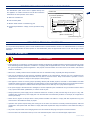
The identification plate shown here is applied directly onto
the appliance. It contains references and all the information
essential for the safe operation of the device.
DATA PLATE
EN
(A) Name of manufacturer
(D) Technical specifications
A.Name of manufacturer.
(C) Serial number
B.CE conformity label
Zucchetti Centro Sistemi S.P.A
Via Lungarno 305/A - 52028 Terranuova B.ni (AR)
C.Model / serial number / manufacturing year.
00000000000000000
D.Technical specifications: voltage, current, protection rating,
mass.
0000
(C) Model
(B) EC conformity label
(C) Manufacturing year
Requesting technical assistance
For any technical requirements, please contact the Manufacturer’s Technical Service Centre or an authorised dealer. For technical
assistance, please indicate the data reported on the identification plate, the approximate hours of use and the type of fault
detected.
Safety information
SAFETY RULES
•
During design and construction, the manufacturer carefully considered the possible hazards and personal risks that may result
from interacting with the equipment. In addition to complying with the applicable laws in force, the manufacturer adopted all
the “good manufacturing practice regulations.” The purpose of this information is to inform users on the need to use extreme
caution to avoid risks.
•
Before use, carefully read the whole manual and be sure to understand it fully, especially the safety information.
•
Only use the equipment for the purposes specifically intended by the manufacturer. Improper use of the equipment may
be hazardous to personal safety and health and may lead to economic losses. Keep in mind that the operator or user is
responsible for accidents or danger to other people or their property.
•
This appliance cannot be used by people (including children) with limited physical, sensorial or mental abilities and little
experience and/or know-how, unless they are supervised by a person responsible for their safety or have received instructions
on how to use the appliance. Children should be supervised to ensure that they do not play with the appliance.
•
If the power supply of the transformer is damaged, it must be replaced by the manufacturer or by its technical service centre
or by a person with similar qualifications, in order to avoid any risk.
•
Always position the power supply unit at a minimum distance of 3 metres (10 feet) from the edge of the pool, in a dry, wellventilated area. Position the power supply unit in an area that cannot be reached by children. For example, at a height above
160 cm (63 inches).
•
Never remove, bypass or tamper with the safety devices installed. The failure to comply with this requirement may pose
serious risks to the health and safety of people.
•
Operators who perform repairs during the working life of the robot must have the necessary technical expertise, skills and
experience in this specific field. The failure to comply with these requirements may be hazardous to the health and safety of
people.
•
Any work to be performed on the charging station must be carried out with plug of the power cord disconnected.
•
The robot cannot be used without the top cover. If the mechanical parts of the robot are damaged, replace them.
3
User manual
EN
•
The Manufacturer shall not be held liable if unoriginal spare parts are used.
•
Never use and recharge the robot in explosive and/or flammable environments.
•
Only use the battery charger and power supply unit supplied to recharge the robot. Improper use can cause electric shocks,
overheating or leakage of corrosive liquid from the battery. In case of leakage, the battery must be washed with water/
neutraliser; in case of contact with eyes, consult a physician.
Technical information
Technical specifications
Model
Description
045BA0
Robot dimensions (W x H x D)
mm
410 x 320 x 460
Weight
Kg
21
Ambient operating temperature
Water protection class
IP
Maximum pool depth
cm
Maximum recharging base depth
ROBOT 5°(Min) +35°(Max)
Max °C
BATTERY CHARGER -10°(Min) +40°(Max)
ROBOT - IP68
BATTERY CHARGER - IP64
500
cm
500
pH: 7.0-7.8
Temperature: 5-35°C
NaCl Max: 5,000 ppm
Chlorine Max : 4 ppm
Water, operating parameters
Vin 100 - 240Vac.
Input Frequency range 50-60.
Vout 36Vcc - 8,9A.
Power Supply unit
Battery
Lithium Ion - 25,2V - 13.8Ah
Avg. working time
hh:mm
2:00
Avg. recharging time
hh:mm
3:00
Travelling speed on the bottom
Mt/min.
10 - 20
Travelling speed on the wall
Mt/min.
8
Filters
2 Litres, mesh pitch of 0.5mm
Tablet/Console
included
Communication Box
optional
Smooth wall kit
optional
Adapter for curves between the wall
and bottom
optional
User manual
4
Main parts
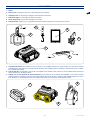
1. Robot.
2. Robot hook: for lifting the robot out of the water (pole not included).
EN
3. Charging hook: for securing the charging cord immersed in the water.
4. Robot recharger: for recharging the robot in the water.
5. Power Supply unit: powers the recharging of the robot.
6. Tablet/Console: it allows you to programme the robotic cleaner settings and consult the user manual.
2
6
4
3
1
5
7. Communication Box: Not included in the kit. Device to be installed between the power supply unit and robotic cleaner
recharging base. It allows you to recall the robotic cleaner to the recharging base or enable it to operate even if it is not within
the set working time band.
8. Smooth wall kit: Not included in the kit. Kit to be applied to the wheels in the presence of smooth walls which prevent the
robotic cleaner from climbing up them.
9. Adapter for curves between the wall and bottom: Not included in the kit. Allows the installation of the robotic cleaner
recharging base in swimming pools that are curved between the wall and bottom, distancing the recharging base up to 20 cm
from the wall so it can detect the bottom. The adapter also allows you to manage non-horizontal bottoms.
9
7
8
5
User manual
Installation and unpacking
Unpacking
EN
The equipment is delivered suitably packaged. When unpacking, carefully remove and check the integrity of the parts.
The packaging contains all the necessary information for handling the device.
Installation
•
Remove the robot from the packaging.
•
Place the robot on the ground.
•
Install the charging base and then gently immerse the robot in the pool. Wait until it has settled on the bottom and then, using
the hook provided, place the robot near the charging plate from the front side of the robot, which is identified by a recharging
sticker. If positioned correctly, the leds of the recharger will light up continuously.
•
Recharge the robot for 15 minutes before moving to the programming phase.
•
To program the robot, take it out of the water using the hook provided, place it on the ground and follow the programming
instructions. The programming only works with the robot out of the water.
•
Once programmed, immerse the robot in the water so that the work cycle can begin.
Installation of charging base
Remove the charging base from its packaging.
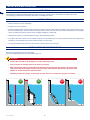
Place the charging base along the vertical wall of the pool.
Important
--
Position the steel side of the dissipator in contact with the pool wall.
--
Do not position the charging base on the bottom of the pool.
--
Make sure that the angle formed between the charging base and the opposite bottom is 90° and that the
area surrounding the recharger (at least 2 meters) is even and horizontal. Alternatively, use the provided
adapter for curves between the wall and bottom.
--
Preferably position the charger on the deeper end and, however, at a depth not greater than 5 meters.
OK
OK
NO
Max. 5 mt
User manual
6
NO
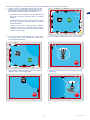
Here are some examples of where the charging base can be installed and where it cannot be installed:
1. position the wire of the charging base 30 cm from the
corner of the wall. Alternatively, the charger can be
installed at the centre of the wall. In this type of set-up,
there are three positioning options and distances:
EN
Right
At least three meters away from the left side wall. Set
the mode of re-entry to follow the edge in a clockwise
direction.
OK
Centre
At least three meters away from the right side wall. Set
the mode of re-entry to follow the edge in a counterclockwise direction.
≥ 300 cm
Roughly in the centre, recommended for irregularshaped or round pools, or pools with narrow passages,
and when the above rules cannot be followed. Set the
Random re-entry mode.
Right
--
30cm
Centre
--
Centro
Left
--
Left
30cm
30cm
Right
2. in case of bottoms with level differences or steps, place
the charging base on the opposite wall. Observe the
above-mentioned distances.
Centre
Left
3. do not place the charging base under or near a ladder.
Left
Centre
Right
30cm
Left
OK
30cm
NO
30cm
Right
Centre
Left
4. do not place the robot near steps. The robot may find it
difficult to return to the charging base.
5. do not place the charging base on the wall near a level
difference.
NO
NO
7
User manual
EN
6. do not place the wire of the charging base less than 30 cm
from the corner. Do not place the recharging base in the
angle of the walls. It must be installed in contact with one
of the vertical walls of the swimming pool. Do not place the
recharging base under or near the stairs.
NO
In the event that more than one positioning solution is possible, follow these tips:
-- Centre. This positioning is recommended for very irregular-shaped and round pools or pools with narrow passages.
--
Left. This positioning is recommended for regular-shaped pools with left wall adjacent to the charger that forms a right angle.
--
Right. This positioning is recommended for regular-shaped pools with right wall adjacent to the charger that forms a right angle.
After positioning the charging base, fasten the cord to the edge of the pool.
Here are some examples of pool edges with installation of the charging hook. The cord can be installed along the edge or on the
ground next to the pool, as long as there is an eyelet or a loop in each of these points on which to fasten the hook.
User manual
8
Warning - Caution
--
Position the power supply unit in an area that cannot be reached by children. For example, at a height
above 160 cm (63 ").
--
When connecting the electricity, make sure a power outlet is positioned near the installation area. Make
sure the connection to the mains power complies with the applicable laws. To operate in complete safety,
make sure the electrical system, which is connected to the power supply unit, is equipped with a wellfunctioning earthing system.
--
Make sure only authorised people have access to the power supply.
Important
It is advisable to install the unit in a cabinet for electric components (for outdoor or indoor use), well ventilated
to maintain correct air circulation and fitted with a key lock.
Connect the cord to the power outlet.
Connect the power unit to the mains electricity supply.
Min.
160 cm
9
User manual
EN
Positioning the robot in the charging base
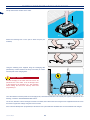
Gently immerse the machine in the water.
EN
Attach the retrieving hook on the pole to clean the pool (not
included).
Using the retrieving hook supplied, bring the recharging side
(identified by a sticker affixed to the body of the robot) in contact
with the plate of the charging base.
Danger - Attention
The first charging of the robot does not have to be
performed out of the water. It can be brought close
to the charger for ten minutes or so.. This operation
allows waking the robot from stand-by mode and
programming it.
Once the machine has been placed on the charging base, check that the leds are on and steady. If the green or blue LED is off or
flashing, consult the TROUBLESHOOTING section.
On first use, leave the robot to recharge for at least 15 minutes, then retrieve the robot using the hook supplied and remove it from
the water. Program the settings using the remote console.
If the robot has already been programmed, it will start its work cycle within the scheduled time once the batteries are charged.
Uso e funzionamento
User manual
10
Use and operation
Requirements for use
EN
Important
--
When using the robot for the first time, carefully read the whole manual and be sure to fully understand
it, especially the safety information.
--
Only use the robot for its intended purpose as described by the Manufacturer. Do not tamper with any
device to obtain different operating performances.
Important
The programming only works with the robot out of the water.
Important
Proceed with the programming within 45 minutes; after this time, the robot goes back into stand-by mode. To
reactivate, place it in the charging station.
Navigation
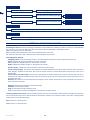
The menu has a tree structure. Follow the introduction containing a summary of the programming functions available. Details of
each function are found in the pages following the flow diagram.
Settings
Percentage on bottom
Indicates the percentage of time
dedicated to cleaning the bottom of
the pool
Recharging base Settings
Recharging base
position
Indicates the position of the
recharging base on the left wall, in the
centre, on the right wall
Return method
Indicates the method used by the
robotic cleaner to search for the
recharging base
Detection
Indicates the recharging base
detection level
0..100%
Left
Right
Centre
Follow clockwise edge
Follow counterclockwise edge
Random
Standard
High
Low
Travelling speed on the bottom
Indicates the travelling speed along
the bottom in metres per minute
Date
Sets the date
Time
Sets the time
Week
Allows adjusting the work days and rest days
Work Schedule 1
Determines the first working time of the robot
Work Schedule 2
Determines the second working time of the robot
10 - 20
Work schedules
11
User manual
Language options
Language
Sets the language of the user menu
Date format
Sets the format for entering the date
Time format
Sets the format for entering the time
EN
DD/MM/YY
MM/DD/YY
24H
12H
Diagnostics
Displays any errors occurring on the turbines, motors and boards
Statistics
Displays the statistics of the work performed by the robot
Settings - programming mode
Percentage on bottom: sets the percentage of time that the robot dedicates to cleaning the bottom of the pool. A value between
0% and 100% can be set. The higher the value set, the longer the time dedicated to cleaning the bottom.
100%: the robot only works on the bottom.
50%: the robot works half the time on the bottom and half the time on the wall.
0%: when the robot finds a wall, it will travel up it until reaching the water surface.
Recharging base Settings:
Charging position: Sets the charging position in the wall, following the wall as if it was positioned inside the pool.
Centre: indicates the charging position in the centre of the wall.
Left: indicates the charging position on the left side of the wall.
Right: indicates the charging position on the right side of the wall.
Re-entry mode: indicates the mode in which the robot looks for the charger.
Follow clockwise edge: This mode is recommended for regular-shaped pools and pools with the left side free of obstacles.
If the charger is positioned at the centre, this mode can only be used if it is at least three metres away from the corner of the
left side wall.
Follow counter-clockwise edge: This mode is recommended for regular-shaped pools and pools with the right side free of
obstacles. If the charger is positioned at the centre, this mode can only be used if it is at least three metres away from the corner
of the right side wall.
Random: This method is recommended when the charger is in the “central” position and for very irregular and round pools or
pools with narrow passages.
Detection: indicates the recharging base detection level.
Standard: recommended settings.
High: recommended for large swimming pools.
Low: recommended when the recharging base is positioned in a narrow section.
Travelling speed on the bottom: sets the travelling speed of the robot on the bottom in metres/minute. The higher the speed set,
the more space the robot covers. Set low speeds in small pools in relation to the maximum capacity of the robot. Set high speeds
in large pools or pools that dirty easily.
Date: function for setting the date.
Time: function for setting the time.
User manual
12
Setting - working times
Weekly: function for programming the working days of the robot during the week. On days with the flag “active,” the robot will
perform the operating cycles according to the set working times.
Work schedule 1: function for setting the first time slot of the robot’s working day. Set the start and end time of the working cycle.
Setting the time at “00:00 – 00:00” means the robot will not work during work schedule 1.
Work schedule 2: function for setting the second time slot of the robot’s working day. Set the start and end time of the working
cycle.
Setting the time at “00:00 – 00:00” means the robot will not work during work schedule 2.
The setting of the time is essential for the robot’s proper functioning. Many parameters should be taken into consideration when
setting the work time such as the size, shape, ease with which it gets dirty, frequency of use, etc. of the pool.
As a rule, it is recommended to follow these rules:
•
program the robot activity while the cleaning system of the robot is running. Dirt removed by the turbines will then be filtered
by the central system, improving the robot’s capacity.
•
start with a wide-ranging program and then reduce it when you are satisfied with the level of cleanliness.
•
program and leave the robot running every day.
•
check the filter of the robot. At first, very frequently, and then decrease the frequency in relation to the dirt found in the filter.
Settings - language options
Function for selecting the display language of the user and format menu that is used to set and display the date and time of the
robot.
Settings - diagnostics
Displays any critical events or errors that occurred in the main components during the operation of the robot.
If major errors occur, refer to the “Troubleshooting” chapter or contact the technical service centre.
Settings - statistics
Displays information on the work performed by the robot during its operation.
Set up
1. Set and check the robot programming.
2. Check and clean the filters.
3. Place the robot inside the pool; refer to “Positioning robot in charging base”.
4. The robot starts is work cycle according to the settings programmed.
13
User manual
EN
Using the communication box
EN
The “Communication Box” allows you to recall the robotic
cleaner to the recharging base or start it up even if it is not
within the set working time band.
Press the “HOME” button to recall the robotic cleaner to the
recharging base, the “Battery” led will start to flash and the
robotic cleaner will return to the recharging base when it
acknowledges the recall command moving to the range of
action of the recharging base itself. Press the “WORK” button
or wait a few hours before starting the robotic cleaner again as
per the standard operating settings.
Press the “WORK” button and the robotic cleaner will perform
a normal work cycle even if the current time is outside the
set time band, the “Power” LED begins to flash and the work
cycle starts within ten seconds or so, only if the batteries are
sufficiently charged. On completing the work cycle, the robotic
cleaner will return to the recharging base and start operating
again as per the standard operating settings.
Ordinary cleaning
Clean the filter frequently, and then less frequently in relation to the dirt found in the filter. The frequency of cleaning depends on
several factors: size of the pool, the ease with which it gets dirty, the frequency of use, etc.
-----
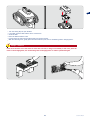
Use the retrieving hook to bring the robot to the surface.
Wait for the turbines to stop working.
Remove the robot gently from the water, grasping it by the handle on the retrieving hook, and place it on the ground.
Wait for it to emit four consecutive beeps to confirm that the robot is off.
---
Unhook the fastening clips of the bonnet.
Lift the bonnet and remove the filters to be cleaned.
User manual
14
EN
-------
Turn the closing clips to open the filter.
If possible, clean the filter with the aid of a water hose.
Close the filter.
Place the filters inside the robot.
Position the body and make sure all the clips are closed correctly.
With the retrieving hook, gently place the robot inside the pool; refer to “Positioning robot in charging base”.
Danger - Attention
If the robot has been out of the water for more than one hour, it will go into standby. In this case, place the
robot on the charging base, see “Positioning robot in charging base” to make it operational again.
15
User manual
Prolonged inactivity and restarting
EN
If the robot has not been used for a long period of time, a series of operations must be performed to guarantee proper functioning
at the time of reuse.
1. Remove the robot from the water when its batteries are fully charged. Usually, before the start of the first daily work cycle.
Alternatively, disable the work times of the robot or the days of activity, and extract it after at least 4 hours of recharging.
2. Have routine maintenance performed by an authorised dealer. This is essential for keeping the robot in good working order.
The assistance usually includes the following operations:
•
thorough cleaning of the robot, turbines, filters and all the moving parts.
•
checking of robot functioning.
•
checking and, if necessary, replacement of any worn parts such as filters, turbines, brushes.
•
checking of the battery capacity.
•
if necessary, the dealer can download the operating statistics, check for any faults and load any new software updates.
3. Thorough cleaning of the robot, turbines, filters and all the moving parts.
4. Check for any worn or damaged parts, such as filters, turbines, brushes and if necessary, replace.
5. Store the robot in a protected and dry place with an ambient temperature between 10° and 20° C, out of reach of children, pets,
other foreign objects, etc. Store the robot at a temperature below 20°C in order reduce the automatic discharge of the batteries.
6. Disconnect the power plug from the power supply unit.
7. For correct maintenance of the batteries, recharge the robot at least every 5 months.
Restarting
Before restarting the robot after a long period of inactivity, proceed as follows.
1. Connect the plug of the power supply unit to the electrical outlet.
2. Reconnect the main electrical power supply.
3. Gently immerse the robot in the water and place it on the charging plate. If positioned correctly, the leds will light up continuously.
4. The robot is now ready for use.
User manual
16
Troubleshooting guide
Troubleshooting
EN
The information below is designed to help identify and correct any faults and/or malfunctions which may occur during operation.
Read this guide before contacting the dealer.
Problem
Cause
Remedies
The robot has difficulty
climbing up the walls
Dirty filter
The robot does not climb the
wall or the walls are dirty
Programming error
Clean the filter
Install the “smooth wall kit”
Check the “Percentage on bottom” value in the
user menu, and if necessary, set it at a higher
value
Check the programming of the re-entry side.
Check that the recharging base has been
positioned correctly.
The robot has stopped in the
pool without being recharged
Check that the fastening hook of the charging
cord is flush with the wall and that the recharger
does not turn around itself.
Recharging cannot be reached
Check the filters and if necessary, clean.
With the retrieving hook, position the robot in
recharging mode, check that the leds are lit up
and steady, wait until the batteries are charged.
The robot will start its cycle only when the
batteries are charged.
Check that electrical power is being supplied to
the power supply unit
Check that electrical power is being supplied to
the power supply unit.
The robot does not start the
work cycle
Power supply unit is off
The recharging does not
start
No electrical power
The blue recharging led
flashes when the robot is in
the recharging position
Wrong recharging side
With the retrieving hook, turn the robot on the
opposite side
Programming error
Check the setting and follow the programming
recommendations for the parameters:
• working days
• working times
• speed on the bottom
• percentage on bottom
The pool is dirty
The robot does not start
when immersed in the pool
Check that electrical power is being supplied to
the power supply unit
•
Dirty filter
The robot works a lot less
than what is declared
Check the programming of the working days and
times
Dirty filter
Perform routine cleaning
Perform routine cleaning
The batteries are about to run out
Discharged batteries
17
Contact an authorised Service Centre
With the retrieving hook, position the robot on
the recharging base, check that the leds are
lit up and steady, wait until the batteries are
charged. The robot will start its cycle only when
the batteries are charged
User manual
Replacement of parts
Tips on replacing parts
EN
Important
Replace and repair any parts according to the manufacturer’s instructions, or contact the service centre if
these operations are not included in the manual.
Battery replacement
Important
Replace the batteries at an authorised service centre.
Robot disposal
•
At the end of its life cycle, this product is classified as WEEE (Waste Electrical and Electronic Equipment)
and therefore cannot be disposed of as household waste, or as mixed municipal waste (unsorted), or
separate municipal waste (sorted).
•
When disposing of the robot the user must ensure that it is recycled in accordance with the local requirements;
in particular, the electrical and electronic components must be sorted and disposed of separately in special
recycling collection centres authorised to collect WEEE, or the product must be returned still intact to the
retailer when a new product is purchased. Unauthorised disposal of WEEE is punishable with fines governed
by the laws in force in the country where the infraction took place.
•
The presence of hazardous substances in electrical and electronic equipment has a potentially harmful
effect on the environment and on human health, therefore the user plays an important role in contributing to
reuse, recycling and other forms of recovering WEEE.
•
All parts that must be collected, separated and disposed of in a specific manner are marked with a special label.
Danger - Attention
WEEE - Waste of Electric and Electronic Equipment may contain hazardous substances having potentially
harmful effects on the environment and on human health. WEEE must be disposed of in the correct manner
and only at authorised collection centres.
•
Packaging - The product packaging is made of recyclable materials and must be disposed of in a sustainable way in approved
collection bins or at special authorised collection centres.
•
Batteries – Old or dead batteries contain substances harmful to the environment and to human health, therefore they must not
be disposed of as normal household waste. The user must dispose of batteries in a sustainable way in approved collection
bins or at authorised collection centres.
User manual
18