1
VSX_816.book.fm 14 ページ 2005年12月8日 木曜日 午後6時54分
04
Connecting up
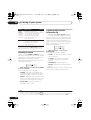
Connecting the multichannel analog
outputs
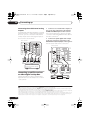
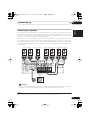
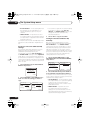
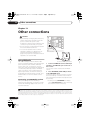
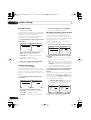
For DVD Audio and SACD playback, your DVD
player may have 5.1 channel analog outputs.In
this case, you can connect the multichannel
analog outputs to the multichannel inputs of
this receiver as shown below.1
This receiver
CEN- SUB
TER WOOFER
IN
AUX
IN
CD
IN
DVR /
VCR
FM UNBAL
75 Ω
AM
LOOP ANTENNA
Y
IN
OUT
TV /
SAT
OUT
IN
DVR /
VCR
IN
DVD
/LD
FRONT
IN
COAX
2
PLAY
(DVR/VCR)
CD-R
/ TAPE
/ MD
IN
COAX
1
(DVD/LD)
This receiver
OUT
VIDEO
IN
IN
XM
IN
(DVR/VC
PB
SURROUND
DVD 5.1CH INPUT
CONTROL
1
(CD)
ASSIGNABLE
DIGITAL IN
ASSIGNABLE
DIGITAL IN
L
R
OUT
2
OPT
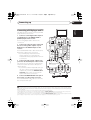
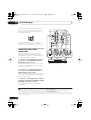
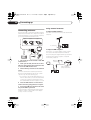
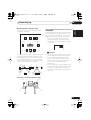
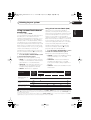
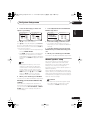
2 Connect an optical digital audio output
from your set-top box component to the
DIGITAL OPT 2 (TV/SAT) input on this receiver.
Use an optical cable for the connection.4
COMPONEN
MONITOR OUT
OPT
(TV/ SAT)
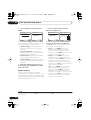
1 Connect a set of audio/video outputs on
the set-top box component to the TV/SAT
AUDIO and VIDEO inputs on this receiver.2
Use a stereo RCA phono cable for the audio
connection and a standard RCA video cable for
the video connection.3
TV /
SAT
MONITOR
OUT
DVD
5.1CH
INPUT
SUB
WOOFER
PREOUT
IN
IN
DVD
/LD
S-VIDEO
REC
OUT
R
AUDIO
L
IN
MONITO
S
P
E
A
K
E
R
S
R
FRONT
LR
IN
AUX
IN
CD
FM UNBAL
75 Ω
A
AM
LOOP ANTENNA
MONITOR OUT
OPT
OUT
2
(TV/ SAT)
IN
CONTROL
DVR /
VCR
OPT
IN
1
(CD)
ASSIGNABLE
DIGITAL IN
OUT
OUT
VIDEO
TV /
SAT
IN
DVR /
VCR
OUT
IN
IN
IN
ASSIGNABLE
DIGITAL IN
XM
IN
DVD
/LD
FRONT
IN
COAX
2
(DVR/VCR)
PLAY
CD-R
/ TAPE
/ MD
IN
COAX
R
L
FRONT
OUTPUT
CENTER
OUTPUT
R
L
SURROUND
OUTPUT
1
SUB
WOOFER
OUTPUT
(DVD/LD)
VIDEO
OUTPUT
DVD/multi-channel decoder
with multi-channel analog
output jacks
DVD
5.1CH
INPUT
SUB
WOOFER
PREOUT
IN
IN
DVD
/LD
S-VIDEO
IN
REC
OUT
R
AUDIO
L
2
1
DIGITAL OUT
OPTICAL
COAXIAL
R
AUDIO
L
VIDEO
AV OUT
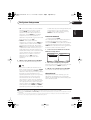
Connecting a satellite receiver
or other digital set-top box
Satellite and cable receivers, and terrestrial
digital TV tuners are all examples of so-called
`set-top boxes'.
TV /
SAT
MONITOR
OUT
STB
Note
1 The multichannel input can only be used when DVD 5.1 ch is selected (see page 33).
2 If you've already connected your TV to the TV/SAT inputs, simply choose another input. However, to receive a signal, you'll
need to press the input select button for the input you connected the set-top box to.
3 For better quality, you can also connect with S-video using the S-VIDEO TV/SAT jack. If your set-top box also has a component
video output, you can connect this too. See Using the component video jacks on page 17 for more on this.
4 If your satellite/cable receiver doesn’t have a digital audio output, omit this step. If it only has a coaxial digital output, you can
connect it to one of the coaxial inputs on this receiver using a coaxial digital audio cable. When you set up the receiver you'll
need to tell the receiver which input you connected the set-top box to (see The Input Assign menu on page 58).
14
En