Transcript
1
1
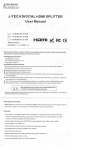
HDMI Splitter
INTRODUCTION
x2
HDMI splitterdistributes 1 HDMI source to 2 HDMI dispiays
lt offers HD video solution for super market;
simultaneously
shopping mall; HDTV,STB,DVD,projector factoryidata control
center;information distribution;conference room presentation;
education and training;corporalion show room:home theater etc
1x2
2 SPECIFICATIONS
Input Video Signal
Input DDC Signal
User Manual
3
CONNECTION
5
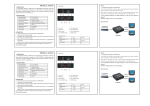
a) Connect the input source and output displays to the
0 5-1 0 volts p-p
5 voltd p-p(TTL)
Max qingle Link Range
1920x1080'1080P
Output Video
HDN4I'l 3+HDCP1 0/'l 1/1 2
Resolutions DTV/HDTV
4AO
HDMlVersion
HDMIl
Operating Frequency
Upto22SMHZ
ElDl Duration
4 Seconds
Power supply
DC 5V
p I
57 6i | 7 20
p I 1
OSOI I 1 O8O
3
FAQ
A) The splitter doesn't appear to function ing
HDMlSplitter
b) Connect the DC 5V power supply to the splitter, please
kindly note that power supply with higher voltage may
danage the splitter
c) When input source and output displays are connecred
and turnedon, the correspondlng LED will light
Attention: In order to protect the splitter and your devices,
please makesure the splitter is powered off before you
attach in or extract video source and displays please
insert and extract HDMI cables gently
4 BOXCONTENS
tem
HDMlsplitterl X2
Fistly, check if the LED lights, if the power supply is in
condition and well connected Secondly, make sure all
in good condition and well connected
Thirdly,make sure the length of the cables is with the
maxmum supported length of this splitter Lisily, please
try the input source to the display directly lo see ifit display
cables are
normally
B) lf the macimu m resolution the two supported is not the
same, what resolution be displayed?
The splitter will display al the lower one to both displays
QtV
Remark
1
PCS
Power
I
PCS
DC5Vi,1A
User Manual
1
PCS
en
p