1
OM9 - EPI2 Profibus DPV1 interface
Installation & Maintenance Instructions
3. Communication features
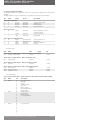
Communication protocol
Profibus DP according to EN 50170
Network topology
Line (bus) structure. With repeaters tree structures can also be realized
Transmission medium
Twisted, screened copper cable according to EN 50170
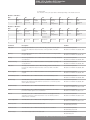
Data rate 9.6
19.2 45.45
93.75
187.5
500
1500
Kbit/sec
Cable length without repeater 1200
1200
1200
1200
1000
400
200
m
Approx. cable length with repeater
10
10
10
10
6
4
2
Km
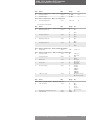
Station typeDPV0 and DPV1 slave
Device number
32 devices per segment without repeater (max 126, with repeaters)
Bus accessToken-passing between masters and polling for slaves
Electrical power
Actuator powered
Bus termination
Available on board via soldering pad
Temperature-40°C, +85°C
EMC protections
EN 50081-2 and EN 50082-2
Types of operation Cyclic data exchange, sync mode, freeze mode, fail safe mode
Baud rate Automatic recognition
AddressingConfigurable via on board rotary BCD switches
4. EPI2 DPV1 interface
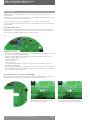
The module consists of a single PCB that is installed inside the actuator housing. It is connected
to the EPI2 base card via a flat cable. The internal wiring connects the Profibus data lines to the
actuator terminal board.
4.1 On board indication
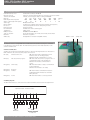
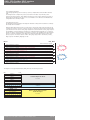
Six LED’s are mounted on the EPI2 DPV1 interface to give the following indications for Field service.
LED’s indications are active only when jumper JP2 is closed.
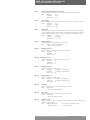
DL1 (red)
Internal comm. error: ON when the internal communication of the
interface card is not working properly.
OFF when the all communication is correct.
DL2 (red)
Fail safe action in progress:
ON when a fail safe action is in progress due to a
communication fault on the Profibus line.
OFF when the Profibus communication is
correct.
DL3 (green) Slave ready: ON when the interface is ready to communicate
to the Profibus line.
OFF when the interface is not ready.
DL4 (green) Reserved
DL5 (green) Profibus:
ON when Profibus communication has been
established and the interface has entered in
DATA_EX state.
DL6 (green) Power: ON when the interface is correctly powered.
4.2 Wiring diagram
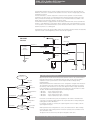
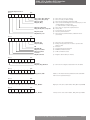
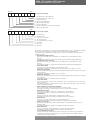
The EPI2 DPV1 interface is connected to the actuator terminal board as shown in the figure below:
Optional module - Profibus interface
Connector H
5
6
7
8
9
17
18
DX-P
HW Mode
19
Shield
DX-N
Profibus line
Pentair reserves the right to change the contents without notice
page 2
LED DL1 – DL6
Jumper JP2