1
There is no need for using this item under normal operational conditions.
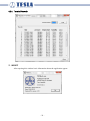
3.2.2. Mesh Configuration
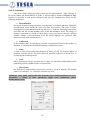
The information regarding the configuration of the entire mesh network is
concentrated in this item; the configuration could also be changed to a certain extent. To
open the window with the basic sections of Configuration and Bonds overview, click it.
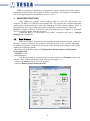
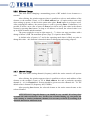
A maximum number of hops for routing is set up in Configuration section in
Number of hops box, i.e. how many points (probes and repeaters) might information pass
over to a particular element. Larger number of hops enables to create more extensive
networks, but it also brings prolongation of communication time. The maximum number of
hops is equal to 16, the default value is 4. The setting of value 0 signifies a network without
routing, i.e. all elements have to be within the direct reach of the terminal.
After entering, the current working channel is also displayed in the section. To
change the channel, click the channel button and the window for setting up a channel opens,
see Change channel menu item.
An overview of all bonded elements together with their function in the system, power
and strength of the received signal (element/terminal) are displayed in Bonds overview
section. To update the data press Enter button. A course of entering progress is displayed in
the lower notification area.
The functions in the system (not assigned, repeater, actuator and probe) for each
bonded element might be changed in its relevant box, see Measuring system/assign as menu
item. As a confirmation of any change, Saved green backlit notice appears in the lower
notification area. To open the window for setting of power, click the button with information
on the power, see Change power menu item.
-8-