1
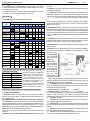
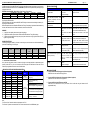
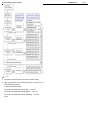
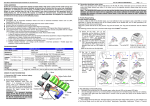
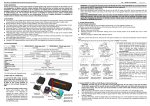
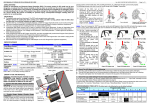
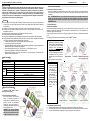
User Manual Of XERUN-120A-1S Brushless Speed Controller HW-SM504ENG-20120702 【ALERT TONES】 1. Input voltage abnormal alert tone: The ESC begins to check the input voltage when power on, if the voltage is out of the normal range, such an alert tone will be heard: “beep-beep-, beep-beep-, beep-beep-” (There is 1 second interval between every “beep-beep-” tone). 2. Throttle signal abnormal alert tone: When the ESC can’t detect the normal throttle signal, such an alert tone will be heard: “beep-, beep-, beep-” (There is 2 seconds interval between every “beep-” tone). 【PROGRAM THE ESC】 1. Programmable Items List (The italics texts in the form are the default settings) Programmable Items Programmable Value 1 2 3 4 5 6 7 8 9 Basic Items 1. Running Mode Forward with Brake 0% 5% 10% 20% 40% 60% 80% 100% 3.Low Voltage Cut-Off Threshold NonProtection 2.6V/Cell 2.8V/Cell 3.0V /Cell 3.2V /Cell 3.4V /Cell 4.Start Mode(Punch) Level1 Level2 Level3 Level4 Level5 Level6 Level7 Level8 5.Max Brake Force 25% 50% 75% 100% 6.Max Reverse Force 25% 50% 75% 100% 7.Initial Brake Force = Drag Brake Force 0% 20% 40% 8.Neutral Range 6% (Narrow) 9% (Normal) 12% (Wide) 0° 3° 6° 9° 12° 15° 18° 21° 0.00 ° 3.75 ° 7.50 ° 11.25 ° 15.00 ° 18.75 ° 22.50° 26.25° Enable Disable Level9 Advanced Items 9.Boost Timing note1 Timing 10.Over-heat Protection 2.2. Drag Brake Force: Set the amount of drag brake applied at neutral throttle to simulate the slight braking effect of a neutral brushed motor while coasting. 2.3. Low Voltage Cut-Off: The function mainly prevents the lithium battery pack from over discharging. The ESC detects the battery’s voltage at any time, if the voltage is lower than the threshold for 2 seconds, the output power will be reduced 70%, after 10 seconds the output power will be completely shut off and the red LED flashes in such a way: “☆-☆-, ☆-☆-, ☆-☆-”. Please stop your car at the track side as soon as possible to avoid obstructing other racing cars. There are 6 options for this programmable item. You can customize the cutoff threshold by using an advanced LCD Program Box (Optional equipment) to trim it with a step of 0.1V, so it will be more suitable for all kinds of batteries (NiMH, NiCd, Li-ion, Lipo, LFP, etc). 2.5. Maximum Brake Force: The ESC provides proportional brake function. The brake force is related to the position of the throttle stick. Maximum brake force refers to the force when the throttle stick is located at the top point of the backward zone. A very large brake force can shorten the brake time, but it may damage the gears. 2.7. Initial Brake Force: It is also called “minimum brake force”, and it refers to the force when the throttle stick is located at the initial position of the backward zone. The default value is equal to the drag brake force, so the brake effect can be very smoothly. 12.Turbo Timing OFF 1° 2° 3° 4° 5° 6° 7° 8° 13.Boost Start RPM 3000 4500 6000 7500 9000 10500 12000 13500 15000 0s 0.1s 0.2s 0.3s 0.4s 0.5s 0.6s 0.7s 0.8s 15.Timing Punch 200 300 400 550 700 850 1000 (RPM/Degree) th th Note1:When using the firmware with 15 programmable items, the 9 item will be “Boost Timing”. Otherwise the 9 items will be th th “Timing”, and 11 to 15 items are canceled. The factory default firmware is V2.0_100528_MOD (with 15 programmable items). The optional firmware versions are as follows: The ESC firmware with 15 programmable items uses Boost Timing Version Programmable Items Amount and Turbo technology, which is a great innovation for STOCK racing. V2.0_100528_MOD 15 For a standard 11.5T STOCK motor, powered by 2S Lipo battery, when the ESC applies the maximum timing to the motor, it runs at an V2.0_100518STOCK 15 incredible speed more than 110000 RPM, which is much close to the V2.0_100422STOCK 15 speed of a MODIFIED motor (While using traditional technology, such a 11.5T STOCK motor only runs at about 26000RPM). V1.10_090205_MOD 10 But the new technology also has some negative impacts; it brings V1.10_090323a_m 10 more power loss and lower efficiency of the whole system. So it is very V1_508_NO timing 10 important to set the programmable items of your ESC correctly. th Note2:The 11 item is reserved item, with no function. Note3:Please check the manufacturer’s website to get information about the latest software for XERUN-120A-1S ESC. 2. stick from forward zone to backward zone, the car will go backward immediately. This mode is usually used for the Rock Crawler. 2.6. Maximum Reverse Force: Sets how much power will be applied in the reverse direction. Different value makes different reverse speed. 11.Reserved item note2 14.Turbo Delay -2- 2.4. Start Mode (Also called “Punch”): Select from “Level1” to “Level9” as your like, Level1 has a very soft start effect, while level9 has a very aggressive start effect. From Level1 to Level9, the start force is increasing. Please note that if you choose “Level7” to “Level9” mode, you must use good quality battery pack with powerful discharge ability, otherwise these modes cannot get the burst start effect as you want. If the motor cannot run smoothly (the motor is trembling), it may caused by the weak discharge ability of the battery pack, please choose a better battery or increase the gear rate. Forward/Reverse Foward/Reverse with Brake (For Rock Crawler) 2.Drag Brake Force Page Explanation For Each Programmable Item 2.1. Running Mode: With “Forward Only with Brake” mode, the car can go forward and brake, but cannot go backward, this mode is suitable for competition; “Forward/Reverse with Brake” mode provides backward function, which is suitable for daily training. Note: “Forward/Reverse with Brake” mode uses “Double-click” method to make the car go backward. When you move the throttle stick from forward zone to backward zone for the first time (The 1st “click”), the ESC begins to brake the motor, the motor speeds down but it is still running, not completely stopped, so the backward action is NOT happened immediately. When the throttle stick is moved to the backward zone again (The 2nd “click”), if the motor speed is slowed down to zero (i.e. stopped), the backward action will happen. The “Double-Click” method can prevent mistakenly reversing action when the brake function is frequently used in steering. By the way, in the process of braking or reversing, if the throttle stick is moved to forward zone, the motor will run forward at once. “Forward/Reverse” mode uses “Single-click” method to make the car go backward. When you move the throttle 2.8. Throttle Neutral Range: Please refer to the following picture to adjust the neutral range as your like. 2.9. Boost Timing: It is effective throughout the entire throttle range and affects the motor speed in the entire track. Please note this refers to the maximum value of the ESC internal timing, the actual timing is always dynamically changed every moment according to the motor RPM. Timing: The “timing” item is usable for both sensored and sensorless brushless motors. Please select the most suitable timing value according to the motor you are just using. Generally, higher timing value brings out higher power output, but the whole efficiency of the system will be slightly lower down. 2.10. Over-Heat Protection: If the function is activated, the output power will be cut-off when the temperature of the ESC or the internal temperature of the sensored brushless motor is up to a factory-preset value for 5 seconds. When the protection happens, the Green LED will flash. When the ESC is over-heat: The Green LED flashes as “☆-, ☆-, ☆-” (Single flash). When the motor is over-heat: The Green LED flashes as “☆-☆-, ☆-☆-, ☆-☆-” (Double flash). Note: The motor over-heat protection function is only available for the sensored brushless motor made by the same manufacturer of the ESC. For motors made by other manufacturers, this function maybe not available or the protection point doesn’t match the design of the ESC, please disable the over-heat protection function in such a case. 2.11. Reserved item: With no function. 2.12. Turbo Timing: It is the additional timing that added to the Boosting Timing and only effective when the throttle is fully opened, so usually it is useful for long straight track. 2.13. Boost Start RPM: ESC begins to increase the internal timing when motor speed reaches the Boost Start PRM. A lower Boost Start RPM setting will produce a faster rate of boost because the ESC increases the internal timing earlier. 2.14. Turbo Delay: This is the time that must expire at fully opened throttle to engage turbo. If the fully opened time of throttle is less than the setting value, the turbo will NOT be activated. 2.15. Timing Punch: This refers to the RPM increment that triggers the ESC timing increase of 1 Degree. A lower Timing Punch setting will produce a faster acceleration and hotter temperature of the motor.