1
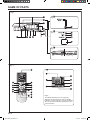
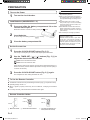
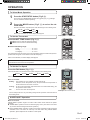
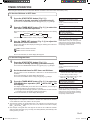
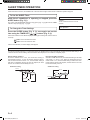
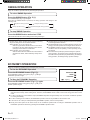
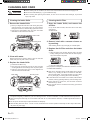
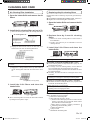
OPERATION To Stop Operation Press the START/STOP button (Fig. 5 M). The OPERATION Indicator Lamp (green) (Fig.3 5) will go out. About AUTO CHANGEOVER Operation AUTO: ● When AUTO CHANGEOVER operation first selected, the fan will operate at very low speed for about a few minutes, during which time the unit detects the room conditions and selects the proper operating mode. If the difference between thermostat setting and actual room temperature is more than +2 °C Cooling or dry operation If the difference between thermostat setting and actual room temperature is within ±2 °C Determined by outdoor temperature If the difference between thermostat setting and actual room temperature is more than –2 °C Heating operation ● When the air conditioner has adjusted your room’s temperature to near the thermostat setting, it will begin monitor operation. In the monitor operation mode, the fan will operate at low speed. If the room temperature subsequently changes, the air conditioner will once again select the appropriate operation (Heating, Cooling) to adjust the temperature to the value set in the thermostat. ● If the mode automatically selected by the unit is not what you wish, select one of the mode operation (HEAT, COOL, DRY, FAN). About Mode Operation Heating: ● Use to warm your room. ● When Heating mode is selected, the air conditioner will operate at very low fan speed for about 3 to 5 minutes, after which it will switch to the selected fan setting. This period of time is provided to allow the indoor unit to warm up before begin full operation. ● When the outdoor temperature is very low, frost may form on the outside unit, and its performance may be reduced. In order to remove such frost, the unit will automatically enter the defrost cycle from time to time. During Automatic Defrosting operation, the OPERATION Indicator Lamp (green) (Fig.3 5) will flash, and the heat operation will be interrupted. ● After the start of heating operation, it takes some time before the room gets warmer. Cooling: ● Use to cool your room. Dry: ● Use for gently cooling while dehumidifying your room. During Heating mode: Set the thermostat to a temperature setting that is higher than the current room temperature. The Heating mode will not operate if the thermostat is set lower than the actual room temperature. During Cooling/Dry mode: Set the thermostat to a temperature setting that is lower than the current room temperature. The Cooling and Dry modes will not operate if the thermostat is set higher than the actual room temperature (in Cooling mode, the fan alone will operate). During Fan mode: You can not use the unit to heat and cool your room. ● You cannot heat the room during Dry mode. ● During Dry mode, the unit will operate at low speed; in order to adjust room humidity, the indoor unit’s fan may stop from time to time. Also, the fan may operate at very low speed when adjusting room humidity. ● The fan speed cannot be changed manually when Dry mode has been selected. Fan: ● Use to circulate the air throughout your room. En-7 9315345387_OM_EN.indb 7 12/2/2010 8:44:40 AM