1
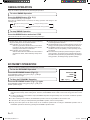
10 °C HEAT OPERATION
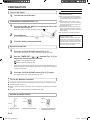
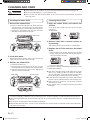
To use 10 °C HEAT OPERATION
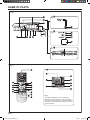
Press the 10 °C HEAT button (Fig.5 H)
The OPERATION indicator lamp (green) (Fig. 3 5) will go out, and the ECONOMY
indicator lamp (green) (Fig. 3 7) will light.
To stop 10 °C HEAT OPERATION
While 10 °C HEAT OPERATION is in
progress, only the following
operation can be used.
• SET button (Vertical)
• SET button (Horizontal)
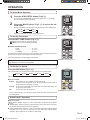
● Indicator Lamp
Press the START/STOP button (Fig.5 M)
OPERATION
Then the OPERATION stops and the ECONOMY indicator lamp (green) (Fig. 3 7) will
go out.
TIMER
ECONOMY
About the 10 °C HEAT Operation
: Lighting
: OFF
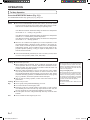
• The Heating mode will not operate if the room temperature is high enough.
• The room temperature can be maintained at 10 °C by pressing the 10 °C HEAT button
(Fig.5 H) so as to prevent the room temperature from falling too far.
• In case of multi-type air conditioner, if other indoor unit is used for heating, the temperature of the room where the “10 °C HEAT” function is applied will rise. When using
the “10 °C HEAT” function, we recommend all indoor units should be run under the
“10 °C HEAT” mode
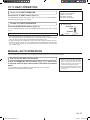
MANUAL AUTO OPERATION
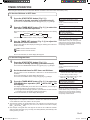
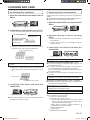
Use the MANUAL AUTO operation in the event the Remote Controller is lost or otherwise unavailable.
How To Use the Main Unit Controls
Press the MANUAL AUTO button (Fig. 2 2 ) more than
3 seconds and less than 10 seconds on the main unit control
panel.
To stop operation, press the MANUAL AUTO button (Fig. 2 2) once again.
(Controls are located inside the intake grille)
● When the air conditioner is operated
with the controls on the MANUAL AUTO
button, it will operate under the same
mode as the AUTO mode selected on
the Remote Controller (see page 7).
● The fan speed selected will be “AUTO”
and the thermostat setting will be standard. (24 °C)
En-12
9315345387_OM_EN.indb 12
12/2/2010 8:44:42 AM