1
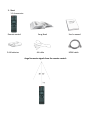
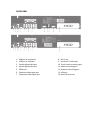
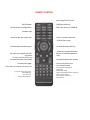
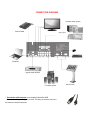
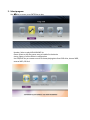
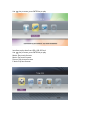
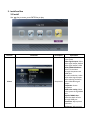
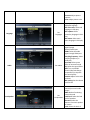
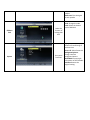
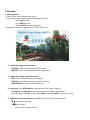
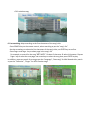
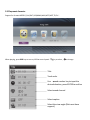
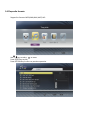
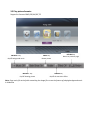
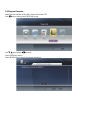
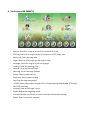
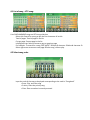
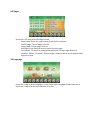
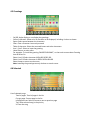
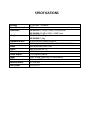
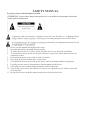
SAFETY MANUAL For safety, please read this manual carefully. ATTENTION: To reduce electric danger, do not open the device cover, and the user may not tamper with its inside. Consult a professional about repair. CAUTION A lightning with arrow head in a triangle to warn the user that there is “a dangerous highvoltage current” inside the product. The current is so strong enough to cause electric shock. An exclamation mark in a triangle to warn the user that there are important instructions for use or maintaining of the peripherals. 1. 2. 3. 4. Please read this manual thoroughly before using. Keep this manual for consulting, when necessary. To reduce the risk of fire or electric shock, keep the device away from rain or humidity. To avoid electric shock, do not use the jack with bare or open wires, unless otherwise they are completely coated. 5. Do not plug the power-source cable in with a wet hand. 6. Keep away from water, humid and very hot places. 7. Care should be taken to prevent the power-source cable from being trodden or stepped on. 8. Carefully prevent water or foreign matters from dropping into the device. 9. Clean with soft towel without using any highly corrosive chemicals. 10. Turn off the power source when the device is not in use; unplug the device when it is not used for a long time. 11. Use the power source under the instructions herein or found on the device. 1. Start 1.1 Accessories Remote control 2 AA batteries Song Book AV cable Angel to receive signals from the remote control: User’s manual HDMI cable 1.2 Overview FRONT PANEL 1. 2. 3. 4. 5. 6. 7. 8. 9. Power Micro 1,2 port Adjust Micro 1,2 volume Infrared eye Number keys Load/eject disk tray Fast rewind Previous song Next song 10. 11. 12. 13. 14. 15. 16. 17. 18. Fast forward Memory card slot USB port Make the list of songs/Store a song Choose TV color system NTSC/PAL Interrupt sounds Stop Play/Pause DVD drive REAR PANEL 1. 2. 3. 4. 5. 6. 7. USB port to peripherals USB port to computer Coaxial digital audio-port Optical digital audio-port HDMI port Composite video signal port Component video signal port 8. Not in use 9. Surround 5.1 audio-port 10. Touch screen connecting port 11. Mouse connecting port 12. Keyboard connecting port 13. VGA port 14. Hard disk drive tray REMOTE CONTROL New song/Trace by time On/off power Set the device’s configuration Load/eject disk tray Select the source of USB/disk Number keys Search as per the song’s title Clear a character entered Confirm/Set a song Increase/decrease the tempo Increase/decrease the key Set a priority song/On-off PCB Arrow key to adjust direction Return to previous operation Stop Play/Pause To main menu/On-off scoring Increase/decrease the melody Previous/next page Select the first characters of song’s title Display the contents being played Select DVD view Interrupt sounds Select audio/voice-over Increase/decrease the volume Select male/female tone Fast rewind/forward Previous/next Track/Chapter Slowly play Select repeat mode Repeat a selected A-B section of pictures Select TV color system Zoom in/zoom out pictures Select caption CONNECTION DIAGRAM Karaoke audio-system External HDD FR,FL port Computer Digital audio-decoder 5.1 audio-system * Connection with computer: use standard cable Mini-USB Connect to cable, press power to start. The way to connect and use is the same as normal computer. Touch screen 2. Select program Use key to move, press ENTER key to play Karaoke: Select to play MIDI KARAOKE list Game: Select to play the games are pre-installed in the device Setting: Select to set the device’s configuration Use USB/DISC key on remote control to choose playing data from DVD drive, internal HDD, external HDD, SD Card. Use key to move, press ENTER key to play Interface to play data from HDD, USB, SD Card Use key to move, press ENTER key to play Movie: Play movie formats Music: Play music formats Picture: Play picture formats E-book: Play text formats 3. Install and Use 3.1 Install Use Function Picture key to move, press ENTER key to play Illustration Description Set pictures Explanation Color system: Select TV color system Video signal output: Select video signal output, default video signal output is VGA YCbCr/HDMI Resolution: Select TV resolution through Component and HDMI port To select resolution, select YCbCr video signal output After selecting resolution, select VGA video signal output Proportion: Screen proportion HDMI color setting: Select color system through HDMI port Depth of HDMI color: Select the depth of color through HDMI port Saturation: Adjust picture saturation Brightness: Adjust picture brightness Contrast: Adjust picture contrast Color: Adjust picture color Language Audio Loudspeaker Set languages Set audios Set loudspeakers Displayed language: Set the displayed language Disk voice-over: Select VO language in DVD play Disk caption: Select secondary language in DVD play Disk menu: Select main menu language in DVD play SPDIF: Select the audio signal through Optical/Coaxial port HDMI: Select the audio signal through HDMI port Sampling frequency: Select sampling frequency in audio play Surround: Select space effect of surround sound EQ: Select the sound effect DRC: Turn on/off DRC function (Dynamic Range Compression) to improve the sound quality Karaoke: Adjust micro echo and tone MIC setting: Set the volume level for Mic Downmix: Select 2channel/surround audio output GM5: Mode of emulating surround sound Loud level: Select the loud level of speakers Distance: Select the distance from each speaker to listener Level: Select the level of balance sound for each speaker Audio test: Test the signal of each speaker Children lock System Select the function of locking DVD disk Set system functions Default code 9999 Code: Change the code Level: Select the limited level of DVD disk Replay: Turn on/off replay function of stored song at previous time Screen fit: Select frame size Background picture: Change interface background picture DivX DRM: See copyright information of Divx decoder Initialize: Restore the original setting 3.2 Karaoke 1. Main operation: - In main menu, select Karaoke item to play - Play: Input the code of the song by using number keys 0-9. + Press PLAY to play + Press ENTER to store + Press 1st RESV to store the priority -Stop: When the device is playing, press “STOP” key to stop. 2. Adjust the song volume and tone: - VOLUME +/- key: Increase/decrease the volume - MELODY +/- key: Increase/decrease the song melody 3. Adjust key, tempo, male/female tone: - KEY +/- key: Increase/decrease the song key - TEMPO +/- key: Adjust fast/slow tempo for the song - MALE/FEMALE key: Select male/female tone 4. New song: Press NEW SONG key to display the list of songs in new Vol - Use Page UP and Page DN key to select previous/next page in the alphabet - Select the song press PLAY to play, press ENTER to store, 1st RESV to store the priority 5. Management of selected song: press OSD key to show the list of songs table. - key to select the song key to select: + TOP to set the song in priority + DEL to delete song 6. Fast searching: helps searching as the first characters of the song’s title - Press SEARCH key on the remote control, select searching as per the “song’s list” - Use the arrow keys to select the first characters of the song’s title, use ENTER key to confirm - Press Page + and Page - key to select page in the song’s list For example, to search for the song “ĐẤT NƯỚC” select D character select N character press Page + key to select the next page, use arrow keys to select the song then press ENTER to play In addition, users can search for a song as per the “Language”, “New song” for Midi Karaoke disc; search as per the “Collection”, “Singer” for MTV Karaoke songs 2.4 Play movie formats: 3.3 Play movie formats: Support for formats MPEG1/2,AVI,DAT,VOB,WMV,MKV,M2TS,M2T,TS,FLV… When playing, press OSD key to turn on/off the control panel. key to select, to change Title Track order Use and number key to input the desired duration, press ENTER to confirm Select sound channel Select caption Select the view angle (Disk must have support) 3.4 Play audio formats: Support for formats: MP3,WMA,WAV,AAC,FLAC… Use key to select, to move Press ENTER key to play Press RETURN key to return to previous operation 3.5 Play picture formats: Support for formats: BMP,JPG,PNG,GIF,TIF MELODY + key On/off background music MELODY - key On/off showing picture MALE key Rotate picture RETURN key Return to previous page FEMALE key On/off the transition effect Note: Copy music file to the folder containing the image files to use the feature of playing background music in slideshow 3.6 Play text formats: Helps see the contents of text file, support for format: TXT Use key to move, press ENTER key to play Use key to select, to move Press ENTER key to play Press RETURN key to return to previous operation 3.7 Game Games are pre-installed in the device, use the remote control of the device to control Use key to move, press ENTER key to play Use key to select, to move Press ENTER key to play Press RETURN key to return to previous operation 4. Touch screen (AR-3600KTV) - Song list: Search for a song as per the first characters of its title KTV song: Search for a song as per the first characters of KTV song’s title Select code: Select the song code Singer: Search for KTV song as per the singer’s name Language: Search for song list as per the language Greeting: Install the greetings, lines Selected: List of the selected songs New song: List of new songs updated System: Adjust system features Play/Pause: Play or pause the song Stop: Stop the song being played VGA/TV: Select video output through VGA or TV (when playing Midi Karaoke, KTV songs) Next: Play next song Interrupt: Helps on/off singer’s voice Repeat: Repeat the song being played Increase/Decrease the volume: Increase or decrease volume when playing Return: Return to previous operation 4.1 List of song – KTV song: List of MIDI KARAOKE songs and KTV song collection Select title: Search for a song as per the first characters of its title Total of pages: Total of pages in the list Current page: Current page in the list Left/Right arrow: Select to move to next or previous page For example: To search for a song “ĐẤT NƯỚC” Select D character Select N character Select right arrow to move to next page Select song’s title to play. 4.2 Select song code: Input the code of the song to be played corresponding to the code in “Song book” + Enter: Play, store the song + Priority: Store the priority song + Clear: Clear a number incorrectly entered 4.3 Singer Search for a KTV song as per the singer’s name Select name: Search for singer’s name as per the first character Total of pages: Total of pages in the list Current page: Current page in the list Left/Right arrow: Select to move to next or previous page For example: To search for a song presented by Đan Trường singer Select D character Select T character Select singer’s name to search for the songs Select song title to play. 4.4 Language Search for a song as per the language. In main menu select Language Select Vietnam Search for a song as per the first character of its title 4.5 Greetings - On/Off: Helps display or not display the greetings Color of character: Select color of character to be displayed, including 4 colors to choose Space: Select space between the characters Clear: Clear a character incorrectly entered Table of character: Select the accented letters and other characters Line 1, line 2: Select to input the greeting Home: Return to main menu For example: To install the greeting “MASECO ARIRANG”, on the touch screen select Greeting item Select On Select Line 1 Select character MASECO Select Line 2 Select character ARIRANG Select Home to return to main menu Note: Installing the greetings can only be done on touch screen. 4.6 Selected List of selected songs Total of pages: Total of pages in the list Current page: Current page in the list Left/Right arrow: Select to move to next or previous page Top: Store selected song in the priority X: Clear the song 4.7 New song Search for a song updated in new Vol. Select title: Search for a song as per the first characters of its title Total of pages: Total of pages in the list Current page: Current page in the list Left/Right arrow: Select to move to next or previous page 4.8 System - Adjust system features Adjust: Increase/decrease the volume, tempo, key, melody of the song Scoring: Select Yes to turn on, select No to turn off scoring feature Mouse: Select the speed of mouse on the screen, including 4 levels SPECIFICATIONS Voltage AC 90-240V – 50/60Hz Power Consumption 25W Dimension AR-3600 KTV: 315(R) x 100(C) x 430(D) mm AR-3600HD: 315(R) x 90(C) x 430(D) mm Weight AR-3600 KTV: 3,7kg AR-3600HD: 3,4kg Compatible with VCD/SVCD/DVD/Audio CD/MP3 Video MPEG1/2,AVI,DAT,VOB,WMV,MKV,M2TS,M2T,TS,FLV Audio MP3,WMA,WAV,AAC,FLAC Photo BMP,JPG,PNG,GIF,TIF Video output HDMI 1.3,Composite,Component Audio output 5.1Ch,Optical,Coaxial Input USB 2.0 Host, Slave USB, SD card Reader SATA 01 internal SATA interface Subtitle format SRT,SUB,ASS File system NTFS,FAT32