1
8
www.electrolux.com
5. CONTROL PANEL
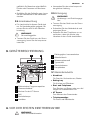
Electronic programmer
1
2 3 4 5
6 7 8 9 10
11
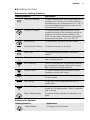
Use the sensor fields to operate the appliance
Number
Sensor
field
Function
Comment
On / off
To activate and deactivate the appliance.
Heating Functions or Assisted Cooking
To choose a heating function or an Assisted Cooking function. To have access to the necessary function, touch
the field once or twice when the appliance is activated. To activate or deactivate the light, touch the field for 3 seconds.
Home key
To go back one level in the menu. To
show the main menu, touch the field for
3 seconds.
Temperature
selection
To set the temperature or show the current temperature in the appliance. To
activate or deactivate the Fast Heat Up
function, touch the field for 3 seconds.
5
Favourite Programme
To save and have access to your favourite programmes.
6
Up key
To move up in the menu.
7
Down key
To move down in the menu.
Time and additional functions
To set different functions. When a heating function operates, touch the sensor
field to set the timer, Child Safety, Favourite Programme memory, Heat +
Hold or Set + Go or to change the settings of the core temperature sensor
(for selected models only).
9
Minute Minder
To set the Minute Minder .
10
OK
To confirm the selection or setting.
1
2
3
4
8