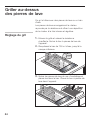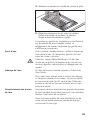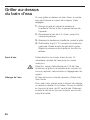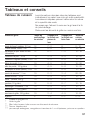
1
de Gebrauchsanleitung . . . . . . . . . . . . . . 2 – 22 en Operating instructions . . . . . . . . . . . . 23 – 43 fr Mode d’emploi . . . . . . . . . . . . . . . . . . 44 – 64 nl Gebruiksaanwijzing . . . . . . . . . . . . . . 65 – 85 es Instrucciones de uso . . . . . . . . . . . . . 86 – 106 pt Manual de instruções . . . . . . . . . . . . .107 – 127 Gebrauchsanleitung Operating instructions Mode d’emploi Gebruiksaanwijzing Instrucciones de uso Manual de instruções ET375MU11E 9000386189/8902 Inhaltsverzeichnis 2 Worauf Sie achten müssen . . . . . . . . . . . . . . . . . 4 Vor dem Einbau . . . . . . . . . . . . . . . . . . . . . . . . . . . 4 Sicherheitshinweise . . . . . . . . . . . . . . . . . . . . . . . . . 5 Ursachen für Schäden . . . . . . . . . . . . . . . . . . . . . . 6 Vor der ersten Benutzung . . . . . . . . . . . . . . . . . . . . 6 Ihr neues Gerät . . . . . . . . . . . . . . . . . . . . . . . . . . . 7 Das ist Ihr neuer Lavasteingrill . . . . . . . . . . . . . . . . . 7 Bedienfeld . . . . . . . . . . . . . . . . . . . . . . . . . . . . . . . . 8 Restwärmeanzeige . . . . . . . . . . . . . . . . . . . . . . . . . 9 Grillheizkörper . . . . . . . . . . . . . . . . . . . . . . . . . . . . . 9 Lavasteinbehälter . . . . . . . . . . . . . . . . . . . . . . . . . . 9 Wasserbad . . . . . . . . . . . . . . . . . . . . . . . . . . . . . . . 9 Grill einstellen . . . . . . . . . . . . . . . . . . . . . . . . . . . . 10 Grill ein- und ausschalten . . . . . . . . . . . . . . . . . . . . 10 Grill einstellen . . . . . . . . . . . . . . . . . . . . . . . . . . . . . 10 Grill vorheizen . . . . . . . . . . . . . . . . . . . . . . . . . . . . . 11 Überhitzungsschutz . . . . . . . . . . . . . . . . . . . . . . . . 11 Automatische Zeitbegrenzung . . . . . . . . . . . . . . . . . 11 Grillen über Lavasteinen . . . . . . . . . . . . . . . . . . . . 12 Grill einstellen . . . . . . . . . . . . . . . . . . . . . . . . . . . . . 12 Grillen über dem Wasserbad . . . . . . . . . . . . . . . . 14 Tabellen und Tipps . . . . . . . . . . . . . . . . . . . . . . . . 15 Grilltabelle . . . . . . . . . . . . . . . . . . . . . . . . . . . . . . . . 15 Tipps zum Grillen . . . . . . . . . . . . . . . . . . . . . . . . . . 16 Timer . . . . . . . . . . . . . . . . . . . . . . . . . . . . . . . . . . . 17 Grundeinstellungen . . . . . . . . . . . . . . . . . . . . . . . . 18 Grundeinstellungen ändern . . . . . . . . . . . . . . . . . . . 19 Pflege und Reinigung . . . . . . . . . . . . . . . . . . . . . . 19 Störung beheben . . . . . . . . . . . . . . . . . . . . . . . . . 21 Kundendienst . . . . . . . . . . . . . . . . . . . . . . . . . . . . 22 3 Worauf Sie achten müssen Lesen Sie bitte sorgfältig diese Gebrauchsanleitung. Nur dann können Sie Ihr Gerät sicher und richtig bedienen. Heben Sie die Gebrauchs- und die Montageanleitung gut auf. Wenn Sie das Gerät weitergeben, legen Sie die Anleitungen bei. Vor dem Einbau Umweltgerecht entsorgen Packen Sie das Gerät aus und entsorgen Sie die Verpackung umweltgerecht. Dieses Gerät ist entsprechend der europäischen Richtlinien 2002/96/EG über Elektro- und Elektronikaltgeräte (waste electrical and electronic equipment – WEEE) gekennzeichnet. Die Richtlinie gibt den Rahmen für eine EU-weit gültige Rücknahme und Verwertung der Altgeräte vor. Transportschäden Prüfen Sie das Gerät nach dem Auspacken. Bei einem Transportschaden dürfen Sie das Gerät nicht anschließen. Elektrischer Anschluss Ist die Anschlussleitung beschädigt, muss sie von einem Fachmann, der vom Hersteller geschult ist, ausgetauscht werden um Gefahren zu vermeiden. Aufstellen und Anschließen Beachten Sie bitte die spezielle Montageanleitung. 4 Sicherheitshinweise Dieses Gerät ist nur für den privaten Haushalt bestimmt. Benutzen Sie das Gerät ausschließlich zum Zubereiten von Speisen. Keine Holzkohle oder ähnliche Brennstoffe für den Grill verwenden! Sichere Bedienung Erwachsene und Kinder dürfen nie unbeaufsichtigt das Gerät betreiben, – wenn sie körperlich oder geistig dazu nicht in der Lage sind, – oder wenn ihnen Wissen und Erfahrung fehlen, das Gerät richtig und sicher zu bedienen. Kinder nicht mit dem Gerät spielen lassen. Überhitztes Öl und Fett Vorsicht, Brandgefahr! Überhitztes Öl oder Fett entzündet sich schnell. Lassen Sie heißes Öl oder Fett niemals unbeaufsichtigt. Löschen Sie nie brennendes Öl oder Fett mit Wasser. Ersticken Sie die Flammen mit einem Deckel. Schalten Sie das Gerät aus. Heißer Grill Vorsicht, Verbrennungsgefahr! Das Gerät wird beim Betrieb heiß. Herabtropfendes Fett kann kurz aufflammen. Halten Sie Kinder fern! Vorsicht, Brandgefahr! Nie brennbare Gegenstände (z. B. Reinigungsmittel, Spraydosen) in Schubladen oder Fächern unter dem Gerät aufbewahren. Kurzschluss-Gefahr! Nie Anschlusskabel von Elektrogeräten über den heißen Grill führen. Die Kabelisolierung kann schmelzen. Glaskeramik-Abdeckung Vorsicht, Verbrennungsgefahr! Die GlaskeramikAbdeckung erst nach vollständiger Abkühlung des Gerätes auflegen. Nie den Grill mit aufgelegter Abdeckung einschalten. 5 Reinigung Schalten Sie den Grill nach Gebrauch aus. Reinigen Sie den abgekühlten Grill nach jedem Gebrauch. Fettige Verschmutzungen können sich entzünden. Reparaturen Unsachgemäße Reparaturen sind gefährlich. Stromschlag-Gefahr! Nur ein von uns geschulter Kundendienst-Techniker darf Reparaturen durchführen. Wenn das Gerät defekt ist, die Sicherung im Sicherungskasten ausschalten. Rufen Sie den Kundendienst. Ursachen für Schäden Harte und spitze Gegenstände Glaskeramik-Abdeckung Wenn harte oder spitze Gegenstände auf die Glaskeramik-Blende oder die GlaskeramikAbdeckung fallen, können Schäden entstehen. Die Glaskeramik-Abdeckung erst nach vollständiger Abkühlung des Gerätes auflegen. Nie den Grill mit aufgelegter Abdeckung einschalten. Die Abdeckung nicht als Abstellfläche oder als Warmhaltefläche benutzen. Vor der ersten Benutzung Lavasteine Entnehmen Sie vor der ersten Benutzung die Lavasteine aus dem Verpackungsbeutel und füllen Sie die Lavasteine in den Lavasteinbehälter. Grill aufheizen Reinigen Sie den Grill und die Zubehörteile vor dem ersten Gebrauch gründlich. Heizen Sie dann den Grill ohne Grillgut für einige Minuten auf der höchsten Stufe auf. Dadurch wird der Neugeruch beseitigt. 6 Ihr neues Gerät Hier lernen Sie Ihr neues Gerät kennen und Sie erhalten Informationen zu dem mitgelieferten Zubehör. Das ist Ihr neuer Lavasteingrill 1 Glaskeramik-Abdeckung 2 Grillrost 3 Lavasteinbehälter 4 Grillheizkörper 5 Bedienfeld 7 Bedienfeld Anzeige für Grillstufe 1-9 Restwärme k/H Vorheizsymbol °C Bedienfläche für Hauptschalter l Anzeige für Timer Einstellbereich Zum Einstellen der Grillstufe Zum Einstellen des Timers Bedienfläche für Timer W Bedienflächen Wenn Sie ein Symbol berühren, wird die jeweilige Funktion aktiviert. Hinweis Halten Sie die Bedienflächen immer trocken. Feuchtigkeit beeinträchtigt die Funktion. 8 Restwärmeanzeige Der Grill hat eine zweistufige Restwärmeanzeige. Erscheint in der Anzeige ein k, ist der Grill noch heiß. Kühlt der Grill weiter ab, wechselt die Anzeige zu h. Die Anzeige erlischt, wenn der Grill ausreichend abgekühlt ist. Reinigen Sie den Grill erst, wenn die Restwärmeanzeige vollständig erloschen ist. Grillheizkörper 몇 Vorsicht, Verbrennungsgefahr! Der Heizkörper wird im Betrieb heiß. Berühren Sie den Grillrost und den Heizkörper nur, wenn das Gerät abgekühlt ist. Vielleicht bemerken Sie, dass sich der Grillheizkörper während der Grillzeit automatisch ein- und ausschaltet. Das ist normal. Wenn Sie den Grillrost abnehmen, können Sie den Heizkörper seitlich hochschwenken. Wenn der Heizkörper hochgeschwenkt ist, bleibt dieser aus Sicherheitsgründen abgeschaltet. Lavasteinbehälter Entnehmen Sie vor der ersten Benutzung die Lavasteine aus dem Verpackungsbeutel und füllen Sie die Lavasteine in den Lavasteinbehälter. Wasserbad Füllen Sie den Grillbehälter vor jedem Betrieb mit Wasser. Die Wassermenge hängt davon ab, ob Sie mit oder ohne Lavasteine grillen möchten. 몇 Vorsicht, Verbrühungsgefahr! Gelangt beim Nachfüllen Wasser auf den heißen Grillrost oder Grillheizkörper entsteht Wasserdampf. 9 Grill einstellen Grill ein- und ausschalten Den Grill schalten Sie mit dem Hauptschalter ein und aus. Einschalten: Berühren Sie das Symbol l. Die Anzeige über dem Hauptschalter leuchtet. Der Grill ist nun betriebsbereit. Ausschalten: Berühren Sie das Symbol l, bis die Anzeige über dem Hauptschalter erlischt. Der Grill ist ausgeschaltet. Die Restwärmeanzeige leuchtet weiter, bis der Grill ausreichend abgekühlt ist. Hinweis Der Grill schaltet sich automatisch aus, wenn die Grillstufe länger als 20 Sekunden auf 0 eingestellt ist. Grill einstellen Im Einstellbereich stellen Sie die gewünschte Grillstufe ein. Grillstufe 1 = niedrigste Leistung Grillstufe 9 = höchste Leistung Grillstufe einstellen: 1. Grill mit dem Hauptschalter einschalten. In der Grillstufen-Anzeige leuchtet 0 und das Symbol . 2. Über den Einstellbereich gleiten, bis die gewünschte Grillstufe in der Anzeige erscheint. 10 Grillstufe ändern: Im Einstellbereich die gewünschte Grillstufe einstellen. Grillstufe ausschalten: Im Einstellbereich auf 0 stellen. Grill vorheizen Das Grillgut erst auflegen, wenn die Vorheizzeit verstrichen ist. Das Vorheizsymbol erlischt. Während der Vorheizzeit heizt der Grill mit voller Leistung. Danach wird die Leistung durch Ein- und Ausschalten der Heizkörper reduziert, um eine konstante Temperatur für die jeweilige Stufe zu erreichen. Die Vorheizzeit beträgt je nach eingestellter Grillstufe zwischen 8 und 10 Minuten. Überhitzungsschutz Der Überhitzungsschutz schaltet bei Überhitzung des Grills die Grillheizung ab. In der Anzeige blinken abwechselnd F und 4. Warten Sie, bis der Grill ausreichend abgekühlt ist. Berühren Sie dann eine beliebige Bedienfläche. Automatische Zeitbegrenzung Ist der Grill zu lange in Betrieb und Sie ändern die Einstellung nicht, wird die automatische Zeitbegrenzung aktiviert. Die Grillheizung wird unterbrochen. In der Anzeige blinken abwechselnd F und 8. Wenn Sie eine beliebige Bedienfläche berühren, erlischt die Anzeige. Sie können neu einstellen. Wann die Zeitbegrenzung aktiv wird, richtet sich nach der eingestellten Grillstufe. 11 Grillen über Lavasteinen Sie können mit Ihrem Grill über Lavasteinen oder über einem Wasserbad grillen. Die Lavasteine speichern die abgestrahlte Hitze des Grillheizkörpers und ergeben eine intensive und gleichmäßige Wärmeverteilung. Grill einstellen 1. Grillrost abnehmen und den Grillheizkörper hochschwenken. Lavasteinbehälter aus dem Gerät nehmen. 2. 700 ml Wasser in den Grillbehälter bis zur unteren Markierung füllen. 3. Lavasteine aus dem Verpackungsbeutel nehmen und in den Lavasteinbehälter füllen. Lavasteinbehälter in das Gerät einsetzen. 12 4. Grillheizkörper herunterschwenken, Grillrost auflegen. 5. Die Grillstufe entsprechend der Tabelle einstellen. Heizen Sie den Grill entsprechend der Tabelle vor. Dann können Sie das Grillgut auflegen. Durch herabtropfendes Fett auf den Grillheizkörper und die heißen Lavasteine entsteht Rauch. Herabtropfendes Fett kann kurz aufflammen. Wasser nachfüllen Vor jedem neuen Grillvorgang den Wasserstand im Grillbehälter prüfen. Gegebenenfalls Wasser bis zur unteren Markierung nachgießen. 몇 Wasser ablassen Vorsicht, Verbrühungsgefahr! Gelangt beim Nachfüllen Wasser auf den heißen Grillrost oder Grillheizkörper entsteht Wasserdampf. Sollte das Wasser beim Ablassen noch heiß sein, gießen Sie zuerst kaltes Wasser zum Abkühlen dazu! Zum Ablassen des Wassers ein hitzebeständiges Gefäß unter den Ablaufhahn stellen. Öffnen Sie den Hahn, indem Sie den Hebel 90° nach unten drehen. Danach schließen Sie den Hahn, indem Sie den Hebel nach oben bis zum Anschlag drehen. Lavasteine wechseln Die Lavasteine saugen herabtropfendes Fett auf und sind gesättigt, wenn die Steine dunkel geworden sind. Die Lavasteine müssen dann ausgewechselt werden. Die passenden Lavasteine für Ihren Grill bekommen Sie bei Ihrem Fachhändler oder unserem Kundendienst. 13 Grillen über dem Wasserbad Beim Grillen über dem Wasserbad wird gegrilltes Fleisch durch den aufsteigenden Wasserdampf saftiger. 1. Grillrost abnehmen und den Grillheizkörper hochschwenken. Lavasteinbehälter aus dem Gerät nehmen. 2. 2,5 l Wasser in den Grillbehälter bis zur oberen Markierung füllen. 3. Grillheizkörper herunterschwenken, Grillrost auflegen. 4. Die Grillstufe entsprechend der Tabelle einstellen. Heizen Sie den Grill entsprechend der Tabelle vor. Dann können Sie das Grillgut auflegen. Wasser nachfüllen Beim Grillen auf den Wasserstand im Grillbehälter achten. Gegebenenfalls Wasser bis zur oberen Markierung nachgießen. 몇 Wasser ablassen Vorsicht, Verbrühungsgefahr! Gelangt beim Nachfüllen Wasser auf den heißen Grillrost oder Grillheizkörper entsteht Wasserdampf. Sollte das Wasser beim Ablassen noch heiß sein, gießen Sie zuerst kaltes Wasser zum Abkühlen dazu! Zum Ablassen des Wassers ein hitzebeständiges Gefäß unter den Ablaufhahn stellen. Öffnen Sie den Hahn, indem Sie den Hebel 90° nach unten drehen. Danach schließen Sie den Hahn, indem Sie den Hebel nach oben bis zum Anschlag drehen. 14 Tabellen und Tipps Grilltabelle Die Angaben in den Tabellen sind Richtwerte und gelten für einen vorgeheizten Grill. Die Werte können je nach Art und Menge des Grillgutes variieren. Das Grillgut erst auflegen, wenn die Vorheizzeit verstrichen ist. Wenden Sie das Grillgut mindestens ein Mal. Grillgut Vorheizzeit Einstellung beim Einstellung beim Grillzeit in in Minuten Grillen über Grillen über Minuten Lavasteinen Wasserbad Rindersteak, medium, 2-3 cm T-Bone-Steak, rosa, 3 cm Schweinenackensteak, ohne Knochen Schweinekoteletts*, 2 cm 12 12 12 7-8 5-6 6-7 9 6-7 7-8 8 - 10 10 - 15 12 - 16 10 3-4 4-5 15 - 20 Lammkoteletts, rosa, 2 cm 10 4-5 5-6 12 - 15 Hähnchenbrust, 2 cm 10 4-5 5-6 15 - 20 Hähnchenflügel, à 100 g 10 4-5 5-6 15 - 20 Putenschnitzel, natur, 2 cm 10 4-5 5-6 12 - 15 Lachssteak**, 3 cm 10 2-3 3-4 20 - 25 Thunfischsteak**, 2 cm 10 3-4 4-5 10 - 15 Forelle***, ganz, 200 g 10 4-5 5-6 12 - 15 Riesengarnelen, à 30 g 12 5-6 6-7 12 - 15 Hamburger / Frikadellen, 1 cm 10 3-4 4-5 12 - 17 Schaschlikspieße****, à 100 g 10 2-3 3-4 17 - 25 Grillwurst, à 100 g 10 3-4 4-5 10 - 20 Gemüse***** 8 1-2 2-3 8 - 12 * ** *** **** ***** Entlang des Knochens einschneiden Grillrost einölen Haut gut einölen, vor dem Wenden nochmals ölen Häufig wenden z. B. Auberginen, Zucchini in 1 cm dicken Scheiben, Paprika in Vierteln 15 Tipps zum Grillen Qualität des Fleisches Das Grillergebnis ist abhängig von Art und Qualität des Fleisches und von Ihrem persönlichen Geschmack. Die Grillstücke sollten möglichst gleich dick sein. So bräunen sie gleichmäßig und bleiben schön saftig. Grill vorheizen Heizen Sie den Grill immer vor. So kann sich durch die intensive Wärmestrahlung eine Kruste auf der Oberfläche des Grillguts bilden und Saft kann nicht austreten. Grillgut vorbereiten Um ein Austrocknen der Oberfläche zu vermeiden und den Geschmack zu verbessern, pinseln Sie das Grillgut leicht mit hitzebeständigem Öl ein. Achten Sie darauf nicht zuviel Öl zu verwenden, da sonst Brandgefahr besteht! Grillen Sie Steaks immer ungesalzen. Wasser und lösliche Nährstoffe könnten sonst austreten und verloren gehen. Entfernen Sie die Fettschicht (z. B. am Kotelett) erst nach dem Grillen, sonst verliert das Fleisch an Saft und Aroma. Grillgut auflegen Legen Sie die Grillstücke direkt auf den Rost. Bei nur einem Grillstück legen Sie dieses möglichst mittig auf den Rost. So gelingt es am besten. Grillgut wenden Wenden Sie das Fleisch, wenn auf der Oberfläche kleine Tröpfchen zu sehen sind. Wenden Sie die Grillstücke erst, sobald sich diese leicht vom Rost lösen lassen. Wenn das Fleisch am Grillrost haften bleibt, werden die Fasern zerstört und Fleischsaft tritt aus. Tipps zum Grillen Stechen Sie nicht während des Grillens in das Fleisch ein. Saft kann verloren gehen. Tritt an der Steakoberfläche Fleischsaft aus, ist das Fleisch medium (innen rosa und außen knusprig braun). Servieren Sie Gegrilltes heiß. Halten Sie Gegrilltes nicht warm, sonst wird es zäh. 16 Heruntertropfendes Fett Heruntertropfendes Fett kann sich auf dem Heizkörper entzünden und zu kurzer Flammen- und Rauchbildung führen. Um dies zu reduzieren, sollten sehr fetthaltige Speisen über dem Wasserbad gegrillt werden. Timer Der Timer kann als Küchenwecker verwendet werden. Der Timer schaltet nicht den Grill ein oder aus. Mit dem Timer können Sie eine Zeit bis 99 Minuten einstellen. Sie können den Timer auch bei ausgeschaltetem Grill verwenden. So stellen Sie ein 1. Symbol W berühren, bis die Anzeige a leuchtet. In der Timer-Anzeige leuchtet 00. 2. Im Einstellbereich die gewünschte Zeit einstellen. Nach Ablauf der Zeit Nach Ablauf der Zeit hören Sie ein Signal. In der Timer-Anzeige leuchtet 00. Nach 10 Sekunden schaltet die Anzeige ab. Zeit korrigieren Symbol W berühren, im Einstellbereich die Zeit neu einstellen. 17 Grundeinstellungen Ihr Gerät hat verschiedene Grundeinstellungen. Sie können diese Grundeinstellungen an Ihre eigenen Gewohnheiten anpassen. Anzeige Funktion c2 Signalton 0 Bestätigungssignal und Fehlbedienungssignal ausgeschaltet 1 Nur Fehlbedienungssignal eingeschaltet 2 Bestätigungssignal und Fehlbedienungssignal eingeschaltet* c6 Dauer des Timer-Ende Signals 1 10 Sekunden* 2 30 Sekunden 3 1 Minute c0 Rücksetzung auf die Grundeinstellung 0 Ausgeschaltet 1 Eingeschaltet * 18 Grundeinstellung Grundeinstellungen ändern Der Grill muss ausgeschaltet sein. 1. Grill einschalten. 2. In den nächsten 10 Sekunden das Symbol W 4 Sekunden lang berühren. Im rechten Display blinkt c2, im linken Display leuchtet 2. 3. Symbol W sooft berühren, bis im rechten Display die gewünschte Anzeige blinkt. 4. Im Einstellbereich den gewünschten Wert einstellen. 5. Symbol W 4 Sekunden lang berühren. Die Einstellung ist gespeichert. Ausschalten ohne zu speichern Zum Verlassen der Grundeinstellung den Grill mit dem Hauptschalter ausschalten. Die Änderungen werden nicht gespeichert. Pflege und Reinigung Verwenden Sie keine Hochdruckreiniger oder Dampfstrahler. 몇 Wasser ablassen Vorsicht, Verbrennungsgefahr! Den Grill erst reinigen, wenn die Restwärmeanzeige erloschen ist. Reinigen Sie den Grill nach jeder Benutzung. Eingebrannte Rückstände lassen sich sonst nur sehr schwer entfernen. Sollte das Wasser beim Ablassen noch heiß sein, gießen Sie zuerst kaltes Wasser zum Abkühlen dazu! Zum Ablassen des Wassers ein hitzebeständiges Gefäß unter den Ablaufhahn stellen. Öffnen Sie den Hahn, indem Sie den Hebel 90° nach unten drehen. Danach schließen Sie den Hahn, indem Sie den Hebel nach oben bis zum Anschlag drehen. 19 Metallteile reinigen Metallteile mit lauwarmer Spüllauge abwaschen und trocken nachpolieren. Vermeiden Sie Kratzen und Scheuern, da sonst bleibende Kratzer entstehen. Hartnäckige Verschmutzungen nur mit einer weichen Bürste lösen oder einweichen. Grillrost reinigen Den Grillrost von Hand mit einem milden Spülmittel reinigen. Keine säurehaltigen Flüssigkeiten (Zitronensaft, Essig, usw.) auf dem emaillierten Grillrost verwenden. Eingebrannte Speiserückstände nicht abkratzen, sondern in Spüllauge aufweichen. Lavasteine Trocknen Sie sehr feuchte Lavasteine gelegentlich im Backofen bei 200 °C. Dadurch kann eine mögliche Schimmelbildung vermieden werden. Glaskeramik-Blende und Glaskeramik-Abdeckung Entfernen Sie leichte Verschmutzungen mit einem feuchten Tuch oder mit warmer Spüllauge. Spülmittelreste mit kaltem Wasser abwaschen, dann die Fläche gut trockenreiben. Ungeeignete Reinigungsmittel Benutzen Sie auf keinen Fall kratzende Schwämme oder Scheuermittel. Auch chemisch aggressive Reinigungsmittel wie Backofenspray oder Fleckentferner dürfen Sie nicht verwenden. Reinigen Sie Grillrost, Lavasteinbehälter und Glaskeramik-Abdeckung nicht in der Spülmaschine. 20 Störung beheben Oft liegt es nur an einer Kleinigkeit, wenn eine Störung auftritt. Achten Sie bitte auf folgende Hinweise, bevor Sie den Kundendienst anrufen. Anzeige Fehler Maßnahme Keine Die Stromversorgung ist unterbrochen. Kontrollieren Sie die Haussicherung des Geräts. Prüfen Sie anhand anderer elektrischer Geräte, ob ein Stromausfall vorliegt. E blinkt Die Bedienfläche ist feucht oder ein Gegenstand liegt darauf. Trocknen Sie die Bedienfläche oder entfernen Sie den Gegenstand. Berühren Sie dann eine beliebige Bedienfläche. F4 Die Elektronik wurde überhitzt und hat das Gerät abgeschaltet. Warten Sie, bis die Elektronik ausreichend abgekühlt ist. Berühren Sie dann eine beliebige Bedienfläche. F8 Das Gerät war zu lange in Betrieb und hat sich abgeschaltet. Sie können den Grill sofort wieder einschalten. 21 Kundendienst Wenn Ihr Gerät repariert werden muss, ist unser Kundendienst für Sie da. Anschrift und Telefonnummer der nächstgelegenen Kundendienststelle finden Sie im Telefonbuch. Auch die angegebenen Kundendienstzentren nennen Ihnen gern eine Kundendienststelle in Ihrer Nähe. E-Nummer und FD Nummer Wenn Sie unseren Kundendienst anfordern, geben Sie bitte die E-Nummer und FD-Nummer des Gerätes an. Das Typenschild mit den Nummern finden Sie am Gerät. Damit Sie im Störungsfall nicht lange suchen müssen, können Sie gleich hier die Daten Ihres Gerätes eintragen. E-Nr. Kundendienst Info-Nummer FD Bei weiteren Fragen zu unseren Produkten wählen Sie unsere Info-Nummer: ! Siemens - Info Line 01805/2223*) (Mo-Fr: 8:00-18:00 Uhr erreichbar) oder unter [email protected] *) 0,14 EUR/Min aus dem Festnetz der T-Com, Mobil ggfs. abweichend. Nur für Deutschland gültig! 22 Table of contents Important information . . . . . . . . . . . . . . . . . . . . . . 25 Before installation . . . . . . . . . . . . . . . . . . . . . . . . . . 25 Safety instructions . . . . . . . . . . . . . . . . . . . . . . . . . . 26 How to avoid damage . . . . . . . . . . . . . . . . . . . . . . . 27 Before first use . . . . . . . . . . . . . . . . . . . . . . . . . . . . 27 Your new appliance . . . . . . . . . . . . . . . . . . . . . . . 28 This is your new lava stone grill . . . . . . . . . . . . . . . . 28 Control panel . . . . . . . . . . . . . . . . . . . . . . . . . . . . . 29 Residual heat indicator . . . . . . . . . . . . . . . . . . . . . . 30 Grill heating element . . . . . . . . . . . . . . . . . . . . . . . . 30 Lava stone container . . . . . . . . . . . . . . . . . . . . . . . 30 Water bath . . . . . . . . . . . . . . . . . . . . . . . . . . . . . . . 30 Setting the grill . . . . . . . . . . . . . . . . . . . . . . . . . . . 31 Switching the grill on and off . . . . . . . . . . . . . . . . . . 31 Setting the grill . . . . . . . . . . . . . . . . . . . . . . . . . . . . 31 Preheating the grill . . . . . . . . . . . . . . . . . . . . . . . . . 32 Safety switch-off . . . . . . . . . . . . . . . . . . . . . . . . . . . 32 Automatic time limit . . . . . . . . . . . . . . . . . . . . . . . . 32 Grilling over the lava stones . . . . . . . . . . . . . . . . . 33 Setting the grill . . . . . . . . . . . . . . . . . . . . . . . . . . . . 33 Grilling over the water bath . . . . . . . . . . . . . . . . . 35 Tables and tips . . . . . . . . . . . . . . . . . . . . . . . . . . . 36 Grilling table . . . . . . . . . . . . . . . . . . . . . . . . . . . . . . 36 Tips for grilling . . . . . . . . . . . . . . . . . . . . . . . . . . . . 37 Timer . . . . . . . . . . . . . . . . . . . . . . . . . . . . . . . . . . . 38 23 24 Basic settings . . . . . . . . . . . . . . . . . . . . . . . . . . . . 39 Changing the basic settings . . . . . . . . . . . . . . . . . . 40 Care and cleaning . . . . . . . . . . . . . . . . . . . . . . . . . 40 Rectifying faults . . . . . . . . . . . . . . . . . . . . . . . . . . 42 After-sales service . . . . . . . . . . . . . . . . . . . . . . . . 43 Important information Read these instructions carefully. Only after reading these will you be able to operate the appliance safely and correctly. Please keep the operating and installation instructions in a safe place. If the appliance is passed to another person, please enclose the instructions. Before installation Environmental protection Remove the packaging from the appliance and dispose of the packaging in an environmentallyfriendly way. This appliance is labelled in accordance with the European Directive 2002/96/EG concerning used electrical and electronic appliances (waste electrical and electronic equipment – WEEE). The guideline determines the framework for the return and recycling of used appliances as applicable. Transport damage Check the appliance after removing the packaging. If it has suffered any damage during transport, do not connect the appliance. Electrical connection The connecting lead must be replaced if it has been damaged. This can only be carried out by one of our after-sales service technicians, in order to guarantee the safety. Installation and connection Please refer to the installation instructions. 25 Safety instructions This appliance should only be used for domestic cooking. Do not use charcoal or similar fuels for this grill! Safe operation Do not let adults or children operate the appliance unsupervised: – if they are mentally or physically unable to use the appliance safely and correctly – if they don’t have the knowledge and experience to use the appliance safely and correctly. Never allow children to play with the appliance. Overheated oil and fat Caution, fire risk! Overheated oil and fat can ignite easily. Do not leave hot oil and fat unattended. Never attempt to extinguish burning oil and fat with water. Use a lid to smother flames. Switch off the appliance. Hot grill Caution, risk of burns! The appliance heats up during operation. Keep children away! Caution, fire risk! Do not store any combustible objects in drawers or shelves under the appliance (for example cleaners, aerosols). Risk of short circuits! The connecting cables of electric appliances must not come into contact with the hot appliance. The cable insulation can be damaged. Glass ceramic cover Wait until the appliance has cooled down completely before placing the glass ceramic cover on the appliance. Do not switch on the grill with the glass ceramic cover placed on it. Do not use the glass ceramic cover as a surface for placing objects or for keeping things warm. Cleaning Switch off the grill after use. Clean the grill after every use when it has cooled down. Greasy soiling can ignite. 26 Repairs Incorrect repairs are dangerous. Risk of electric shock! Repairs must be carried out by one of our experienced after-sales engineers. If the appliance is damaged, switch off the corresponding household fuse. Call after-sales service. How to avoid damage Hard or pointed objects Hard or pointed objects may cause damage if they fall onto the glass ceramic panel or the glass ceramic cover. Glass ceramic cover Wait until the appliance has cooled down completely before placing the glass ceramic cover on the appliance. Do not switch on the grill with the glass ceramic cover placed on it. Do not use the glass ceramic cover as a surface for placing objects or for keeping things warm. Before first use Lava stones Before using the appliance for the first time, take the lava stones out of the plastic bag and pour them into the lava stone container. Heat up grill Thoroughly clean the appliance and accessories before using them for the first time. Then heat up the appliance without any food placed on it at the highest level for a few minutes. This will eliminate any 'newness' smells. 27 Your new appliance Your new appliance and its accessories are described in this section. This is your new lava stone grill 1 Glass ceramic cover 2 Grid iron 3 Lava stone container 4 Grill heating element 5 Control panel 28 Control panel Display for grill setting 1-9 residual heat k/H preheating °C Control panel for main switch l Display for timer Control panel for selecting the grill setting setting the timer Control panel for timer W Control panels When you touch a symbol, the respective function is activated. Note Always keep the control panels dry. Moisture reduces their effectiveness. 29 Residual heat indicator The grill has a two-stage residual heat indicator. If k appears on the display, the grill is still hot. As the grill cools down further, the display changes to h. The display remains lit until the grill has cooled down sufficiently. Only clean the grill when the residual heat indicator has gone out. Grill heating element 몇 Caution, risk of burns! The grill heating element heats up during operation. Wait until the appliance has cooled down before touching the grid iron or the grill heating element. You might notice that the grill heating element switches on and off automatically during the grilling time. This is normal. You can tilt up the heating element after taking off the grid iron. For safety reasons, tilting up the heating element will result in the heating element being switched off, even if the control is switched on. Lava stone container Before using the appliance for the first time, take the lava stones out of the plastic bag and pour them into the lava stone container. Water bath Always fill the grill trough with water before each use. The amount of water depends on whether you wish to grill with or without lava stones. 몇 30 Caution, risk of scalding! If water splashes onto the hot grid iron or grill heating element when adding more water to the trough, this will result in hot steam being given off. Setting the grill Switching the grill on and off Switch the grill on and off using the main switch. To switch on: touch the l symbol. The indicator above the main switch lights up. The grill is ready. To switch off: touch the l symbol until the indicator above the main switch goes out. The grill is switched off. The residual heat indicator remains on until the grill has cooled down sufficiently. Note The grill switches off automatically if the grill setting has been set to 0 for more than 20 seconds. Setting the grill Set the required grill setting on the control panel. grill setting 1 = lowest setting grill setting 9 = highest setting To select a grill setting 1. Switch on the grill by the main switch. 0 and the symbol light up on the grill setting display. 2. Slide your finger along the control panel until the desired grill setting appears on the display. 31 To change a grill setting Set the desired grill setting on the control panel. To switch off the grill Set to 0 on the control panel. Preheating the grill Wait until the grill has heated up before placing the food on the grill. The preheating symbol goes off. During preheating the grill heats up on full power. After the grill has heated up, the set temperature is regulated automatically which switches the grill heating element on and off. The preheating time is between 8 and 10 minutes depending on the selected grill setting. Safety switch-off The safety switch-off function switches off the grill heating element when overheating. F and 4 flash alternately on the display. Wait until the grill has cooled down sufficiently. Then touch any control panel. You can make new settings. Automatic time limit If the grill is in use for a long time without the setting being changed, the automatic time limit is activated. The grill stops heating. the display. F and 8 flash alternately on The display goes out when you touch any control panel. You can make new settings. When the time limit is activated, depends on the grill setting selected. 32 Grilling over the lava stones With your new grill you can grill over the lava stones or over the water bath. The lava stones accumulate the heat from the grill heating element and radiate an intense and even heat. Setting the grill 1. Remove the grid iron and tilt up the grill heating element. Remove the lava stone container. 2. Pour in approx. 0.7 litres of water up to the lower marking. 3. Remove the lava stones from their packaging and pour them into the lava stone container. Insert the lava stone container into the appliance. 33 4. Tilt down the grill heating element and put on the grid iron. 5. Select the heat setting according to the settings table. Preheat the grill according to the settings table. Then you can put on the food to be grilled. Fat dripping onto the grill heating element and the hot lava stones will produce smoke. Dripping fat may flare up briefly. Water level When grilling, always monitor the water level in the grill trough and, if required, add more water up to the lower marking. 몇 Draining the water Caution, risk of scalding! If water splashes onto the hot grid iron or grill heating element when adding more water to the trough, this will result in hot steam being given off. In the event that the water is still hot when drained, add some cold water to the container to cool it! To drain the water, place a heat-resistant container beneath the drain valve. Open the drain tap by turning the lever down by 90°. Then close the tap by turning the lever fully up. Changing the lava stones The lava stones absorb any fat which drips from the grill. When the stones become dark, this means that they are saturated and must then be replaced. You can obtain suitable lava stones from your specialist dealer or our after-sales service. 34 Grilling over the water bath When grilling over the water bath the rising steam will keep grilled meat juicy and tender. 1. Remove the grid iron and tilt up the grill heating element. Remove the lava stone container. 2. Pour in approx. 2.5 litres of water up to the upper marking. 3. Tilt down the grill heating element and put on the grid iron. 4. Select the heat setting according to the settings table. Preheat the grill according to the settings table. Then you can put on the food to be grilled. Water level When grilling, always monitor the water level in the grill trough and, if required, add more water up to the upper marking. 몇 Draining the water Caution, risk of scalding! If water splashes onto the hot grid iron or grill heating element when adding more water to the trough, this will result in hot steam being given off. In the event that the water is still hot when drained, add some cold water to the container to cool it! To drain the water, place a heat-resistant container beneath the drain valve. Open the drain tap by turning the lever down by 90°. Then close the tap by turning the lever fully up. 35 Tables and tips Grilling table These values are to be regarded as guidelines only. The grilling times apply to a preheated grill and will depend on the quality and the amount of the food. Wait until the grill has heated up before placing the food on the grill. Turn the food at least once. Food Preheating Control setting Control setting Grilling time in minutes Grilling over Grilling over in minutes the lava stones the water bath Beef steak, medium, 2-3 cm T-Bone-Steak, pink, 3 cm Pork collar steak, without bone Pork cutlets*, 2 cm 12 12 12 10 7-8 5-6 6-7 3-4 9 6-7 7-8 4-5 8 - 10 10 - 15 12 - 16 15 - 20 Lamb cutlets, pink, 2 cm 10 4-5 5-6 12 - 15 Chicken breast, 2 cm 10 4-5 5-6 15 - 20 Chicken wings, 100 g each 10 4-5 5-6 15 - 20 Turkey steak, plain, 2 cm 10 4-5 5-6 12 - 15 Salmon steak**, 3 cm 10 2-3 3-4 20 - 25 Tuna steak**, 2 cm 10 3-4 4-5 10 - 15 Trout***, whole, 200 g 10 4-5 5-6 12 - 15 King prawns, 30 g each 12 5-6 6-7 12 - 15 Hamburgers, 1 cm 10 3-4 4-5 12 - 17 Shish kebap****, 100 g each 10 2-3 3-4 17 - 25 Sausages, 100 g each 10 3-4 4-5 10 - 20 Vegetables***** 8 1-2 2-3 8 - 12 * ** *** **** ***** 36 cut along the bone oil the grid iron oil skin well, then oil again before turning turn frequently for example aubergine, courgette in slices 1 cm thick, pepper (quartered) Tips for grilling Quality of the meat The grilled result depends on the nature and quality of the meat and on your personal taste. As far as possible, grilled pieces should be equally thick. In this way, they will brown evenly and they will stay nice and juicy. Preheating the grill Always preheat the grill. In this way, the intensive heat radiation will seal the surface of the grilled food and juice cannot leak out. Preparing the food To avoid drying out the surface and to improve the taste, lightly brush the food before grilling with heat-resistant oil (e.g. peanut oil). Make sure you do not use too much oil as otherwise there will be a risk of fire. Always grill steaks unsalted. Otherwise, water and soluble nutrients might leak and be lost. Do not remove the fatty layer (e.g. on a cutlet) until after grilling as otherwise the meat will lose juice and aroma. Placing the food on the grill Place grilled pieces directly on the grid iron. If there is only one piece for grilling, place it in the middle of the grid iron for best results. Turning the food Turn the meat when small fluid drops can be seen on the surface of the meat. Turn grilled pieces over as soon as they can be removed easily from the grid iron. If the meat is sticking to the grid iron its texture will be destroyed and juice will leak out. Tips for grilling Do not pierce the meat while grilling it. It may lose its juice. Meat is medium if juice appears on the surface of a steak (pink inside and crispy brown on the outside). Serve grilled food hot. Grilled food will go tough if you keep it warm. Dripping Fat Fat dripping onto the grill heating element may flare up briefly and will produce smoke. To reduce flaring up, grill fatty food over the water bath. 37 Timer You can use the timer as a kitchen timer. The timer will not switch the grill on or off. You can set a time of up to 99 minutes. You can also use the timer when the grill is switched off. Setting procedure 1. Touch the W symbol until the a indicator lights up. 00 lights up on the timer display. 2. Set the required time on the control panel. When the time has elapsed A signal sounds once the time has elapsed. 00 lights up on the timer display. After 10 seconds, the indicator switches off. Changing the time 38 Touch the panel. W symbol, reset the time on the control Basic settings Your appliance has various basic settings. You can adapt these settings to your needs. Indicator Function c2 Audible signal 0 Confirmation signal and operation error signal switched off 1 Only operation error signal switched on 2 Confirmation signal and operation error signal switched on* c6 Duration of the timer end signal 1 10 seconds* 2 30 seconds 3 1 minute c0 Reset to basic settings 0 Switched off 1 Switched on * Basic setting 39 Changing the basic settings The grill must be switched off. 1. Switch on the grill. 2. Within the next 10 seconds, touch the W symbol for 4 seconds. c2 appears on the right-hand display and 2 on the left-hand display. 3. Touch the W symbol repeatedly until the desired symbol appears on the right-hand display. 4. Set the desired value on the control panel. 5. Touch the W symbol for 4 seconds. The setting is activated. Switching off without storing To exit the basic setting, switch off the grill with the the settings main switch. The changes of the settings will not be saved. Care and cleaning Do not use high-pressure or steam jet cleaning devices. 몇 Draining the water Caution, risk of burns! Wait until the residual heat display has gone out before cleaning the grill. Clean the grill after every use. Burnt in residues may be difficult to remove. In the event that the water is still hot when drained, add some cold water to the container to cool it! To drain the water, place a heat-resistant container beneath the drain valve. Open the drain tap by turning the lever down by 90°. Then close the tap by turning the lever fully up. 40 Cleaning the metal parts Wipe clean the metal surfaces using warm soapy water. Polish with a clean, dry cloth. Avoid scratching or scrubbing as this could cause permanent scratches. Remove stubborn soiling with a soft brush or soak with a small amount of soapy water. Cleaning the grid iron The grid iron can be cleaned by hand by adding a mild detergent to the cleaning water. Do not apply acidic substances (lemon juice, vinegar, etc.) to the enamel surface. Do not scrape away burnt in residues but soak with a small amount of soapy water. Lava stones It is advisable to dry very damp lava stones occasionally in the oven at 200 °C. This will prevent the formation of mildew. Glass ceramic panel and glass ceramic cover Remove light soiling using a damp cloth, or with warm soapy water. Rinse any left-over detergent with cold water and dry the surface well. Unsuitable cleaning agents Do not use an abrasive sponge or a scouring agent. Nor should any chemically aggressive cleaners such as oven sprays or stain removers be used. Do not clean the grid iron, the lava stone container and the glass ceramic cover in a dish washer. 41 Rectifying faults Malfunctions often have simple explanations. Please read the following notes before calling the after-sales service. Indicator Fault Blank There is no power supply. Check the household fuse for the appliance. Check whether there is a power cut by trying other electrical appliances E is flashing The control panel is damp or an object is resting on it. Dry the control panel or remove the object. Then touch any control panel. F4 The electronics have overheated and have switched off the appliance. Wait until the electronics have cooled down sufficiently. Then touch any control panel. F8 The grill was in use for too long and has switched itself off. You can switch the grill back on again immediately. 42 Action After-sales service Our after-sales service is there for you if your appliance should need to be repaired. You will find the address and telephone number of your nearest after-sales service centre in the phone book. The after-sales service centres listed will also be happy to inform you of a service point in your local area. E-number and FD-number Please quote the E number (product number ) and the FD number (production number) of your appliance when contacting the after-sales service. The nameplate containing these numbers can be found on the appliance. For future reference you can note these numbers here: E-nr. FD 43 Sommaire Remarques importantes . . . . . . . . . . . . . . . . . . . . . 46 Avant l’installation . . . . . . . . . . . . . . . . . . . . . . . . . . . 46 Consignes de sécurité . . . . . . . . . . . . . . . . . . . . . . . . 47 Causes des dommages . . . . . . . . . . . . . . . . . . . . . . . 48 Avant la première utilisation . . . . . . . . . . . . . . . . . . . . 48 Votre nouveau gril . . . . . . . . . . . . . . . . . . . . . . . . . . 49 Voici votre nouveau gril à pierres de lave . . . . . . . . . . 49 Panneau de commande . . . . . . . . . . . . . . . . . . . . . 50 Indicateur de chaleur résiduelle . . . . . . . . . . . . . . . . 51 Résistance chauffante du gril . . . . . . . . . . . . . . . . . . . 51 Bac à pierres de lave . . . . . . . . . . . . . . . . . . . . . . . . 51 Bain d’eau . . . . . . . . . . . . . . . . . . . . . . . . . . . . . . . . . 51 Réglage du gril . . . . . . . . . . . . . . . . . . . . . . . . . . . . . 52 Allumage et extinction du gril . . . . . . . . . . . . . . . . . 52 Réglage du gril . . . . . . . . . . . . . . . . . . . . . . . . . . . . 52 Préchauffez le gril . . . . . . . . . . . . . . . . . . . . . . . . . . 53 Protection antisurchauffe . . . . . . . . . . . . . . . . . . . . . . 53 Limitation automatique de fonctionnement . . . . . . . 53 Griller au-dessus des pierres de lave . . . . . . . . . 54 Réglage du gril . . . . . . . . . . . . . . . . . . . . . . . . . . . . 54 Griller au-dessus du bain d’eau . . . . . . . . . . . . . . 56 Tableaux et conseils . . . . . . . . . . . . . . . . . . . . . . . . 57 Tableau de cuisson . . . . . . . . . . . . . . . . . . . . . . . . . . 57 Conseil de cuisson au gril . . . . . . . . . . . . . . . . . . . . . 58 Programmateur . . . . . . . . . . . . . . . . . . . . . . . . . . . 44 59 Réglages de base . . . . . . . . . . . . . . . . . . . . . . . . . 60 Modification des réglages de base . . . . . . . . . . . . . 61 Entretien et nettoyage . . . . . . . . . . . . . . . . . . . . . 61 Comment remédier aux incidents . . . . . . . . . . . . 63 Service après-vente . . . . . . . . . . . . . . . . . . . . . . . 64 45 Remarques importantes Lisez attentivement cette notice d’utilisation. Cela est indispensable pour utiliser votre appareil de manière correcte et sûre. Conservez avec soin cette notice d’utilisation et de montage. Si vous cédez l’appareil à une autre personne, remettez-lui aussi les notices. Avant l’installation Respectez l’environnement Déballez l’appareil et jetez l’emballage sans nuisances pour l’environnement. Cet appareil est marqué conformément à la Directive européenne 2002/96/CE relative aux déchets d’équipements électriques et électroniques (DEEE). Cette directive fixe un cadre pour la reprise et la valorisation des appareils usagés sur tout le territoire de l’Union européenne. Dommages de transport Après avoir déballé l’appareil, examinez-le. Si vous constatez qu’il a été endommagé pendant le transport, ne le branchez pas. Branchement électrique Si le cordon d’alimentation est endommagé, il faut qu’il soit remplacé par un technicien formé par le fabricant afin d’éviter tout risque. Installation et branchement Veuillez respecter la notice spéciale de montage. 46 Consignes de sécurité Cet appareil est destiné exclusivement à un usage domestique. Utilisez-le uniquement pour des préparations culinaires. Ne pas utiliser de charbon de bois ou d’autres combustibles de ce genre pour le gril ! Pour une utilisation sûre Ne laissez jamais des adultes ou des enfants utiliser l’appareil sans surveillance : – s’ils ne sont pas physiquement ni mentalement en mesure de le faire, – ou bien s’ils n’ont ni le savoir ni l’expérience nécessaires pour se servir de l’appareil de manière correcte et sûre. Ne pas laisser des enfants jouer avec l’appareil. Surchauffe de l’huile ou de la graisse Attention, risque d’incendie ! L’huile ou la graisse surchauffées peuvent s’enflammer très rapidement. Ne laissez jamais de l’huile ou de la graisse chaudes sans surveillance. N’éteignez jamais avec de l’eau de l’huile ou de la graisse qui a pris feu. Étouffez les flammes avec un couvercle. Éteignez l’appareil. Gril très chaud Attention, risque de brûlure ! L’appareil chauffe beaucoup. La graisse qui goutte peut s’enflammer brièvement. Maintenez les enfants à distance ! Attention, risque d’incendie ! Ne conservez jamais sous l’appareil des objets inflammables (produits de nettoyage, bombes aérosol, etc.), dans des tiroirs ou des casiers. Risque de court-circuit ! Ne faites jamais passer des cordons d’alimentation d’appareils électriques au-dessus du gril chaud. L’isolation des cordons pourrait fondre. Couvercle en vitrocéramique Attention, risque de brûlure ! Pour remettre le couvercle en vitrocéramique sur l’appareil, attendez que ce dernier soit bien refroidi. Ne mettez jamais le gril en marche avec le couvercle. 47 Nettoyage Après usage, éteignez le gril. Après chaque utilisation, nettoyez le gril à froid. Les salissures graisseuses peuvent s’enflammer. Réparations Les réparations non-conformes sont source de danger. Risque de choc électrique ! Les réparations doivent être faites exclusivement par un technicien d’après-vente formé par nous. Si l’appareil est défectueux, désactivez le coupecircuit concerné sur le tableau électrique. Appelez le service après-vente. Causes des dommages Objets durs et pointus La chute d'objets durs ou pointus sur le bandeau en vitrocéramique ou sur le couvercle en vitrocéramique peut provoquer des dommages. Couvercle en vitrocéramique Pour remettre le couvercle en vitrocéramique sur l’appareil, attendez que ce dernier soit bien refroidi. Ne mettez jamais le gril en marche avec le couvercle. N'utilisez jamais le couvercle comme desserte ou chauffe-plat. Avant la première utilisation Pierres de lave Avant la première utilisation, sortez les pierres de lave du sac d’emballage et versez-les dans le bac. Faire chauffer le gril Avant la première utilisation, nettoyez soigneusement le gril et les accessoires, Ensuite, faites chauffer le gril sans aliments pendant quelques minutes à la puissance maximale. Cela permet d’éliminer l’odeur de neuf. 48 Votre nouveau gril Faites connaissance avec votre nouveau gril et ses accessoires. Voici votre nouveau gril à pierres de lave 1 Couvercle en vitrocéramique 2 grille 3 bac à pierres de lave 4 résistance chauffante 5 Panneau de commande 49 Panneau de commande Affichage pour puissance du gril 1 à 9 chaleur résiduelle k/H préchauffage °C Zone de commande pour interrupteur général l Affichage pour le programmateur Zone de réglage pour régler la puissance du gril pour régler le programmateur Zone de commande pour programmateur W Zones de commande Lorsque vous effleurez un symbole, la fonction correspondante est activée. Remarque Les zones de commande doivent toujours être sèches. L'humidité peut affecter leur fonctionnement. 50 Indicateur de chaleur résiduelle Le gril comporte un indicateur de chaleur résiduelle à deux niveaux. Lorsqu'un k est affiché, le gril est encore brûlant. Le gril refroidissant, l'afficheur indique un h. L'affichage s'éteint lorsque le gril est suffisamment froid. Ne nettoyez pas le gril avant que l'indicateur de chaleur résiduelle ne soit complètement éteint. Résistance chauffante du gril 몇 Attention, risque de brûlure ! La résistance chauffante devient très chaude. Ne touchez pas à la grille ni à la résistance avant que l’appareil n’ait refroidi. Vous remarquerez peut-être que la résistance chauffante du gril s’allume et s’éteint automatiquement pendant la cuisson. Cela est normal. Après avoir enlevé la grille, vous pouvez rabattre la résistance sur le côté. Lorsque la résistance est relevée, elle reste éteinte pour des raisons de sécurité. Bac à pierres de lave Avant la première utilisation, sortez les pierres de lave du sac d’emballage et versez-les dans le bac. Bain d’eau Avant chaque utilisation, remplissez le bac d’eau. La quantité d’eau dépend de l’utilisation ou non des pierres de lave. 몇 Attention, risque d’ébouillantement ! Si de l’eau tombe sur la grille ou la résistance au moment où vous en rajoutez, cela entraîne un dégagement de vapeur. 51 Réglage du gril Allumage et extinction du gril Pour allumer et éteindre le gril, utilisez l'interrupteur général. Allumage : Effleurez le symbole l. Le voyant situé au-dessus de l'interrupteur s'allume. Le gril est maintenant prêt à fonctionner. Extinction : Effleurez le symbole l jusqu'à ce que le voyant situé au-dessus de l'interrupteur s'éteint. Le gril est éteint. L'indicateur de chaleur résiduelle reste allumé jusqu'à ce que le gril ait suffisamment refroidi. Remarque Le gril s'éteint automatiquement lorsqu'il est réglé à 0 pendant plus de 20 secondes. Réglage du gril Dans la zone de réglage, choisissez la puissance de chauffe désirée. Puissance du gril 1 = niveau le plus bas Puissance du gril 9 = niveau le plus haut Réglage de la puissance du gril 1. Allumez le gril au moyen de l'interrupteur général. Sur l'afficheur de puissance, le symbole s'allument. 0 et le 2. Glissez sur la zone de réglage jusqu'à ce que le niveau souhaité s'affiche. 52 Modification de la puissance Dans la zone de réglage, choisissez la puissance voulue. Mettez la puissance à zéro Dans la zone de réglage, mettez le niveau à 0. Préchauffez le gril Ne posez pas l'aliment à cuire sur le gril avant la fin du préchauffage. Le symbole de préchauffage s'éteint. Pendant le temps de préchauffage, le gril chauffe à pleine puissance. Ensuite, la puissance est réduite par allumage et extinction des résistances afin que la température reste constante pour le niveau de puissance choisi. Selon le niveau de puissance choisi, le préchauffage dure entre 8 et 10 minutes. Protection antisurchauffe La protection antisurchauffe coupe le chauffage lorsque le gril est en surchauffe. Sur l'afficheur, F et 4 clignotent en alternance. Attendez que le gril ait suffisamment refroidi. Ensuite, effleurez n'importe quelle zone de commande. Limitation automatique de fonctionnement Si le gril fonctionne depuis longtemps sans aucune modification de réglage, la fonction de limitation automatique entre en action. Le chauffage du gril est coupé. Sur l'afficheur, 8 clignotent en alternance. F et Lorsque vous effleurez une zone de commande quelconque, l'afficheur s'éteint. Vous pouvez choisir un nouveau réglage. L'intervention de la fonction de limitation de durée de fonctionnement dépend de la puissance choisie. 53 Griller au-dessus des pierres de lave Ce gril s’utilise avec des pierres de lave ou un bain d’eau. Les pierres de lave emmagasinent la chaleur rayonnée par la résistance et offrent une répartition de la chaleur à la fois intense et régulière. Réglage du gril 1. Enlevez la grille et relevez la résistance chauffante. Sortez le bac à pierres de lave de l’appareil. 2. Remplissez le bac de 700 ml d’eau, jusqu’à la marque inférieure. 3. Sortez les pierres de lave du sac d’emballage et placez-les dans le bac. Placez le bac à pierres de lave dans l’appareil. 54 4. Abaissez la résistance chauffante, posez la grille. 5. Réglez la puissance du gril selon le tableau. Faites préchauffer le gril selon le tableau. Posez ensuite les aliments à griller. La graisse qui goutte sur la résistance chauffante et sur les pierres de lave chaudes produit un dégagement de fumée. La graisse qui goutte peut s’enflammer brièvement. Ajout d’eau 몇 Vidange de l’eau Avant chaque nouvelle cuisson, vérifier le niveau de l’eau dans le bac. Si nécessaire, ajoutez de l’eau jusqu’au niveau minimum. Attention, risque d’ébouillantement ! Si de l’eau tombe sur la grille ou la résistance au moment où vous en rajoutez, cela entraîne un dégagement de vapeur. Si l’eau est encore chaude, ajoutez-y d’abord de l’eau froide. Pour vider l'eau, placez sous le robinet de vidange un récipient résistant à la chaleur. Ouvrez le robinet en tournant le levier de 90° vers le bas. Refermez ensuite le robinet en tournant le levier vers le haut jusqu'à la butée. Remplacement des pierres de lave Les pierres de lave absorbent les gouttes de graisse et sont saturées lorsqu’elles prennent une coloration foncée. Il faut alors les remplacer. Vous trouverez auprès de votre distributeur ou de notre service après-vente les pierres de lave qui conviennent à votre gril. 55 Griller au-dessus du bain d’eau Si vous grillez au-dessus du bain d’eau, la viande sera plus juteuse en raison de la vapeur d’eau dégagée. 1. Enlevez la grille et relevez la résistance chauffante. Sortez le bac à pierres de lave de l’appareil. 2. Remplissez le bac de 2,5 l d’eau, jusqu’à la marque supérieure. 3. Abaissez la résistance chauffante, posez la grille. 4. Préchauffez le gril 8-12 minutes à la puissance maximale. Posez ensuite les aliments à griller. Réglez la puissance de chauffe en fonction du tableau. Ajout d’eau Faites attention au niveau d’eau du bac. Si nécessaire, ajoutez de l’eau jusqu’au niveau maximum. 몇 Vidange de l’eau Attention, risque d’ébouillantement ! Si de l’eau tombe sur la grille ou la résistance au moment où vous en rajoutez, cela entraîne un dégagement de vapeur. Si l’eau est encore chaude, ajoutez-y d’abord de l’eau froide. Pour vider l'eau, placez sous le robinet de vidange un récipient résistant à la chaleur. Ouvrez le robinet en tournant le levier de 90° vers le bas. Refermez ensuite le robinet en tournant le levier vers le haut jusqu'à la butée. 56 Tableaux et conseils Tableau de cuisson Les informations données dans les tableaux sont indicatives et ne valent que si le gril a été préchauffé. Les valeurs indiquées peuvent varier selon la nature et la quantité des mets. Ne posez pas l'aliment à cuire sur le gril avant la fin du préchauffage. Retournez les aliments à griller au moins une fois. Aliments à griller Temps de préchauffage en minutes Réglage pour la cuisson sur pierres de lave Réglage pour la cuisson sur bain d'eau Temps de cuisson en minutes steak de bœuf, medium, 2-3 cm T-Bone steaks, rosés, 3 cm escalopes de porc dans l'échine (désossées) côtelettes de porc*, 2 cm 12 12 12 7-8 5-6 6-7 9 6-7 7-8 8 - 10 10 - 15 12 - 16 10 3-4 4-5 15 - 20 côtelettes d'agneau (rosées), 2 cm 10 4-5 5-6 12 - 15 blanc de poulet, 2 cm 10 4-5 5-6 15 - 20 ailes de poulet, 100 g pièce 10 4-5 5-6 15 - 20 escalopes de dinde (nature), 2 cm 10 4-5 5-6 12 - 15 pavés de saumon**, 3 cm 10 2-3 3-4 20 - 25 steaks de thon**, 2 cm 10 3-4 4-5 10 - 15 truite*** (entière, 200 g) 10 4-5 5-6 12 - 15 gambas, 30 g pièce 12 5-6 6-7 12 - 15 hamburger / fricadelles, 1 cm 10 3-4 4-5 12 - 17 brochettes****, 100 g pièce 10 2-3 3-4 17 - 25 saucisses à griller, 100 g pièce 10 3-4 4-5 10 - 20 légumes***** 8 1-2 2-3 8 - 12 * ** *** **** ***** Entailler le long de l'os Huiler la grille Bien huiler la peau, huiler encore une fois avant de retourner Tourner fréquemment par exemple aubergines, courgettes en tranches de 1 cm d'épaisseur, poivrons en quartiers 57 Conseil de cuisson au gril Qualité de la viande Le résultat dépend de la nature et de la qualité de la viande et de vos goûts personnels. Les morceaux à griller doivent avoir à peu près la même épaisseur. Ils bruniront ainsi régulièrement et resteront bien juteux. Préchauffage du gril Faites toujours préchauffer le gril. Grâce au rayonnement intense de chaleur, il se formera ainsi une croûte à la surface du mets et le jus ne pourra pas sortir. Préparation des mets à griller Pour éviter que la surface ne se dessèche et améliorer le goût, enduisez les mets d’une légère couche d’huile résistant à la chaleur avec un pinceau. Ne mettez pas trop d’huile, cela risque de déclencher un feu. Ne salez jamais les steaks à griller. Sinon, l’eau et les substances nutritives solubles pourraient se détacher. Enlevez la couche de graisse (par exemple des côtelettes) après la cuisson, sinon la viande va perdre du jus et des arômes. Placement des mets à griller Placez les morceaux directement sur la grille. Si vous n’avez qu’un seul morceau à griller, placez-le le plus au milieu possible de la grille. Vous obtiendrez ainsi le meilleur résultat. Retourner le mets Lorsque vous voyez de petites gouttelettes sur la surface, retournez le mets. Retournez les mets seulement lorsqu’il se détachent facilement de la grille. Si la viande reste collée à la grille, les fibres seront détruites et le jus va sortir. Conseil de cuisson au gril Pendant la cuisson, ne piquez pas la viande. Sinon, le jus va sortir. Si du jus sort à la surface des steaks, cela signifie que la viande est “médium” (intérieur rosé, extérieur brun croustillant). Servez les mets grillés chauds. Ne les maintenez pas au chaud, cela les rend coriaces. 58 Gouttes de graisse Des gouttes de graisse peuvent s'enflammer sur la résistance chauffante, entraînant un bref dégagement de flammes et de fumée. Pour réduire ce phénomène, faites griller les aliments très gras au-dessus d'un bain d'eau. Programmateur Le programmateur peut servir de réveil de cuisine. Le programmateur n'allume pas et n'éteint pas le gril. Vous pouvez programmer une durée allant jusqu'à 99 minutes. Vous pouvez aussi utiliser le programmateur lorsque le gril est éteint. Comment régler 1. Effleurez le symbole W jusqu'à ce que a s'allume sur l'afficheur a. 00 s'allume sur l'afficheur du programmateur. 2. Dans la zone de réglage, choisissez la durée voulue. À la fin de la durée programmée À la fin de la durée programmée. Une fois le temps programmé expiré, vous entendez un signal. Sur l'afficheur du programmateur, l'indication 00 apparaît puis s'éteint au bout de 10 secondes. Correction de la durée Effleurez le symbole W et réglez une nouvelle valeur dans la zone de réglage. 59 Réglages de base Votre appareil a plusieurs réglages de base que vous pouvez adapter à vos habitudes. Affichage Fonction c2 signal sonore 0 signal de confirmation et signal de fausse manœuvre désactivés 1 seul le signal de fausse manœuvre est activé 2 signal de confirmation et signal de fausse manœuvre activés* c6 durée du signal de fin du temps programmé 1 10 secondes* 2 30 secondes 3 1 minute c0 retour aux réglages de base 0 désactivé 1 activé * 60 Réglage de base Modification des réglages de base Le gril doit être éteint. 1. Allumez le gril. 2. Dans les 10 secondes qui suivent, effleurez le symbole W pendant 4 secondes. c2 clignote sur l'afficheur de gauche, 2 s'allume sur l'afficheur de droite. 3. Effleurez le symbole W plusieurs fois jusqu'à ce que l'indication souhaitée apparaisse sur l'afficheur de gauche. 4. Dans la zone de réglage, choisissez la valeur souhaitée. 5. Effleurez le symbole W pendant 4 secondes. Le réglage est activé. Arrêt sans mise en mémoire Pour quitter les réglages de base, éteignez le gril au moyen de l’interrupteur général. Les modifications ne seront pas mises en mémoire. Entretien et nettoyage N’utilisez pas de nettoyeurs haute pression ni de nettoyeurs à vapeur. 몇 Attention, risque de brûlure ! Ne nettoyez pas le gril avant que l'indicateur de chaleur résiduelle ne soit éteint. Nettoyez le gril après chaque utilisation. Sinon, vous aurez beaucoup de mal pour enlever les résidus brûlés. Vidange de l’eau Si l’eau est encore chaude, ajoutez-y d’abord de l’eau froide. Pour vider l'eau, placez sous le robinet de vidange un récipient résistant à la chaleur. Ouvrez le robinet en tournant le levier de 90° vers le bas. Refermez ensuite le robinet en tournant le levier vers le haut jusqu'à la butée. 61 Nettoyage des parties métalliques Rincez les parties métalliques à l’eau de vaisselle tiède et frotter pour sécher. Évitez de gratter et de récurer : cela peut provoquer des rayures. Détachez les salissures tenaces seulement avec une brosse douce ou en les ramollissant à l’eau. Nettoyage de la grille Nettoyez la grille à la main, avec un produit à vaisselle doux. N’utilisez pas de liquides acides (jus de citron, vinaigre, etc.) sur la grille émaillée. Ne grattez pas les résidus brûlés sur la grille, mais ramollissez-les dans l’eau de vaisselle. Pierres de lave Bandeau et couvercle en vitrocéramique Si les pierres de lave sont très humides, faites-les sécher de temps en temps au four à 200 °C de façon à éviter qu’elles ne moisissent. Enlevez les crasses légères avec un chiffon humide ou de l'eau de vaisselle chaude. Rincez à l'eau froide les résidus de produit à vaisselle afin que la surface sèche bien. Produits de nettoyage non-conformes N'utilisez jamais d'éponges à gratter ni de produits à récurer. Ne vous servez pas non plus de produits de nettoyage chimiques agressifs (bombe aérosol pour four ou détachant). Ne lavez pas la grille, le bac à pierres de lave et le couvercle en vitrocéramique au lave-vaisselle. 62 Comment remédier aux incidents Il n'est pas rare que les incidents de fonctionnement aient des causes mineures. Tenez compte des instructions suivantes avant de faire appel au service après-vente. Affichage Défaut Remède Aucun L'alimentation électrique est interrompue. Vérifiez le fusible du logement qui protège l'appareil. Vérifiez sur d'autres appareils électriques si une panne d'électricité est en cours. E clignotant La zone de commande est humide ou un objet se trouve dessus. Séchez la zone de commande ou enlevez l'objet qui s'y trouve. Ensuite, effleurez n'importe quelle zone de commande. F4 L'électronique a surchauffé et a éteint l'appareil. Attendez que l'électronique ait suffisamment refroidi. Ensuite, effleurez n'importe quelle zone de commande. F8 L'appareil a fonctionné trop longtemps et s'est éteint. Vous pouvez réallumer tout de suite le gril. 63 Service après-vente Si votre appareil doit être réparé, notre service aprèsvente est là pour vous dépanner. Vous trouverez dans l’annuaire téléphonique l’adresse et le numéro de téléphone du service après-vente le plus proche. De plus, les centres de S.A.V. indiqués sont à votre disposition pour vous indiquer un réparateur proche de chez vous. Numéro E et numéro FD Lorsque vous appelez notre service après-vente, veuillez indiquer les numéros E et FD de l’appareil. Ces numéros sont indiqués sur la plaque signalétique apposée sur l’appareil. Pour ne pas perdre de temps en cas de panne, vous pouvez inscrire ici les données de l’appareil. E-no. 64 FD Inhoud Waar u op moet letten . . . . . . . . . . . . . . . . . . . . . 67 Vóór het inbouwen . . . . . . . . . . . . . . . . . . . . . . . . . 67 Veiligheidsvoorschriften . . . . . . . . . . . . . . . . . . . . . . 68 Oorzaken van schade . . . . . . . . . . . . . . . . . . . . . . . 69 Voor het eerste gebruik . . . . . . . . . . . . . . . . . . . . . . 69 Zo ziet uw nieuwe apparaat eruit . . . . . . . . . . . . 70 Zo ziet uw nieuwe lavasteengrill uit . . . . . . . . . . . . . 70 Bedieningspaneel . . . . . . . . . . . . . . . . . . . . . . . . . . 71 Restwarmte-indicatie . . . . . . . . . . . . . . . . . . . . . . . 72 Grillelement . . . . . . . . . . . . . . . . . . . . . . . . . . . . . . . 72 Bak voor lavastenen ....................... 72 Waterbad . . . . . . . . . . . . . . . . . . . . . . . . . . . . . . . . 72 Grill instellen . . . . . . . . . . . . . . . . . . . . . . . . . . . . . 73 Grill in- en uitschakelen . . . . . . . . . . . . . . . . . . . . . . 73 Grill instellen . . . . . . . . . . . . . . . . . . . . . . . . . . . . . . 73 Grill voorverwarmen . . . . . . . . . . . . . . . . . . . . . . . . 74 Beveiliging tegen oververhitting . . . . . . . . . . . . . . . . 74 Automatische tijdsbegrenzing . . . . . . . . . . . . . . . . . 74 Grillen boven de lavestenen . . . . . . . . . . . . . . . . . 75 Grill instellen . . . . . . . . . . . . . . . . . . . . . . . . . . . . . . 75 Grillen boven het waterbad . . . . . . . . . . . . . . . . . 77 Tabellen en tips . . . . . . . . . . . . . . . . . . . . . . . . . . . 78 Grilltabel . . . . . . . . . . . . . . . . . . . . . . . . . . . . . . . . . 78 Tips voor het grillen . . . . . . . . . . . . . . . . . . . . . . . . . 78 Reiniging en onderhoud . . . . . . . . . . . . . . . . . . . . 79 Timer . . . . . . . . . . . . . . . . . . . . . . . . . . . . . . . . . . . 80 65 66 Basisinstellingen . . . . . . . . . . . . . . . . . . . . . . . . . . 81 Basisinstellingen wijzigen . . . . . . . . . . . . . . . . . . . . 82 Reiniging en onderhoud . . . . . . . . . . . . . . . . . . . . 82 Storingen opheffen . . . . . . . . . . . . . . . . . . . . . . . . 84 Klantenservice . . . . . . . . . . . . . . . . . . . . . . . . . . . . 85 Waar u op moet letten Lees zorgvuldig de gebruiksaanwijzing. Alleen dan kunt u op een juiste en veilige wijze gebruik maken van het apparaat. Gebruiksaanwijzing en montagehandleiding goed bewaren. Indien u het apparaat aan derden afstaat, dient u de gebruiksaanwijzing en de montagehandleiding mee te geven. Vóór het inbouwen Afval op milieuvriendelijke wijze verwijderen Haal het apparaat uit de verpakking en verwijder het verpakkingsmateriaal op een milieuvriendelijke wijze. Dit apparaat is volgens de Europese richtlijnen 2002/96/EG betreffende afgedankte elektrische en elektronische apparatuur (waste electrical and electronic equipment – WEEE) van een merkteken voorzien. Deze richtlijn bevat de in de EU geldende bepalingen betreffende terugname en verwerking van afgedankte apparatuur. Transportschade Controleer het apparaat na het uitpakken. In geval van transportschade mag het apparaat niet worden aangesloten. Elektrische aansluiting Indien de aansluitkabel is beschadigd, dient deze door een via de fabrikant geschoold vakman te worden vervangen om gevaar te voorkomen. Plaatsing en aansluiting Volg de aanwijzingen in de speciale montagehandleiding. 67 Veiligheidsvoorschriften Het apparaat is uitsluitend bestemd voor huishoudelijk gebruik. Gebruik het apparaat alleen voor het bereiden van voedingsmiddelen. Gebruik voor de grill geen houtskool of gelijksoortig brandbare stoffen! Het apparaat op een veilige manier bedienen Volwassenen en kinderen mogen het apparaat nooit zonder toezicht in gebruik nemen, – wanneer zij lichamelijk of mentaal niet in staat zijn, – of bij gebrek aan kennis en ervaring om het apparaat op een juiste en veilige wijze te bedienen. Laat kinderen niet met het apparaat spelen. Als olie en vet oververhit raken Pas op, brandgevaar! Oververhit vet en oververhitte olie vatten gemakkelijk vlam. Blijf er altijd bij wanneer u met hete olie of heet vet werkt. Blus brandende olie of brandend vet nooit met water. Verstik de vlammen met een deksel. Schakel het apparaat uit. Als de grill heet is Pas op, u kunt zich branden! Het apparaat wordt tijdens het gebruik heet. Afdruipend vet kan kort opvlammen. Houd kinderen op een afstand! Pas op, brandgevaar! Bewaar nooit brandbare voorwerpen (zoals reinigingsmiddelen, spuitbussen) in lades of vakken onder het apparaat. Gevaar voor kortsluiting! Trek nooit aansluitkabels van elektrische apparaten over de hete grill. De kabelisolatie kan gaan smelten. Glaskeramische afdekking 68 Pas op, u kunt zich branden! De glaskeramische afdekking mag pas op het apparaat worden geplaatst als dit volledig is afgekoeld. Schakel de grill nooit in als de afdekking op het apparaat ligt. Reiniging Schakel de grill na gebruik uit. Maak de afgekoelde grill na ieder gebruik schoon. Vethoudende verontreinigingen kunnen vlam vatten. Reparaties Ondeskundig uitgevoerde reparaties zijn gevaarlijk. Gevaar van een elektrische schok! Reparaties mogen alleen door een door ons geschoold servicetechnicus worden uitgevoerd. Schakel de zekering van de huisinstallatie uit wanneer het apparaat defect is. Neem contact op met de klantenservice. Oorzaken van schade Harde en spitse voorwerpen Als er harde of spitse voorwerpen op het glaskeramische paneel of de glaskeramische afdekking vallen, kan er schade ontstaan. Glaskeramische afdekking De glaskeramische afdekking mag pas op het apparaat worden geplaatst als dit volledig is afgekoeld. Schakel de grill nooit in als de afdekking op het apparaat ligt. Plaats geen voorwerpen op de afdekking en gebruik deze niet om gerechten warm te houden. Voor het eerste gebruik Lavastenen Neem voor het eerste gebruik de lavastenen uit de verpakking en vul de lavastenen in de hiervoor bestemde bak. Grill opwarmen Reinig de grill en de accessoires grondig voor het eerste gebruik. Verwarm de grill vervolgens zonder levensmiddelen gedurende enkele minuten op de hoogste stand. Hierdoor verdwijnen eventuele geurtjes. 69 Zo ziet uw nieuwe apparaat eruit In dit hoofdstuk leest u wat u over het nieuwe apparaat moet weten en verkrijgt u informatie over de bijgeleverde toebehoren. Zo ziet uw nieuwe lavasteengrill eruit 1 Glaskeramische afdekking 2 Grillrooster 3 Bak voor lavastenen 4 Grillelement 5 Bedieningspaneel 70 Bedieningspaneel Indicatie voor Grillstand 1-9 Restwarmte k/H Voorverwarmen °C Bedieningsvlak voor Hoofdschakelaar l Indicatie voor Timer Instelbereik Voor het instellen van de grillstand Voor het instellen van de timer Bedieningsvlak voor Timer W Bedieningsvlakken Wanneer u een symbool aanraakt wordt de desbetreffende functie geactiveerd. Let op! Houd de bedieningsvlakken altijd droog. Vocht heeft een nadelige invloed op de werking. 71 Restwarmte-indicatie De grill heeft een restwarmte-indicatie met twee standen. Verschijnt er een k op de display dan is de grill nog heet. Koelt de grill verder af, dan verandert de indicatie in h. De indicatie verdwijnt wanneer de grill voldoende is afgekoeld. Reinig de grill pas wanneer de restwarmte-indicatie volledig is gedoofd. Grillelement 몇 Pas op, u kunt zich branden! Het grillelement wordt tijdens het gebruik heet. Raak het grillrooster en het grillelement alleen aan als het apparaat is afgekoeld. Het valt u wellicht op dat het grillelement tijdens de bereidingstijd automatisch wordt in- en uitgeschakeld. Dit is normaal. Als u het grillrooster verwijdert, kunt u het grillelement aan de zijkant omhoogklappen. Wanneer het grillelement omhooggeklapt is, blijft dit uit veiligheidsoverwegingen uitgeschakeld. Bak voor lavastenen Neem voor het eerste gebruik de lavastenen uit de verpakking en vul de lavastenen in de hiervoor bestemde bak. Waterbad Vul de grillbak voor ieder gebruik met water. De hoeveelheid water hangt af van het feit of u met of zonder lavastenen wilt grillen. 몇 72 Pas op, u kunt zich branden! Wanneer er tijdens het bijvullen water op het hete grillrooster of grillelement komt, ontstaat er waterdamp. Grill instellen Grill in- en uitschakelen U schakelt de grill met de hoofdschakelaar in en uit. Inschakelen: Raak het symbool l aan. Het controlelampje boven de hoofdschakelaar brandt. De grill is nu klaar voor gebruik. Uitschakelen: Raak het symbool l aan totdat het controlelampje boven de hoofdschakelaar uitgaat. De grill is uitgeschakeld. De restwarmte-indicatie blijft aan totdat de grill voldoende is afgekoeld. Let op! De grill wordt automatisch uitgeschakeld wanneer de grillstand langer dan 20 seconden op 0 staat. Grill instellen Binnen het instelbereik kunt u de gewenste grillstand instellen. Grillstand 1 = laagste vermogen Grillstand 9 = hoogste vermoge Grillstand instellen 1. Schakel de grill via de hoofdschakelaar in. In de grillstand-display branden 0 en het symbool . 2. Over het instelbereik glijden totdat de gewenste grillstand in de display verschijnt. 73 Grillstand wijzigen Stel in het instelbereik de gewenste grillstand in. Grillstand uitschakelen In het instelbereik op 0 zetten. Grill voorverwarmen Plaats de levensmiddelen pas op de grill als de voorverwarmtijd is verstreken. Het symbool „voorverwarmen“ dooft. Tijdens de voorverwarmtijd wordt de grill op het hoogste vermogen verwarmd. Daarna wordt het vermogen door het in- en uitschakelen van de verwarmingselementen gereduceerd, om een constante temperatuur voor de desbetreffende stand te bereiken. De voorverwarmtijd bedraagt, afhankelijk van de ingestelde grillstand tussen 8 en 10 minuten. Beveiliging tegen oververhitting Automatische tijdsbegrenzing De beveiliging tegen oververhitting schakelt het grillelement uit wanneer dit oververhit raakt. In de display knipperen afwisselend F en 4. Wacht totdat de grill voldoende is afgekoeld. Raak dan een willekeurig bedieningsvlak aan. Indien de grill te lang in gebruik is en u de instelling niet wijzigt, dan wordt de automatische tijdsbegrenzing geactiveerd. De verwarming van het grillelement wordt onderbroken. In de display knipperen afwisselend en 8. F Wanneer u een willekeurig bedieningsvlak aanraakt, verdwijnt de indicatie. U kunt het apparaat opnieuw instellen. Wanneer de tijdsbegrenzing in werking treedt, hangt af van de ingestelde grillstand. 74 Grillen boven de lavastenen U kunt met de grill boven lavastenen of boven een waterbad grillen. De lavastenen nemen de warmte die van het grillelement afstraalt op en zorgen voor een intensieve en gelijkmatige warmteverdeling. Grill instellen 1. Verwijder het grillrooster en klap het grillelement omhoog. Haal de bak voor de lavastenen uit het apparaat. 2. Vul 700 ml water in de grillbak tot aan de onderste markering. 3. Haal de lavastenen uit de verpakking en vul deze in de hiervoor bestemde bak. Plaats de bak met lavastenen in het apparaat. 75 4. Klap het grillelement omlaag en plaats het grillrooster. 5. Stel de grillstand in volgens de aanwijzingen in de tabel. Verwarm de grill voor volgens de aanwijzingen in de tabel. Nu kunt u de levensmiddelen op de grill plaatsen. Door afdruipend vet op het grillelement en de hete lavastenen ontstaat er rook. Afdruipend vet kan kort opvlammen. Water bijvullen Controleer het waterniveau in de grillbak voordat u nieuwe voedingsmiddelen op de grill plaatst. Indien nodig, water tot aan de onderste markering bijvullen. 몇 Water afvoeren Pas op, u kunt zich branden! Wanneer er tijdens het bijvullen water op het hete grillrooster of grillelement komt, ontstaat er waterdamp. Indien het water tijdens het afvoeren nog heet is, kunt u het afkoelen door eerst koud water in de grillbak te gieten. Zet een hittebestendige bak onder de afvoerkraan om het water af te voeren. Open de kraan door de hendel 90° naar beneden te draaien. Sluit vervolgens de kraan door de hendel naar boven tot de aanslag te draaien. Lavastenen vervangen De lavastenen nemen afdruipend vet op en zijn verzadigd wanneer deze donker zijn geworden. De lavastenen moeten dan worden vervangen. Lavastenen die geschikt zijn voor de grill zijn verkrijgbaar bij uw vakhandelaar of bij de klantenservice. 76 Grillen boven het waterbad Bij het grillen boven een waterbad wordt gegrild vlees door de opstijgende waterdamp sappiger. 1. Verwijder het grillrooster en klap het grillelement omhoog. Haal de bak met lavastenen uit het apparaat. 2. Vul 2,5 l water in de grillbak tot aan de bovenste markering. 3. Klap het grillelement omlaag en plaats het grillrooster. 4. Verwarm de grill ca. 8-12 minuten op de hoogste stand voor. Nu kunt u de levensmiddelen op het grillrooster plaatsen. Stel de grillstand in volgens de aanwijzingen in de tabel. Water bijvullen Houd tijdens het grillen het waterniveau in de grillbak in de gaten. Indien nodig, water tot aan de bovenste markering bijvullen. 몇 Water afvoeren Pas op, u kunt zich branden! Wanneer er tijdens het bijvullen water op het hete grillrooster of grillelement komt, ontstaat er waterdamp. Indien het water tijdens het afvoeren nog heet is, kunt u het afkoelen door eerst koud water in de grillbak te gieten. Zet een hittebestendige bak onder de afvoerkraan om het water af te voeren. Open de kraan door de hendel 90° naar beneden te draaien. Sluit vervolgens de kraan door de hendel naar boven tot de aanslag te draaien. 77 Tabellen en tips Grilltabel De in de tabel genoemde waarden zijn richtlijnen en gelden voor een voorverwarmde grill. Deze waarden kunnen afhankelijk van de aard en de hoeveelheid van de te grillen voedingsmiddelen variëren. Plaats de levensmiddelen pas op de grill als de voorverwarmtijd is verstreken. De gerechten tijdens het grillen minstens één maal keren. Voedingsmiddelen VoorverInstelling bij het Instelling bij het Grilltijd warmtijd grillen boven grillen boven in minuten in minuten lavastenen waterbad Runderbiefstuk, medium 2-3 cm T-Bone-Steak, medium, 3 cm Varkenskarbonade (zonder bot) Varkenskoteletten*, 2 cm 12 12 12 10 7-8 5-6 6-7 3-4 9 6-7 7-8 4-5 8 - 10 10 - 15 12 - 16 15 - 20 Lamskoteletten (medium), 2 cm 10 4-5 5-6 12 - 15 Kipfilet, 2 cm 10 4-5 5-6 15 - 20 Kippenvleugels, à 100 g 10 4-5 5-6 15 - 20 Kalkoenschnitzel (natuur), 2 cm 10 4-5 5-6 12 - 15 Zalmsteak**, 3 cm 10 2-3 3-4 20 - 25 Tonijnsteak**, 2 cm 10 3-4 4-5 10 - 15 Forel*** (heel, 200 g) 10 4-5 5-6 12 - 15 Reuzengarnalen, à 30 g 12 5-6 6-7 12 - 15 Hamburger / bal gehakt, 1 cm 10 3-4 4-5 12 - 17 Shaslikspiezen****, à 100 g 10 2-3 3-4 17 - 25 Grillworst, à 100 g 10 3-4 4-5 10 - 20 Groente***** 8 1-2 2-3 8 - 12 * ** *** **** ***** 78 Langs het bot insnijden Grillrooster met olie bestrijken Huid goed met olie bestrijken, vóór het keren nogmaals met olie bestrijken regelmatig keren bijv. aubergines, courgettes in schijfjes van 1 cm, paprika in 4 stukken Tips voor het grillen Kwaliteit van het vlees Bij het grillen is het resultaat afhankelijk van de aard en de kwaliteit van het vlees en uw persoonlijk smaak. De te grillen stukken vlees moeten zo mogelijk even dik zijn. Zo wordt het vlees gelijkmatig bruin en blijft het lekker sappig. Grill voorverwarmen Verwarm de grill altijd voor. Op die manier ontstaat er door de intensieve warmtestraling een korstje aan de buitenkant van de voedingsmiddelen en blijven de sappen bewaard. Voedingsmiddelen voorbereiden Om uitdrogen aan de buitenkant te voorkomen en de smaak te verbeteren kunt u de voedingsmiddelen met een dun laagje hittebestendige olie bestrijken. Let op dat u niet teveel olie gebruikt omdat er anders brandgevaar bestaat! Steaks altijd ongezouten grillen. Vocht en oplosbare voedingsstoffen kunnen anders uit het vlees komen en verloren gaan. Verwijder de vetrand (bijv. bij een kotelet) pas na het grillen omdat er anders sap en aroma verloren gaan. Voedingsmiddelen op het grillrooster plaatsen Leg de stukken direct op het rooster. Indien u slechts één stuk grilt, plaats dit dan zoveel mogelijk in het midden van het rooster. Zo verkrijgt u het beste resultaat. Voedingsmiddelen omdraaien Draai vlees om als er aan de bovenkant kleine druppeltjes zichtbaar worden. Draai de stukken pas om als deze gemakkelijk van het rooster loslaten. Wanneer het vlees aan het grillrooster blijft kleven, worden de vezels vernietigd en gaat het vleessap verloren. Tips voor het grillen Steek tijdens het grillen nooit in het vlees. Het vleessap kan verloren gaan. Als er aan de buitenkant van de biefstuk sap vrijkomt, is het vlees medium (van binnen roze en van buiten knapperig bruin). Serveer de gegrilde gerechten heet. Gegrilde gerechten niet warmhouden anders worden deze taai. 79 Afdruipend vet Door afdruipend vet kunnen er op het verwarmingselement kortstondig vlammen en rook ontstaan. Om dit tegen te gaan, adviseren wij u zeer vetrijke voedingsmiddelen boven het waterbad te grillen. Timer De timer kan als kookwekker worden gebruikt. De timer schakelt de grill niet in of uit. Met de timer kunt u een tijd tot 99 minuten instellen. U kunt de timer ook gebruiken wanneer de grill is uitgeschakeld. Op deze manier stelt u de timer in 1. Raak het symbool W aan totdat de indicatie a brandt. In de timer-display brandt 00. 2. Stel in het instelbereik de gewenste tijd in. Na afloop van de ingestelde tijd Na afloop van de tijd hoort u een signaal. In de timer-display brandt 00. Na 10 seconden verdwijnt de indicatie. Tijd wijzigen Raak het symbool tijd opnieuw in. 80 W aan, stel in het instelbereik de Basisinstellingen Het apparaat is voorzien van diverse basisinstellingen. U kunt deze instellingen aanpassen aan uw gewoontes. Indicatie Functie c2 Akoestisch signaal 0 Bedieningssignaal en signaal bij bedieningsfout zijn uitgeschakeld 1 Alleen het signaal bij bedieningsfout is ingeschakeld 2 Bedieningssignaal en signaal bij bedieningsfout zijn ingeschakeld* c6 Duur van het signaal bij afloop van de timer 1 10 seconden* 2 30 seconden 3 1 minuut c0 Terugzetten naar de basisinstellin 0 uitgeschakeld 1 ingeschakeld * Basisinstelling 81 Basisinstellingen wijzigen De grill moet uitgeschakeld zijn. 1. Grill inschakelen. 2. Raak binnen de volgende 10 seconden het symbool W gedurende 4 seconden aan. In de linker display knippert c2, in de rechter display brandt 2. 3. Raak het symbool W zo vaak aan totdat in de linker display de gewenste indicatie knippert. 4. Stel in het instelbereik de gewenste waarde in. 5. Raak het symbool W gedurende 4 seconden aan. De instelling is geactiveerd. Uitschakelen zonder op te slaan Om de basisinstelling te verlaten, moet de grill met de hoofdschakelaar worden uitgeschakeld. De wijzigingen worden niet opgeslagen. Reiniging en onderhoud Gebruik geen hogedrukreiniger of stoomreiniger. 몇 Water afvoeren Pas op, u kunt zich branden! Reinig de grill pas wanneer de restwarmte-indicatie is gedoofd. Maak de grill na ieder gebruik schoon. Anders kunnen ingebrande resten slechts zeer moeilijk worden verwijderd. Indien het water tijdens het afvoeren nog heet is, kunt u het afkoelen door eerst koud water in de grillbak te gieten. Zet een hittebestendige bak onder de afvoerkraan om het water af te voeren. Open de kraan door de hendel 90° naar beneden te draaien. Sluit vervolgens de kraan door de hendel naar boven tot de aanslag te draaien. 82 Metalen onderdelen reinigen Metalen onderdelen afwassen in lauwwarm sop van afwasmiddel en droogwrijven. Voorkom krassen en schuren omdat er anders blijvende beschadigingen ontstaan. Verwijder hardnekkige verontreinigingen alleen met een zachte borstel of laat deze inweken. Grillrooster reinigen Reinig het grillrooster met de hand met een mild afwasmiddel. Gebruik geen zuurhoudende vloeistoffen (citroensap, azijn, enz.) op het geëmailleerde grillrooster. Ingebrande resten niet afkrabben. Laat deze weken in een sopje van afwasmiddel. Lavastenen Glaskeramisch bedieningspaneel en glaskeramische afdekking Laat zeer vochtige lavastenen af en toe in de oven drogen op 200 °C. Hierdoor voorkomt u dat er eventueel schimmel op de stenen ontstaat. Verwijder lichte verontreinigingen met een vochtige doek of een warm sopje van afwasmiddel. Spoel afwasmiddelresten met koud water af en wrijf het oppervlak vervolgens goed droog. Ongeschikte reinigingsmiddelen Gebruik in geen enkel geval krassende sponzen of schuurmiddelen. Ook chemisch agressieve reinigingsmiddelen zoals ovensprays of vlekkenverwijderaars mogen niet worden gebruikt. Reinig het grillrooster, de bak voor de lavastenen en de glaskeramische afdekking niet in de vaatwasser. 83 Storingen opheffen Storingen worden vaak veroorzaakt door een kleinigheid. Neem alstublieft de volgende aanwijzingen in acht voordat u de klantenservice belt. Indicatie Storing Maatregel Geen De stroomtoevoer is onderbroken. Controleer de zekering van het apparaat. Controleer aan de hand van andere elektrische apparaten of er sprake is van een stroomstoring. E knippert Het bedieningsvlak is vochtig of er ligt een voorwerp op. Maak het bedieningsvlak droog of verwijder het voorwerp. Raak dan een willekeurig bedieningsvlak aan. F4 De elektronica is oververhit en heeft het apparaat uitgeschakeld. Wacht totdat de elektronica voldoende is afgekoeld. Raak dan een willekeurig bedieningsvlak aan. F8 Het apparaat was te lang U kunt de grill meteen weer inschakelen. in gebruik en werd automatisch uitgeschakeld. 84 Klantenservice Indien het apparaat moet worden gerepareerd, staat onze klantenservice voor u klaar. Adresgegevens en telefoonnummer van de klantenservice bij u in de buurt vindt u in de telefoongids. Bovendien verstrekken de genoemde servicecentrales graag informatie betreffende een klantenservice bij u in de buurt. E-nummer en FD-nummer Wanneer u contact opneemt met onze klantenservice, vermeld dan het E-nummer en het FD-nummer van het apparaat. Het typeplaatje met de nummers vindt u op het apparaat. Om te voorkomen dat u in geval van een storing lang moet zoeken, kunt u de gegevens van uw apparaat hier meteen invullen. E-nr. FD 85 Contenido Qué debe tener en cuenta . . . . . . . . . . . . . . . . . . 88 Antes de la instalación . . . . . . . . . . . . . . . . . . . . . . 88 Indicacciones de seguridad . . . . . . . . . . . . . . . . . . 89 Causas de daños . . . . . . . . . . . . . . . . . . . . . . . . . . 90 Antes del primer uso . . . . . . . . . . . . . . . . . . . . . . . . 90 Su nuevo aparato . . . . . . . . . . . . . . . . . . . . . . . . . 91 Este es su nuevo grill con piedras de lava . . . . . . . 91 Panel de mandos . . . . . . . . . . . . . . . . . . . . . . . . . . 92 Indicador de calor residual . . . . . . . . . . . . . . . . . . . 93 Elemento calefactor del grill . . . . . . . . . . . . . . . . . . 93 Contenedor de piedras de lava . . . . . . . . . . . . . . . 93 Bandeja de agua . . . . . . . . . . . . . . . . . . . . . . . . . . . 93 Ajustar el grill . . . . . . . . . . . . . . . . . . . . . . . . . . . . 94 Encender y apagar el grill . . . . . . . . . . . . . . . . . . . . 94 Ajustar el grill . . . . . . . . . . . . . . . . . . . . . . . . . . . . . . 94 Precalentar el grill . . . . . . . . . . . . . . . . . . . . . . . . . . 95 Protección frente a sobrecalentamiento . . . . . . . . . 95 Limitación de tiempo automática . . . . . . . . . . . . . . 95 Asar con piedras de lava . . . . . . . . . . . . . . . . . . . 96 Ajustar el grill . . . . . . . . . . . . . . . . . . . . . . . . . . . . . . 96 Asar con bandeja de agua . . . . . . . . . . . . . . . . . . 98 Tablas y consejos . . . . . . . . . . . . . . . . . . . . . . . . . 99 Tabla de asado . . . . . . . . . . . . . . . . . . . . . . . . . . . . 99 Consejos para asar . . . . . . . . . . . . . . . . . . . . . . . . . 100 Temporizador . . . . . . . . . . . . . . . . . . . . . . . . . . . . 101 86 Ajustes básicos . . . . . . . . . . . . . . . . . . . . . . . . . . . 102 Cambiar los ajustes básicos . . . . . . . . . . . . . . . . . . 103 Cuidados y limpieza . . . . . . . . . . . . . . . . . . . . . . . 103 Solución de anomalías . . . . . . . . . . . . . . . . . . . . . 105 Servicio de atención al cliente . . . . . . . . . . . . . . . 106 87 Qué debe tener en cuenta Lea con atención estas instrucciones de uso. Sólo así podrá utilizar su aparato de forma segura y correcta. Conserve las instrucciones de uso y montaje. Si cede el aparato a terceros, entregue también las instrucciones. Antes de la instalación Evacuación respetuosa con el medio ambiente Desempaquete el aparato y evacue el embalaje de forma respetuosa con el medio ambiente. Este aparato está identificado según las directivas europeas 2002/96/CE sobre aparatos eléctricos y electrónicos usados (waste electrical and electronic equipment – WEEE). La Directiva marca el ámbito para una retirada y aprovechamiento de los aparatos usados válido en toda la UE. Daños de transporte Compruebe el aparato después de desempaquetarlo. En caso de daños de transporte no debe conectar el aparato. Conexión eléctrica Si el cable de conexión está dañado, deberá ser cambiado por un profesional formado por el fabricante para evitar riesgos. Emplazamiento y conexión Por favor, respete las instrucciones especiales de montaje. 88 Indicaciones de seguridad Este aparato está sólo indicado para el uso privado en el hogar. Utilice el aparato sólo para la preparación de alimentos. ¡No utilice carbón ni combustibles similares para el grill! Manejo seguro Los adultos y los niños no pueden utilizar el aparato sin vigilancia, – si tienen deficiencias físicas o mentales y no se encuentran en la situación, – o les falta conocimiento y experiencia, para manejar el aparato correctamente. No dejar que los niños jueguen con el aparato. Aceite y grasa sobrecalentados Cuidado, ¡peligro de incendio! El aceite o la grasa sobrecalentados se inflaman fácilmente. No deje nunca desatendidos el aceite o la grasa calientes. No apague nunca el aceite o la grasa ardiendo con agua. Extinga las llamas con una tapa. Desconecte el aparato. Grill caliente Cuidado, ¡peligro de quemaduras! El aparato se calienta durante el funcionamiento. El aceite vertido puede empezar a arder rápidamente. ¡Mantenga alejados a los niños! Cuidado, ¡peligro de incendio! No guarde nunca objetos inflamables (p. ej. productos de limpieza, botes de spray) en cajones o compartimientos bajo el aparato. ¡Peligro de cortocircuito! Nunca pase el cable de conexión de aparatos eléctricos sobre el grill caliente. El aislamiento del cable puede derretirse. Cubierta vitrocerámica ¡Precaución, peligro de quemaduras! Coloque la cubierta vitrocerámica sólo después de que el aparato se haya enfriado completamente. No conecte nunca el grill con la tapa colocada. 89 Limpieza Desconecte el grill después del uso. Limpie el grill en frío tras cada uso. La suciedad con grasa puede inflamarse. Reparaciones Las reparaciones inadecuadas son peligrosas. ¡Peligro de descarga eléctrica! Sólo puede llevar a cabo las reparaciones un técnico del servicio técnico, instruido por nosotros. Si el aparato está defectuoso, desconecte el fusible de la caja de fusibles. Póngase en contacto con el servicio de atención al cliente. Causas de daños Objetos duros y puntiagudos Cubierta vitrocerámica Si caen objetos puntiagudos sobre el embellecedor vitrocerámico o la cubierta vitrocerámica pueden ocasionarse daños. Coloque la cubierta vitrocerámica sólo después de que el aparato se haya enfriado completamente. No conecte nunca el grill con la tapa colocada. No utilice la tapa como zona de apoyo o zona de mantenimiento de calor. Antes del primer uso Piedras de lava Antes del primer uso saque de la bolsa las piedras de lava e introdúzcalas en el contenedor de piedras de lava. Calentar el grill Limpie bien el grill y los accesorios antes del primer uso. Caliente luego el grill sin el alimento durante unos minutos al nivel máximo. Con ello se solucionará el olor a nuevo. 90 Su nuevo aparato Aquí conocerá su aparato y recibirá información sobre los accesorios suministrados. Este es su nuevo grill con piedras de lava 1 Cubierta vitrocerámica 2 parrilla 3 contenedor de piedras de lava 4 5 elemento calefactor del grill Panel de mandos 91 Panel de mandos Indicador del nivel de grill 1-9 calor residual k/H precalentar °C Indicador del temporizador Superficie de mando del Zona de ajuste interruptor principal l para ajustar el nivel de grill para ajustar el temporizador Superficie de mando del temporizador W Superficies de mando Al tocar un símbolo se activa la función correspondiente. Indicación Mantenga las superficies de mando secas en todo momento. La humedad afecta al funcionamiento. 92 Indicador de calor residual El grill dispone de un indicador de calor residual de dos niveles. Si en el indicador aparece un k, el grill está todavía caliente. Cuando el grill se vuelva a apagar el indicador cambia a h. El indicador se apaga cuando el grill se ha enfriado lo suficiente. No limpie el grill hasta que se haya apagado completamente el indicador de calor residualt. Elemento calefactor del grill 몇 Cuidado, ¡peligro de quemaduras! El elemento calefactor se calienta durante el funcionamiento. Toque la parrilla y el elemento calefactor sólo cuando el aparato se haya enfriado. Es posible que note que el elemento calefactor se conecta y desconecta durante el tiempo de uso del grill. Esto es normal. Si retira la parrilla podrá levantar lateralmente el elemento calefactor. Mientras el elemento calefactor está levantado permanece desconectado por motivos de seguridad. Contenedor de piedras de lava Antes del primer uso saque de la bolsa las piedras de lava e introdúzcalas en el contenedor de piedras de lava. Bandeja de agua 몇 Antes de cada uso llene el contenedor del grill con agua. La cantidad de agua depende de si desea asar con o sin piedras de lava. Cuidado, ¡peligro de escaldadura! Si durante el rellenado cae agua sobre la parrilla caliente o el elemento calefactor, se generará vapor de agua. 93 Ajustar el grill Encender y apagar el grill Con el interruptor principal puede encender y apagar el grill. Encender: Toque el símbolo l. El indicador situado sobre el interruptor principal se ilumina. El grill está ahora listo para su uso. Apagar: Toque el símbolo l, hasta que el indicador situado sobre el interruptor principal se apague. El grill está apagado. El indicador de calor residual permanece iluminado hasta que el grill se enfríe lo suficiente. Indicación El grill se apaga automáticamente cuando se ajusta el nivel de grill durante más de 20 segundos en la posición 0. Ajustar el grill Regule el nivel de grill deseado en la zona de ajuste. Nivel de grill 1 = potencia mínima Nivel de grill 9 = potencia máxima Ajustar el nivel de grill 1. Encender el grill con el interruptor principal. En el indicador de niveles de grill se ilumina símbolo . 0 y el 2. Deslice el dedo sobre la zona de ajuste hasta que aparezca en la pantalla el nivel de grill deseado. 94 Cambiar el nivel de grill Regular en la zona de ajuste el nivel de grill deseado. Desactivar el nivel de grill Ajustar en la zona de ajuste la posición 0. Precalentar el grill Colocar el alimento cuando haya transcurrido el tiempo de precalentamiento. El símbolo de precalentamiento se apaga. Durante el tiempo de precalentamiento el grill se calienta a máxima potencia. Después la potencia se reduce encendiendo y apagando el calefactor para alcanzar una temperatura constante para el nivel correspondiente. El tiempo de precalentamiento comprende, según el nivel de grill ajustado, entre 8 y 10 minutos. Protección frente a sobrecalentamiento La protección contra sobrecalentamiento apaga el calefactor del grill en caso de sobrecalentamiento del grill. En el indicador parpadean F y 4 alternativamente. Espere hasta que el grill se haya enfriado lo suficiente. Toque entonces la superficie de mando que desee. Limitación de tiempo automática Si el grill está demasiado tiempo en funcionamiento y usted no cambia el ajuste, se activará la limitación de tiempo automática. Se interrumpirá el calentamiento del grill. En el indicador parpadean F y 8 alternativamente. Cuando toque la superficie de mando que desee se apagará el indicador. Puede realizar un nuevo ajuste. Cuando la limitación de tiempo se active se recuperará el nivel de grill ajustado. 95 Asar con piedras de lava Puede asar con su grill utilizando las piedras de lava o con la bandeja de agua. Las piedras de lava mantienen el calor emitido por el elemento calefactor y proporcionan un reparto del calor uniforme e intenso. Ajustar el grill 1. Retirar la parrilla y levantar el elemento calefactor. Sacar el contenedor de piedras de lava del aparato. 2. Introducir 700 ml de agua en el contenedor del grill hasta la marca inferior. 3. Sacar las piedras de lava de su embalaje e introducirlas en el contenedor de piedras de lava. Colocar el contenedor de piedras de lava en el aparato. 96 4. Bajar el elemento calefactor, colocar la parrilla. 5. Ajustar el nivel de grill según la tabla. Precaliente el grill según la tabla. Después puede colocar el alimento para asar. Debido al goteo de grasa sobre el elemento calefactor y las piedras de lava calientes, se genera humo. El aceite vertido puede inflamarse rápidamente. Añadir más agua Antes de cada nuevo proceso de asado, compruebe el nivel del agua en el contenedor del grill. Si es necesario, añada más agua hasta la marca inferior. 몇 Purgar el agua Cuidado, ¡peligro de escaldadura! Si durante el rellenado cae agua sobre la parrilla caliente o el elemento calefactor, se generará vapor de agua. ¡Si el agua estuviese todavía caliente durante el purgado, añada primero agua fría para enfriarla! Para purgar el agua coloque un recipiente resistente al calor bajo el grifo de salida. Abra el grifo girando la palanca 90° hacia abajo. A continuación cierre el grifo girando la palanca hacia arriba hasta el tope. Cambiar las piedras de lava Las piedras de lava absorben la grasa que gotea y se vuelven oscuras cuando están saturadas. Entonces será necesario cambiar las piedras de lava. Puede adquirir las piedras de lava indicadas para su grill a través de su establecimiento habitual o de nuestro servicio de atención al cliente. 97 Asar con bandeja de agua Al asar con la bandeja de agua la carne asada queda más jugosa gracias al vapor de agua ascendente. 1. Retirar la parrilla y levantar el elemento calefactor. Sacar el contenedor de piedras de lava del aparato. 2. Introducir 2,5 l de agua en el contenedor del grill hasta la marca superior. 3. Bajar el elemento calefactor, colocar la parrilla. 4. Precalentar el grill durante aprox. 8-12 minutos al nivel máximo. Luego se puede colocar el alimento para asar. Ajuste el nivel según la tabla. Añadir más agua Durante el asado preste atención al nivel de agua en el contenedor del grill. Si es necesario, añada más agua hasta la marca superior. 몇 Purgar el agua Cuidado, ¡peligro de escaldadura! Si durante el rellenado cae agua sobre la parrilla caliente o el elemento calefactor, se generará vapor de agua. ¡Si el agua estuviese todavía caliente durante el purgado, añada primero agua fría para enfriarla! Para purgar el agua coloque un recipiente resistente al calor bajo el grifo de salida. Abra el grifo girando la palanca 90° hacia abajo. A continuación cierre el grifo girando la palanca hacia arriba hasta el tope. 98 Tablas y consejos Tabla de asado Los datos de la tabla son valores orientativos y se calculan con el grill precalentado. Los valores pueden variar según el tipo y cantidad del alimento para asar. Colocar el alimento cuando haya transcurrido el tiempo de precalentamiento. Gire al menos una vez el producto que desea asar. Alimento Tiempo de precalentamiento en minutos Ajuste con grill sobre piedras de lava Ajuste con grill Tiempo de sobre baño grill en de agua minutos Bistec de ternera, medio 2-3 cm Chuleta T, rosada, 3 cm Bistec de pescuezo de cerdo (sin hueso) Costilla de cerdo*, 2 cm 12 12 12 7-8 5-6 6-7 9 6-7 7-8 8 - 10 10 - 15 12 - 16 10 3-4 4-5 15 - 20 Costilla de cordero (rosada), 2 cm 10 4-5 5-6 12 - 15 Pechuga de pollo, 2 cm 10 4-5 5-6 15 - 20 Alitas de pollo, 100 g cada una 10 4-5 5-6 15 - 20 Escalope de pavo (natural), 2 cm 10 4-5 5-6 12 - 15 Filete de salmón**, 3 cm 10 2-3 3-4 20 - 25 Filete de atún**, 2 cm 10 3-4 4-5 10 - 15 Trucha*** (entera, 200 g) 10 4-5 5-6 12 - 15 Gambones, 30 g cada uno Hamburguesa / rollitos de carne picada, 1 cm 12 10 5-6 3-4 6-7 4-5 12 - 15 12 - 17 Pinchos morunos****, 100 g cada uno 10 2-3 3-4 17 - 25 Salchicha para asar, 100 g cada una 10 3-4 4-5 10 - 20 Verduras***** 8 1-2 2-3 8 - 12 * ** *** **** ***** Cortar a lo largo del hueso Untar la parrilla con aceite Untar bien la piel con aceite, antes de dar la vuelta volver a untar con aceite Dar la vuelta a menudo p. ej. berenjenas, calabacín en rodajas de 1 cm de grosor, pimiento en dados 99 Consejos para asar Calidad de la carne El resultado del asado depende del tipo y la calidad de la carne y de su gusto personal. El grosor de las porciones debe ser lo más similar posible. Así se dorarán de forma regular y quedarán jugosas. Precalentar el grill ¡Precaliente siempre el Grill! Así, gracias a la intensiva emisión de calor, se podrá formar una costra en la superficie del alimento y no podrá salir el jugo. Preparar el alimento para asar Para evitar que la superficie se seque y mejorar el sabor, impregne ligeramente el alimento con un aceite resistente al calor. ¡Tenga cuidado de no utilizar demasiado aceite, ya que de otro modo existe peligro de incendio! Ase los bistecs siempre sin sal. De otro modo, el agua y los nutrientes solubles podrían derramarse y perderse. No retire la capa de grasa (p. ej. en las chuletas) hasta después del asado, de otro modo la carne perderá jugo y aroma. Colocar el alimento para asar Coloque las porciones directamente sobre la parrilla. Si sólo coloca una porción, sitúela si es posible en el centro de la parrilla. Ésta es la mejor forma. Dar la vuelta al alimento Gire la carne cuando vea pequeñas gotas en la superficie. Dé la vuelta a la porción sólo cuando ésta se despegue con facilidad de la parrilla. Si la carne queda adherida a la parrilla, las fibras se destruirán y saldrá el jugo. Consejos para asar No pinche nunca la carne durante el asado. Podría perderse el jugo. Si sale jugo a la superficie del filete, la carne está en el punto de asado medio (rosa en el interior y marrón y crujiente por fuera). Sirva los alimentos asados calientes. No mantenga los alimentos asado calientes, de otro modo se endurecerán. 100 Grasa derramada La grasa derramada puede inflamarse en el elemento calefactante y provocar pequeñas llamas y la aparición de humo. Para reducirlo se deben asar con el baño maría los alimentos con alto contenido en grasa. Temporizador El Temporizador se puede utilizar como reloj de cocina. El temporizador no enciende ni apaga el grill. Con el temporizador puede ajustar un tiempo de hasta 99 minutos. También puede utilizar el temporizador con el grill apagado. De este modo se realizan ajustes 1. Tocar el símbolo W hasta que el indicador a se ilumine. En el indicador del temporizador se ilumina 00. 2. Regular el tiempo deseado en la zona de ajuste. Después de agotarse el tiempo Después de agotarse el tiempo oirá una señal. En el indicador del temporizador se ilumina 00. Tras 10 segundos el indicador se apaga. Corregir el tiempo Tocar el símbolo zona de ajuste. W, volver a regular el tiempo en la 101 Ajustes básicos Su aparato dispone de varios ajustes básicos. Puede adaptar los ajustes básicos a sus propios hábitos. Indicador Función c2 señal acústica 0 señal de confirmación y señal de manejo incorrecto desactivadas 1 Sólo la señal de manejo incorrecto está activada 2 señal de confirmación y señal de manejo incorrecto activadas* c6 Duración de la señal de fin de temporizador 1 10 segundos* 2 30 segundos 3 1 minuto c0 Restablecimiento de los ajustes básicos 0 Apagado 1 Encendido * 102 Ajuste básico Cambiar los ajustes básicos El grill debe estar apagado. 1. Encender el grill. 2. En los siguientes 10 segundos, tocar el símbolo W durante 4 segundos.En la pantalla izquierda parpadea c2, en la pantalla derecha se ilumina 2. 3. Tocar el símbolo W hasta que en la pantalla izquierda parpadee el indicador deseado. 4. Regular en la zona de ajuste el valor deseado. 5. Tocar el símbolo W durante 4 segundos. El ajuste se ha activado. Descartar sin memorizar Para salir del ajuste básico, apagar el Grill usando el interruptor principal. Los cambios no se memorizarán. Cuidados y limpieza No utilice limpiadores a presión o por chorro de vapor. 몇 Cuidado, ¡peligro de quemaduras! Limpiar el grill, sólo después de que se haya apagado el indicador de calor residual. Limpie el grill después de cada uso. De otro modo será muy difícil eliminar los restos quemados. Purgar el agua ¡Si el agua estuviese todavía caliente durante el purgado, añada primero agua fría para enfriarla! Para purgar el agua coloque un recipiente resistente al calor bajo el grifo de salida. Abra el grifo girando la palanca 90° hacia abajo. A continuación cierre el grifo girando la palanca hacia arriba hasta el tope. 103 Limpiar las piezas metálicas Lave las piezas metálicas con agua jabonosa tibia y séquelas. Procure no arañar ni frotar, ya que de otro modo aparecerán arañazos permanentes. Despegue la suciedad endurecida sólo con un cepillo suave o póngalas en remojo. Limpiar la parrilla Limpie la parrilla a mano con un lavavajillas suave. No utilice líquidos ácidos (zumo de limón, vinagre, etc.) sobre la parrilla esmaltada. No rasque los restos de alimentos quemados, deje que se reblandezcan en agua jabonosa. Piedras de lava Embellecedor vitrocerámico y cubierta vitrocerámica De vez en cuando seque las piedras de lava muy húmedas en el horno a 200 °C. Así se puede evitar la posible formación de moho. Retire la suciedad superficial con un paño húmedo o con agua jabonosa templada. Lave los restos de lavavajillas con agua fría, luego seque bien las superficies. Productos de limpieza inadecuados No utilice bajo ningún concepto esponjas que puedan rascar ni lejía. Tampoco debe usar productos de limpieza químicos agresivos como el spray para el horno o quitamanchas. No lave en el lavavajillas la parrilla, el contenedor de piedras de lava ni la cubierta vitrocerámica. 104 Solución de anomalías A menudo la causa de la aparición de anomalías se debe sólo a un problema menor. Observe las siguientes indicaciones antes de llamar al servicio de atención al cliente. Indicador Fallo Medida Ninguno La alimentación eléctrica se ha interrumpido. Compruebe los fusibles del aparato. Compruebe con otros aparatos eléctricos si hay un corte en el suministro eléctrico. E parpadea La superficie de mando está húmeda o hay un objeto sobre ella. Seque la superficie de mando o retire el objeto. Toque entonces la superficie de mando que desee. F4 El sistema electrónico se ha sobrecalentado y ha apagado el aparato. Espere hasta que el sistema electrónico se haya enfriado lo suficiente. Toque entonces la superficie de mando que desee. F8 El aparato ha estado demasiado tiempo en funcionamiento y se ha apagado. Puede volver a encender el grill inmediatamente. 105 Servicio de atención al cliente Si su aparato necesita una reparación, nuestro servicio de atención al cliente está a su disposición. En la guía telefónica encontrará la dirección y número de teléfono del servicio de atención al cliente más próximo. También los centros de atención al cliente indicados le informarán sobre el servicio de atención al cliente más próximo para usted. Número E y número FD Si reclama a nuestro servicio técnico indique, por favor, el número E y el número FD del aparato. Encontrará la placa de identificación con los números en el aparato. Para que no deba buscar mucho en caso de avería, puede anotar ahora los datos de su aparato. E-n°. 106 FD Índice Aspectos a ter em consideração . . . . . . . . . . . . . 109 Antes da montagem encastrada . . . . . . . . . . . . . . . 109 Instruções de segurança . . . . . . . . . . . . . . . . . . . . . 110 Causas dos danos . . . . . . . . . . . . . . . . . . . . . . . . . 111 Antes da primeira colocação em funcionamento . . . 111 O seu aparelho novo . . . . . . . . . . . . . . . . . . . . . . 112 Este é o seu novo grill de pedras vulcânicas . . . . . . 112 Painel de comando . . . . . . . . . . . . . . . . . . . . . . . . . 113 Indicador de calor residual . . . . . . . . . . . . . . . . . . . 114 Elemento de aquecimento do grill . . . . . . . . . . . . . . 114 Recipiente das pedras vulcânicas . . . . . . . . . . . . . 114 Banho-maria . . . . . . . . . . . . . . . . . . . . . . . . . . . . . . 114 Ajustes do grill . . . . . . . . . . . . . . . . . . . . . . . . . . . 115 Ligar e desligar o grill . . . . . . . . . . . . . . . . . . . . . . . 115 Ajustes do grill . . . . . . . . . . . . . . . . . . . . . . . . . . . . 115 Pré-aquecimento do grill . . . . . . . . . . . . . . . . . . . . . 116 Protecção contra sobreaquecimento . . . . . . . . . . . 116 Limite de tempo automático . . . . . . . . . . . . . . . . . . 116 Grelhar sobre as pedras vulcânicas . . . . . . . . . . 117 Ajustes do grill . . . . . . . . . . . . . . . . . . . . . . . . . . . . 117 Grelhar sobre o banho-maria . . . . . . . . . . . . . . . . 119 Tabelas e sugestões . . . . . . . . . . . . . . . . . . . . . . . 120 Tabela do grill . . . . . . . . . . . . . . . . . . . . . . . . . . . . . 120 Sugestões para grelhar . . . . . . . . . . . . . . . . . . . . . . 121 Temporizador . . . . . . . . . . . . . . . . . . . . . . . . . . . . 122 107 Ajustes base . . . . . . . . . . . . . . . . . . . . . . . . . . . . . 123 Alteração dos ajustes base . . . . . . . . . . . . . . . . . . . 124 Cuidados e Limpeza . . . . . . . . . . . . . . . . . . . . . . . 124 Reparação de uma falha . . . . . . . . . . . . . . . . . . . 126 Serviço de Apoio ao Cliente . . . . . . . . . . . . . . . . . 127 108 Aspectos a ter em consideração Leia atentamente este manual de instruções. Apenas assim poderá utilizar o aparelho de forma segura e correcta. Guarde o manual de instruções e as instruções de montagem num local seguro. Se entregar o aparelho a terceiros, faça-o acompanhar do manual de instruções. Antes da montagem encastrada Eliminação ecológica Tire o aparelho da embalagem e elimine a mesma de forma ecológica. Este aparelho ostenta marcas em conformidade com a directiva europeia 2002/96/CE relativa aos resíduos de equipamentos eléctricos e electrónicos (waste electrical and electronic equipment – WEEE). Esta directiva define o âmbito de retoma e reciclagem dos resíduos de equipamentos válido a nível europeu. Danos resultantes do transporte Verifique o aparelho depois de o retirar da embalagem. Caso verifique danos resultantes do transporte não pode ligar o aparelho. Ligação eléctrica Se o cabo de alimentação apresentar danos, um técnico devidamente formado pelo fabricante terá de proceder à substituição do mesmo, de forma a evitar situações de perigo. Montagem e ligação Observe as instruções de montagem especiais. 109 Instruções de segurança Este aparelho destina-se unicamente às cozinhas domésticas, pelo que deve ser utilizado exclusivamente para a preparação de refeições. Não utilize carvão vegetal nem combustíveis semelhantes n o grill! Utilização segura Adultos e crianças não podem utilizar o aparelho sem supervisão, se não reunirem as condições físicas ou mentais necessárias para o efeito ou se não dispuserem de conhecimentos e experiência suficientes para uma utilização correcta e segura do mesmo. Não permita que as crianças brinquem com o aparelho. Óleo e gorduras sobreaquecidos Cuidado, perigo de incêndio! Óleo e gorduras sobreaquecidos inflamam-se facilmente. Nunca deixe óleo e gorduras quentes sem supervisão. Nunca apague óleo em chamas com água. Abafe as chamas com uma tampa e desligue o aparelho. Grill quente Cuidado, perigo de queimadura! O aparelho aquece durante o funcionamento. podendo provocar chamas por breves instantes. Mantenha as crianças afastadas! Cuidado, perigo de incêndio! Nunca guarde matérias combustíveis (p. ex. produtos de limpeza, aerossóis) nas gavetas ou compartimentos situados por baixo do aparelho. Perigo de curto-circuito! Nunca passe os cabos de alimentação de aparelhos eléctricos sobre o grill quente, pois o isolamento dos cabos pode derreter. Cobertura vitrocerâmica 110 Cuidado, perigo de queimadura! Não aplique a cobertura vitrocerâmica antes do completo arrefecimento do aparelho e nunca ligue o grill com a cobertura colocada. Limpeza Desligue e limpe o grill após cada utilização, depois de ter arrefecido. Os resíduos de gordura podem-se inflamar. Reparações As reparações inadequadas são perigosas. Perigo de choque eléctrico! As reparações podem apenas ser realizadas por um técnico formado pela nossa empresa. Se o aparelho apresentar defeitos desligue o fusível no quadro eléctrico. Contacte o Serviço de Apoio ao Cliente. Causas dos danos Objectos duros e aguçados A queda de objectos duros ou pontiagudos sobre o painel ou a cobertura vitrocerâmica pode provocar danos. Cobertura vitrocerâmica Não aplique a cobertura vitrocerâmica antes do completo arrefecimento do aparelho e nunca ligue o grill com a cobertura colocada. Não utilize a cobertura para pousar objectos ou como superfície de aquecimento. Antes da primeira colocação em funcionamento Pedras vulcânicas Antes da primeira colocação em funcionamento retire as pedras de lava do saco de embalagem e coloque as mesmas dentro do recipiente previsto para o efeito. Aquecimento do grill Antes da primeira colocação em funcionamento limpe muito bem o grill e os acessórios. Em seguida, aqueça o grill durante alguns minutos no nível de potência máximo, sem colocar alimentos sobre o mesmo. Desta forma são eliminados os odores gerados pelo equipamento novo. 111 O seu aparelho novo Nesta secção vai conhecer o seu aparelho novo e encontrar informações relativamente aos acessórios fornecidos. Este é o seu novo grill de pedras vulcânicas 1 Cobertura vitrocerâmica 2 Grelha do grill 3 Recipiente das pedras vulcânicas 4 Elemento de aquecimento do grill 5 Painel de comando 112 Painel de comando Indicador do nível de potência do grill 1-9 calor residual k/H pré-aquecimento °C Botão do comando principal l Indicador do temporizador Zona de ajustes Para ajustar o nível de potência do grill Para ajustar o temporizador Botão do temporizador W Botões Ao tocar num dos símbolos é activada a respectiva função. Nota Mantenha os botões sempre secos, pois a humidade afecta o funcionamento. 113 Indicador de calor residual O grill dispõe de um indicador de calor residual de dois níveis. Se o indicador exibir um k o grill ainda está quente. Se o grill continuar a arrefecer, o indicador comuta para h. O indicador apaga-se quando o grill tiver arrefecido suficientemente. Não limpe o grill enquanto o indicador de calor residual não tiver apagado completamente. Elemento de aquecimento do grill 몇 Cuidado, perigo de queimadura! O elemento de aquecimento aquece durante o funcionamento. Não toque na grelha do grill e no elemento de aquecimento se o aparelho não tiver arrefecido. Possivelmente vai notar que, durante o tempo de funcionamento, os elementos de aquecimento se ligam e desligam automaticamente. Tal comportamento é normal. Se retirar a grelha do grill é possível elevar lateralmente o elemento de aquecimento. Por motivos de segurança, o elemento de aquecimento mantém-se desligado quando está elevado. Recipiente das pedras vulcânicas Antes da primeira colocação em funcionamento retire as pedras de lava do saco de embalagem e coloque as mesmas dentro do recipiente previsto para o efeito. Banho-maria Antes de colocar o aparelho em funcionamento, encha o recipiente do grill com água. A quantidade de água depende se pretende grelhar com ou sem pedras vulcânicas. 몇 114 Cuidado, perigo de escaldadura! O contacto da água com a grelha quente do grill ou o elemento de aquecimento gera vapor. Ajustes do grill Ligar e desligar o grill O grill liga-se e desliga-se com o botão de comando principal. Ligar: Toque no símbolo l. O indicador acima do botão do comando principal está iluminado. O grill está agora pronto para ser colocado em funcionamento. Desligar: Toque no símbolo l, até o indicador acima do botão do comando principal se apagar. O grill está agora pronto para ser colocado em funcionamento. O indicador de calor residual mantém-se iluminado até o grill ter arrefecido suficientemente. Nota O grill desliga-se automaticamente quando o seu nível de potência estiver ajustado para 0 há mais de 20 segundos. Ajustes do grill Ajuste o nível de potência pretendido na zona de ajustes. Nível de potência do grill 1 = potência mais baixa Nível de potência do grill 9 = potência mais alta Ajuste do nível de potência do grill 1. Ligue o grill com o botão de comando principal. O indicador do nível de potência do grill exibe 0, assim como o símbolo . 2. Toque na zona de ajustes até o indicador exibir o nível de potência do grill pretendido. 115 Alterar o nível de potência do grill Ajuste o nível de potência pretendido na zona de ajustes. Desligar o nível de potência do grill Ajuste a posição 0 na zona de ajustes. Pré-aquecimento do grill Não coloque alimentos sobre o grill enquanto não tiver decorrido o tempo de pré-aquecimento. O símbolo de pré-aquecimento apaga-se. Durante tempo de pré-aquecimento o grill aquece com a capacidade máxima. Em seguida, a capacidade é reduzida através da activação e desactivação dos elementos de aquecimento, de forma a assegurar uma temperatura constante para o respectivo nível de potência. Dependendo do nível de potência do grill ajustado, o tempo de pré-aquecimento situa-se entre os 8 e 10 minutos. Protecção contra sobreaquecimento Limite de tempo automático Em caso de sobreaquecimento do grill, a protecção contra sobreaquecimento desliga o aquecimento do grill. No indicador brilham alternadamente F e 4. Aguarde até o grill ter arrefecido suficientemente. Nessa altura, toque num botão qualquer. Se o grill estiver demasiado tempo em funcionamento e os ajustes não forem alterados, é activado o limite de tempo automático. O aquecimento do grill é interrompido. No indicador do nível de potência do grill pisca alternadamente F e 8. Se tocar num botão qualquer o indicador apaga-se e pode efectuar novos ajustes. O momento de activação do limite de tempo automático depende do nível de potência do grill ajustado. 116 Grelhar sobre as pedras vulcânicas O grill permite-lhe grelhar sobre as pedras vulcânicas ou sobre o banho-maria. As pedras vulcânicas armazenam o calor emitido pelo elemento de aquecimento do grill e asseguram uma distribuição intensa e uniforme do calor. Ajustes do grill 1. Retire a grelha do grill e eleve o elemento de aquecimento lateralmente. Retire o recipiente das pedras vulcânicas do aparelho. 2. Adicione 700 ml de água no recipiente do grill, até à marca inferior. 3. Retire as pedras vulcânicas do saco de embalagem e coloque-as no recipiente previsto para o efeito. Coloque o recipiente das pedras vulcânicas no aparelho. 117 4. Baixe o elemento de aquecimento e coloque a grelha do grill. 5. Ajuste o nível de potência do grill de acordo com a tabela. Pré-aqueça o grill de acordo com a tabela. Em seguida, pode colocar os alimentos que pretende grelhar sobre o grill. Os pingos de gordura que caem sobre o elemento de aquecimento do grill e sobre as pedras vulcânicas geram fumo, podendo provocar chamas por breves instantes. Adicionar água Verifique o nível de água do recipiente do grill antes de cada nova utilização do grill. Se for necessário, adicione água até à marca inferior. 몇 Esvaziar água Cuidado, perigo de escaldadura! O contacto da água com a grelha quente do grill ou o elemento de aquecimento gera vapor. Se a água ainda estiver quente, adicione água fria, para que arrefeça! Para esvaziar a água, coloque um recipiente resistente ao calor sob a torneira de drenagem. Abra a torneira rodando a alavanca 90° para baixo. Em seguida, feche a torneira rodando a alavanca para cima, até ao batente. Substituição das pedras vulcânicas As pedras vulcânicas absorvem pingos de gordura e quando apresentam uma coloração escura estão saturadas. Nessa altura é necessário proceder à sua substituição. Pode adquirir as pedras vulcânicas adequadas para o grill no seu revendedor ou através do nosso Serviço de Apoio ao Cliente. 118 Grelhar sobre o banho-maria Ao grelhar sobre o banho-maria, o vapor da água torna a carne mais suculenta. 1. Retire a grelha do grill e eleve o elemento de aquecimento lateralmente. Retire o recipiente das pedras vulcânicas do aparelho. 2. Adicione 2,5 l de água ao recipiente do grill, até à marca superior. 3. Baixe o elemento de aquecimento e coloque a grelha do grill. 4. Ajuste o nível de potência do grill de acordo com a tabela. Pré-aqueça o grill de acordo com a tabela. Em seguida, pode colocar os alimentos que pretende grelhar sobre o grill. Adicionar água Ao grelhar tenha atenção ao nível de água do recipiente do grill. Se for necessário, adicione água até à marca superior. 몇 Esvaziar água Cuidado, perigo de escaldadura! O contacto da água com a grelha quente do grill ou o elemento de aquecimento gera vapor. Se a água ainda estiver quente, adicione água fria, para que arrefeça! Para esvaziar a água, coloque um recipiente resistente ao calor sob a torneira de drenagem. Abra a torneira rodando a alavanca 90° para baixo. Em seguida, feche a torneira rodando a alavanca para cima, até ao batente. 119 Tabelas e sugestões Tabela do grill Os dados desta tabela são valores de referência e aplicam-se a um grill pré-aquecido. Os valores podem variar em função do tipo e da quantidade dos alimentos a grelhar. Não coloque alimentos sobre o grill enquanto não tiver decorrido o tempo de pré-aquecimento. Vire os alimentos pelo menos uma vez. Alimentos a grelhar Tempo de pré-aquecimento em minutos Ajustes para Ajustes para Tempo de grelhar sobre as grelhar sobre o grill em pedras vulcânicas banho-maria minutos Bife de novilho, no ponto, 2-3 cm Bife T-Bone, rosado, 3 cm Bife do cachaço de porco, sem osso Costeletas de porco*, 2 cm 12 12 12 7-8 5-6 6-7 9 6-7 7-8 8 - 10 10 - 15 12 - 16 10 3-4 4-5 15 - 20 Costeletas de borrego, rosado, 2 cm 10 4-5 5-6 12 - 15 Peito de frango, 2 cm 10 4-5 5-6 15 - 20 Asas de frango, 100 g cada 10 4-5 5-6 15 - 20 Bife de peru, natural, 2 cm 10 4-5 5-6 12 - 15 Lombo de salmão**, 3 cm 10 2-3 3-4 20 - 25 Bife de atum**, 2 cm 10 3-4 4-5 10 - 15 Truta***, inteira, 200 g 10 4-5 5-6 12 - 15 Gambas, 30 g cada 12 5-6 6-7 12 - 15 Hambúrguer / almôndegas, 1 cm 10 3-4 4-5 12 - 17 Espetadas****, à 100 g 10 2-3 3-4 17 - 25 Salsicha de churrasco, 100 g cada 10 3-4 4-5 10 - 20 Legumes***** 8 1-2 2-3 8 - 12 * ** *** **** ***** 120 Fazer cortes ao longo do osso Untar a grelha do grill Untar bem a pele e, antes de virar, voltar a untar Virar frequentemente p. ex. beringelas, curgetes, em rodelas com 1 cm de espessura, pimentos em quartos Sugestões para grelhar Qualidade da carne O resultado do grelhado depende do tipo e da qualidade da carne, bem como dos seus gostos pessoais. A espessura da peça deve ser uniforme. Assim doura uniformemente e mantém-se suculenta. Pré-aquecimento do grill Faça sempre o pré-aquecimento do grill. Desta forma o calor intenso permite criar uma crosta na parte exterior da peça, impedindo a perda dos sucos. Preparação dos alimentos a grelhar Para impedir o ressequimento da parte exterior e para melhorar o sabor, pincele ligeiramente a peça com uma gordura de boa qualidade. Não utilize gordura em excesso, caso contrário existe perigo de incêndio! Grelhe os bifes sempre sem sal. Caso contrário perde-se suculência e nutrientes solúveis. Remova a camada de gordura (p. ex. na costeleta) apenas depois de grelhar a peça, caso contrário a carne perde sucos e aroma. Colocação dos alimentos sobre o grill Coloque os alimentos directamente sobre a grelha. Se pretender grelhar apenas uma peça coloque-a no centro da grelha. Desta forma obterá melhores resultados. Virar os alimentos Vire a carne quando a parte exterior da mesma deixar de apresentar gotículas. Não vire as peças se estas não se soltarem facilmente da grelha. Quando a carne fica colada à grelha destroem-se fibras e perdem-se sucos. Sugestões para grelhar Não pique a carne enquanto a está a grelhar, pois perdem-se sucos. Quando o bife começar a perder sucos na parte superior, a carne está média (rosada por dentro e estaladiça e dourada por fora). Sirva os grelhados em pratos aquecidos e não os mantenha aquecidos, pois ficam duros. 121 Pingos de gordura Os pingos de gordura podem inflamar-se no elemento de aquecimento e provocar a formação breve de chamas e fumo. Para reduzir esse efeito, os alimentos com elevado teor de gordura devem ser grelhados sobre o banho-maria. Temporizador O temporizador pode ser utilizado como despertador de cozinha. O temporizador nem sempre liga ou desliga o grill. O temporizador permite-lhe ajustar um tempo até 99 minutos. Também pode utilizar o temporizador com o grill desligado. Modo de ajuste 1. Toque no símbolo W, até o indicador a estar iluminado. O indicador do temporizador exibe 00. 2. Ajuste o tempo pretendido na zona de ajustes. Depois de decorrido o tempo Depois de decorrido o tempo é emitido um sinal de aviso. O indicador do temporizador exibe 00 e o indicador apaga-se após 10 segundos. Correcção do tempo 122 Toque no símbolo zona de ajustes. W, ajuste de novo o tempo na Ajustes base O seu aparelho dispõe de diversos ajustes base. Pode adaptar estes ajustes aos seus próprios hábitos. Indicador Função c2 Sinal de aviso 0 Sinal de confirmação e sinal de erro funcional desactivados 1 Apenas sinal de erro funcional activado 2 Sinal de confirmação e sinal de erro funcional activados* c6 Duração do sinal de aviso relativo ao final do tempo do temporizador 1 10 segundos* 2 30 segundos 3 1 minuto c0 Reposição para os ajustes base 0 Desligado 1 Ligado * Ajuste base 123 Alteração dos ajustes base O grill tem de estar desligado. 1. Ligar o grill. 2. Durante os próximos 10 segundos toque no símbolo W durante 4 segundos. No mostrador esquerdo pisca c2, no mostrador direito brilha 2. 3. Toque no símbolo W até o indicador pretendido piscar no mostrador esquerdo. 4. Ajuste o valor pretendido na zona de ajustes. 5. Toque no símbolo W durante 4 segundos. O ajuste está activado. Desligar sem memorizar Para sair dos ajustes base desligue o grill com o botão de comando principal. As alterações não são memorizadas. Cuidados e Limpeza Não utilize aparelhos de limpeza de alta pressão nem aparelhos de limpeza a vapor. 몇 Esvaziar água Cuidado, perigo de queimadura! Não limpe o grill enquanto o indicador de calor residual estiver aceso. Limpe o grill após cada utilização. Caso contrário, os resíduos queimados serão difíceis de remover. Se a água ainda estiver quente, adicione água fria, para que arrefeça! Para esvaziar a água, coloque um recipiente resistente ao calor sob a torneira de drenagem. Abra a torneira rodando a alavanca 90° para baixo. Em seguida, feche a torneira rodando a alavanca para cima, até ao batente. 124 Limpeza das partes metálicas Lave as partes metálicas com água morna e detergente e, em seguida, seque-as muito bem. Evite riscar e esfregar, pois formam-se riscos permanentes. Amoleça a sujidade mais resistente ou limpe-a apenas com uma escova macia. Limpeza da grelha do grill Limpe a grelha manualmente com um detergente de louça suave. Não aplique líquidos ácidos (sumo de limão, vinagre, etc.) sobre a grelha esmaltada. Não raspe os resíduos mais incrustados, amoleça-os em água com detergente da louça. Pedras vulcânicas Quando as pedras vulcânicas estiverem muito húmidas seque-as, de vez em quando, no forno, a uma temperatura de 200 °C. Desta forma evita-se a eventual formação de bolor. Painel vitrocerâmico e cobertura vitrocerâmica Remova sujidades ligeiras com um pano húmido ou com água morna e detergente da louça. Enxagúe os resíduos de detergente da louça com água fria e, em seguida, seque bem a superfície. Produtos de limpeza inadequados Nunca utilize esponjas ou produtos abrasivos, nem produtos de limpeza agressivos como sprays para limpeza de fornos ou removedores de manchas. Não lave a grelha, o recipiente das pedras vulcânicas nem a cobertura vitrocerâmica na máquina de lavar louça. 125 Reparação de uma falha Muitas vezes, a origem de uma falha é apenas um problema menor. Observe as seguintes indicações antes de contactar o Serviço de Apoio ao Cliente. Indicador Erro Medida Nenhuma A alimentação eléctrica está interrompida. Verifique o fusível do aparelho. Verifique se existe uma falha de energia, através do funcionamento de outros aparelhos eléctricos. E intermitente O botão está húmido ou encontra-se um objecto sobre o mesmo. Seque o botão ou retire o objecto. Nessa altura, toque num botão qualquer. F4 O sistema electrónico sofreu um sobreaquecimento e desactivou o aparelho. Aguarde até o sistema electrónico ter arrefecido suficientemente. Nessa altura, toque num botão qualquer. F8 O aparelho esteve demasiado tempo em funcionamento e desligou-se. É possível voltar a ligar imediatamente o grill. 126 Serviço de Apoio ao Cliente Se o aparelho tiver de ser submetido a uma reparação, o nosso Serviço de Apoio ao Cliente está ao seu dispor. Poderá encontrar o número de telefone do Serviço de Apoio ao Cliente mais próximo na lista telefónica. Os Centros de Serviço de Apoio ao Cliente referidos também lhe poderão indicar um centro próximo da sua área de residência. Número E e número FD Se solicitar a intervenção do nosso Serviço de Apoio ao Cliente indique sempre o número E e o número FD do aparelho. A placa de características com estes números encontra-se no aparelho. Para, em caso de avaria, não perder muito tempo à procura dos dados do seu aparelho pode inserir os mesmos neste local. N.º E FD Serviço de Apoio ao Cliente 127 Notizen 128