1
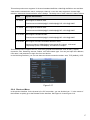
Play/Pause
f
z
z
z
z
In backward playback or pause mode, click this button to go
normal playback.
In normal playback click this button to pause playback
In pause mode, click this button to resume playback.
In real-time monitor mode, click it to go to the search
interface.
Reverse/Pause
W
Play previous
_
In normal playback or pause mode, click this button to
reverse
z playback
z In reverse playback, click this button to pause playback.
In playback mode, playback the previous video
Play Next
f
z
In playback mode, playback the next video
z
z
z
Activate current control, modify setup, and then move up
and down.
Increase/decrease numeral.
Assistant function such as PTZ menu.
z
z
Shift current activated control, and then move left and right.
When playback, click these buttons to control playback bar.
Up/Down
,
Left/Right
,
z
ESC
ESC
z
z
Go to previous menu, or cancel current operation.
When playback, click it to restore real-time monitor mode.
Enter
ENTER
z
z
z
Confirm current operation
Go to default button
Go to menu
Assistant
Fn
z
One-window monitor mode, click this button to display
assistant function: PTZ control and image color.
Backspace function: in numeral control or text control, press
it for 1.5 seconds to delete the previous character before
the cursor.
In motion detection setup, working with Fn and direction
keys to realize setup.
In text mode, click it to switch between numeral, English
character (small/capitalized) and etc.
In HDD management interface, you can click it to switch
HDD record information and other information (Menu
prompt)
Realize other special functions.
z
z
z
z
z
Record
REC
Manually stop/start recording, working with direction keys
or numeral keys to select the recording channel.
Window switch
Mult
Click it to switch one-window/multiple-window.
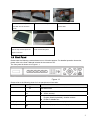
USB port
To connect USB storage device, USB mouse, burner and etc.
Record light
1-16
Power
light
Power
indication
For 4/8/16 channel device: indication light on means that the
channel is in recording.
Power indication light.
HDD
abnormal
indication light
HDD
HDD error occurs or HDD capacity is below specified threshold
value, the light becomes red to alert you.
Network abnormal
indication light
Net
Network error occurs or there is no network connection, the light
becomes red to alert you.
3