1
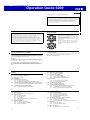
Operation Guide 5269
Mode Reference Guide
E-70 Troubleshooting
E-75 Specifications
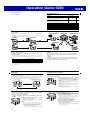
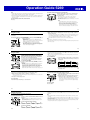
Your watch has 9 “modes”. The mode you should select depends on what you want to do.
To do this:
• View the current time and date in the Home City
• Configure Home City and daylight saving time (DST) settings
• Configure current location latitude and longitude settings
• Configure time and date settings
• Determine your current bearing or the direction from your current
location to a destination as a direction indicator and angle value
• Determine your current location using the watch and a map
Determine the temperature at your current location
View the sunrise and sunset times for a specific date
Determine a Moon age value
Set an alarm time
Use the stopwatch to measure elapsed time
Use the countdown timer
View the current time in one of 48 cities (31 time zones) around the globe
Enter this mode:
See:
Timekeeping Mode
E-16
Digital Compass
Mode
E-29
Thermometer Mode
Sunrise/Sunset Mode
Moon Age Mode
Alarm Mode
Stopwatch Mode
Countdown Timer Mode
World Time Mode
E-43
E-49
E-52
E-54
E-58
E-60
E-63
E-11
E-10
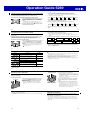
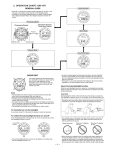
Selecting a Mode
• The illustration below shows which buttons you need to press to navigate between
modes.
• To return to the Timekeeping Mode from any other mode, hold down C for about
two seconds.
• In any mode, press L to illuminate the display.
Alarm Mode
Timekeeping Mode
Sunrise/Sunset Mode
Digital Compass Mode
Moon Age Mode
World Time Mode
Stopwatch Mode
Thermometer Mode
Countdown Timer Mode
E-13
E-12
General Functions (All Modes)
The functions and operations described in this section can be used in all of the modes.
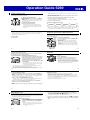
Auto Return Features
• If you do not perform any operation for a certain amount of time in certain modes as
shown in the table below, the watch will automatically return to the Timekeeping
Mode.
Mode
No operation time
Digital Compass, Thermometer
1 to 2 minutes
Sunrise/Sunset, Moon Age, Alarm
2 to 3 minutes
Initial Screens
When you enter the Sunrise/Sunset Mode, Digital Compass Mode, Alarm Mode, or
World Time Mode, the data you were viewing when you last exited the mode will
appear first.
Scrolling
The B and D buttons are used on the setting screen to scroll through available
settings on the digital display. In most cases, holding down these buttons during a
scroll operation scrolls through the data at high speed.
• If you leave a setting screen (one with flashing digits) on the digital display for two
or three minutes without performing any operation, the watch exits the setting
screen automatically.
E-14
E-15
Timekeeping
Configuring Home City Settings
Use the Timekeeping Mode to set and view the current time and date.
• Each press of A in the Timekeeping Mode toggles the digital display between the
current date and the current time.
• You can select one of the two following Date Screen display formats: SUN 6.30 or
SUN 30.6. For information about how to select the format, see “Date Display
Format” under “To change the current time and date settings” (page E-22).
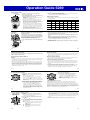
There are two Home City settings: actually selecting the Home City and selecting
either standard time or daylight saving time (DST).
Date screen
Month Day
Day of week
Regular timekeeping screen
Hour : Minutes Seconds
To configure Home City settings
1. In the Timekeeping Mode, hold down A for at least two
City Name
seconds until ADJUST appears on the digital display.
This is the setting mode. Release A after ADJUST
appears.
• The city name of the currently selected Home City
data will appear on the digital display with an arrow
( ) flashing to the left.
• The watch will exit the setting mode automatically if
you do not perform any operation for about two or
three minutes.
• For details about city data, see the “City Data Table”
at the back of this manual.
E-16
E-17
2. Press D (East) and B (West) to scroll through city names until the one you want
to use as your Home City data is displayed.
3. Press C to display the DST setting screen.
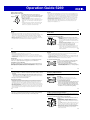
4. Press D to toggle between Daylight Saving Time (DST ON) and Standard Time
(DST OFF).
Setting
DST indicator
E-18
5. When the setting is the way you want, press A twice to
return to the Timekeeping Mode.
• The DST indicator appears to indicate that Daylight
Saving Time is turned on.
Note
• After you specify city data, the watch will use UTC*
offsets to calculate the current time for other time
zones based on the current time in your Home City.
* Coordinated Universal Time, the world-wide
scientific standard of timekeeping.
The reference point for UTC is Greenwich, England.
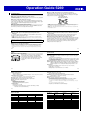
To change the Daylight Saving Time (summer time) setting
1. In the Timekeeping Mode, hold down A for at least two
seconds until ADJUST appears on the digital display.
Release A after ADJUST appears.
• The name of the city currently selected as your
Home City will appear on the digital display with an
arrow ( ) flashing to the left.
Setting
DST indicator
2. Press C to display the DST setting screen.
3. Press D to toggle between Daylight Saving Time
(DST ON) and Standard Time (DST OFF).
4. When the setting is the way you want, press A twice to
return to the Timekeeping Mode.
• The DST indicator appears to indicate that Daylight
Saving Time is turned on.
E-19