1
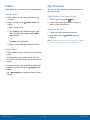
TA B L E T
User Manual
Please read this manual before operating your device
and keep it for future reference.
Legal Notices
Disclaimer of Warranties;
Exclusion of Liability
Warning: This product contains chemicals known
to the State of California to cause cancer and
reproductive toxicity. For more information, please call
1-800-SAMSUNG (726-7864).
EXCEPT AS SET FORTH IN THE EXPRESS
WARRANTY CONTAINED ON THE WARRANTY
PAGE ENCLOSED WITH THE PRODUCT, THE
PURCHASER TAKES THE PRODUCT “AS IS”, AND
SAMSUNG MAKES NO EXPRESS OR IMPLIED
WARRANTY OF ANY KIND WHATSOEVER WITH
RESPECT TO THE PRODUCT, INCLUDING BUT
NOT LIMITED TO THE MERCHANTABILITY OF THE
PRODUCT OR ITS FITNESS FOR ANY PARTICULAR
PURPOSE OR USE; THE DESIGN, CONDITION OR
QUALITY OF THE PRODUCT; THE PERFORMANCE
OF THE PRODUCT; THE WORKMANSHIP OF THE
PRODUCT OR THE COMPONENTS CONTAINED
THEREIN; OR COMPLIANCE OF THE PRODUCT
WITH THE REQUIREMENTS OF ANY LAW, RULE,
SPECIFICATION OR CONTRACT PERTAINING
THERETO. NOTHING CONTAINED IN THE
INSTRUCTION MANUAL SHALL BE CONSTRUED
TO CREATE AN EXPRESS OR IMPLIED WARRANTY
OF ANY KIND WHATSOEVER WITH RESPECT TO
THE PRODUCT. IN ADDITION, SAMSUNG SHALL
NOT BE LIABLE FOR ANY DAMAGES OF ANY KIND
RESULTING FROM THE PURCHASE OR USE OF
THE PRODUCT OR ARISING FROM THE BREACH
OF THE EXPRESS WARRANTY, INCLUDING
INCIDENTAL, SPECIAL OR CONSEQUENTIAL
DAMAGES, OR LOSS OF ANTICIPATED PROFITS
OR BENEFITS.
Intellectual Property
All Intellectual Property, as defined below, owned
by or which is otherwise the property of Samsung
or its respective suppliers relating to the SAMSUNG
mobile device, including but not limited to,
accessories, parts, or software relating there to
(the “mobile device”), is proprietary to Samsung
and protected under federal laws, state laws, and
international treaty provisions. Intellectual Property
includes, but is not limited to, inventions (patentable
or unpatentable), patents, trade secrets, copyrights,
software, computer programs, and related
documentation and other works of authorship. You
may not infringe or otherwise violate the rights
secured by the Intellectual Property. Moreover,
you agree that you will not (and will not attempt
to) modify, prepare derivative works of, reverse
engineer, decompile, disassemble, or otherwise
attempt to create source code from the software.
No title to or ownership in the Intellectual Property
is transferred to you. All applicable rights of the
Intellectual Property shall remain with SAMSUNG
and its suppliers.
Open Source Software
Modification of Software
Some software components of this product
incorporate source code covered under GNU
General Public License (GPL), GNU Lesser
General Public License (LGPL), OpenSSL
License, BSD License and other open source
licenses. To obtain the source code covered
under the open source licenses, please visit:
http://opensource.samsung.com.
Legal Notices
SAMSUNG IS NOT LIABLE FOR PERFORMANCE
ISSUES OR INCOMPATIBILITIES CAUSED BY
YOUR EDITING OF REGISTRY SETTINGS, OR
YOUR MODIFICATION OF OPERATING SYSTEM
SOFTWARE.
USING CUSTOM OPERATING SYSTEM SOFTWARE
MAY CAUSE YOUR DEVICE AND APPLICATIONS
TO WORK IMPROPERLY. YOUR CARRIER MAY
NOT PERMIT USERS TO DOWNLOAD CERTAIN
SOFTWARE, SUCH AS CUSTOM OS.
i
USC-SM-T807R4_UM_ENG_TN_OE5_060215_R2
Samsung Knox™
Google, the Google logo, Android, the Android
logo, Google Play, Gmail, Google Mail, Google
Maps, Google Music, Google Now, Chrome, Google
Hangouts, Picasa, Play Newsstand, YouTube and
other marks are trademarks of Google Inc.
Samsung Knox™ is Samsung’s security platform
and is a mark for a Samsung device tested for
security with enterprise use in mind. Additional
licensing fee may be required. For more information
about Knox, please refer to:
www.samsung.com/us/knox. [030115]
Wi-Fi is a registered trademark of the
Wireless Fidelity Alliance, Inc.
Swype and the Swype logos are trademarks of
Swype, Inc.
Samsung Electronics America
(SEA), Inc
Online Legal Information
The online version of the Health/Safety and
Warranty guide for your device can be found at:
Address:
85 Challenger Road
Ridgefield Park,
New Jersey 07660
English
www.samsung.com/us/Legal/Tablet-HSGuide
Phone:
1-800-SAMSUNG (726-7864)
Spanish
www.samsung.com/us/Legal/Tablet-HSGuide-SP
Internet Address:
www.samsung.com
The online version of the End User Licensing
Agreement for your device can be found online at:
www.samsung.com/us/Legal/SamsungLegal-EULA4
©2015 Samsung Electronics America, Inc.
Samsung and Galaxy S are trademarks of
Samsung Electronics Co., Ltd.
Do you have questions about your
Samsung Mobile Device?
For 24 hour information and assistance, we offer
a new FAQ/ARS System (Automated Response
System) at: www.samsung.com/us/support
The actual available capacity of the internal memory
is less than the specified capacity because the
operating system and default applications occupy
part of the memory. The available capacity may
change when you upgrade the device.
Nuance®, VSuite™, T9® Text Input, and the Nuance
logo are trademarks or registered trademarks of
Nuance Communications, Inc., or its affiliates in the
United States and/or other countries.
The Bluetooth® word mark, figure mark (stylized “B
Design”), and combination mark (Bluetooth word
mark and “B Design”) are registered trademarks and
are wholly owned by the Bluetooth SIG.
microSD™ and the microSD logo are Trademarks of
the SD Card Association.
Legal Notices
ii
Table of Contents
Getting Started ............................................................. 1
Settings ..............................................................................48
Front View ........................................................................... 2
Back View ........................................................................... 3
Assemble Your Device ............................................... 4
Set Up Your Device ...................................................... 6
Set Up Accounts on Your Device ........................ 7
How to Use Settings ..................................................49
Wi-Fi and Wi-Fi Direct ................................................50
Bluetooth ...........................................................................52
Tethering and Wi-Fi Hotspot ..................................54
Airplane Mode ...............................................................56
Download Booster.......................................................57
Data Usage ......................................................................58
Location Services ........................................................59
More Networks ..............................................................60
Nearby Devices .............................................................61
Printing................................................................................62
Screen Mirroring ...........................................................63
Sound Settings ..............................................................64
Display Settings ............................................................66
Wallpaper ..........................................................................69
Lock Screen ....................................................................70
Multi Window Settings ..............................................71
Notification Panel Settings .....................................72
Toolbox ...............................................................................73
Motions ...............................................................................74
Accessibility.....................................................................75
Users....................................................................................77
Private Mode ...................................................................78
Finger Scanner ..............................................................79
Accounts............................................................................80
Cloud ...................................................................................81
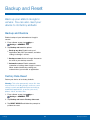
Backup and Reset.......................................................82
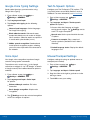
Language and Input Settings ...............................83
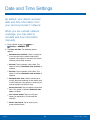
Date and Time Settings ...........................................85
Accessories .....................................................................86
Know Your Device ..................................................... 8
Home Screen.................................................................... 9
Status Bar .........................................................................12
Navigation and Motions ...........................................13
Notification Panel .........................................................14
Multi Window ..................................................................16
Enter Text ..........................................................................18
Applications ...................................................................20
Apps Screen ...................................................................21
Google Applications ..................................................23
Other Applications ......................................................25
Calculator ..........................................................................27
Calendar ............................................................................28
Camera and Video ......................................................29
Clock....................................................................................32
Contacts.............................................................................33
Email ....................................................................................37
Gallery.................................................................................39
Internet ................................................................................41
Music Player ....................................................................43
My Files ..............................................................................44
S Voice ...............................................................................45
Samsung Apps/GALAXY Apps ..........................46
Video Player ....................................................................47
Table of Contents
iii
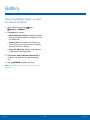
Battery.................................................................................87
Power Saving ..................................................................88
Storage ...............................................................................89
Security...............................................................................91
About Your Device ......................................................93
Application Manager..................................................94
Default Applications ...................................................96
Applications Settings Shortcuts..........................97
Table of Contents
iv
Getting Started
Learn about your mobile
device hardware, assembly
procedures, and how to
get started using your new
device.
Front View
Light sensor
Volume key
Front camera
Power/Lock key
microSD card slot
USB charger/
Accessory port
SIM card slot
Recent
Back
Home key/Finger scanner
• Back: Tap to return to the previous screen, or to
• Power/Lock key: Press and hold to turn the
close an option menu, the notifications panel, or
onscreen keyboard.
device on or off. Press to lock or wake up the
screen. Press and hold to turn the device off or
restart it, or for quick access to Airplane Mode,
Emergency Mode, and to Mute, Vibrate, and
Sound modes.
• Front camera: Take self-portraits and record
videos of yourself.
• Home key/Finger scanner: Tap to return to the
• Recent: Tap to display recent apps, or touch and
• Light sensor: Detects the presence of objects
• SIM card slot: Install your SIM card here.
• USB charger/Accessory port: Connect the
Home screen. Activate the fingerprint security
feature.
hold for home screen options.
near the tablet, and light conditions.
charger/USB cable (included), and other optional
accessories (not included).
• microSD card slot: Install an optional memory
card (not included) for storage of files.
• Volume key: Press to adjust the volume of your
device’s sounds and audio.
Getting Started
2
Front View
Back View
Infrared transmitter
Flash
Back camera
Headset jack
Speaker
Speaker
Simple clicker
Simple clicker
Microphone
• Back camera: Take pictures and record videos.
• Flash: Illuminate subjects in low-light
• Microphone: Records audio and detects voice
commands.
• Simple clicker: These retractable circles attach
environments when taking a photo or recording
video.
optional covers securely to your device (not
included).
• Headset jack: Connect an optional headset
• Speaker: Plays music, and other sounds.
(not included).
• Infrared transmitter: Controls external devices
using infrared light.
Getting Started
3
Back View
Assemble Your Device
This section helps you to
assemble your device.
Install an Optional Memory Card
Install the SIM Card
Note: A memory card can be installed at any time; it
is not necessary to install it prior to using the device.
You can install an optional microSD or microSDHC
memory card (not included) to expand available
memory space.
When you subscribe to a cellular network, you are
provided with a plug-in SIM card. During activation,
your SIM card will be loaded with your subscription
details, such as your PIN, available optional
services, and other features.
For more information on installing a memory card,
see Install a Memory Card.
Charge the Battery
Warning: Please be careful when handling the SIM
card to avoid damaging it. Keep all SIM cards out of
reach of small children.
Your device is powered by a rechargeable, standard
Li-Ion battery. A Wall/USB Charger (charging head
and USB cable) is included with the device for
charging the battery from any standard outlet.
The battery comes partially charged. A fully
discharged battery requires up to four hours of
charge time. You can use the device while charging.
Caution: Use only Samsung-approved charging
devices and batteries. Samsung accessories are
designed to maximize battery life. Using other
accessories may invalidate your warranty and may
cause damage.
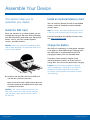
► Carefully slide the SIM card into the SIM card
slot until the card locks into place.
Make sure that the card’s gold contacts face into
the device and that the angled corner of the card
is positioned as shown.
Caution: If the card is not inserted correctly, the
device will not detect the SIM card. Re-orient the
card and place it back into the slot if the SIM is
not detected.
Getting Started
4
Assemble Your Device
When to Charge the Battery
When the battery is weak and only a few minutes of
operation remain, the device sounds a warning tone
at regular intervals.
In this condition, your device conserves its
remaining battery power by dimming the screen.
When the battery level becomes too low, the device
automatically turns off.
► For a quick check of your battery level, view the
battery charge indicator located in the Status
Bar of your device’s display. A solid color ( )
indicates a full charge.
1. Insert the USB cable into the port.
2. Connect the USB cable to the charging head,
and then plug the charging head into a standard
outlet.
You can also choose to display a percentage
value. Viewing a percentage value can provide
a better idea of the remaining charge on the
battery. For more information, see Battery.
3. When charging is complete, unplug the charging
head from the outlet and remove the USB cable
from the device.
Caution: Failure to unplug the wall charger before you
remove the battery can cause damage to the device.
Getting Started
5
Assemble Your Device
Set Up Your Device
Turn Your Device On and Off
Secure Your Device
To turn the device on:
Use your device’s screen lock features to secure
your device.
► Press and hold the Power/Lock key until the
device vibrates and starts up.
Lock the Device
To turn the device off:
By default, the device locks automatically when the
screen times out.
1. Press and hold the Power/Lock key until the
device vibrates and the Device options menu
displays.
► To lock the device, press the Power/Lock key.
2. Tap Power off > POWER OFF.
Unlock the Device
The default Screen lock on your device is Swipe.
Welcome Screen
► To unlock your device, press the Power/Lock
key or Home key, and then touch and drag your
finger across the screen.
The first time you turn your device on, the Welcome
Screen displays. It will guide you through the basics
of setting up your device.
Set Up a Secure Screen Lock
Follow the prompts to choose a default language,
connect to a Wi-Fi network, set up accounts, choose
location services, learn about your device’s features,
and more.
Getting Started
The default Screen lock is Swipe, which offers no
security. To choose a more secure screen lock,
see Lock Screen.
6
Set Up Your Device
Set Up Accounts on Your Device
Google Account
Samsung Account
Your new device uses your Google Account to
fully utilize its Android features, including Gmail,
Google Hangouts, and the Google Play store.
Create a Samsung account for access to Samsung
content and apps on your device.
When you turn on your device for the first time, set
up your existing Samsung account or create a new
Samsung account.
When you turn on your device for the first time, set
up your existing Google Account, or create a new
Google Account.
– or –
– or –
To create a new Samsung account or set up your
Samsung account on your device at any time,
use Accounts settings. For more information,
see Accounts.
To create a new Google Account or set up your
Google Account on your device at any time,
use Accounts settings. For more information,
see Accounts.
► From a Home screen, tap
Apps >
Settings > GENERAL > Accounts >
Add account > Samsung account.
► From a Home screen, tap
Apps >
Settings > GENERAL > Accounts >
Add account > Google.
Getting Started
7
Set Up Accounts on Your Device
Know Your Device
Learn some of the key
features of your mobile
device, including the screens
and icons, as well as how to
navigate the device and enter
text using the keyboard.
Warning: Please note that a touch screen
responds best to a light touch from the pad
of your finger or a non-metallic stylus. Using
excessive force or a metallic object when
pressing on the touch screen may damage the
tempered glass surface and void the warranty.
Home Screen
Status Bar
Notification
icons
Status
icons
Widgets
App folder
My Files
Home screen indicator
App shortcuts
Apps screen
• App folder: For your convenience, there are
• Notification icons: Display new messages and
• App shortcuts: Shortcuts to your favorite
• Status Bar: Displays device status icons (right)
• Apps screen: Allows quick access to all of your
• Status icons: Display information about the
several related applications grouped into a single
folder on the main Home screen.
emails, notifications, available software updates,
and so on.
applications.
and notification icons (left).
applications.
device, such as the network signal strength,
battery level, the time, and so on.
• Home screen indicator: Indicates which
• Widgets: Self-contained applications that run on
Home screen is presently displayed.
the Home screen (not shortcuts).
• My Files: Shortcut to the My Files app.
See My Files.
Know Your Device
9
Home Screen
Widgets
The Home screen is the starting
point for using your device.
Widgets are self-contained apps that run on a
Home screen. There are all kinds of widgets,
including links to a specific contact, Internet
bookmarks, Gmail and email accounts, and
many others.
Customize your Home screen
by adding application shortcuts,
widgets, folders, and using
wallpapers.
Add a Widget to the Home Screen
1. From a Home screen, pinch the screen.
– or –
Manage Home Screens
Touch and hold an empty space on the screen.
Your device comes with multiple Home screens to
hold apps and widgets. You can rearrange the Home
screens in a different order.
2. Tap Widgets.
3. Touch and hold a widget, drag it to a
Home screen and release it.
1. From a Home screen, pinch the screen.
– or –
Remove a Widget
Touch and hold an empty space on the screen.
1. From a Home screen, touch and hold a widget to
release it.
2. Use these options to manage screens:
•
Add a screen: Scroll to the end of the
screens, and then tap
Add.
•
Remove a screen: Touch and hold on a
Remove.
screen, and then drag it to the
•
Set a screen as the main Home screen:
Tap
Main Home screen at the top of a
screen. This screen displays when you press
the Home Key.
•
2. Drag the widget to the
release it.
Remove icon and
Note: Removing a widget does not delete the widget,
it just removes the widget from the Home screen.
Change the Wallpaper
Change the look of the Home and Lock screens
with wallpaper. You can display a favorite picture, or
choose from preloaded wallpapers.
Change the order of screens: Touch and
hold on a screen, and then drag to a new
position.
1. From a Home screen, pinch the screen.
– or –
Touch and hold an empty space on the screen.
2. Tap Wallpapers, and then choose Home screen,
Lock screen, or Home and lock screen.
3. Tap a wallpaper to see a sample, and then tap
SET AS WALLPAPER.
Know Your Device
10
Home Screen
Folders
App Shortcuts
Place folders on the Home screen to organize items.
You can use app shortcuts to launch an app from
any Home screen.
Adding Folders
Add a Shortcut to a Home Screen
1. From a Home screen, touch and hold an app
shortcut.
2. Drag the shortcut onto
release.
•
•
1. From a Home screen, tap
Create folder and
Apps.
2. Touch and hold an app shortcut, drag it to a
Home screen and release it.
Enter a folder name.
Remove a Shortcut
Tap
Add to place additional apps in the
folder. Tap the apps to add, and tap SAVE
when finished.
1. Touch and hold a shortcut to release it.
2. Drag the icon to the
release it.
– or –
Remove icon and
Note: Removing a shortcut does not delete the app, it
just removes the shortcut from the Home screen.
Tap Done on the keyboard.
A folder is created with the shortcut(s) inside.
Using Folders
• Tap the folder to open it and access the shortcuts
inside.
• To add shortcuts to the folder, touch and hold
the shortcut, and then drag it onto the folder and
release.
• To delete a folder, touch and hold the folder until
it detaches, and then drag it to
release.
Remove and
• Tap
More options to change the folder’s color
scheme.
Know Your Device
11
Home Screen
Status Bar
The Status Bar at the top of the
Home screen provides device
information (such as network
status, battery charge, and time)
on the right side and notification
alerts on the left.
Notification Icons
New email has arrived
New Gmail has arrived.
Download of a file or app is in progress.
File is being uploaded or sent.
Status Icons
Battery is fully charged.
Location service (GPS) is active.
Battery is low.
App updates are available from the
Google Play store.
Battery is charging.
App updates are complete.
Vibrate mode is enabled.
Keyboard is in use.
Mute mode is enabled.
The device is connected to a 4G LTE
wireless network.
Signal strength.
Wi-Fi is active.
No wireless network is available.
Know Your Device
12
Status Bar
Navigation and Motions
Touchscreen Navigation
Drag
Tap
To drag, touch and hold on an item, and then move
it to a new location.
• Drag a shortcut onto the Home screen.
Lightly tap items to select or launch them.
• Tap the onscreen keyboard to enter characters
• Drag a widget onto the Home screen.
or text.
• Tap an item to select it.
• Tap an app icon to launch the application.
Pinch and Spread
Touch and Hold
• Zoom in or out while viewing a picture or a
Pinch the screen using your thumb and forefinger, or
spread by moving your fingers apart.
web page.
Activate onscreen items by a touch and hold
gesture.
• Zoom in or out while taking a picture.
• Touch and hold a widget on the Home screen to
move it.
Motions
• Touch and hold a field to display a pop-up menu
of options.
Control your device by making specific motions with
your hand above the device’s screen.
Swipe or Slide
For details, see Motions.
To swipe, lightly drag your finger vertically or
horizontally across the screen.
• Swipe the screen any direction to unlock the
screen.
• Swipe the screen to scroll through the Home
screen or a menu.
Know Your Device
13
Navigation and Motions
Notification Panel
Users
Settings
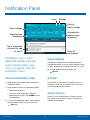
View all
Quick settings
Quick settings
Automatically
adjust screen
brightness
Adjust screen
brightness
Tap a notification
to launch its app
or view it
Clear all
notifications
Notification icons on the
Status Bar display calendar
events, device status, and
more. For details, open the
Notification Panel.
Quick Settings
View the Notification Panel
S Finder
1. Swipe down on the Status Bar to display the
Notification Panel.
Find content on your device using filters such as
media type, date, tag, or location. Your search can
also be extended to the Internet.
In addition to notifications, the Notification Panel
also provides quick access to device functions such
as Wi-Fi, allowing you to quickly turn them on or off.
► To view additional Quick settings, tap
View all.
2. Scroll down the list to see notification details.
•
•
Tap an item to open it.
Quick Connect
To clear a single notification, drag the
notification left or right. Tap CLEAR to clear
all notifications.
View a list of all nearby devices. Quickly connect
to a device to share data or media, or all them to
connect to your device.
3. To close the Notification Panel, swipe upward
from the bottom of the screen or press the
Back key.
Know Your Device
14
Notification Panel
Notification Panel Settings
► From a Home screen, tap
Apps >
> DEVICE > Notification panel.
Settings
– or –
From the Notification Panel, tap
Edit.
View all >
For more information, see
Notification Panel Settings.
Know Your Device
15
Notification Panel
Multi Window
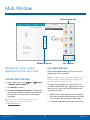
Multi window tray
Window controls
Multitask by using multiple
applications at the same time.
Use Multi Window
After enabling Multi window, you can use it to run
multiple apps at the same time.
Note: Only apps located on the Multi window tray can
be used together. Additional Multi window apps are
available from the Google Play store.
Activate Multi Window
1. From a Home screen, tap
> DEVICE > Multi window.
Apps >
Settings
The apps display together on a split screen. You
can switch between the apps, adjust the size of their
display on the screen, and copy information from
one app to the other.
2. Tap ON/OFF to enable.
3. Tap Open in multi window view to automatically
view content in Multi window when you open files
from My Files or Video player, or attachments
from email.
1. Swipe from the right edge of the screen toward
the center to display the Multi window tray. (After
a few seconds, the tray will be hidden again.)
Tip: You can also activate Multi window from the
Notification Panel. For more information,
see Notification Panel.
Know Your Device
Tray controls
2. Touch and drag apps off of the tray and release.
16
Multi Window
Window Controls
Choose Apps to Display in the
Multi Window Tray
Select an application window and tap
Border
button in the middle of the window border.
You can choose the apps you want to display in the
Multi window tray.
Control Buttons
1. Swipe from the right edge of the screen toward
the center to display the Multi window tray.
Switch windows: Switch locations between
Multi window applications.
2. Tap
Drag and drop content: Share items
between the application windows. Drag an
item to share from one window to another.
Some applications may not support this
feature.
Maximize window: Maximize the application
window.
Tray Controls >
Edit for options:
•
To remove an app from the tray, drag it off of
the tray and place it in the storage area.
•
To add an app to the tray, drag it from the
storage area to the tray.
•
To relocate an app, drag it to a new location.
For more information, see Multi Window Settings.
Close application: Close the application.
Customize Multi Window
You can customize Multi window to suit your
preferences.
Create a Window Group
If you use certain apps together in Multi window
often, you can create a window group to quickly
display the two apps in Multi window.
The window group will be stored in the Multi window
tray, so you can choose it any time to display the
two apps.
1. Swipe from the right edge of the screen toward
the center to display the Multi window tray.
2. Tap
Tray Controls >
Create.
Change the Order of Apps in the
Multi Window Tray
1. Swipe from the right edge of the screen toward
the center to display the Multi window tray.
2. Touch and hold an app, drag it to a new position
in the tray and then drop it.
Know Your Device
17
Multi Window
Enter Text
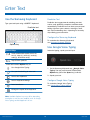
Use the Samsung Keyboard
Predictive Text
Type your text input using a QWERTY keyboard.
Predictive text suggest words matching your text
entries, and, optionally, completes common words
automatically. Predictive text can learn your personal
writing style from your contacts, messages, email,
and social networking sites — improving its accuracy
of predicting your text entries.
Predictive text
Configure the Samsung Keyboard
To customize the Samsung Keyboard,
see Samsung Keyboard Settings.
Options key
Use Google Voice Typing
Special Keys
Instead of typing, speak your text input.
Touch and hold for quick access to
cut (x), copy (c), paste (v), undo (z),
redo (y), and select all (a).
Tap to insert symbols.
Touch and hold the Options key to:
Use Google Voice Typing.
Use your handwriting to enter text.
1. On the Samsung Keyboard, tap Google Voice
Typing. You may need to touch and hold the
Options key (left of the Space key) to find it.
Access the clipboard.
2. Speak your text.
Access keyboard settings.
Configure Google Voice Typing
Insert emoticons.
To customize Google Voice Typing,
see Google Voice Typing Settings.
Change the layout of the keyboard.
Note: Available Options keys may differ depending
on whether or not they are enabled (such as Google
Voice Typing) and the app that is in use.
Know Your Device
18
Enter Text
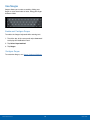
Use Swype
Swype allows you to enter a word by sliding your
finger or stylus from letter to letter, lifting your finger
between words.
Enable and Configure Swype
To enable the Swype keyboard while entering text:
1. Touch the top of the screen and swipe downward
to display the Notification Panel.
2. Tap Select input method.
3. Tap Swype.
Configure Swype
To customize Swype, see Swype Keyboard Settings.
Know Your Device
19
Enter Text
Applications
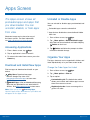
The Apps screen displays all
applications installed on your
device, both preloaded apps
and apps you download and
install yourself.
Learn how to change the way
apps appear, organize apps
into folders, and uninstall or
disable apps.
Apps Screen
Uninstall or Disable Apps
The Apps screen shows all
preloaded apps and apps that
you downloaded. You can
uninstall, disable, or hide apps
from view.
You can uninstall or disable apps you download and
install.
• Preloaded apps cannot be uninstalled.
• Apps that are disabled are turned off and hidden
from view.
Shortcuts to app can be placed on any of
the Home screens. For more information,
see Add a Shortcut to a Home Screen.
1. From a Home screen, tap
2. Tap More options > Uninstall/disable apps.
Apps that can be uninstalled or disabled display
Delete on their icon.
Accessing Applications
1. From a Home screen, tap
Apps.
3. Tap
Delete and follow the prompts to either
uninstall or disable the app.
Apps.
2. Tap an application’s icon to launch it.
Organize Your Apps
3. To return to the main Home screen, press the
Home key.
The Apps shortcuts can be organized in folders and
listed alphabetically or in your own custom order.
Download and Install New Apps
Change the Order Apps Are Listed
Find new apps to download and install on your
device:
•
•
1. From a Home screen, tap
2. Tap
Play Store: Download new apps
from the Google Play store. Visit
play.google.com/store/apps to learn more.
More options > View as.
3. Tap an option:
GALAXY Apps: View and download Samsung
apps that are optimized for use with GALAXY
devices. Visit apps.samsung.com to learn more.
Note: When you access
Samsung Apps,
GALAXY Apps will be downloaded to your tablet and
will appear on the Apps screen.
Applications
Apps.
21
•
Customizable grid: The default view, which
allows you to touch and hold on apps to move
them from screen to screen.
•
Alphabetical order: Icons are arranged in a
grid in A-Z order.
Apps Screen
Apps Screen Options
Use Folders to Organize Apps
1. From a Home screen, tap
2. Tap
Apps.
1. From a Home screen, tap
More options > Create folder.
2. Tap
3. Enter a folder name.
4. Tap
Add, select apps to include in the folder,
and then tap Done.
•
Touch a folder to view its apps. Touch an app
to launch it.
•
Touch More options to select a background
color for the folder.
Hide Apps from View
You can hide (rather than uninstall or disable) any
apps you do not want to see on the App screen.
1. From a Home screen, tap
2. Tap
Apps.
More options > Hide apps.
You can unhide apps you have hidden and put them
back on the App screen.
1. From a Home screen, tap
2. Tap
Apps.
More options > Show hidden apps.
Edit: Touch and hold an app icon then drag
it to the Create folder icon to create a new
folder. Drag it to the Create page icon to
create a new apps screen and place the icon
on it. Drag it to App info to view information
about this app. Or drag it to Disable or Delete
to remove the app.
•
Create folder: Create a new folder to hold the
app icon.
•
•
View type: Configure the apps screen.
•
Uninstall/disable apps: Uninstall an app that
you downloaded to your device, or disable
a preloaded app (preloaded apps cannot be
uninstalled). Touch
Delete to remove or
disable the selected app.
•
•
•
•
Hide apps: Hide apps from the Apps screen.
•
Help: View information about your device.
3. Tap apps to unhide, and then tap Done.
Applications
22
More options for these options:
•
3. Tap apps to hide, and then tap Done.
Show Hidden Apps
Apps.
Downloaded applications: Display
downloaded applications.
Show disabled apps: Display disabled apps.
Show hidden apps: Display hidden apps.
GALAXY Essentials: GALAXY Essentials is
a collection of specially chosen applications
available through Samsung Apps. From
GALAXY Essentials, you can access and
download a collection of premium content, free
of charge.
Apps Screen
Google Applications
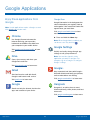
Enjoy these applications from
Google.
Google Now
Google Now works in the background to
collect information you regularly look up
and organize it into convenient cards that
appear when you need them.
Note: Certain applications require a Google account.
Visit google.com to learn more.
Visit google.com/landing/now to learn
more.
Chrome
► Press and hold the Home key.
Use Google Chrome to browse the
Internet and bring your open tabs,
bookmarks and address bar data from
your computer to your mobile device.
Note: When Google Now is enabled, you
can also access it by touching .
Google Settings
Visit google.com/chrome/mobile to learn
more.
Quickly and easily change Google app
settings to suit your preferences.
Drive
Note: You must be signed in to the
application you want to configure. For
example, sign in to Google+ to configure
Google+ settings.
Open, view, rename, and share your
Google Docs and files.
Visit drive.google.com to learn more.
Google+
Gmail
Stay connected and share with Google+.
Chat with friends and family, post photos,
and see what others are sharing.
Send and receive email with Gmail,
Google’s web-based email service.
Visit google.com/mobile/+ to learn more.
Visit gmail.com to learn more.
Hangouts
Google
Hangouts is an online place to meet
friends and family, share photos, and host
video calls.
Search not only the Internet, but also the
apps and contents of your device.
Visit google.com/hangouts to learn more.
Applications
23
Google Applications
Maps
Play Music
Use Google Maps to find your current
location, get directions, and other
location-based information.
With Google Play Music, you can play
music and audio files on your device.
Visit google.com/maps to learn more.
Visit play.google.com/about/music to learn
more.
Note: You must enable location services to
use Maps. See Location Services.
Play Newsstand
Photos
Subscribe to your favorite magazines to
read on your device at your leisure.
Visit play.google.com/store/newsstand to
learn more.
This application automatically backs up
your photos and videos to your Google+
account.
Play Store
Play Books
Find new apps, movies and TV shows,
music, books, magazines, and games in
Google Play store.
With Google Play Books, you can find
millions of free e-books and hundreds of
thousands more to buy in the eBookstore.
Visit play.google.com/store to learn more.
Visit play.google.com/store/books to learn
more.
Voice Search
Play Games
Use voice commands to search the web
with Google.
Discover hundreds of games for download
and purchase through the Google
Play Store.
YouTube
Visit play.google.com/store to learn more.
View and upload YouTube videos right
from your device.
Play Movies & TV
Visit youtube.com to learn more.
Watch movies and TV shows purchased
from Google Play. You can stream them
instantly, or download them for viewing
when you are not connected to the
Internet. You can also view videos saved
on your device.
Visit play.google.com/about/movies to
learn more.
Applications
24
Google Applications
Other Applications
Amazon
Help
Shop at Amazon.com from your device.
View information on using your device’s
basic features and settings.
Businessweek +
KIDOZ
Read Bloomberg Businessweek+ weekly
for all the content of the print edition of
the magazine along with exclusive content
and interactive features that enrich the
reading experience.
Access a huge library of kids’ content.
Discover fun and educational apps,
videos, games, and web sites.
Milk
Dropbox
Use this application to save and share
files with others via the Dropbox cloud
storage.
Exclusive to Galaxy owners, Milk Music is
a radio service that gives you more of the
music you love, curated by top DJs and
industry pros and all for free.
Evernote
NYTimes
Create, synchronize, and share multimedia
notes. You can add tags to the notes, or
sort the notes into a notebook so that you
can manage your ideas efficiently.
Read the latest web edition of
The New York Times newspaper.
Paper Garden
Visit evernote.com to learn more.
Paper Garden is an interactive digital
magazine service that offers a seamless
user experience with a wide variety of
premium global magazines.
Flipboard
Use this application to access your
personalized magazines.
Portable Wi-Fi hotspot
Hancom Office Viewer
Use Portable Wi-Fi hotspot to share your
device’s mobile data connection using a
USB cable or as a portable Wi-Fi hotspot.
Opens and manages Hancom Office
Hanword (*.hwp) and Hanshow (*.show)
documents.
Applications
25
Other Applications
SideSync 3.0
SideSync is a PC-Mobile solution that
enables the screens, windows, and data
to be shared easily between a PC and
Samsung Android Device.
WebEx
Schedule, host, and attend meetings.
View shared content and see who’s in the
meeting. Meet face-to-face with two-way
video. Join Cisco WebEx Training Center
meetings.
Applications
26
Other Applications
Calculator
The Calculator provides basic
and advanced arithmetic
functions.
Basic Operation
1. From a Home screen, tap
Calculator.
Apps >
2. Enter the first number using the numeric keys.
3. Tap the appropriate arithmetic function key.
4. Enter the next number.
5. To view the result, tap the
Equals key.
Additional Functions
To clear the results:
► Tap
Clear.
To clear the calculator history:
► Tap CLEAR HISTORY.
To copy all or part of the calculation to the
clipboard:
► Touch and hold an entry in the display field.
Scientific Calculator
The device also provides advanced arithmetic
functions, such as sin, cos, and tan.
Applications
27
Calculator
Calendar
Calendar Settings
Manage your events and tasks.
These settings allow you to modify settings
associated with using the Calendar.
Create an Event or Task
1. From a Home screen, tap
Calendar.
1. From a Home screen, tap
Calendar.
Apps >
2. Tap
2. Tap
Add and use one of the following
methods:
•
EVENT: Enter an event with an optional repeat
setting.
•
TASK: Enter a task with an optional priority
setting.
Apps >
More options > Settings.
3. Tap an option and follow the prompts.
3. Enter details for the event or task, and then
tap DONE.
Delete an Event or Task
1. From a Home screen, tap
Calendar.
Apps >
2. Tap an event or task to view it. Tap
More options > Delete.
– or –
To delete multiple events or tasks, tap
More options > Delete, select events or
tasks, and then tap DONE.
Share Events
1. From a Home screen, tap
Calendar.
Apps >
2. Tap to view an event or task.
3. Tap More options > Share via, select a
sharing method, and follow the prompts.
Applications
28
Calendar
Camera and Video
Current
shooting
mode
Current
flash mode
Storage
location
Number of
pictures you
can take
Switch
between the
front and
back cameras
Record video
Quick
settings
Take a picture
Change
shooting
mode
Camera
settings
View pictures and
videos in the Gallery
Take Pictures
Take pictures with your device’s front or back
camera, or combine shots with Dual mode.
Note: Prior to using the camera, remove the plastic
protective covering from the camera lens.
1. From a Home screen, tap
Apps >
3. Tap
Camera.
Note: You can also press the Volume key up or
down to take a photo. This is the default action of the
Volume key. You can also set the Volume key to act as
the video record key or as a zoom key.
2. Using the display screen as a viewfinder,
compose your shot by aiming the camera at the
subject. While composing your picture, use the
onscreen options or these gestures:
•
Touch the screen with two fingers and pinch
or spread them on the screen to zoom in and
out.
•
Tap the screen to focus on the area you
touched.
Applications
Capture to take the picture.
29
Camera and Video
Shooting Modes
•
ISO: Select an ISO value. This controls
camera light sensitivity. It is measured in
film-camera equivalents. Low values are for
stationary or brightly-lit objects. Higher values
are for fast-moving or poorly-lit objects.
•
Metering modes: Select a metering
method. This determines how light values
are calculated. Center-weighted measures
background light in the center of the scene.
Spot measures the light value at a specific
location. Matrix averages the entire scene.
•
Tap to take pics: Tap the image on the
preview screen to take photos.
•
Save as: Set the device to delete the original
photo when taking photos with rich tone mode.
•
Video size: Select a resolution. Use higher
resolution for higher quality. Higher resolution
videos take up more memory.
•
Recording mode: Select Normal, Limit for
email, or Fast motion mode.
•
Video stabilization: Activate anti-shake.
Anti-shake helps to keep the focus steady
when the camera is moving.
•
•
•
•
Effects: Add special graphical effects.
•
Location tags: Attach a GPS location tag to
the photo.
•
Storage location: Select the memory location
for storage.
•
Review pics/videos: Set to show photos or
videos after taking them.
Several photo effects are available. Some modes are
not available when taking self-portraits.
► Tap
MODE
MODE to display the following options:
•
Auto: Allow the camera to evaluate the
surroundings and determine the ideal mode
for the photo.
•
Beauty face: Take a photo with lightened
faces for gentler images.
•
Shot & more: Take a quick burst of photos
and apply effects to them.
•
Panorama: Create a linear image by taking
pictures in either a horizontal or vertical
direction.
•
HDR (Rich tone): Take photos without losing
details in bright and dark areas.
•
Dual camera: Take pictures and record videos
using the front and rear cameras at the same
time. A variety of picture-in-picture styles are
available.
•
Manage modes: Select which shooting modes
to display when you tap MODE.
•
Download: Download additional shooting
modes from the Samsung Apps store.
Camera Settings
► Tap
Settings to configure settings for
Camera. Available options vary depending on the
camera/recording mode used.
•
Picture size: Select a resolution. Use higher
resolution for higher quality. Higher resolution
photos take up more memory.
Flash: Activate or deactivate the flash.
Timer: Take time-delayed pictures or videos.
View mode: View pictures and videos in
standard ratio or full-screen.
•
Burst shots: Take a series of photos of moving
subjects.
•
•
Low-light detection: Automatically detects low
light levels and adjusts the camera accordingly
to take clear pictures.
Remote viewfinder: Take pictures using the
viewfinder of a connected device. Wi-Fi Direct
is required.
•
White balance: Select an appropriate white
balance, so images have a true-to-life color
range.
•
Face detection: Detect faces in pictures for
tagging with the person’s name.
Applications
30
Camera and Video
•
Exposure value: Change the exposure value.
This determines how much light the camera’s
sensor receives. For low light situations, use a
higher exposure.
•
Grid lines: Display viewfinder grid lines to help
composition when selecting subjects.
•
The Volume key: Use the Volume key as the
camera key, the record key, or as a zoom key.
•
Voice control: Set the camera to take photos
with voice commands.
•
•
Help: View information on using the camera.
Reset settings: Reset the camera settings.
Applications
31
Camera and Video
Clock
The Clock app offers features for
keeping track of time and setting
alarms.
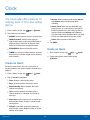
1. From a Home screen, tap
Apps >
•
Snooze: Allow snoozing, and set the Interval
and Repeat values for the alarm while
snoozing.
•
Smart alarm: When on, the alarm will start
playing a tone at a low volume at an interval
before the alarm time, and slowly increase in
volume. Choose an Interval and a Tone to
use with smart alarm. Available when you have
chosen an alarm type that includes sound.
•
Name: Enter a name for the alarm.
Clock.
2. Tap a tab to use a feature:
•
•
•
•
ALARM: Set an alarm to ring at a specific time.
WORLD CLOCK: View the time of day or
night in other parts of the world. World Clock
displays time in hundreds of different cities,
within all 24 time zones around the world.
3. Tap SAVE.
STOPWATCH: Measure intervals of time.
Delete an Alarm
TIMER: Use a timer to count down to an event
based on a preset time length (hours, minutes,
and seconds).
1. From a Home screen, tap
Apps >
Clock.
2. Touch and hold an alarm, and then tap
Delete.
Create an Alarm
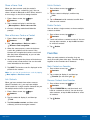
Create an alarm event. You can set one-time or
recurring alarms, and choose options for how to be
notified.
1. From a Home screen, tap
2. Tap
Apps >
Clock.
Create to configure:
•
•
•
Time: Choose a time for the alarm.
•
Type: Choose whether the alarm will use
sound, vibration, or vibration and sound to
alert you.
•
Alarm tone: If you have chosen an alarm type
that includes sound, choose a sound to play
for the alarm.
•
Volume: If you have chosen an alarm type
that includes sound, drag the slider to set the
volume of the alarm.
Days: Choose the days to use this alarm.
Repeat weekly: When enabled, the alarm
repeats every week.
Applications
32
Clock
Contacts
Store and manage your contacts
with the Contacts app, which
can be synchronized with a
variety of your existing personal
accounts, including Google,
Email, Facebook, and your
Samsung account.
Add a Contact
Use the following procedure to add a new contact.
1. From a Home screen, tap
Contacts.
2. Tap
Create, and then tap contact fields to
enter information.
For more information on connecting with and
managing your accounts through your device, see
Accounts.
Contacts
Access your list of contacts by using the Contacts
app, which is a shortcut to the Contacts tab. To
access your Contacts list:
► From a Home screen, tap
Contacts.
•
Choose a storage account for the contact. You
can store the contact on the device, your SIM
card, or sync it with an account.
•
Tap
Photo to assign a picture to the new
contact.
•
Enter a name, phone number, email address,
and assign the contact to a group. Tap
Add another field to add additional contact
information.
-
Apps >
Tap
Add to enter additional entries.
Tap
Delete to remove an entry.
Tap
Expand for additional fields.
Tap
Label to choose a label for the field.
Finding a Contact
3. Tap SAVE.
You can search for a contact, or scroll the list to find
one by name.
Edit a Contact
1. From a Home screen, tap
Contacts.
Apps >
When editing a contact, you can tap a field and
change or delete the information, or you can add
additional fields to the contact’s list of information.
Apps >
2. Tap the Search field, and then enter characters
to find contacts that match.
1. From a Home screen, tap
Contacts.
– or –
Apps >
2. Tap the contact to display it, and then tap
Edit.
Tap a letter on the side of the list to jump directly
to that letter in the alphabetical list. You can also
press and slide across the alphabetical list to
select a letter with better precision.
3. Tap any of the fields to add, change, or delete
information.
4. Tap SAVE.
Applications
33
Contacts
Share a Name Card
Unlink Contacts
When you share a name card, the contact’s
information is sent as a vCard file (.vcf). You can
share a vCard via Bluetooth or Wi-Fi Direct, attach it
to a message, or save it to a storage location.
1. From a Home screen, tap
Contacts.
1. From a Home screen, tap
Contacts.
Apps >
2. Tap the contact to display it, and then tap
Link.
Apps >
3. Tap
Remove beside contacts to unlink them
from the main contact.
2. Tap a contact to display it, and then tap
More options > Share name card via.
Delete Contacts
3. Choose a sharing method and follow the
prompts.
You can delete a single contact, or choose multiple
contacts to delete.
Save a Business Card as a Contact
1. From a Home screen, tap
Contacts.
1. From a Home screen, tap
Contacts.
Apps >
2. Touch and hold on a contact to select it. You can
also tap other contacts, or tap the All checkbox
to select all contacts.
2. Tap More options > Business cards >
Business card recognition.
3. Tap
3. When the camera opens, center the business
card in the guidelines on the screen. If the
Camera can recognize the business card, it will
take the picture automatically, or you can take
the picture manually.
Delete.
Favorites
When you mark contacts as favorites, they are
easily accessible from other apps. Favorites display
together on the Favorites tab in Contacts.
4. Your device analyzes the picture of the business
card to create a new contact. You can also add
more information to the contact.
Mark Contacts as Favorites
5. Tap SAVE. The business card is displayed as the
picture for the contact.
1. From a Home screen, tap
Contacts.
Note: You can view all your business cards by tapping
More options > Business cards.
Apps >
2. Tap a contact to display it, and then tap
Favorite (the star turns gold ).
Link Contacts
Remove Contacts from Favorites
When you have contacts from various sources
(Gmail, Facebook, etc.), you may have multiple
similar entries for a single contact. Contacts lets you
link multiple entries into a single contact.
1. From a Home screen, tap
Contacts.
Apps >
1. From a Home screen, tap
Contacts.
Apps >
2. Tap the FAVORITES tab, and then touch and
hold on a contact to select it. You can also tap
other contacts, or tap the All checkbox to select
all contacts.
Apps >
2. Tap the contact to display it, and then tap
Link.
3. Tap
Delete.
3. Tap Link another contact, and then select
contact(s) to link to the original contact.
Applications
34
Contacts
Create a Shortcut to a Favorite
Rename a Group
You can create a shortcut to a favorite on the home
screen, to access their information directly from the
home screen.
1. From a Home screen, tap
Contacts.
1. From a Home screen, tap
Contacts.
2. Tap the GROUPS tab, and then tap a group.
Apps >
3. Tap More options > Edit group and enter a
new name.
2. Tap the FAVORITES tab, and then touch and
hold on a contact to select it.
4. Tap SAVE.
3. Tap More options > Add shortcut to home.
The new shortcut displays in an empty area of
the home screen.
Add Contacts to a Group
1. From a Home screen, tap
Contacts.
3. Tap More options > Add member and then
tap the contact(s) you want to add.
You can use groups to organize your contacts. Your
device comes with preloaded groups, and you can
create your own. You might create a group for your
family, for coworkers, or a team. Groups make it
easy to find contacts, and you can send messages
to the members of a group.
4. Tap DONE.
Send an Email to a Group
You can send an email to members of a group.
1. From a Home screen, tap
Contacts.
Create a Group
Apps >
2. Tap the GROUPS tab, and then tap
•
Apps >
2. Tap the GROUPS tab, and then tap a group.
3. Tap More options > Send email.
Add.
4. Tap contacts to select them, or tap the All
checkbox, and then tap DONE. (You will only see
group members that have email addresses in
their contact records.)
3. Tap fields to enter information about the group:
•
Apps >
2. Tap the GROUPS tab, and then tap a group.
Groups
1. From a Home screen, tap
Contacts.
Apps >
Tap Create group in All Accounts in to
choose where to save the group. You can save
it to a specific account, to the device memory,
or to all accounts.
5. Choose an account and follow the prompts.
Tap Group name to enter a name for the new
group.
Delete a Group
Preset groups, such as Family, cannot be deleted.
4. Tap Add member and select contact(s) to add to
the new group, and then tap DONE.
1. From a Home screen, tap
Contacts.
5. Tap SAVE.
Apps >
2. Tap the GROUPS tab.
3. Tap More options > Delete groups.
4. Select groups to delete and tap DONE.
Applications
35
Contacts
Contact Settings
These settings allow you to modify settings
associated with using the Contacts app.
1. From a Home screen, tap
Contacts.
Apps >
2. Tap More options > Settings.
3. Tap an option and follow the onscreen
instructions.
Applications
36
Contacts
Email
Use the Email app to view and
manage all your email accounts
in one application.
Manage Your Email Accounts
To access Email:
1. From a Home screen, tap
► From a Home screen, tap
Apps >
You can view email you receive for all accounts on
the Combined view screen or you can view email
accounts individually.
Email.
You can configure Email for most accounts in just a
few steps.
Apps >
•
Combined view: View all email in a combined
inbox.
•
[Account Name]: View email for only this
account.
Email.
Refresh Your Email Account
2. Follow the onscreen instructions to set up your
email account.
Refresh your account to update your email
accounts.
– or –
For additional accounts, tap
Settings > Add account.
Email.
2. Tap
Menu at the top left of the screen to
select:
Configure Email Accounts
1. From a Home screen, tap
Apps >
More options >
The device communicates with the appropriate
server to set up your account and synchronize your
email. When complete, your email appears in the
Inbox for that account.
1. From a Home screen, tap
Apps >
2. In the Application Bar, tap
Refresh.
Email.
Delete Email Accounts
Note: To configure email account settings at any time,
tap More options > Settings. Tap the account to
display Account settings.
To delete an Email account:
1. From a Home screen, tap
2. Tap
Apps >
Email.
More options > Settings.
3. Tap the account you want to delete, and then tap
REMOVE ACCOUNT.
Applications
37
Email
Email Settings
Use the Email Settings to configure your Email
preferences.
Note: Available settings depend on the email provider.
1. From a Home screen, tap
Apps >
Email.
2. Tap More options > Settings, then tap
General settings.
3. Tap an option and follow the onscreen
instructions.
4. Tap an account to configure specific settings.
Applications
38
Email
Gallery
View, edit, and manage pictures
and videos.
Trimming Segments of a Video
1. Select a video, and then tap
2. Using the sliders at the bottom of the screen
to trim the video. Move the left bracket to the
desired starting point, move the right bracket to
the desired ending point, and then tap Done to
save the video.
View Images and Videos
Launching Gallery displays available folders. When
another application, such as Email, saves an image,
a Download folder is automatically created to
contain the image. Likewise, capturing a screenshot
automatically creates a Screenshots folder.
1. From a Home screen, tap
Apps >
Edit Images
► While viewing an image, tap:
Gallery.
2. Tap
Menu, and then tap Time or Album to
choose the way items display.
3. Tap
Menu > Album, and then tap
More options > Create album to create a
new album.
Tap an image or video to view it in full screen.
Scroll left or right to view the next or previous
image or video.
Use one of the following methods to zoom in or out
on an image:
• Double-tap anywhere on the screen to zoom in or
zoom out.
• Spread two fingers apart on any place to zoom in.
Pinch the screen to zoom out.
Play Videos
•
•
Apps >
Change player: Show the image on
another connected device.
•
Share via: Select a service to share the
image with another device.
Delete: Delete the image.
Camera: Open the camera app to take a
new image.
•
Zoom In and Out
► From a Home screen, tap
•
•
•
4. Tap an album to open it.
•
Trim.
More options:
-
Edit: Open Photo studio and edit the image.
-
Rotate right: Rotate the photo clockwise.
More info: View image details.
Studio: Edit your photo with advanced tools.
Rotate left: Rotate the photo
counter-clockwise.
Crop: Resize the frame to crop the image.
Rename: Rename the file.
Slideshow: Start a slideshow with the
images and videos in the current folder.
Gallery.
Tap a folder to open it.
Tap a video to view it.
Applications
39
Gallery
-
Set as: Set the image as wallpaper or as a
contact’s photo.
-
Print: Print the image via a USB or Wi-Fi
connection. Some printers may not be
compatible with the device.
-
Gallery Settings
These settings allow you to modify settings
associated with using your Gallery.
1. From a Home screen, tap
Settings: Access Gallery settings.
2. Tap
Gallery.
More options > Settings.
3. Tap an option and follow the onscreen
instructions.
Delete Images
1. From a Home screen, tap
Apps >
Apps >
4. Tap More options > Add account to add a
Samsung, Google, or other account service.
Gallery.
2. Tap a folder to open it.
3. In a folder, tap More Options > Delete, select
images, and then tap Done.
– or –
When viewing an single image, tap
Delete.
Share Images
Use one of the following methods:
1. From a Home screen, tap
Apps >
Gallery.
2. Tap a folder to open it.
3. In a folder, tap More options > Select, select
images, and then tap
Share via to send
them to others or share them via social network
services.
– or –
When viewing an image full screen, tap
Share via to send it to others or share it via
social network services.
Applications
40
Gallery
Internet
Access the Internet with a fully
featured web browser.
Browser Tabs
Access the Internet
To open a new tab:
► From a Home screen, tap
Apps >
Use tabs to view multiple web pages at the
same time.
► Tap
Internet.
•
•
Command Keys
Back or
page.
If all tabs are closed, tap NEW TAB.
Tap a different tab to view it.
To close a tab:
The following command keys are available:
•
New tab.
► Tap
Back key to return to the previous
Close tab.
Bookmarks
• Forward to go forward to a recent page.
• New tab to open a new browser tab.
• Close tab to close a browser tab.
• Refresh to reload the current page.
• Tap HOME to display your Internet Home screen.
To bookmark the current web page:
► Tap BOOKMARKS > ADD.
To open a bookmarked web page:
► Tap BOOKMARKS and tap an entry.
History
View Web Sites
To view a list of recently visited web pages:
To view a web site:
► Tap BOOKMARKS > HISTORY tab.
► Tap the address field, enter the web address,
and then tap Go on the keyboard.
Saved Pages
To save a web page:
To share, save, or print the current web page:
► Tap MORE > Save Web page.
► Tap MORE.
To view a list of saved Web pages:
To zoom in or out:
► Tap BOOKMARKS > SAVED PAGES tab.
► Tap the screen twice or pinch the screen to
zoom out and stretch the screen to zoom in.
Applications
41
Internet
Share Pages
To share a web page address with others:
► Tap MORE > Share and follow the prompts.
Secret Mode
Pages viewed in secret tabs do not appear within
your browser history or search history, and leave no
traces (such as cookies) on your device.
Secret tabs display
Secret on their tab.
Note: Any downloaded files will remain on your device
after you close the secret tab.
To open a new secret tab:
► Tap MORE > New secret tab.
Internet Settings
These settings allow you to modify settings
associated with using the Internet app.
1. From a Home screen, tap
Apps >
Internet.
2. Tap MORE > Settings.
3. Tap an option and follow the onscreen
instructions.
Applications
42
Internet
Music Player
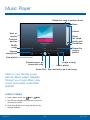
Stream the song to another device
Menu
Volume
Mark as
favorite
Playback
position
Adjust
the sound
quality with
SoundAlive
Shuffle
songs
Repeat the
song or
playlist
Elapsed
playing time
View playlist
Length of song
Rewind song or go
to previous song
Add to playlist
Pause/Play Scan forward or go to next song
Listen to your favorite songs
with the Music player. Navigate
through your music library, play
songs, and create customized
playlists.
Listen to Music
1. From a Home screen, tap
Apps >
Music.
2. Tap a library category at the top of the screen to
view your music files.
3. Scroll through the list of songs and tap an entry
to begin playback.
Applications
43
Music Player
My Files
Access files stored on your
device, including images, videos,
songs, and sound clips.
File Options
► Tap More options > Select, select a file or
folder, and then use one of these functions:
•
•
•
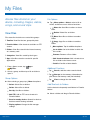
View Files
Files stored in the device are sorted into groups:
• Timeline: View files that are grouped by date.
• Favorite folders: View shortcuts to folders or FTP
•
Share via: Send files to others or share
them.
Delete: Delete files or folders.
Move: Move files or folders to another
folder.
Copy: Copy files or folders to another
folder.
•
servers.
• Folders: View files stored in the internal memory
or a memory card.
• Categories: View files sorted by their types.
• Apps: View files stored or created in specific
More options: Tap for additional options:
-
Go to folder: Go to the folder in which the
file resides.
-
Rename: Rename a file or folder.
-
Details: View file or folder details.
applications.
1. From a Home screen, tap
My Files.
Apps >
Additional Functions
2. Select a group, and then tap a file or folder to
open it.
• Tap
• Tap
Search, and then enter search criteria.
• Tap
View to change the view mode.
Storage to view memory information for
your device and memory card (not included).
Group Options
► After selecting a group, tap
Add shortcut to home: Add a shortcut to a
file or folder to the Home screen.
Menu for options:
•
•
•
•
Select: Select files or folders.
Add Shortcuts to Folders
Delete: Select files to delete.
Add a shortcut to frequently-used folders in Favorite
folders.
•
Scan for nearby devices: Search for devices
that have media sharing activated.
•
Display options: Change the file manager
settings.
Sort by: Sort files or folders.
► Select a folder and drag to Favorite folders.
Add FTP: Add an FTP server shortcut in
Favorite folders.
Applications
44
My Files
S Voice
Speak commands to perform
operations on your device, and
to speak criteria for searches
and other operations.
Use S Voice to find everything
from directions to trivia answers
to the current weather forecast
1. From a Home screen, tap
Apps >
S Voice.
2. Speak a command.
3. Tap the microphone icon if the device does not
hear you or to give it another command.
Tip: Tap
More options to view a tutorial.
S Voice Settings
These settings allow you to modify settings
associated with using S Voice.
1. From a Home screen, tap
2. Tap
Apps >
S Voice.
More options > Settings.
3. Tap an option and follow the onscreen
instructions.
Applications
45
S Voice
Samsung Apps/GALAXY Apps
Samsung Apps is now Galaxy
Apps. When you access
Samsung Apps, GALAXY Apps
will be installed on your device.
Samsung GALAXY Apps is a free storefront that
provides a quick and easy way to find and download
apps that are compatible with your Galaxy device.
GALAXY Essentials is a collection of specially
chosen applications available through
Samsung Apps.
From GALAXY Essentials, you can access and
download a collection of premium content, free
of charge.
To access the Samsung GALAXY Apps website:
► From a Home screen, tap
GALAXY Apps.
Apps >
To access GALAXY Essentials:
1. From a Home screen, tap
Apps >
More options > GALAXY Essentials.
2. Follow the onscreen instructions to download
GALAXY Essentials apps specially chosen from
Samsung Apps.
Note: A Samsung account is required to purchase
and download apps.
Applications
46
Samsung Apps/GALAXY Apps
Video Player
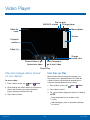
Pop up play
Change player
AMOLED cinema
More options
Video file
name
Volume
Playback
position
Video list
Change
screen ratio
Rewind video or go
to previous video
Scan forward or
go to next video
Pause/Play
Play and manage videos stored
on your device.
Use Pop-up Play
Multi task with Pop-up Play by transforming your
video player into a pop-up window. The video will
continue to play, and the pop-up window can be
resized or moved anywhere on the screen.
To access video:
1. From a Home screen, tap
Apps >
Video.
1. From a Home screen, tap
2. Scroll through the videos stored on your device.
After a few seconds, each video thumbnail
begins playing a preview of the clip.
Video.
2. Tap a video to view it.
3. Tap
to continue playing the video in a floating
window.
3. Tap a video to view it.
Applications
Apps >
47
•
Drag the window to any location on the
screen.
•
With two fingers, pinch or spread the window
to resize it.
Video Player
Settings
Configure your device’s
connections and settings,
add accounts, and customize
the home screen, apps, and
features.
• Some options use an ON/OFF button to turn
the option on (
ON
) or off (
OFF
).
• For some options, you must tap a field,
such as Email address, to display and set
options.
• Some options are enabled or disabled by
tapping a
check box. When enabled, a
check mark displays. Tap the check mark to
remove it and disable the option.
How to Use Settings
Accessing Settings
► From a Home screen, tap
Settings.
Apps >
– or –
From a Home screen, drag down from the Status
Bar to display the Notification panel, and then
tap Settings.
Search for Settings
If you are not sure exactly where to find a certain
setting, you can use the Setting search feature.
1. From a Home screen, tap
Settings.
2. Tap
Settings
Apps >
Search.
•
Enter a word or words in the Search box. As
you type, settings that match will appear on
the screen.
•
Tap an entry to go to that setting.
49
How to Use Settings
Wi-Fi and Wi-Fi Direct
Wi-Fi is a term used for certain
types of Wireless Local Area
Networks (WLAN). Wi-Fi
communication requires access
to a Wireless Access Point
(WAP).
3. Tap the network you want to connect to.
•
When you select an open network, you are
automatically connected to the network.
Otherwise, enter a password to connect.
•
To manually scan for networks, tap
More options > Scan.
Manually Connect to a
Wi-Fi Network
Wi-Fi Direct creates a direct
connection between two or
more devices using Wi-Fi.
1. From a Home screen, tap
> CONNECTIONS.
Apps >
Settings
2. Tap Wi-Fi, and then tap ON/OFF to turn Wi-Fi on.
Turn Wi-Fi On or Off
3. Tap Add Wi-Fi network (scroll to the bottom of
the list of discovered networks).
Turning Wi-Fi on makes your device able to discover
and connect to compatible in-range WAPs.
1. From a Home screen, tap
> CONNECTIONS.
Apps >
4. Enter information about the Wi-Fi network:
Settings
2. Tap Wi-Fi, and then tap ON/OFF to turn Wi-Fi on
or off.
Scan and Connect to a Wi-Fi
Network
1. From a Home screen, tap
> CONNECTIONS.
Apps >
•
Tap Network SSID to enter the name of the
Wi-Fi network.
•
Tap the Security field and select a security
option and enter your password.
•
Tap Show advanced options if you need to
add advanced options such as Proxy settings,
or IP settings.
5. Tap CONNECT to store the new information and
connect to your target WAP.
Settings
2. Tap Wi-Fi, and then tap ON/OFF to turn Wi-Fi on.
When Wi-Fi is first turned on, your device will
automatically scan for available networks and
display them.
Settings
50
Wi-Fi and Wi-Fi Direct
Wi-Fi Status Indicators
-
MAC address: View your device’s
MAC address, which is required when
connecting to some secured networks (not
configurable).
-
IP address: View your device’s IP address
(not configurable).
These Status Bar icons show your current Wi-Fi
connection status:
Displays when Wi-Fi is connected, active,
and communicating with a Wireless Access
Point (WAP).
A Wi-Fi access point is available, but your
device is not connected to it. It may also
display if there is a communication issue
with the target Wireless Access Point.
Wi-Fi Settings
The Wi-Fi settings menu allows you to set up many
of your device’s advanced Wi-Fi services.
1. From a Home screen, tap
> CONNECTIONS.
Apps >
Settings
2. Tap Wi-Fi, and then tap ON/OFF to turn Wi-Fi on.
Scan: Start another scan for nearby Wi-Fi
networks.
•
Wi-Fi Direct: Configure a Wi-Fi Direct
connection with a nearby device.
•
Advanced:
-
Network notification: Receive a notification
when new Wireless Access Points (WAPs)
are available.
-
Passpoint: Connect to passpoint-enabled
Wi-Fi Access Points automatically.
-
Sort by: Sort Wi-Fi networks by Alphabet or
Signal strength.
-
Keep Wi-Fi on during sleep: Specify when
to disconnect from Wi-Fi.
-
Always allow scanning: Allow Google
location service and other apps to scan for
networks, even when Wi-Fi is turned off.
-
Settings
•
WPS PIN entry: View the PIN used by your
device to set up a PIN-secured connection
to a Wi-Fi router or other equipment (not
configurable).
•
Share Wi-Fi profile: Share Wi-Fi profiles you
have created with others.
•
Help: Learn about setting up and using Wi-Fi
networks, and other settings.
Wi-Fi Direct allows direct device-to-device
connections via Wi-Fi, without having to connect to a
Wi-Fi network.
More options for options:
•
WPS push button: Set up a connection to a
WPS (Wi-Fi Protected Setup) router or other
equipment.
Wi-Fi Direct
3. Tap Smart network switch to automatically
switch between Wi-Fi and mobile networks to
maintain a stable Internet connection.
4. Tap
•
1. From a Home screen, tap
> CONNECTIONS.
Apps >
Settings
2. Tap Wi-Fi, and then tap ON/OFF to turn Wi-Fi on.
3. Tap More options > Wi-Fi Direct. Your device
automatically scans for nearby Wi-Fi Direct
devices, or you can tap SCAN to start scanning.
4. After scanning for devices, select a device,
and then follow the prompts to complete the
connection.
•
Tap Multi connect to scan for devices that
support multi connect. Select the devices
and follow the prompts to establish the
connections.
•
To rename your device (as seen by
other devices), tap More options >
Rename device.
Wi-Fi Direct Status Indicator
When your device is connected to another device
using Wi-Fi Direct,
displays in the Status Bar.
Install certificates: Install authentication
certificates.
51
Wi-Fi and Wi-Fi Direct
Bluetooth
Bluetooth is a short-range
communications technology that
allows you to connect wirelessly
to a number of Bluetooth
devices, such as headsets
and hands-free car Bluetooth
systems, and Bluetooth-enabled
computers, printers, and wireless
devices.
Tip: Under the My device section, tap the check box
next to your device. Your device is then visible to other
Bluetooth devices for the length of time set under
Visibility timeout.
Review Files Received via
Bluetooth
When you receive files from another device via
Bluetooth, you can access them from Bluetooth
settings.
1. From a Home screen, tap
> CONNECTIONS.
Note: The Bluetooth communication range is
approximately 30 feet.
2. Tap Bluetooth >
Received files.
Turn Bluetooth On or Off
1. From a Home screen, tap
> CONNECTIONS.
Apps >
More options >
Change the name others will use when pairing with
your device via Bluetooth.
1. From a Home screen, tap
> CONNECTIONS.
Make Your Device Visible to
Other Bluetooth Devices
2. Tap Bluetooth >
Rename device.
Apps >
Settings
More options >
3. Tap Device name and edit your device name.
When you make your device visible, other Bluetooth
can find it in a scan and initiate pairing. You can
choose the length of time your device remains
visible.
Apps >
Settings
Change Your Device’s Name
Settings
2. Tap Bluetooth, and then tap ON/OFF to turn
Bluetooth on or off.
1. From a Home screen, tap
> CONNECTIONS.
Apps >
Settings
2. Tap Bluetooth, and then tap ON/OFF to turn
Bluetooth on.
3. Tap Bluetooth > More options >
Visibility timeout.
4. Select a time period for your device to remain
visible after you turn on visibility.
Settings
52
Bluetooth
Scan for Bluetooth Devices
Note: Due to different specifications and features
of other Bluetooth-compatible devices, display and
operations may be different, and functions such as
transfer or exchange may not be possible with all
Bluetooth-compatible devices.
When you want to pair with another Bluetooth
device, you can scan for nearby devices that are
visible.
1. From a Home screen, tap
> CONNECTIONS.
Apps >
Settings
Delete a Paired Device (Unpairing)
When you unpair from a Bluetooth device, the two
devices no longer recognize each other. To connect
again, you must pair the devices.
2. Tap Bluetooth, and then tap ON/OFF to turn on
Bluetooth.
3. When Bluetooth is first turned on, it scans for
nearby Bluetooth devices and displays them.
1. From a Home screen, tap
> CONNECTIONS.
To manually perform a new scan:
3. From the Bluetooth settings page, tap
next
to the previously paired device, and then tap
Unpair to disconnect the paired device.
Pair Bluetooth Devices
The Bluetooth pairing process allows you to
establish trusted connections between your device
and another Bluetooth device.
Bluetooth Status Indicators
When Bluetooth is turned on,
Status Bar.
Pairing between two Bluetooth devices is a one-time
process. Once a pairing is created, the devices
will continue to recognize their partnership and
exchange information without having to re-enter a
passcode.
Apps >
Settings
2. Tap Bluetooth, and verify your Bluetooth is on.
► Tap SCAN.
1. From a Home screen, tap
> CONNECTIONS.
Apps >
displays in the
Settings
2. Tap Bluetooth, and then tap ON/OFF to turn on
Bluetooth.
3. Make sure that the target device is discoverable,
so that your device can find it. Refer to the
instructions that came with the device to find out
how to set it to discoverable mode.
4. Tap SCAN. Your device starts scanning for
Bluetooth devices within range.
5. When you see the name of the target device
displayed in the Bluetooth devices section, tap
the name. Your device then automatically tries to
pair with the target device. If automatic pairing
fails, enter the passcode supplied with the target
device.
Settings
53
Bluetooth
Tethering and Wi-Fi Hotspot
Connect a Device to
Your Mobile Hotspot
Share your device’s Internet
connection with a computer that
connects to your device using a
USB cable or via Bluetooth.
Use the other device’s Wi-Fi control to connect to
your device’s Portable Wi-Fi hotspot.
1. From a Home screen, tap
Apps
> Settings > CONNECTIONS >
Tethering and Wi-Fi hotspot.
Use Portable Wi-Fi hotspot to
share your device’s Internet
connection with other devices
using your device as a Portable
Wi-Fi hotspot.
2. Tap ON/OFF to turn on Portable Wi-Fi hotspot.
3. Activate Wi-Fi on the target device.
4. Scan for Wi-Fi hotspots, and select the target
device from the list.
5. On the target device, enter your device’s
Portable Wi-Fi hotspot password.
Use Your Device as a
Portable Wi-Fi Hotspot
Allowed Device List
Note: You must have a tethering plan on your service
account in order to use the Portable Wi-Fi hotspot.
Control whether devices connect to your Portable
Wi-Fi hotspot with the Allowed device list. After
you add devices to the list, they can scan for your
device and connect using your device’s Portable
Wi-Fi hotspot name and password.
Warning: Portable Wi-Fi hotspot consumes battery
power and uses data service.
Turn Portable Wi-Fi Hotspot On or Off
Note: Using your device as a Portable Wi-Fi hotspot
consumes battery power and uses data service.
While Portable Wi-Fi hotspot is active, your device’s
applications will use the Portable Wi-Fi hotspot
data service. Roaming while using your device as a
Portable Wi-Fi hotspot will incur extra data charges.
Activate your device’s Portable Wi-Fi hotspot
application to allow other devices to use your
device’s Internet connection.
1. From a Home screen, tap
Apps
> Settings > CONNECTIONS >
Tethering and Wi-Fi hotspot.
1. From a Home screen, tap
Apps
> Settings > CONNECTIONS >
Tethering and Wi-Fi hotspot.
2. Tap ON/OFF to turn Portable Wi-Fi hotspot on
or off.
2. Tap ON/OFF to turn on Portable Wi-Fi hotspot.
Warning: By default, your device’s Portable
Wi-Fi hotspot has no security applied, and any
device can connect. For more information, see
Configure Portable Wi-Fi Hotspot Settings.
3. Tap Allowed devices, and then tap
Add
to enter the other device’s Device name and
MAC address.
4. Tap OK to add the device.
Settings
54
Tethering and Wi-Fi Hotspot
Change the Portable HotSpot
Password
1. From a Home screen, tap
Apps
> Settings > CONNECTIONS >
Tethering and Wi-Fi hotspot.
2. Tap ON/OFF to turn on Portable Wi-Fi hotspot.
3. Tap Portable Wi-Fi hotspot.
4. Tap
•
Security: Choose the security level for your
Portable Wi-Fi hotspot.
•
Password: If you choose a security level that
uses a password, enter the password.
•
Show password: Display your password
instead of masking it.
•
Show advanced options: Access advanced
options, including Broadcast channel, and
to specify the channel your device uses for
Portable Wi-Fi hotspot.
Configure.
5. Tap the Security field, select WPA2 PSK, and
enter a new password.
Connect Your Device to a
Computer Using Tethering
Turn Off Portable Wi-Fi Hotspot
Automatically
1. From a Home screen, tap
Apps
> Settings > CONNECTIONS >
Tethering and Wi-Fi hotspot.
Set your device to automatically turn off Portable
Wi-Fi hotspot if there are no connected devices.
2. Choose a tethering method:
1. From a Home screen, tap
Apps
> Settings > CONNECTIONS >
Tethering and Wi-Fi hotspot.
•
USB tethering: Connect the computer to the
device using the USB cable, and then tap
USB tethering to turn tethering on.
2. Tap ON/OFF to turn on Portable Wi-Fi hotspot.
•
Bluetooth tethering: Pair your device with
the computer using Bluetooth. Tap Bluetooth
tethering to turn tethering on. For more
information, see Bluetooth.
3. Tap More options > Timeout settings, and
select an amount of time.
Configure Portable Wi-Fi Hotspot
Settings
Manage your Portable Wi-Fi hotspot security and
connecting settings.
1. From a Home screen, tap
Apps
> Settings > CONNECTIONS >
Tethering and Wi-Fi hotspot.
2. Tap Portable Wi-Fi hotspot.
3. Tap
Settings
Configure.
•
Network SSID: View and change the name of
your Portable Wi-Fi hotspot.
•
Hide my device: Make your Portable Wi-Fi
hotspot invisible to other Wi-Fi devices during
a scan. Other devices can still connect to your
Portable Wi-Fi hotspot, but will have to set up
the connection manually with your Network
SSID and Password.
55
Tethering and Wi-Fi Hotspot
Airplane Mode
Airplane mode disconnects your
device from all networks and
turns off connectivity features,
such as Wi-Fi.
While in airplane mode, you
can use other features, such as
playing music, watching videos,
and other online applications.
1. From a Home screen, tap
> CONNECTIONS.
Apps >
Settings
2. Tap Airplane mode, and then tap ON/OFF to
enable or disable the option.
Note: You can also control Airplane mode from
the Device options menu. Press and hold the
Power/Lock key, and then tap Airplane mode.
Settings
56
Airplane Mode
Download Booster
Download Booster improves
download speed by using both
Wi-Fi and LTE networks at the
same time when downloading
files over 30 MB in size.
Note: Download Booster uses mobile data services.
To turn on Download Booster:
1. From a Home screen, tap
> CONNECTIONS.
Apps >
Settings
2. Tap Download booster, and then tap ON/OFF to
turn Download Booster on or off.
•
Settings
If you want to turn off download speed info, tap
Do not show speed info.
57
Download Booster
Data Usage
Monitor your mobile data usage.
Note: Your service provider may account for data
usage differently.
1. From a Home screen, tap
Apps > Settings
> CONNECTIONS > Data usage for options:
•
Mobile data: Enable mobile data. You can also
control Mobile Data at the Notification panel.
•
Set mobile data limit: Disable your mobile
data connection when the specified limit is
reached. Drag the red limit line to set the data
usage limit.
•
Data usage cycle: Tap the menu, and then
choose a time period for data usage. Data
usage for the period displays on the graph,
along with usage by application below.
2. Tap
Settings
More options for options:
•
Data roaming: Enable data roaming on your
device.
•
Restrict background data: Restrict some
apps and services from working unless you
are connected to a Wi-Fi network.
•
Auto sync data: Set your accounts to
automatically sync.
•
Show Wi-Fi usage: Display a Wi-Fi tab that
shows Wi-Fi usage.
•
Mobile hotspots: Select Wi-Fi networks that
are mobile hotspots. You can restrict apps
from using these networks, and you can
configure apps to warn you before using these
networks for large downloads.
58
Data Usage
Location Services
Location Reporting
Some apps, such as Google
Maps, may require one or more
location services be turned on
for full functionality.
Google uses Location Reporting to store and use
your device’s most recent location data. Google
apps, such as Google Maps, can use this data to
improve your search results based on places that
you have visited.
1. From a Home screen, tap
Apps >
> CONNECTIONS > Location.
Locating Method
1. From a Home screen, tap
Apps >
> CONNECTIONS > Location.
2. Tap ON/OFF to turn on Location services.
Settings
3. Tap Google Location Reporting for options:
2. Tap ON/OFF to turn on Location services.
3. Tap Mode to select how your location is
determined:
•
High accuracy: Use GPS, Wi-Fi, and mobile
networks.
•
Power saving: Use Wi-Fi and mobile networks
(no GPS).
•
GPS only: Use GPS only.
•
Location Reporting: Allow Google apps to
use your device’s most recent location data.
•
Location History: Allow Google to store a
history of your location data. Tap DELETE
LOCATION HISTORY to permanently delete
your location history.
My Places
You can save your favorite locations for use with
services that require location information. This
information can improve your search results and
other location-related activities.
Recent Location Requests
Apps that have requested your location are listed
under Recent location requests.
1. From a Home screen, tap
Apps >
> CONNECTIONS > Location.
Settings
1. From a Home screen, tap
Apps >
> CONNECTIONS > Location.
Settings
Settings
2. Tap ON/OFF to turn on Location services.
2. Tap ON/OFF to turn on Location services.
3. Tap My places.
3. Tap an entry to view the app’s settings.
4. Tap a category (Home, Work, or Car) to add a
location:
•
•
Tap
Tap More options > Select to delete a
custom category.
-
Settings
59
Add to add custom categories.
Home, Work, and Car cannot be deleted.
Location Services
More Networks
Virtual Private Network (VPN)
The More Networks settings
allow you to configure a variety
of communication settings for
your device.
Set up and manage your Virtual Private Networks
(VPNs).
Note: You must set a screen lock PIN or password
before setting up a VPN. For more information, see
Lock Screen.
Mobile Networks
Add a VPN
Control your device’s access to networks and
mobile data service.
1. From a Home screen, tap
Apps > Settings
> CONNECTIONS > More networks > VPN.
1. From a Home screen, tap
> CONNECTIONS.
Apps >
Settings
2. Tap
Add and follow the prompts to set up
your VPN.
2. Tap More networks > Mobile networks for
options:
Connect to a VPN
•
Mobile data: Allow your device to connect to a
mobile data network.
1. From a Home screen, tap
Apps > Settings
> CONNECTIONS > More networks > VPN.
•
Data roaming: All your device to connect
to data services while roaming. Significantly
higher charges may result.
2. Tap the VPN, enter your log in information, and
tap CONNECT.
•
Network mode: Choose a preferred network
mode.
•
System select: Choose a CDMA roaming
mode.
•
Access Point Names: To use Wi-Fi you need
access to a wireless access point (hotspot).
Touch to display a list of the Access Point
Names. The active access point displays a
green, filled circle to the right of the name.
Edit or Delete a VPN
1. From a Home screen, tap
Apps > Settings
> CONNECTIONS > More networks > VPN.
2. Touch and hold the VPN that you want to edit or
delete.
Ethernet
Configure your device for an Ethernet connection.
► From a Home screen, tap
Apps > Settings
> CONNECTIONS > More networks > Ethernet.
Settings
60
More Networks
Nearby Devices
Share your media files with
nearby devices via Wi-Fi,
Wi-Fi Direct, or Mobile Hotspot.
Warning: If file sharing is enabled, other devices can
access your data. Use this option with care.
1. From a Home screen, tap
Apps >
> CONNECTIONS > Nearby devices.
Settings
2. Tap ON/OFF to enable Nearby devices.
3. Set the following options:
Settings
•
Content to share: Select the content to share.
Choices are: Videos, Photos, and Music.
•
Allowed devices: Indicate the devices
accessible to your device.
•
Denied devices: Indicate devices not allowed
access to your device.
•
Download to: Allow downloading of data to
your device or optional memory card (not
included).
•
Receive files from other devices: Warn if a
device attempts to upload data to your device.
61
Nearby Devices
Printing
Print images and documents
to Samsung printers and
other compatible printers
(not included).
1. From a Home screen, tap
Apps >
> CONNECTIONS > Printing.
Settings
2. Tap a print service and follow the prompts.
Note: Tap Download plug-in to install additional print
service drivers.
Settings
62
Printing
Screen Mirroring
Share Your Device’s Screen with
Another Device.
1. From a Home screen, tap
Apps > Settings
> CONNECTIONS > Screen Mirroring.
2. Tap ON/OFF to enable Screen Mirroring.
Available devices are listed.
3. Tap SCAN to find more devices.
4. Tap a device and follow the prompts to connect.
Settings
63
Screen Mirroring
Sound Settings
Configure the sounds and
vibrations used to indicate
notifications, screen touches,
and other activities.
2. Tap Sounds and notifications > Sound mode,
and then choose a mode:
Adjust the Volume
Set the system volume level, and set default volume
for notifications and other audio.
Tip: You can also set System volume from the home
screen by pressing the Volume key.
1. From a Home screen, tap
> DEVICE.
Apps >
Vibrate: Your device vibrates for notifications
and alerts. This uses the Vibration intensity
you choose in Sound settings.
•
Mute: Your device plays no sounds or
vibrations. Onscreen reminders will still occur.
1. From a Home screen, tap
> DEVICE.
Apps >
Settings
2. Tap Sounds and notifications >
Vibration intensity.
3. Drag the slider for:
Notifications
•
•
System
You can switch between sound modes, while
preserving the individual sound settings you have
made.
Haptic feedback
Change the Notification Sound
Choose a sound for notifications, such as for new
messages and event reminders.
Tip: Sound modes are also available from the Device
options menu. Press and hold the Power/Lock key,
and then choose Mute, Vibrate, or Sound from the
Device options.
Apps >
Notifications
4. Tap OK to set the intensity.
Change the Sound Mode
Settings
•
Adjust the intensity of the vibration.
Settings
Media
1. From a Home screen, tap
> DEVICE.
Sound: Your device uses the sounds,
vibrations, and volume levels you have chosen
in Sound settings for notifications and alerts.
Change the Vibration Intensity
2. Tap Sounds and notifications > Volume, and
then drag the sliders to set the default volume
for:
•
•
•
•
1. From a Home screen, tap
> DEVICE.
Apps >
Settings
2. Tap Sounds and notifications >
Notification ringtone.
Settings
3. Tap a sound to preview it, and then tap OK to set
it as your default notification sound.
64
Sound Settings
Other Sounds
Notifications on Lock Screen
Set various other sound options.
Define how notifications should be displayed on
your device’s lock screen.
1. From a Home screen, tap
Apps >
Settings > DEVICE > Sounds and
notifications.
1. From a Home screen, tap
Apps >
Settings > DEVICE > Sounds and
notifications.
2. Tap Other sounds.
2. Tap Notifications on lock screen and select
an option: Show all content, Hide content, or
Do not show notifications.
3. The following options are available for Feedback:
•
Screen lock sound: Play a sound when you
unlock the screen.
•
Touch sounds: Play tones when you touch or
tap the screen to make selections.
App Notifications
•
Haptic feedback: Set the device to vibrate
when you tap the Back key and Recent apps
key, and for certain screen interactions
Set whether application notifications are displayed.
1. From a Home screen, tap
Apps >
Settings > DEVICE > Sounds and
notifications.
4. The following options are available for the
Samsung keyboard:
2. Tap App notifications.
•
Sound when tapped: Play a sound when
typing on the Samsung keyboard.
•
3. Scroll through the alphabetical list of apps and
tap the app.
Vibrate when tapped: Vibrate when typing on
the Samsung keyboard.
4. Tap ON/OFF to block all notifications from
this app, to show priority notifications for the
selected app, or to hide sensitive content from
the selected app.
5. To modify sound settings associated with several
frequently used apps, tap the following to access
the app’s sound settings:
•
•
Email: Configure email account notifications.
Notification Access
Calendar: Configure event notifications.
Allow apps to read notifications.
1. From a Home screen, tap
Apps >
Settings > DEVICE > Sounds and
notifications.
Do Not Disturb
You can set your device to silence all alerts except
for times you schedule.
2. Tap Notification access.
3. Tap the checkbox next to an app to turn the
feature on.
1. From a Home screen, tap
Apps >
Settings > DEVICE > Sounds and
notifications.
2. Tap Do not disturb.
3. Tap ON/OFF to turn the feature on.
4. Tap Allow exceptions to allow alarms, calls,
messages, or events and reminders.
5. Tap Set schedule and then tap Days, Start
time, and End time to set up a do not disturb
schedule.
Settings
65
Sound Settings
Display Settings
Automatically Rotate the Screen
Adjust display options and
features, including the font
options, screen brightness,
and more.
Use the front camera to rotate the screen based on
the orientation of your face.
1. From a Home screen, tap
> DEVICE.
Apps >
Settings
2. Tap Display > Screen rotation.
Change the Font Style and Size
3. Tap ON/OFF, and then tap Smart rotation to
turn the feature on.
You can set the font style and size for all text that
displays on the screen.
1. From a Home screen, tap
> DEVICE.
Apps >
Smart Stay
Settings
Using the front camera to detect your face, the
screen will not time out as long as you are facing
the screen.
2. Tap Display > Font to choose a Font style and
Font size.
•
Tap Font style then tap a font or tap
DOWNLOAD to find new fonts from the
Google Play store.
•
Tap Font size and select a font size.
1. From a Home screen, tap
> DEVICE.
Set the Screen Timeout Delay
Choose how long the display screen remains lit after
you tap the screen or press any key.
Adjust the screen brightness to suit your
surroundings or personal preference. You may also
want to adjust screen brightness to conserve battery
power.
Apps >
Settings
2. Tap Display > Smart stay to turn the feature on.
Adjust the Screen Brightness
1. From a Home screen, tap
> DEVICE.
Apps >
1. From a Home screen, tap
> DEVICE.
Apps >
Settings
2. Tap Display > Screen timeout, and then choose
a time period.
Settings
2. Tap Display > Brightness for options:
•
Tap Automatic brightness to allow the device
to adjust brightness automatically.
•
To set a custom brightness level, clear the
Automatic brightness check mark and then tap
and drag the Brightness level.
Note: You can also control Brightness from the
Notification panel. Drag down the Status Bar at the top
of the screen to find the Brightness options.
Settings
66
Display Settings
Select a Screen Mode
Daydream (Screen Saver)
Choose a screen mode to match your type of
viewing. You can choose to have the device
automatically adapt the display depending on the
type of image being displayed, and other criteria
such as battery level.
The Daydream setting controls what the screen
displays when the device is docked (dock not
included), or while charging. You can choose to
display colors, or display photos stored on your
device.
1. From a Home screen, tap
> DEVICE.
Apps >
1. From a Home screen, tap
> DEVICE.
Settings
2. Tap Display > Screen mode, and then choose a
screen mode.
•
Apps >
Settings
2. Tap Display > Daydream. Tap ON/OFF to turn
Daydream on. Configure options:
To have your device automatically optimize
the display to match the type of image being
displayed and other criteria, such as battery
level, tap Adaptive display.
•
Colors: Tap the selector to display a changing
screen of colors.
•
Desk Home screen: Select items to display
while the device is docked.
– or –
•
Flipboard: Display pictures from Flipboard.
Tap
Settings for options.
•
Google Photos: Display pictures from your
Google Photos account. Tap
Settings for
options.
•
Photo Frame: Display pictures in a photo
frame. Tap
Settings for options.
•
Photo Table: Display pictures in a photo table.
Tap
Settings for options.
Choose a specific type of screen mode based
on what your are viewing.
Reading Mode
Optimize the screen for reading with selected
applications.
1. From a Home screen, tap
> DEVICE.
Apps >
Settings
3. Tap Preview to see a demonstration of
Daydream.
2. Tap Display > Reading mode.
3. Tap ON/OFF to enable the feature.
•
Set the Touch Key Light Duration
Tap
Edit to select additional applications
for use with Reading mode.
Set the length of time the
Recent apps key and
Back key remain lit after you touch them.
Auto Adjust the Screen Tone
1. From a Home screen, tap
> DEVICE.
Adjust the screen brightness to suit your
surroundings, or to your personal preference.
You may also want to adjust screen brightness to
conserve battery power.
1. From a Home screen, tap
> DEVICE.
Apps >
Apps >
Settings
2. Tap Display > Touch key light duration to
choose a timeout period.
Settings
2. Tap Display > Auto adjust screen tone to turn
on the feature.
Settings
67
Display Settings
Increase the Touch Sensitivity of
the Screen
Increase the sensitivity of the touch screen to
improve results when wearing gloves.
1. From a Home screen, tap
> DEVICE.
Apps >
Settings
2. Tap Display > Increase touch sensitivity to turn
the feature on.
Settings
68
Display Settings
Wallpaper
Change the look of the home
and lock screens with wallpaper.
You can display a favorite
picture, or choose from
preloaded wallpapers.
1. From a Home screen, tap
> DEVICE.
Apps >
Settings
2. Tap Wallpapers, and then choose Home screen,
Lock screen, or Home and lock screen.
3. Tap a wallpaper to see a sample, and then tap
SET AS WALLPAPER.
Settings
•
Tap From Gallery to select an image from the
Gallery.
•
Tap Bubbles or Phase beam for animated
wallpaper. (Animated wallpaper consumes
additional battery power).
•
Tap Travel wallpaper to see recommended
travel destinations (Lock screen only).
69
Wallpaper
Lock Screen
Choose a method for unlocking
your screen. Different Screen
locks have different levels of
security and options.
Screen Lock Options
Swipe Only
Apps >
Settings
2. Tap Lock Screen.
3. Tap Screen lock to select a screen lock and
level of security:
Settings
Unlock effect: Set the visual effect used when
unlocking the screen.
•
Help text: Show help information on unlocking
the screen on the Lock screen.
Pattern Only
Set a Screen Lock
1. From a Home screen, tap
> DEVICE.
•
•
•
Pattern type: Select a pattern type.
•
Vibration feedback: Causes your device to
vibrate if you enter a wrong pattern.
Make pattern visible: Display the pattern as
your draw it.
Pattern, PIN, Password, and Fingerprint
•
Swipe: Swipe the screen to unlock it. This
option provides no security.
•
Lock automatically: Set a time-out for the
lock screen.
•
Pattern: A screen unlock pattern is a touch
gesture you create and use to unlock your
device. This option provides medium security.
•
Lock instantly with power key: Instantly lock
the device after pressing the power key.
•
PIN: Select a PIN to use for unlocking the
screen. This option provides medium to high
security.
•
Password: Create a password for unlocking
the screen. This option provides high security.
•
Fingerprint: Use fingerprint recognition
to unlock the screen. This option provides
medium to high security.
•
None: Never use a Lock screen.
All Screen Locks
70
•
Clock widget options: Choose options for the
clock widget.
•
Owner Information: Show owner information
on the Lock screen.
Lock Screen
Multi Window Settings
Turn on the Multi window feature.
For more information, see Use Multi Window.
1. From a Home screen, tap
> DEVICE.
Apps >
Settings
2. Tap Multi window.
3. Tap ON/OFF to enable. The following option is
available:
•
Settings
Open in multi window view: Automatically
view content in a multi window when you open
files from My Files or Video, or attachments
from email.
71
Multi Window Settings
Notification Panel Settings
Recommended Apps
Customize which Quick setting
buttons appear on the
Notification panel.
When you perform certain actions, such as plugging
in earphones, the Notification panel can display
shortcut to your favorite related apps, such as Music
Player or Google Play Music.
You can also customize
which apps appear on the
Recommended apps menu on
the Notification pane when you
perform certain actions, such as
plugging in earphones.
► From a Home screen, tap
Apps >
> DEVICE > Notification panel.
1. From a Home screen, tap
Apps >
> DEVICE > Notification panel.
Settings
2. Tap Recommended apps.
3. Tap ON/OFF to turn the feature on.
•
To customize which shortcuts appear on the
Recommended apps menu, tap
Edit.
Settings
– or –
From the Notification panel, tap
Edit.
View all >
The following options are available:
•
Tap Brightness adjustment to be able
to adjust the screen brightness from the
Notification panel.
•
Tap Recommended apps to show selected
apps on the Notification panel after certain
actions, such as connecting earphones. Tap
ON/OFF to turn the feature on.
To customize which quick setting buttons appear
at the top of the Notification panel:
► Tap and drag buttons to reorder them.
To Use the default layout:
► Tap
Settings
Reset.
72
Notification Panel Settings
Toolbox
The Toolbox is a floating
shortcut menu that displays on
every screen, giving you quick
access to your favorite apps.
To activate the Toolbox:
1. From a Home screen, tap
> DEVICE.
Apps >
Settings
2. Tap Toolbox.
3. Tap ON/OFF to enable the feature.
4. Tap
Edit to choose up to five apps to display
in Toolbox.
Settings
73
Toolbox
Motions
Control certain device actions
by touching the screen with the
palm of your hand.
1. From a Home screen, tap
> DEVICE.
Apps >
Settings
2. Tap Motions.
3. Tap ON/OFF to enable each of the following:
Settings
•
Mute/pause: Mute or pause sounds and
video by covering the screen or turning over
the device.
•
Palm swipe to capture: Capture an image of
the screen when you sweep your hand left or
right across the screen.
74
Motions
Accessibility
Accessibility services are special
features to make using the
device easier for those with
certain physical disabilities.
Note: You can download additional accessibility
applications from the Google Play store.
1. From a Home screen, tap
> DEVICE.
Apps >
Notification reminder: Play a beep when a
notification for a call, message, and so on, has
been missed.
•
Negative colors: Reverse the display
of onscreen colors from White text on a
Black background to Black text on a White
background.
•
Color adjustment: Adjust the color of the
screen if you are color blind or have difficulty
reading the display because of the screen
color. Tap Color adjustment for options.
•
Accessibility shortcut: Quickly enable
accessibility features in two quick steps. Tap
to turn the feature on.
Text-to-speech options: Set your preferred
TTS engine and options. For more information,
see Text-To-Speech Options.
Settings
2. Tap Accessibility for options:
Vision
•
Switch Access: Use this option to control your
device using configurable key combinations.
Tap ON/OFF to turn the feature on. Tap
SETTINGS for more options.
•
•
TalkBack: Speak feedback aloud to help blind
and low-vision users.
Hearing
-
Settings
•
TalkBack can collect all of the text you
enter, except passwords, including personal
data and credit card numbers. It may also
log your user interface interactions with the
device.
•
Flash notification: Set your camera light to
blink whenever you receive a notification.
•
Turn off all sounds: For privacy, turn off all
notifications and audio.
•
Samsung subtitles (CC): Use Samsung
subtitles with multimedia files when available
Tap Samsung subtitles (CC) for options.
•
Google subtitles (CC): Use Google subtitles
with multimedia files when available. Tap
Google subtitles (CC) for options.
•
Dark screen: Keep the screen turned off at all
times for privacy.
•
Rapid key input: Release your finger to enter
selection instead of double tapping.
•
Speak passwords: Read the characters aloud
as you enter your passwords.
•
•
•
Sound balance: Use the slider to set the Left
and Right balance when using a stereo device.
Font size: Set the font size.
•
Mono audio: Switch audio from stereo to
mono for use with one earphone.
Magnification gestures: Use exaggerated
gestures such as triple-tapping, double
pinching, and dragging two fingers across the
screen.
75
Accessibility
Dexterity and Interaction
•
Assistant menu: Improve the device
accessibility for users with reduced dexterity.
•
Press and hold delay: Select a time interval
for this tap gesture.
•
Interaction control: Block areas of the screen
from touch interaction. Disable Auto rotate
screen and hard key functions. Only show
application notifications in the Notification
Panel and the Status Bar.
More Settings
•
Direct Access: Open your accessibility
settings by pressing the Home Key three times
in quick succession.
•
Single tap mode: Tap to stop or snooze
alarms and calendar events.
•
Manage accessibility: Export your
accessibility settings and share them with
another device.
Services
Additional accessibility apps may be downloaded
from the Google Play store. Certain accessibility
services you install may be configured here.
Settings
76
Accessibility
Users
Deleting a User or Profile
Share this tablet with multiple
people by creating User
accounts.
1. From a Home screen, tap
> DEVICE.
Settings
2. Tap Users.
Users have their own space,
which they can customize with
their own apps, wallpaper, and
so on. Users can also adjust
settings like Wi-Fi which affect
everyone.
3. Tap
Delete next to a User profile to delete it.
Note: Only the Device Owner can delete other User
accounts.
Use User Profiles
To access the device with a user profile:
Restricted profiles allow only
limited access to apps and
content.
1. Swipe down on the Status Bar to display the
Notification panel.
2. Tap
Manage Users, and then tap a profile.
Change User Account
Nicknames and Photo IDs
Set Up User Profiles
Set up user profiles and then select one when
unlocking the device to use personalized settings.
1. From a Home screen, tap
> DEVICE.
Apps >
Apps >
The photo and name each user uses in their
personal Contact entry (listed under ME at the
top of their Contacts list) is used as their User ID
and name.
Settings
To change their ID photo and name, each user
can edit their personal Contact entry. For more
information, see Edit a Contact.
2. Tap Users.
3. To add a new user or profile, tap
or profile and follow the prompts.
Add user
Note: Up to seven Users and Restricted profiles can
be set up.
Settings
77
Users
Private Mode
Hide personal content from
being accessed by anyone else
using your device.
Private mode is only available for
certain applications.
Note: A secure screen lock (Pattern, PIN, Fingerprint,
or Password) is required to use Private mode.
Set Up Private Mode
1. From a Home screen, tap
> DEVICE.
Apps >
Settings
2. Tap Private mode.
3. Follow the prompts to learn about and set up
Private mode.
Settings
78
Private Mode
Finger Scanner
Use fingerprint recognition as an
alternative to entering passwords
in certain apps.
3. Scan your fingerprint to proceed. The following
options are then available:
You can also use your fingerprint
to verify your identity when
logging in to your Samsung
account.
Note: Fingerprint recognition uses the unique
characteristics of each fingerprint to enhance the
security of your device. The likelihood of the fingerprint
sensor confusing even small areas of two different
fingerprints is very low. But, in rare cases the
sensor may recognize a fingerprint that is similar
to a registered fingerprint.
•
To add a fingerprint, tap
Add and follow
the instructions to register a fingerprint and
password.
•
To rename a fingerprint, touch and hold the
fingerprint, and then tap
Rename.
•
To delete a fingerprint, touch and hold the
fingerprint, and then tap
Delete.
Change Your Backup Password
1. From a Home screen, tap
> DEVICE.
Apps >
Settings
2. Tap Finger Scanner > Change backup
password.
3. Enter your fingerprint or password.
Register a Fingerprint
Additional Settings
You can register up to 3 fingerprints. A password
will also set up as an alternative to your fingerprint.
1. From a Home screen, tap
> DEVICE.
Apps >
1. From a Home screen, tap
> DEVICE.
Settings
Settings
2. Tap Finger Scanner for options.
2. Tap Finger Scanner > Fingerprint manager.
3. Swipe your finger over the Home key to register
your first fingerprint or to continue to the next
screen.
•
Screen lock: Change your Screen lock
and access Screen lock settings. For more
information, see Lock Screen.
•
Verify Samsung account: Verify your identity
using your fingerprint when logging in to your
Samsung account.
•
Pay with PayPal: Link your PayPal account to
your device to make faster and more secure
PayPal payments using any of your registered
fingerprints.
To add a fingerprint:
If no fingerprints are registered, the manager
automatically opens the Register fingerprint
screen. Otherwise:
1. From a Home screen, tap
> DEVICE.
Apps >
Apps >
Settings
2. Tap Finger Scanner > Fingerprint manager.
Settings
79
Finger Scanner
Accounts
Account Settings
Set up and manage accounts,
including your Google Account,
Samsung account, email, and
social networking accounts.
Each account has its own set of settings. In addition,
you can configure common settings for all accounts
of the same type.
Note: Account settings and available features vary
between account types and service providers. Contact
your service provider for more information on your
account’s settings.
Depending on the account, you
can choose to synchronize your
calendar, contacts, and other
types of content.
1. From a Home screen, tap
Settings > GENERAL.
2. Tap Accounts > [Account type].
Add an Account
1. From a Home screen, tap
Settings > GENERAL.
Apps >
Apps >
•
Tap an account to configure that account’s
settings.
•
Tap available options to configure common
settings for all accounts of this type.
2. Tap Accounts > Add account.
3. Tap one of the account types.
Remove an Account
4. Follow the prompts to enter your credentials and
set up the account.
1. From a Home screen, tap
Settings > GENERAL.
Apps >
2. Tap Accounts > [Account type].
Synchronize Accounts
1. From a Home screen, tap
Settings > GENERAL.
3. Tap the account, and then tap
Remove account.
Apps >
More options >
2. Tap Accounts > [Account type].
3. Tap an account to view the sync settings for that
account.
•
•
Settings
Check individual data items to sync.
Tap Sync to synchronize the account. Other
sync options may be available in the menu.
80
Accounts
Cloud
Back up your personal data
using your Samsung Account or
Dropbox.
Using Your Samsung Account
1. From a Home screen, tap
Settings > GENERAL.
Apps >
2. Tap Cloud.
3. Tap your Samsung account to manage your sync
settings and backup options.
•
If you have not signed in to your
Samsung account, tap Add Samsung
account.
•
Tap Storage usage to show the storage used
and remaining storage available.
•
Tap Sync settings to select which data to
sync.
•
Tap Backup to manage your back up and
restore options.
•
Tap Restore to retrieve data from your
Samsung account.
Using Your Dropbox Account
For more information about Dropbox,
visit dropbox.com.
1. From a Home screen, tap
Settings > GENERAL.
Apps >
2. Tap Cloud.
3. Tap your Dropbox account to manage your sync
settings and backup options.
Settings
•
If you have not signed in to your Dropbox
account, tap Link Dropbox account.
•
Follow the prompts to set up and use Dropbox.
81
Cloud
Backup and Reset
Back up your data to Google’s
servers. You can also reset your
device to its factory defaults.
Backup and Restore
Enable backup of your information to Google’s
servers.
1. From a Home screen, tap
Settings > GENERAL.
Apps >
2. Tap Backup and reset for options:
•
Back up my data: Enable back up of
application data, Wi-Fi passwords, and other
settings to Google’s servers.
•
Backup account: Select a Google Account to
be used as your backup account.
•
Automatic restore: Enable automatic
restoration of settings from Google’s servers.
When enabled, backed-up settings are
restored when you reinstall an application.
Factory Data Reset
Return your device to its factory defaults.
Warning: This action permanently erases ALL data
from the device, including Google or other account
settings, system and application data and settings,
downloaded applications, as well as your music,
photos, videos, and other files.
1. From a Home screen, tap
Settings > GENERAL.
Apps >
2. Tap Backup and reset > Factory data reset.
3. Tap RESET DEVICE and follow the prompts to
perform the reset.
Settings
82
Backup and Reset
Language and Input Settings
Configure your device’s
language and input settings.
•
Predictive text: Allow Predictive text to
suggest words matching your text entries,
and, optionally, complete common words
automatically. Predictive text can learn your
personal writing style from your Contacts,
Messages, Gmail, and social networking
sites — improving its accuracy of predicting
your text entries.
•
Additional keyboard settings provide
assistance with capitalization, punctuation,
and much more.
Set Your Default Language
1. From a Home screen, tap
Settings > GENERAL.
Apps >
2. Tap Language and input > Language.
3. Select a language from the list.
Swype Keyboard Settings
Select Your Default Keyboard
or Input Method
1. From a Home screen, tap
Settings > GENERAL.
Configure options for using the Swype keyboard.
1. From a Home screen, tap
Settings > GENERAL.
Apps >
2. Tap Language and input.
2. Tap Language and input > Default.
3. Tap Swype for the following options:
3. Select a keyboard.
Note: Additional keyboards can be downloaded from
the Google Play store.
Samsung Keyboard Settings
Configure options for using the Samsung keyboard.
1. From a Home screen, tap
Settings > GENERAL.
Apps >
Apps >
2. Tap Language and input.
•
•
•
Settings: Configure basic options.
•
Languages: Set the current language.
Additional languages can be downloaded.
•
•
Gestures: Learn about using Swype gestures.
Themes: Change the keyboard layout.
My Words: Manage your personal dictionary,
new word updates, as well as how Swype can
learn from your writing style in various apps.
Help: View information on using Swype.
3. Tap Samsung keyboard for the following
options:
•
Settings
Select input languages: Choose which
languages are available on the keyboard. To
switch between languages, slide the space bar
sideways.
83
Language and Input Settings
Google Voice Typing Settings
Text-To-Speech Options
Speak rather than type your text entries using
Google Voice Typing.
Configure your Text-To-Speech (TTS) options. TTS
is used for various accessibility features, such as
TalkBack. For more information, see Accessibility.
1. From a Home screen, tap
Settings > GENERAL.
Apps >
1. From a Home screen, tap
Settings > GENERAL.
2. Tap Language and input.
2. Tap Language and input > Text-to-speech
options for options:
3. Tap Google voice typing for the following
options:
•
Choose input languages: Select languages
for Google voice typing.
•
Block offensive words: Hide words many
people find offensive are in results of Google
voice searches. Offensive words are replaced
in results with a placeholder (####).
•
Apps >
Offline speech recognition: Download and
install speech recognition engines, allowing
you to use voice input while not connected to
the network.
•
Choose either the Samsung or Goggle
text-to-speech engine. Tap
Settings next to
each TTS engine for options.
•
Speech rate: Set the speed at which the text
is spoken.
•
Listen to an example: Play a sample of
speech synthesis (available if voice data is
installed).
•
Default language status: Display the default
language in use.
Voice Input
Mouse/Trackpad Settings
Use Google voice recognition to perform Google
searches using spoken commands.
Configure settings for using an optional mouse or
trackpad (not included).
To perform a voice search, tap in the Google
search bar or widget. Or say “Ok Google” to launch
a Google search (if the hotword detection option is
enabled).
1. From a Home screen, tap
Settings > GENERAL.
1. From a Home screen, tap
Settings > GENERAL.
2. Tap Language and input > Pointer speed.
3. Drag the slider to the right to go faster or to the
left to go slower.
Apps >
4. Touch OK to save your setting.
2. Tap Language and input > Voice input
for options.
•
Enhanced Google services: Full voice
interaction.
•
Basic Google recognition: Simple voice
recognition.
Apps >
3. Tap
Settings next to the selected recognition
service to configure its options.
Settings
84
Language and Input Settings
Date and Time Settings
By default, your device receives
date and time information from
your service provider’s network.
When you are outside network
coverage, you may want to
set date and time information
manually.
1. From a Home screen, tap
Settings > GENERAL.
Apps >
2. Tap Date and time. The following options
appear:
Settings
•
Automatic date and time: Tap the check box
to use the time on the mobile and/or Wi-Fi
network. If this option is checked, you cannot
manually set the date and time.
•
Set date: Tap to manually set the date. This
option is locked if Automatic date and time is
enabled.
•
Set time: Tap to manually set the time. This
option is locked if Automatic date and time is
enabled.
•
Automatic time zone: Tap the check box to
use the time zone detected on the mobile and/
or Wi-Fi network. If this option is checked, you
cannot manually set the time zone.
•
Select time zone: Tap to manually set the time
zone. This option is locked if Automatic time
zone is enabled.
•
Use 24-hour format: Tap to use 24-hour
format (as opposed to 12-hour with AM
and PM).
•
Select date format: Tap to choose your
preferred date format.
85
Date and Time Settings
Accessories
Configure options when using
HDMI audio devices (not
included) or using a book cover
(not included).
1. From a Home screen, tap
Settings > GENERAL.
Apps >
2. Tap Accessories for options:
Settings
•
Dock sound: Play a sound when inserting and
removing the device from a dock.
•
Audio output: Select a sound output format
to use when connecting your device to HDMI
devices. Some devices may not support the
surround sound setting.
•
Automatic unlock: Flip the cover open
to unlock the screen when secure lock is
turned off.
86
Accessories
Battery
View how battery power is used
for device activities.
1. From a Home screen, tap
Settings > GENERAL.
Apps >
2. Tap Battery for options:
•
Show battery percentage: Display the battery
charge percentage next to the battery icon on
the Status Bar.
•
Battery Chart: The battery level displays as
a percentage. The amount of time the battery
has been used also displays.
•
Apps and OS Usage: Battery usage displays
in percentages per application.
3. Tap Screen, Android System, Android OS, or
an app to view how they are affecting battery
use.
4. Tap
REFRESH to update the listing.
Note: Other applications may be running that affect
battery use.
Settings
87
Battery
Power Saving
Conserve battery power by
automatically adjusting the
screen brightness, limiting the
performance of the CPU, and
other power reduction activities.
Ultra power saving mode saves
even more battery power by
using a gray scale theme on the
Home screen and limiting the
number of usable apps.
1. From a Home screen, tap
Settings > GENERAL.
Apps >
2. Tap Power saving for options:
•
Power saving mode: Tap ON/OFF to turn the
feature on. Tap Power saving mode to select
options.
•
Ultra power saving mode: Tap ON/OFF to
turn the feature on. Tap Ultra power saving
mode for options.
-
Tap More options > Turn off Ultra power
saving mode to turn the option off.
-
Tap More options > Settings to access
device settings while in this mode.
Tip: Tap More options > Help to display more
information about conserving power.
Settings
88
Power Saving
Storage
Memory Card (SD Card)
View the device memory and
usage, or mount, unmount, or
format an optional memory card
(not included).
Once an optional memory card (not included) has
been installed in your device, the card memory
displays as Total space and Available space.
Install a Memory Card
You can use an optional microSD or microSDHC
card (not included) to add additional memory space
to your device.
Device Memory
View and manage the memory used by the device.
1. From a Home screen, tap
Settings > GENERAL.
Apps >
2. Tap Storage.
•
Device memory displays Total space and
Available space.
•
The amounts of memory used by Applications,
Pictures and videos, Audio, Downloads,
Cached data, and Miscellaneous files are also
displayed.
To increase available memory:
1. Tap Cached data to clear all cached data for
all apps.
1. Open the microSD card slot cover and turn to
expose the slot.
2. Tap Miscellaneous files, select
unnecessary files (or tap Select all),
and then tap
Delete.
2. With the gold contacts facing down, carefully
slide the memory card into the slot, pushing
gently until it clicks into place.
3. Close the microSD card slot cover.
Settings
89
Storage
Mount a Memory Card
Format a Memory Card
When you install an optional memory card, it is
automatically mounted (connected to the device)
and prepared for use. However, should you unmount
the card without removing it from the device, you will
need to mount it before it can be accessed.
Warning: When formatting an SD card, you should
backup all files stored on the card as formatting the
SD card permanently deletes all data on the SD card.
1. From a Home screen, tap
Settings > GENERAL.
1. From a Home screen, tap
Settings > GENERAL.
Apps >
Apps >
2. Tap Storage > Format SD card and follow the
prompts.
2. Tap Storage > Mount SD card.
Unmount an Memory Card
To prevent damage to information stored on the
memory card, always unmount the card before
removing it from the device.
Unmounting an SD card may stop some applications
from functioning until you mount the SD card again.
1. From a Home screen, tap
Settings > GENERAL.
Apps >
2. Tap Storage > Unmount SD card.
Remove a Memory Card
Warning: To prevent damage to information stored on
the memory card, unmount the card before removing
it from the device.
1. From a Home screen, tap
Settings > GENERAL.
Apps >
2. Tap Storage > Unmount SD card.
3. Open the memory card slot cover and turn to
expose the slot.
4. Gently press inward on the memory card so that
it pops out from the slot and carefully pull the
card out.
5. Close the memory card slot cover.
Settings
90
Storage
Security
Secure your device and protect
your data with Security settings.
Find My Mobile
Device Administration
Note: You must sign up for a Samsung account
and enable Google location service to use Remote
controls.
Protect your device from loss or theft allowing your
device to be locked, tracked, and for your data to be
deleted remotely.
Manage your device administrators and application
installation privileges.
1. From a Home screen, tap
Settings > GENERAL.
1. From a Home screen, tap
Settings > GENERAL.
Apps >
2. Tap Security for options:
2. Tap Security for options:
•
Device administrators: Add or remove device
administrators.
•
Unknown sources: Enable installation of
non-Google Play applications.
Warning: Enabling installation of third-party
applications can cause your device and personal data
to be more vulnerable to attacks by unknown sources.
•
Remote controls: Lock and erase your data
remotely if your device is lost or stolen.
•
Go to website: Direct link to the Find my
Mobile website.
•
Reactivation lock: Use your Samsung
account to prevent anyone from reactivating
your device.
View Passwords
Encrypt Your Data
Display password characters briefly as you type
them.
Require a numeric PIN or password to decrypt your
device each time you power it on or encrypt the
data on a memory card (not included) each time it is
connected.
1. From a Home screen, tap
Settings > GENERAL.
Apps >
1. From a Home screen, tap
Settings > GENERAL.
Apps >
2. Tap Security > Make passwords visible to turn
the feature on.
Apps >
2. Tap Security for options:
Settings
•
Tap Encrypt device and follow the prompts to
encrypt all data on your device.
•
Tap Encrypt external SD card to encrypt data
on a memory card (not included).
91
Security
Security Update Service
Advanced Security Settings
Automatically receive security updates.
Protect your device with these advanced security
options.
1. From a Home screen, tap
Settings > GENERAL.
Apps >
1. From a Home screen, tap
Settings > GENERAL.
2. Tap Security for options:
•
Security policy updates: Automatically or
manually check for security policy updates.
•
Send security reports: Send security reports
to Samsung via Wi-Fi for threat analysis.
2. Tap Security for options:
Credential Storage
Manage your security certificates. If a certificate
authority (CA) certificate gets compromised or
for some other reason you do not trust it, you can
disable or remove it.
1. From a Home screen, tap
Settings > GENERAL.
Apps >
Apps >
•
Trust agents: (Only available when a secure
screen lock is set.) Set screen lock type to
use.
•
Pin windows: Pin a specific app on
your device screen. Follow the onscreen
instructions.
•
Apps with access to usage data: View which
applications can access your device’s usage
history.
•
Smart Lock: (Only available when a secure
screen lock is set.) Set your device to stay
unlocked when you have trusted devices
connected or when it is in a trusted place.
2. Tap Security for options:
Settings
•
Storage type: Select a storage location for
credential contents.
•
Trusted credentials: Display certificates in
your device’s ROM and other certificates you
have installed.
•
Install from device storage: Install a new
certificate from storage.
•
Clear credentials: Erase the credential
contents from the device and reset the
password.
92
Security
About Your Device
View information about your
device, including status, legal
information, hardware and
software versions, and a tutorial.
1. From a Home screen, tap
Settings > GENERAL.
Apps >
2. Tap About device, and then tap items for more
details:
•
Status: View the status of the battery, network,
and other information about your device.
•
Legal information: View your device’s open
source licenses and Google legal information.
•
Report diagnostic info: Give consent
to provide diagnostic and usage data to
Samsung to help improve the quality and
performance of its products and services.
•
Device name: View and change your device’s
name.
•
Additional device information includes the
Model number, Android version, Build number,
and more.
Software Update
Use Software update to update your device’s
software.
1. From a Home screen, tap
Settings > GENERAL.
Apps >
2. Tap About device > Software updates.
3. Follow the prompts to check for available
software updates to download and install.
Settings
93
About Your Device
Application Manager
Downloaded
You can download and install
new applications on your device.
Use Application manager
settings to manage your
downloaded and preloaded
applications.
Displays apps you have downloaded onto your
device.
1. From a Home screen, tap
Apps > Settings
> APPLICATIONS > Application manager.
2. Tap DOWNLOADED to view a list of all the
downloaded applications on your device.
Warning: Because this device can be configured
with system software not provided by or supported
by Google or any other company, you operate this
software at your own risk.
•
To switch the order of the DOWNLOADED list,
tap More options > Sort by size or Sort by
name.
•
To reset all of your application preferences,
tap More options > Reset app preferences.
Memory Usage
•
Tap an application to view and update
information about the application, including
memory usage, default settings, and
permissions. The following options are
displayed:
See how memory is being used by Downloaded or
Running applications.
1. From a Home screen, tap
Apps > Settings
> APPLICATIONS > Application manager.
2. Tap DOWNLOADED, SD CARD, RUNNING, or
ALL to display memory usage for that category
of applications.
The graph on the DOWNLOADED tab shows
used and free device memory. The graph on the
RUNNING tab shows used and free RAM.
Settings
94
-
FORCE STOP: Stop an app that is
misbehaving. Restart your device if stopping
an app, process, or service causes your
device to stop working correctly.
-
UNINSTALL UPDATES: Delete the
application from the device or its updates
(for apps that cannot be deleted).
-
DISABLE: Prevent the app from being used,
unless it is enabled again.
-
MOVE TO SD CARD: Move this app to your
microSD card.
-
CLEAR DATA: Clear application data from
memory.
-
CLEAR CACHE: Clear an application’s
temporary memory storage.
-
CLEAR DEFAULTS: Clear an application’s
customization.
-
Permissions: View information about the
application’s access to your device and
data.
Application Manager
SD Card
Displays apps you have downloaded onto your
memory card (not included).
1. From a Home screen, tap
Apps > Settings
> APPLICATIONS > Application manager.
2. Tap SD CARD to view a list of all the downloaded
applications on your SD card.
•
To switch the order of the SD CARD list, tap
More options > Sort by size or Sort by
name.
•
To reset your application preferences, tap
More options > Reset app preferences.
Note: When you reset app preferences, you will not
lose any app data.
3. Tap an application to view and update
information about the application, including
memory usage, default settings, and permissions.
Running Services
View and control services running on your device.
1. From a Home screen, tap
Apps > Settings
> APPLICATIONS > Application manager.
2. Tap RUNNING.
All the applications that are currently running on
the device display.
3. Tap SHOW CACHED PROCESSES to display
all the cached processes that are running. Tap
SHOW SERVICES IN USE to switch back.
4. Tap one of the applications to view application
information.
•
STOP: Stops the application from running
on the device. This is usually done prior to
uninstalling the application. (Not all services
can be stopped. Stopping services may have
undesirable consequences on the application
or Android System.)
•
REPORT: Report failure and other application
information.
Note: Options vary by application.
Settings
95
Application Manager
Default Applications
If you have multiple applications
of the same type, such as email
apps, you can select one app to
be the default.
You can also use a simpler
Home screen which provides
an easier user experience for
first-time tablet users.
1. From a Home screen, tap
Apps > Settings
> APPLICATIONS > Default Applications.
•
Tap Home and select a Home screen mode:
•
Settings
TouchWiz home: The Home screen that
originally displays on your device.
To clear defaults you have set up, tap CLEAR.
96
Default Applications
Applications Settings Shortcuts
Shortcuts to the settings for
various apps are available in one
convenient location.
To quickly access the settings for Contacts,
Email, Gallery, Internet, Calendar, or S Voice:
1. From a Home screen, tap
> APPLICATIONS.
Apps >
Settings
2. Tap one of the following to display the settings
for the selected app:
•
•
•
•
•
•
Settings
Contacts
Email
Gallery
Internet
Calendar
S Voice
97
Applications Settings Shortcuts