1
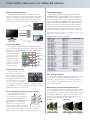
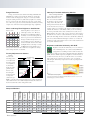
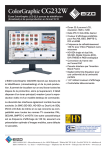
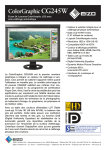
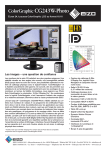
Color stability and accuracy for editing and reference. Editing and Master Monitor 10-Bit Video Support The ColorEdge CG232W meets the various demands of postproduction, including color grading, image evaluation and nonlinear editing for broadcasting. A button on the monitor’s front bezel for switching between PC and SDI signals lets studio professionals do both video editing and reference (playback) on a single monitor. The ColorEdge CG232W’s input support includes BNC × 2 (SD‑SDI/HD-SDI × 2 or dual-link SDI × 1) for transferring uncompressed video signals, DVI-D, and D-Sub for direct connection to broadcast and studio sources as well as desktop PCs. YCbCr 4:2:2, YCbPr 4:2:2, YPbPr 4:4:4 and RGB 4:4:4 SDI signal formats are all supported. The CG243W and CG245W come equipped with DisplayPort inputs so they accept 10-bit PC video signals and display 1.07 billion colors from a pallet of 68 billion. 10-bit video support enables these monitors to support 64 times the colors compared to standard 8-bit display, and minimizes color and grayscale banding. For video editing and post-production DVI/D-Sub A graphics board and software which support 10-bit output are necessary for 10-bit display with the CG245W and CG243W. SDI SD Input Signals and Formats (CG232W) PC Switch between signals at the touch of a button For final content evaluation Preset Color Modes The ColorEdge CG232W, CG243W, and CG245W offer preset color modes that reproduce the color spaces used in broadcasting and digital cinema such as EBU, SMPTE-C, Rec709 and DCI almost in their entirety. To correct CG232W color drift that naturally occurs over time with PAL/SECAM (EBU) any LCD monitor, the SMPTE-C bundled ColorNavigator (CCIR 601-5) software comes with a Digital reset function for returnCinema ing the preset modes to HDTV (Rec709) their factory settings. Remote Control Console For faster and more convenient adjustment of screen settings, a remote control console (sold separately) is available for the ColorEdge CG232W. Powered via a USB connection to the monitor, this console gives you one-touch access to frequently used settings such as brightness, gamma, color temperature, black level, RGB gain, and screen size. It includes a rotary wheel so you can quickly adjust settings to the desired level. 3D LUT for More Accurate Grayscale Display All ColorEdge models incorporate R a look-up table (LUT) for accurate color and grayscale rendering, but the ColorEdge CG232W, CG243W, and B CG245W utilize a new EIZO-developed 3D LUT. While a typical 1D LUT G adjusts color on separate tables for 3D LUT image each of red, green, and blue, a 3D LUT accomplishes this using a single, mixed-color cubic table. This improves the monitors’ additive color mixture (combination of RGB), a key factor in their ability to display neutral gray tones. Signal 8-bit Format 720×487/59.94i 720×576 /50i 1280×720 / 60p 1280×720 /59.94p 1280×720 /50p 1280×720 /30p 1280×720 /29.97p 1280×720 /25p 1920×1035/ 60i 1920×1080 / 60i 1920×1080 /59.94i 1920×1080 /50i 1920×1080 /30p 1920×1080 /30PsF 1920×1080 /29.97p 1920×1080 /29.97PsF 1920×1080 /25p 1920×1080 /25PsF 1920×1080 /24p 1920×1080 /24PsF 1920×1080 /23.98p 1920×1080 /23.98PsF 1920×1080 / 60p 1920×1080 /59.94p 1920×1080 /50p 2048×1080 /24p 2048×1080 /24PsF YCbCr 4:2:2 YCbCr 4:2:2 YPbPr 4:2:2 YPbPr 4:2:2 YPbPr 4:2:2 YPbPr 4:2:2 YPbPr 4:2:2 YPbPr 4:2:2 YPbPr 4:2:2 YPbPr 4:2:2 YPbPr 4:2:2 YPbPr 4:2:2 YPbPr 4:2:2 YPbPr 4:2:2 YPbPr 4:2:2 YPbPr 4:2:2 YPbPr 4:2:2 YPbPr 4:2:2 YPbPr 4:2:2 YPbPr 4:2:2 YPbPr 4:2:2 YPbPr 4:2:2 YPbPr 4:2:2 YPbPr 4:2:2 YPbPr 4:2:2 10-bit Format YPbPr,RGB YPbPr,RGB YPbPr,RGB YPbPr,RGB YPbPr,RGB YPbPr,RGB YPbPr,RGB YPbPr,RGB YPbPr,RGB YPbPr,RGB YPbPr,RGB YPbPr,RGB YPbPr,RGB 4:4:4 4:4:4 4:4:4 4:4:4 4:4:4 4:4:4 4:4:4 4:4:4 4:4:4 4:4:4 4:4:4 4:4:4 4:4:4 RGB 4:4:4 RGB 4:4:4 2K × 1K Signal Support The ColorEdge CG232W and CG303W support 2048 × 1080 signals which are compliant with the DCI standard. A left and right screen panning feature operated from the monitor’s on-screen display menu (OSD) allows viewing of all areas of an image with the CG232W. Black Frame Insertion and Pseudo-Interlace The ColorEdge CG232W’s panel display frame rate of 120 Hz allows for black screen insertion (pseudo-impulse), which virtually eliminates motion artifacts and blur when showing fast-paced moving images. With interlace signals, a pseudo-interlace feature minimizes motion artifacts, giving this LCD monitor smooth motion picture playback akin to that of a CRT. 60 Hz Input 1/60 sec. 120 Hz Display 1/60 sec. … 1/120 sec. black frame insert 1/120 sec. black frame insert …