1
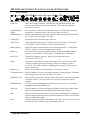
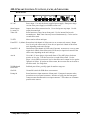
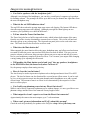
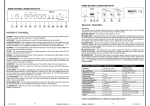
MK-I PREAMP CONTROL FUNCTIONS, JACKS, & INDICATORS:
FRONT PANEL
PEDAL
PREAMP
GAIN
OUT
PREAMP
IN
IN
INPUT
IMPEDANCE
4 5
3
4
0
3
7
8
2
9
1
2
1
MID
FREQ
TREBLE
LEVEL
6
10
0
5
6
4
7
3
8
2
9
1
10
0
5
6
7
2
8
3
9
4
10
-5
MID
LEVEL
BASS
LEVEL
1 0
4
1
2
3
3
2
4
1
5+
0
5
MASTER
LEVEL
BLEND
1 0
6
7
2
8
3
9
4
10
-5
4 5
1
2
3
3
2
4
1
5+
HEADPHONE
LEVEL
OVERLOAD
6
7
8
9
0
4 5
INPUT
3
7
8
2
OUTPUT
10
MUTE POWER
6
1
MK-I
9
0
10
TUNER
OUT
Preamp In
There are two input connectors. Insertion of a plug into the front panel input
connector auto-disconnects rear input connector. This reduces or eliminates
possible noise sources.
Input Impedance
Adjust
Set for best tone. If this function not desired, set to 12 o’clock (200 k ohms) for
normal tone. Adjustment range is 20 k to 500 k ohms. See FAQ’s.
Pedal In and Out
Allows volume pedals to be patched in after the input preamp stage but before the
EQ. Only use line level signals. See FAQ’s.
Preamp Gain
Sets the gain for the first audio stage. Start at 5.
Treble Level
Adjusts the high frequency level. CW boosts the level of highs. CCW cuts the
level of highs. (CW is clockwise, CCW is counterclockwise.)
Mid Frequency
Sets the frequency at which the Mid Level control has an effect. 0 equals about
250 Hz, 5 equals 370 Hz, and 10 equals about 1100 Hz.
Mid Level
Sets a boost or cut in the mid range frequencies selected by the Mid Frequency
control. -5 is equivalent to -16 db cut and +5 is equivalent to +16 db boost.
Bass Level
Controls low frequency response. Start at 5 (flat) and tweak to taste.
CW is boost, CCW is cut.
Blend
Only set this control after you have set the others. This is to be used as a sonic
“shading” control and, like any seasoning, a little goes a long way. Start at
12 o’clock. CW yields a “Mooney” bright aggressive sound; CCW gives you a
mellow, darker tone.
Master Level
Sets the overall output level of the preamp. Use between 5 and 10.
Overload indicators
Red LED indicators only turn on in the rare instance of peaks being hit. Indication
of soft clipping may occur you’ll probably never hear it.
Headphone Level
This unit puts out up to half a watt per channel into 8 ohms – more than enough for
any player at home. You can, if you wish, even drive a small pair of passive
speakers.
Headphone Jack
1/4" stereo jack for headphones or a small pair of passive speakers. Use quality
headphones such as Sony MDR 7505.
Tuner Out
Buffered output so it will not load down the pickup or the rest of the signal chain.
May be used simultaneously with the Tuner Out jack on the rear panel.
Mute
Yellow LED comes on when muted. Tuner, Effects and Headphones remain on to
allow for string replacement, tuning and effects adjustment. Power Amp and XLR
feeds are killed in mute mode.
Power
Turns the unit on and off and is indicated by a blue LED. A time delay is built into
the audio circuits to minimize “pop” when turning on or off.
LeMay MK-I Preamplifier
3