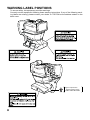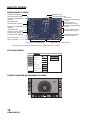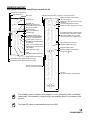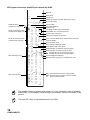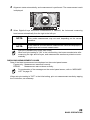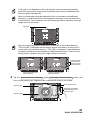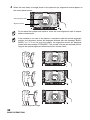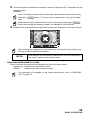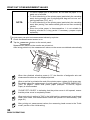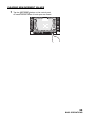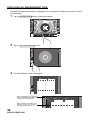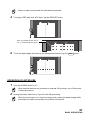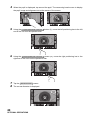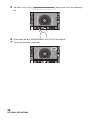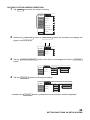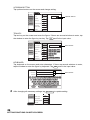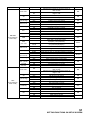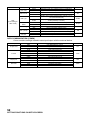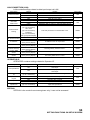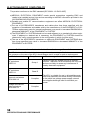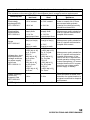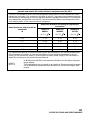
1
ID R 0000100001000 1 -1.. 25 -1 -0 . 50 -0. 1 80 180 K 1 R1 7 . 8 0 R2 7.75 A 1 80 180 PR1 7.80 PR2 R S MANUAL 0000100001000 0 C 0 1 mm R/K S L A 0 K R1 R2 A PA1 HIGH R C A FOG PR2 PR1 PA1 12.00 VD M USER MANUAL AUTO KERATO-REFRACTOMETER KR-1 INTRODUCTION Thank you for purchasing the TOPCON Auto Kerato-Refractometer KR-1. INTENDED USE / INDICATIONS FOR USE This instrument is used to measure the spherical refractive-power, cylindrical refractive power, the direction of astigmatic axis, the radius of curvature, the corneal astigmatic axis angle and the corneal refractory power. This instrument features the following: • The KR-1 is simple to operate and measures the refraction and corneal curvature of the eye. • The position of the touch panel can be adjusted to accommodate the user's preferred position. • The auto start function facilitates quick measurements under the optimal condition. This User Manual provides an overview of the basic operation, troubleshooting, checking, maintenance and cleaning of the TOPCON Auto Kerato-Refractometer KR-1. To get the best use of the instrument, read Safety Displays and Safety Cautions. Keep this Manual at hand for future reference. PRECAUTIONS • The patient who undergoes an examination by this instrument must maintain concentration for a few minutes and keep to the following instructions: To fix the face to the chinrest, forehead rest. To keep the eye open. To understand and follow instructions when undergoing an examination. • Since this product is a precision instrument, always use and keep it in a normally controlled living environment, within a temperature range of 10-40°C, humidity levels between 30-90% and an atmospheric pressure range of 700hPa-1,060hPa. The instrument should also be placed away from direct sunlight. • To ensure smooth operation, install the instrument on a level floor free of vibrations. Also, do not place anything on the instrument. • Connect all cables properly before using. • Use the power at a rated voltage. • When not in use, switch off the power source and apply the rubber cap and dust cover. • For accurate measurement results, take care to keep the measuring window clean and free of fingerprints, spots and dust. [WARNING] When operating the instrument, do not touch the patient's eye or nose. This symbol is applicable for EU member countries only. To avoid potential damage to the environment and possibly human health, this instrument should be disposed of (i) for EU member countries - in accordance with WEEE (Directive on Waste Electrical and Electronic Equipment), or (ii) for all other countries, in accordance with local disposal and recycling laws. [WARNING] Handling the cord on this product or cords associated with accessories sold with this product, will expose you to lead, a chemical known to the State of California to cause birth detects or other reproductive harm. Wash hands after handling. This product contains a CRL Lithium Battery which contains Perchlorate Material-special handling may apply. See http://www.dtsc.ca.gov/hazardouswaste/perchlorate/ Note; This is applicable to California, U.S.A. only Since this product partly uses a program derived from IPA Font, using the product is regarded as consent to the IPA Font License Agreement v1.0. For the IPA Font License Agreement v1.0, see page 68 or the following URL. http://ipafont.ipa.go.jp/ipa_font_license_v1.html 1 PRECAUTIONS BASIC INSTRUCTIONS • To avoid injury when operating the chinrest up/down button, be careful not to catch the patient's fingers. • To avoid injury when operating the instrument, be careful not to touch the eye/nose of the patient. • To avoid injury by electric shock, do not open the cover. For repair, call your service engineer. • To avoid injury by electric shock when changing the fuse, turn off the power and pull off the power cable. Use the rated fuse. DISPOSAL When disposing of the instrument and/or parts, follow local regulations for disposal and recycling. STORAGE AND USAGE PERIOD 1. WHEN STORING THE INSTRUMENT, ENSURE THAT THE FOLLOWING CONDITIONS ARE MET: (1) The instrument should not be splashed with water. (2) Store the instrument away from environments where air pressure, temperature, humidity, ventilation, sunlight, dust, salty/sulfurous air, etc. could cause damage. (3) Do not store or transport the instrument on a slanted or uneven surface or in an area where it is subject to vibrations or instability. (4) Do not store the instrument where chemicals are stored or gas is generated. 2. NORMAL LIFE SPAN OF THE INSTRUMENT: 8 years from delivery providing regular maintenance is performed (according to the self-certification [Topcon data]) USER MAINTENANCE 1. 2. 3. 4. 2 Regularly measure the attached model eye and check the accuracy. Clean the measuring window when it is soiled. Clean the forehead rest and chinrest when these are soiled. Put on the dust cover when not in use. HOW TO READ THIS MANUAL • Read the instructions on pages 1 to 8 before using the machine. • Regarding connection to various devices, see "CONNECTING EXTERNAL I/O TERMINALS" on page 20. • If you would like an overview of the system, begin by reading "BASIC OPERATIONS"(page 24). • For setting various functions, see "SETTING FUNCTIONS ON SETUP SCREEN" on page 44. SYMBOLS IN TEXT MEMO: Useful functions to know and attentions to prevent troubles are noted. 3 SAFETY DISPLAYS In order to encourage the safe use of the instrument and to avoid danger to the operator and others as well as damage to properties, warnings are described in the User Manual and marked on the instrument body. We suggest you thoroughly understand the meaning of the following displays/icons and Safety Cautions, as well as read the Manual, and strictly observe the instructions. DISPLAYS DISPLAY MEANING WARNING Improper handling or ignoring this display may lead to the danger of death or serious injury. CAUTION Improper handling or ignoring this display may cause personal injury or physical damage. • Injury means hurt, burn, electric shock, etc. • Physical damage means extensive damage that may involve building, peripheral equipment and furniture. ICON ICON MEANING This icon indicates an action to be avoided. Specific contents are shown with words or illustration close to the icon. This icon indicates Mandatory Action. Specific contents are shown with words or illustration close to the icon. This icon indicates Hazard Alerting (Warning). Specific content are shown with words or illustration close to the icon. 4 SAFETY CAUTIONS WARNINGS Icon Meaning Page To avoid electrical shock, do not open the instrument. All service should be performed by a qualified service engineer. 55 To avoid fire and electric shock, install the instrument in a dry place free of water and other liquids. –– To avoid fire and electric shock, do not put cups or other containers with liquids near the instrument. –– To avoid electric shocks, do not insert metal objects into the instrument body through the vent holes or gaps. –– Be sure to connect the power plug to an AC 3-pin receptacle equipped with grounding. Connection with receptacle without grounding may cause fire and electric shock in case of short-circuiting. To avoid electric shocks during fuse change, be sure to unplug the power cable before removing the fuse lid. Also, do not plug the power cable with the fuse lid removed. 19 68 Always use the attached fuse (T 3AL 250V). Using any other type may cause malfunction and fire. 68 To avoid fire in the event of an instrument malfunction, immediately turn OFF the power switch " " and disconnect the power plug from the outlet if you see smoke coming from the instrument, etc. Don't install the instrument where it is difficult to disconnect the power plug from the outlet. Ask your dealer for service. –– 5 SAFETY CAUTIONS CAUTIONS Icon Meaning Page To prevent damage and injuries, do not install the instrument on an uneven, unsteady or sloped surface. 19 To avoid electric shocks, do not handle the power plug with wet fingers. 19 To avoid electric shock, do not touch the external connection terminal and the patient at the same time. 20 25 To avoid injury when moving the chinrest up/down button, be careful not to catch the patient's fingers. 25 To avoid injury when operating the machine, be careful about the cover not to catch fingers of the patient. Tell this to the patient, too. 25 To avoid failure or potential injury, do not open the printer cover while the printer is in operation. To avoid potential injury in case of malfunction including a paper jam, be sure to shut off the power before attempting to repair it. 6 21 67 21 67 The instrument should be moved by two people holding the bottom of the device. Be sure to hold the bottom with two persons. To avoid injury, be aware of projections at the bottom. Carrying by one person may cause harm to his back or injury by falling parts. Also, holding areas other than the bottom and holding the External I/O terminal cover may cause injury, as well as damage to the instrument. 19 Be careful not to hit the patient's eyes or nose with the instrument during operation. 8 When setting an instrument on an instrument table, pay attention not to catch the patient's fingers between the instrument and the table. 19 To avoid potential injury, do not touch the printer body including metal parts or the paper cutter, while the printer is in operation or when replacing the printer paper. 21 67 This instrument has been tested (with 100/120/230V) and found to comply with IEC60601-1-2:Ed.3.0:2007. This instrument radiates radio frequency energy within standard and may affect other devices in the vicinity. If you have discovered that turning on/off the instrument affects other devices, we recommend you change its position, keep a proper distance from other devices, or plug it into a different outlet. Please consult your authorized dealer if you have any additional questions. –– USAGE AND MAINTENANCE Usage: • Since the Auto Kerato-Refractometer KR-1 is medical device, the operation should be supervised by a physician. USER MAINTENANCE To maintain the safety and performance of the equipment, never attempt to do maintenance except for the items specified below. For details, follow the instructions. FUSE CHANGE For details, See “FUSE CHANGE” on page 68. CLEANING OF MEASURING WINDOW For details, See “CLEANING THE INSTRUMENT” on page 65. DISCLAIMERS • TOPCON is not responsible for damage due to fire, earthquakes, actions or inactions of third persons or other accidents, or damage due to negligence and misuse by the user and any use under unusual conditions. • TOPCON is not responsible for damage derived from inability to properly use this equipment, such as loss of business profits and suspension of business. • TOPCON is not responsible for damage caused by operations other than those described in this User Manual. • The device does not provide a diagnosis of any condition or lack thereof or any recommendations for appropriate treatment. The relevant healthcare provider is fully responsible for all diagnosis and treatment decisions and recommendations. 7 WARNING LABEL POSITIONS To secure safety, this equipment provides warnings. Correctly use the equipment following these warning instructions. If any of the following marking labels are missing, please contact your dealer or TOPCON at the address stated on the back cover. Degree of protection against electric shock: TYPE B APPLIED PART 8 CONTENTS INTRODUCTION ....................................................................................................1 HOW TO READ THIS MANUAL .............................................................................3 SYMBOLS IN TEXT .....................................................................................3 SAFETY DISPLAYS ...............................................................................................4 DISPLAYS ....................................................................................................4 ICON.............................................................................................................4 SAFETY CAUTIONS ..............................................................................................5 USAGE AND MAINTENANCE ...............................................................................7 USER MAINTENANCE...........................................................................................7 FUSE CHANGE............................................................................................7 CLEANING OF MEASURING WINDOW......................................................7 DISCLAIMERS .......................................................................................................7 WARNING LABEL POSITIONS..............................................................................8 COMPONENTS COMPONENT NAMES.........................................................................................11 COMPOSITION OF PARTS WHICH CONTACT THE HUMAN BODY ................11 OPERATION METHOD OF CONTROL PANEL...................................................12 CONTROL PANEL COMPONENTS.....................................................................12 FUNCTION BUTTON .................................................................................13 MONITOR SCREEN.............................................................................................14 MEASUREMENT SCREEN........................................................................14 SETTINGS SCREEN..................................................................................14 CORNEA DIAMETER MEASUREMENT SCREEN....................................14 PRINTER OUTPUT ..............................................................................................15 PRINTOUT FORMAT SETTING ................................................................17 STANDARD ACCESSORIES ...............................................................................18 PREPARATIONS INSTALLATION ....................................................................................................19 CONNECTING POWER CABLE ..........................................................................19 CONNECTING EXTERNAL I/O TERMINALS ......................................................20 DATA OUTPUT ..........................................................................................20 DATA INPUT ..............................................................................................21 PRINTER PAPER SETTING ................................................................................21 RECOVERY FROM POWER SAVE STATUS......................................................23 ADJUSTING THE CONTROL PANEL POSITION................................................23 BASIC OPERATIONS PREPARATION BEFORE MEASUREMENT .......................................................24 TURNING ON THE INSTRUMENT ............................................................24 SELECTING THE MEASUREMENT MODE ..............................................24 PATIENT POSITIONING ............................................................................25 AUTO MODE MEASUREMENT ...........................................................................27 SETTING THE AUTO MODE .....................................................................27 ALIGNMENT AND MEASUREMENT .........................................................28 DISPLAYING MEASUREMENT VALUES ..................................................29 MANUAL MODE MEASUREMENT ......................................................................30 SETTING THE MANUAL MODE ................................................................30 ALIGNMENT AND MEASUREMENT .........................................................30 DISPLAYING MEASUREMENT VALUES ..................................................33 PRINT-OUT OF MEASUREMENT VALUES ........................................................34 CLEARING MEASUREMENT VALUES ...............................................................35 DISPLAYING ALL MEASUREMENT DATA .........................................................36 OPERATION OF AFTER USE .............................................................................37 9 OPTIONAL OPERATIONS DISPLAYING THE PATIENT ID (PATIENT NO.) OR EXAMINER ID ..................38 MEASURING ONE EYE ONLY ............................................................................38 MEASURING THE RIGHT EYE ONLY ......................................................38 MEASURING THE LEFT EYE ONLY .........................................................38 MEASUREMENT OF CORNEA DIAMETER ........................................................39 MEASUREMENT ON THE ACTUAL IMAGE .............................................39 MEASUREMENT ON THE STILL IMAGE ..................................................41 OUTPUT USING RS232C ....................................................................................43 INPUT USING USB ..............................................................................................43 OUTPUT USING LAN...........................................................................................43 SETTING FUNCTIONS ON SETUP SCREEN OPERATING THE SETUP SCREEN ...................................................................44 PREPARATONS FOR SETTING ...............................................................44 OUTLINE OF SETUP SCREEN OPERATIONS ........................................45 RETURNING TO THE MEASUREMENT SCREEN ...................................47 LIST OF SETUP ITEMS .......................................................................................48 INITIAL (INITIAL SETTING) .......................................................................48 SETTING OF INTERNAL PRINTER (PRINT) ............................................50 DATA COMMUNICATION (COMM) ...........................................................52 LAN CONNECTION (LAN) .........................................................................53 OPERATOR ID...........................................................................................53 SPECIAL ....................................................................................................53 TROUBLESHOOTING MESSAGE LIST .........................................................................................54 TROUBLE-SHOOTING OPERATIONS......................................................55 SPECIFICATIONS AND PERFORMANCE SPECIFICATIONS AND PERFORMANCE ..........................................................56 ENVIRONMENTAL CONDITIONS OF USE...............................................57 ENVIRONMENTAL CONDITIONS OF STORAGE ....................................57 ENVIRONMENTAL CONDITIONS OF TRANSPORT................................57 ELECTROMAGNETIC COMPATIBILITY .............................................................58 ELECTRIC RATING .............................................................................................62 SAFETY DESIGNATIONS PER IEC 60601-1 STANDARD .................................62 DIMENSIONS AND WEIGHT ...............................................................................62 OPERATION AND PRINCIPLE OF OPERATION ................................................63 REFERENCE OPTIONAL ACCESSORIES.................................................................................64 SHAPE OF PLUG.................................................................................................64 SYMBOL...............................................................................................................64 MAINTENANCE DAILY CHECKUPS ..............................................................................................65 CHECKING THE MEASURING ACCURACY ............................................65 CLEANING THE INSTRUMENT ................................................................65 CLEANING THE FOREHEAD REST AND CHIN REST ............................65 DAILY MAINTENANCE ..............................................................................66 ORDERING CONSUMABLE ITEMS ..........................................................66 USER MAINTENANCE ITEM .....................................................................66 BRIGHTNESS ADJUSTMENT OF CONTROL PANEL..............................67 PRINTER PAPER JAM ..............................................................................67 FUSE CHANGE..........................................................................................68 SUPPLYING THE CHINREST TISSUE .....................................................69 MAINTENANCE....................................................................................................70 CLEANING THE COVER ...........................................................................70 CLEANING THE CONTROL PANEL..........................................................70 10 COMPONENTS COMPONENT NAMES Main body Section Measuring head Eye height mark of measuring window Control panel Power unit Section Printer cover open switch Printer cover External I/O terminal cover Chinrest Section Power inlet *1 Forehead rest Measuring window Eye height mark Chinrest tissue pin *1 Chinrest Fuse folder POWER switch *1: Contacting part (class B) Rubber cap COMPOSITION OF PARTS WHICH CONTACT THE HUMAN BODY Forehead rest : Silicone rubber Chinrest : Acrylonitrile butadiene styrene resin 11 COMPONENTS OPERATION METHOD OF CONTROL PANEL The control panel is a touch panel. Do not use any sharp tools; e.g. ball point pen. NOTE: Tap ID R To select any relevant item. 0000100001000 01/01 -1 . 25 -1. C -0. -0 . 50 A 18 180 K 01/01 R1 7.80 7. 80 R2 7. 75 7.75 A 180 18 PR1 7. 80 PR2 7.80 R S AUTO HIGH 0 PR2 0 1 mm R/K 0000100001000 0 PA1 PA1 FOG Continue to press S L R R C S A C 0000100001 AUTO 0 0 R K A A R1 R1 R2 R2 R2 A A A PR1 0 1 mm VD A R/K L S C R1 PR1 12.00 00001000010000100001 ID R Used for continuous moving. (Moving of chinrest and measuring head) PR2 PR2 PA1 PA1 HIGH S PR1 VD 12.00 dio A FOG Specified area Touch the screen softly with a finger. Continue to touch the screen softly with a finger. In the measurement screen, only a specified area can be operated. CONTROL PANEL COMPONENTS The control panel is designed as a touch panel for performing various operations and settings. It displays images and shows information, including set conditions and measurement results. Display ID button Settings button R button L button Measuring head forward button Up/down button for chinrest Measuring head backward button Reset button Start button Measurement mode button Auto/Manual button Function button ID button ................................ Input the patient ID (up to 13 characters) and operator ID (up to 21 characters). However, if no patient ID is input, the patient No. is allocated automatically. Measurement mode button ...... Selects a measurement mode from REF, KRT and R/K. R button/L button................. Selects the right/left eye. By tapping the button, the main body moves to the selected direction. The selected button is framed in orange. 12 COMPONENTS Up/down button for chinrest ... Moves the chinrest up/down. Reset button ............................ Returns the chinrest and measuring head to the initial position. Forward/backward button for measuring head ............. Moves the measuring head closer to/away from the patient's eye. Start button............................... Starts measurement . Auto/Manual button.................. Selects Auto/Manual mode (A: Auto mode, M: Manual mode). The name of selected (Auto/Manual) is displayed on the control panel. Settings button ....................... Displays the Settings screen. FUNCTION BUTTON Cataract button Fixation target button FOG button Cornea diameter button Print out button Target image button ALL CLEAR button Cataract button............... If error messages occur in patient's with cataracts, push the Cataract button may improve measurements. When the button is selected, "CAT" is displayed on the monitor and the selected button is framed in orange. Fixation target button ..... Brightness of the fixation target can be changed. When the brightness of the fixation target is "LOW," the selected button is framed in orange. FOG button .................... Changes setting temporarily to perform fogging only in the first measurement or each time in the continuous measurement. Target image button ....... The captured measurement target can be observed on the control panel. Print out button .............. Prints measurement results. Tap the button when no measurement data is present to feed the paper. By setting the printer mode to Graphic Printer on the Settings screen, figures showing refractive conditions can be printed. In this case, the printer button changes to . ALL CLEAR button......... Clears all measurement data. Cornea diameter button .. Changes to cornea diameter measurement mode. 13 COMPONENTS MONITOR SCREEN MEASUREMENT SCREEN Alignment mark Outer alignment mark Operator ID Number of reading/setting (L, REF) Refractive power measurement result (L) Number of reading/setting (L, KRT) Patient No. (Patient ID when patient ID is input) Number of reading/setting (R, REF) Refractive power measurement result (R) Number of reading/setting (R, KRT) *Eye Height mark Corneal curvature radius measurement result (L) Corneal curvature radius measurement result (R) Peripheral KRT value (L) VD (Vertex distance) Peripheral KRT value (R) Device ID number D/mm unit display Typical value of R measurement Typical value of L measurement *Eye Height mark: Shows the position of the eye height mark on the chinrest. SETTINGS SCREEN 1/5 Initial Buzzer Print Comm ON Start mode AUTO Auto Print ON LAN Printer ON Serial No. reset OFF OFF ON Examiner Special Show patient ID ON Required patient ID OFF Device ID Return 1 CORNEA DIAMETER MEASUREMENT SCREEN R 14 COMPONENTS R: L: 9 .5 0 L PRINTER OUTPUT KRT typical value style and KRT print format are HV C(Cataract mode) mark Reliability factor Bar code Typical measured value of right eye corneal curvature Work ID No. -4 OID : 0#/' AA#/ 0Q SN 4'(# 8& 5 ޛ4ޜ % % % % ޛ.ޜ 5' %;. % # 5 % # 5' 2& #&& 02& Operator ID Patient No.(Patient ID when patient ID is input) Device ID number Serial number VD (vertex distance) Cylinder sign 3 readings of REF right measurement (recordable up to 10 measurements) Typical value of right eye SPHERICAL EQUIVALENT of right eye The ( ) mark is added when measurement values are not fully reliable. -46# ޛ4ޜ & // * 8 #8' %;. %140'#&+# -1* 8 #8' -2* 8 #8' -3* 8 #8' & %;. & %;. & %;. & 2* 28 Refractive power measurement result (L) Refractive power measurement result (R) // // // # // # Measured value of horizontal corneal curvature Measured value of vertical corneal curvature Corneal astigmatic axis angle Measured value of right eye cornea # # 3 readings of kerato-cylinder value, average value and kerato-cylinder value (recordable up to 10 measurements each for right/left eye) Typical measured value of Peripheral KRT value (R) Peripheral KRT value Peripheral KRT measurement values near 6mm ޛ.ޜ * 8 #8' // & %;. %140'#&+# # -1* 8 Typical measured value of Left eye corneal curvature ADD (standard additional power) Pupil distance (PD value) Near vision PD value # #8' -2* 8 #8' -3* 8 #8' & %;. & %;. & %;. & // // // # // # # # Left eye corneal curvature measurement 2* 28 612%10 The reliability factor is defined with integers 1 to 9 in increasing order of reliability. Additionally, if the reliability is high enough, the reliability factor is not shown on the printout. The Near PD value is calculated based on the ADD. 15 COMPONENTS KRT typical value style and KRT print format are R1R2 Barcode Work ID No. Operator ID -4 OID : 0#/' Reliability factor C(Cataract mode) mark Result of refractory power measurement (Right eye) AA#/ 0Q SN 4'(# 8& ޛ4 ޜ5 % % % -0.25 5' %;. % # -0.75 90 KRT data (Right eye) Typical value of right eye % # 5 -0.75 -0.25 90 5' 2& #&& 02& -46# ޛ4ޜ & // # 4 4 #8' %;. %140'#&+# // // # عع #8' %;. عع #8' %;. عع #8' %;. ޛ.ޜ 4 4 #8' Serial number VD (vertex distance) Cylinder sign 3 readings of REF right measurement (recordable up to 10 measurements) ޛ.ޜ Result of refractory power measurement (Left eye) Patient No. (Patient ID when patient ID is input) Device ID number & // Spherical equivalent of right eye The ( ) mark is added when measurement values are not fully reliable. Near vision PD value ADD (ordinary additional power) Pupil distance (PD value) (mm) Measured value of horizontal corneal curvature Measured value of vertical corneal curvature D: Average value of corneal refractive power MM: Average value of cornea curvature radius Corneal astigmatic axial angle Measured value of right eye cornea diameter (mm) # %;. KRT data (Left eye) عع #8' %;. عع #8' %;. عع #8' %;. %140'#&+# // // # MM1: Corneal refractive power at flat meridian MM2: Corneal refractive power at steep meridian A1: Angle of steep meridian 612%10 The reliability factor is defined with integers 1 to 9 in increasing order of reliability. Additionally, if the reliability is high enough, the reliability factor is not shown on the printout. The Near PD value is calculated based on the ADD. 16 COMPONENTS PRINTOUT FORMAT SETTING Printout format can be changed by pushing "Print" in the Settings screen. For Print settings, see "SETTING FUNCTIONS ON SETUP SCREEN" on page 44. PRESET ALL: Initial setting (all measurement values are printed.) AVE: Only typical value are printed. CLASSIC: Equivalent with RM/KR-8900 Classic 2 ITEM Common REF/KRT REF KRT Barcode Examiner ID Name Date Date style Patient ID Device ID number Serial number Include error data TOPCON logo Message Message data Between the lines Print order VD Cylinder sign REF format Credibility S.E. PD ADD KRT print order KRT format KRT type KRT format detail KRT average KRT cylinder Cornea diameter VD Cylinder sign REF format Credibility S.E. PD ADD KRT print order KRT format KRT type KRT format detail KRT average KRT cylinder Cornea diameter INITIAL OFF OFF ON ON YMD ON OFF ON OFF ON OFF NULL 0 DATA ON ON ALL OFF ON ON OFF D/mm ALL R1R2 R1R2 ON ON ON ON ALL OFF ON ON OFF OFF D/mm ALL R1R2 R1R2 ON ON ON ALL OFF OFF ON ON YMD ON OFF ON OFF ON OFF NULL 0 DATA ON ON ALL OFF ON ON OFF D/mm ALL R1R2 R1R2 ON ON ON ON ALL OFF ON ON OFF OFF D/mm ALL R1R2 R1R2 ON ON ON PRESET AVE OFF OFF ON ON YMD ON OFF ON OFF ON OFF NULL 0 DATA ON ON AVE OFF ON ON OFF D/mm AVE R1R2 R1R2 ON ON ON ON AVE OFF ON ON OFF OFF D/mm AVE R1R2 R1R2 ON ON ON CLASSIC OFF OFF ON ON YMD ON OFF ON OFF ON OFF NULL 0 DATA ON ON ALL OFF ON ON OFF D/mm AVE HV HV ON ON ON ON ALL OFF ON ON OFF OFF D/mm ALL HV HV ON ON ON 17 COMPONENTS STANDARD ACCESSORIES The following are standard accessories. Make sure that all these items are included (quantity). Power cable (1) Chinrest tissue pin (2) Printer paper (2) Monitor cleaner (1) Chinrest tissue (1) Dust cover (1) Fuse (2) Instruction Manual (1) Accessory case (1) User manual and unpacking manual (1 each) Rubber cap (1) Model eye (1) 18 COMPONENTS PREPARATIONS INSTALLATION CAUTION When moving the instrument, two people should lift from the bottom of the device. One person lifting the device may cause harm to his back or injury by falling parts. Also, holding areas other than the bottom and holding the External I/O terminal cover may cause injury, as well as damage to the instrument. CAUTION To prevent damage and injuries, do not install the instrument on an uneven, unsteady or sloped surface. CAUTION When setting an instrument on an instrument table, pay attention not to injur the patient's fingers between the instrument and the table. NOTE: 1 The instrument should also be placed away from strong light like direct sunlight. Auto alignment may not function properly. Firmly hold the instrument at the position shown below and place it on the automatic instrument table. For the adjustable instrument table, see “OPTIONAL ACCESSORIES” on page 64. External I/O terminal cover Holding positions Holding the instrument CONNECTING POWER CABLE 1 WARNING Be sure to connect the power plug to an AC 3-pin receptacle equipped with grounding. Connection with receptacle without grounding may cause fire and electric shock in case of shortcircuiting. CAUTION To avoid electric shocks, do not handle the power plug with wet fingers. Make sure the POWER switch of the instrument is OFF. 19 PREPARATIONS 2 Tilt the body slowly so that the POWER switch is on top and the power inlet at the bottom can be seen. 3 4 Connect the power cable to the Power inlet. Insert the power cable plug into the 3-pin AC grounding receptacle. CONNECTING EXTERNAL I/O TERMINALS CAUTION To avoid electric shock, do not touch the external connection terminal and the patient at the same time. Use the external device complying with IEC60950/IEC60950-1. DATA OUTPUT This product can be connected to a personal computer (PC) and other external devices via the RS232C or LAN. 1 Remove the External I/O terminal cover by pulling up as follows. External I/O terminal cover 2 Connect the connection cable to the output terminal of the instrument. RS232C output terminal LAN output terminal USB input terminal 20 PREPARATIONS 3 4 Connect the other end of the connection cable to the PC, etc. Replace the External I/O terminal cover. DATA INPUT This product can be connected to a bar-code reader and other external devices via USB. 1 2 Connect the connection cable to the input terminal of the instrument. Connect the other end of the connection cable to the external device. For questions about connections, contact your TOPCON dealer. PRINTER PAPER SETTING CAUTION To avoid failure or potential injury, do not open the printer cover while the printer is in operation. CAUTION To avoid potential injury in case of malfunction, including a paper jam, be sure to shut off the power before attempting to repair it. CAUTION To avoid potential injury, do not touch the printer body including metal parts or the paper cutter, while the printer is in operation or when replacing the printer paper. NOTE: 1 • If you insert the printer paper backwards, printing will not start. Press the printer cover open switch to open the printer cover. Printer cover Printer cover open switch 21 PREPARATIONS 2 Open the printer cover to the limit. 3 Insert the printer paper in the direction shown below and pull out the paper end to your side by 7 to 8cm. Roll direction 4 Bring the paper into the center, then close the printer cover. . In case the printer cover is not firmly closed, printing will not start, and "CLOSE PRT COVER" wil be displayed on the monitor screen. A 58mm wide paper roll (example: TP-50KJ-R [Nippon Paper Co.]) is recommended. Other paper rolls may cause abnormal printing noise or unclear print. 22 PREPARATIONS RECOVERY FROM POWER SAVE STATUS This instrument adopts the power save system for saving electric power. When the machine is not operated for a set time, the control panel becomes a screensaver. 1 Tap the control panel. In a few seconds, the measurement screen is displayed and measurement is enabled. The time to start the power save status can be changed in the initial setting "Auto power save" (see page 48). ADJUSTING THE CONTROL PANEL POSITION The control panel may be positioned by swinging and tilting the monitor to your desired position. Touching the control panel controls operations including chinrest movements, alignment and measurement. 23 PREPARATIONS BASIC OPERATIONS PREPARATION BEFORE MEASUREMENT TURNING ON THE INSTRUMENT 1 Make sure the power cable is connected properly. For the details of connection, refer to “CONNECTING POWER CABLE” on page 19. 2 3 Press on the POWER SWITCH. Make sure that the title screen is displayed and then the MEASUREMENT screen is displayed in a few seconds. SELECTING THE MEASUREMENT MODE This product has three measurement modes: R/K (REF/KRT continuous measurement), KRT (KRT single measurement) and REF (REF single measurement). 1 2 Check that the MEASUREMENT screen is on. Tap the MEASUREMENT MODE mode. Indication of the button on the control panel and select the measurement MEASUREMENT MODE REF: Only REF measurement KRT: Only KRT measurement R/K: REF/KRT continuous measurement button is changed. ID R R S 0 0000100001000 AUTO 0000100001000 0 A R1 0 0 R2 K R1 A PR1 0 1 mm BASIC OPERATIONS L R2 A 24 S C A K R/K R C PR2 PR2 PR1 PA1 PA1 12.00 VD HIGH FOG A PATIENT POSITIONING 1 2 CAUTION To avoid electric shock, do not touch the external connection terminal and the patient at the same time. CAUTION To avoid injury when moving the chinrest up/down button, be careful not to catch the patient's fingers. CAUTION To avoid injury when operating the machine, be careful about the cover not to catch fingers of the patient. Tell this to the patient, too. NOTE: Adjust the height of the adjustable instrument table so that the patient can sit on the chair comfortably. Otherwise, correct measurement values may not be obtained. NOTE: When operating the instrument, be careful that the instrument does not touch the patient's lip or nose. If touched, clean the instrument following "CLEANING THE INSTRUMENT" on page 65. Check the measurement screen. Make sure that the eye height mark is at the center position as explained below. If the eye height mark is above the center position, press the lower side of the control panel display, or if it is below the center position, press the upper side of the control panel display, so as to move the eye height mark to the center position. 00001000010000100001 ID Eye height mark R Center position AUTO R S S C C C A A A R1 R1 R1 R2 R2 R2 A PR1 0 1 mm 3 4 L R R S A R/K R 0000100001 PR2 PR2 PA1 PA1 HIGH S FOG A PR1 12.00 Eye height mark on the center position PR1 VD dio A Have the patient sit in front of the instrument. Adjust the adjustable instrument table or the chair height for the patient to put his/her chin on the chinrest comfortably. 25 BASIC OPERATIONS 5 Place the patient's chin on the chinrest and check that his/her forehead is touching to the forehead rest. 6 Press the UP/DOWN button to adjust the chinrest height until the eye height mark of the chinrest reaches the same height as the patient's eye. At this moment, confirm that the height mark of the measuring window is at the height of the patient's visual line. 00001000010000100001 ID R 0000100001 AUTO R R S S C C A A R1 R1 R2 R2 A PR1 Chinrest up/down button Eye height mark Eye height mark of measuring window 26 BASIC OPERATIONS L A PR2 PR2 0 1 mm PA1 PA1 PR1 VD 12.00 dio R/K HIGH FOG A AUTO MODE MEASUREMENT NOTE: Auto measurement mode may not be possible, in case the eyelid and the eyelashes cover the pupil. If this occurs, the operator should tell the patient to open their eyes as wide as possible, or lift the eyelid to allow for measurement. NOTE: Auto measurement mode may not be possible due to frequent blinks or existing abnormalities in the corneal surface caused corneal disease etc. In this case, select manual mode. NOTE: When operating the instrument, be careful that the instrument does not touch the patient's face or nose. If touched, clean the instrument as specified in "CLEANING THE INSTRUMENT" on page 65. NOTE: If the patient is wearing make up on the eyelid or around the eyelid using glitter, the auto alignment may not function properly. In this case, select manual mode. SETTING THE AUTO MODE 1 Make sure the mode. 2 If "M" (Manual mode) is displayed, tap it and change to the Auto mode. button is on A on the measurement screen. "A" is Auto AUTO/MANUAL ID R R S 0 0000100001000 AUTO 0000100001000 0 S C C A A K R1 0 0 R2 L K R1 R2 A A PR1 0 1 mm R/K R PR2 PR2 PA1 PA1 HIGH FOG PR1 12.00 VD A 27 BASIC OPERATIONS ALIGNMENT AND MEASUREMENT Alignment can be operated from the control panel. 1 When the pupil is displayed, tap the display around the pupil. The measuring head moves to display the pupil image and alignment dot on the center of the screen. Then tell the patient to look at red-roof house. 0000100001000 ID R 0 R S 0000100001000 AUTO 0 ID R S L R R S 0 0000100001000 0000100001000 AUTO 0 R S C C C C A A A A 0 K 0 R1 R2 K K R1 R1 R2 R2 A A A PR1 PR2 R/K HIGH PR1 PR2 0 1 mm PA1 S C 0 A A K R1 R2 A PR1 12.00 VD FOG 0 L PR2 PR2 PR1 0 1 mm PA1 01 PA1 12.00 VD R/K A FOG HIGH If the pupil is not displayed on the control panel, move the measuring head by press the control panel, checking the eye height mark on the measurement window as a guide (see page 26). When the measuring head has reached the limit of movement (vertical/lateral directions), a yellow-colored limit mark appears, showing it is the movement limit in that direction. Tap the display, move the measuring head to a position until pupil image comes to the center. Limit mark ID R 0 R S 0000100001000 0000100001000 AUTO 0 C R S L C A A K R1 0 0 R2 K R1 R2 RA K PR1 A PR2 0 1 mm PA1 R/K PR2 PR1 PA1 12.00 VD A FOG HIGH When the measuring head is at the limit of movement in the forward direction, "TOO CLOSE" is displayed and the buzzer sounds, and when it is at the limit of movement in the backward direction, "TOO FAR" is displayed. Using the Measuring Head Forward button and Measuring Head Backward button, move the measuring head to a position until pupil image comes to the center. ID R 0 R S 0000100001000 AUTO 0000100001000 0 S L R 0 R S 0000100001000 AUTO 0000100001000 0 R S C C C C A A A A K R1 0 0 R2 A PR1 TOO CLOSE PR2 PA1 0 1 mm R/K ID R HIGH 12.00 FOG Limit of movement in the forward direction 28 BASIC OPERATIONS K R1 R2 R2 A A PR1 PR2 PA1 K R1 0 0 R2 TOO FAR PR2 PA1 0 1 mm A R/K Measuring Head Forward button/ Measuring Head Backward button K R1 A PR1 VD L HIGH PR2 PA1 FOG Limit of movement in the backward direction PR1 12.00 VD A 2 Alignment starts automatically, and measurement is performed. The measurement result is displayed. ID R 0000100001000 01/01 S -1 - 1.. 25 C -0 - 0.. 50 A 18 180 K 01/01 R1 7. 80 R2 7. 75 A 180 18 PR1 7.80 PR2 R 3 0 R S L A 0 K R1 R2 A PR2 0 1 mm HIGH 0000100001000 C PA1 R/K AUTO PA1 FOG PR1 12.00 VD A When Right/Left eye continuous measurement is selected, the instrument measuring head moves automatically from the right to the left eye. NOTE: If auto mode measurement does not work, select manual mode. Auto mode measurement may not work depending on the cornea condition. NOTE: If the machine is moved before measurement values are displayed, it might cause an incorrect measurement. Auto print (available only under Auto mode) When auto print setting is "ON" in the initial setting, the buzzer sounds twice after measuring the right and left eyes, and measurement results are printed out automatically. DISPLAYING MEASUREMENT VALUES Data of the latest measurement are displayed on the control panel screen. Figures only: Measurement was done correctly. ERROR: Measurement was not done correctly. For explanation of the messages on the control panel screen, refer to “MESSAGE LIST” on page 54. When auto print setting is "OFF" in the initial setting, print out measurement results by tapping the Print button, as necessary. 29 BASIC OPERATIONS MANUAL MODE MEASUREMENT SETTING THE MANUAL MODE 1 Check the MEASUREMENT screen is on. If the Manual mode. 2 If "A" (Auto mode) is displayed, tap it and change to "M". 0000100001000 ID R 0 R AUTO/MANUAL button is "M," the mode is 0000100001000 MANUAL 0 R S S C C A L A 0 K 0 K R1 R1 R2 R2 A A PR1 PR2 PR2 PR1 PA1 PA1 12.00 V D 0 1 mm R/K M FOG HIGH ALIGNMENT AND MEASUREMENT Alignment is operated on the control panel. 1 Select the right/left eye by tapping the ID R R S 0 0000100001000 R button/ MANUAL L button. 0000100001000 0 R S C A K R1 A 0 0 R2 K R1 R2 A A PR2 PR2 PR1 0 1 mmPA1 PA1 12.00 VD PR1 R/K 2 L C M FOG HIGH When the pupil is displayed, tap the display around the pupil. The measuring head moves to display the pupil image and alignment dot on the center of the screen. Then tell the patient to look at red-roof house. ID R R S 0 0000100001000 MANUAL 0000100001000 0 ID R S L R R S 0 0000100001000 MANUAL 0000100001000 0 R S C C C C A A A A K 0 0 K K R1 R1 R1 R2 R2 R2 A A A PR1 PR2 PR2 PR1 0 K R1 R2 A PR1 12.00 VD 0 1 mmPA1 0 L PR2 PR2 PR1 0 1 mmPA1 01 PA1 12.00 VD di o dio R/K HIGH 30 BASIC OPERATIONS FOG M R/K HIGH FOG M If the pupil is not displayed on the control panel, move the measuring head by press the control panel, checking the eye height mark on the measurement window as a guide (see page 26). When the measuring head has reached the limit of movement (vertical/lateral directions), a yellow-colored limit mark appears, showing it is the movement limit in that direction. Tap the display, move the measuring head to a position until pupil image comes to the center. Limit mark ID 0 R R S 0000100001000 0000100001000 MANUAL 0 C R L S C A A 0 K R1 0 R2 K R1 R2 RA A KPR1 PR2 0 1 mm R/K PR1 PR2 PA1 PA1 12.00 VD M FOG HIGH When the measuring head is at the limit of movement in the forward direction, "TOO CLOSE" is displayed and the buzzer sounds, and when it is at the limit of movement in the backward direction, "TOO FAR" is displayed. Using the Measuring Head Forward button and Measuring Head Backward button, move the measuring head to a position until pupil image comes to the center. ID R 0 R S 0000100001000 MANUAL 0000100001000 0 S C A K R1 0 0 R2 A PR1 TOO CLOSE PR2 0 1 mm R/K HIGH PA1 L R 12.00 0 R S C C A A K R1 R2 R2 A A 0 0 0 PR2 0 1 mm M S L Measuring Head Forward button/ Measuring Head Backward button K R1 R2 TOO FAR PR2 PA1 VD R A PR1 R/K Limit of movement in the forward direction 3 0000100001000 MANUAL A K FOG 0000100001000 C R1 PR1 PR2 PA1 ID R HIGH PA1 PR1 12.00 VD M FOG Limit of movement in the backward direction Tap the MEASURING HEAD FORWARD button/ MEASURING HEAD BACKWARD button and focus on the patient's eye. Alignment dot is reflected off-focus on the cornea. 0000100001000 ID Alignment dot R R 0 0000100001000 MANUAL 0 S C C A K 0 R2 A Outer alignment mark Measuring head forward button/Measuring head backward button K R1 R2 A PR1 R/K L A 0 R1 Alignment mark R S PR2 PR2 PR1 0 1 mmPA1 01 PA1 12.00 VD HIGH FOG M 31 BASIC OPERATIONS 4 When the main body is brought closer to the patient's eye, alignment arrows appear on the control panel screen. 0000100001000 ID R R 0 0000100001000 MANUAL 0 S C C A K Outer alignment mark 0 K R1 R2 R2 A PR1 FORWARD PR2 0 1 mm PA1 R/K L A 0 R1 A Alignment arrows R S HIGH PR2 PR1 PA1 12.00 VD M FOG Do not allow the eyelash and eyelid to cover the outer alignment mark to ensure stable measurement. If the machine is too near to the patient in comparison with the optimal alignment position, the alignment arrows are displayed outward with the message "BACKWARD," or if it is too far from the patient, the alignment arrows are displayed inward with the message "FORWARD." The number of arrow are reduced accordingly as the optimal alignment reference position comes closer. 0000100001000 ID R R 0 0000100001000 MANUAL 0 R S S C C A A K 0 0 L K R1 R1 R2 R2 A A PR1 BACKWARD PR2 0 1 mm 01 PA1 R/K HIGH PR2 PA1 PR1 12.00 VD M FOG Too close 0000100001000 ID R R 0 0000100001000 MANUAL 0 R S S C C A A K L 0 0 K R1 R1 R2 R2 A A PR1 FORWARD PR2 PA1 0 1 mm 01 R/K HIGH PR2 PA1 PR1 12.00 VD M FOG Too far 0000100001000 ID R R 0 0000100001000 MANUAL 0 S C C A A K 0 0 R1 R2 R2 A PR1 Off the alignment range 32 BASIC OPERATIONS L K R1 A R/K R S PR2 PR2 PR1 01 mmPA1 PA1 12.00 VD HIGH FOG M 5 When the alignment dot becomes smaller in size and "Alignment OK" is displayed, tap the START button. Even if fine alignment has not been achieved, measurement can be performed by tapping the START button. To ensure correct measurement, try to get fine alignment. Measurements can be performed off center if necessary by tapping the START button after placing the measuring head in the desired off center position. 6 Measurement is performed and measurement values are displayed on the control panel. 0000100001000 ID 1 R S -1 - 1.. 25 C -0 - 0.. 50 A 18 180 K 1 R1 7. 80 80 R2 7. 75 75 A 180 18 PR1 7.80 PR2 R 0 1 mm R/K 0000100001000 0 R S L C A 0 K R1 R2 A PA1 HIGH MANUAL FOG PR2 PR1 PA1 12.00 VD M After finishing the measurement, auto alignment is performed if the patient's eye position is moved right/left and up/down. NOTE: If the machine is moved before measurement values are displayed, it may cause incorrect measurement result. DISPLAYING MEASUREMENT VALUES Data of the latest measurement are displayed on the control panel screen. Figures only: Measurement was done correctly. ERROR: Measurement was not done correctly. For explanation of messages on the control panel screen, refer to “MESSAGE LIST” on page 54. 33 BASIC OPERATIONS PRINT-OUT OF MEASUREMENT VALUES NOTE: • To avoid a paper jam in the printer, do not feed the paper if it is partly cut or wrinkled. • To avoid discoloring of the printer paper (particularly the recording area) during storage, use a polypropylene bag and not one containing plasticizer (PVC, etc.). • To avoid discoloring of the printer paper (particularly the recording area) after pasting, use water-soluble glue and not one containing solvent. • Since the printer paper is thermosensitive, it is not suitable for keeping records for a long period. If necessary, prepare copies separately. This instrument can print out measurement values by a printer. 1 2 Check the Measurement screen is on. Tap the PRINT OUT button on the control panel. Measurement values on the monitor are printed out. After being printed out, the measurement values on the screen are deleted automatically. When the cylindrical refractive power is "0," the direction of astigmatic axis and measurement values are not displayed/printed. When a red line is printed at the end of the printer paper, replace it with a new one. For details about the replacement of printer paper, see “PRINTER PAPER SETTING” on page 21. 58mm wide printer paper (example: TP-50KJ-R, Nippon Paper) is recommended. "CLOSE PRT COVER" is indicating that the printer cover is left opened, ensure that the printer cover is completely closed. When auto print is setting is "ON" in the initial setting, measurement is performed under Auto mode, and measurement results are printed out automatically. (See page 48.) After printing out measurement values, the measuring head moves to the "finish mode" position of the initial setting. 34 BASIC OPERATIONS CLEARING MEASUREMENT VALUES 1 Tap the ALL CLEAR button on the control panel. All measurement values of both eyes are cleared. ID R 0000100001000 03/03 - 1 . 25 -1 C -0 - 0 . 50 A 180 K 03/03 R1 7 . 8 0 R2 7.75 A 180 PR1 7.80 PR2 0000100001000 AUTO R S PR2 03/03 R --00 . 25 S - 0 . 50 C -0 180 A 03/03 K 7 . 8 0 R1 7 . 7 5 R2 180 A L PR1 PA1 PA1 12.00 VD 0 1 mm S - 1 . 25 C - 0 . 50 A 1 8 0 S -0 - 0 . 25 C -0 - 0 . 50 A1 8 0 dio dio R/K HIGH FOG A 35 BASIC OPERATIONS DISPLAYING ALL MEASUREMENT DATA Normally the latest measurement is displayed, but it is possible to display and confirm all measurement data. 1 Tap the button of the control panel. TARGET IMAGE ID R 0000100001000 03/03 -1 . 25 C -0 . 50 A 180 K 03/03 R1 7 ..8 80 R2 7 ..77 5 A 180 PR1 7.80 PR2 R S 0000100001000 AUTO PR2 03/03 R -0.. 25 S -0 -0 . 50 C -0. 180 A 18 03/03 K 7. 80 8 0 R1 7. 75 7 5 R2 180 A 18 L PR1 12.00 VD 0 1 mm S - 1 .25 . 25 C - 0 .50 . 50 A 1 8 0 S -0 - 0 . 25 C -0 - 0 . 50 A1 8 0 PA1 R/K 2 Tap the ALL DATA DISPLAY PA1 A FOG HIGH button. R L REF 3 The Data Display screen is displayed. RIGHT S C1 REF LEFT C A S C A -1.25 -0.50 180 -1.25 -0.50 180 1 2 2 -0.25 -0.50 -0.25 -0.50 180 180 (3) -1.25 -0.50 180 3 -0.25 -0.50 180 -0.25 -0.50 180 4 4 5 5 6 6 7 7 8 8 9 9 10 10 AVE -1.25 -0.50 180 AVE When measurement is performed with the Cataract button ON, "C" comes at the head of figures. RIGHT S C1 When Cataract mode starts automatically during the measurement, figures will be put in ( ). 36 BASIC OPERATIONS LEFT C A S 1 2 -1.25 -0.50 180 -1.25 -0.50 180 (3) -1.25 -0.50 180 C A 2 -0.25 -0.50 -0.25 -0.50 180 180 3 -0.25 -0.50 180 4 4 5 5 When no data is memorized, the data table shows blank. 4 To change "REF data" and "KRT data," tap the REF/KRT button. When the reliability of KRT data is low, "*" is attached after the figures. 5 To exit the data display and return to the Measurement screen, tap the EXIT button. OPERATION OF AFTER USE 1 Turn the POWER switch to off. When external devices are connected to external I/O terminals, turn off the power of these devices too. 2 Unplug the power cable from a 3-pin AC inlet with grounding. When the instrument is not used for a long period, unplug the power supply cable, and detach the cable connected to the external I/O terminal. 37 BASIC OPERATIONS OPTIONAL OPERATIONS DISPLAYING THE PATIENT ID (PATIENT No.) OR EXAMINER ID A patient ID or examiner ID of up to 13 characters can be input and displayed on the control panel and printout. However, if no patient ID is input, the patient No. is allocated automatically by the device. 1 2 Tap ID button. Tap keyboard on the screen and enter characters. Tap OK button and fix the input value. Patient ID is reset when measurement values are printed or if the ALL CLEAR button is tapped. Patient No. reset condition can be selected such that the patient No. is reset upon power on or not, in the initial setting of setup screen. "Refer to "Patient No.reset" on page 48. MEASURING ONE EYE ONLY In Auto mode, it is possible to measure one eye only. The current measurement position is distinguished by the color of the indicates active measurement position. 00001000010000100001 ID R button; orange 0000100001 AUTO R / R S S C C A A R1 R1 R2 R2 L A A PR2 PR2 PR1 PA1 0 1 mm PA1 12.00VD PR1 dio R/K HIGH A FOG MEASURING THE RIGHT EYE ONLY 1 2 Tap the button to move the measuring head to the right. When the measuring head stops moving tap the button once again: the lock icon is displayed . • When the lock icon is displayed, the measuring head does not move to the other eye even when the measurement of one eye is finished. 3 To release the lock, tap the icon: The lock icon disappears. MEASURING THE LEFT EYE ONLY Operation is the same as measuring the right eye. In order to measure the other eye when the lock icon is displayed, tap the other side button or 38 OPTIONAL OPERATIONS button. MEASUREMENT OF CORNEA DIAMETER MEASUREMENT ON THE ACTUAL IMAGE 1 Tap the R button/ button to select the right/left eye. L ID 0 R R S 0000100001000 MANUAL 0000100001000 0 R S C A A K R1 0 0 K R1 R2 R2 A A PR1 PR2 0 1 mm R/K 2 Tap the ID R S 0 PR1 PR2 PA1 HIGH PA1 12.00 M FOG 0000100001000 MANUAL 0000100001000 0 R S C C A A K 0 0 L K R1 R1 R2 R2 A A PR1 PR2 PR2 0 1 mm PA1 R/K 3 VD button. CORNEA DIAMETER R L C HIGH PA1 FOG PR1 12.00 VD M The Cornea Diameter Measurement screen is displayed, and The positioning bar is displayed. R R: L Positioning bar Positioning bar R/L balance display Exit button Positioning bar control button (L) Positioning bar control button (R) Capture button Measurement button 39 OPTIONAL OPERATIONS 4 When the pupil is displayed, tap around the pupil. The measuring head moves to display the pupil image and alignment dot at the center of the screen. R 5 L R: Using the POSITIONING BAR CONTROL end of the iris from the operator side. R 6 L R: R: button (L), move the left positioning bar to the left L R: Using the POSITIONING BAR CONTROL button (R), move the right positioning bar to the right end of the iris from the operator's side. R 7 8 R Tap the MEASUREMENT L R: button. The cornea diameter is displayed. R 40 OPTIONAL OPERATIONS R: L:9.50 L 9 Tap the R L button and move to the other eye. In like manner, measure the other eye. 10 Tap the EXIT button and measure the other eye. MEASUREMENT ON THE STILL IMAGE When KRT measurement values are available, the still image of the measurement is displayed. 1 Follow steps 1 to 5 of "MEASUREMENT ON THE ACTUAL IMAGE" and display the cornea image at the screen center. 2 Tap the CAPTURE is saved. button. The eye image is displayed full-screen, and the cornea image R 3 Tap EXIT The MEMORY R: L L button to exit the full-screen display. button appears indicating that the image is saved. R R: R: L L Memory button 4 Tap the MEMORY button to display the saved image. 41 OPTIONAL OPERATIONS 5 Tap either of the (R)/(L) bar. R 6 7 POSITIONING BAR CONTROL buttons and move the positioning L R: Follow steps 6 to 8 of "MEASUREMENT ON THE ACTUAL IMAGE." The cornea diameter is displayed. R 42 OPTIONAL OPERATIONS R: L:9..5 L:9 50 0 L OUTPUT USING RS232C This instrument can output data to a PC, etc via the RS232C interface. 1 Connect the interface cable to RS232C OUT. Refer to “CONNECTING EXTERNAL I/O TERMINALS” on page 20. 2 Set up of data communication settings. For details, refer to “DATA COMMUNICATION (COMM)” on page 52. 3 4 Perform measurements. Tap the PRINT OUT button of the control panel. When output is completed, “DATA OUT” is displayed on the screen. INPUT USING USB This instrument can input ID numbers from a bar code reader, etc via the USB. 1 Check the connection of USB IN. For connection, refer to “CONNECTING EXTERNAL I/O TERMINALS” on page 20. 2 Input ID numbers from the external device. The inputted ID numbers are displayed on the screen. OUTPUT USING LAN This instrument can output data to a PC, etc via the LAN interface. 1 Connect the network cable to LAN OUT. For connection, refer to “CONNECTING EXTERNAL I/O TERMINALS” on page 20. 2 Set up of LAN connection settings. For details, refer to “LAN CONNECTION (LAN)” on page 53. 3 4 Perform measurements. Tap the PRINT OUT button of the control panel. When output is completed, “DATA OUT” is displayed on the screen. For explanation of messages during communication refer to the "MESSAGE LIST" on page 54. 43 OPTIONAL OPERATIONS SETTING FUNCTIONS ON SETUP SCREEN OPERATING THE SETUP SCREEN Various functions can be set on the SETUP screen. PREPARATONS FOR SETTING 1 Make sure that the power cable is connected. For connection, refer to “CONNECTING POWER CABLE” on page 19. 2 3 Turn ON the Tap the switch. POWER SETTINGS button on the control panel. 00001000010000100001 AUTO ID 03/03 R S - 1 .25 . 25 C - 0 .50 . 50 A 180 K 03/03 R1 7 7.. 80 80 R2 77.. 75 A 180 PR1 7.80 PR2 R 0000100001 PR2 03/03 R - 0 . 25 S -0 - 0 . 50 C -0 180 A 03/03 K 7 .8 . 800 R1 7 .7 . 755 R2 180 A 7.80 PR1 SETTINGS button L PA1 PA1 12.00 VD 0 1 mm S - 1 .25 . 25 C - 0 .50 . 50 A 1 8 0 S -0 - 0 .25 . 25 C -0 - 0 .50 . 50 A1 8 0 dio R/K HIGH A FOG The SETUP screen is displayed. Page display Back Page button Next page button 1/5 Initial Print Index Comm ON OFF Start mode AUTO ON Auto Print ON Buzzer LAN Printer ON Serial No. reset OFF Examiner Special Return button Return Show patient ID ON Required patient ID OFF Device ID 1 Descriptions Options Current condition button 44 SETTING FUNCTIONS ON SETUP SCREEN OUTLINE OF SETUP SCREEN OPERATIONS 1 Tap INDEX and select the subject of setting. 1/5 Initial Print Comm Buzzer A Start mode Auto Print LAN Printer Examiner O Serial No. reset Special Show patient ID O Required patient ID Return 2 Operate the NEXT PAGE page to confirm/change. button or Device ID button, as necessary, and display the BACK PAGE 1/5 Initial Print Comm 3 Tap the button. CURRENT CONDITION Buzzer A Start mode Auto Print button of the item to be changed and find the OPTIONS 1/5 Initial Print Comm ON OFF Start mode AUTO ON Auto Print ON Buzzer LAN 4 Tap the OPTIONS button and change the setting. 1/5 Initial Print Comm ON Buzzer Start mode AUTO Auto Print ON OFF ON LAN • Instead of the OPTIONS button, up/down buttons and ten-key would be displayed. 45 SETTING FUNCTIONS ON SETUP SCREEN UP/DOWN BUTTON: Tap up/down buttons on the screen and change setting. 3/5 Initial Print Comm ADD NO D or mm mm HV or R1R2 HV LAN 68 Up/Down buttons - Cylinder sign Examiner R/K Initial measure mode Special 68mm Pupil distance Pupil Move Mode AUTO Chin Piont Return CENTER TEN-KEY: Tap ten-key on the screen and enter the figure. If there are several windows to enter, tap the window to enter the figure by ten-key. Tap OK and fix the input value. 1/1 Initial Print Comm LAN Connection OFF XML File Output OFF Output REF/KRT data OFF LAN NULL Share Folder Examiner FIX IP Address Setting Special 192.168.10.7 IP Address Default Gateway Return 7 8 9 BS 4 5 6 AC 1 2 3 0 56789 Subnet mask Enter window 192.168.10.7 . OK 0.0.0.0 CANCEL KEYBOARD: Tap keyboard on the screen and enter characters. If there are several windows to enter, tap the window to enter the figure by keyboard. Tap OK and fix the input value. Shard Folder : Enter window User Name : Password : 1 2 q 3 w 4 e a s z 5 r d x c 7 8 y g f Caps. 5 6 t v h b n Reset Serial No. reset OFF Show patient ID ON Required patient ID OFF SETTING FUNCTIONS ON SETUP SCREEN 1 BS p l AC - _ . space Cancel RETURN Special 46 m 0 o k OK Examiner Device ID i j After changing all necessary settings, tap Return 9 u to update setting. RETURNING TO THE MEASUREMENT SCREEN 1 Tap the RETURN button. Examiner Serial No. reset OFF Special Return 2 Show patient ID ON Required patient ID OFF Device ID 1 The Measurement screen is displayed. ID 00001000010000100001 AUTO 03/03 R S -1 - 1 .25 . 25 C -0 - 0 .50 . 50 A 180 K 03/03 R1 7 .8 0 R2 7 .7 5 A 180 PR1 7.80 PR2 R 0000100001 PR2 03/03 R --00 .25 . 25 S - 0 .50 -0 . 50 C 180 A 03/03 K 7 . 8 0 R1 7 . 7 5 R2 180 A 7.80 PR1 L PA1 PA1 12.00 VD 0 1 mm S -1 - 1 .25 . 25 C -0 - 0 .50 . 50 A 1 8 0 S - 0 .25 . 25 C - 0 .50 . 50 A1 8 0 dio R/K HIGH FOG A 47 SETTING FUNCTIONS ON SETUP SCREEN LIST OF SETUP ITEMS Setup items are categorized into 6 large indexes. "Initial" .....................items related to the initial status after power on "Print" ......................items related to output from the internal printer "Comm" ...................items related to data input/output with the external device "LAN".......................items related to input/output using the LAN "Examiner ID" ..........items related to Examiner ID. "Special" ..................items related to maintenance (for service engineer only) INITIAL (INITIAL SETTING) Initial contains settings related to the initial status after power on, clearing all measurement values, etc. Descriptions Buzzer Start mode Auto print Printer Patient No. reset Show patient ID Required patient ID Device ID number Show Device ID number. Stand by mode Auto power save Cont. Cycle Continuous fog Date/Time Sph/Cyl step Axis step Options OFF ON MANUAL AUTO ON OFF OFF ON OFF ON OFF ON OFF ON 1-99 Set by ten-key display. OFF ON RIGHT LEFT LAST OFF 1min 5min 10min 20min 30min 60min 1-10 Set by ten-key display EVERYTIME Details Buzzer does not sound. Buzzer sounds. Default measurement mode is MANUAL. Default measurement mode is AUTO. After AUTO measurement, results are printed out automatically. Not printed automatically. Internal printer is disabled. Internal printer is active. Patient No. is not reset upon power on. Patient No. is reset upon power on. Patient ID is not displayed. Patient ID is displayed. Patient ID is not displayed. Patient ID is displayed. Initial value Sets the Device ID number 1 Device ID is not required. Device ID is required. Waiting at the initial position for right eye measurement. Waiting at the initial position for left eye measurement. Waiting at the last position of the measured eye. Power save function is not used. Power save status in 1min after last operation. Power save status in 5min after last operation. Power save status in 10min after last operation. Power save status in 20min after last operation. Power save status in 30min after last operation. Power save status in 60min after last operation. ON AUTO ON ON OFF ON OFF OFF RIGHT 10min The number of continuous measurements 3 Continuous fog is applied every time. Continuous fog is applied only once before the 1st measurement. ONCE Set by ten-key display. Sets year, month, day, time (24hrs), minute and second Installation date/time 0.12 0.25 1° 5° Sph/Cyl is displayed by 0.12D step. Sph/Cyl is displayed by 0.25D step. Axial angle is displayed by 1° step Axial angle is displayed by 5° step ONCE 48 SETTING FUNCTIONS ON SETUP SCREEN 0.25 1° Descriptions VD ADD D or mm(KRT) Options 0.00 12.00 13.75 NO 40-44 45-49 50-54 55-59 60-64 65-69 70-74 D mm HV HV or R1R2 R1R2 Show KRT unit Cylinder sign Init. Measure Mode Pupil distance R/L move R/L notation Chin rest height Peripheral KRT Control panel brightness Picture printer REF ring display REF average Packing mode Model eye measure mode OFF ON + MIX REF REF/KRT KRT 58mm 60mm 62mm 64mm 66mm 68mm 70mm 72mm 74mm Set by up/down button. Manual Auto R/L OD/OS HIGH CENTER LOW OFF ON Level 1 (dark) Level 2 Level 3 Level 4 (bright) Normal Printer Graphic Printer OFF ON OFF ON Start Start Details VD value is set to 0mm (contact lens). VD value is set to 12.00mm (eyeglass lens). VD value is set to 13.75mm (eyeglass lens). Initial value The typical additional power for the age can be selected. NO D (diopter) of corneal refractive power mm of corneal curvature Corneal curvature radius measurement result on screen is displayed by HV Corneal curvature radius measurement result on screen is displayed by R1R2 KRT unit is not shown. KRT unit is shown. Cylinder sign is "+". Cylinder sign is "-". Cylinder sign is "+" and "-". Default measurement mode on is REF. Default measurement mode is R/K. Default measurement mode is KRT. Sets the pupil distance between right and left eyes. Measurement head moves right and left manually. After selecting R/L, auto alignment for right/left and up/down is performed. Right/left eyes is displayed by R/L. Right/left eyes is displayed by OD/OS. 13.75 mm R1R2 OFF - REF/KRT 68 Auto R/L Default chinrest height. LOW Peripheral KRT measurement is off. Peripheral KRT measurement is on. OFF The brightness of control panel. Level 4 Picture of refractive condition is not printed. Picture of refractive condition is printed. REF ring is not displayed. REF ring is displayed. REF average is not displayed. REF average is displayed. Packing mode will start. Normal Printer Model eye measurement mode will start. - ON OFF - 49 SETTING FUNCTIONS ON SETUP SCREEN Descriptions Shaded characters Options ON OFF Details Font style of measurement values is shaded. Font style of measurement values is not shaded. Initial value ON SETTING OF INTERNAL PRINTER (PRINT) Print contains settings related to output from the internal printer. Preset Description Barcode Operator ID Name Date Date style Patient ID Common KR number Serial number ERROR data TOPCON logo Message Message data Between the lines Options ALL AVE CLASSIC ON OFF ON OFF ON OFF ON OFF YMD MDY DMY ON OFF ON OFF ON OFF ON OFF ON OFF ON OFF Set by keyboard display 0-24 Set by ten key display 50 SETTING FUNCTIONS ON SETUP SCREEN Details Print format of preset is ALL. Print format of preset is AVE. Print format of preset is CLASSIC. Barcode is printed. Barcode is not printed. Operator ID is printed. Operator ID is not printed. "Name" space is available. "Name" space is not available. Date is printed. Date is not printed. Print in Year/Month/Day format. Print in Month/Day/Year format. Print in Day/Month/Year format. Patient ID is printed. Patient ID is not printed. KR No. is printed. KR No. is not printed. Serial No. is printed. Serial No. is not printed. "Error" data is printed. "Error" data is not printed. TOPCON logo is printed. TOPCON logo is not printed. Message is printed. Message is not printed. Initial value String of up to 72 characters. NONE Line space is set in dot units. 0 ALL OFF OFF ON ON DMY ON OFF ON OFF ON OFF Description Options R/K Print order R/L VD Cylinder sign REF format Credibility S.E. PD REF/KRT (Print setting on R/K mode) ADD KRT print order KRT format KRT style KRT print format KRT average KRT cylinder Corneal diameter ON OFF ON OFF ALL AVE OFF ON ON OFF ON OFF ON OFF D/mm mm/D ALL AVE HV R1R2 HV R1R2 ON OFF ON OFF ON OFF R/K Print order R/L VD Cylinder sign REF (Print setting on REF mode) REF format Credibility S.E. PD ADD ON OFF ON OFF ALL AVE OFF ON ON OFF ON OFF ON OFF Details Measurement values are printed in terms of REF or KRT. Measurement values are printed in terms of Right or Left. VD value is printed. VD values is not printed. Cylinder sign is printed. Cylinder sign is not printed. All refractive measurements are printed. Only averaged is printed. Credibility number is not printed. Credibility number is printed. S.E. is printed. S.E.is not printed. PD values is printed. PD value is not printed. ADD value is printed. ADD value is not printed. KRT data is printed as follows, D(diopter) / mm(milimeter). KRT data is printed as follows, mm(milimeter)/D(diopter). All measurement values are printed. Only typical value are printed. Kerato style in print out is HV (horizontal/vertical). Kerato style in print out is R1R2 (flat/steep meridian). KRT measurement result is printed in simple format. KRT measurement result is printed in full format. KRT average value is printed. KRT average value is not printed. kerato-cylinder value and axial angle are printed. Kerato-cylinder value and axial angle are printed. Corneal diameter is printed. Corneal diameter is not printed. Measurement values are printed in terms of REF or KRT. Measurement values are printed in terms of Right or Left. VD value is printed. VD values is not printed. Cylinder sign is printed. Cylinder sign is not printed. All refractive measurements are printed. Only averaged is printed. Credibility number is not printed. Credibility number is printed. S.E. is printed. S.E.is not printed. PD values is printed. PD value is not printed. ADD value is printed. ADD value is not printed. Initial value R/K ON ON ALL OFF ON ON OFF D/mm ALL R1R2 Simple ON ON ON R/K ON ON ALL OFF ON ON OFF 51 SETTING FUNCTIONS ON SETUP SCREEN Description KRT print order KRT format Options D/mm mm/D ALL AVE HV KRT type KRT (Print setting on KRT mode) R1R2 KRT format detail KRT average KRT cylinder Corneal diameter HV R1R2 ON OFF ON OFF ON OFF Details Printed in order of D (diopter) and mm (millimeter). Printed in order of mm (millimeter) and D (diopter) Printout all measurement values. Printout only typical value. Display style of KRT measurement results is set to HV (horizontal/vertical). Display style of KRT measurement results is set to R1R2 (flat/steep meridian). KRT measurement result is printed in simple format. KRT measurement result is printed in full format. Print KRT average value. Do not print KRT average value. Print kerato-cylinder value and axial angle. Do not print kerato-cylinder value and axial angle. Print corneal diameter. Do not print corneal diameter. Initial value D/mm ALL R1R2 Simple ON ON ON DATA COMMUNICATION (COMM) Comm contains settings related to data input/output with the external device. Description Output Data Format Output port Baudrate Options REF KRT ALL OLD NEW STD1 STD2 STD4 OFF ON 2400 9600 USB 52 SETTING FUNCTIONS ON SETUP SCREEN Details Only REF data are output. Only KRT data are output. All data are output. OLD TOPCON format NEW TOPCON format TOPCON STD1 format TOPCON STD2 format TOPCON STD4 format RS-232C port is disabled. RS-232C port is enabled. Baudrate value:2400 Baudrate value:9600 USB Initial value ALL OLD OFF 2400 LAN CONNECTION (LAN) LAN contains settings related to data input/output via LAN. Description LAN Connection XML File Output REF/KRT Data format Shared Folder Setting IP Address Setting IP Address Subnet Mask Default Gateway Primary DNS Server Secondary DNS Server Options ON OFF ON OFF OFF STD2 STD4 Shared folder (up to 32 characters) User name (up to 32 characters) Password (up to 16 characters) Set by keyboard display FIX AUTO 0. 0. 0. 0 Set by ten-key display 0. 0. 0. 0 Set by ten-key display 0. 0. 0. 0 Set by ten-key display 0. 0. 0. 0 Set by ten-key display 0. 0. 0. 0 Set by ten-key display Details LAN connection is on. LAN connection is off. XML file is output. XML file is not output. REF/KRT data file is not output. REF/KRT data are output in TOPCON STD2 format REF/KRT data are output in TOPCON STD4 format Initial value Path and permission to shared folder is set. NONE Assign IP address manually. Assign IP address automatically. FIX IP address of PC to output data. NONE Subnet mask address of KR-1. NONE Default gateway address of KR-1. NONE Primary DNS Server number. NONE Secondary DNS Server number. NONE OFF OFF OFF OPERATOR ID OPERATOR contains settings related to Operator ID. Description Options ON Use Operator ID OFF Prefix of Operator. ID Operator ID request Fixed operator ID Input Fixed operator ID Set by ten-key display (up to 3 characters) OFF ON OFF ON Set by ten-key display (up to 21 characters) Details Operator ID will be displayed on the control panel and output. Operator ID will not be displayed on the control panel and output. Initial value Set the Prefix of Operator ID can be registered. NONE Operator ID is not required. Operator ID is required. Operator ID is not fixed. Operator ID is fixed. Input fixed operator ID OFF OFF OFF NONE SPECIAL SPECIAL is the mode for service engineer only; it can not be accessed. 53 SETTING FUNCTIONS ON SETUP SCREEN TROUBLESHOOTING MESSAGE LIST "OVER-SPH" Spherical power exceeds +22D or -25D. "OVER-CYL" Cylindrical power exceeds ±10D. "OVER-R" Corneal curvature exceeds 5.00-10.00mm. "NO TARGET" There is no target or the eye image is too dark. "AGAIN" There is more than 5D difference from the previous measurement value. "NO CENTER" Center of eye can not be found. "ALIGN ERR" Alignment significantly failed during the measurement. "ERROR" The patient's eye blinks or moves during measurement. If this message appears while with measuring model eye, the instrument may have a problems. Contact your service engineer. "LAN hostname Error" Failed in host name resolution of the destination (to be connected with the share folder). Confirm the inputted host name or DNS server address. "LAN mount Error" Failed in connection with the share folder. Confirm the address, folder name, user name and password of the destination (to be connected with the share folder). "LAN create Error" Failed in file creation. Confirm that write permission to the share folder is set correctly. "LAN write Error" Failed in writing to the file. Confirm that write permission to the share folder is set correctly. Also, check whether or not the share folder is accessed by another program. "RS232C FAIL" Failed in RS232C data transmission. "Please check the DATE/TIME" The battery for the buit-in clock become run down. Before using, confirm the time and date on the SETUP menu. If the message comes up frequently, call your service engineer. 54 TROUBLESHOOTING TROUBLE-SHOOTING OPERATIONS WARNING To avoid electrical shock, do not open the instrument. All service should be performed by a qualified service engineer. If a problem is suspected, use the following check list. If following instructions does not improve the condition, or if your problem is not included in the list, contact your dealer or TOPCON at the address on the back cover. CHECK LIST Trouble Condition Control panel does not turn on. Control panel is not clear. Page Is power cable unplugged? 19 Is power cable connected to the instrument? 19 Fuse blows when power switch is turned on. Call our service engineer. The image is dark. Adjust the brightness by “Control panel Brightness Adjust”. 49 Do not move it forcibly but call our service engineer. 28 Paper comes out without printing. Confirm the direction of paper winding. If the direction is incorrect, reset paper to the proper direction. 21 Paper does not come out. If “PAPER END” displayed on control panel, replenish printer paper. 21 Any trouble is found in a movable part. Printing is not done. Check 68 55 TROUBLESHOOTING SPECIFICATIONS AND PERFORMANCE SPECIFICATIONS AND PERFORMANCE Range of Refractometry Measurement Range of Cornea Curvature Measurement Spherical refractive power: -25 to +22D (0.12D/0.25D steps) Cylindrical refractive power: 0D to 10D (0.12D/0.25D steps) Direction of astigmatic axis: 0° to 180° (1°/5° steps) (where, spherical refractive power + cylindrical refractive power +22D, or spherical refractive power + cylindrical refractive power -25D) Measured minimum pupil diameter: 2mm Cornea curvature radius: 5.00mm to 10.00mm (0.01mm display unit) Corneal refractive power: 67.50D to 33.75D(0.12D/0.25D steps) (where, corneal refractive power =1.3375) Corneal astigmatic power: 0D to 10D (0.12D/0.25D steps) Direction of corneal astigmatic axis: 0 to 180° (1°/5° steps) PD measurement 20-85mm, 1mm display unit External I/O terminal USB(for Inport), RS232C(for Export), LAN(for Export) ESSENTIAL PERFORMANCE *Measurement must be performed correctly. Monitor screen display must not be distorted. 56 SPECIFICATIONS AND PERFORMANCE ENVIRONMENTAL CONDITIONS ENVIRONMENTAL CONDITIONS OF USE Temperature: +10°C to + 40°C Humidity: 30% to 90% RH(without condensation) Atmospheric pressure: 700hPa to 1060hPa ENVIRONMENTAL CONDITIONS OF STORAGE (Product unprotected, ready for operation, power supply not connected) *Temperature: +10 °C to + 40 °C Humidity: 10% to 95% (without condensation) Atmospheric pressure: 700hPa to 1060hPa *THIS INSTRUMENT DOES NOT MEET THE TEMPERATURE REQUIREMENTS OF ISO 15004-1 FOR STORAGE. DO NOT STORE THIS INSTRUMENT IN CONDITIONS WHERE THE TEMPERATURE MAY RISE ABOVE 40°C OR FALL BELOW 10°C. ENVIRONMENTAL CONDITIONS OF STORAGE (Product in its normal transport and storage container as provided by manufacturer) Temperature : -20°C to + 50°C Humidity : 10% to 95% ENVIRONMENTAL CONDITIONS OF TRANSPORT (Product in its normal transport and storage container as provided by manufacturer) Temperature: : -40°C to + 70°C Humidity: : 10% to 95% 57 SPECIFICATIONS AND PERFORMANCE ELECTROMAGNETIC COMPATIBILITY The product conforms to the EMC standard (IEC 60601-1-2 Ed3.0:2007) a)MEDICAL ELECTRICAL EQUIPMENT needs special precautions regarding EMC and needs to be installed and put into service according to the EMC information provided in the ACCOMPANYING DOCUMENTS. b)Portable and mobile RF communications equipment can affect MEDICAL ELECTRICAL EQUIPMENT. c)The use of ACCESSORIES, transducers and cables other than those specified, with the exception of transducers and cables sold by the manufacturer of the EQUIPMENT or SYSTEM as replacement parts for internal components, may result in increased EMISSIONS or decreased IMMUNITY of the EQUIPMENT or SYSTEM. d)The EQUIPMENT or SYSTEM should not be used adjacent to or stacked with other equipment. If adjacent or stacked use is necessary, the EQUIPMENT or SYSTEM should be observed to verify normal operation in the configuration in which it will be used. e)The use of the ACCESSORY, transducer or cable with EQUIPMENT and SYSTEMS other than those specified may result in increased EMISSION or decreased IMMUNITY of the EQUIPMENT or SYSTEM. Guidance and manufacturer's declaration - electromagnetic emissions The KR-1 is intended for use in the electromagnetic environment specified below. The customer or the user of the KR-1 should assure that it is used in such an environment. Emissions test Compliance Electromagnetic environment - guidance RF emissions CISPR 11 Group 1 RF emissions CISPR 11 Class B Harmonic emissions IEC61000-3-2 Complies Voltage fluctuations/ flicker emissions IEC61000-3-3 Complies 58 SPECIFICATIONS AND PERFORMANCE The KR-1 uses RF energy only for its internal function. Therefore, its RF emissions are very low and are not likely to cause any interference in nearby electronic equipment. The KR-1 is suitable for use in all establishments other than domestic and those directly connected to the public low-voltage power supply network that supplies buildings used for domestic purposes. Guidance and manufacturer's declaration - electromagnetic immunity The KR-1 is intended for use in the electromagnetic environment specified below. The customer or the user of the KR-1 should assure that it is used in such an environment. IEC 60601 Compliance Electromagnetic environment Immunity test test level level - guidance Floors should be wood, con± 6 kV contact ± 6 kV contact crete or ceramic tile. If floors Electrostatic are covered with synthetic discharge(ESD) material, the relative humidity IEC 61000-4-2 ± 8 kV air ± 8 kV air should be at least 30%. ± 2 kV for power ± 2 kV for power Mains power quality should be supply lines supply lines Electrical fast that of a typical commercial or transient/burst hospital environment. ± 1 kV for ± 1 kV for IEC 61000-4-4 input/output lines input/output lines ± 1 kV ± 1 kV Mains power quality should be line(s) to line(s) line(s) to line(s) Surge that of a typical commercial or IEC 61000-4-5 hospital environment. ± 2 kV ± 2 kV line(s) to earth line(s) to earth <5% Ut <5% Ut (>95% dip in Ut) (>95% dip in Ut) Mains power quality should be for 0, 5 cycle for 0, 5 cycle that of a typical commercial or 40% U 40% U t t Voltage dips, short hospital environment. If the (60% dip in Ut) (60% dip in Ut) interruptions and user or the KR-1 requires conVoltage variations for 5 cycles for 5 cycles tinued operation during power on power supply 70% Ut 70% Ut mains interruptions, it is recominput lines (30% dip in Ut) (30% dip in Ut) mended that the KR-1 be powIEC 61000-4-11 for 25 cycles for 25 cycles ered from an uninterruptible <5% Ut <5% Ut power supply or battery. (>95% dip in Ut) (>95% dip in Ut) for 5 sec. for 5 sec. Power frequency magnetic Power frequency fields should be at levels char(50/60 Hz) 3 A/m 3 A/m acteristic of a typical location in magnetic field a typical commercial or hospital IEC 61000-4-8 environment. NOTE Ut is the a.c. mains voltage prior to application of the test level. 59 SPECIFICATIONS AND PERFORMANCE Guidance and manufacturer's declaration - electromagnetic immunity The KR-1 is intended for use in the electromagnetic environment specified below. The customer or the user of the KR-1 should assure that it is used in such an environment. IEC 60601 Compliance Electromagnetic environment Immunity test test level level guidance Portable and mobile RF communications equipment should be used no closer to any part of the KR-1, including cables, than the recommended separation distance calculated from the equation applicable to the frequency of the transmitter. Recommended separation distance Conducted RF IEC 61000-4-6 Radiated RF IEC 61000-4-3 3 Vrms 150kHz to 80MHz 3V 3 V/m 80MHz to 2, 5GHz 3 V/m d = 1.2 P d = 1.2 P 80MHz to 800MHz d = 2.3 P 800MHz to 2, 5GHz where P is the maximum output power rating of the transmitter in watts (W) according to the transmitter manufacturer and d is the recommended separation distance in meters (m). Field strengths from fixed RF transmitters, as determined by an electromagnetic site survey, a should be less than the compliance level in each frequency range. b Interference may occur in the vicinity of equipment marked with the following symbol: NOTE 1 NOTE 2 a b At 80 MHz and 800 MHz, the higher frequency range applies. These guidelines may not apply in all situations. Electromagnetic propagation is affected by absorption and reflection from structures, objects and people. Field strengths from fixed transmitters, such as base stations for radio (cellular/cordless) telephones and land mobile radios, amateur radio, AM and FM radio broadcast and TV broadcast cannot be predicted theoretically with accuracy. To assess the electromagnetic environment due to fixed RF transmitters, an electromagnetic site survey should be considered. If the measured field strength in the location in which the KR-1 is used exceeds the applicable RF compliance level above, the KR-1 should be observed to verify normal operation. If abnormal performance is observed, additional measures may be necessary, such as reorienting or relocating the KR-1. Over the frequency range 150 kHz to 80 MHz, field strengths should be less than 3 V/m. 60 SPECIFICATIONS AND PERFORMANCE Recommended separation distance between portable and mobile RF communications equipment and the KR-1 The KR-1 is intended for use in an electromagnetic environment in which radiated RF disturbances are controlled. The customer or the user of the KR-1 can help prevent electromagnetic interference by maintaining a minimum distance between portable and mobile RF communications equipment (transmitters) and the KR-1 as recommended below, according to the maximum output power of the communications equipment. Separation distance according to frequency of transmitter Rated maximum output power of transmitter W 150kHz to 80MHz d = 1.2 P 80MHz to 800MHz d = 1.2 P 800MHz to 2,5GHz d = 2.3 0, 01 0, 12 0, 12 0, 23 0, 1 0, 38 0, 38 0, 73 1 1.2 1.2 2.3 10 3.8 3.8 7.3 100 12 12 23 P For transmitters rated at a maximum output power not listed above, the recommended separation distance d in metres (m) can be estimated using the equation applicable to the frequency of the transmitter, where P is the maximum output power rating of the transmitter in watts (W) according to the transmitter manufacturer. NOTE 1 NOTE 2 At 80 MHz and 800 MHz, the separation distance for the higher frequency range applies. These guidelines may not apply in all situations. Electromagnetic propagation is affected by absorption and reflection from structures, objects and people. 61 SPECIFICATIONS AND PERFORMANCE ELECTRIC RATING Source voltage:100-240V AC, 50-60Hz Power input: 75VA SAFETY DESIGNATIONS PER IEC 60601-1 STANDARD • Type of protection against electric shocks: Class I The Class I equipment provides means to connect itself to the protective grounding system of utilities to thereby independently provide protection against electric shocks by keeping connectable metal components nonconductive in case of a failure in the basic insulation. • Degree of protection against electric shocks: B type applied component The B type applied component provides the specified degree of protection against electric shocks with regard to the reliability particularly of leak current, patient measuring current and protective utility connection (in case of Class I equipment). • Degree of protection against harmful intrusion of water (IEC 60529): IPX0 This product does not provide protection against intrusion of water. (The degree of protection against harmful ingress of water defined in IEC 60529 is IPX0) • Classification by sterilization/disinfection method specified by manufacturer This product does not have a component requiring sterilization/disinfection. • Classification by safety of use in air/flammable anesthetic gas, oxygen or nitrous oxide/flammable anesthetic gas atmosphere • Equipment not suited for use in air/flammable anesthetic gas, oxygen or nitrous oxide/flammable anesthetic gas atmosphere • This product should be used in an environment free of flammable anesthetic gas and other flammable gases. • Classification by operation mode Continuous operation refers to an operation under normal load conditions, within the specified temperature and without limitations on the operating time. DIMENSIONS AND WEIGHT Dimensions: 286~326mm(W) × 445~526mm(D) × 466~615mm(H) Weight : 19.0kg 62 SPECIFICATIONS AND PERFORMANCE OPERATION AND PRINCIPLE OF OPERATION Refraction (REF) The instrument projects a near infra red ring of light onto the retina and the reflection of the ring is captured by a CCD camera. An internal computer analyzes the image and calculates the spherical, cylindrical and axial values. Keratometry (KRT) The instrument projects a near infra red ring of light onto the cornea and the reflection of the ring is captured by a CCD camera. An internal computer analyzes the image and calculates the curvature radius, corneal astigmatic axis and the corneal refractive values. The KR-1 projects a luminous flux (near-infrared light) for refractive measurement to retina, the reflected image is received by a CCD camera, and the spherical refractive power, cylindrical refractive power and the axis of astigmatism are determined through computation. The KR-1 performs corneal curvature measurements by projecting a kerato-ring to the cornea, which receives the reflected image by a CCD camera from the cornea surface, and determines the curvature radius, corneal astigmatic axis angle and the corneal refractive power. 63 SPECIFICATIONS AND PERFORMANCE REFERENCE OPTIONAL ACCESSORIES • Adjustable instrument table AIT-16 The table height can be adjusted to facilitate measurement. Specifications • Dimensions ...............525(W)x490(D)mm • Table height...............660~880mm • Table size ..................490x500mm • Weight.......................approx. 23kg • Power consumption ..150VA (100-120V, 220-240V) • RS232C on-line cable SHAPE OF PLUG Country Mexico Argentina Peru Venezuela Voltage/frequency 110V/50Hz 220V/60Hz 220V/60Hz 110V/50Hz Bolivia & Paraguay 220V/60Hz Chile Colombia 220V/60Hz 110V/50Hz 220V/60Hz 127V/60Hz 110V/50Hz 120V/60Hz 120V/60Hz Brazil Ecuador USA Canada Shape of plug Type C&E Type A Type A Type C&E Type A (Most common) Type H (Infrequently) Type A Type C Type A Type C Type C&E Type A (Hospital Grade) Type A (Hospital Grade) SYMBOL Symbol 64 REFERENCE IEC/ISO Publication Description IEC 60417-5032 Alternating Current Description (French) Courant alternatif IEC 60417-5008 Off (power: disconnection Éteint (courant: coupure from the main power supply) avec le secteur) IEC 60417-5007 On (power: connection to the main power supply) Allumé (courant: raccordement sur le secteur) IEC 60878-02-02 Type B applied part Partie appliquée du Type B ISO 7010-W001 General warning sign Symbole d'avertissement général MAINTENANCE DAILY CHECKUPS CHECKING THE MEASURING ACCURACY • The attached model eye should be measured and the accuracy checked at regular intervals. • To set up the model eye, insert the guide groove of the model eye to the chinrest tissue pin. • Set the display step of spherical/cylindrical to 0.12D and perform measurement. Guide groove If the measurement result is widely different from the value shown on the model eye, call your dealer or TOPCON at the address on back cover. CLEANING THE INSTRUMENT NOTE: To ensure correct measurement, do not touch a light source for Peripheral KRT measurement. • Dust on measuring window........ Blow off dust with a blower. • Dust on a light source for Peripheral KRT measurement........Blow off dust by a blower. To ensure correct measurement, do not touch a light source for Peripheral KRT measurement. a light source for Peripheral KRT • Fingerprints and oil spots on measuring window ..................... Blow off dust by a blower and wipe the surface gently with a camera lens cleaner using clean gauze. • Dirty instrument cover ................ Wipe the surface with the attached silicon cloth or a dry soft cloth. Never use solvents or a chemical duster. CLEANING THE FOREHEAD REST AND CHIN REST • Wipe the forehead rest and the chin rest with a cloth moistened with a tepid solution of neutral detergent for kitchenware. 65 MAINTENANCE DAILY MAINTENANCE • For this instrument, dust may cause errors. When not in use, replace the measuring lens cap and dust cover. • When not in use, turn off the POWER switch. When using the dust cover, tap the Reset button and return the chinrest and measuring head to their initial positions. ORDERING CONSUMABLE ITEMS • When ordering consumable items, tell the product name, product code and quantity to your dealer or TOPCON at the address of back cover. Product name Chinrest tissue Silicon cloth Dust cover Product code 40310 4082 44800 1001 42360 9002 Product name Printer paper Fuse T 3AL 250V Product code 44800 4001 T2400 0158A USER MAINTENANCE ITEM Item Inspection time Inspection Before using Cleaning When the part is stained Replacement As required 66 MAINTENANCE • • • • • Contents The instrument works properly. The objective lens must be free of stain or flaw. Objective lens External cover, control panel, etc. Fuse BRIGHTNESS ADJUSTMENT OF CONTROL PANEL • The control panel is optimally adjusted when shipped. • For control panel brightness adjustment, see "INITIAL (INITIAL SETTING)," "Control panel brightness" (page 49). PRINTER PAPER JAM CAUTION To avoid failure or potential injury, do not open the printer cover while the printer is in operation. CAUTION To avoid potential injury in case of malfunction, including a paper jam, be sure to shut off the power before attempting to repair it. CAUTION To avoid potential injury, do not touch the printer body including metal parts or the paper cutter, while the printer is in operation or when replacing the printer paper. NOTE: 1 • If the printer paper is jammed in the printer, printing will stop and the jam should be cleared. Open the printer cover, and take out the jammed paper pieces with the paper retainer lever fully released. After removing the jammed printer paper, tap the Print button to print out the previous measurement data. If no previous measurement data has saved, a blank sheet is printed out. 67 MAINTENANCE FUSE CHANGE WARNING To avoid electric shocks during fuse change, be sure to unplug the power cable before removing the fuse lid. Also, do not plug the power cable with the fuse lid removed. WARNING Always use the attached fuse (T 3AL 250V). Using any other type may cause malfunction and fire. 1 2 Make sure the power is off and the power cable is unplugged. 3 Press the fuse holder with a screwdriver and turn it counter-clockwise. The fuse holder can be taken out. 4 Replace the fuse with a spare one. Tilt the body slowly so that the power switch comes up and the power inlet at the bottom can be seen. Replacing the fuse 5 Press the fuse holder lightly with a screwdriver and turn it clockwise. The fuse holder is set. 68 MAINTENANCE SUPPLYING THE CHINREST TISSUE • When the chinrest tissue has run out, pull off chinrest tissue pins and place new tissue. Chinrest tissue pins Chinrest tissue 69 MAINTENANCE MAINTENANCE CLEANING THE COVER NOTE: 1 2 Do not clean plastic parts with solvents. Benzine, thinner, ether and gasoline may cause discoloring and decomposition. If the cover, control panel, etc. get soiled, wipe the surface with dry cloth. If the cover is noticeably stained, wipe the surface with a damp cloth which is moistened in a tepid water solution of neutral detergent. CLEANING THE CONTROL PANEL NOTE: As the control panel screen is a touch panel, be sure to turn off the POWER switch before wiping. The touch panel will react and malfunction. NOTE: When the monitor cleaner has become dirty, wash it. When washing, rinse it thoroughly so no detergent is left. If the detergent is left, it may cause uneven wiping. CONTAMINATION BY DUST Remove the dust with a soft brush, and wipe with the attached monitor cleaner. CONTAMINATION BY FINGERPRINTS Wipe with the attached monitor cleaner. If the stain still remains, moisten the monitor cleaner with water and then wipe off the stain. 70 MAINTENANCE IPA FONT LICENSE AGREEMENT V1.0 The Licensor provides the Licensed Program (as defined in Article 1 below) under the terms of this license agreement (“Agreement”). Any use, reproduction or distribution of the Licensed Program, or any exercise of rights under this Agreement by a Recipient (as defined in Article 1 below) constitutes the Recipient’s acceptance of this Agreement. Article 1 (Definitions) 1. “Digital Font Program” shall mean a computer program containing, or used to render or display fonts. 2. “Licensed Program” shall mean a Digital Font Program licensed by the Licensor under this Agreement. 3. “Derived Program” shall mean a Digital Font Program created as a result of a modification, addition, deletion, replacement or any other adaptation to or of a part or all of the Licensed Program, and includes a case where a Digital Font Program newly created by retrieving font information from a part or all of the Licensed Program or Embedded Fonts from a Digital Document File with or without modification of the retrieved font information. 4. “Digital Content” shall mean products provided to end users in the form of digital data, including video content, motion and/or still pictures, TV programs or other broadcasting content and products consisting of character text, pictures, photographic images, graphic symbols and/or the like. 5. “Digital Document File” shall mean a PDF file or other Digital Content created by various software programs in which a part or all of the Licensed Program becomes embedded or contained in the file for the display of the font (“Embedded Fonts”). Embedded Fonts are used only in the display of characters in the particular Digital Document File within which they are embedded, and shall be distinguished from those in any Digital Font Program, which may be used for display of characters outside that particular Digital Document File. 6. “Computer” shall include a server in this Agreement. 7. “Reproduction and Other Exploitation” shall mean reproduction, transfer, distribution, lease, public transmission, presentation, exhibition, adaptation and any other exploitation. 8. “Recipient” shall mean anyone who receives the Licensed Program under this Agreement, including one that receives the Licensed Program from a Recipient. Article 2 (Grant of License) The Licensor grants to the Recipient a license to use the Licensed Program in any and all countries in accordance with each of the provisions set forth in this Agreement. However, any and all rights underlying in the Licensed Program shall be held by the Licensor. In no sense is this Agreement intended to transfer any right relating to the Licensed Program held by the Licensor except as specifically set forth herein or any right relating to any trademark, trade name, or service mark to the Recipient. 1. The Recipient may install the Licensed Program on any number of Computers and use the same in accordance with the provisions set forth in this Agreement. 2. The Recipient may use the Licensed Program, with or without modification in printed materials or in Digital Content as an expression of character texts or the like. 3. The Recipient may conduct Reproduction and Other Exploitation of the printed materials and Digital Content created in accordance with the preceding Paragraph, for commercial or non-commercial purposes and in any form of media including but not limited to broadcasting, communication and various recording media. 4. If any Recipient extracts Embedded Fonts from a Digital Document File to create a Derived Program, such Derived Program shall be subject to the terms of this agreement. 5. If any Recipient performs Reproduction or Other Exploitation of a Digital Document File in which Embedded Fonts of the Licensed Program are used only for rendering the Digital Content within such Digital Document File then such Recipient shall have no further obligations under this Agreement in relation to such actions. 6. The Recipient may reproduce the Licensed Program as is without modification and transfer such copies, publicly transmit or otherwise redistribute the Licensed Program to a third party for commercial or non-commercial purposes (“Redistribute”), in accordance with the provisions set forth in Article 3 Paragraph 2. 7. The Recipient may create, use, reproduce and/or Redistribute a Derived Program under the terms stated above for the Licensed Program: provided, that the Recipient shall follow the provisions set forth in Article 3 Paragraph 1 when Redistributing the Derived Program. Article 3 (Restriction) The license granted in the preceding Article shall be subject to the following restrictions: 1. If a Derived Program is Redistributed pursuant to Paragraph 4 and 7 of the preceding Article, the following conditions must be met : (1)The following must be also Redistributed together with the Derived Program, or be made available online or by means of mailing mechanisms in exchange for a cost which does not exceed the total costs of postage, storage medium and handling fees: (a)a copy of the Derived Program; and (b)any additional file created by the font developing program in the course of creating the Derived Program that can be used for further modification of the Derived Program, if any. (2)It is required to also Redistribute means to enable recipients of the Derived Program to replace the Derived Program with the Licensed Program first released under this License (the “Original Program”). Such means may be to provide a difference file from the Original Program, or instructions setting out a method to replace the Derived Program with the Original Program. (3)The Recipient must license the Derived Program under the terms and conditions of this Agreement. (4)No one may use or include the name of the Licensed Program as a program name, font name or file name of the Derived Program. (5) Any material to be made available online or by means of mailing a medium to satisfy the requirements of this paragraph may be provided, verbatim, by any party wishing to do so. 2. If the Recipient Redistributes the Licensed Program pursuant to Paragraph 6 of the preceding Article, the Recipient shall meet all of the following conditions: (1)The Recipient may not change the name of the Licensed Program. (2)The Recipient may not alter or otherwise modify the Licensed Program. (3)The Recipient must attach a copy of this Agreement to the Licensed Program. 71 MAINTENANCE 3. THIS LICENSED PROGRAM IS PROVIDED BY THE LICENSOR “AS IS” AND ANY EXPRESSED OR IMPLIED WARRANTY AS TO THE LICENSED PROGRAM OR ANY DERIVED PROGRAM, INCLUDING, BUT NOT LIMITED TO, WARRANTIES OF TITLE, NON-INFRINGEMENT, MERCHANTABILITY, OR FITNESS FOR A PARTICULAR PURPOSE, ARE DISCLAIMED. IN NO EVENT SHALL THE LICENSOR BE LIABLE FOR ANY DIRECT, INDIRECT, INCIDENTAL, SPECIAL, EXTENDED, EXEMPLARY, OR CONSEQUENTIAL DAMAGES (INCLUDING, BUT NOT LIMITED TO; PROCUREMENT OF SUBSTITUTED GOODS OR SERVICE; DAMAGES ARISING FROM SYSTEM FAILURE; LOSS OR CORRUPTION OF EXISTING DATA OR PROGRAM; LOST PROFITS), HOWEVER CAUSED AND ON ANY THEORY OF LIABILITY, WHETHER IN CONTRACT, STRICT LIABILITY OR TORT (INCLUDING NEGLIGENCE OR OTHERWISE) ARISING IN ANY WAY OUT OF THE INSTALLATION, USE, THE REPRODUCTION OR OTHER EXPLOITATION OF THE LICENSED PROGRAM OR ANY DERIVED PROGRAM OR THE EXERCISE OF ANY RIGHTS GRANTED HEREUNDER, EVEN IF ADVISED OF THE POSSIBILITY OF SUCH DAMAGES. 4. The Licensor is under no obligation to respond to any technical questions or inquiries, or provide any other user support in connection with the installation, use or the Reproduction and Other Exploitation of the Licensed Program or Derived Programs thereof. Article 4 (Termination of Agreement) 1. The term of this Agreement shall begin from the time of receipt of the Licensed Program by the Recipient and shall continue as long as the Recipient retains any such Licensed Program in any way. 2. Notwithstanding the provision set forth in the preceding Paragraph, in the event of the breach of any of the provisions set forth in this Agreement by the Recipient, this Agreement shall automatically terminate without any notice. In the case of such termination, the Recipient may not use or conduct Reproduction and Other Exploitation of the Licensed Program or a Derived Program: provided that such termination shall not affect any rights of any other Recipient receiving the Licensed Program or the Derived Program from such Recipient who breached this Agreement. Article 5 (Governing Law) 1. IPA may publish revised and/or new versions of this License. In such an event, the Recipient may select either this Agreement or any subsequent version of the Agreement in using, conducting the Reproduction and Other Exploitation of, or Redistributing the Licensed Program or a Derived Program. Other matters not specified above shall be subject to the Copyright Law of Japan and other related laws and regulations of Japan. 2. This Agreement shall be construed under the laws of Japan. 72 MAINTENANCE When calling please have ready the following information about your unit: • Machine type: KR-1 • Manufacturing No. (Shown on the rating plate on the right side of the base.) • Period of Usage (Please give us the date of purchase). • Description of Problem (as detailed as possible). AUTO KERATO-REFRACTOMETER KR-1 USER MANUAL Version of 2011 (2011.07-100LW0) Date of issue: 1st, July 2011 Published by TOPCON CORPORATION 75-1 Hasunuma-cho, Itabashi-ku, Tokyo, 174-8580 Japan. ©2011 TOPCON CORPORATION ALL RIGHTS RESERVED AUTO KERATO-REFRACTOMETER KR-1 41844 97050 Printed in Japan 2011.07-100LW0