1
12.1”/15” Sunlight Readable Industrial
Grade TFT LCD Monitor
NEW
GA
12.1"X e
bl
Availa
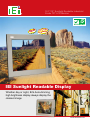
IEI Sunlight Readable Display
Whether day or night, IEI's Auto-dimming
high brightness display always display the
clearest image
www.ieiworld.com
12.1”/15” Sunlight Readable Industrial Grade TFT LCD Monitor
s
Fanles
rame
Open F
SRM Series
12V DC input
RS-232 9~36V DC input VGA
(Optional) (Optional)
DVI-D
SRM-KIT Series
Super High
Brightess
AutoDimming
AntiReflection
SRM Features
What a well-designed sunlight readable display must do:
Sunlight Readable Display
Pump out enough light for the viewing environment. For sunlight readability, this means at least 700 nits.
Drive the backlight tubes for maximum lifetime and minimum thermal output at the desired luminance.
Dim the display for low-ambient light viewing.
Work within wide temperature ranges. The IEI SRM Series operational temperature range is -10ºC~ +60ºC.
Apply anti-glare/anti-reflection technology for excellent visibility.
Front Panel OSD Functions
The IEI SRM series integrates full OSD function on the front
panel. Users can easily configure all monitor functions with the
waterproof OSD membrane keypad.
Ambient Light Sensor
Main Display Features Menu
Color Menu
LCD ON/OFF
AUTO-adjust/ESC
LEFT
RIGHT
MENU/SELECT
Indicator
OSD Menu
Level 0
Power Indicator
www.ieiworld.com
Image Setting Menu
OSD Menu
Signal Menu
Auto-Dimming Menu
Level 1
Brightness
Contrast
Sharpness
9300K
7500K
6500K
User Temp
Auto Color
Width
Phase
H. Position
V. Position
OSD Time Out
OSD Position
Factory Reset
Digital
Analog
Light Enable
Light Max
Light Min
LUX Max
LUX Min
800 and 1000 nits Super High Brightness
The SRM series is designed to operate in high ambient lighting conditions at 800 nits or 1000 nits of brightness
within extended operating temperature ranges and is especially designed for outdoor use under direct or indirect
sunlight.
SRM-121GS
SRM-150GS
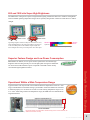
Typical high brightness monitors usually have more than six CCFLs,
but the IEI SRM monitors offer super high brightness with only four
CCFLs. IEI SRM panels are still readable in bright sunlight with
fewer backlights which saves power and produces lower heat output.
1,000cd/m²
800cd/m²
SRM Series
Typical LCD
300cd/ m²
Brightness
Superior Fanless Design and Low Power Consumption
SRM models are fanless, use less power and are quieter than conventional high
brightness monitors that generally use several high-speed cooling fans. SRM models use between 25W and 30W of power compared to the 40W to 50W used by
conventional high-brightness monitors
Typical monitors can only be used in environments that have temperatures in the 0°C~50°C
range, Extended IEI environmental testing is performed to ensure the SRM series continues
to function properly over its entire service life in a wide working temperature range of -10°
C to +60°C. After being tested in the temperature range, the SRM series still maintained its
original luminance.
IEI’s in-house Burn-In testing laboratory
Nine thermocouples record temperature variations during the burn-in test. Afterwards, the
SRM monitor functions normally.
www.ieiworld.com
Sunlight Readable Display
Operational Within a Wide Temperature Range
Innovative Auto-dimming Function
The SRM industrial monitor features an auto-dimming LCD that can automatically adjust the backlight brightness according to the ambient light. If the auto-dimming function is turned on, the backlight turns brighter when
the ambient illuminance is high. The backlight dims automatically when the ambient brightness level is low.
LUX Measurement of Everyday Light Source
Light Source
Night without moonlight
Night with moonlight
Office desk lighting
Overcast day
Sunny day
DAY
NIGHT
The SRM series auto-dimming default settings can be easily customized with the
OSD menu to suit any environment.
Light Max Light Min LUX Max LUX Min
Auto-dimming
On/Off
Adjustable Backlight
Sunlight Readable Display
Ambient Brightness (LUX)
<10
<100
500~1,000
1,000~2,000
10,000
Auto-dimming Default Settings
OSD
Default
Setting
Description
Light Min
0
Minimum backlight value(%)
Light Max
100
Maximum backlight value(%)
LUX Min
0
Minimum ambient brightness
(LUX)
LUX Max
5200
Maximum ambient brightness
(LUX)
Adjustable Ambient Brightness
52
Light Max. and Light Min. Default Setting
LUX Max. and LUX Min. Default Setting
To keep the LCD brightness within a specific range, not the
0~100% wide range, adjust the minimum and maximum value of
the LCD backlight. For example, set the Light Min. to 30 and the
Light Max. to 70. By doing this, the LCD brightness does not become too bright or too dark if the ambient light reaches the default
maximum or minimum value.
The SRM series is an ideal product for outdoor display. However,
if the SRM series is installed in low light level environment,
the default maximum lux setting (5200 lux) will be too high for
the light sensor to adjust the monitor’s brightness. Adjusting the
maximum lux setting to match the ambinet lighting conditions
will ensure the monitor’s light sensor can properly read the ambient lighting conditioins and adjust the LCD brightness.
Adjusting the LUX Max. Setting for Low Ambient Lighting Conditions
For example, in a low lux office desk lighting environment, the default lux maximum value may be
adjusted from 52 (5200 lux) to 4 (400 lux). Once the setting is changed, the monitor detects the ambient
light and increases the LCD brightness to the maximum In this case, the LCD brightness increases in a
low lux environment by decreasing the maximum LUX value while keeping other settings in default.
www.ieiworld.com
Low Reflection through Anti-Reflection Technology
Outdoor applications in daylight or other bright environments require technology that can suppress surface reflection. The SRM-121GS panel has special AR (anti-reflection) surface treatment to prevent reflection, ensuring excellent visibility in daylight conditions.
How does anti-reflection Surface work?
Glare from External Light Source
No Diffusion
of LCD Image
Reduced Reflection
of Light
Smooth Surface
Anti-reflective
Polarlzer Film
NEW
LCD Screen
Reduces intensity of reflected light
Higher contrast
Colors are more vibrant
No image distortion
12.1" XGA High Resolution
SRM-121XA series supports higher resolutions and smaller pixel pitches (0.24mm versus 0.24mm) to deliever
great displays. Higher resolution of a high-density display allows more viewable content so that the user does not
have to scroll as much to view the entire spreadsheet.
12.1” SVGA Screen Capture
12.1” XGA Screen Capture
XGA Higher Resolution
25%
• Present vivid and fine display quality
• Increase viewable content
Natural Color Matrix (NCM) Technology
POS terminals and kiosks often display advertisements with colorful images, the colors of which must remain vivid and accurate.The IEI SRM
monitor with NCM optimization technology prevents this difference
by separating color data and luminance components while controlling
individual display colors for optimized performance.
Original Image
How does NCM technology work?
G Data
B Data
Red
Green
Blue
Magenta
Cyan
Yellow
Matrix Operation
R Data
Separate
Color/Brightness
Components
Input Data
Conventional Image
Display Data
Image with NCM
R Data
G Data
B Data
Brightness
Color/Brightness Individual Conversion
www.ieiworld.com
Sunlight Readable Display
25%
New
GA
12.1"X
Specifications
Model
LCD Size
Max Resolution
(H x V)
Brightness (cd/m²)
Contrast Ratio
Display Color
View Angle (H/V)
Pixel Pitch (mm)
Operating Temperature
Storage Temperature
Lamp Life Time
Input Interface
Front Frame
Chassis
OSD Function
Smart OSD
SRM-121GS
SRM-KIT121G
12.1”
SRM-121XA
SRM-KIT121XA
12.1"
SRM-150GS
SRM-KIT150G
15”
800 x 600 (SVGA)
1024 x 768 (XGA)
1024 x 768 (XGA)
1000
700:1
262k
130°/120°
0.3075
Input Voltage
Mounting
Front Panel Protection
Power Consumption
Net Weight (GS Models)
Dimension
(W x H x D mm)
1000
700:1
262k
120°/120°
0.240
-10°C ~ +60°C
-20°C ~ +70°C
50000hrs
Analog VGA , DVI-D
Aluminum
Heavy-duty Steel
Yes
Yes
+12VDC/+ 9 ~ +36VDC(optional)
+12VDC
Wall/Panel/Rack/Arm/Stand
Rack
IP65 Compliant
N/A
25W
3.3kgs
340 x 260 x 58
316 x 224.4 x 47.9
800
600:1
262k
150°/110°
0.297
30W
6kgs
410 x 309 x 65.2
364.1 x 262.5 x 46
Dimensions
Sunlight Readable Display
SRM-150
SRM-KIT121
www.ieiworld.com
SRM-121
SRM-KIT150
Mounting Kits Information
SRM-121GS
SRM-150GS
Panel Mount Kit
PK-121M
PK-150M
Wall Mount Kit
WK-121MS-R10
WK-150MS-R10
Rack Mount Kit
RK-121MS-R10
RK-150MS-R10
LCD Monitor Arm
ARM-11
ARM-31
LCD Monitor
Stand
STAND-100-RS
STAND-100-RS
Panel Mount Kits
Wall Mount
Packing List
1 X AC Power
Cable
1 X User Manual-CD ROM
1 X VGA Cable
1 X Power Cable for Terminal Block ( For M
model only )
1 X DVI cable
1 X Touch Screen RS-232 Cable / Touch Pen
/ Driver CD ROM ( For T-R model only )
1 X 45W AC
Power Adapter
1 X Touch Screen USB Cable / Touch Pen /
Driver CD ROM
( For USB / T-R model only )
Rack Mount
Stand
Arm
1 X Screw set
Point of Sale (POS)
Transportation
Gas Stations
Vending Machines
Ordering Information
Description
SRM-121GS-R11/T-R
12.1” 1000cd/m² Sun Readable SVGA LCD Monitor, Aluminum Front Panel, Silver Color, w/VGA and DVI-D input, w/12.1” Touch Screen,
RoHS
SRM-121GS-USB-R11/T-R
12.1” 1000cd/m² Sun Readable SVGA LCD Monitor, Aluminum Front Panel, Silver Color, w/VGA and DVI-D input, w/12.1” USB Touch Screen,
RoHS
SRM-121GMS-R11/T-R
12.1” 1000cd/m² Sun Readable SVGA LCD Monitor, Aluminum Front Panel, Silver Color, w/VGA and DVI-D input, w/9~36V DC input , w/12.1”
Touch Screen, RoHS
SRM-121GMS-USB-R11/T-R
12.1” 1000cd/m² Sun Readable SVGA LCD Monitor, Aluminum Front Panel, Silver Color, w/VGA and DVI-D input, w/9~36V DC input, w/12.1”
USB Touch Screen, RoHS
9~36V DC
12.1” XGA SRM Series
Model
Description
SRM-121XA-R10/T-R
12.1" 1000cd/m² Sun Readable XGA LCD Monitor,Aluminum Front Panel,Silver Color,w/VGA and DVI-D input, w/12.1" Touch Screen, RoHS
SRM-121XA-USB-R10/T-R
12.1" 1000cd/m² Sun Readable XGA LCD Monitor,Aluminum Front Panel,Silver Color,w/VGA and DVI-D input, w/12.1" USB Touch Screen,
RoHS
SRM-121XMA-R10/T-R
12.1" 1000cd/m² Sun Readable XGA LCD Monitor,Aluminum Front Panel,Silver Color,w/VGA and DVI-D input,w/9~36V DC input, w/12.1" Touch
Screen, RoHS
SRM-121XMA-USB-R10/T-R
12.1" 1000cd/m² Sun Readable XGA LCD Monitor,Aluminum Front Panel,Silver Color,w/VGA and DVI-D input,w/9~36V DC input, /12.1" USB
Touch Screen, RoHS
15” XGA SRM Series
9~36V DC
NEW
Model
Model
Description
SRM-150GS-R11/T-R
15” 800cd/m² Sun Readable XGA LCD Monitor, Aluminum Front Panel, Silver Color, w/VGA and DVI-D input, w/15” Touch Screen, RoHS
SRM-150GS-USB-R11/T-R
15” 800cd/m² Sun Readable XGA LCD Monitor, Aluminum Front Panel, Silver Color, w/VGA and DVI-D input, w/15” USB Touch Screen, RoHS
SRM-150GMS-R11/T-R
15” 800cd/m² Sun Readable XGA LCD Monitor, Aluminum Front Panel, Silver Color, w/VGA and DVI-D input, w/9~36V DC input , w/15” Touch
Screen, RoHS
SRM-150GMS-USB-R11/T-R
15” 800cd/m² Sun Readable XGA LCD Monitor, Aluminum Front Panel, Silver Color, w/VGA and DVI-D input, w/9~36V DC input , w/15” USB
Touch Screen, RoHS
12.1”/15” SRM-KIT Series
Model
Description
SRM-KIT121G-R11
12.1" 1000 cd/m² Sun Rdadable SVGA TFT LCD kit, VGA and DVI-D input, RoHS
SRM-KIT121XA-R10
12.1" 1000 cd/m² Sun Rdadable XGA TFT LCD kit,VGA and DVI-D input, RoHS
SRM-KIT150G-R11
15" 800 cd/m² Sun Rdadable XGA TFT LCD kit, VGA and DVI-D input, RoHS
www.ieiworld.com
Sunlight Readable Display
9~36V DC
12.1” SVGA SRM Series
2008.09