1
PELLET STOVES
Chapter 4
INSTALLATION AND USE MANUAL
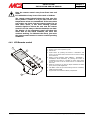
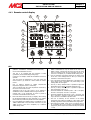
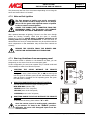
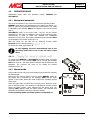
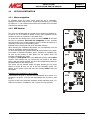
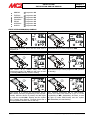
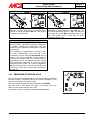
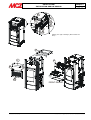
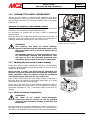
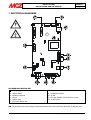
4.4.3. Remote control display
2
3
4
5
1
6
7
20
19
6
24 h
18
8
17
16
9
CLOCK
10
15
MAX
AUTO
SLEEP
PROGRAM
14
13
12
11
KEY
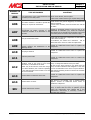
12.
Icon that indicates the SLEEP function. If completely off,
SLEEP is deactivated. If only the border of the icon is on,
SLEEP is active, meaning that the stove will shut off at the
end of a countdown set by the user and visible in icon no. 9.
If the icon is completely on, it indicates SLEEP setting mode.
13.
This icon shows the temperature in the room where the
remote control is, by means of a sensor inside the remote
control
Icon for ventilation which allows setting of the speed of the
hot air fan. If the message AUTO is also on, it means that
ventilation is connected to the power.
14.
6.
Unit of measure selected to display
temperature (degrees Celsius – Fahrenheit)
set/measured
Icon of the flame that allows adjustment of the flame to one
of five power levels. If the flame is at power setting 5, the
message MAX will also appear.
15.
7.
This icon appears with the room temperature measured by
the sensor in the remote control
This icon, if active, indicates that it is possible to adjust the
downloading of the pellets( specialized technician only)
16.
8.
Temperature set by the user, which is to be reached in
AUTOMATIC mode. In MANUAL mode this signal will be off.
This icon, if active, indicates that it is possible to adjust the
time that appears in icon no. 9
17.
9.
Internal clock. It can temporarily be used to provide a
countdown if the SLEEP function is active.
These bars indicate the ventilation power: 1 bar = 1st speed;
two bars = 2nd speed;...five bars = 5th speed
18.
10.
Icons that indicate the current day (in English). When setting
the personalized TIMER, the bars underneath, if on, indicate
that for that day certain time periods have been activated
These bars indicate the flame power: 1 bar = 1st power; two
bars = 2nd power;...five bars = 5th power These bars appear
only if the stove is in MANUAL operation mode
19.
Icon that indicates the TIMER function. If completely off, the
TIMER is deactivated. If only the border of the icon is on, the
TIMER is active. If the icon is completely on, it indicates
TIMER setting mode.
This icon is necessary for the selection of the weekly
programme when setting the TIMER. It is also used to select
the daily programmes in the personalized timer programme.
20.
When setting the TIMER, if this icon is on together with no.
19, it indicates that you are choosing a personalized weekly
programme (which requires the insertion of daily time periods
-> 24h)
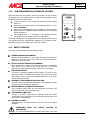
1.
Icons that indicate the operating mode of the stove
(MANUAL – AUTOMATIC – AUTOMATIC WITH ECO STOP)
2.
Icon for data transmission to stove
3.
This icon, if on, indicates that the keyboard is locked
(provided to prevent accidentally pressing keys)
4.
If this icon is on steady it means that the batteries need to be
replaced.
5.
11.