1
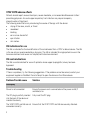
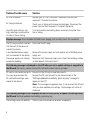
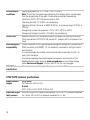
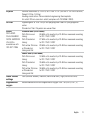
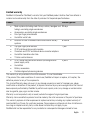
 Problem/Possible cause
Solution
Displays message: High leak, please check system setup and all connections
There is excessive leak.
Adjust position of mask and headgear.
Connect the air tubing firmly at both ends.
If you use the ClimateLineMAX Oxy, check if the cap of the oxygen
connector is attached firmly.
Displays message: No tube, please check your tube is connected
Flow is high because air tubing
is not connected properly.
Note: The tube disconnection
check may not operate when an
antibacterial filter is used.
Connect the air tubing firmly at both ends.
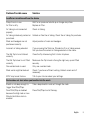
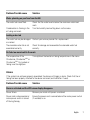
Displays message: Tube blocked, please check your tube
Air tubing is blocked.
Check your air tubing and remove any blockages. Disconnect the
power cord and then reconnect it to restart the device.
Displays message: Please close H5i flip lid, attach tube and press any key.
H5i flip lid is not closed.
Close the flip lid ensuring that it clicks into place.
Air tubing is not connected
properly.
Connect firmly at both ends.
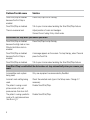
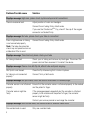
Displays message: No SpO2 data, check oxi sensor attachment to module/finger
Oximeter sensor is not attached
properly.
Ensure that the oximeter sensor is attached properly to the module
and the patient's finger.
Oximeter sensor might be
faulty.
If the message appears repeatedly but the oximeter is attached
properly to the module and the patient's finger, the oximeter
sensor might be faulty.
Contact your service provider or exchange the oximeter.
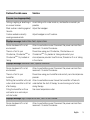
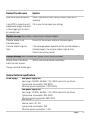
Displays message: Non-vented mask, use vented mask or unblock mask vents
Non-vented mask is used.
8
Only use a vented mask.