1
3.
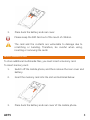
Place back the battery and rear cover.
Please keep the SIM Card out of the reach of children.
The card and the contacts are vulnerable to damage due to
scratching or bending. Therefore, be careful when using,
inserting or removing the cards
INSERT MEMORY CARD
To store additional multimedia files, you must insert a memory card.
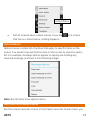
To insert memory card:
1.
Switch off the mobile phone, and then remove the rear cover and
battery.
2.
Insert the memory card into the slot as illustrated below:
3.
Place back the battery and rear cover of the mobile phone.
A075
8























![[www.mtsindia.in] pdf](http://vs1.manualzilla.com/store/data/005968002_1-f4a1d92f85fc1b780e8a391964e3f1f2-150x150.png)