1
D3.2 Initial management guide of the testbed
5.1.3.
FOLLOW-UP
TESTS
Due to the simplicity of this setup, it should not be difficult to monitor the
temperature of a node on a regular basis, especially as we do currently not
have any insight on how the hardware is going to behave when 'extreme' low
temperatures are reached.
However, a drawback of this monitoring mechanism exists in the lack of a way
to monitor humidity in the enclosure box. This might become an issue
especially on colder days to keep an eye on.
5.2.
Deployment of nodes
In this second year the efforts on the deployment of research nodes have been
specially focused on the indoor type device since all the accepted proposals of
the first Open Call except one do not require link layer control in their
experiments.
These nodes do not have operational Wi-Fi devices but they are more powerful
(in terms of CPU, memory and storage) than the outdoor nodes deployed
during the first year. Thus, they suit better for experimentation in the
application layer.
The deployment has been mainly achieved through the subproject named
confine@home, which promotes the spread of CONFINE nodes among
community network participants. The nodes are purchased, mounted and
configured by the CONFINE project and the participants are in charge of the
collocation and the maintenance. The CONFINE project will keep the ownership
of these nodes during its duration. Afterwards they might by donated to the
participants (not yet decided).
The confine@home participants have to connect the research device to their
community node through a wired interface (RJ45 Ethernet). Once it is done the
node will appear as ready to be used for experimentation in the
Community-Lab web controller. Using the web interface the user can see the
status of the node, statistics, experiments running, etc.
The next guide has been published to let the confine@home users know how to
install and configure the nodes themselves.
https://wiki.confine-project.eu/testbeds:addnode
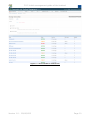
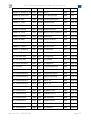
The following table presents the current status of the deployment, as of
September 201310 (82 nodes):
Name
Arch. Group Name
Arch.
Group
AWMN-dem-chem
i686
AWMN UPC-Omega
i586
DSG
Awmn-dem-iit
i586
AWMN UPC-C6
i586
DSG
AWMN-dem-ims
i586
AWMN UPC-D1
i586
DSG
AWMN-CF-djk604
i686
AWMN RD_Commel_FF
i686
DSG
10
This information can be obtained from the controller web page https://panel.community-lab.net/admin/
under Nodes, select Filter, By nodes, All.
Version 1.0 – 15/09/2013
Page 21