1
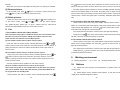
press ▲, ▼ to adjust brightness. Adjust level: 0-7.
standby mode automatically after 30 seconds.
B.
press the
Operation
B
button to turn off the screen and then enter into standby mode.
Indoor monitor enters into the standby mode after 30 seconds if no any operation.
Note: if you use multiple indoor monitors, please keep distance among indoor
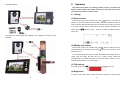
(1) Indoor monitor turn on/off
Turn on:
If do not want to let the visitor go in after seeing the video, no operation or
monitors to avoid affecting talk effect.
Turn the power switch to “ON”, working light display red and rings the
melody.
Turn off:
Turn the power switch to “OFF”, working light off。
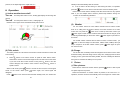
Maximum Com-sign is level 6. Maximum battery bar is level 4.
(3)
Monitor
For one outdoor camera or more outdoor cameras with one indoor monitor, if
there is no calling from the outdoor camera, the indoor monitors are in standby
mode. User can press the
button once to wake up the indoor monitor; press
button again to enter monitor mode and monitor the outdoor as long as you like,
monitor signal will display on the screen. Press
button again to quit and turn off
the screen.
For several outdoor cameras with one indoor monitor, in monitor mode,
press
button to show the image from the CAM1, CAM2, CAM3, CAM4 (if the system
has) in sequence. At the last outdoor camera, press
button again to quit and
turn off the screen.
(4) Charge
(2) Talk, unlock
For the first time, the battery should be charged for more than 5 hours to activate
The visitor presses the “call” button of the outdoor camera. All indoor monitors will
the lithium battery. After that charge 3 hours every time, Charging led is red when
sound melody.
A.
Press
button of one indoor monitor to speak to visitor before unlock.
Other indoor monitors can see the image but can not hear sound of the visitor.
If you want to let other indoor monitor to talk, press
button to end the
current dialogue, then another indoor monitor could press
button to
speak to visitor.
When in talk mode, press
from green to red when the battery is in low power.
C
Picture
(1) Take pictures
button to unlock the door lock, the unlock signal
shows on the screen. When press
button again, the unlock signal will
When there is video from outdoor camera, presses
button to take a picture,
one press captures one picture.
When the Call button of outdoor camera is pressed, if the user isn't in or no
disappear.
Press
charging, it turns green when the battery is filled, the color of battery bar will change
button to turn off the screen and enter standby mode, or it will turn into
10
operation, all indoor monitors automatically save the image from camera after 10
11