1
For HP Field Personnel Worldv ide
Fchru,~r.v 15.1985
Announcing the HP 2689A Laser Printing System
Plug-Compatible Printer for IBM Mainframes
For HP Use Only
C
MARKETING & INTERNATIONAL SECTOR
US Field OperatinnEurnpean Operalinnm
Intercontinental ODerallone
Major Aeenvnta M i r k e t i n g
C o m r a t e Marketina
MIC
Marketing lnformation Center
FRD
Finance and Remarketinn Division
Vol. 10, No. 8
Corporate Parts Center.
COMPONENTS, MEASUREMENT & DESlGN SYSTEM SECTOR
Microwave & Communications C r o u p (MCC)
SPD
Stanford Park Division
NMD
Network Measurements Division
SAD
Signal Analysis Division
SPK
Spokane Division
CTD
Colorado Telecom Division
QTD
Queensferrv Telemm Division
~ i n o w a v e ? e c h n o l o Division
~~
MTD
QMO
Queensferry Microwave Operation
Electronic lnatrumenta G r o u p (EIG)
NJD
New Jersey Divtsion
SCD
Santa Clara Division
Boeblingen Instrument Division
BID
YIP
YHP Instrument Division
YCD
YHP Cornputer Operation
ICD
integrated Circuits Division
Deaign Syatema G r o u p (DSG)
FSD
Fort Collins Systems Division
FEO
Fort Collins Engineering Operation
LSD
Logic Systems Division
LDO
Logic Design Operation
COL
Colorado Springs Division
BCD
Boeblingen Cornputer Division
LSIP
Lake Stevens Instrument Division
BE0
Boeblingen Engineering Operation
TSC
DSG Technical Software Center
Component G r o u p
MSD
Microwave Semiconductor Division
OED
Optoelectronics Division
OCD
Optical Communication Division
SAO
Southeast Asia Operation
Corporate Engineering
INFORMATION SYSTEMS& NETWORKS SECTOR
lnformation S y s t e m s Group (1%)
CSY
Computer Systems Division
CSY-R
Computer Systems Roseville
BGD
Boeblingen General SystemsDivision
OPD
Offlce Productivity Division
GCO
Guadalajara Gmputer Operation
APD
Administrative Productivity Division
IRO
lnformation Resources Operation
AW
Administrative Productivity Operation
FSO
Financial Systems Operation
lnformation Networka G r o u p (ING)
RND
Raseville Networks Division
IN@
Information Networks Division
GND
Grenoble Networks Division
Glorado Networks Operation
CNO
Information Technology G r o u p (ITG)
CID
Cupertino lC Division
FlD
Fort Collins IC Division
NID
Northwest 1C Division
HO
lnformation Hardware Operation
SO
lnformation Software Operation
Peraonal Computer Group (PCG)
RTD
Raseville Terminals Division
FCD
Portable Gmputer Division
Handheld Cornputer & Calculator Operation
HCCO
GKD
Grenoble Personal Computer Division
POD
Personal Office Computer Division
PSD
Personal Software Division
KEG
Personal Computer Distribution Operation
K G 0
Personal Computer Group Operation
HPPR
Puerto Rico Operation
FCS
Singapore Operation
BPC
Brazil Operation
Peripherals G r o u p (PC)
mi
B o w Diwton
MilP
Disc Memory Division
GLP
Greeley Division
CPB
Computer Peripherals Bristol Division
SDP
San Diego Divisan
V?%
~ i n c o u G e rDivision
MANUFACTURING, MEDICAL & ANALYTICAL SYSTEMS SECTOR
Manufacturing S y s t e m s Group (MSG)
DSP
Data Svstems Division
- -AMSO
~ d v a n c e dManufacturing S y ~ t e m Operation
s
MPD
Manufacturing Productivity Div~sion
SPNO
Semiconductor Productivity Network Operat~on
LID
Loveland Instrument Division
PA0
Panacom Automation Operation
MTD
Manufacturing Test Division
Lyon Manufacturing Systems Operation
6
LMSO
Analytical G r o u p
AS0
Analytical Supplies Operation
AVD
Avondale Division
ILAS
Laboratory Automation Systems Operation
SID
Scientific Instruments Division
WAD
Waldbronn Division
Medical Groop (MED)
AND
Andover Division
BMD
Boebhngen Medical division
MCM
McMinnville Ihvision
WAL
Waltham Division
HCP
Health Care Productivity Operation
MSC
Medical Supplies Center
Corporate Manmfacturing
CPC
Editor
Roman Kichorowsky
Copy Editor
Tracy Wester
Production Editor
Darleen Brettes
Circulation
Roster Administrator (408-864-5621)
Computer Newsis published biweekly for Hewlett-Packard
field personnel to keep you informed of new HP products
and services.
Please send address changes and subscription requests
to Roster Administrator, 49B2, Phone 408-864-5621,
or TELNET 1-864-5621.
Address editorial correspondence to Computer News,
Hewlett-Packard C o m p a n y , Building 20BV, 3000 Hanover
S t r e e t , Palo Alto, CA 94304-0890 USA, COMSYS 0 0 0 0 ,
Phone 415-857-8972.
On the Cover
Consisting of our industryproven HP 2680A laser
printer and a powerful new
subsystem, the HP 2689A
offers a direct-channel connection to selected IBM and
IBM-compatible mainframe
systems. See story on p. 24.
2
COMPUTER NEWS
For HP Use Only
February 15, 1985
HP Computer Museum
www.hpmuseum.net
For research and education purposes only.
In This Issue
1 7 Office Systems
4 General
The system rental program: cluestions and answers
4 Third Party
Third-party solutions highlighted a t Financial Services
Conference
PERSONAL CONIPUTERS
Series 80 is alive and well for FY85
Price increases on Series 80 products
6 Series 100
No Symphony'" for The Portable
introducing Dow Jones Spreadshekt Link for the
HP Touchscreen and The Portable personal computers
HP LaserJet printer/Microsoft@Word promotion
PFS:WRITE receives four-star rating from
Software Digest
Books on PFS software now availqble
High-quality forms can be created with Diagraph
Dustcover available for the AP Touchscreen personal
computer
HP 1 2 5 software to be obsolete
TECHNICAL COMPUTERS
Interex/HP 1000 users conference scheduled on
April 9-12
HP 1000 E/F-Series hardware price increases
10 HP9OOO
MicroTrak7"/HP-UX now availage for the
HP Series 200 and the HP Ir~tegrqlPC
HP 9825 desktop computer 1.0 be bbsolete May 1
BUSINESS COMPUTERS
12 HP 250
HP 250 Model 3 5 to be obsollete
Upgrading HP 250 users to operating system B.07
13 HP260
How many devices can you connect to the HP 260?
New HP 260 data sheets available
14 HP 3 0 0 0
Support Link I1 replaces o r ~ ~ g i nSupport
al
Link
New HP AdvanceNet overview prcesentation available
HP IBM 3278 Terminal Emulation Accessory helps
sell HP 3000s
HP 37230A and 30037A to lbecome obsolete
1984 DataPro survey results available in HP 3000
sales training manual
16 ~inancials
HP PCM beta test is a success
1 7 Manufacturing
HP Telex11 links HP PPC to the telex world
New HP PPC product information guide now available
T a r g e t i n g t h e Office is now in the field
HP AdvanceLink cannot be used with HP ListKeeper
19 Distribution
1984 SIGSFD Users Group meeting a success
Call IRO to learn more about HP Distribution Solutions
New electronics distributors directory available
2 1 Vertical Markets
New banking sales literature folder highlights HP
business computers
NETWORKS/PERIPHERALS
22 Networks
New version of E/F-Series 8-channel MUX released
23 Mass Storage
Price reduced on remarketed HP 7925
Tape drive cabinet options to be obsolete March 1
Order additional Mass Storage Sales Reference
Manuals from LDC
24 Printers
Announcing HP's IBM plug-compatible laser
printing system
Positioning the HP 2685A and HP 2689A laser
printers
Output Design Service centers help sell laser printer
products
HP 2934A offers more features than HP 2932A
New large-character font cartridge for HP 2934A
business printer
Eliminating HP 293X competitors
IDSFORM supported on HP 262X terminals
IBM PC graphics capability for HP LaserJet and
ThinkJet printers
HP LaserJet printer ISV and third-party support
update
LaserJet/Wang PC application note available
Printer Command Language explained
31 Terminals
Bar-coded badges available for the HP 3081A
industrial workstation terminal
One last chance for HP 2703A terminal customer
training
SUPPORT/SUPPLIES
33 Supplies
Get organized with CSO's new media and
documentation storage cabinets
CSO direct order phone numbers
FACTORY COLITACTS
35 Factory Contacts
HP Maintenance Management SR training now
available
February 15, 1985
COMPUTER NEWS
For HP Use Only
3
Marketing
THIRD PARTY
GENERAL
The system rental program:
questions and answers
Carol Robertson/FRD
T o help clarify the new system rental program, here
are a few of the most frequently asked questions.
Q: If the list price is lowered during the rental
period, does this affect the customer's buy-out
price?
A: No. T h e buy-out price is determined at the time
the rental contract is signed. Customers can
change their contract to reflect the lower list
price; however, they will lose all accrued
purchase option credits (POCs).
With the attractive POCs that Finance and
Remarketing Division (FRD) offers, it will be to
the customers' advantage to keep the existing
contract and the accrued POCs. T h e only time the
customers should consider changing the contract
is if they buy out the rental equipment before the
sixth month and the list price is reduced more
than 16%.
Q: How does a customer order the Datacom Network
Link software packages?
A: FRD offers the hardware and software packages
separately. Order the INP board (30020B) and
order the required software link with Option 490.
Option 490 deletes the hardware from the
bundled software package.
Q: Since software support is supplied with the
operating system (FOS), do additional software
applications include software support costs?
A: No. Customers must order additional software
support separately. FRD recommends ordering
the highest level of support to ensure customer
satisfaction.
4
COMPUTER NEWS
For HP Use Only
Third-party solutions
highlighted at Financial
Services Conference
Debra Miele/ISG
T h e vertical markets team for the Financial Services
Industry hosted their third annual conference in
Manhattan on December 3-4, 1984. HP SRs from
more than 25 sales offices in the US, as well as France,
Italy, the UK, Canada, Switzerland, and Australia,
attended.
T h e objective of this conference was to provide H P
SRs, who have a large number of banks, investment
firms, and insurance companies in their territories,
with sales tools and software solutions to further
penetrate specific financial markets. T h e two-day
workshop focused on industry education, third-party
solutions, marketing strategies, and H P success
stories.
Comments from the attendees were overwhelmingly
positive, and expressed a strong motivation in pursuing more focused sales strategies in their financial districts. One of the most acclaimed sessions involved the
participation of six of HP's key third parties, who presented their software solutions and lead-qualification
criteria.
T h e vertical marketing group plans to continue the
momentum generated by the conference through
their monthly Vertical Markets Newsletter and the
new national program for value-added suppliers.
For those SRs and managers who could not attend,
literature and a videotape from the conference are
available by contacting Debra Miele at 408-725-8111,
ext. 3395.
1.a
February 15. 1985
7
Personal Computers
SERIES 80
-
-
-
Series 80 is alive and well for
FY85
Bill Hodges/PCD
Despite recent rumors, the Series 80 product line will
not be obsoleted in the near future. The HP-85B and
the HP-86B personal computers are selling very well
and are in demand. These unique Series 80 products
are still HP's lowest-priced technical! computers and
are the choice for technical professio~alsespecially in
instrument control and data acquisition applications.
In order to keep Series 8 0 selling well throughout
FY85, Portable Computer Division will be announcing
in April 1985 a new extended mass storage plug-in
ROM to support new SS-80 disc drives such as the HP
9122D dual disc drive and the H P 91B3D Winchester
drive. No pre-release EPROM copies of the extended
mass storage ROM will be available fbr either beta
testing or early customer needs.
We appreciate all the business that has been generated for the Series 8 0 product line over the last five
years, and we look forward to assistiqg you in continuing your success.
February 15, 1985
Price increases on Series 80
products
Bill Hodges/PCD
In order to increase revenues for FY85, Personal
Computer Division has implemented the following
price increases for certain Series 80 products on the
January 1, 1985 Corporate Price List:
P/N
HP-85B
HP-86B
82903A
82908A
00085-15001
00085-15002
00087-15002
00085-15004
00087-15004
00085-15005
00087-15005
US list
price
Description
16K byte memory module
64K byte memory module
Mass storage ROM
PrinterfPlotter ROM
Plotter ROM
Matrix ROM
Matrix ROM
Advanced program ROM
Advanced program ROM
$3.495
1,695
225
445
195
195
195
195
195
195
195
COMPUTER NEWS
For HP Use Only
5
Personal Computers
Introducing Dow Jones
Spreadsheet Link for the
HP Touchscreen and
The Portable personal
computers
SERIES 1
00
No SymphonyTM
for The Portable
Pat Forbes/PCD
When Hewlett-Packard introduced T h e Portable in
May 1984, we announced that owners of T h e Portable
would be able to upgrade their 1-2-3'" from Lotusr"
with the more sophisticated Symphony software.
After several months of development, HP and Lotus
Development Corporation decided not to adapt
Syrnphony to T h e Portable, after all. Technical
difficulties associated with the rnemory requirements
of Symphony and the ROMIRAM capacity of T h e
Portable do not allow a reasonable i~nplementation.
This decision will prevent dissatisfaction with an
application that does not meet customer expectations
for either product.
T h e combined capabilities of T h e Portable's bundled
application software - 1-2-3, MemoMaker, and Data
Communications - already provide a powerful set of
productivity solutions that make T h e Portable a
potent business computer.
Symphony'". 1.2-3'".c~tldLotus'" arc. IJS trc~dc~wnrks
ofl.otus
1)eveloptnent Corporalion.
Carol Luebke/PSI)
T h e Dow Jones Spreadsheet LinkT".which allows easy
connection between the Dew Jones NewslRetrieval '
and a LotusrM1-2-31M,Multiplan", or VisiCalc"'
spreadsheet, is now available for the HP 'Touchscreen
and T h e Portable personal computers.
With Dow Jones Spreadsheet Link, a personal investor
or business professional can spend more time analyzing financial data and less time searching for it.
Spreadsheet Link provides easy access to detailed corporate information on over 8,700 companies and 170
industries, SEC filings, as well as current and historical stock quotes. After retrieving the desired information, users can load it into a pre-formatted
spreadsheet for analysis. This financial tool is useful
to individual investors, credit managers, financial
analysts, strategic planners, management consultants,
money managers, and pension managers.
Packaging
Customers will receive a user's manual complete with
an extensive tutorial, software on 3' >-inchmedia, a
Ilow Jones NewslRetrieval membership and use
agreement, and one hour of free unrestricted usage on
the Dow JonesIRetrieval service.
Hardware and software requirements
HP Touchscreen or T h e Portable personal
computers
HP 45640A (Ventel) modem, Hayes Smartmodern
1200, or built-in modern (for T h e Portable)
Lotus 1-2-3, Multiplan, or VisiCalc ' spreadsheet
Ordering Information
1
PIN
US List Price
-
-
-
1
-
Syn?pho)ly ", 1 -2-3"',and LotusT" nro CTSfmcicmnrks qf l>otrts
I ) e v u l o o ) ) ~t ~Corpora
t~
ti or^.
Mlrltiblan ' is a US rrgistcrc'd tradcmcirk (1.f.kficrosof1Coroorntio~i.
C'isiCalc ' 1s a 115
. rrgisterrd tradertrark of I..isiCorp.
6
COMPlITEK NELVS
For HIJ l ~ s O
e ~IV
Personal Computers
HP LaserJet printer/
Microsoft@Word promotion
Curt Riffle/PSD
For U,S only
The LaserJet printer and Microsoft Word software
make a truly stunning document pr~cessingsystem.
Typeset-quality documents, from letters to manuals,
can be produced quickly and quietly, and at a very
reasonable cost. Starting February 215, 1985 and ending May 15, 1985, the deal gets even better:
If you purchase the HP LaserJet pri/lter and either
the HP version of Microsoft Word on' Microsoft's IBM
PC version of Microsoft Word betwden February 1 5
and May 15,1985, and submit the ntxessary proof of
purchase materials, you will be sent a free proportional space font cartridge (HP 922$6B, $225 US list
price). This promotion applies to both the dealer and
direct-sales channels.
The HP LaserJet printer is one of the most popular
printers available today. Microsoft word - now
available for the HP Touchscrec$n, t t e Touchscreen
MAX, and The Portable personal copputers - is the
most recent addition to HP's fulll-fufiction word processors. Automatic paragraph refor@atting, footnotes,
and page numbering; what-you-seeris-what-you-get
with on-screen commands; windowjng; style sheets;
and a WordStarIMemoMaker file-cgnversion utility
are just some of Microsoft Word's obtstanding
features.
Demonstrations of the HP LaserJet printer1Microsoft
Word team can be seen a t most dealkrs who carry the
HP LaserJet printer and Microsoft *ord. In addition,
the HP and Microsoft sales forces h ve been sent promotion kits that contain copies of H LaserJet
printer1Microsoft Word print samples and other information about both products. Look fqr the "Set your
laser on stun" ads in the Wall Streelt Journal, Business
Week,, Venture, Infoworld, and PC Weekin March and
April.
!
Please note: This promotion is only good in the US,
and does not include HP or Microsoft employees, their
families, or participating dealers.
Ordering Information:
Description
45474D
2686A
Microsoft Word
LaserJet printer
US list
price
3,495
Microsojt" is a US registered trademark ojMicrisojt Corporation.
PFS:WRITE receives four-star
rating from Software Digest
Chris Walker/PSD
PFS:WRITE, recently introduced for the HP
Touchscreen personal computer, received a top fourstar rating in an independent evaluation of 30 other
top-selling word processing programs. The popular
bestseller tied with two other programs for highest
overall rating. The test results were compiled and
published in the January 1984 issue of the Ratings
Newsletter, and included such popular word processors as Wordstar, Multimate, and Microsoft@
Word. These ratings are put together by the publisher, Software Digest, and are based on a series of
standardized tests.
PFS:WRITE received the highest ratings in the
categories of Performance and Ease of Use. In the
Value for Money category, it tied with one other program for the highest rating. Other categories included
Ease of Startup, Ease of Learning, Error Handling,
and Versatility. PFS:WRITE was one of only four programs to receive Software Digest's high four-star
rating.
PFS:WRITE is part of the integrated PFS family of
software: PFS:FILE and REPORT (PIN 45488A),
PFS:WRITE (PIN 45489A), and PFS:GRAPH (PIN
45490A). These productivity tools have been
carefully designed to be exceptionally easy to learn
and use, yet powerful and versatile enough for most
business applications.
Microsojt8 is a US registered trademark ojMicrosojt Corporation.
February 15, 1985
COMPUTER NEWS
For H P Use Only
7
Personal Computers
Books on PFS software now
available
Chris Walker/PSD
PFS software products are available for the HP
Touchscreen personal computer. Now there are currently two books on PFS software available for your
interested customers:
The complete PFS Book from Wordware Publishing
offers detailed instruction for PFS:FILE and REPORT, PFS:WRITE, and PFS:GRAPH. The book
also demonstrates the integration capabilities of the
various programs. For more information call 214423-0900, or write to Marlene Jowell, Wordware
Publishing, Inc., 1104 Summit Ave., Plano, TX
75074.
Increasing Productivity with PFS from TAB Books
overviews the complete product line, emphasizing
the integration between PFS family members. It
also covers advanced uses of form letters. For more
information call 800-233-1128 (in Pennsylvania,
Alaska, and Hawaii call 717-794-2191), or write
TAB Books, P.O. Box 40, Blue Ridge Summit, PA
17214.
Dustcover available for the
HP Touchscreen personal
computer
Nancy Hittinger/CSO
Your customers can prevent grime, spilled liquids,
and food from affecting the performance of their HP
Touchscreen personal computer. Especially vulnerable to these undesirable elements are the computer's
internal printer and disc drive.
High-quality forms can be
created with Diagraph
Dave Pugmire/PSD
Now high quality forms can be produced quickly and
easily with a little-known feature of Diagraph, the
presentation-quality drawing package for the HP
Touchscreen personal computer.
To create a form, simply touch "Specify Form" after
touching "Change Symbol." You will be prompted for
the number of rows and columns to fill the rectangle.
By combining rectangles of various sizes, complex
forms can be created.
Adding forms to HP Diagraph's 1,500-plus symbols
and pictorials makes Diagraph a graphics package that
meets your presentation needs to illustrate concepts,
flow charts, word charts, and organizational charts.
Diagraph is available on the HP Touchscreen personal
computer as PIN 45463A for $395.
8
COMPUTER NEWS
For HP UI only
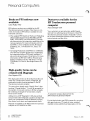
A custom-fit, two-piece dustcover for the
HP Touchscreen personal computer
For the ideal solution, get CSO's custom-fit, two-piece,
dark gray dustcover. It's made of water-resistant,
washable cotton polyblend and slips easily over the
,?
February 15, 1985
Personal Computers
"stacE;ed" Touchscreen system - tpe display, HP
9121D disc drive or Winchester drive, and tiltlswivel
set. The top piece is open in the bact, so it will not
interfere with the cables. The bottom piece is
designed to fit over the keyboard.
/
PIN
Description
92251P
Two-piece dustcover
(not sold separately)
1
1
US list
price
HP 125 software to be obsolete
1
P/N
45553A
45560A
45560EA
45561A
45562A
45603A
45670A
45671A
45900-13800
45900-13810
45900-15800
45900-15800
Obsolete Product
BPI Payroll (Opt. 630 and 650)
WordStar (Opt. 630 and 650)
WordStarISpanish (Opt. 630 and 650)
SpellStar (Opt. 630 and 650)
MailMerge (Opt. 630 and 650)
Picture Perfect (Opt. 630 and 650)
Microplan (Opt. 630 and 650)
Microplan Consolidation (Opt. 630 and
650)
OpSys: 125A Upgrade
OpSys: US Exchange Kit
OpSys: 125A Upgrade
OpSys: US Exchange Kit
Marilyn Ruel/PSD
The following HP 125 software products have been
obsoleted and will be removed from the March 1985
Corporate Price List:
• IP/N
-
I
455ti5A
455ti6A
Note: A l l upgrade kits for the above listed packages are
also being obsoleted.
Obsolete Prodc~ct
Aardvark Professional T a x Plan H P Plus
Aardvark Personal T a x Plan H P Plus
As of the May 1, 1985 Corporate Price List the following HF' 125 products will be obsdete:
Obsolete Product
VisiCalc (Opt. 630 and 650)
Also in this issue
HP AdvanceLink cannot be used
with HP ListKeeper
MicroTrak:"/HP-UX now available
for the Series 200 and the
HP Integral PC
19
10
VisiCalcISpanish (Opt. 630 and 650)
Series 100 Graphics (Opt. 630,631,632.
633,635,650,65:L,652,653,655)
Series 100 GraphicsIS~anish(Opt. 630
and 650)
Word1125 (Opt. 630 add 650)
c*a
DSNILINK (Opt. 630 4nd 650)
BASIC (Opt. 630 and 660)
Programmer's Pa'ckage (Opt. 630 and
650)
Condor 1 (Opt. 630 and 650)
Condor 3 (Opt. 630 and 650)
BPI General Accounting (Opt. 630 and
650)
February 15, 1985
COMPUTER NEWS
For HP Use Only
9
Technical Computers
HP 1000 E/F-Series hardware
price increases
Interex/HP 1000 users
conference scheduled on
April 9-12
Pam Tower/SMC
Interex, the International Association of HewlettPackard Computer Users, and the European HP 1000
users group are proud to present their biennial computer conference in Europe. The conference,
organized by the Belgian users group, will be held at
the Conference Center of the University of Antwerp,
Belgium, on April 9-12, 1985. You are invited to take
part in this unique exchange of technical expertise.
Come and share experiences and learn of new products and applications.
The theme of the conference is "Systems and
Applications," and paper topics include operating
systems, graphics, CADICAM, data base management,
data communications, and instrumentation. There will
also be a vendor exhibit.
Erik Van Ocken, chairman of the Belgian HP 1000
users group and hosting the meeting, notes that the
committee has tried to limit the conference fees and
attendant costs enabling more people to attend the
meeting.
If you would like more information on the conference,
including registration material, contact Pam Tower at
TELNET 125-4461 or HP Desk 4700111.
10
Dan Meitus/DSD
Data Systems Division (DSD) has raised the prices on
many of their HP 1000 EIF-Series computers and
memory products. Greg Grillen, marketing manager,
cited rising manufacturing costs of the more laborintensive products as the primary reason for the price
increase. He added that this action was a necessary
part of DSD's ability to achieve profitability targets.
The price increase is reflected in the January 1985
Corporate Price List. The 30-day grace period has
expired, so the new prices are now in effect.
For further information on specific product prices,
please consult the Corporate Price List or the Technical Sales Center.
MicroTrakTM/HP-UX
now
available for the HP Series 200
and the HP Integral PC
John Lumb/PSD
Project management software is one of the most
desired specific applications in a technical environment. To meet this demand, MicroTrakTM/HP-UX
from SofTrakTM
Systems is now available for the HP
9000 Series 200 HP-UX systems and the HP Integral
PC. It will not appear in the Corporate Price List until
March 1,but the product is now orderable.
MicroTrakIHP-UX is a project management tool that
can schedule projects from the simplest to the most
complex; a move across town, the design and
manufacture of a new product, or the construction of a
high-rise office building. It automates scheduling and
updates the schedule based on actual progress.
MicroTrak can help plan projects, coordinate
resources, track accompanying costs, evaluate "what
if" scenarios, generate reports, and print time-scaled
schedules.
COMPUTER NEWS
For HP Use Onl"
1
February 15. 1985
-"#-.--
~
=
"
-
Technical Computers
MicroTrak uses critical path method scheduling with
three different relationships (finish-to-start, start-tostart, finish-to-finish) to analyze the activities and
develop reports to show the critical path and status of
a project. There are seven standard reports generated: :network, schedule, time-scale or GANTT chart,
updates, milestones, activities, and resources. Each
can be sorted in various ways to highlight the needed
information.
Key features of MicroTrak include:
Updating: MicroTrak presents aq accurate picture
of the progress of a report at any point in time.
Schedule size: MicroTrak is disc based, allowing up
to 5,000 activities to be included ib a schedule.
Schedule power: MicroTrak has the power necessary to easily manage and update schedules for
large and complex projects.
Ease of use: MicroTrak is menu driven, making the
system as easy to use as filling out a form.
Micro'Trak runs on Series 200 computers running
HP-UX 2.1 or 2.2, and the HP Integral PC. Consult the
Technical Data Sheet (PIN 5953-952'7) and the Sales
Training Manual for more informati~nabout
MicroTrak.
MicroTrak is distributed standard on a double-sided
microfloppy. It is also available on %-inch tape as
Option 022.
Product
45524G
455248
1
HP 9825 desktop computer to be
obsolete May 1
Wolfgang Monauni
The HP 9825 has been a very long-lived and successful product, opening the door to the world of small
desktop computer systems. Now, however, due to
newer and faster technology available in our HP 9000
Series 200, HP 9825 sales are falling off. It has
reached the point where it is impractical and
unprofitable for HP to continue a product line devoted
to the HP 9825. So we aregoing to obsolete the HP
9 8 2 5 B/T on May 1 , 1 9 8 5 .
Orders will be accepted until July 31 only. No shipment will be allowed worldwide after September 15,
1985. We will continue supporting the HP 9825
through the availability of ROMs, interfaces, and
accessories for one year after the mainframe goes out
of production (May 1, 1986). Technical support will
be available for 10 years after mainframe
discontinuance.
If you have any customers who wish to place an order
for the HP 9815 BIT, please inform us as soon as
possible.
For further information, call your RSE in the US or
your local SMC in Europe.
US
price
list
MicroTrakIHP-UE
(single-user)
Opt. 022 (%" tape)
MicroTrakIHP-UX
(multi-user)
Opt. 022 (%" tape)
MicroTrakTM
and SofTrakT"are US tratiemat;ks of SofTrak
Systems
February 15, 1985
COMPUTER NEWS
Par HP Use Only
11
Business Computers
HP 250
HP 250 Model 35 to be obsolete
Lynne Ovington/BGD
T h e H P 250 Model 35 (SPU H P 45251B) is now
obsolete. Sales of the "desk version" of the H P 250
have decreased rapidly following the introduction of
the smaller and lower cost HP 250 Model 30. T h e
Model 35 has not been actively manufactured or sold
for several years. Its five-year support life has begun
on February 1,1985, and continues until February 1,
1990.
Also in obsolescence is the "A" version of the H P 250
operating system. In late 1981 the "B" version was
introduced with the Model 30 system. After the
release of the Al3.6 operating system, all future O/S
enhancements were for the "B" version (B.04,
B.04.02, B.05, B.06.01, and B.07).
Users of the "A" operating system can move to the
"B" operating system with the HP 45265D Operating
System Upgrade Kit. For more information on moving
from the "A" to the "B" operating system, plus a letter to give your "A" O/S customers, refer to the H P
250 Product Training Guide dated April 1984.
Upgrading HP 250 users to
operating system B.07
Lynne Ovington/BGD
H P 250 users will be able to take advantage of many
of the new features of the H P 260's B.07 operating
system on their HP 250 systems. T h e B.07 system
software is downward compatible with the HP 250's
operating system. All H P 250 customers on a n HP
support contract will receive B.07 and the new user
manuals. With B.07, HP 250 systems will be able to
support the new disc drives, printers, and plotters
offered on the HP 260 system. H P 250 users without
an H P support contract can obtain B.07 by ordering
the new H P 45265D Upgrade Kit.
12
COMPUTER NEWS
For H P Use Only
This new product has been created to replace the previous H P 250 Upgrade Kit (HP 4526512) and the H P
250 system software release product (HP 45230B).
~rodictH
s P 45265A and 4 5 2 3 0 ~will be removed
from the Corporate Price List on February 1,1985,
and replaced with H P 45265D.
P/N
Deecription
HP 45265D Operating System Upgrade Kit to upgrade from HP 250 System
Software prior to O/S B.07.Includes
O/S B.07 system software on tape
Factory
base
price
US
liet
price
$1.300
$1,345
N/C
N/C
cartridge, updated manuals,
exchange CPU ROMs and
installation.
Opt. 043
O/S 8.07system software on
3H" microfloppy discs.
Opt. 048
O/S B.07 system software on 8"
floppy discs
N/C
N/C
Opt. 050
Delete new CPU ROMs
-150
-155
Opt. 060
Delete O/S B.07 system software
and manual updates (receive
exchange CPU ROMs and installation only)
-850
-880
Opt. 251
Opt. 252
Opt. 253
Opt. 255
Opt. 256
Opt. 257
Opt. 258
US language version
French language version
German language version
UK language version
Swedish language version
Spanish language version
Italian language version
Katakana language version
Opt. 259
Opt. 500
Danish language version
Opt. 254
French-Canadianlanguage version
Who needs the H P 45265D upgrade kit?
Customers who are not on an H P 250 support contract and wish to receive the new B.07 operating
system and/or the new CPU ROMs.
Customers who have a support contract but need
the new CPU ROMs can order H P 45265D with
Option 060.
Customers who want the new O/S B.07 revision but
do not need the new CPU ROMs can order H P
45265D with Option 050.
February 15. 1985
Business Computers
Why are the new CPU ROMs needed?
ROMs (Read-Only Memory) an- integrated circuits
that contain special software, or microcode, that functions as an operating system until the system software
is loaded. The microcode tells the system to perform
self tests and (if everything is working properly) to
load the operating system.
On the HP 250 system, the operating system could
only be loaded from the integrated flexible disc drives,
HP 7906MlH discs, integrated HP T910K disc, and
the HI3 7908111112P integrated storage units. With
these new ROMs, the 0 1 s can ble loaded from any supported disc or tape on the system. This includes the
built-in 5M-byte, l0M-byte ancl 15M-byte
Winchester discs on the HP 250 Models 20,25, and
26, and the new HP 7941A, 7942A, 7945A, 7946A,
9133D, and 9134D disc drives.
Support of the new HP 7941142145146A discs and the
HP 9133134D discs on any instailled HP 250 system
reauires o~eratinr!svstem revision B.07 on that
sys'ten?. he newt^^ ROMs are not necessary if you
do not load the 0 1 s from these discs.
All HE' 260 systems will be shipped with the new
ROMs.
can be controlled by a primary task and has no direct
user interaction. A single task, whether primary or
secondary, can control multiple devices. For example,
an HP 260 user could run a program in one of the 11
partitions that accepts data entry from several data
capture terminals and bar code readers. Thus, an HP
260 configuration could be quite large and very
versatile.
New HP 260 data sheets
available
Kathy Wipperfeld/BGD
Nine new data sheets for HP 260 software products
are now available for customers who would like more
technical information on the HP 260 system. These
data sheets will complement the management
brochure, direct-mail flyer, and other promotional
literature currently offered (please refer to the
February 1 issue of Computer Newsand Computer
Focus).
The new data sheets can be ordered under the following part numbers.
P/N
How many devices can you
connect to the HP 26d?
On the new HP 260 SPU you are able to connect up to
eight HP 45262D personal workstations and a mixture
of ten RS-232-C, RS-422, or Current Loop Devices eighteen ports in all. Plus you can connect two printers and four disc drives on the IIP-I$ channel.
The HP 260 has 11 memory partitions that interact
with the SPU. A partition can ble configured as a "primary task," which is controlled by the user and an
application program, or as a "secondary task," which
February 15, 1985
5953-4363
5953-4364
5953-4365
5953-4366
5953-4367
5953-4368
5953-4369
5953-4370
5953-4371
Data Sheets
Network1250
Query1260
Text1250
DSGl250
Report Writer1260
GPLl260
DSNlINPlDSlRJEI260
Image1260
Slide1250
These data sheets can be ordered from the Literature
Distribution Center in Palo Alto and from Parts
Center Europe in Boeblingen.
COMPUTER NEWS
For HP Use Only
13
Business Computers
T h e Support Link I1 has a new feature that can reduce
phone iine costs to your customers. T h e Support Link
I1 is compatible with most PBXs. Specifically, it can
answer on PBXs that use the two-ring signal as long
as the modem is connected to an analog line. This
means that a dedicated phone line and the associated
cost is no longer required to participate in the TeleSupport Program. H P cannot guarantee that the Support Link I1 will work with all PBXs, so some
customers may still need to install a direct dedicated
line.
T h e other Tele-Support requirements are still necessary to ensure effective support. These include the
presence of a second phone line for voice communication and the phone line to the system must be "data
quality" (capable of carrying data without a significant error rate). T h e data line must also be able to
accept incoming and outgoing calls without being
interrupted by a n operator. Please inform your
customers of the site requirements, so they can take
advantage of the new feature in the Support Link 11.
Series 3 7 customers who do not qualify for a free
modem can purchase any one of the qualifying
modems. These include Racal Vadic's VA-3451s, VA3451P, and VA-212PA as well as the BELL-212A.
Anderson Jacobson's AJ1212-AD1 is identical to the
Support Link I1 and can be used on the Tele-Support
Program. It is now being sold through Computer Supplies Operation (CSO) as HP PIN 92205J. Anderson
Jacobson can also provide on-site support.
Support Link I1 replaces
original Support Link
Mike Balma/CSD
T h e Support Link I1 modem (HP 35031A) will replace the original Support Link modem (HP 35141A).
T h e new modem was selected because it meets more
stringent FCC regulations regarding RFI (FCC B),
and its manufacturing cost is 2596 less. In addition, its
new features reduce costs to customers.
As part of the Tele-Support Program, the Support
Link I1 will continue to be shipped with the HP 3000
Series 39,4X, and 6X systems. This will begin around
the third week of March. In addition, those customers
who purchase central site Account Management Support (AMS) or Response Center Support (RCS) for a
Series 3 7 a t the time of purchase will also receive the
Support Link 11. T h e Support Link I1 will be used for
all these qualifying systems. For these Series 3 7
customers, work with your Area AEO admin contact
who will actually be placing the order for the modem.
7
New HP AdvanceNet overview
presentation available
A rie Scope/NMC
I
I
A s part of the Tele-Support Program, the Support
Link I1 will be shipped with HP 3 0 0 0 Series 39, 4X,
and 6 X systems.
14
COMPUTER NEWS
For HP LISP Only
Network Marketing Center (NMC) has developed a
new presentation aimed at managers who influence
key buying decisions for integrated information networks. This presentation will be an important tool for
you to use in presenting H P AdvanceNet to your
customers and potential customers.
This new presentation was developed as a companion
to "HP in the Eighties," which provides a look at H P
and H P AdvanceNet handling the evolution of networking, changes in the industry, and how H P
AdvanceNet covers all the bases. T h e two presentations will work well together.
February 15. 1985
1
Business Computers
T o provide you with an in-depth look at the presentation, a copy of the script, containing reference copies
of the slides, was included with the package of
materials that was recently mailed to you.
The finished presentation consists of a set of colorful
overhead transparencies plus a copy of the script. In
late February and early March, presentation materials
will be mailed to regional managers, prea managers,
and field marketing managers. The FMMs will also be
receiving a copy of the HP Draw filed that were used
to generate the slides in case sonne local customization
is required.
Look for your copy of the script and check the
finished presentation. I am sure that you will find this
presentation to be a valuable tool in selling HP networks.
If your office needs extra copies of the presentation
materi,als, you can order them from Computer
Systenis Division (CSY) (the PIN for the overhead
slides is 30000-90281; the PIN for the script is
30000-90282). Check with CSY for orice and delivery
information on duplicate sets of slides andlor scripts.
HP IBM 3278 Terminal
Emulation Accessory helps sell
HP 3000s
Steve Martin/CNO
The H1' IBM 3278 Terminal Emulation Accessory can
now help you sell the HP 3000 a!$well as the HP
Touchscreen personal computer. For' Bob Noyes of the
Piscataway sales office, the Terminal Emulation
Accessory played a major part in the sale of three HP
3000s to the petro-chemical and plastics division of a
large pharmaceuticals company.
The customer had made a commitment to automate
their plant with the HP 3000 ant1 wanted terminals
that would talk to their existing [BM mainframes and
to the new HP 3000s. However, lbecause of their
intense data-entry requirements, the IMF solution
was not fast enough to satisfy their needs. Because of
their strong desire to deal with HP, they were willing
to work with Bob to find a satisfactor'y solution.
February 15, 1985
Bob obtained an HP Touchscreen personal computer
demo unit with the IBM Terminal Emulation
Accessory and loaned it to the customer. They were so
impressed with the emulation capabilities that they
went ahead with their plans and placed an order for
three HP 3000s. The Touchscreen personal computers will be used as terminals to the IBMs and HP
3000s and as workstations in accounting, bookkeeping, and manufacturing environments. The
Touchscreen personal computer is now their approved
workstation because of its performance and its ability
to talk to both IBM and HP computers.
The IBM 3278 Terminal Emulation Accessory
increases your arsenal of tools for selling into accounts
with IBM mainframes. Your customers now have two
ways to connect their HP Touchscreen personal computers to their IBM mainframes: IMF and the IBM
3278 Terminal Emulation Accessory. The IMF
capability is ideal in applications where communication with the IBM mainframes is infrequent, whereas
the IBM 3278 Terminal Emulation Accessory is the
perfect solution for data-intensive applications.
HP 37230A and 30037A to
become obsolete
Roy P a t e r s o d Q T D
The HP 37230A Short Haul Modem and the HP
30037A Asynchronous Repeater will be removed from
the Corporate Price List on April 30, 1985, due to a
lack of demand. Both products will have a formal support life of five years.
If you have any customers who wish to place a final
order for either of these two products, please have
them place their orders soon.
COMPUTER NEWS
For H P Use Only
15
Business Computers
1984 DataPro survey results
available in HP 3000 sales
training manual
FINANCIALS
HP PCM beta test is a success
Stan Tims/CS Y
Karen Ochoa/FSO
DataPro, a research firm for the information processing industry, publishes the results of its annual users
survey. In past DataPro surveys, the HP 3000 has
scored very well, and this year is no exception. T o aid
you in using the high ratings of the HP 3000 in sales
situations, these results have been compiled,
organized, and consolidated for the HP 3000 and its
primary competitors in a sales training manual, "1984
DataPro Users Survey Results." Copies of this document are now available in your local sales office. See
your literature distribution coordinator. Additional
copies may be obtained from the Literature Distribution Center by ordering PIN 5954-0443.
T h e beta test for HP Production Cost Management
(HP PCM) was successfully completed in early January, with high praises for the product from the beta
site customer. HP PCM is a new cost-accounting solution available from Financial Systems Operation, and
it integrates with HP Materials Management13000 to
provide the link between the shop floor and the
general ledger (see the January 1, 1985, issue of
Computer News).
Implementation at the beta site was extremely smooth
- in seven weeks, the customer was using HP PCM
to improve inventory and control costs. Everyone at
the beta site is very pleased with the product and the
factory support they received.
In the words of the vice president of finance1
controller: "HP PCM is a very effective cost-control
and work-in-process valuation system. It gives you a
complete picture of your costs, from raw goods moving into production through conversion to finished
goods, and you can use it to accurately analyze your
productivity. Variancing is the most powerful part of
this tool. With it, you can make sure you are producing to standard. W e analyzed HP PCM carefully
before we bought it and had very high expectations
for this product. It has not disappointed us in any
way."
Beta site profile
T h e HP PCM beta site customer is a fast-growing
electronics manufacturer in southern California. Current sales are approximately $10.5 million per year
and are expected to increase 40% this year. They process 100 work orders per month with 6,000 active
parts, and they print 500 checks a month.
Beta site system configuration
T h e beta site customer recently converted from a
Basic Four computer to an HP 3000 Series 44, using
Genesis (a Speedware Software programming tool) to
convert their internal software. Their current configuration is:
One HP 3000 Series 44 (4M-bytes memory) with
Q-MIT (an upgrade to MPE 5 E is planned)
One HP 7935 disc drive
Two HP 7925 disc drives.
Correction
T h e 3 of 9,9MIL barcode for the HP 2687A
(PIN 92186T) announced on p. 22 of the January 1 issue of Computer News was cancelled.
This product is not available from CSO at this
time.
Also on p. 22, in the article entitled "Math symbols, linedraw, and barcode now available on the
HP 2688A," the three new 11.2-point Helvetica
and Roman fonts mentioned in the fourth
paragraph are available on the HP 2680A printer
not the HP 2688A as implied.
16
COMPUTER NEWS
For ,P (lse Only
February 15. 1985
?
9
Business Computers
This site has up to 3 active HP PCM terminals,
4 active HPFA terminals, and 16 active HP MMl3000
terminals at a time.
The HP applications used on the Series 44 are HPFA
(General Ledger, Accounts Receivable, and Accounts
Payable), Report Facility, Interfacq Facility, PCM,
MMl3000, Inform/3000, and Rlepo~t13000.In addition, they use an internal payroll and sales order entry
system.
The HP PCM beta site is referepceable
The beta site is pleased with HP PCM's feature set and
its functionality and stability and wants to serve as
a reference account for this product. In fact, the HP
PCM beta site program was so successful that the beta
site company wants to do it again -+ with the next
available HP product appropriate for their needs.
For more information, contact Andy Garcia at
TELNET 163-5043 or 408-263-7500, ext. 5043.
MANUFACTURING
HP Maintenance Management
SR training now available
Bob Greenfield/MPD
Manufacturing Productivity Divisibn (MPD) has just
developed and field tested a half-day SR training class
on HI' Maintenance Management. t h e class objectives are to enable the SRs to understand the facilities
and maintenance environment, why companies1
organizations need a maintenance system, understand
the rr~ajormodules and features of HP Maintenance
Management and how they will help customers
achieve benefits, preliminarily qualify prospects, understand where to sell HP Maintenance Management.
and understand how to win. Aclditionally, we ;an
teach interested SRs how to deliver a high-level product introduction/overview and screen simulator (HP
Touchscreen ~ e r s o n acl o m ~ u t e rdemo).
The training class can be delivered to the field by HP
Maintenance Management trained application
engineers or bv MPD marketing. For more informatioi contact ~ o Greenfield,
b
~ 1 ~ ~4700124
e s k or call
408-725-8111. ext. 3845.
February 15. 1985
OFFICE SYSTEMS
HP TelexII links HP PPC to the
telex world
Richard Hull/OPD
Office Productivity Division (OPD) announces a
major office systems enhancement to the Personal
Productivity Center with the release of HP TelexII.
HP TelexII consists of a software package which runs
on any HP 3000 computer, and a Telex Interface Unit
which connects the HP 3000 to the public telex network. The product allows users to prepare and send
telex messages from HP TelexII, HP DeskManager
111, or a user-written application program. These are
then stored and automatically forwarded over the
telex network at a time specified by the user.
Incoming telex messages are maintained in MPE files
for a configurable time period, from where they can
be printed, directed to the in tray of an HP
DeskManager user, or processed by an application
program.
The HP TelexII solution provides customers with
total flexibility and control over their traditional telex
traffic.
As a stand-alone package, it optimizes the telex
resources within a company by efficiently controlling
the flow of telexes in and out of the organization.
When used as a fully integrated package within HP
DeskManager 111 as part of the HP PPC users have
available an extremely cost effective w;rldwide
message-switching system and can send and receive
telex messages directly from within their in tray. Full
programmatic access facilitates automatic transmission and reception of telexes from an organization's
own application program.
HP Telex11 will be available in the US with release of
the Personal Productivity Center MIT on March 1,
1985, at a price of $5,000 (PIN 36572). Existing users
of HP Telex with subscriptions to the relevant support contract will receive a free upgrade. For the
availability in other countries, please contact the HP
TelexII product manager at OPD.
COMPUTER NEWS
For HP Use Only
17
Business Computers
New HP PPC product
information guide now available
Targeting the Office is now in
the field
Shelley Harrison/ISG
Lesa Elliott/ISG
The HP Personal Productivity Center product information guide, entitled Building Office Productivity
with Proven Hewlett-Packard Products, is now available for you to distribute to your office prospects. The
guide contains, in data sheet format, information on
hardware, software, and support products available
for the HP Personal Productivity Center (PPC).
The intention of the guide is not to introduce your
customer to the HP PPC concept, but rather to describe the features and benefits of the various products that might make up an office solution. Prospects
should, therefore, have a good understanding of
Hewlett-Packard's Personal Productivity Center
before receiving the document.
Building Office Productivity is written in a casual
style, presenting each product in an easy-to-read narrative, yet it also contains technical product information typically found in data sheets. The 100-page
document provides in one neat package most of the
information necessary to determine what software
and peripherals to include for any particular HP PPC
solution.
The target audience for this guide are decision
makers who desire information on the individual components of their HP PPC system. So instead of handing your customers a stack of data sheets and software guides, give them one neatly organized document with the latest, up-to-date product information
available.
A small quantity of guides is on its way to each sales
office. Check your literature stock for samples (PIN
5954-0413). Additional copies can be ordered from
the Literature Distribution Center, COMSYS 0070.
18
COMPUTER NEWS
For HP Use Only
Congratulations to those of you who were chosen to
attend the Targeting the Office workshop. Targeting
the Office is a two-day workshop developed by Esprit,
Ltd., training consultants. Targeting the Oflice will
aid commercial sales people in identifying and targeting the office potential in their territories.
Facilitators from Esprit will be delivering the
workshop to the US, European, and Intercon sales
force. The following is an implementation schedule for
Targeting the Office. These sessions are being run for
SRs and their DMs unless indicated otherwise.
February 15, 1985
t
I
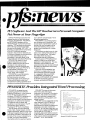
PFS Sof2hrare Arzd The HP 'TbuchscreenPersonal M y l u t e r
Put Power at Yollr FingerCIeps
Software Publishing Corporation has
released versions of their best-selling
PFS:FIL-E, PFS:REPORT, PFS:WRITE,
and PFS:GRAPH programs for the
Hewlett.-PackardTouchscreen personal
computer. "PFS products are commonly
seen at the top of industry best-seller
lists such as the Softsel " HOT LIST'" for
Business. Coupled with the convenirtnce
of the HP Touchscreen personal
computer, they provide an ideal solu1:ion
for busir~essmanagers and professionals
who need software they can use
immediately," says Mike Steep, OEM
Product Manager at Software Publishing.
PFS:FILE is an electronic filing
program that allows you to store,
retrieve, update, and print all kinds 01
information, from mailing lists to
inventories to potential customer files.
PFS:REPORT works with PFS:FILE to
provide tabular summaries of the
information in a file, complete with
counts, totals, and averages.
PFS:VJRITE is a word-processing
Droaram that creates error-free
dokments quickly and easily.
Documents appear on the screen just
as they will look when printed, and
comprehensive editing capab~litiesallow
PFS:
1
I
i
I
I
you to perform a broad range of wordprocessing applications.
PFS:GRAPH is a business graphics
tool that allows you to create bar, line,
and pie charts of presentation quality in
minutes. Bar and line graphs can be
mixed and matched, and up to four
graphs may be displayed on a single
set of axes.
PFS products are best known for their
ease of use, making them ideal for the
first-time computer user. This quallty
also makes them very easy to
demonstrate and sell to customers.
Another aspect of PFS software that
makes it so easy to sell is that each
application is sold separately. This way,
customers may purchase only the
applications they need, but feel confiden
that additional applications will be easy
to add in the future.
PFS:FILE and PFS:REPORT are
combined in a single product for the
HP Touchscreen personal computer
for a suggested retail price of $265
(PIN 45488A). PFS:WRITE (PIN
4 5 4 8 9 ~~) ~ ~ ' P F S : G R A(PPINH 45490A)
for the HP Touchscreen personal
computer are priced at $140 each.
TE Rovides b~tegratedWorcI Bocessing
PFS:\hlRITE,the powerful wordprocessing program from Software
Publishing Corporation, is now availal~le
for the Hf3 Touchscreen personal
computer. PFS:WRITE is designed with
comprehensive editing functions to
handle a broad range of word-processing
applications. It combines the simplicit!/
of a typewriter with the power and
versatility of a word processor. The HP
Touchscreen version takes full
advantage of HP Touch and softkeys.
You can easily move and duplicate
blocks of text, change margins, number
pages auitomatically, search for any word
or phrase throughout the document, and
insert other PFS:WRITE documents into
the body of the one you're preparing. As
you edit, your text is automatically
reformatted within the specified margins.
PFS:WRITE comes with documentation that is clear and easy to
understand, like the other PFS products.
In addition, help screens are available
with just a keystroke to explain main
menu selections, printing options, and
editing functions.
PFS:WRITE is fully integrated with the
other members of the PFS family of
software. This enables you to print
personalized form letters (complete with
envelopes) using data created with
PFS:FILE. You may also merge bar, line,
and pie charts created with PFS:GRAPH
into the body of a PFS:WRITE
document, and include tables produced
by PFS:REPORT, as well as output from
other popular software packages such
as Lotus'" 1-2-3'" and VisiCalcs
M i r c h 15 '88:
M i S c o l t @ C ,i1.
12% Cri,it.:30 1 A J P - , ~ ~
Bu.lngarri~C
~ A qroin
Deal MI Coo*
W e a l e vevi c l e i i i . d t a reparl lhat we
S U C I P S S ~ U31~81511110
~ ~ ~
yovr ~ n v e s t m e nmsr
l
Ihr
past yea. We h a v e c h a n g e l vaur h l l d l n g s 'rom
75'0 rea estate and 25'c cash l o d l e s s r s k v
pnitfollo dr d e t d l e l bolaw
COOK INVESTMENT PORTFOLIO
O F TOTAL
0 28
a
23
STOCK:,
n
020
018
011
REAL ESTATE
MUNICIPAL B O N D S
MONEY MARKET
>
blAMl'S
Sample PITS:WRITE document
The Bengits
ClRT ancl PFS:(;K
PFS:FILE owners are discovering
the benefits of PFS:REPORT and
PFS:GRAPH - more and better use
of information.
PFS:REPORT sorts, calculates,
formats, and prints presentation-quality
reports from the information in files
created with PFS:FILE. It presents
information in multiple columns, including
three calculated columns. Totals,
subtotals, averages, subaverages,
counts, and subcounts can be printed in
every column. PFS:REPORT has
comprehensive sorting capabilities plus
automatic page numbering, title printing,
and centering. Eight predefined report
formats can be saved for repeat usage.
These advanced capabilities of
PFS:REPORT make it the perfect
complement to PFS:FILE.
Employee Reports
Inventory Reports
Sales Reports
MONTHLY SALEL STATUS
EMPLOYEE INFORt.IAT1ON
SALARY NAME
ADDRESS
INVENTORY
1
625
1 700
1 850
PART a
JESCRIPTION OTY
LOMAS CA 91075
23
J M STONE
33SPARKSAVE
MFG
TACOMA CAY2071
25
85
Hi
4DRILI
' 8 DRILL
5 BOXES
8 BOXES
1 JONFS
45ELM
TlOGA CA96832
J STRIBLING 1801 LAWNDALE
M K TALENT
(IIIOTA
EAST
200
200
175
150
:35
:32
075
AVERAGE 191
TOTAL
i75
130
417
'3 72
225
200
175
110
0
AVERAGE 217
TOTAL
175
142
285
0 66
140
702
0 70
PRICE TOTALS
BROWN
JONES A
TAYLOR
SALES
170
125
100
250
29 25 4 9-? 30
18 30 2 31210
U 5U
5000
125
312 50
FINANCE
WEST
TOTAL
LOUNT
i
I
I
-.SUOTA
JONkS J
PARDEE
'647 50
0 6R
075
7e
055
4
202 S ALMA
MKTG
HALLEN CA9100i
AVERAGE
TOTAL
COUNl
iI
11
SOLD
DEPT
-
1 400
TERRITORY REP
200
1000
2
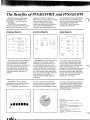
Let's say you want a list of employees
and their addresses, sorted by salary.
Just use the form you created with
PFS:FILE to indicate the information you
want. Reports like this are useful for
almost any group - companies with
employees, professionals with clients,
clubs with members, teachers with
students.
PFS:REPORT is a great way to report
on any items in inventory. Using the
information you put into PFS:FII_E,you
could compute the total value of your
inventory and get a report sorted by part
number, complete with a count of the
items listed. Using the same information.
you could produce reports sorted other
ways. A purchasing manager might want
to sort by price, for example, or a
materials control manager might sort
by quantity.
To evaluate sales representatives'
performance, a sales manager might
want to create a monthly sales status
report sorted by territory, with averages,
totals, and percentages, as in the
example. Sorting by percent quota would
be useful in analyzing and reassigning
quotas. A product manager might want
to report the same information sorted by
quantity sold, to determine product
acceptance in the market.
PFS:GRAPH is the first graphics
package that can work alone or directly
with PFS:FILE, VisiCalcR,Lotus'"
1-2-3'", or Multiplan' data to produce
bar, line, or pie charts of presentation
quality in minutes. Line and bar graphs
can be mixed and matched, and up to
four graphs can be displayed on a single
set of axes. Bar graphs can be stacked
or comparative. Other features include
automatic formatting, scaling, legend
labeling, and pattern fill. PFS:GRAPH
is the perfect way to illustrate your
PFS:FILE data files.
Trademarks
PFS IS a r e g i s t e r e d t r a d e m a r k o f S o f t w a r e
P u b l l s h ~ n gC o r p
L o t u s " and 1-2-3 ' a r e U S t r a d e m a r k s
Development Corp
V l s l C a l c IS a U S r e g i s t e r e d t r a d e m a r k
ol L o t u s
of V i s i C o r p
M u l t ~ p l a n 'IS a U S r e g i s t e r e d t r a d e m a r k o f
M ~ c r o S o HC o r p
S o f t s e l 9 s a r e g ~ s t e r e dt r a d e m a r k of S o f t s e l
C o m p u t e r Products I ~ L
HOT LIST "
IS a t r a d e m a r k
P r o d u c t s Inc
of S o f t s e l Computer
Business Computers
rDate
Location
January 24-25
February 4-5
February 6-7
February 11-12
February 14-15
February 19-20
February 21-22
February 25-26
February 27-28
February
March-July
I
Toronto (DMs)
Clevel+nd
Chicago
Novi
St. Louis
Hclustan
Piscataway
Atlanta
Englewood
Rockville
Valley Forge
Lexington
White Plains
Los Angeles
Palo Alto
Latin America
(Progrqm Mgrs)
Europe
(Progrqm Mgrs)
Far East
(Program Mgrs)
For those of you who missed the February sessions in
the US, a second implementation will be planned by
your regional development manager. These sessions
will run during the summer.
The long-term implementation of Targeting the Office
will begin in the learning centers, apd in areas that
have copies of the workshop's video tapes and
worksheets. Esprit designed Targeiing the Office to be
self-paced. New SRs will be able to get the value from
the workshop through video tapes, exercises, and
coaching from their DMs or senior SRs who have gone
through workshop.
HP AdvanceLink cannot be used
wi,thHP ListKeeper
Rudy W. BattiedISG
HP AdvanceLink is an HP Touchscreen personal
computer communications and terminal emulation
software product that lets the user link and access
other computers and their applications. The access
procedures (command files) can be installed into the
operating system, PAM, combining many of the steps
generally required for computer-to-computer communications. With the announcement of the new HP
Personal Productivity Center packages (Computer
News, October 15,1984) we stated that by using HP
AdvanceLink's access capabilities, an HP
Touchscreen personal computer user could develop a
common HP Touchscreen interface to HP 3000
applications.
Further testing has now shown that HP AdvanceLink
cannot be used with the current version of HP
ListKeeper. This means that an HP AdvanceLink
command file designed for HP Touchscreen access to
HP ListKeeper, when executed, will cause an I10
error. A fix to this problem will be included in the
next release of HP ListKeeper (The "T-Delta" MIT).
Please keep this in mind when setting customer
expectations.
DISTRIBUTION
1984 SIGSFD Users Group
meeting a success
Carol McDonell/IRO
A major selling point for HP SFDl3000 is the fact that
it has an international users group composed of very
satisfied installed users. SIGSFD (Special Interest
Group for System for Distributors), part of the HP
3000 International Users Group, holds a three-day
educational conference each year, as well as frequent
local meetings.
The 1984 SIGSFD Users Group meeting took place
November 6-9,1984, at the Waverly Hotel in Atlanta.
It was the group's biggest meeting ever, with approximately 200 users attending. Many East Coast
customers sent representatives for the first time, and
there was an excellent showing of new HP SFD/3000
and OM/3000 users.
February 15, 1985
COMPUTER NEWS
For HP Use Only
19
Business Computers
T h e meeting was organized by the users, with the
emphasis on making the event a valuable educational
opportunity. Sessions were structured to facilitate the
practical use of data processing and specifically HP
SFDl3000 and OM13000 in the wholesale distribution
environment. T h e conference consisted of formal and
informal presentations by HP's Information Resources
Operation (IRO), user representatives from different
sizes and types of companies, a s well as well known
speakers from the wholesale distribution industry
sponsored by IRO.
T h e annual meeting gives users a chance to participate in the future evolution of HP's Distribution Management products, and provides a forum for users to
share ideas and solutions and to discuss special programs which have resulted in significant savings to
the participants. It is a proven and well-understood
fact that the best ideas for the use of any system come
from the people who work with it each day.
A highlight of the meeting was a tour of the Atlanta
HP Response Center. Marc Hoff, HP's North American AEO manager, was also present to talk about the
Response Centers and to help our customers learn
how to effectively use this valuable resource.
T h e SFD/OM/3000 users were especially impressed
by HP's commitment to them. This commitment was
further exemplified by the number of H P field and
IRO attendees and by the presence of Dave Sanders,
general manager of the newly formed Administrative
Productivity Division.
20
COMPUTER NEWS
For H P Use Only
Call IRO to learn more about HP
Distribution Solutions
Paul Sieuers/IRO
With the recent changes that have taken place in the
field sales organization, we've found that there are a
great number of SRs that know nothing about what
we do a t Information Resources Operation (IRO).
Many SRs don't even know we exist.
For the past few weeks we've been trying to identify
all SRs and field personnel who are doing something
with our products or have expressed an interest in
learning more. T h e response has been overwhelming,
and we know there are more. If you know of any SRs
or field marketing personnel who are interested in
finding out more about HP Distribution Solutions, or if
you would like to know more yourself, please call IRO
Sales Support (303-773-1992) so that we can send
information about our program and lists of leads for
your area. Thanks.
New electronics distributors
directory available
Paul Sievers/IRO
T h e 1984-85Buyer's Guide to Electronic Distributors
and Sales Representatives in the San Francisco Bay
Area is now available from Information Resources
Operation. T h e directory contains such useful information a s a glossary of buzzwords, listings of distributors and manufacturers, and manufacturers' representatives in the Bay Area.
If you're an SR from the Bay Area and interested in
selling H P Distribution Solutions to electronics distributors, call IRO Sales Support a t 303-773-1992 for
your copy.
February 15. 1985
Business Computers
VERTICAL MARKETS
New banking sales literature
folder highlights HP business
computers
The folder attempts to inform bankers that HP offers
a viable solution to their data processing needs. To
obtain copies of these folders, simply send a sales
literature order form (SLO) to the Literature Distribution Center in Palo Alto. Order PIN 5953-7661.
Debra Miele/ISG
T h e new vertical markets banking sales literature
folder highlights the advantages of using the HP
family of business computer systems for solutions to
banking problems. For broad spectrum of banking
applications, the HP 3000 offers both office automation and data processing in a single system. At the
same time, HP's third-party companies can offer
proven software packages specifically designed for the
financial community.
February 15, 1985
Also in this iesue
Third-party solutions highlighted
at Financial Services Conference
4
Ehd
COMPUTER NEWS
For H P Use Only
21
NETWORKS
New version of E/F-Series
8-channel MUX released
David Kuntz/RND
The HP 12792C, the new version of the EJF-Series
8-channel MUX, is now on the Corporate Price List
and has a US list price of $2,700. The product itself is
very similar to the HP 12792B and is functionally
backward compatible. Therefore, the HP 12792B will
be removed from the Corporate Price List in April
1985.
Although the printed circuit assembly is unchanged,
several components are different. These components
are the RS-232 connection panel, the MUX-to-panel
cable, the mounting bracket, and a new version of the
firmware (EPROM PIN 5180-7228).
The new firmware incorporates the following
changes:
Change - Both baud rate generators on the card
will have a default setting of 9600 baud. The old
card default setting programmed baud rate generator 0 to 2400 baud and baud rate generator l to
9600 baud at card power up.
Situation - Where a device (printer) is connected
to a port of the MUX and is printing, chances are
the last command it received was an X-off (DC3). If
this receive-only device is turned off (to clear a
buffer), the port of the MUX will be left in a state
requiring an X-on (DCl), and no way to send it.
Change - The new firmware will allow an X-on to
be sent to a port via a different port using a command (CN,LU,34B,3). This will force an X-on on
the specified port.
Situation - During the MUX initialization, if the
devices attached to the ports are powered off, and
oddleven parity is used, there is a chance that the
port could end up in a confused state. The typical
cause has been that a parity error interrupts the
on-card 2-80 CPU at the same time the 2-80 is trying to initialize the port.
Change - The new firmware disables interrupts
while initializing the ports.
22
COMPUTER NEWS
For HP Use Only
Situation - If a Break key is hit while the MUX is
transmitting to an odd parity terminal, the port
may hang. The noise on the receive line while an
odd parity terminal is powered off may also cause
the same problem. This is because the old firmware
did not correctly handle the rare occurrence of
simultaneous parity error and break when configured for odd parity.
Change - The new firmware ignores the parity
error when the error occurs because of the use of
the Break key on odd parity configured ports.
Situation - If the length of receive data is greater
than the read request length and the character set
is Katakana, the MUX may hang.
Change - The new firmware corrects this
situation.
Product
P/N
Description
5061-3415
12792-90021
5061-7228
28658-60005
28658-63002
PC Assembly
Manual
EPROM
RS-232 Panel
MUX-Panel
Cable
Mounting
Bracket
Cable
Extension Kit
US list
price
HP 12792C
5001-5278
1252-0508
HP 12792C
Opt. 002
System
Modem Cable
Delete Panel
HP 12792C
Opt. 003
Delete Panel
and Cable
$2.700
-500
-600
*The HP 37214A Systems Modem is purchased separately.
February 15. 1985
MASS STORAGE
In the January 1 issue of Comput!erNews, in the
article entitled "New version of IIP Series 500
8-channel MUX released," the pricing information given in the shaded box is not correct. The
correct information is as follows:
T h e HP 27130B consists of the following:
Price reduced on remarketed
HP 7925
Liza L,opez/FRD
1
:!
1
P/N
Description
1
HP 27130B:
5061-4929
27130-90003
MUX Interface Assembly
Installation Manual
28658-60005
28658-63001
RS-232 Panel
MUX-to-Panel Cable
1252-0508
Cable Extender Kit
Option 019
19" Rack Mounting
Bracket Kit
Option 540
Mounting Bracket Kit for
HP 9040A Systems
Mounting Bracket for
HP 92211R Cabinet
Option 550
price
Just when prices seern to be going up, Finance and
Remarketing Division (FRD) has reduced its HP
792514R and 7925SR disc drives by 20%. The new
prices are listed below.
base price
I
40
40
7925MR
Opt. 102
I
US list
price
oHP7925MR
p t . 102
HP 7970ER
Opt.. 426
Also in this issue
February 15, 1985
$12,950
You c.an also bundle the disc drives with HP 7970ER
tape drives for additi~onalsavings.
I
New HP AdvanceNet overview
presentation available
$13,200
Total Price
14
FRD'a peripheral prices are lower than ever. Now is
the time to sell remarketed discs and tapes to your
new price-sensitive c:ustomers along with your
installed base accounts.
COMPUTER NEWS
For HP Use Only
23
PRINTERS
Tape drive cabinet options to be
obsolete March 1
Jim Jonez/G L D
Effective March 1, 1985, options deleting the cabinet
from HP 7974A and 7978A tapes drives will be
obsoleted and removed from the Corporate Price List.
Options affected are HP 7974A Option 131 and 7978A
Option 132, which delete the cabinet from the product
for installation into an existing cabinet of the same
type.
These options were placed on the Corporate Price List
when the drives where introduced but due to other
engineering priorities have never been released for
shipment. Outstanding issues are a possible overheating condition with two HP 7974A drives in one
rack and the usual list of regulatory approvals for RFI
(radio frequency interference), safety, and other concerns that affect these options on both HP 7974A and
7978A drives. Our current assessment of the situation
is that an engineering effort to resolve these issues is
not justified for the low order volume we have seen.
We will be contacting SRs on all orders we have in
backlog to work out an alternate solution on a sitespecific basis.
OEM customers who order HP 7978A Option 132 will
need to do so on an override basis. This will be
handled as a product special.
Order additional Mass Storage
Sales Reference Manuals from
LDC
Jon SchiedeVGLD
The Mass Storage Sales Reference Manual published
in November 1984 is proving to be very popular. We
have reprinted the manual and stocked it at the
Literature Distribution Center. Request your copies
by ordering PIN 5953-6840. Greeley Division is no
longer stocking the manual.
24
COMPUTER NEWS
For HP Use Only
Announcing HP's IBM plugcompatible laser printing
system
Matt Cuson/BOI
Boise Division is pleased to announce the HP 2689A
laser printing subsystem. The HP 2689A is designed
to be a high-speed line printer replacement for connection to IBM systems. It combines the field-proven
HP 2680A laser printer with a separate control unit
which allows interfacing to an IBM mainframe.
The HP 2689A subsystem combines the HP 2680A
laser printer with a separate control unit that plugs
into an IBM mainframe.
The HP 2689A is a natural extension to our already
broad laser printer product line. From the HP LaserJet printer to the HP 2685 and 2689, HP has the
largest and most diverse laser printer offering of any
vendor on the market. The HP 2689A will keep HP in
the limelight rightly earned by the HP LaserJet
printer.
The HP 2689A allows you to sell into major accounts
who need laser printers but don't want to use a
datacom link. In addition, you will be able to expand
the number of sites within the company that has a
successful laser printer installation.
February 15. 1985
Training
Training kits were sent to the field in January.
Included in the kit were a sales training manual, print
sample, data sheet, output design service sales information and data sheets, and HP 2689A "Tie One On"
buttons and stickers.
Sales opportunities
A good point for you about the HP 26139A is that the
target customer is easy to identify. Anyone using an
IBM 43XX, 303X, or 308X mainframe (or compatible)
system is a potential prospect. You can use laser
printing as a way to get in the door. Once in, you can
look for local or remote laser printing applications, as
well as office and DP applications for the HP 3000.
To get started on your prospecting, check the Directory of Computer Executives for names of the MIS
managers in your territory.
Sales support
We understand that there may be tinies when you
need a little extra help in selling a laser printer, so
we've made sure you have the tools you need to be
successful. When you run into a tight spot, try the
following sources for information:
Sales training manual. The manual provides
information about the features and benefits of laser
printers and the HP 2689A; a feature and price
comparison against the competition; technical
information on how the HP 2689A works with the
IBM host; a description of the marketplace; and a
list of IBM buzz words. It will help you position
HP's products against each other and the competition and will help identify qualifyiing customers.
Read the manual carefully before you make the
first call, and you'll be on top of the sale from the
start.
HP 2689A audio cassette. This cassette uses a
sales scenario to highlight importaint points to make
at various parts of the sales cycle. Listen to it in
your car on the way to a sales call to help you
visualize the process.
HP 2685 GIM. This document gives you more
information about the capabilities of the HP 2685.
Customers will ask about local and remote connections, and you will need this to help you cover the
remote applications.
HP 2689A sales presentation. A copy has been
distributed to the FbIMs. A brief script is also
included to make your preparation easy. The print
sample included is probably the best way to demonstrate the capabilities of the HP 2689A in an informal one-on-one session.
Computerized support. "Mailcoach," a special
mailstop (part of the HP Desk network) has been
set up to receive the day-to-day questions on ordering, configurations, pricing, delivery, literature,
cables, technical points, and so on. Send your questions to HP Desk Jurnbojet/HP4600/M2. We will
answer within 24 hours.
We have taken this approach so that your support
person is free to help you with sales consulting, big
deal management, marketing program planning
(seminars, presentations, mailings, telemarketing,
and so on). Please use this service whenever you
can. The more you use it, the better we can help
you.
SMC and Boise Division. If you can't find what
you need in the available documentation, your local
support people are out of the office, or your situation is too complex for Mailcoach, then give the
SMC or Boise Market Development a call. We'll be
glad to help.
Positioning the HP 2685A and
HP 2689A laser printers
Matt Cuson/BOI
With the introduction of the HP 2689A laser printing
system, you have another good reason for a customer
to go with HP for their printing solutions: direct
channel connect. The HP 2689A complements the
existing HP 2685 procluct offering by providing a
straightforward, high-speed connection for local
printing applications on IBM mainframe systems.
The HP 2689A: The local system printer
replacement
The HP 2689A was designed to replace impact printers as the primary loc,alsystem printer. The HP
2689A uses the comrr~andset of the popular IBM 3211
line printer (2,000 Ipm) and can replace it (or others
in the same class) in most applications.
Typical uses would be for system dumps, program
listings, financial reports, parts explosions, product
listings, order processing, payroll, and personnel reports (:in general preprinted forms replacement).
February 15, 1985
COMPUTER NEWS
For HP Use Only
25
Primary selling points are reduced operator intervention, excellent print quality, forms cost savings (using
electronic forms), speed, and paper size.
The HP 2685: The remote line printer
replacement
T h e H P 2685 allows a user to locate printer capacity
where needed without being constrained by cable distance limitations. T h e H P 2685 supports a variety of
communications software (RJE, MRJE. SNA, X.25) to
satisfy just about everyone's configuration needs.
T h e data communications controller of the HP 2685
(an H P 3000 in disguise) can also print graphics (no
graphics on the HP 2689). Users connected to the
print station can generate their own graphics images
or download files from the host for printing.
The HP 2685: Variations on a theme
T h e H P 2685 comes with printer and controller
options. T h e customer has a choice of printers (the
H P 2680A or the HP 2688A), as well as controllers
(HP 3000 Series 37/48/68). In addition, multiple
printers can be attached to a single controller. In
remote applications where special applications need an
impact printer (privacy envelopes, color forms, and
odd paper sizes or weights), any one of the high-speed
dot-matrix printers from Boise Division can also be
connected.
T h e H P 2685 offers customers the greatest flexibility
in terms of hardware configuration and software
capability in remote printer applications.
Product/Application Matrix
Local line printer
(forms, listings,
financial reports, etc.)
HP 2689
HP 2685
XXX
X
Remote line printer
(as above, remote or long
line configuration)
-
XXX
Graphics output
(business graphics.
drawings)
-
XX
r
Distributed p r ~ n t e server
-
XXX
XXX: best application
XX: good application
X: possible application
- : no application
26
COMPUTER NEWS
For HP Use Only
Output Design Service centers
help sell laser printer products
Steve Berube/BOI
Two new Output Design Service (ODs) centers are
now available to assist in the sale of the H P 2680A,
H p 2688A, and H P 2689A laser printer products.
Located at Boeblingen General Systems and Boise
Divisions, these ODs centers provide logo, signature,
image scanning, and electronic form design.
Presale/postsale successes
As a pre-sale tool, you can offer a custom laser printer
demonstration. Bill Lovejoy of the Akron office called
upon Boise to scan a complex coat-of-arms image for a
customer desiring the ability to print geneology reports using the H P 2688A, HP 26096A digital camera,
and office automation software. Bill approached Boise
because his local SEO was unable to do the job.
Bill wanted to prove to the customer that H P could
offer the system solution to do the required print job.
Boise came through with the sample printout, and
the customer signed the order.
T h e twist to this story is the customer bought an H P
2680A rather than the H P 2688A because the
customer needed a higher speed printer to meet the
upfront promotional mass mailing announcing the
customer's geneology service. T h e customer further
plans to purchase the H P 2688A and digital camera as
higher resolution print requirements dictate. From a
post-sale standpoint, this same customer plans to use
ODs to generate the logos, letterhead, and signatures
needed for the mass mailing.
This sales example highlights the advantages of ODs
in closing an H P 2680A or 2688A order.
A customized demonstration for a particular
customer
Ability to prove that H P has the correct solution
Pre-sale support
Post-sale design service
Excellent pricing and turnaround.
Some O D s specifics
T h e ODs centers offer two basic services: Electronic
Scanning and Electronic Forms Design. T h e
Electronic Scanning service offers logo, signature, letterhead, and line a r t graphics generation. T h e
Electronic Forms Design service provides the design
February 15. 1985
.?
T
1
NetworldPeripherals
New large-character font
cartridge for :IHP2934A
business printer
of light, medium, and heavy form composition. Pricing
has been structured to compete effectively with competitive laser printer design services (like those
offered by Xerox). Details on these new services are
being sent to your offices. Data sheets and associated
literature are available from Literature Distribution
Center. T h e part numbers for each information piece
are listed below.
I
I
r
P/N
Data Sheet
5954-2254
5954-2260
ODs Electronic Scanning
ODs Electronic Forms
P/N
Order Forms
5952-2262
5954-2263
5954-2261
Electronic Scanning
Electronic Forms Design
Letter of Agreement
Joe Barbera/VCD
I
I
I
I
Announcing the introduction of a new plug-in
character cartridge available for the HP 2934A business printer. The new -type style, Orator, similar to the
Orator style for the IBM Selectric typewriter, features
characters that utilize ,the full height of the printer's
9 x 12 dot-matrix character cell.
These are approximately 38% taller than a standard
character. They are especially useful in generating
text for overhead slides, preparation of speeches, or
for use .when text must be read at a greater-thannormal distance.
This is one of 16 character-font cartridges available
for the IHP 2934A business printer.
The Orator cartridge has been available through Computer Supplies Operation since January 1,1985, as
PIN 92188K. US list price is $100.
HP 2934A offers more features
than HP 2932A
Harold Fast/VCD
The HP 2934A printer offers four more features than
the HP 2932A printer. T h e 2934A offers bar codes,
large characters, near-letter-quality (:NLQ) print, and
an optional single-bin sheet feeder. That is quite a
bargain for the $400 price difference ($2,495 versus
$2,895).
When proposing workstation printers, remember that
these printers are built to last up to llD years, depending upon usage, and that your customer may have
reason to take advantage of these features at some
time in the future. You'd be surprised at how many
customers find applications for the N:LQ printing
capabilities of the HP 2934A. There is not an upgrade
kit for the HP 2932A to make it a 2934A. If you think
that your customer may have a future need for any of
these features, propose the 2934A instead of the
2932A. They will be impressed with the versatility of
their new printer.
Eliminating E[P 293X
competitors
Harold Fast/VCD
The HP 293X printer family has been a very successful product line. 263X printer orders have doubled.
The most popular host is the HP 3000, followed by the
HP 1000. From everything we can tell, customer
satisfaction is terrific. We can count on the fingers of
one hand the number of times that we have been told
that the HP 293X family has lost out to a competitive
printer.
Vancouver Division (V'CD) is constantly striving to
measure the HP 293X against the competition. Please
let us know of any deals where a competitive printer
has won the day. In fact, if you have HP 3000 or HP
1000 customers using competitive printers on their
systems we would appreciate hearing about it. We
would like to do what we can to help you eliminate
competitors from your installations. Please contact
Brodie Keast at VCD with any input you have at
TELNET 1-254-2585, COMSYS code 5400, or
HP Desk HP5400lBU. Direct dial is 206-254-81 10.
COMPUTER NEWS
For HP Use Only
27
Networks/Peripherals
T
IDSFORM supported on
HP 262X terminals
Steve Berube/BOI
A t long last IDSFORM is supported on the HP 262X
family-of terminals. Your cistomers can now design
their electronic forms for the HP 2680A and HP
2688A laser printers on a low-cost graphics terminal
retaining all the functionality previously offered on
the HP 264X terminals
T h e official list of graphics terminals supported under
the new version of IDSFORM (A.02.00) is: HP 150A,
2623A, 2625A with Option 523,2627A, 2628A with
Option 523,2647A/F, and 2648A.
Forms previously designed using the HP 264X terminals can be modified without problems using one of
the above-mentioned HP 262X graphics terminals.
Additional features available with this new IDSFORM
version are:
Augmentation of function-key templates with two
letter commands
Help screen
Localizable two-letter commands
New default font improving HP 2680 and 2688
compatibility
Miscellaneous bug fixes.
This new version of IDSFORM will be supported on
MPE versions Q-Delta and later.
IBM PC graphics capability for
HP LaserJet and ThinkJet
printers
Cathy Lyons/BOI
Until now, printing graphics from an IBM PC to the
HP LaserJet or ThinkJet printers has been a problem.
T h e solution to this graphics incompatibility is the
IBM PC print screen utility, which was distributed to
all HP authorized
dealers and HP dealer SRs via a
.. . - ~
Personal Computer Group dealer mailing last month.
After your customer installs this utility, they will be
able to print alpha and graphics images to their HP
LaserJet or ThinkJet printers.
T h e utility comes handsomely packaged in a diskette
folder complete with a 5%-inch floppy disc and documentation. This initial utility is free and is not copy
protected. We encourage you to make copies and distribute them to your customers and other SRs. You
can also order additional copies (PIN 5954-2266)
through Corvallis Literature Center at a cost of $20.
Support note
T h e documentation included in the package clearly
states the tested and supported configurations for this
utility. It also gives some tested but unsupported configurations. Untested configurations may be tried by
the user, but HP can provide no support for these.
HP has no intention of upgrading or modifying this
utility. Questions regarding this driver should be
referred to 800-HPCOACH.
L o t u s T MP r i n t G r a p h d r i v e r
Currently, LotusTM
1-2-3'" does not support the HP
LaserJet or ThinkJet printers using the PrintGraph
utility. Lotus Development Corporation has promised
us a driver to correct this incompatibility. W e expect
that Lotus will distribute this driver to their dealers in
March 1985. Meanwhile, we suggest that you recommend our print screen utility to your customers as an
alternative solution.
~
--
~
-~
~~
~
~
LotusT"and 1-2-3'" are US trademarks ofLotus Ilevelopment
Corporation.
28
COMPUTER NEWS
For H P Use Only
February 15. 1985
.?
HP LaserJet printer ISV and
third-party support update
Cathy Lyons/BOI
a
During December and January, Boise Division distributed an HP LaserJet printer bindler to all HP
authorized dealers, HP dealer reps, F'CSEs, PWSRs,
SEDMs, SRDMs, and HP internal customer response
centers (e.g., HPCOACH). This binder contains
valuable information such as hardware configuration
notes, software application notes, font cartridge
schedule, print samples, paper specifications, and
independent software vendor (ISV) and third-party
software and hardware solutions. Additional guides
may be ordered through the Corvallis Literature
Center, PIN 5954-0800.
HP LaserJet printer software support update
The dealer binder contains a third-p.arty software listing dated November 1984. We are pleased to
announce additional ISV software support to add to
that list. Please make a note of the following.
*
Package
Description
SuperCalc 111
Spreadsheet
Perfect Writer
Word processing
Office Writer
Diagraph
Word processing
Presentation
graphics
Chart-Master
Sign-Master
Au toCAD
Presentation
graphics
Computer aided
engineering
Word processing
Palantir
Softease
Unitext
a
Integrated
package
Scientific word
processor and
text formatter
C;ompany/Phone
-
Sorcim IUS
408-942-0522
Perfect Software
503-344-7638
Clffice Solutions
Computer Support
Corporation
214-661-8960
Decision Resources
203-222-1974
Autodesk, Inc.
415-331-0356
P'alantir Software
800-368-3797
Software Solutions
800-243-5123
Textware
International
617-UNI-TEXT
Order your own copy of the third-party software listinn (PIN 5954-0799) from Corvallis Literature
center.
February 15, 1985
HP L a s e r J e t p r i n t e r t h i r d - p a r t y s o l u t i o n s
update
The binder also contains a third-party solutions list
that describes briefly some software and hardware
solutions for specific IIP LaserJet printer applications.
These solutions address everything from Wang interfaces to WordStar drivers to Macintosh interfaces and
more. Call BOI Market Development for the most current listing.
LaserJet/Wang PC application
note available
Tina kValker/DMD
An application note entitled "Configuring Your HP
LaserJet Printer with the Wang Professional Computer" is now available. The note is being distributed
to all HP LaserJet printer dealers, dealer representatives, F'CSEs, PCSRs, major account representatives,
PCG Dealer Hot-Line, HPCOACH, and will be stocked
at Corvallis Literature Center (PIN 5954-0792).
Included in the contents are the cabling requirements
to connect the HP LaserJet printer to the Wang PC.
Also included are easy-to-follow instructions on creating the printer driver necessary for printing from the
word processing application of the Wang PC to the HP
LaserJet printer. Lastly, an example that demonstrates the available features of the word processor
with this configuration is included. Additional
capabilities of the HP LaserJet printer, such as
graphics and font selection, may not be accessible
without the purchase of a third-party driver such as
the driver available from one of the following:
MCS Group, Inc.
2465 West Chicago
Rapid City, SD 57701
605-341-6755
The Computer Group
1260 Boylston Street
Boston, MA 02215
617-536-4242
John Carr & Assoc~~ates
P.O. Box 291
Flossmoor, IL 60422
312-799-2337
COMPUTER NEWS
For HP Use Only
29
Other applications, such as LotusTM
1-2-3'", Multiplano, and BASIC, may not print to the HP LaserJet
printer when using one of the above drivers since the
printer driver is primarily for configuring the HP
LaserJet printer to the word processing application of
the Wang PC.
Other application notes currently available for configuring personal computers to the HP LaserJet
printer include:
P/N
Application note
5953-0798
Configuring a Non-HP CPU to the HP
LaserJet Printer
Configuring Your HP LaserJet Printer
With the HP 150 Touchscreen Personal
Computer
Configuring the HP LaserJet Printer to
the Apple IIe Computer
Configuring the HP LaserJet Printer to
the Apple I11 Computer
Configuring the HP LaserJet Printer to
the DEC Rainbow
Configuring Your HP LaserJet Printer
with the IBM Personal Computer
5954-0797
5954-0794
5954-0795
5954-0793
5954-0796
Lotus'" and 1-2-3'" are US trademarks ofLotus Development
Corpora tion.
Multiplan" is a US registered trademark of Microsoft Corporation.
30
COMPUTER NEWS
For HP Use Only
Printer Command Language
explained
Jim L ucas/BOI
Boise and Vancouver Divisions are teaming up to open
new printer markets with large sales potential.
Together we offer a strong family of printers positioned to lead the industry in pricelperformance. The
backbone of our printer strategy is Printer Command
Language (PCL), which allows all HP printers
manufactured after December 1983 to speak the same
language.
PCL is an emerging standard that categorizes printer
features into four levels. Each higher level is a proper
subset of the previous level, and conversely, each level
a subset of the next. Its power lies in its ability to
bring together Hewlett-Packard printers under a
common and consistent control structure - which
ensures feature compatibility from printer to printer.
This standard provides a structure that standardizes
printer features, feature access, and feature
implementation.
The four levels of printer features:
LEVEL ONE:
(HP ThinkJet printer)
The print and space feature set is the base level
printer definition. Printers implementing this feature
set are typically inexpensive and provide a convenient
means for the user to obtain hardcopy output. This
level is associated with a single-user workstation.
LEVEL TWO:
(HP 2563,2565,2566, and 293x1
The EDP and transaction printing feature set is a
superset of the print and space level. This printer is
generally a multi-user hardcopy device that has a
wide range of performance. This level is used in an
EDP environment or for transaction processing.
February 15. 1985
LEVEL THREE:
(HP LaserJet printer)
The document processing feature set is a superset of
the EDP and transaction level. This level is tailored
toward the office: high-quality output and additional
data-formatting capabilities. Document processing
.
printers range from single to multi-user.
LEVEL FOUR:
(Future Products)
The page formatting feature set is a superset of the
document processing level. It gives the user the most
flexibility in the formation of hardcopy output. Examples of Level Four capabilities are found in the HP
2680A, 2688A and 2685A printers, yet these are not
PCL devices.
a
-
PCL is our competitive advantage that benefits our
customers by providing:
Common feature access among several printer
models
Reduced software driver develop~nent,increased
software utility, and software investment
protection
Smooth upgrade paths
Increased configuration flexibility.
Target markets
The three target markets with the highest probability
for success are the (1) system integrator, (2) hardware manufacturer, and (3) major account markets.
All of these target segments welcome the advantages
of PCL printers. Each recognize the value of writing
only one driver for all HP printers, reducing spare
parts inventory, using industry standard interfaces,
leveraging discounts, and the ability to count on
worldwide service from HP. Additionally, both Boise
and Vancouver are experienced in the OEM business
(both as customers and suppliers) and have the
expertise to help you find and win business in these
markets.
February 15, 1985
In 1985, these will be viable markets - where you
can earn significant commissions and better HewlettPackard's position in the growing printer OEM business. Printers can open doors to previously unreachable accounts, which can mean leveraged future business for you with other HP products. Even selling a
couple of HP LaserJel: printers into an account, has
opened doors to much larger sales opportunities. Any
way you look a t it, selling printers on non-HP systems
is already big business, and you can share in the
profits.
If you would like to learn more about the printer OEM
business, contact Jim Lucas in the market development department, TE:LNET 1-323-3610.
TERMINALS
Bar-coded baidges available for
the HP 3081,A industrial
workstation terminal
Francis Scarella/GPCD
DataCode Systems has created a special flyer featuring the badge developed for the HP 3081A industrial
workstation terminal's bar code slot reader. The flyer
featur~esa picture of the badge with the HP logo on
one side and a picture of the terminal on the other
side.
The badge, intended :for applications such as time and
attendance or access control, is designed to include
the be,arer's photograph and to conceal the bar code
identification label, which can be read by the infrared
slot reader on the HP 3081A (Option 056). Concealing
the bar code is done to prevent unauthorized photocopying or duplicatioii. The DataCode badge can be
custon~designed with, the company's logo, for example, and with or without a photo or concealed bar code
label.
COMPUTER NEWS
For HP Use Only
31
Networks/Peripherals
One last chance for HP 2703A
terminal customer training
Mike HachigiadPOD
To obtain copies of the flyer, send a COMSYS to Francis Scarella in Grenoble (6300) or Gene Lee in Cupertino (66501, or call DataCode Systems directly:
US (in Ohio)
800-336-5300
US (outside of Ohio)
800-345-5300
Spain
2394107
32
COMPUTER NEWS
For HP Use Only
Do you have any customers who still need training on
the HP 2700 series terminals? This is Personal Office
Computer Division's (POD) One Last Chance Sale.
Even though the HP 2703A is now obsolete, POD will
accept customer training requests until July 1, 1985.
After this time, class slides will be the only method
available to fulfill customer training requirements.
The training is a three-day course which is
customized to fit each customer's needs. The class can
include instruction on Autoplot, Paintbrush, Presentation, and terminal functions (including escape
sequences). The field cost of the class from the division is time plus expenses. When requesting this class,
we would like the following information:
Customer name
Number of students in the class
Location code and account number to charge time
and expenses
A selection of possible dates that the customer
would prefer
a Curriculum the customer would like covered
of product experience the student has
Number of training units the customer has
available.
If you have any questions, or would like to schedule
this class, please contact Mike Hachigian at
408-720-3315.
February 15. 1985
9
Get organized with CSO's new
media and documentation
storage cabinets
Jim Kinney/CSO
Computer Supplies Operation (CSO) is replacing its
previous line of storage cabinets with a more versatile,
preconfigured system. Your customers will save time
and better organize their filing and storage needs with
these multi-use cabinets. They come assembled in five
common configurations so your customers don't have
to install the internal components - they arrive
ready to use. Unlike other cabinets, the internal components can be moved easily to accommodate any
special storage situations.
An outstanding feature is the side opening tambour
door. No more bending or reaching to open and close
cabinet doors. They glide open easily and, when
closed, lock to protect stored data and media.
Standard features include:
All steel construction
Three cabinet heights to fit your storage needs
Fixed and roll-out shelves for three-ring binders,
disc cartridges, and packs
Hanger bars for data binders and mag tapes in seals
Optional oak woodgrain top for small and medium
height cabinets
Extra accessories for special storage situations.
The cabinets' attractive cream gray finish complements HP Design Plus and HP Standard furniture or
any other office environment.
US list
From left to right: large storage cabiinet, workstation
storage cabinet, and printout/documentation storage
cabinet.
February 15, 1985
P/N
Description
price
92272A
Workstation storage cabinet.
Comes with one fixed shelf, two rollout shelves installed. 38'h"H x
361h"W x 21"D.
$825
92272B
Medium storage cabinet.
Comes with one fixed shelf, two rollout shelves, and one hanger bar
installed. 613"H x 36M"D x 21"W.
990
92272C
Printout/dtxumentation storage
cabinet. Comes with one fixed shelf
and two hanger bars installed. Dimensions are the same as the 92272B
825
92272D
Magnetic tape storage cabinet.
Comes with five hanger bars
installed. 84"H x 36M"D x 21"W.
900
92272E
Large storage cabinet.
Comes with one fixed shelf, two rollshelves, and two hanger bars. Dimensions are the same as the 92272D.
1,125
All hanger bars in the HP 92272-series cabinets
require single or center point suspension capability
for data binders. HP 92174A-H data binders support
this requirement. Mag tapes in seals hang directly on
the bars.
More details on these cabinets can be found in Up &
Running, Supplement to the HP Computer Users
Catal,og, Vol. 2, No. 1,February, 1985.
For fast service customers should call CSO's Direct
Order phone numbers listed in this section.
COMPUTER NEWS
For HP Use Only
33
-
-
-
-
CSO DIRECT ORDER
CSO Fast Phones - the easy, direct way for customers to
order supplies, accessories, media, furniture and software.
Location
United States
California
United Kingdom
France
Belgium/Luxembourg
Switzerland
Italy
West Germany
The Netherlands
South Africa
Canada
Toronto Local
Ontario
Quebec
British Columbia
Other Provinces
Sweden
AustriaIVienna
34
COMPUTER NEWS
For HP Use Only
Telephone Number
800-538-8787
408-738-4133
0734-697201
0734-792959
(6) 928 32 64
(02) 762 32 00
(057) 31 22 54
or 31 22 59
(02) 92 36 91
(06) 5 48 31
07031-142829
07031-223133
020-470639
802-51 11
53-7954
28-4178
416-671-8383
1-800-387-3417
1-800-387-3417
112-800-387-3154
1-800-387-3154
08-7502027
08-7502028
222-2500, ext. 615 or 616
February 15. 1985
Factory Contacts
Commercial Sales Center
Phone 408-725-81 1 1
TELNET 125-XXXX
COMSYS 4 7 0 0
Ross HuntIMgr
ext. 3045
Nancy GordonISec
ext. 4367
Yeely Region
Phil JohnsonIMgr
ext. 4206
Chere AndreISec
ext. 3089
South Bav Area
Myra ~ e t k r s o n
ext. 4082
Central Area
Brad Fortier
ext. 4084
Rocky Mt. Area, 3rd Party Accts
Roge; LeMay
ext. 4419
MIA Southwest and LA
Art Price
ext. 4457
MIA Central, !South
Steve Schield
ext. 4998
Los Angeles Area
Bill Franklin
ext. 4020
Northwest Area
Ed Enos
ext. 4219
Southwest Area
Lou Jeraci
ext. 4216
Midwest Region
Mary Etta PortIMgr
ext. 3306
Katie BarrettlSec
ext. 4997
Great Lakes Area
Marilee French
ext. 4729
Major Accounts
Vince Maggiore
ext. 3053
West Area
Sandra Jeung
ext. 2241
Central Area
Carl Evans
ext. 4467
Major Accounts
ext. 3452
Annette Smith
Major Accounts
Gary Sharon
ext. 4458
East Area
ext. 4578
Pradeep Amladi
Southern Region
Willie AustinIMgr
ext. 4083
Ella WashingtonISec
ext. 5090
Raleigh
Michelle Ohlrich
ext. 5148
Atlanta
ext. 3092
Sid Deshpande
West Area
ext. 4481
Jackie Robinson
Gulf Area
Ajit Ranadive
ext. 4359
San Antonio, Oklahoma
Reed Hornberger
ext. 4187
Eastern Region
ext. 4088
Dave ButtIMgr
ext. 4968
Jill KunderlSec
New York Horiz.
Hal Bader
ext. 4872
Valley Forge MIA
ext. 4499
Denny Chandler
New England MIA
ext. 4380
Marilyn Moore
February 15, 1985
New York MIA
Don Williams
Valley Forge Horiz.
Robert Gressens
New England Horiz.
Jane Kornfield
Rockville
Mary Jo Miller
Rockville (gov't)
Frank McGorman
ext. 3095
ext. 4097
ext. 4477
ext. 2405
ext. 4972
Manufacturing Systems Group
Phone 408-725-81 1 1
TELNET 125-XXXX
COMSYS 4 7 0 1
Dave YewellIMgr
ext. 3400
ext. 3115
Ginny PyleISec
Neely Region
Dan GroveIMgr
ext. 2534
Mary DalzellISec
ext. 2670
LA. Hughes, Boeing
Gary Lemke
South Bay,
Lockheed, Ford Aerospace
Loren Peake
Rocky Mt.
Pamela Findlay
Southwest. General Dynamic
Cynthia White
Northwest, San Ramon,
Sacramento. Brisbane
Janet Beyers
Midwest Region
TBH
TBH
AMSO
Gina Cassinelli
West, Bloomington
Janet Gee
Central East, Chicago
Andy Meyer
Major Accounts
Eric Isaacson
- AT&T
- Westinghouse
Randy Englund
- General Electric
Major OEM Program
Dana Chamberlain
ext. 3689
ext. 2446
Dan Vivoli
ext. 4079
Van Jermoluk
Eastern Region
TBH
ext. 2031
Rita BernalISec
BaltimreIWash. DC
ext. 2816
Alan Falk
PhiladelphialRochester
ext. 221 1
Lucia Mikasa
New York
Maria Biggs
ext. 2212
New England
ext. 2322
Chris Bego
Southern Region
Texas
ext. 2841
Lenny Alugas
GA ALA, NC, SC, VA, T N
Bill Leavy
FL, LA, OK
Greg Pulliam
Inti?rnational
Ralph OkadalMgr
Jean WindlerISec
Far East
Jeff Shen
Canada
TBII
Europe
Tim Beblo
Australasia
Gevrge Boudreau
Latin America & France
Carlos Torreblanca
Japun
Roger Nelson
ext. 3686
ext. 4077
ext. 4995
ext. 2015
ext. 4821
ext. 3665
ext. 2166
ext. 3566
ext. 4871
Technical Sales Center/Colorado
Phone 303-226-2800
TELNET 226-XXXX
COMSYS 4000
Dennis VetterIMgr
Carol MartinISec
Nancy VenturatoICOE
On-line assistance
Neely Sales Region
John HettricklMgr
TBH
Central Bay, South Bay
TBH
Northwest, Rocky Mountain
Becky Hennig
Southwest, LA
Dan Taylor
Midruest Sales Region
Phil FarleyIMgr
Pat E;toffellSec.
East, CentralIEast
Cindy Furst
Wesl, CentrallWest
Scott Delp
Southern Sales Region
John HettricklMgr
TBH
Northeast, Southeast
Joe P,rmstrong
N o r t ~ w e s tSouthwest
,
Jim IIaselmaier
Staff
Danic:lle Forsythe
East~?rnSales Region
Phil I~arleyIMgr
Pat StoffelISec
Rochester, NY, Valley Forge
Dave Mack
Baltimore, Wash. DC
Laurie Miller
New England, NJ
Lee Reep
Intercon
Phil I:arley/Mgr
Bo Viger
ext. 3605
ext. 2915
ext. 3942
ext. 3875
ext. 3290
ext. 2990
ext. 3640
ext. 3500
ext. 3870
ext. 3325
ext. 3295
ext. 3290
ext. 3455
ext. 3345
ext. 2930
ext. 3500
ext. 3870
ext. 3820
ext. 3075
ext. 3330
ext. 3500
ext. 3645
COMPUTER NEWS
For HE' Use Only
35
Factory Contacts
Program Support
Dennis VetterIMgr
(acting)
Factory Sales
Calls Mgt.
Marcia Lubecki
Training
Gary Thomas
Info. Mgmt.
Jim Sheppard
ext. 3605
ext. 3280
ext. 3715
ext. 3880
Personal Computer Sales Center
(National Accounts)
P h o n e : 408-257-7000
T E L N E T 157-XXXX
COMSYS 6650
John KemperIMgr
ext. 4327
ext. 4325
Cindy MartinISec
MidwestlEastern Sales
Lyndell LewislMgr
ext. 2976
Erin FeeleyISec
ext. 2574
Midwest Region
East Area
Karl Darr
ext. 4484
Midwest Area
Farhang Oshidary
ext. 2090
Cen trallwest
Mary Ellen Kassatokis
ext. 4814
Eastern Region
New YorklNew England
Harry Uy
ext. 4302
PhiladelphialRochester
Tom Offutt
ext. 4819
New JerseylBaltlWash
Betsy Thomas
ext. 2171
NeelyISouthern Sales
John KemperIMgr
ext. 4227
ext. 4325
Cindy MartinISec
Neely Region
Los AngeleslNorthwest
Eric Grandjean
ext. 2084
SouthwestIRocky Mtn
Diane Bassett
ext. 2090
South BaylCentral
Andy Gee
ext. 5153
Southern Region
WestlRaleigh
Laura Simpson
ext. 4488
Gulf CoastIEast
Jeff Wong
ext. 4494
Domestic Retail Sales Center
P h o n e 408-257-7000
T E L N E T 125-XXX
COMSYS 2200
Dave GoodreauIMgr
Cindy GlennlSec
Eastern/Sou thern
Mark PriestleyIMgr
Louise HartISec
Eastern
LexingtonIVailey Forge
Stan Anderson
ext. 2263
ext. 2021
ext. 4182
ext. 2186
ext. 2265
\ < t ~ h ~ P t l rC tl t l P L 1
CLhpfih 5fiLES R L G I C h
HFCH
Q'OO
Rockville
Margaret Schroeder
New YorkINJ
Mary Malneritch
Southern
GulflWestlEast
Mark Passell
Raleigh
Margaret Schroeder
Midwest/Neely
Hal JoneslMgr
Cindy GlennISec
Midwest
CentralIWest
Jeff Seinal
East/~ist
Jim Carroll
Neely
CentrallSouth BaylAirport
Jeff Nagle
FullertonIRocky MountainlNW
Liz Aust
ext. 2948
ext. 2258
ext. 2874
ext. 2948
ext. 2947
ext. 2021
ext. 2306
ext. 2948
ext. 2243
ext. 2189
International Sales Center
P h o n e 408-725-8111
T L E N E T 125-XXXX
COMSYS 4701
Kich PhillipslMgr
ext. 3087
Bonnie KraberlSec
ext. 4949
Canada/Europe
Kon LimIMgr
ext. 4976
Canada
WesternlCentral
Lisa Geifer
ext. 4784
Eastern
Carl D'Costa
ext. 4352
Europe
France. Germany, So. Region
Kevin Wallace
ext. 4445
LIK, No. Kegion
A.J. O'Brien
ext. 4109
Latin America
'TBH
Far East
Malaysia. Singapore. Taiwan. China
Sue Lim
ext. 3086
Hong KonglAsia, Samsung-HP Taiwan,
India, Indonesia & Philippines, Thailand
Shamik Mehta
ext. 4774
Australasia
Ilavid Branscome
ext. 2525
International PC Sales Center
P h o n e 408-725-8111
T E L N E T 125-XXXX
COMSYS 4701
Guy CohenIMgr
A rrstralasia-Far East
John Humphreys
Latin America
Frank Lucero
Canada, Japan, Europe
Louise Callot
ext. 2053
ext. 2880
F i n a n c e & R e m a r k e t i n g Division
P h o n e 408-720-XXXX
T b L N E T 720-XXXX
COMSYS C l O O
Russ McBrienlMgr
ext. 4157
Melody Malachowsky
ext. 2401
Neely Region
Central & Southbay
ext. 4164
Liza Lopez
Midwest & Canada
Carol Robertson
ext. 4160
Southern, Eastern & Intercon
Raymond Dean
ext. 4158
Neely Region
Southwest, Northwest, Rocky Mtn, LA
Que Dang
ext. 4162
Used Workstation Products
Rhonda Willens
ext. 4165
Computer Supplies Operation
408-738-8858
T E L N E T 720-XXXX
COMSYS A500
-
Linda NesslMgr
Katheryn W~lsonISec
EasterniNorth
Richard Byrd
EasternISouth-Intercon
Margaret Toppei
NeelylNorth
TBH
NeelylSouth
Nancy Hawkes
MidwedCanada
Carol McKay
SouthernIEurope
Kevin Lernihan
ext. 2424
ext. 2509
ext. 2343
ext. 2490
ext. 235
ext. 245
ext. 342
ext. 241
ext. 212
ext. 243
ext. 323
ext. 244
[*a
ext. 2415
ext. 2384
HEWLETT
PACKARD
1
L
n
ext. 2337
H P P R - Puerto Rico
P h o n e 809-891-5235
COMSYS 5600
Sean KellylMgr
Jeanette PadinISec
Edwin MoralesITech
Support
Neely
Mary Ann Villanueva
Midwest
Denise Mendez
CanadalInterconlEurope
Mayra Ojeda
Southern
Sarah Rodriguez
Eastern
Miriam Villanueva
I
ext. 2268
ext. 2202
Please send address changes and undel~veredComputer Newscop~esto Roster Adm~n~strator,
19B2, 19320 Prunerldge Avenue, Cupert~no,CA 95014
1
a