Transcript
User Manual for Portable Power Station
Thank you for choosing Portable Power Station
SFMP. Please read the user manual carefully before
using the Portable Power Station. Keep this user
manual in a safe and proper place for your future
reference.
Safety Notice
• Scorpion and their re-sellers are not responsible
for your use of this products, or any damage of
injuries you may cause or sustain as a result of it’s
usage.
• Do not modify, disassemble, open, drop, crush,
puncture or shred this product.
• Keep away from open flame or sunlight to prevent
heat build-up.
• Keep away from children and pets, this is NOT a
toy.
Specification
Model Number
Cell Type
Capacity
Dimension
Weight
Charging Time
Input
Output
: SFMP-V50A
: Li-polymer battery
: 5200 mAh
: 115mm x 59mm x 12mm
: 120 grams
: 3 ~ 4 hours
: DC 5.0v / 2000mA
: DC 5.0v / 1000mA
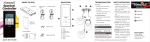
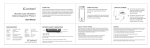
Product Layout
Limited Warranty
This limited warranty shall last for (six) months from
the date of original purchase, this limited warranty
applies only due to the manufacturing defect and
does not apply to any improper installation, unauthorized repair, alternation or modification of this
product.
Included in the Box
• 1 x Portable Power Station
• 1 x User Manual
• 1 x Micro USB Cable
Page 1
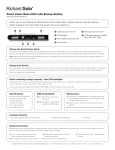
Indication of Light – Li-Po Charge Status
Back
1-Solid Green Light
<25% (Charging is required)
2-Solid Green Light
25~50%
3-Solid Green Light
50~75%
4-Solid Green Light
75~100%
LED Indicator
ON/OFF Button
USB Output Port
Micro USB Input Port
Micro USB Cable
Page 2
Portable Power Station
User Manual (V1.0)
15 October 2012
Charging the Power Station
Connect the included micro-USB cable to charge the
Portable Power Station from the USB port on your
computer or from a USB compatible wall charger.
Each LED flashes and remains solid as its corresponding capacity has been reached. All LEDs remain solid
when the unit is fully charged.
Charging your Device
Connect the USB cable included with your device to
Portable Power Station USB Output port and press
ON/OFF button to begin charging. When no connection is detected for more than 5 seconds, the
Portable Power Station shuts off automatically.
Maintenance
• Do not store in a depleted state as the battery
power cells can be damaged. Charge your
Portable Power Station at least once every 3
months when not in use.
• Keep the unit dry. Avoid damp conditions and
corrosive materials.
• Do not clean with harsh chemicals, soaps or
detergents.
Page 3
User Manual for
Portable Power Station
V 1.0