1
GT-P7300
user manual
Using this manual
Thank you for choosing this Samsung mobile device.
This device will provide you with high-quality mobile
communication and entertainment based on Samsung’s
exceptional technology and high standards.
This manual has been specially designed to guide you
through the functions and features of your device.
Read me first
Before using your device, read the entire manual and all
safety instructions to ensure safe and proper use.
●● The descriptions in this manual are based on the default
settings of your device.
●● The images and screenshots used in this manual may differ
from the actual product.
●● The contents of this manual may differ from the product,
or from software provided by service providers or carriers,
and are subject to change without prior notice. Access the
Samsung website (www.samsung.com/hk) for the latest
version of the manual.
●● Available features and additional services may vary by
device, software, or service provider.
●● Formatting and delivery of this manual is based on Android
operating systems and may vary depending on the user’s
operating system.
●● Applications on this device may perform differently from
comparable computer applications and may not include all
functions available in the computer version.
●● Applications and their functions may vary by region
or hardware specifications. Samsung is not liable for
performance issues caused by third-party applications.
●●
Using this manual
2
Samsung is not liable for performance issues or
incompatibilities caused by edited registry settings or
modified operating system software. Attempting to
customise the operating system may cause your device or
applications to work improperly.
●● You can upgrade your device’s software by accessing the
Samsung website (www.samsung.com/hk).
●● Software, audio, wallpapers, and images provided in this
device are licensed for limited use between Samsung
and their respective owners. Extracting and using
these materials for commercial or other purposes is an
infringement of copyright laws. Samsung is not liable for
such copyright infringement by users.
●● Please keep this manual for future reference.
●●
Instructional icons
Before you start, familiarise yourself with the icons used in this
manual:
Warning—situations that could cause injury to
yourself or others
Caution—situations that could cause damage to
your device or other equipment
Note—notes, usage tips, or additional information
►
Refer to—pages with related information; for
example: ► p. 12 (represents “refer to page 12”)
→
Followed by—the order of options or menus you
must select to perform a step; for example: In the
application list, select Settings → About device
(represents Settings, followed by About device)
Using this manual
3
Copyright
Copyright © 2012 Samsung Electronics
This manual is protected under international copyright laws.
No part of this manual may be reproduced, distributed,
translated, or transmitted in any form or by any means,
electronic or mechanical, including photocopying, recording,
or storing in any information storage and retrieval system,
without the prior written permission of Samsung Electronics.
Trademarks
SAMSUNG and the SAMSUNG logo are registered
trademarks of Samsung Electronics.
●● The Android logo, Google , Google Maps , Google
™
™
Mail™, YouTube™, Google Play™ Store, Google Latitude™,
and Google Talk™ are trademarks of Google, Inc.
●●
is a trademark of SRS Labs, Inc. WOW HD technology
is incorporated under licence from SRS Labs, Inc.
●● Bluetooth is a registered trademark of the Bluetooth SIG,
®
Inc. worldwide.
●● Windows Media Player is a registered trademark of the
®
Microsoft Corporation.
●● Wi-Fi , Wi-Fi Protected Setup , Wi-Fi Direct , Wi-Fi
®
™
™
CERTIFIED™, and the Wi-Fi logo are registered trademarks
of the Wi-Fi Alliance.
●● DivX , DivX Certified and
®
®
associated logos are trademarks
of Rovi Corporation or its
subsidiaries and are used under
licence.
●● All other trademarks and copyrights are the property of
their respective owners.
●●
Using this manual
4
ABOUT DIVX VIDEO
DivX® is a digital video format created by DivX, LLC, a
subsidiary of Rovi Corporation. This is an official DivX
Certified® device that plays DivX video. Visit www.divx.com
for more information and software tools to convert your files
into DivX videos.
ABOUT DIVX VIDEO-ON-DEMAND
This DivX Certified® device must be registered in order to play
purchased DivX Video-on-Demand (VOD) movies. To obtain
your registration code, locate the DivX VOD section in your
device setup menu. Go to vod.divx.com for more information
on how to complete your registration.
DivX Certified® to play DivX® video up to HD 720p, including
premium content.
May play DivX® video up to HD 1080p.
Using this manual
5
Contents
Assembling......................................................... 10
Unpack .................................................................................................. 10
Device layout ...................................................................................... 11
Keys . ....................................................................................................... 13
Insert the SIM or USIM card .......................................................... 13
Charge the battery ........................................................................... 14
Getting started................................................... 17
Turn on or off your device . ........................................................... 17
Use the touch screen ...................................................................... 18
Use motions ........................................................................................ 20
Lock or unlock the touch screen and the keys .................... 21
Get to know the Home screen .................................................... 21
Access applications . ........................................................................ 26
Launch multiple applications . .................................................... 28
Customise your device ................................................................... 28
Enter text .............................................................................................. 33
Web and GPS-based services............................. 39
Internet ................................................................................................. 39
Latitude ................................................................................................. 42
Maps ....................................................................................................... 43
Play Store . ............................................................................................ 44
Navigation ........................................................................................... 45
Local ....................................................................................................... 46
Pulse ....................................................................................................... 47
Readers Hub ....................................................................................... 47
Contents
6
Samsung Apps . ................................................................................. 48
YouTube ................................................................................................ 48
Communication.................................................. 50
Messages .............................................................................................. 50
Google Mail ......................................................................................... 51
Email . ..................................................................................................... 53
Talk .......................................................................................................... 55
Messenger ........................................................................................... 56
Google+ ................................................................................................ 56
Social Hub ............................................................................................ 57
Entertainment..................................................... 58
Camera .................................................................................................. 58
Video player ........................................................................................ 65
Gallery . .................................................................................................. 68
Photo editor ........................................................................................ 70
Music Player ........................................................................................ 71
Personal information......................................... 75
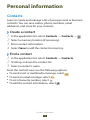
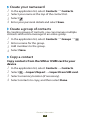
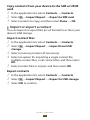
Contacts . .............................................................................................. 75
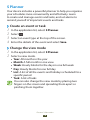
S Planner . ............................................................................................. 78
Memo . ................................................................................................... 79
Pen memo ........................................................................................... 80
Connectivity........................................................ 81
USB connections ............................................................................... 81
Wi-Fi ........................................................................................................ 83
Wi-Fi Direct .......................................................................................... 86
AllShare ................................................................................................. 87
Contents
7
Mobile network sharing ................................................................ 89
Bluetooth ............................................................................................. 91
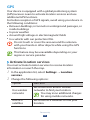
GPS . ........................................................................................................ 93
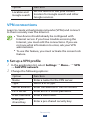
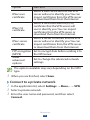
VPN connections .............................................................................. 94
Tools..................................................................... 96
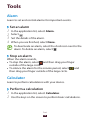
Alarm . .................................................................................................... 96
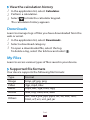
Calculator ............................................................................................. 96
Downloads .......................................................................................... 97
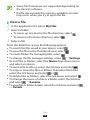
My Files . ................................................................................................ 97
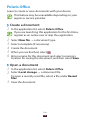
Polaris Office ....................................................................................... 99
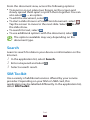
Search .................................................................................................. 100
SIM Toolkit . ........................................................................................ 100
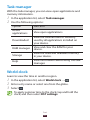
Task manager ................................................................................... 101
World clock ........................................................................................ 101
Settings............................................................. 102
Access the setting options . ........................................................ 102
Wi-Fi ...................................................................................................... 102
Bluetooth ........................................................................................... 102
Data usage . ....................................................................................... 102
More... .................................................................................................. 103
Sound .................................................................................................. 104
Display ................................................................................................. 105
Power saving .................................................................................... 105
Storage ................................................................................................ 106
Battery ................................................................................................. 106
Applications ...................................................................................... 106
Accounts and sync ......................................................................... 106
Location services ............................................................................ 107
Contents
8
Security ............................................................................................... 107
Language and input . .................................................................... 108
Back up and reset ........................................................................... 111
Dock ..................................................................................................... 112
Date and time . ................................................................................. 112
Accessibility . ..................................................................................... 112
Motion ................................................................................................. 113
Developer options ......................................................................... 113
About device .................................................................................... 114
Troubleshooting............................................... 115
Safety information........................................... 119
Contents
9
Assembling
Unpack
Check your product box for the following items:
●● Mobile device
●● Quick start guide
Use only Samsung-approved software. Pirated or illegal
software may cause damage or malfunctions that are
not covered by your manufacturer's warranty.
The items supplied with your device and available
accessories may vary depending on your region or
service provider.
●● You can buy additional accessories from your local
Samsung retailer.
●● The supplied items are designed only for your device
and may not be compatible with other devices.
●● Other accessories may not be compatible with your
device.
●●
Assembling
10
Device layout
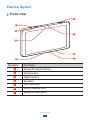
››Front view
5
1
2
6
3
4
7
4
Number
Function
1
Power/Reset/Lock key
2
Volume key
3
Light sensor
4
Speaker
5
SIM card slot
6
Front camera lens
7
Multifunction jack
Assembling
11
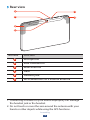
››Rear view
8
12
9
13
10
11
Number
Function
8
Microphone
9
Rear camera lens
10 Main antenna
11 Flash
12 Headset jack1
13 Wi-Fi/Bluetooth/GPS internal antenna2
1.Connecting a headset to your device improperly can damage
the headset jack or the headset.
2.Do not touch or cover the area around the antenna with your
hands or other objects while using the GPS functions.
Assembling
12
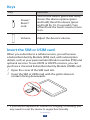
Keys
Key
Function
Power/
Reset1/
Lock
Turn on the device (press and hold);
Access the device options (press
and hold); Reset the device (press
and hold for 10-15 seconds); Turn
off and lock the touch screen or turn
it on.
Volume
Adjust the device’s volume.
Insert the SIM or USIM card
When you subscribe to a cellular service, you will receive
a Subscriber Identity Module (SIM) card, with subscription
details, such as your personal identification number (PIN) and
optional services. To use UMTS or HSDPA services, you can
purchase a Universal Subscriber Identity Module (USIM) card.
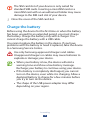
1 Open the cover of the SIM card slot.
2 Insert the SIM or USIM card with the gold-coloured
contacts facing downwards.
1.If your device experiences fatal errors, hanging, or freezing, you
may need to reset the device to regain functionality.
Assembling
13
The SIM card slot of your device is only suited for
standard SIM cards. Inserting a microSIM card or a
microSIM card with an unauthorised holder may cause
damage to the SIM card slot of your device.
3 Close the cover of the SIM card slot.
Charge the battery
Before using the device for the first time or when the battery
has been unused for an extended period, you must charge
the battery. Charge the battery only with a charger. You
cannot charge the battery with a USB cable.
You cannot replace the battery in the device. If you have
problems with the battery or need it replaced, take the device
to a Samsung Service Centre.
Use only Samsung-approved chargers and cables.
Unapproved chargers or cables may cause batteries to
explode or damage your device.
When your battery is low, the device will emit a
warning tone and show a low battery message.
Recharge your battery to continue using your device.
●● If the battery is completely discharged, you cannot
turn on the device, even while it is charging. Allow a
depleted battery to charge for a few minutes before
you try to turn on the device.
●● The shape of the USB power adapter may differ
depending on your region.
●●
Assembling
14
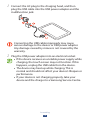
1 Connect the AC plug to the charging head, and then
plug the USB cable into the USB power adapter and the
multifunction jack.
Connecting the USB cable improperly may cause
serious damage to the device or USB power adapter.
Any damage caused by misuse is not covered by the
warranty.
2 Plug the USB power adapter into an electrical socket.
If the device receives an unstable power supply while
charging, the touch screen may not function. If this
happens, unplug the USB cable from the device.
●● The device may heat up while charging. This is
normal and should not affect your device’s lifespan or
performance.
●● If your device is not charging properly, take your
device and the charger to a Samsung Service Centre.
●●
Assembling
15
3 When the battery is fully charged, first unplug the USB
cable from the device, and then unplug the USB power
adapter from the electrical socket.
To save energy, unplug the USB power adapter when
not in use. The USB power adapter does not have a
power switch, so you must unplug the USB power
adapter from the electrical socket when not in use to
avoid wasting power. The device should remain close to
the electrical socket while charging.
››Reduce the battery consumption
Your device provides options that help you save battery
power. By customising these options and deactivating
features in the background, you can use the device longer
between charges:
●● Activate Power saving mode.
●● When you are not using your device, switch to Sleep mode
by pressing the Power key.
●● Close unnecessary applications with the task manager.
●● Deactivate the Bluetooth feature.
●● Deactivate the Wi-Fi feature.
●● Deactivate auto-syncing of applications.
●● Decrease the backlight time.
●● Decrease the brightness of the display.
Assembling
16
Getting started
Turn on or off your device
To turn on your device, press and hold the Power key.
If you are turning on your device for the first time, follow
the on-screen instructions to set up your device. You
must sign in to Google or create a Google account to
use applications that interact with the Google server.
To turn off your device, press and hold the Power key, and
then select Power off → OK.
●● Follow all posted warnings and directions from
approved personnel in areas where the use of wireless
devices is restricted, such as aeroplanes and hospitals.
●● To use only your device’s non-network features,
switch to Flight mode. ► p. 103
Getting started
17
Use the touch screen
Your device’s touch screen lets you easily select items or
perform functions. Learn basic actions for using the touch
screen.
●● Do not press the touch screen with your fingertips,
or use sharp tools on the touch screen. Doing so may
damage the touch screen or cause it to malfunction.
●● Do not allow the touch screen to come into contact
with other electrical devices. Electrostatic discharges
can cause the touch screen to malfunction.
●● Do not allow the touch screen to come into contact
with liquids. The touch screen may malfunction in
humid conditions or when exposed to liquids.
●● Leaving the touch screen idle for extended periods
may result in afterimages (screen burn-in) or ghosting.
Turn off the touch screen when you do not use the
device.
For optimal use of the touch screen, remove the
screen protection film before using your device.
●● Your touch screen has a layer that detects small
electrical charges emitted by the human body. For
best performance, tap the touch screen with your
fingertip. The touch screen will not react to touches
from sharp objects, such as a stylus or pen.
●●
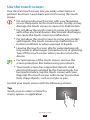
Control your touch screen with the following actions:
Tap
Touch once to select or launch a
menu, option, or application.
Getting started
18
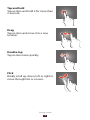
Tap and hold
Tap an item and hold it for more than
2 seconds.
Drag
Tap an item and move it to a new
location.
Double-tap
Tap an item twice quickly.
Flick
Briskly scroll up, down, left, or right to
move through lists or screens.
Getting started
19
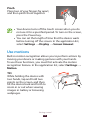
Pinch
Place two of your fingers far apart,
and then pinch them together.
Your device turns off the touch screen when you do
not use it for a specified period. To turn on the screen,
press the Power key.
●● You can set the length of time that the device waits
before turning off the screen. In the application list,
select Settings → Display → Screen timeout.
●●
Use motions
Built-in motion recognition allows you to perform actions by
moving your device or making gestures with your hands.
To use these functions, you must first activate the motion
recognition feature. In the application list, select Settings →
Motion.
Tilt
While holding the device with
two hands, tap and hold two
points on the screen, and then
tilt the device back and forth to
zoom in or out when viewing
images in Gallery or browsing
webpages.
Getting started
20
Pan
While holding an item, slide the
device to the left or right to move
the item to another page on the
Home screen or the application
list.
Lock or unlock the touch screen and the
keys
When you do not use the device for a specified period, your
device turns off the touch screen and locks the touch screen
and the keys automatically to prevent unintended operations.
To lock the touch screen and the keys manually, press the
Power key.
To unlock them, turn on the screen by pressing the Power
key, tap anywhere on the screen, and then drag your finger
outside of the large circle.
You can activate the screen lock feature to prevent
others from using or accessing your personal data and
information saved in your device. ► p. 30
Get to know the Home screen
From the Home screen, you can view your device’s status and
access applications.
The Home screen has multiple panels. Scroll left or right to
view the panels on the Home screen. You can also select one
of the dots at the top of the screen to move directly to the
corresponding panel.
Getting started
21
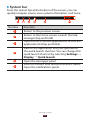
››System bar
From the system bar at the bottom of the screen, you can
quickly navigate screen, view system information, and more.
6
Number
Function
1
Return to the previous screen.
2
Return to the Home screen; Launch the task
manager (tap and hold).
3
Open the list of recent applications; Access the
application list (tap and hold).
4
Launch the application that you specified as
the quick launch shortcut. You can change this
quick launch shortcut by selecting Settings →
Display → Quick launch.
5
Open the mini apps panel.
6
View the current time and your device’s status;
Open the notifications panel.
Getting started
22
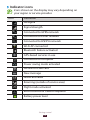
››Indicator icons
Icons shown on the display may vary depending on
your region or service provider.
Icon
Definition
No signal
Signal strength
Connected to GPRS network
Connected to EDGE network
Connected to HSDPA network
Wi-Fi AP connected
Bluetooth feature activated
GPS-based services in use
Connected to computer
Power saving mode activated
No SIM or USIM card
New message
Alarm activated
Roaming (outside of service area)
Flight mode activated
Error occurred or caution required
Battery power level
Getting started
23
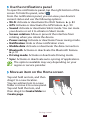
››Use the notifications panel
To open the notifications panel, tap the right bottom of the
screen. To hide the panel, select .
From the notifications panel, you can view your device’s
current status and use the following options:
●● Wi-Fi: Activate or deactivate the Wi-Fi feature. ► p. 83
●● GPS: Activate or deactivate the GPS feature. ► p. 93
●● Sound: Activate or deactivate Silent mode. You can mute
your device or set it to vibrate in Silent mode.
●● Screen rotation: Allow or prevent the interface from
rotating when you rotate the device.
●● Power saving: Activate or deactivate Power saving mode.
●● Notification: Hide or show notification icons.
●● Mobile data: Activate or deactivate the data connection.
●● Bluetooth: Activate or deactivate the Bluetooth feature.
► p. 91
●● Driving mode: Activate or deactivate Driving mode.
●● Sync: Activate or deactivate auto-syncing of applications.
The options available may vary depending on your
region or service provider.
››Move an item on the Home screen
Tap and hold an item, and then
drag it to a new location.
You can add an item to a new
folder or move it to a new panel.
Tap and hold the item, and
then drag it to Create folder or
Create page.
Getting started
24
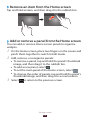
››Remove an item from the Home screen
Tap and hold an item, and then drag it to the rubbish bin.
››Add or remove a panel from the Home screen
You can add or remove Home screen panels to organise
widgets.
1 On the Home screen, place two fingers on the screen and
2
3
pinch them together to switch to Edit mode.
Add, remove, or reorganise panels:
●● To remove a panel, tap and hold the panel’s thumbnail
image, and then drag it to the rubbish bin.
●● To add a new panel, select
.
●● To set the main panel of the Home screen, select
.
●● To change the order of panels, tap and hold the panel’s
thumbnail image, and then drag it to a new location.
to return to the previous screen.
Select
Getting started
25
››Use widgets
Widgets are small applications that provide convenient
functions and information on your Home screen.
The widgets available may vary depending on your
region or service provider.
1 In the application list, select Widgets to open the widget
2
3
panel.
Scroll left or right on the widget panel to find a widget.
Tap and hold a widget to add it to the Home screen.
Access applications
Launch applications and take full advantage of features on
your device. You can reorganise the application list to match
your preferences, or download applications from the Internet
to enhance your device’s functionality.
1 On the Home screen, select
2
3
4
to access the application
list.
Scroll left or right to another screen.
You can also select one of the dots at the bottom of the
screen to move directly to the corresponding screen.
Select an application.
Select
to return to the previous screen. Select
to
return to the Home screen.
●● You can add an application shortcut to the Home
screen by tapping and holding an icon in the
application list.
●● If you rotate the device while using some features, the
interface will rotate as well. To prevent the interface
from rotating, select Settings → Display → Autorotate screen.
Getting started
26
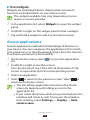
››Organise applications
You can change the order of applications in the application
list or group them into categories.
1 In the application list, select → Edit.
2 Tap and hold an application icon.
3 Organise applications:
To move the application, drag it to a new location.
To add the application to a new folder, drag it to Create
folder.
●● To move the application to a new panel, drag it to
Create page.
●● To uninstall the application, drag it to Uninstall.
Select Save.
●●
●●
4
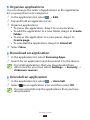
››Download an application
1 In the application list, select Samsung Apps.
2 Search for an application and download it to the device.
To install applications that you downloaded from
other sources, you must select Settings → Security →
Unknown sources.
››Uninstall an application
1 In the application list, select → Uninstall.
2 Select on an application icon and then select OK.
You can uninstall only the applications that you have
downloaded.
Getting started
27
››Access recently-used applications
1 Select
2
to view the applications you have accessed
recently.
Select an application.
Launch multiple applications
Your device allows you to multitask by running multiple
applications at the same time. To launch multiple
while using an application. Then
applications, select
select another application to launch from the Home screen.
››Manage applications
You can manage multiple applications with the task manager.
1 In the application list, select Task manager → Active
2
applications.
The task manager launches and shows active applications.
Control active applications:
●● To switch applications, select one from the list.
●● To close an application, select End.
●● To close all active applications, select End all.
Customise your device
Get more from your device by changing settings to match
your preferences.
››Change the display language
1 In the application list, select Settings → Language and
2
input → Language.
Select a language.
Getting started
28
››Turn on or off the touch tones
In the application list, select Settings → Sound → Touch
sounds.
››Adjust the device’s volume
1 Press the Volume key up or down.
2 Select and drag the sliders to adjust the volume level
for each sound.
››Switch to Silent mode
To mute or unmute your device, do one of the following:
●● Tap the right bottom of the screen to open the notifications
panel, and then select Sound.
●● Press and hold the Power key, and then select
or .
››Select a wallpaper for the Home screen
1 On the Home screen, tap and hold the empty area.
2 Select Set wallpaper for → Home screen → an image
folder → an image.
››Change the display font
1 In the application list, select Settings → Display → Font
2
style.
Select a font.
››Adjust the brightness of the display
Your device includes a light sensor, which can detect the
level of ambient light and adjust the brightness of the display
automatically. You can also manually set the brightness of the
display.
The brightness of the display will affect how quickly the
device consumes battery power.
Getting started
29
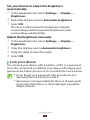
Set your device to adjust the brightness
automatically
1 In the application list, select Settings → Display →
2
3
Brightness.
Select the tick box next to Automatic brightness.
Select OK.
The device will increase the brightness in bright
surroundings and decrease the brightness in dim
surroundings automatically.
Adjust the brightness manually
1 In the application list, select Settings → Display →
2
3
4
Brightness.
Clear the tick box next to Automatic brightness.
Drag the slider to the left or right.
Select OK.
››Lock your device
You can lock your device with a pattern, a PIN, or a password.
Once the screen lock is enabled, your device will require your
password each time you turn it on or unlock the touch screen.
●● If you forget your password, take your device to a
Samsung Service Centre to reset it.
●● Samsung is not responsible for the loss of passwords
or private information, or other damages caused by
illegal software.
Getting started
30
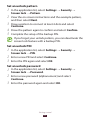
Set an unlock pattern
1 In the application list, select Settings → Security →
2
3
4
5
Screen lock → Pattern.
View the on-screen instructions and the example pattern,
and then select Next.
Draw a pattern to connect at least 4 dots and select
Continue.
Draw the pattern again to confirm and select Confirm.
Complete the setup of the backup PIN.
If you forget your unlock pattern, you can deactivate the
screen lock feature with a backup PIN.
Set an unlock PIN
1 In the application list, select Settings → Security →
2
3
Screen lock → PIN.
Enter a new PIN and select Continue.
Enter the PIN again and select OK.
Set an unlock password
1 In the application list, select Settings → Security →
2
3
Screen lock → Password.
Enter a new password (alphanumeric) and select
Continue.
Enter the password again and select OK.
Getting started
31
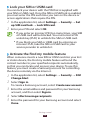
››Lock your SIM or USIM card
You can lock your device with the PIN that is supplied with
your SIM or USIM card. Once the SIM or USIM lock is enabled,
you must enter the PIN each time you turn on the device or
access applications that require the PIN.
1 In the application list, select Settings → Security → Set
2
up SIM card lock → Lock SIM card.
Enter your PIN and select OK.
●● If you enter an incorrect PIN too many times, your SIM
or USIM card will be blocked. You must enter a PIN
unlock key (PUK) to unblock the SIM or USIM card.
●● If you block your SIM or USIM card by entering an
incorrect PUK, take the SIM or USIM card to your
service provider to unblock it.
››Activate the Find my mobile feature
When someone inserts a new SIM or USIM card into your lost
or stolen device, the Find my mobile feature will send the
contact number to your specified recipients automatically,
so that you can locate and recover your device. To use this
feature, you must create a Samsung account for controlling
the device remotely via the Internet.
1 In the application list, select Settings → Security → SIM
2
3
4
5
Change Alert.
Select Sign in.
To create a Samsung account, select Create new account.
Enter the email address and password for your Samsung
account, and then select Sign in.
Select Alert message recipients.
Enter the password for your Samsung account and select
Done.
Getting started
32
6 Select the recipient field and add recipients:
Enter phone numbers manually, including the country
code and the + symbol.
●● Select phone numbers from your contact list by
selecting .
Enter the text message that will be sent to the recipients.
Select Done.
●●
7
8
Enter text
You can enter text by speaking words into the microphone,
by selecting characters on the virtual keypad, or by writing on
the screen.
Text entry is not supported in some languages. To enter
text, you must change the input language to one of the
supported languages.
››Change the text input method
Select
on the system bar and select a text input method.
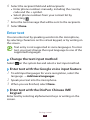
››Enter text with the Google voice input feature
1 To add input languages for voice recognition, select the
2
3
language → Add more languages.
Speak your text into the microphone.
When you are finished, select Done.
››Enter text with the DioPen Chinese IME
keypad
Enter text by selecting alphanumeric keys or writing on the
screen.
Getting started
33
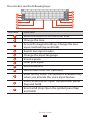
You can also use the following keys:
Number
Function
1
Move the cursor to the next text field.
2
Change the case.
3
Access the keypad settings; Change the text
input method (tap and hold).
4
Switch text input modes.
5
Change the input language.
6
Insert a space.
7
Clear your input.
8
Start a new line.
9
Add an item from the clipboard.
10 Enter text by voice. This feature is available only
when you activate the voice input feature.
11 Insert an emoticon; Open the emoticon panel
(tap and hold).
12 Insert a full stop; Open the symbol panel (tap
and hold).
Getting started
34
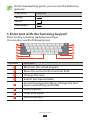
On the handwriting panel, you can use the following
gestures:
Function
Gesture
Space
Enter
Backspace
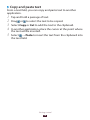
››Enter text with the Samsung keypad
Enter text by selecting alphanumeric keys.
You can also use the following keys:
Number
Function
1
Minimise the virtual keypad.
2
Move the cursor to the next text field.
3
Change the case.
4
Switch text input modes.
5
Access the keypad settings; Change the text
input method (tap and hold).
6
Insert a space.
7
Clear your input.
8
Start a new line.
Getting started
35
Number
Function
9
Add an item from the clipboard.
10 Switch to Handwriting mode.
11 Insert an emoticon; Open the emoticon panel
(tap and hold).
››Enter text with the Swype keypad
1 Tap the first character of a word, and then drag your finger
2
to the second character without lifting your finger from
the screen.
Continue until you have finished spelling the word.
3 Lift your finger.
4 When the device recognises the correct word, select
5
to insert a space. If the device does not recognise the
correct word, select an alternative word from the list that
appears.
Repeat steps 1-4 to complete your text.
●● You can also tap the keys to enter text.
●● You can tap and hold a key to enter characters that
appear above the key. When you tap and hold a key
until the character list appears, you can enter special
characters, symbols, and numbers.
Getting started
36
You can also use the following keys:
Number
Function
1
Change the input language.
2
Move the cursor to the next text field.
3
Change the case.
4
Enter the recommended word or add a new
word to the dictionary; Access the keypad
settings (tap and hold).
5
Switch text input modes.
6
Clear your input.
7
Start a new line.
8
Minimise the virtual keypad.
9
Enter text by voice.
10 Insert a space.
Getting started
37
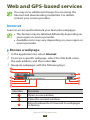
››Copy and paste text
From a text field, you can copy and paste text to another
application.
1 Tap and hold a passage of text.
2 Drag or to select the text to be copied.
3 Select Copy or Cut to add the text to the clipboard.
4 In another application, place the cursor at the point where
5
the text will be inserted.
Select → Paste to insert the text from the clipboard into
the text field.
Getting started
38
Web and GPS-based services
You may incur additional charges for accessing the
Internet and downloading media files. For details,
contact your service provider.
Internet
Learn to access and bookmark your favourite webpages.
●● This feature may be labelled differently depending on
your region or service provider.
●● Available icons may vary depending on your region or
service provider.
››Browse a webpage
1 In the application list, select Internet.
2 To access a specific webpage, select the URL field, enter
3
the web address, and then select Go.
Navigate webpages with the following keys:
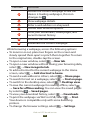
10
Number
Function
1
Open a new window.
2
Close the current window.
3
Move backwards or forwards to webpages
in history.
Web and GPS-based services
39
Number
Function
4
Reload the current webpage. While the
device is loading webpages, this icon
changes to .
5
View webpage details.
6
Enter a web address or a keyword.
7
Access web browser options.
8
View your bookmarks, saved pages, and
recent Internet history.
9
Activate the URL field.
10 Bookmark the current webpage.
While browsing a webpage, access the following options:
●● To zoom in or out, place two fingers on the screen and
slowly spread them apart or pinch them together. To return
to the original size, double-tap the screen.
●● To open a new window, select
→ New tab.
●● To open a new window without saving your browsing data,
select → New incognito tab.
●● To add a shortcut for the current webpage to the Home
screen, select → Add shortcut to home.
●● To send a web address to others, select
→ Share page.
●● To search for text on a webpage, select
→ Find on page.
●● To switch to the desktop view, select
→ Desktop view.
●● To save the current webpage for reading offline, select
→ Save for offline reading. You can view the saved pages
by selecting → Saved pages.
●● To view your download history, select
→ Downloads.
●● To print the webpage via Wi-Fi or USB, select
→ Print.
Your device is compatible only with some Samsung
printers.
●● To change the browser settings, select
→ Settings.
Web and GPS-based services
40
››Search for information by voice
This feature may be unavailable depending on your
region or service provider.
1 In the application list, select Internet.
2 Select the URL field.
3 Select and say a keyword into your device’s microphone.
4
The device searches for webpages related to the keyword.
Select a search result.
››Bookmark your favourite webpage
If you know the address of a webpage, you can add a
bookmark manually.
1 In the application list, select Internet.
2 Enter a web address or navigate to a webpage.
3 Select → .
4 Enter a name for the bookmark and select OK.
To view your bookmarks, select → Bookmarks. From
the bookmark list, tap and hold a bookmark to access the
following options:
●● To open the webpage in the current window, select Open.
●● To open a new window, select Open in new tab.
●● To edit bookmark details, select Edit bookmark.
●● To add the bookmark shortcut to the Home screen, select
Add shortcut to home.
●● To send the address of the current webpage to others,
select Share link.
●● To copy the address of the current webpage, select Copy
link URL.
Web and GPS-based services
41
●●
●●
To delete the bookmark, select Delete bookmark.
To set the webpage as your browser’s homepage, select Set
as homepage.
››Download a file from the Internet
When you download files or applications from the Internet,
your device saves them to the internal memory.
Files you download from the Internet can include
viruses that will damage your device. To reduce this risk,
only download files from sources you trust.
Some media files include Digital Rights Management
to protect copyrights. This protection may prevent you
from downloading, copying, modifying, or transferring
some files.
1 In the application list, select Internet.
2 Search for a file or application and download it to the
device.
››View your recent history
1 In the application list, select Internet →
2 Select a webpage to access.
→ History.
Latitude
Learn to share your location with your friends and view their
locations with the Google Latitude™ location service.
This feature may be unavailable depending on your
region or service provider.
Web and GPS-based services
42
1 In the application list, select Latitude.
2
3
4
The device joins Latitude automatically.
Select → Add friends → an option.
Select a friend, or enter an email address and select Add
friends.
Select Yes.
When your friend accepts your invitation, you can share
locations.
Maps
Learn to use the Google Maps™ mapping service to find your
location, search for places, and get directions.
●● This feature may be unavailable depending on your
region or service provider.
●● You must activate location services to find your
location and search the map. ► p. 93
››Search for a location
1 In the application list, select Maps.
2
3
4
The map will show your current location.
Select Search Maps.
Enter a keyword for the location and select
To search for a location by voice, select .
Select the location to view its details.
Web and GPS-based services
43
.
While viewing the map, use the following options:
●● To zoom in or out, place two fingers on the screen and
slowly spread them apart or pinch them together.
●● To view the most recent search result, select Search
Results.
●● To view your current location, select
. To switch to the
compass view of the map that changes orientation when
you move the device, select .
●● To search for a place nearby, select
.
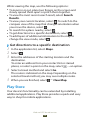
●● To get directions to a specific destination, select
.
●● To add layers of additional information to the map or
change the view mode, select .
››Get directions to a specific destination
1 In the application list, select Maps.
2 Select .
3 Enter the addresses of the starting location and the
4
5
destination.
To enter an address from your contact list or starred
places, or select a point on the map, select → an option.
Select a travel method and select Go.
The route is indicated on the map. Depending on the
selected travel method, you may see multiple routes.
When you are finished, select → Clear Map.
Play Store
Your device’s functionality can be extended by installing
additional applications. Play Store provides a quick and easy
way to shop for mobile applications.
Web and GPS-based services
44
This feature may be unavailable depending on your
region or service provider.
●● Your device will save user files from downloaded
applications to the internal memory.
●●
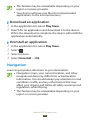
››Download an application
1 In the application list, select Play Store.
2 Search for an application and download it to the device.
When the download is complete, the device will install the
application automatically.
››Uninstall an application
1 In the application list, select Play Store.
2 Select .
3 Select an item.
4 Select Uninstall → OK.
Navigation
Learn to get spoken directions to your destination.
●● Navigation maps, your current location, and other
navigational data may differ from actual location
information. You should always pay attention to road
conditions, traffic, and any other factors that may
affect your driving and follow all safety warnings and
regulations while driving.
●● This feature may be unavailable depending on your
region or service provider.
Web and GPS-based services
45
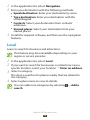
1 In the application list, select Navigation.
2 Enter your destination with the following methods:
Speak destination: Enter your destination by voice.
Type destination: Enter your destination with the
virtual keypad.
●● Contacts: Select your destination from contacts’
addresses.
●● Starred places: Select your destination from your
starred places.
Install the required software, and then use the navigation
features.
●●
●●
3
Local
Learn to search for business and attractions.
This feature may be unavailable depending on your
region or service provider.
1 In the application list, select Local.
2 If you want to search for businesses or attractions near a
3
4
specific location, select your location → Enter an address.
Select a category.
The device searches for places nearby that are related to
the category.
Select a place name to view its details.
You can add more categories by selecting → Add a
search.
Web and GPS-based services
46
Pulse
Learn to read news articles on your device and add feeds for
your favourite news topics.
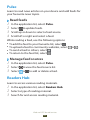
››Read feeds
1 In the application list, select Pulse.
2 Select to update feeds.
3 Scroll up or down to select a feed source.
4 Scroll left or right and select a feed.
While reading a feed, use the following options:
●● To add the feed to your favourite list, select
.
●● To upload a feed to community websites, select
●● To send a feed to others, select
.
●● To return to the feed list, select
.
››Manage feed sources
1 In the application list, select Pulse.
2 Select to view the feed source list.
3 Select or to add or delete a feed.
Readers Hub
Learn to access various reading materials.
1 In the application list, select Readers Hub.
2 Select a type of reading material.
3 Search for and access reading material.
Web and GPS-based services
47
or
.
Samsung Apps
Samsung Apps allows you to easily download a wide range of
applications and updates for your device. With fully optimised
applications from Samsung Apps, your device becomes even
smarter. Explore the useful applications on offer and enhance
your mobile life.
1 In the application list, select Samsung Apps.
2 Search for and download applications to the device.
This feature may be unavailable depending on your
region or service provider.
●● For details, please visit www.samsungapps.com or
refer to the Samsung Apps leaflet.
●●
YouTube
Learn to view and upload videos via the YouTube™ video
sharing service.
This feature may be unavailable depending on your
region or service provider.
››Play a video
1 In the application list, select YouTube.
2 Select a video.
3 Select to view a full screen.
Web and GPS-based services
48
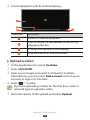
4 Control playback with the following keys:
4
Number
Function
1
Pause or resume playback.
2
Scan forwards or backwards in the file by
dragging the bar.
3
Change the quality of the display.
4
Play the video on the full screen.
››Upload a video
1 In the application list, select YouTube.
2 Select ACCOUNT.
3 Select your Google account if it is linked to YouTube.
4
Alternatively, you can select Add account and set up an
account to sign in to YouTube.
Select → a video.
If you are uploading a video for the first time, select a
network type to upload a video.
5 Enter the details of the upload and select Upload.
Web and GPS-based services
49
Communication
Messages
Learn to create and send text (SMS) or multimedia (MMS)
messages, and view or manage messages that you have sent
or received.
You may incur additional charges for sending or
receiving messages while you are outside your home
service area. For details, contact your service provider.
››Send a text message
1 In the application list, select Messaging →
2 Add recipients:
.
Enter phone numbers manually and separate them with
a semicolon or a comma.
●● Select phone numbers from your contact list by
selecting .
Select the text field and enter your message text.
To insert emoticons, select → Insert smiley.
To send the message, select .
●●
3
4
››Send a multimedia message
1 In the application list, select Messaging →
2 Add recipients:
.
Enter phone numbers or email addresses manually and
separate them with a semicolon or a comma.
●● Select phone numbers or email addresses from your
contact list by selecting .
●●
Communication
50
When you enter an email address, the device will
convert the message to a multimedia message.
3 Select the text field and enter your message text.
4
5
6
To insert emoticons, select → Insert smiley.
Select and attach a file.
Select → Add subject and enter a subject.
To send the message, select .
››View a text or multimedia message
1 In the application list, select Messaging.
2
3
Your messages are grouped by contact as a message
thread.
Select a contact.
Select a message to view more details.
Google Mail
Learn to send or view email messages via the Google Mail™
webmail service.
●● This feature may be unavailable depending on your
region or service provider.
●● This feature may be labelled differently depending on
your region or service provider.
››Send an email message
1 In the application list, select Gmail → .
2 Select the recipient field and enter an email address.
3 Select the subject field and enter a subject.
4 Select the text field and enter your email text.
Communication
51
5 Select and attach a file.
6 To send the message, select SEND.
If you are offline or outside your service area, the
message will be held in the message thread until you
are online and inside your service area.
››View an email message
1 In the application list, select Gmail.
2 Select to update the message list.
3 Select an email message.
From the message view, use the following options:
●● To move to the next or previous message, scroll right or left.
●● To reply to the message, select
.
●● To reply to the message and include all recipients, select
.
●● To forward the message to others, select
.
●● To add the message to the favourites list, select
.
●● To view an attachment, select VIEW. To save it to your
device, select SAVE.
●● To search for a message, select
.
●● To archive the message, select .
●● To delete the message, select .
●● To add a label to the message, select
.
●● To mark the message as unread, select → Mark unread.
●● To mark the message as important, select → Mark as
important.
●● To hide the message, select → Mute. To view hidden
messages, select All mail from the label list.
●● To add the message to the spam list, select → Report
spam.
●● To update the message list, select → Refresh.
Communication
52
To customise the settings for each label, select →
Manage labels.
●● To change the email settings, select → Settings.
The options available may vary depending on the email
account or device’s orientation.
●●
Email
Learn to send or view email messages via your personal or
company email account.
››Set up an email account
1 In the application list, select Email.
2 Enter your email address and password.
3 Select Next. To enter account details manually, select
4
Manual setup.
Follow the on-screen instructions.
When you are finished setting up the email account, email
messages will be downloaded to your device. If you have
created two or more accounts, you can switch between them.
Select an account name at the top of the screen, and then
select the account from which you want to retrieve messages.
››Send an email message
1 In the application list, select Email →
2 Add recipients:
Enter email addresses manually and separate them with
a semicolon or a comma.
●● Select email addresses from your contact list by
selecting .
Select the subject field and enter a subject.
●●
3
.
Communication
53
4 Select the text field and enter your email text.
5 Select and attach a file.
6 To send the message, select .
If you are offline or outside your service area, the
message will be held in the message thread until you
are online and inside your service area.
››View an email message
1 In the application list, select Email.
2 Select to update the message list.
3 Select an email message.
From the message view, use the following options:
●● To search for a message, select
.
●● To reply to the message, select
.
●● To reply to the message and include all recipients, select
.
●● To forward the message to others, select
.
●● To delete the message, select
.
●● To mark the message as unread, select
→ Mark as
unread.
●● To move the message to another folder, select
→ Move.
●● To save the message to your device, select
→ Save
email. The message will be saved in My Files → Root →
Saved Email.
●● To sort messages, select
→ Sort by.
●● To change the view mode of the message list, select
→
View mode.
●● To change the font colour of messages, select
→ Font
colour.
●● To change the background colour of messages, select
→
Background colour.
Communication
54
To print the message via Wi-Fi or USB, select → Print.
Your device is compatible only with some Samsung
printers.
●● To delete all messages, select
→ Delete all.
●● To change the email settings, select
→ Settings.
●● To save an attachment to your device, select the
attachment tab → .
The options available may vary depending on the email
account or device’s orientation.
●●
Talk
Learn to send and receive instant messages to friends and
family with the Google Talk™ instant messaging service.
This feature may be unavailable depending on your
region or service provider.
››Set your status
1 In the application list, select Talk.
2 Select a Google account.
3 Customise your status, image, and message.
››Add a contact to your friend list
1 In the application list, select Talk → .
2 Enter a friend’s email address, and then select DONE.
When your friend accepts the invitation, he or she is
added to your friend list.
Communication
55
››Start a conversation
1 In the application list, select Talk.
2 Select a contact from the friend list.
3
4
The conversation screen opens.
Enter and send your message.
●● To add more contacts to the conversation, select →
Add to chat.
●● To use video chat, select
.
●● To use voice chat, select .
Select → End chat to end the conversation.
Messenger
Learn to send and receive instant messages from friends
and family with the Google+ messenger instant messaging
service.
1 In the application list, select Messenger.
If you are launching this application for the first time,
follow the on-screen instructions to complete the
account setup.
2 Enter and send your message.
Google+
Learn to access Google’s social network service. You can
create groups to send and receive instant messages and
upload your photos.
1 In the application list, select Google+.
If you are launching this application for the first time,
follow the on-screen instructions to complete the
account setup.
2 Select a social network feature.
Communication
56
Social Hub
Social Hub allows you to access all types of messages from
one location. You can view and respond to messages without
opening other applications and switch social accounts easily.
Visit socialhub.samsungapps.com for more details.
This feature may be unavailable depending on your
region or service provider.
1 In the application list, select Social Hub.
2 Select a message type.
3 View or respond to messages directly in Social Hub.
Communication
57
Entertainment
Camera
Learn how to take and view photos and videos.
●● The camera turns off automatically when you do not
use it for a specified period.
●● The memory capacity may differ depending on the
scene or shooting conditions.
››Take a photo
1 In the application list, select Camera.
2 Aim the camera lens at the subject and make any
necessary adjustments.
Entertainment
58
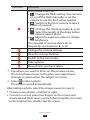
Number
Function
1
Use camera shortcuts.
●●
: Change the flash setting; You can turn
on or off the flash manually, or set the
camera to use the flash when needed.
●●
: Switch to the front camera to take a
photo of yourself.
●●
: Change the shooting mode. ► p. 60
●●
: Select the length of the delay before
the camera takes a photo.
●●
: Adjust the exposure value to change
the brightness.
You can add or remove shortcuts to
frequently-used options. ► p. 65
2
Change the camera settings.
3
View the storage location.
4
Switch to the camcorder.
5
Take a photo.
6
View photos you have taken.
3 Tap where you want to focus on the preview screen.
4
The focus frame moves to the place you tapped and
changes to green when the subject is in focus.
Select to take a photo.
The photo is saved automatically.
After taking a photo, select the image viewer to view it.
●● To view more photos, scroll left or right.
●● To zoom in or out, place two fingers on the screen and
slowly spread them apart or pinch them together. To return
to the original size, double-tap the screen.
Entertainment
59
To view the photo on a DLNA certified device, select .
To send the photo to others or share it, select .
●● To delete the photo, select
.
●● To start a slide show, select
. Tap the screen to stop the
slide show.
●● To add the photo to the clipboard, select
→ Copy to
clipboard.
●● To crop a section from the image, select
→ Crop.
●● To rotate the photo anti-clockwise, select
→ Rotate left.
●● To rotate the photo clockwise, select
→ Rotate right.
●● To set the photo as your wallpaper or a contact image,
select → Set picture as.
●● To print the photo via Wi-Fi or USB, select
→ Print. Your
device is compatible only with some Samsung printers.
●● To edit the photo with the image editor, select
→ Edit.
► p. 70
●● To use motion recognition, select
→ Motion.
●● To change the name of a file, select
→ Rename.
●● To view photo details, select
→ Details.
●●
●●
››Change the shooting mode
You can take photos with various shooting modes. To change
the shooting mode, select → Shooting mode → an
option.
Option
Function
Smile shot
Set the device to recognise people’s faces
and help you take photos of them when
they smile.
Panorama
Take panoramic photos.
Action shot
Take shots of a moving subject and then
combine them into a single photo that
shows the action.
Entertainment
60
››Customise camera settings
Before taking a photo, select
options:
to access the following
Option
Function
Edit shortcuts
Edit shortcuts to frequently-used options.
Self portrait
Switch to the front camera to take a photo
of yourself.
Flash
Change the flash setting: You can turn on
or off the flash manually, or set the camera
to use the flash when needed.
Shooting
mode
Change the shooting mode. ► p. 60
Scene mode
Change the scene mode.
Exposure value
Adjust the exposure value to change the
brightness.
Focus mode
Select a focus mode. You can take closeup photos, or set the camera to focus on
the subject automatically.
Timer
Select the length of the delay before the
camera takes a photo.
Effects
Apply a special effect.
Resolution
Select a resolution option.
White balance
Adjust the colour balance according to the
lighting conditions.
Metering
Select a type of exposure metering.
Outdoor
visibility
Set to improve the contrast of the display
in bright sunlight.
Guidelines
Set to view the grid lines on the preview
screen.
Entertainment
61
Option
Function
GPS tag
Set the camera to include location
information for your photos.
●● To improve GPS reception, avoid
shooting in locations where the
signal may be obstructed, such
as between buildings or in lowlying areas, or in poor weather
conditions.
●● Your location may appear on your
photos when you upload them
to the Internet. To avoid this,
deactivate the GPS tag setting.
Reset
Reset camera settings.
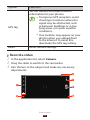
››Record a video
1 In the application list, select Camera.
2 Drag the slider to switch to the camcorder.
3 Aim the lens at the subject and make any necessary
adjustments.
Entertainment
62
Number
Function
1
Use camcorder shortcuts.
●●
: Change the flash setting.
●●
: Switch to the front camera to record
a video of yourself.
●●
: Change the recording mode (for
attaching to a message or for saving
normally).
●●
: Select the length of the delay before
the camcorder records a video.
●●
: Adjust the exposure value to change
the brightness.
You can add or remove shortcuts to
frequently-used options. ► p. 65
2
Change the camcorder settings.
3
View the storage location.
4
Switch to the camera.
5
Record a video.
6
View videos you have recorded.
4 Tap where you want to focus on the preview screen.
5
6
The focus frame moves to the place you tapped and
changes to green when the subject is in focus.
Select to start recording.
Select to stop recording.
The video is saved automatically.
After recording a video, select the image viewer to view it.
●● To view more videos, scroll left or right.
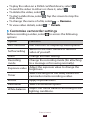
●● To play the video, select
.
Entertainment
63
To play the video on a DLNA certified device, select .
To send the video to others or share it, select .
●● To delete the video, select
.
●● To start a slide show, select
. Tap the screen to stop the
slide show.
●● To change the name of a file, select
→ Rename.
●● To view video details, select
→ Details.
●●
●●
››Customise camcorder settings
Before recording a video, select
options:
to access the following
Option
Function
Edit shortcuts
Edit shortcuts to frequently-used options.
Self recording
Switch to the front camera to record a
video of yourself.
Flash
Change the flash setting.
Recording
mode
Change the recording mode (for attaching
to a message or for saving normally).
Exposure value
Adjust the exposure value to change the
brightness.
Timer
Select the length of the delay before the
camcorder starts recording a video.
Effects
Apply a special effect.
Resolution
Select a resolution option.
White balance
Adjust the colour balance according to the
lighting conditions.
Entertainment
64
Option
Function
Outdoor
visibility
Set to improve the contrast of the display
in bright sunlight.
Guidelines
Set to view the grid lines on the preview
screen.
Reset
Reset camcorder settings.
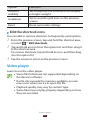
››Edit the shortcut icons
You can add or remove shortcuts to frequently-used options.
1 From the preview screen, tap and hold the shortcut area,
2
3
or select → Edit shortcuts.
Tap and hold an icon from the option list, and then drag it
to the shortcut area.
To remove shortcuts, tap and hold an icon, and then drag
it to the option list.
Tap the screen to return to the preview screen.
Video player
Learn to use the video player.
●● Some file formats are not supported depending on
the device’s software.
●● If a file size exceeds the memory available, an error
may occur when you try to open the file.
●● Playback quality may vary by content type.
●● Some files may not play properly depending on how
they are encoded.
Entertainment
65
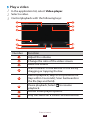
››Play a video
1 In the application list, select Video player.
2 Select a video.
3 Control playback with the following keys:
11
Number
Function
1
Adjust the volume.
2
Change the ratio of the video screen.
3
Mute the sound.
4
Scan forwards or backwards in the file by
dragging or tapping the bar.
5
Restart playback; Skip to the previous file
(tap within 3 seconds); Scan backwards in
the file (tap and hold).
6
Pause playback; Select
playback.
7
Access video player options.
8
Play the video on a DLNA certified device.
Entertainment
66
to resume
Number
Function
9
Select a sound effect.
10 Insert a bookmark.
11 Skip to the next file; Scan forwards in the
file (tap and hold).
During playback, select to access the following options:
●● To send the video to others, select Share via.
●● To trim a segment of the video, select Trim.
●● To listen to audio via a Bluetooth headset, select Via
Bluetooth. You cannot use this option if you connect a
headset to your device’s headset jack.
●● To view your bookmarks, select Bookmarks. This option
appears if you have inserted a bookmark during playback.
●● To change the video player settings, select Settings.
●● To view video details, select Details.
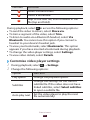
››Customise video player settings
1 During playback, select → Settings.
2 Change the following options:
Option
Function
Play speed
Change the playback speed.
Subtitles
Change the settings for the current
subtitle file. If the video does not have
linked subtitles, select Select subtitles
to open a subtitle file.
Auto play next
Set the video player to play the next
file automatically.
Entertainment
67
Option
Function
Colour tone
Select a colour tone.
Outdoor
visibility
Set to improve the contrast of the
display in bright sunlight.
Gallery
Learn to view images and play videos saved in your device.
●● Some file formats are not supported depending on
the device’s software.
●● If a file size exceeds the memory available, an error
may occur when you try to open the file.
●● Playback quality may vary by content type.
●● Some files may not play properly depending on how
they are encoded.
››View an image
1 In the application list, select Gallery.
2 Select a folder → an image.
While viewing an image, use the following options:
●● To view more images, scroll left or right.
●● To zoom in or out, place two fingers on the screen and
slowly spread them apart or pinch them together. To return
to the original size, double-tap the screen.
●● To view the image on a DLNA certified device, select
.
●● To send the image to others or share it, select
.
●● To delete the image, select
.
Entertainment
68
To start a slide show, select . Tap the screen to stop the
slide show.
●● To add the image to the clipboard, select
→ Copy to
clipboard.
●● To crop a section from the image, select
→ Crop.
●● To rotate the photo anti-clockwise, select
→ Rotate left.
●● To rotate the photo clockwise, select
→ Rotate right.
●● To set the image as your wallpaper or a contact image,
select → Set picture as.
●● To print the image via Wi-Fi or USB, select
→ Print. Your
device is compatible only with some Samsung printers.
●● To edit the image with the image editor, select
→ Edit.
► p. 70
●● To use motion recognition, select
→ Motion.
●● To change the name of a file, select
→ Rename.
●● To view image details, select
→ Details.
The options available may vary depending on the
selected folder.
●●
››Play a video
1 In the application list, select Gallery.
2 Select a folder → a video (indicated by the
3 Select to begin playback.
4 Control playback with the keys. ► p. 66
icon).
During playback, select to access the following options:
●● To send the video to others, select Share via.
●● To trim a segment of the video, select Trim.
Entertainment
69
To listen to audio via a Bluetooth headset, select Via
Bluetooth. You cannot use this option if you connect a
headset to your device’s headset jack.
●● To view your bookmarks, select Bookmarks. This option
appears if you have inserted a bookmark during playback.
●● To change the video player settings, select Settings.
●● To view video details, select Details.
●●
Photo editor
You can edit images and apply various effects.
1 In the application list, select Photo editor.
2 Select an image, or select Select picture → a folder → an
3
4
5
image.
To take a new photo, select Take picture.
Select Selection → OK.
Draw a border around the area you want to select, and
then select Done.
●● To change the type of selection tool, select Selection.
●● To edit the selection border, select
, , or . If you
select Magnetic or Brush, you can adjust the border
size by selecting Selection size.
●● To reverse the selection, select Inverse.
Edit the image with the following tools:
Tool
Function
Rotate
Rotate or flip the image.
Resize
Resize the image by dragging the rectangle
or selecting 100% → an option.
Entertainment
70
Tool
Function
Crop
Crop the image by moving or dragging the
rectangle.
Colour
Apply a colour effect.
Effect
Apply a filter effect.
Tools
Use additional options.
Undo your last action.
Redo your last action.
6 When you are finished, select Done → .
7 Enter a name for the image and select OK.
Music Player
Learn to listen to your favourite music while on the go.
●● Some file formats are not supported depending on
the device’s software.
●● If a file size exceeds the memory available, an error
may occur when you try to open the file.
●● Playback quality may vary by content type.
●● Some files may not play properly depending on how
they are encoded.
››Add music files to your device
Start by transferring files to your device:
●● Download from the Internet. ► p. 39
●● Download from a computer with Samsung Kies. ► p. 81
●● Download from a computer with Windows Media Player.
► p. 82
●● Receive via Bluetooth. ► p. 92
Entertainment
71
››Play music
1 In the application list, select Music Player.
2 Select a music category → a music file.
3 Select the album image to open the music player screen.
4 Control playback with the following keys:
14
Number
Function
1
Adjust the volume.
2
Set the file as your favourite track.
3
Mute the sound.
4
Scan forwards or backwards in the file by
dragging or tapping the bar.
5
Activate Shuffle mode.
6
Restart playback; Skip to the previous file
(tap within 3 seconds); Scan backwards in
the file (tap and hold).
7
Pause playback; Select
playback.
8
View music details.
9
Open the playlist.
Entertainment
72
to resume
Number
Function
10 Access music options.
11 Play the music file on a DLNA certified
device.
12 Select a sound effect.
13 Change the repeat mode.
14 Skip to the next file; Scan forwards in the
file (tap and hold).
You can control the music player with a headset. On
the Home screen, press and hold the headset button to
launch the music player. Then, press the headset button
to start or pause playback.
During playback, select to access the following options:
To add the music file to a playlist, select Add to playlist.
●● To listen to music via a Bluetooth headset, select Via
Bluetooth. You cannot use this option if you connect a
headset to your device’s headset jack.
●● To send the music file to others, select Share via.
●● To set the music file as your alarm tone, select Set as alarm
tone.
●● To change the music player settings, select Settings.
●●
››Create a playlist
1 In the application list, select Music Player.
2 Select → New playlist.
3 Enter a title for your new playlist and select OK.
4 Select a music category and select next to the files to
5
include.
Select Done.
Entertainment
73
››Customise music player settings
1 In the application list, select Music Player.
2 Select → Settings.
3 Change the following options:
Option
Function
Advanced →
SoundAlive
Select a sound effect.
Advanced →
Play speed
Change the playback speed.
Advanced →
Lyrics
Set to show song lyrics during
playback.
Advanced →
Music auto off
Set the music player to turn off
automatically after a specific period of
time.
Music menu
Select music categories to show in the
music library.
Entertainment
74
Personal information
Contacts
Learn to create and manage a list of your personal or business
contacts. You can save names, phone numbers, email
addresses, and more for your contacts.
››Create a contact
1 In the application list, select Contacts → Contacts →
2 Select a memory location (if necessary).
3 Enter contact information.
4 Select Save to add the contact to memory.
››Find a contact
1 In the application list, select Contacts → Contacts.
2 Scroll up or down the contact list.
3 Select a contact’s name.
From the contact view, use the following options:
●● To send a text or multimedia message, select
.
●● To send an email message, select
.
●● To set a favourite number, select
.
●● To edit the contact information, select
.
Personal information
75
.
››Create your namecard
1 In the application list, select Contacts → Contacts.
2 Select your name at the top of the contact list.
3 Select .
4 Enter your personal details and select Save.
››Create a group of contacts
By creating groups of contacts, you can manage multiple
contacts and send a message to an entire group.
1 In the application list, select Contacts → Groups →
2 Enter a name for the group.
3 Add members to the group.
4 Select Save.
.
››Copy a contact
Copy contacts from the SIM or USIM card to your
device
1 In the application list, select Contacts → Contacts.
2 Select → Import/Export → Import from SIM card.
3 Select a memory location (if necessary).
4 Select contacts to copy, and then select Done.
Personal information
76
Copy contacts from your device to the SIM or USIM
card
1 In the application list, select Contacts → Contacts.
2 Select → Import/Export → Export to SIM card.
3 Select contacts to copy, and then select Done → OK.
››Import or export a contact
You can import or export files (in vcf format) to or from your
device’s USB storage.
Import contact files
1 In the application list, select Contacts → Contacts.
2 Select → Import/Export → Import from USB
3
4
5
storage.
Select a memory location (if necessary).
Select an option for importing a single contact file,
multiple contact files, or all contact files, and then select
OK.
Select contact files to import, and then select OK.
Export contacts
1 In the application list, select Contacts → Contacts.
2 Select → Import/Export → Export to USB storage.
3 Select OK to confirm.
Personal information
77
S Planner
Your device includes a powerful planner to help you organise
your schedules more conveniently and effectively. Learn
to create and manage events and tasks, and set alarms to
remind yourself of important events and tasks.
››Create an event or task
1 In the application list, select S Planner.
2 Select .
3 Select an event type at the top of the screen.
4 Enter the details of the event and select Save.
››Change the view mode
1 In the application list, select S Planner.
2 Select a view mode.
Year: All months in the year
●● Month: A full month in one view
●● Week: Hourly blocks for the days in one full week
●● Day: Hourly blocks for one full day
●● List: A list of all the events and holidays scheduled for a
specific period
●● Task: A list of tasks
You can also change the view mode by placing two
fingers on the screen and spreading them apart or
pinching them together.
●●
Personal information
78
››View an event or task
1 In the application list, select S Planner.
2 Select a date on the calendar.
To move to a specific day, select → Go to and enter
the date.
●● To move to today’s date, select Today.
Select an event to view its details.
You can send the event to others by selecting →
Share via or selecting → .
●●
3
››Stop an event or task alarm
If you set a reminder for a calendar event or task, an alarm will
sound at the specified time.
1 Tap the right bottom of the screen to open the
2
3
notifications panel.
Select the event notification.
Select an event to view more details.
To snooze the event alarm, select Snooze.
Memo
Learn to record important information for viewing at a later
date.
››Create a memo
1 In the application list, select Memo.
2 Select .
3 Enter your memo text and select Done.
Personal information
79
››View a memo
1 In the application list, select Memo.
2 Select a memo to view its details.
While viewing the memo, use the following options:
●● To edit the memo, tap the screen.
●● To delete the memo, select
→ .
●● To change the background colour, select
→ .
●● To protect the memo from accidental deletion, select
→
.
●● To print the memo via Wi-Fi or USB, select
→ . Your
device is compatible only with some Samsung printers.
●● To upload the memo to a social network site, select
→ .
●● To send the memo to others, select
→ .
Pen memo
Learn to create freehand memos.
1 In the application list, select Pen memo.
2 Select .
3 Create a freehand memo with the following tools:
Tool
Function
Enter text.
Write or draw on the screen.
Erase pen marks.
Change the tool settings.
Undo your last action.
Redo your last action.
4 When you are finished, select Done.
Personal information
80
Connectivity
USB connections
Learn to connect your device to a computer with a USB cable.
Do not disconnect the USB cable from a computer while
the device is transferring or accessing data. Doing so
may result in data loss or damage to the device.
For best results, connect the USB cable directly to a USB
port on a computer. Data transfers may fail when using
a USB hub.
››Connect with Samsung Kies
Ensure that Samsung Kies is installed on your computer. You
can download the program from the Samsung website.
Samsung Kies will work on both Windows and
Macintosh computers.
1 Connect your device to a computer with a USB cable.
2
Samsung Kies launches on the computer automatically. If
Samsung Kies does not launch, double-click the Samsung
Kies icon on the computer.
Transfer files between your device and the computer.
Refer to the Samsung Kies help for more information.
Connectivity
81
››Connect with Windows Media Player
Ensure that Windows Media Player is installed on your
computer.
1 Connect your device to a computer with a USB cable.
2 Open Windows Media Player and synchronise music files.
››Connect as a media device
You can connect your device to a computer and access media
files stored on your device.
1 Connect your device to a computer with a USB cable.
2 Tap the right bottom of the screen to open the
3
4
notifications panel.
Select Connected as a media device → Media device
(MTP).
Transfer files between your device and the computer.
››Connect as a camera device
You can connect your device to a computer as a camera and
access files in your device.
Use this USB connection mode when your computer
does not support the media transfer protocol (MTP) or
does not have the USB driver for your device installed.
1 Connect your device to a computer with a USB cable.
2 Tap the right bottom of the screen to open the
3
4
notifications panel.
Select Connected as a media device → Camera (PTP).
Transfer files between your device and the computer.
Connectivity
82
Wi-Fi
Learn to use your device’s wireless networking capabilities
to activate and connect to any wireless local area network
(WLAN) compatible with the IEEE 802.11 standards.
You can connect to the Internet or other network devices
anywhere an access point or wireless hotspot is available.
Your device uses a non-harmonised frequency and is
intended for use in all European countries. The WLAN
can be operated in the EU without restriction indoors,
but cannot be operated outdoors.
››Activate the Wi-Fi feature
In the application list, select Settings and then drag the Wi-Fi
switch to the right.
The Wi-Fi feature running in the background will
consume battery power. To preserve battery power,
activate the feature only when needed.
››Find and connect to a Wi-Fi AP
1 In the application list, select Settings → Wi-Fi.
2
3
4
Your device searches for available Wi-Fi APs automatically.
Select an AP.
Enter the password for the AP (if necessary).
Select Connect.
Connectivity
83
››Add a Wi-Fi AP manually
1 In the application list, select Settings → Wi-Fi → Add
2
3
network.
Enter an SSID for the AP and select a security type.
Set the security settings according to the security type
you selected, and then select Save.
››Connect to a Wi-Fi AP with a protected setup
You can connect to a secured AP with a WPS button or WPS
PIN. To use this method, your wireless access point must have
a WPS button.
Connect with a WPS button
1 In the application list, select Settings → Wi-Fi.
2 Select an AP indicated as a protected network, and then
3
4
5
select Show advanced options.
Select the WPS drop-down menu.
Select Push button → Connect.
Press the WPS button on the AP within 2 minutes.
Connect with a WPS PIN
1 In the application list, select Settings → Wi-Fi.
2 Select an AP indicated as a protected network, and then
3
select Show advanced options.
Select the WPS drop-down menu.
Connectivity
84
4 Select PIN from this device to use a WPS PIN of your
5
6
device.
Select Connect.
On the AP, enter the PIN of your device.
››Set the static IP settings
1 In the application list, select Settings → Wi-Fi.
2 Select an AP → Show advanced options.
3 Select the IP settings drop-down menu.
4 Select Static.
5 Change the IP settings.
6 Select Connect.
››Customise Wi-Fi settings
1 In the application list, select Settings → Wi-Fi →
2
Advanced.
Change the following options:
→
Option
Function
Network
notification
Set the device to notify you when an
open Wi-Fi AP is available.
Keep Wi-Fi on
during sleep
Set whether or not to keep the Wi-Fi
feature active in Sleep mode.
MAC address
View the MAC address.
IP address
View the IP address.
Connectivity
85
Wi-Fi Direct
Learn to use the Wi-Fi Direct feature to connect two devices
via Wi-Fi without requiring an AP.
››Connect your device to another device
1 In the application list, select Settings → More... → Wi-Fi
2
3
4
5
Direct.
Drag the Wi-Fi Direct switch to the right.
Select OK (if necessary).
Select Scan.
Select a device.
When the owner of the other device accepts the
connection, the devices are connected.
››Send data via Wi-Fi
1 Select a file or item from an appropriate application.
2 Select an option for sending data via Wi-Fi.
The method for selecting an option may vary by data
type.
3 Search for and select another device.
››Receive data via Wi-Fi
When you receive data, it is saved to your device
automatically. Received data is saved to the ShareViaWiFi
folder.
Connectivity
86
AllShare
Learn to use the Digital Living Network Alliance (DLNA)
service that enables you to share media files between DLNA
certified devices in your home via Wi-Fi.
●● Some files may not play on some DLNA certified
devices.
●● Sharing media files may be buffered depending on
the network connection.
››Play your files on another device
1 In the application list, select AllShare.
2 Select My device.
3 Select a media category → a file.
4 Select a player.
5
Playback begins on the selected player.
Control playback with the keys on your device.
››Play a file from another device on your device
1 In the application list, select AllShare.
2 Select a device that contains media files.
3 Select a media category → a file.
4 Control playback with the keys on your device.
Connectivity
87
››Play a file from one device on another device
1 In the application list, select AllShare.
2 Select a device that contains media files.
3 Select a media category → a file.
4 Select .
5 Select a player.
6
Playback begins on the selected player.
Control playback with the keys on your device.
››Customise settings for sharing media files
To allow other DLNA certified devices to access media files on
your device, you must activate media sharing.
1 In the application list, select AllShare →
2 Change the following options:
.
Option
Function
Media server
name
Enter a media server name for your
device.
Share media
Set to share your videos, images, or
music with other devices.
Access point
network
Select a connection profile to use for
DLNA connections.
Upload from
other devices
Set to accept uploads from other
devices.
Connectivity
88
Mobile network sharing
Learn to share your device’s mobile network connection with
other devices.
››Share your device’s mobile network via Wi-Fi
Learn to use your device as a wireless access point for other
devices.
This feature may be unavailable depending on your
region or service provider.
1 In the application list, select Settings → More... →
2
3
Tethering and portable hotspot.
Select Portable Wi-Fi hotspot to activate mobile network
sharing via Wi-Fi.
Select Configure portable Wi-Fi HotSpot to configure
network settings to use your device as an AP.
Option
Function
Network SSID
Edit the device name that will be
shown to other devices.
Security
Select a security type.
Password
Enter a password to prevent
unapproved access to your mobile
network. This option is available only
when you set the security option.
4 Select Save.
5 On another device, locate your device’s name and connect
to your mobile network.
Connectivity
89
››Share your device’s mobile network via USB
Learn to use your device as a wireless modem by making a
USB connection with a computer.
1 Connect your device to a computer with a USB cable.
2 In the application list, select Settings → More... →
3
Tethering and portable hotspot.
Select USB tethering to activate mobile network sharing
via USB.
To stop sharing the network connection, clear the tick box
next to USB tethering.
The sharing method may differ depending on the
computer’s operating system.
››Share your device’s mobile network via
Bluetooth
1 In the application list, select Settings → More... →
2
3
Tethering and portable hotspot.
Select Bluetooth tethering to activate the mobile
network sharing via Bluetooth.
On another device, find and pair with your device.
Ensure that you have activated the Bluetooth feature and
the visibility setting.
Connectivity
90
Bluetooth
Learn to exchange data or media files with other devices via
Bluetooth.
●● Samsung is not responsible for the loss, interception,
or misuse of data sent or received via the Bluetooth
feature.
●● Always ensure that you share and receive data with
devices that are trusted and properly secured. If there
are obstacles between the devices, the operating
distance may be reduced.
●● Some devices, especially those that are not tested or
approved by the Bluetooth SIG, may be incompatible
with your device.
●● Do not use the Bluetooth feature for illegal purposes
(for example, pirating copies of files or illegally
tapping communications for commercial purposes).
Samsung is not responsible for the repercussions of
illegal use of the Bluetooth feature.
››Activate the Bluetooth feature
In the application list, select Settings and then drag the
Bluetooth switch to the right.
››Find and pair with another device
1 In the application list, select Settings → Bluetooth →
2
Scan for devices.
Select a device.
Connectivity
91
3 Select OK to match the Bluetooth PIN between two
devices. Alternately, enter a Bluetooth PIN and select OK.
When the owner of the other device accepts the
connection or enters the same PIN, pairing is complete.
If the pairing is successful, the device will search for
available services automatically.
Some devices, especially headsets or hands-free car
kits, may have a fixed Bluetooth PIN, such as 0000. If the
other device has a PIN, you must enter it.
››Send data via Bluetooth
1 Select a file or item from an appropriate application.
2 Select an option for sending data via the Bluetooth
feature.
The method for selecting an option may vary by data
type.
3 Search for and pair with a Bluetooth device.
››Receive data via Bluetooth
1 In the application list, select Settings → Bluetooth and
then select the tick box next to your device.
To select the length of time that your device will be
visible, select → Visible time-out.
2 When prompted, select OK to match the Bluetooth PIN or
3
enter the Bluetooth PIN and select OK (if necessary).
Select Accept to confirm that you are willing to receive
data.
Received data is saved to the bluetooth folder. If you receive a
contact, it is saved to the phonebook automatically.
Connectivity
92
GPS
Your device is equipped with a global positioning system
(GPS) receiver. Learn to activate location services and use
additional GPS functions.
For better reception of GPS signals, avoid using your device in
the following conditions:
●● Between buildings, in tunnels or underground passages, or
inside buildings
●● In poor weather
●● Around high voltage or electromagnetic fields
●● In a vehicle with sun protection film
Do not touch or cover the area around the antenna
with your hands or other objects while using the GPS
functions.
This feature may be unavailable depending on your
region or service provider.
››Activate location services
You must activate location services to receive location
information or search the map.
1 In the application list, select Settings → Location
2
services.
Change the following options:
Option
Function
Use wireless
networks
Set to use Wi-Fi and/or mobile
networks to find your location.
You may incur additional charges
for using mobile networks.
Use GPS
satellites
Set to use GPS satellites to find your
location.
Connectivity
93
Option
Function
Location and
Google search
Set the device to use your current
location for Google search and other
Google services.
VPN connections
Learn to create virtual private networks (VPNs) and connect
to them securely over the Internet.
●● Your device should already be configured with
Internet access. If you have trouble accessing the
Internet, you must edit the connections. If you are
not sure what information to enter, ask your VPN
administrator.
●● To use this feature, you must activate the screen lock
feature.
››Set up a VPN profile
1 In the application list, select Settings → More... → VPN
→ Add VPN network.
2 Change the following options:
Option
Function
Name
Enter a name for the VPN server.
Type
Select a VPN type.
Server address
Enter the address of the VPN server.
L2TP secret
Enter an L2TP secret password.
IPSec identifier Enter a user name.
IPSec preshared key
Enter a pre-shared security key.
Connectivity
94
Option
Function
IPSec user
certificate
Select a user certificate that the VPN
server will use to identify you. You can
import certificates from the VPN server
or download them from the Internet.
IPSec CA
certificate
Select a certificate authority (CA)
certificate that the VPN server will
use to identify you. You can import
certificates from the VPN server or
download them from the Internet.
IPSec server
certificate
Select a server certificate that the VPN
server will use to identify you. You can
import certificates from the VPN server
or download them from the Internet.
PPP encryption Set to encrypt data before sending it to
(MPPE)
the VPN server.
Show
advanced
options
Set to change the advanced network
settings.
The options available may vary depending on the VPN
type.
3 When you are finished, select Save.
››Connect to a private network
1 In the application list, select Settings → More... → VPN.
2 Select a private network.
3 Enter the user name and password, and then select
Connect.
Connectivity
95
Tools
Alarm
Learn to set and control alarms for important events.
››Set an alarm
1 In the application list, select Alarm.
2 Select .
3 Set the details of the alarm.
4 When you are finished, select Done.
To deactivate an alarm, select the clock icon next to the
alarm. To delete an alarm, select .
››Stop an alarm
When the alarm sounds,
●● To stop the alarm, select
and then drag your finger
outside of the large circle.
●● To silence the alarm for the snooze period, select
and
then drag your finger outside of the large circle.
Calculator
Learn to perform calculations with your device.
››Perform a calculation
1 In the application list, select Calculator.
2 Use the keys on the screen to perform basic calculations.
Tools
96
››View the calculation history
1 In the application list, select Calculator.
2 Perform a calculation.
3 Select to hide the calculator keypad.
The calculation history appears.
Downloads
Learn to manage logs of files you have downloaded from the
web or email.
1 In the application list, select Downloads.
2 Select a download category.
3 To open a downloaded file, select the log.
To delete a log, select the tick box and select
.
My Files
Learn to access various types of files saved in your device.
››Supported file formats
Your device supports the following file formats:
Type
Format
Image
bmp, gif, jpg, png
Video
3gp, mp4, mkv
Music
mp3, aac, 3ga, m4a, ogg
Sound
wav, imy, midi, amr, awb
Others
doc, docx, pdf, ppt, pptx, txt, xls, xlsx, htm,
html, vcf, vcs, vnt, jad, jar
Tools
97
Some file formats are not supported depending on
the device’s software.
●● If a file size exceeds the memory available, an error
may occur when you try to open the file.
●●
››View a file
1 In the application list, select My Files.
2 Select a folder.
To move up one level in the file directory, select
To return to the Home directory, select .
Select a file.
●●
.
●●
3
From the folder list, access the following options:
●● To search for files saved in your device, select
.
●● To view the files in the thumbnail view, select
.
●● To create folders for managing files, select
.
●● To change the file manager settings, select
→ Settings.
●● To sort files or folders, select the Name drop-down menu
and select an option.
●● To send a file to others, select the tick box and select
.
●● To copy or move the files or folders to another file folder,
select the tick boxes and select or .
●● To delete files or folders, select the tick boxes and select
.
●● To change the name of a file or a folder, select the tick box
and select → Rename.
●● To view file or folder details, select the tick box and select
→ Details.
Tools
98
Polaris Office
Learn to create or view documents with your device.
This feature may be unavailable depending on your
region or service provider.
››Create a document
1 In the application list, select Polaris Office.
If you are launching this application for the first time,
register as an online user or skip the registration.
2 Select New file → a document type.
3 Select a template (if necessary).
4 Create the document.
5 When you are finished, select .
6 Enter a name for the document and select a memory
location for saving the document, and then select Save.
››Open a document
1 In the application list, select Polaris Office.
2 Select Local storage → a document file.
3
To open a recently-used file, select a file under Recent
files.
View the document.
Tools
99
From the document view, access the following options:
●● To zoom in or out, place two fingers on the screen and
slowly spread them apart or pinch them together. You can
also select → an option.
●● To edit the document, select
.
●● To start a slide show in a PowerPoint document, select
.
to exit
Tap the screen to move to the next slide. Select
the slide show.
●● To search for text, select
.
●● To use additional options with the document, select
.
The options available may vary depending on the
document type.
Search
Learn to search for data in your device or information on the
Internet.
1 In the application list, select Search.
2 Enter a keyword and select .
3 Select a search result.
SIM Toolkit
Use a variety of additional services offered by your service
provider. Depending on your SIM or USIM card, this
application may be labelled differently. In the application list,
select SIM Toolkit.
Tools
100
Task manager
With the task manager, you can view open applications and
memory information.
1 In the application list, select Task manager.
2 Use the following options:
Option
Function
Active
applications
View open applications.
Downloaded
View the total amount of memory
used by all applications installed on
your device.
RAM manager
View and clear the RAM for your
device.
Storage
View the used and available memory
in your device.
Help
View information about using the task
manager.
World clock
Learn to view the time in another region.
1 In the application list, select World clock → .
2 Enter a city name or select one from the globe.
3 Select .
To apply summer time to the clock, tap and hold the
clock, and then select DST settings.
Tools
101
Settings
Access the setting options
1 In the application list, select Settings.
2 Select a setting category, and then select an option.
Wi-Fi
Activate the Wi-Fi feature to connect to a Wi-Fi AP and access
the Internet or other network devices.
Bluetooth
Activate the Bluetooth feature to exchange information over
short distances.
Data usage
Keep track of your data usage amount.
●● Mobile data: Set to use data connections on any mobile
network.
●● Set mobile data limit: Set a limit for the mobile data usage.
●● Data usage cycle: Change the settings for the limit cycle.
To use more options, select .
●● Data roaming: Set to use data connections when you are
roaming.
●● Restrict background data: Set to disable synchronisation
in the background while using a mobile network.
●● Show Wi-Fi usage: Set to show your data usage via Wi-Fi.
Settings
102
More...
Change the settings to control connections with other
devices or networks.
››Flight mode
Activate Flight mode to disable all wireless functions on your
device. You can use only non-network features.
››Kies via Wi-Fi
Connect your device to Samsung Kies via Wi-Fi.
››VPN
Set up and manage virtual private networks (VPNs).
››Tethering and portable hotspot
USB tethering: Set to use your device as a wireless modem
by making a USB connection with a computer.
●● Portable Wi-Fi hotspot: Set to use your device as a wireless
access point for other devices.
●● Configure portable Wi-Fi Hotspot: Change the network
settings for your access point or hotspot.
●● Bluetooth tethering: Activate the Bluetooth tethering
feature to share your mobile network with computers via
Bluetooth.
●● Help: View information about using the tethering features.
●●
››Wi-Fi Direct
Activate the Wi-Fi Direct feature to connect two devices via
Wi-Fi without requiring an AP.
Settings
103
››Mobile networks
Use packet data: Set to use data connections on any
mobile network.
●● Data roaming: Set to use data connections when you are
roaming.
●● Access Point Names: Select an access point name (APN) for
mobile networks. You can add or edit APNs. To reset your
APN settings to the factory defaults, select → Reset to
default.
●● Network mode: Select a network type.
●● Network operators:
-- Search networks: Search for and select a network.
-- Select automatically: Set the device to select the first
available network.
●●
Sound
Change the settings for various sounds on your device.
●● Volume: Adjust the volume for various sounds on your
device.
●● Vibration intensity: Adjust the vibration intensity.
●● Default notifications: Select a ringtone to alert you to
events.
●● Sound and vibration: Set the device to vibrate and play a
ringtone for various events.
●● Touch sounds: Set the device to sound when you select an
application or option.
●● Screen lock sound: Set the device to sound when you lock
or unlock the touch screen.
●● Vibrate on screen tap: Set the device to vibrate when you
or
, or tap and hold
or .
select
Settings
104
Display
Change the settings to control the display and backlight on
your device.
●● Home screen wallpaper: Select a background image for
the Home screen.
●● Lock screen wallpaper: Select a background image for the
locked screen.
●● Help text: Set to show the help text on the locked screen.
●● Brightness: Adjust the brightness of the display.
●● Screen mode: Select a display mode.
●● Auto-rotate screen: Set the interface to rotate
automatically when you rotate the device.
●● Quick launch: Select an application to launch with the
quick launch shortcut. The shortcut icon will change
according to the application you specify.
●● Screen timeout: Select the length of time that the device
waits before turning off the display backlight.
●● Font style: Change the font type for the display text.
●● Font size: Change the font size for creating or showing
items in applications.
●● Auto adjust screen power: Set to save power by adjusting
the brightness of the display.
●● Horizontal calibration: Calibrate the accelerometer to
adjust the horizontal axis of the device for better motion
recognition.
Power saving
Change the settings for Power saving mode.
●● Custom power saving mode: Set to activate Power saving
mode according to your custom settings.
●● Custom power saving mode settings:
-- Power saving starts at: Select a power level at which the
device will switch to Power saving mode automatically.
Settings
105
-- Turn off Wi-Fi: Deactivate the Wi-Fi feature when the
device is not connected with a Wi-Fi AP.
-- Turn off Bluetooth: Deactivate the Bluetooth feature
when not in use.
-- Turn off GPS: Deactivate the GPS feature when not in use.
-- Turn off Sync: Deactivate auto-syncing when the device
is not synchronising with a web server.
-- Brightness: Set to adjust the brightness in Power saving
mode.
-- Brightness: Adjust the brightness for Power saving mode.
-- Screen timeout: Select the length of time that the device
waits before turning off the display backlight.
●● Learn about power saving: View information for saving
battery power.
Storage
View memory information for your device.
The actual available capacity of the internal memory is
less than the specified capacity because the operating
system and default applications occupy part of the
memory.
Battery
View the amount of battery power consumed by your device.
Applications
View and manage the applications on your device.
Accounts and sync
Change the settings for the auto sync feature or manage
accounts for synchronisation.
Settings
106
Location services
Change the settings for location services.
●● Use wireless networks: Set to use Wi-Fi and/or mobile
networks for finding your location.
●● Use GPS satellites: Set to use GPS satellites for finding your
location.
●● Location and Google search: Set the device to use your
current location for Google search and other Google
services.
Security
Change the settings for securing your device.
●● Screen lock: Activate the screen lock feature.
●● Owner information: Enter your information that is shown
on the locked screen.
●● Encrypt device: Set a password to encrypt data saved on
the device. You must enter the password each time you
turn on the device.
Charge the battery before enabling this setting because
it may take more than an hour to encrypt your data.
SIM Change Alert: Activate the Find my mobile feature.
●● Alert message recipients: Add recipients who will receive
a tracking message from your lost or stolen device.
●● Remote controls: Set to allow remote control of your
device via the Internet when your device is lost or stolen.
●● SamsungDive web page: Access the SamsungDive
website to register your Samsung account.
●● Set up SIM card lock:
-- Lock SIM card: Set to lock the SIM or USIM card. To use
your device with the SIM or USIM card, you must enter the
PIN.
-- Change SIM PIN: Change the PIN supplied with the SIM
or USIM card.
●●
Settings
107
Make passwords visible: Set to show your passwords as
you enter them.
●● Device administrators: View the administrators you
have approved for your device. You can allow device
administrators to apply new policies to your device.
●● Unknown sources: Set the device to install applications
downloaded from any source. If you do not select this
option, you can install only applications downloaded from
Samsung Apps.
●● Trusted credentials: Set to use certificates and credentials
to ensure the secure use of applications.
●● Install from device storage: Install encrypted certificates
that are saved in the device’s USB storage.
●● Clear credentials: Delete credentials from the device and
reset the password.
●●
Language and input
Change the settings for languages and text input.
››Language
Select a display language.
››Default
Select a text input method.
››DioPen Chinese IME
To change the DioPen Chinese IME keypad settings, select .
●● Keypad types: Select a keypad type.
●● Language Settings: Select input languages to use with the
keypad.
●● Show suggestions: Set the device to predict words based
on your input and show word suggestions.
Settings
108
Detail settings: Customise the settings for word
suggestions.
●● Recognize delay time: Select how long the device waits to
recognise words in Handwriting mode.
●● Pen thickness: Select a line thickness for Handwriting
mode.
●● Pen color: Select a line colour for Handwriting mode.
●● Use Fuzzy: Activate the Fuzzy input feature so that you can
easily enter Chinese characters that are similar in phonetic
spelling.
●● Fuzzy settings: Select Fuzzy pinyin pairs.
●● About: View version information.
●●
››Google voice typing
Activate the Google voice input feature to enter text by voice.
To change the voice input settings, select .
●● Select input languages: Select input languages for Google
voice recognition.
●● Block offensive words: Set to prevent the device from
recognising offensive words in voice inputs.
››Samsung keyboard
To change the Samsung keypad settings, select .
●● Input language: Select input languages to use with the
keypad.
●● XT9: Activate XT9 mode to predict words based on your
input and show word suggestions.
●● XT9 advanced settings: Change the advanced settings for
XT9 mode and set up your own dictionary.
●● Automatic full stop: Set the device to insert a full stop
when you double-tap the space bar.
●● Sound on keypress: Set the device to sound when you tap
a key.
Settings
109
Auto-capitalization: Set to capitalise the first letter of a
sentence automatically.
●● Voice input: Activate the voice input feature to enter text
by voice.
●● Handwriting settings: Change the settings for
Handwriting mode, such as recognition time, pen thickness,
or pen colour.
●● Tutorial: View the tutorial for using the Samsung keypad.
●●
››Swype
To change the Swype keypad settings, select .
●● Select Input Method: Select a text input method.
●● How to Swype: View information about using the Swype
keypad.
●● Personal dictionary: Set up your own dictionary. The
words in your dictionary will appear as suggestions for your
text inputs.
●● Preferences:
-- Audio feedback: Set an audible alert to sound if you
double-tap a word that has no alternative suggestions.
-- Vibrate on keypress: Set the device to vibrate when you
tap a key.
-- Show tips: Set the device to show tips for your actions
automatically when available.
-- Auto-spacing: Set to insert a space between words
automatically.
-- Auto-capitalization: Set to capitalise the first letter of a
sentence automatically.
-- Show complete trace: Set to show the traces of your
finger on the keypad.
-- Word suggestion: Set the device to predict words based
on your input and show word suggestions.
-- Speed vs. accuracy: Set the ratio between the speed and
accuracy of Swype suggestions.
Settings
110
-- Reset Swype’s dictionary: Delete the words you have
added to the dictionary.
-- Version: View version information.
●● Language Options: Select input languages to use with the
keypad.
››Voice search
Language: Select a language for voice recognition.
●● SafeSearch: Select a level for filtering out explicit text and
images from voice search results.
●● Block offensive words: Set to hide offensive words from
voice search results.
●●
››Text-to-speech output
Preferred engine: Select a speech synthesis engine. To
change the settings for speech synthesis engines, select .
●● Speech rate: Select a speed for the TTS feature.
●● Listen to an example: Listen to the spoken text for an
example.
●● Driving mode: Activate Driving mode to provide audible
notifications for event details.
●● Driving mode settings: Specify applications to use in
Driving mode.
●●
››Pointer speed
Adjust the pointer speed for the mouse or trackpad
connected to your device.
Back up and reset
Change the settings for managing settings and data.
●● Back up my data: Set to back up your settings and
application data to the Google server.
●● Backup account: Set up or edit your Google backup
account.
Settings
111
Automatic restore: Set to restore your settings and
application data when you must reinstall an application.
●● Factory data reset: Reset your settings to the factory
defaults and delete all your data.
●●
Dock
Dock sound: Set to use the dock speaker when your device is
connected to a desktop dock.
Date and time
Change the settings to control how time and date appears on
your device.
If the battery remains fully discharged or removed from
the device, the time and date will be reset.
Automatic date and time: Set to receive time information
from the network and update the time and date
automatically.
●● Automatic time zone: Set to receive time zone information
from the network when you move across time zones.
●● Set date: Set the current date manually.
●● Set time: Set the current time manually.
●● Select time zone: Select a time zone.
●● Use 24-hour format: Set to show the time in 24-hour
format or 12-hour format.
●● Select date format: Select a date format.
●●
Accessibility
Accessibility services are special features for those with
physical challenges. Change the settings to improve
accessibility to the device’s interface and features.
Settings
112
TalkBack: Activate TalkBack, which provides voice
feedback.
●● Font size: Change the font size in the calendar, email,
phonebook, and memo applications.
●● Auto-rotate screen: Set the interface to rotate
automatically when you rotate the device.
●● Speak passwords: Set the device to read aloud passwords
you enter with TalkBack.
●● Tap and hold delay: Set the recognition time for tapping
and holding the screen.
●● Install web scripts: Set applications to install web scripts to
make their web content more accessible.
●●
Motion
Change the settings that control the motion recognition
feature on your device.
●● Motion activation: Set to use the motion recognition
feature.
●● Tilt to zoom: Set to use a tilting motion to zoom in or out
when viewing images in Gallery or browsing webpages.
●● Pan to edit: Set to move an item to another page when you
tap and hold the item, and then slide the device to the left
or right.
Developer options
Change the settings for application development.
●● USB debugging: Activate USB debugging mode to
connect your device to a computer with a USB cable.
●● Development device ID: View your device’s development
ID.
●● Allow mock locations: Allow mock locations and service
information to be sent to a Location Manager service for
testing.
Settings
113
Desktop backup password: Set a password to secure your
backup data.
●● Strict mode: Set the device to flash the screen when
applications perform long operations.
●● Show pointer location: Set to show the coordinates and
traces of the pointer when you touch the screen.
●● Show touches: Set to show the pointer when you touch
the screen.
●● Show screen updates: Set to flash areas of the screen
when they are updated.
●● Show CPU usage: Set to list all active processes.
●● Force GPU rendering: Set to use 2D hardware acceleration
to improve graphic performance.
●● Window animation scale: Select a speed for opening and
closing pop-up windows.
●● Transition animation scale: Select a speed for switching
between screens.
●● Do not keep activities: Set to end a running application
when you launch a new application.
●● Limit background processes: Set to limit the number of
processes that can run in the background.
●● Show all ANRs: Set the device to alert you to unresponsive
applications that are running in the background.
●●
About device
View information about your device, such as model number
and version.
You can download and install firmware update with
the firmware over-the-air (FOTA) service. To check for
firmware updates, select Software update → Update.
Settings
114
Troubleshooting
When you turn on your device or while you are
using the device, it prompts you to enter one of the
following codes:
Code
Try this to solve the problem:
Password
When the device lock feature is enabled,
you must enter the password you set for the
device.
PIN
When using the device for the first time or
when the PIN requirement is enabled, you
must enter the PIN supplied with the SIM or
USIM card. You can disable this feature by
using Lock SIM card.
PUK
Your SIM or USIM card is blocked, usually as a
result of entering your PIN incorrectly several
times. You must enter the PUK supplied by
your service provider.
PIN2
When you access a menu requiring the PIN2,
you must enter the PIN2 supplied with the
SIM or USIM card. For details, contact your
service provider.
Your device displays network or service error
messages
When you are in areas with weak signals or poor reception,
you may lose reception. Move to another area and try
again.
●● You cannot access some options without a subscription.
Contact your service provider for more details.
●●
Troubleshooting
115
The touch screen responds slowly or improperly
If your device has a touch screen and the touch screen is not
responding properly, try the following:
●● Remove any protective covers from the touch screen.
Protective covers may prevent the device from recognising
your inputs and are not recommended for touch screen
devices.
●● Ensure that your hands are clean and dry when tapping the
touch screen.
●● Restart your device to clear any temporary software bugs.
●● Ensure that your device’s software is upgraded to the latest
version.
●● If the touch screen is scratched or damaged, take your
device to a Samsung Service Centre.
Your device freezes or has fatal errors
If your device freezes or hangs, you may need to close
applications or reset the device to regain functionality. If
your device is still responsive and an application is frozen,
close the application with the task manager. If your device is
frozen and unresponsive, press and hold the Power key for
10-15 seconds.
If this problem persists, perform a factory data reset. In the
application list, select Settings → Back up and reset →
Factory data reset → Reset device → Erase everything.
The device beeps and the battery icon is empty
Your battery is low. Recharge the battery to continue using
the device.
Troubleshooting
116
The battery does not charge properly or the device
turns off
If the battery will no longer charge completely, you need to
replace it with a new battery. Take your device to your local
Samsung Service Centre.
Your device is hot if touched
When you use applications that require more power or use
applications on your device for an extended period of time,
your device may feel hot. This is normal and should not affect
your device’s lifespan or performance.
Error messages appear when launching the camera
Your device must have sufficient memory and battery power
available to operate the camera application. If you receive
error messages when launching the camera, try the following:
●● Charge the battery.
●● Free some memory by transferring files to a computer or
deleting files from your device.
●● Restart the device. If you are still having trouble with
the camera application after trying these tips, contact a
Samsung Service Centre.
Error messages appear when opening music files
Some music files may not play on your device for a number of
reasons. If you receive error messages when opening music
files on your device, try the following:
●● Free some memory by transferring files to a computer or
deleting files from your device.
●● Ensure that the music file is not Digital Rights Management
(DRM)-protected. If the file is DRM-protected, ensure that
you have the appropriate licence or key to play the file.
●● Ensure that your device supports the file type.
Troubleshooting
117
Another Bluetooth device is not located
Ensure that the Bluetooth feature is activated on your
device.
●● Ensure that the Bluetooth feature is activated on the device
you wish to connect to, if necessary.
●● Ensure that your device and the other Bluetooth device are
within the maximum Bluetooth range (10 m).
●●
If the tips above do not solve the problem, contact a Samsung
Service Centre.
A connection is not established when you connect
the device to a computer
Ensure that the USB cable you are using is compatible with
your device.
●● Ensure that you have the proper drivers installed and
updated on your computer.
●● If you are a Windows XP user, ensure that you have
Windows XP Service Pack 3 or higher installed on your
computer.
●● Ensure that you have Samsung Kies 2.0 or Windows Media
Player 10 or higher installed on your computer.
●●
Troubleshooting
118
Safety information
To prevent injury to yourself and others, or damage to your device, read all of
the following information before using your device.
Warning: Prevent electric shock, fire, and
explosion
Do not use damaged power cords or plugs, or loose electrical
sockets
Do not touch the power cord with wet hands or disconnect the
charger by pulling the cord
Do not bend or damage the power cord
Do not use your device while it is charging or touch your device
with wet hands
Do not short-circuit the charger
Do not drop or cause an impact to the charger or the device
Do not charge the battery with chargers that are not approved by
the manufacturer
Do not use your device during a thunderstorm
Your device may malfunction and your risk of electric shock is increased.
Handle and dispose of the device and chargers with care
• Use only Samsung-approved chargers specifically designed for your device.
Incompatible chargers can cause serious injuries or damage to your device.
• Never dispose of devices in a fire. Follow all local regulations when disposing
of used devices.
• Never place devices on or in heating devices, such as microwave ovens,
stoves, or radiators. Batteries may explode when overheated.
• Never crush or puncture the device. Avoid exposing the device to high
external pressure, which can lead to an internal short circuit and overheating.
Safety information
119
Protect the device and chargers from damage
• Avoid exposing your device to very cold or very hot temperatures.
• Extreme temperatures can damage the device and reduce the charging
capacity and life of your device and batteries.
• Never use a damaged charger.
Caution: Follow all safety warnings and
regulations when using your device in restricted
areas
Do not use your device near other electronic devices
Most electronic devices use radio frequency signals. Your device may interfere
with other electronic devices.
Do not use your device near a pacemaker
• Avoid using your device within a 15 cm range of a pacemaker, if possible, as
your device can interfere with the pacemaker.
• To minimise possible interference with a pacemaker, use your device only on
the side of your body that is opposite the pacemaker.
Do not use your device in a hospital or near medical equipment
that can be interfered with by radio frequency
If you use medical equipment, contact the equipment manufacturer before
using your device to determine whether or not the equipment will be affected
by radio frequencies emitted by the device.
If you use a hearing aid, contact the manufacturer for information
about radio interference
The radio frequency emitted by your device may interfere with some hearing
aids. Before using your device, contact the manufacturer to determine whether
or not your hearing aid will be affected by radio frequencies emitted by the
device.
Turn off the device in potentially explosive environments
• Always comply with regulations, instructions and signs in potentially
explosive environments.
• Do not use your device at refuelling points (petrol stations), near fuels or
chemicals, or in blasting areas.
Safety information
120
• Do not store or carry flammable liquids, gases, or explosive materials in the
same compartment as the device, its parts, or accessories.
Turn off your device when on an aircraft
Your device may interfere with the aircraft’s electronic navigation instruments.
Your device may interfere with automotive equipment
Electronic devices in your car may malfunction, due to radio interference from
your device. Contact the manufacturer for more information.
Comply with all safety warnings and regulations
regarding mobile device usage while operating a
vehicle
While driving, safely operating the vehicle is your first responsibility. Never use
your mobile device while driving, if it is prohibited by law. For your safety and
the safety of others, use your common sense and remember the following tips:
• Position your device within easy reach. Make sure you can access your
wireless device without taking your eyes off the road.
• Suspend calls in heavy traffic or hazardous weather conditions. Rain, sleet,
snow, ice, and heavy traffic can be hazardous.
• Do not take notes or look up phone numbers. Jotting down a “to do” list or
flipping through your address book takes attention away from your primary
responsibility of driving safely.
• Dial sensibly and assess the traffic. Place calls when you are not moving or
before pulling into traffic. Try to plan calls when your car will be stationary.
• Do not engage in stressful or emotional conversations that may be
distracting. Make the person you are talking to aware that you are driving
and suspend conversations that could potentially divert your attention from
the road.
• Use your device to call for help. Dial a local emergency number in the case of
fire, traffic accidents, or medical emergencies.
• Use your device to help others in emergencies. If you see a car accident, a
crime in progress, or a serious emergency where lives are in danger, call a
local emergency number.
• Call roadside assistance or a special, non-emergency assistance number
when necessary. If you see a broken-down vehicle posing no serious hazard,
a broken traffic signal, a minor traffic accident where no one appears injured,
or a vehicle that you know to be stolen, call a number that is designated for
reporting these types of situations.
Safety information
121
Proper care and use of your mobile device
Keep your device dry
• Humidity and liquids may damage the parts or electronic circuits in your
device.
• Do not turn on your device if it is wet. If your device is already on, turn it off
and remove the battery immediately (if the device will not turn off or you
cannot remove the battery, leave it as-is). Then, dry the device with a towel
and take it to a service centre.
• Liquids will change the colour of the label that indicates water damage
inside the device. Water damage to your device can void your manufacturer’s
warranty.
Do not use or store your device in areas with high concentrations of
dust or airborne materials
Dust or foreign materials can cause your device to malfunction and may result
in fire or electric shock.
Store your device only on flat surfaces
If your device falls, it may be damaged.
Do not store your device in very hot or very cold areas. It is
recommended to use your device at temperatures from 5 °C to 35 °C
• Your device can explode if left inside a closed vehicle, as the internal
temperature can reach up to 80 °C.
• Do not expose your device to direct sunlight for extended periods of time
(on the dashboard of a car, for example).
• Store the battery at temperatures from 0 °C to 45 °C.
Do not store your device with metal objects, such as coins, keys,
and necklaces
Your device may be scratched or may malfunction.
Do not store your device near magnetic fields
• Your device may malfunction or the battery may discharge from exposure to
magnetic fields.
• Magnetic stripe cards, including credit cards, phone cards, passbooks, and
boarding passes, may be damaged by magnetic fields.
• Do not use carrying cases or accessories with magnetic closures or allow
your device to come into contact with magnetic fields for extended periods
of time.
Safety information
122
Do not store your device near or in heaters, microwaves, hot
cooking equipment, or high pressure containers
• The battery may leak.
• Your device may overheat and cause a fire.
Do not drop your device or cause impacts to your device
• The screen of your device may be damaged.
• If bent or deformed, your device may be damaged or parts may malfunction.
Do not use your device or applications for a while if the device is
overheated
Prolonged exposure of your skin to an overheated device may cause low
temperature burn symptoms, such as red spots and pigmentation.
If your device has a camera flash or light, do not use it close to the
eyes of people or pets
Using a flash close to the eyes may cause temporary loss of vision or damage to
the eyes.
Use caution when exposed to flashing lights
• While using your device, leave some lights on in the room and do not hold
the screen too close to your eyes.
• Seizures or blackouts can occur when you are exposed to flashing lights
while watching videos or playing Flash-based games for extended periods. If
you feel any discomfort, stop using the device immediately.
Reduce the risk of repetitive motion injuries
When you repetitively perform actions, such as pressing keys, drawing
characters on a touch screen with your fingers, or playing games, you may
experience occasional discomfort in your hands, neck, shoulders, or other parts
of your body. When using your device for extended periods, hold the device
with a relaxed grip, press the keys lightly, and take frequent breaks. If you
continue to have discomfort during or after such use, stop using the device and
consult a physician.
Ensure maximum battery and charger life
• Avoid charging batteries for more than a week, as overcharging may shorten
battery life.
• Over time, unused batteries will discharge and must be recharged before
use.
• Disconnect chargers from power sources when not in use.
Safety information
123
Use manufacturer-approved chargers, accessories, and supplies
• Using generic chargers may shorten the life of your device or cause the
device to malfunction.
• Samsung cannot be responsible for the user’s safety when using accessories
or supplies that are not approved by Samsung.
Do not bite or suck the device
• Doing so may damage the device or cause an explosion.
• If children use the device, make sure that they use the device properly.
Do not insert the device or supplied accessories into the eyes, ears,
or mouth
Doing so may cause suffocation or serious injuries.
When using the device:
• Speak directly into the microphone.
• Do not touch the device’s internal antenna. Doing so may cause the device
to emit unintended levels of radio frequency (RF) energy.
Protect your hearing and ears when using a headset
• Excessive exposure to loud sounds can cause hearing
damage.
• Exposure to loud sounds while driving may distract your
attention and cause an accident.
• Always turn the volume down before plugging the
earphones into an audio source and use only the minimum
volume setting necessary to hear your conversation or
music.
• In dry environments, static electricity can build up in the
headset. Avoid using headsets in dry environments or
touch a metal object to discharge static electricity before
connecting a headset to the device.
Use caution when using the device while walking or moving
• Always be aware of your surroundings to avoid injury to yourself or others.
• Make sure the headset cable does not become entangled in your arms or on
nearby objects.
Do not carry your device in your back pockets or around your waist
You could be injured or damage the device if you fall.
Safety information
124
Do not disassemble, modify, or repair your device
Any changes or modifications to your device can void your manufacturer’s
warranty. If your device needs servicing, take your device to a Samsung Service
Centre.
Do not paint or put stickers on your device
Paint and stickers can clog moving parts and prevent proper operation. If you
are allergic to paint or metal parts of the device, you may experience itching,
eczema, or swelling of the skin. When this happens, stop using the device and
consult your physician.
When cleaning your device:
• Wipe your device or charger with a towel or an eraser.
• Do not use chemicals or detergents.
Do not use the device if the screen is cracked or broken
Broken glass or acrylic could cause injury to your hands and face. Take the
device to a Samsung Service Centre to have it repaired.
Do not use the device for anything other than its intended use
Avoid disturbing others when using the device in public
Do not allow children to use your device
Your device is not a toy. Do not allow children to play with it as they could hurt
themselves and others or damage the device.
Install mobile devices and equipment with caution
• Ensure that any mobile devices or related equipment installed in your vehicle
are securely mounted.
• Avoid placing your device and accessories near or in an airbag deployment
area. Improperly installed wireless equipment can cause serious injury when
airbags inflate rapidly.
Allow only qualified personnel to service your device
Allowing unqualified personnel to service your device may result in damage to
your device and will void your manufacturer’s warranty.
Safety information
125
Handle SIM cards with care
• Do not remove a card while the device is transferring or accessing
information, as this could result in loss of data and/or damage to the card or
device.
• Protect cards from strong shocks, static electricity, and electrical noise from
other devices.
• Do not touch gold-coloured contacts or terminals with your fingers or metal
objects. If dirty, wipe the card with a soft cloth.
Keep your personal and important data safe
• While using your device, be sure to back up important data. Samsung is not
responsible for the loss of any data.
• When disposing of your device, back up all data and then reset your device
to prevent misuse of your personal information.
• Carefully read the permissions screen when downloading applications. Be
particularly cautious with applications that have access to many functions or
to a significant amount of your personal information.
• Check your accounts regularly for unapproved or suspicious use. If you
find any sign of misuse of your personal information, contact your service
provider to delete or change your account information.
• In the event your device is lost or stolen, change the passwords on your
accounts to protect your personal information.
• Avoid using applications from unknown sources and lock your device with a
pattern, password, or PIN.
Do not distribute copyright-protected material
Do not distribute copyright-protected material without the permission of the
content owners. Doing this may violate copyright laws. The manufacturer is
not liable for any legal issues caused by the user’s illegal use of copyrighted
material.
Safety information
126
Disclaimer
Some content and services accessible through this device belong to third
parties and are protected by copyright, patent, trademark and/or other
intellectual property laws. Such content and services are provided solely for
your personal non-commercial use. You may not use any content or services
in a manner that has not been authorised by the content owner or service
provider. Without limiting the foregoing, unless expressly authorised by the
applicable content owner or service provider, you may not modify, copy,
republish, upload, post, transmit, translate, sell, create derivative works, exploit,
or distribute in any manner or medium any content or services displayed
through this device.
“THIRD PARTY CONTENT AND SERVICES ARE PROVIDED “AS IS.” SAMSUNG
DOES NOT WARRANT CONTENT OR SERVICES SO PROVIDED, EITHER EXPRESSLY
OR IMPLIEDLY, FOR ANY PURPOSE. SAMSUNG EXPRESSLY DISCLAIMS ANY
IMPLIED WARRANTIES, INCLUDING BUT NOT LIMITED TO, WARRANTIES OF
MERCHANTABILITY OR FITNESS FOR A PARTICULAR PURPOSE. SAMSUNG
DOES NOT GUARANTEE THE ACCURACY, VALIDITY, TIMELINESS, LEGALITY, OR
COMPLETENESS OF ANY CONTENT OR SERVICE MADE AVAILABLE THROUGH
THIS DEVICE AND UNDER NO CIRCUMSTANCES, INCLUDING NEGLIGENCE,
SHALL SAMSUNG BE LIABLE, WHETHER IN CONTRACT OR TORT, FOR ANY
DIRECT, INDIRECT, INCIDENTAL, SPECIAL OR CONSEQUENTIAL DAMAGES,
ATTORNEY FEES, EXPENSES, OR ANY OTHER DAMAGES ARISING OUT OF, OR IN
CONNECTION WITH, ANY INFORMATION CONTAINED IN, OR AS A RESULT OF
THE USE OF ANY CONTENT OR SERVICE BY YOU OR ANY THIRD PARTY, EVEN IF
ADVISED OF THE POSSIBILITY OF SUCH DAMAGES.”
Third party services may be terminated or interrupted at any time, and
Samsung makes no representation or warranty that any content or service will
remain available for any period of time. Content and services are transmitted
by third parties by means of networks and transmission facilities over which
Samsung has no control. Without limiting the generality of this disclaimer,
Samsung expressly disclaims any responsibility or liability for any interruption
or suspension of any content or service made available through this device.
Samsung is neither responsible nor liable for customer service related to the
content and services. Any question or request for service relating to the content
or services should be made directly to the respective content and service
providers.
Safety information
127
Some contents in this manual may differ from your device
depending on the software of the device or your service
provider.
To install Samsung Kies (PC Sync)
1. Download the latest version of Samsung Kies from
the Samsung website (www.samsung.com/kies)
and install it on your computer.
2. Connect your device to a computer with a USB
cable.
Refer to the Samsung Kies help for more
information.
www.samsung.com/hk
English (HK). 08/2012. Rev. 1.0