1
Getting started
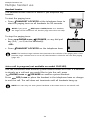
Quick reference guide - handset
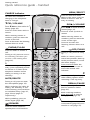
MENU/SELECT
CHARGE indicator
Press to show the menu.
While in the menu, press to
select an item or save an
entry or setting.
On when the handset is
charging in the telephone
base or charger.
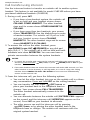
TCID/-VOLUME
DIRS/+VOLUME
Press TCID to show caller ID
history (page 36).
Press DIRS to show directory
entries (page 31).
Press to scroll down while in
menus.
Press to scroll up while in
menus.
While entering names or
numbers, press to move the
cursor to the left.
While entering names or
numbers, press to move the
cursor to the right.
Press to decrease the listening
volume when on a call.
Press to increase the
listening volume when on a
call.
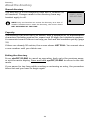
PHONE/FLASH
OFF/CLEAR
Press to make or answer a
call.
During a call, press to hang
up.
During a call, press to answer
an incoming call when you
receive a call waiting alert
(page 22).
While in a menu, press to
cancel an operation, back up
to the previous menu, or exit
the menu display.
1
Press and hold while the
telephone is not in use to
erase the missed calls
indicator.
While reviewing a call log
entry, press repeatedly to add
or remove 1 in front of the
telephone number before
dialing or saving it in the
directory.
#
Press repeatedly to display
other dialing options when
reviewing a call log entry.
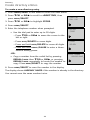
MUTE/DELETE
During a call, press to mute
the microphone (page 22).
REDIAL/PAUSE
Press repeatedly to view the
last five numbers dialed
(page 21).
While reviewing the caller ID
history, the directory or the
redial memory, press to delete
an individual entry (page 37,
page 32 and page 21
respectively).
While entering numbers,
press and hold to insert a
dialing pause (page 29).
While predialing, press to
delete digits (page 20).
INT
Press to begin an intercom
conversation (page 25) or to
transfer a call (page 27).
SPEAKER
Press to switch between
speakerphone and handset.
1