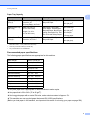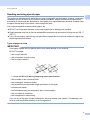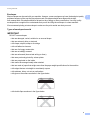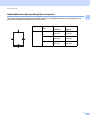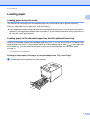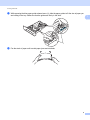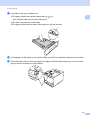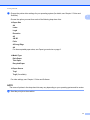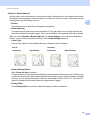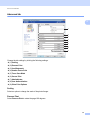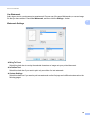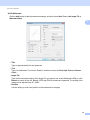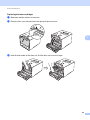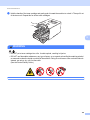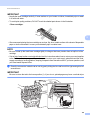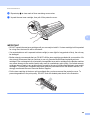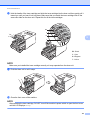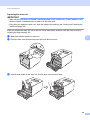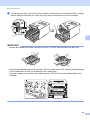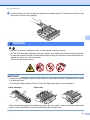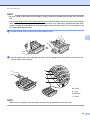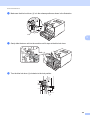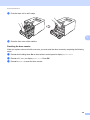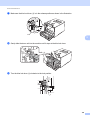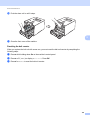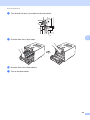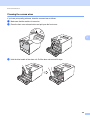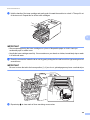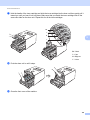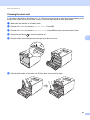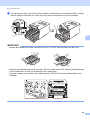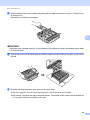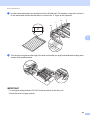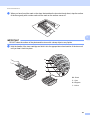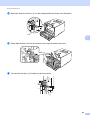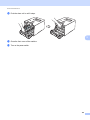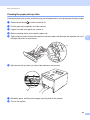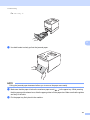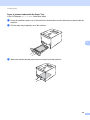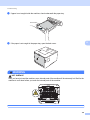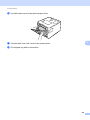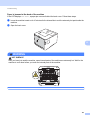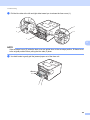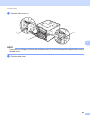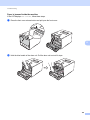
1
User’s Guide Brother Laser Printer HL-L8250CDN HL-L8350CDW HL-L8350CDWT For visually-impaired users You can read this manual with Screen Reader ‘text-to-speech’ software. You must set up the hardware and install the driver before you can use the machine. Please use the Quick Setup Guide to set up the machine. You can find a printed copy in the box. Please read this User's Guide thoroughly before you use the machine. Please visit http://solutions.brother.com/ where you can get product support, the latest driver updates and utilities, and answers to frequently asked questions (FAQs) and technical questions. Note: Not all models are available in all countries. Visit the Brother Solutions Center at http://solutions.brother.com/ and click Manuals on your model's page to download other manuals. Version 0 USA/CAN User's Guides and where do I find them? Which Guide? What's in it? Where is it? Product Safety Guide Read this Guide first. Read the Safety Instructions before you set up your machine. See this Guide for trademarks and legal limitations. Printed / In the Box Quick Setup Guide Follow the instructions for setting up your machine Printed / In the Box and installing the drivers and software for the operating system and connection type you are using. User's Guide Learn the print operations and how to replace supplies and perform routine maintenance. See troubleshooting tips. For USA: PDF file / Brother Solutions Center at http://solutions.brother.com/ For Other Countries: PDF file / CD-ROM / In the box Network User's Guide This Guide provides useful information about wired and wireless network settings and security settings using the Brother machine. You can also find supported protocol information for your machine and detailed troubleshooting tips. For USA: HTML file / Brother Solutions Center at http://solutions.brother.com/ For Other Countries: HTML file / CD-ROM / In the box Google Cloud Print Guide This Guide provides information about how to configure your Brother machine to a Google account and use Google Cloud Print services for printing over the Internet. PDF file / Brother Solutions Center at http://solutions.brother.com/ Mobile Print/Scan Guide for Brother iPrint&Scan This Guide provides useful information about printing from your mobile device and scanning from your Brother machine to your mobile device when connected on a Wi-Fi network. PDF file / Brother Solutions Center at http://solutions.brother.com/ i Using the documentation Thank you for buying a Brother machine! Reading the documentation will help you make the most of your machine. Symbols and conventions used in the documentation The following symbols and conventions are used throughout the documentation: WARNING WARNING indicates a potentially hazardous situation which, if not avoided, could result in death or serious injuries. IMPORTANT IMPORTANT indicates a potentially hazardous situation which, if not avoided, may result in damage to property or loss of product functionality. NOTE Notes tell you how to respond to a situation that may arise or give tips about how the operation works with other features. Electrical Hazard icons alert you to possible electrical shocks. Fire Hazard icons alert you to the possibility of a fire. Hot Surface icons warn you not to touch machine parts that are hot. Prohibition icons indicate actions that must not be performed. Bold Bold style identifies buttons on the machine's control panel or computer screen. Italics Italicized style emphasizes an important point or refers you to a related topic. Courier New Courier New font identifies the messages shown on the LCD of the machine. ii Accessing Brother Utilities (Windows®) Brother Utilities is an application launcher that offers convenient access to all Brother applications installed on your device. a (Windows® XP, Windows Vista®, Windows® 7, Windows Server® 2003, Windows Server® 2008 and Windows Server® 2008 R2) Click (Start) > All Programs > Brother > Brother Utilities. (Windows® 8 and Windows Server® 2012) Tap or click (Brother Utilities) either on the Start screen or the desktop. (Windows® 8.1 and Windows Server® 2012 R2) Move your mouse to the lower left corner of the Start screen and click (if you are using a touchbased device, swipe up from the bottom of the Start screen to display the Apps screen). When the Apps screen appears, tap or click (Brother Utilities). b Select your machine. c Choose the operation you want to use. iii Table of Contents 1 Printing Methods 1 About this Machine ....................................................................................................................................1 Front view and Back view....................................................................................................................1 Acceptable paper and other print media....................................................................................................2 Recommended paper and print media ................................................................................................2 Paper type and size.............................................................................................................................2 Handling and using special paper .......................................................................................................4 Unprintable area when printing from a computer ................................................................................7 Loading paper............................................................................................................................................8 Loading paper and print media............................................................................................................8 Loading paper in the standard paper tray and the optional lower tray ................................................8 Loading paper in the multi-purpose tray (MP tray) ............................................................................12 2-sided printing ........................................................................................................................................20 Guidelines for printing on both sides of the paper .............................................................................20 Automatic 2-sided printing .................................................................................................................21 Manual 2-sided printing .....................................................................................................................23 Printing from a USB flash drive or digital camera supporting mass storage............................................24 Creating a PRN file for direct printing ................................................................................................25 Printing directly from the USB flash drive or digital camera supporting mass storage ......................26 2 Driver and Software 29 Printer driver ............................................................................................................................................29 Printing a document...........................................................................................................................30 Printer driver settings.........................................................................................................................31 Windows® ................................................................................................................................................32 Accessing the printer driver settings..................................................................................................32 Features in the Windows® printer driver............................................................................................33 Basic tab............................................................................................................................................33 Advanced tab.....................................................................................................................................41 Print Profiles tab ................................................................................................................................50 Device Settings tab............................................................................................................................52 Support ..............................................................................................................................................53 BR-Script 3 printer driver features (PostScript® 3™ language emulation) .......................................55 Uninstalling the printer driver.............................................................................................................63 Status Monitor ...................................................................................................................................64 Macintosh ................................................................................................................................................66 Features in the printer driver (Macintosh)..........................................................................................66 Choosing page setup options ............................................................................................................66 Features in the BR-Script3 printer driver (PostScript® 3™ language emulation) .............................76 Removing the printer driver ...............................................................................................................81 Status Monitor ...................................................................................................................................82 Software ..................................................................................................................................................84 Software for networks .......................................................................................................................84 iv 3 General Information 85 Control panel ...........................................................................................................................................85 Control panel overview ......................................................................................................................85 LED indications..................................................................................................................................87 Machine status messages .................................................................................................................87 Settings table.....................................................................................................................................88 Entering Text for Wireless Settings .......................................................................................................103 Printing Secure documents....................................................................................................................104 Secure documents...........................................................................................................................104 How to print Secure documents ......................................................................................................104 Security features....................................................................................................................................105 Setting Lock.....................................................................................................................................105 Secure Function Lock 3.0................................................................................................................106 IPSec ...............................................................................................................................................107 Ecology features ....................................................................................................................................108 Toner Save ......................................................................................................................................108 Sleep Time ......................................................................................................................................108 Deep Sleep mode............................................................................................................................108 Auto Power Off ................................................................................................................................109 Quiet mode feature ................................................................................................................................110 Turning Quiet mode on/off...............................................................................................................110 Color Correction.....................................................................................................................................111 Color Calibration..............................................................................................................................111 Color Registration............................................................................................................................112 Auto Correction................................................................................................................................112 4 Options 113 Lower tray (LT-320CL)...........................................................................................................................114 SO-DIMM...............................................................................................................................................115 SO-DIMM types ...............................................................................................................................115 Installing extra memory ...................................................................................................................116 5 Routine Maintenance 118 Replacing supplies.................................................................................................................................118 Replacing the toner cartridges.........................................................................................................122 Replacing the drum unit...................................................................................................................128 Replacing the belt unit .....................................................................................................................135 Resetting the belt counter................................................................................................................140 Replacing the waste toner box ........................................................................................................141 Cleaning and Checking the machine .....................................................................................................148 Cleaning the outside of the machine ...............................................................................................148 Cleaning the inside of the machine .................................................................................................150 Cleaning the corona wires ...............................................................................................................154 Cleaning the drum unit ....................................................................................................................157 Cleaning the paper pick-up roller.....................................................................................................164 Replacing periodic maintenance parts...................................................................................................165 Packing and shipping the machine ........................................................................................................166 v 6 Troubleshooting 170 Identifying the problem ..........................................................................................................................170 Error and maintenance messages.........................................................................................................171 Paper jams ......................................................................................................................................176 If you are having difficulty with your machine ........................................................................................188 Improving the print quality......................................................................................................................192 Machine Information ..............................................................................................................................200 Checking the Serial Number............................................................................................................200 Default settings................................................................................................................................200 A Appendix 202 Machine specifications...........................................................................................................................202 General............................................................................................................................................202 Print media ......................................................................................................................................204 Printer ..............................................................................................................................................205 Interface...........................................................................................................................................205 Network (LAN) .................................................................................................................................206 Direct Print feature...........................................................................................................................206 Computer requirements...................................................................................................................207 Important information for choosing your paper................................................................................208 Supplies...........................................................................................................................................209 Important information for the toner cartridge life..............................................................................210 Brother numbers ....................................................................................................................................212 B Index 215 vi 1 Printing Methods 1 1 About this Machine 1 Front view and Back view 1 7 1 9 2 12 3 10 4 5 11 6 8 1 Face-down output tray support flap (support flap) 2 Control panel with a Liquid Crystal Display (LCD) 3 USB direct print interface 4 Front cover release button 5 Front cover 6 Paper tray 7 Face-down output tray 8 Multi-purpose tray (MP tray) 9 Back cover (Face-up output tray when open) 10 AC power connector 11 USB connector 12 10BASE-T/100BASE-TX port NOTE Most of the illustrations in this User's Guide show the HL-L8350CDW. 1 Printing Methods Acceptable paper and other print media 1 1 Print quality may vary according to the type of paper you are using. You can use the following types of print media: plain paper, thin paper, thick paper, thicker paper, bond paper, recycled paper, labels, envelopes or glossy paper (see Print media on page 204). For best results, follow the instructions below: DO NOT load different types of paper in the paper tray at the same time because it may cause paper jams or misfeeds. For correct printing, you must choose the same paper size in your software application as the paper in the tray. Avoid touching the printed surface of the paper immediately after printing. Before you buy a lot of paper, test a small quantity to make sure that the paper is appropriate for the machine. Recommended paper and print media Paper Type Item Plain Paper Xerox 4200 20 lb 1 Hammermill Laser Print 24 lb (90 g/m2) Recycled Paper (No specific brand recommended) Labels Avery laser labels white #5160 Envelopes (No specific brand recommended) Glossy Paper NewPage Futura Laser Gloss 80 lb Text/32 lb Bond (118 g/m2) Xerox Digital Color Elite Gloss Paper type and size 1 The machine feeds paper from the installed standard paper tray, multi-purpose tray or optional lower tray. The names for the paper trays in the printer driver and this Guide are as follows: Tray Name Paper Tray Tray 1 Optional Lower Tray Unit (Standard equipment for HL-L8350CDWT) Tray 2 Multi-purpose Tray MP Tray 2 Printing Methods Paper Tray Capacity Paper size Paper types No. of sheets Paper Tray (Tray 1) Letter, A4, Legal, B5 (JIS), Executive, A5, A5 (Long Edge), A6, Folio 1 Plain Paper, Thin Paper and Recycled Paper up to 250 sheets Multi-purpose Tray (MP Tray) Width: 3.0 to 8.5 in. (76.2 to 215.9 mm) Plain Paper, Thin Paper, Thick Paper, Thicker Paper, Recycled Paper, Bond Paper, Labels, Envelopes, Env. Thin, Env.Thick and Glossy Paper 2 up to 50 sheets Plain Paper, Thin Paper and Recycled Paper up to 500 sheets Length: 5 to 14 in. (127 to 355.6 mm) Optional Lower Tray (Tray 2) 3 Letter, A4, Legal, B5(JIS), Executive, A5, Folio 1 1 Folio size is 8.5 in. 13 in. (215.9 mm x 330.2 mm). 2 Load only one sheet of Glossy in the MP tray. 3 Tray 2 is standard on HL-L8350CDWT. 1 20 lb (80 g/m2) 20 lb (80 g/m2) 3 Envelopes 1 Glossy paper 20 lb (80 g/m2) Recommended paper specifications 1 The following paper specifications are appropriate for this machine: Basis Weight 20-24 lb (75-90 g/m2) Thickness 80-110 m Roughness Higher than 20 sec. Stiffness 90-150 cm3/100 Grain Direction Long Grain Volume Resistivity 10e9-10e11 ohm Surface Resistivity 10e9-10e12 ohm-cm Filler CaCO3 (Neutral) Ash Content Below 23 wt% Brightness Higher than 80% Opacity Higher than 85% Use plain paper that is appropriate for laser machines to make copies. Use paper that is 20 to 24 lb (75 to 90 g/m2). Use long grain paper with a neutral Ph value, and a moisture content of approx. 5%. This machine can use recycled paper that meets DIN 19309 specifications. (Before you load paper in this machine, see Important information for choosing your paper on page 208.) 3 Printing Methods Handling and using special paper 1 1 The machine is designed to work well with most types of xerographic and bond paper. However, some paper variables may have an effect on print quality or handling reliability. Always test samples of paper before purchasing to ensure desirable performance. Store paper in its original packaging and keep it sealed. Keep the paper flat and away from moisture, direct sunlight and heat. Some important guidelines when selecting paper are: DO NOT use inkjet paper because it may cause a paper jam or damage your machine. Preprinted paper must use ink that can withstand the temperature of the machine’s fusing process 392 F (200 C). If you use bond paper, paper having a rough surface, or paper that is wrinkled or creased, the paper may exhibit degraded performance. Types of paper to avoid 1 IMPORTANT Some types of paper may not perform well or may cause damage to your machine. DO NOT use paper: • that is highly textured • that is extremely smooth or shiny • that is curled or warped 1 1 1 A curl of 0.08 in. (2 mm) or greater may cause jams to occur. • that is coated or has a chemical finish • that is damaged, creased or folded • that exceeds the recommended weight specification in this guide • with tabs and staples • with letterheads using low temperature dyes or thermography • that is multipart or carbonless • that is designed for inkjet printing If you use any of the types of paper listed above, they may damage your machine. This damage is not covered under any Brother warranty or service agreement. 4 Printing Methods Envelopes 1 1 Most envelopes can be used with your machine. However, some envelopes may have feed and print-quality problems because of the way they have been made. Envelopes should have edges with straight, well-creased folds. Envelopes should lie flat and not be of baggy or flimsy construction. Use only quality envelopes from a supplier who understands that you will be using the envelopes in a laser machine. We recommend printing a test envelope to make sure the print results are what you want. Types of envelopes to avoid 1 IMPORTANT DO NOT use envelopes: • that are damaged, curled, wrinkled or an unusual shape • that are extremely shiny or textured • with clasps, staples, snaps or tie strings • with self-adhesive closures • that are of a baggy construction • that are not sharply creased • that are embossed (have raised writing on them) • that were previously printed by a laser printer • that are pre-printed on the inside • that cannot be arranged neatly when stacked • that are made of paper that weighs more than the paper weight specifications for the machine • with edges that are not straight or consistently square • with windows, holes, cut-outs or perforations • with glue on the surface as shown in the figure below • with double flaps as shown in the figure below 5 Printing Methods • with sealing flaps that are not folded down when purchased 1 • with each side folded as shown in the figure below If you use any of the types of envelopes listed above, they may damage your machine. This damage may not be covered under any Brother warranty or service agreement. Labels 1 Most labels can be used with your machine. Labels should have an adhesive that is acrylic-based since this material is more stable at the high temperatures in the fuser unit. Adhesives should not come in contact with any part of the machine, because the label stock may stick to the drum unit or rollers and cause jams and print quality problems. No adhesive should be exposed between the labels. Labels should be arranged so that they cover the entire length and width of the sheet. Using labels with spaces may result in labels peeling off and causing serious jams or print problems. All labels used in this machine must be able to withstand a temperature of 392 F (200 C) for a period of 0.1 seconds. Types of labels to avoid 1 Do not use labels that are damaged, curled, wrinkled or an unusual shape. IMPORTANT • DO NOT feed partially used label sheets or labels with the carrier sheet exposed because your machine will be damaged. • DO NOT reuse or insert labels that have been used previously or are missing a few labels on the sheet. • Label sheets should not exceed the paper weight specifications described in this User's Guide. Labels exceeding this specification may not feed or print correctly and may cause damage to your machine. 6 Printing Methods Unprintable area when printing from a computer 1 1 The figures below show maximum unprintable areas. The unprintable areas may vary depending on the paper size or settings in the application you are using. Usage 1 Print 2 Document Size Top (1) Left (2) Bottom (3) Right (4) Letter 0.16 in. (4.23 mm) 0.16 in. (4.23 mm) A4 0.16 in. (4.23 mm) 0.16 in. (4.23 mm) Legal 0.16 in. (4.23 mm) 0.16 in. (4.23 mm) 4 3 7 Printing Methods Loading paper 1 1 Loading paper and print media 1 The machine can feed paper from the standard paper tray, multi-purpose tray or optional lower tray. When you load paper into the paper tray, note the following: If your application software supports paper size selection on the print menu, you can select it through the software. If your application software does not support it, you can set the paper size in the printer driver or by using the control panel buttons. Loading paper in the standard paper tray and the optional lower tray 1 Load up to 250 sheets of paper in the standard paper tray (Tray 1). You can also load up to 500 sheets in the ) on the right side optional lower tray (Tray 2) 1. Paper can be loaded up to the maximum paper mark ( of the paper tray. (For the recommended paper to use, see Acceptable paper and other print media on page 2.) 1 Tray 2 is standard on HL-L8350CDWT. Printing on plain paper, thin paper, or recycled paper from Tray 1 and Tray 2 a 1 Pull the paper tray completely out of the machine. 8 Printing Methods b While pressing the blue paper-guide release levers (1), slide the paper guides to fit the size of paper you are loading in the tray. Make sure that the guides are firmly in the slots. 1 c Fan the stack of paper well to avoid paper jams and misfeeds. 9 1 Printing Methods d Load paper in the tray and make sure: The paper is below the maximum paper mark ( 1 ) (1). Over filling the paper tray will cause paper jams. The side to be printed on is face down. The paper guides touch the sides of the paper so it will feed correctly. 1 e f Put the paper tray firmly back in the machine. Make sure that it is completely inserted into the machine. Lift up the support flap (1) to prevent paper from sliding off the face-down output tray, or remove each page as soon as it comes out of the machine. 1 10 Printing Methods g Change the printer driver settings for your operating system (for details, see Chapter 2: Driver and Software). 1 Choose the option you want from each of the following drop-down lists: Paper Size A4 Letter Legal Executive A5 JIS B5 Folio A5 Long Edge A6 For the acceptable paper sizes, see Paper type and size on page 2. Media Type Plain Paper Thin Paper Recycled Paper Paper Source Tray1 Tray2 (if available) For other settings, see Chapter 2: Driver and Software. NOTE The name of options in the drop-down lists may vary depending on your operating system and its version. h Send the print job to the machine. 11 Printing Methods Loading paper in the multi-purpose tray (MP tray) 1 1 You can load up to three envelopes, one sheet of glossy paper, other special print media, or up to 50 sheets of plain paper in the MP tray. Use this tray to print on thick paper, bond paper, labels, envelopes or glossy paper. (For the recommended paper to use, see Acceptable paper and other print media on page 2.) Printing on plain paper, thin paper, recycled paper, bond paper, or glossy paper from the MP tray a Open the MP tray and lower it gently. b Pull out the MP tray support (1) and unfold the flap (2). 1 2 1 12 Printing Methods c Load paper in the MP tray, making sure: The paper stays under the maximum paper tab (1). The paper's leading edge (top of paper) is positioned between the 1 and arrows (2). The side to be printed on must be face up with the leading edge in first. The paper guides touch the sides of the paper so it will feed properly. 2 1 NOTE When you are using glossy paper, load only one sheet at a time in the MP tray to avoid a paper jam. d Lift up the support flap to prevent paper from sliding off the face-down output tray, or remove each page as soon as it comes out of the machine. 13 Printing Methods e Change the printer driver settings for your operating system (for details, see Chapter 2: Driver and Software). 1 Choose the option you want from each of the following drop-down lists: Paper Size A4 Letter Legal Executive A5 A5 Long Edge A6 B5 JIS B5 3x5 Folio Customized paper size 1 1 You can define your original paper size by choosing User Defined... in Windows® printer driver, PostScript Custom Page Size in BR-Script printer driver for Windows®, or Manage Custom Sizes... in Macintosh printer drivers. For the acceptable paper sizes, see Paper type and size on page 2. Media Type Plain Paper Thin Paper Recycled Paper Bond Paper Glossy Paper Paper Source MP Tray For other settings, see Chapter 2: Driver and Software. NOTE The names of options in the drop-down lists may vary depending on your operating system and its version. f Send the print job to the machine. 14 Printing Methods Printing on thick paper, labels and envelopes from the MP tray 1 When the back cover (face-up output tray) is pulled down, the machine has a straight paper path from the MP tray through to the back of the machine. Use this paper feed and output method when you print on thick paper, labels, or envelopes. (For the recommended paper to use, see Acceptable paper and other print media on page 2 and Envelopes on page 5.) Before loading, press the corners and sides of the envelopes to make them as flat as possible. a Open the back cover (face-up output tray). b (For printing envelopes only) Pull down the two gray levers, one on the left side and one on the right side, toward you as shown in the illustration. 15 1 Printing Methods c Open the MP tray and lower it gently. 1 d Pull out the MP tray support (1) and unfold the flap (2). 2 1 e Load paper, labels, or envelopes in the MP tray, making sure: The number of envelopes in the MP tray does not exceed three. The paper, labels or envelopes stay under the maximum paper tab (1). The paper's leading edge (top of paper) is positioned between the and arrows (2). The side to be printed on is face up. 2 1 16 Printing Methods f Change the printer driver settings for your operating system (for details, see Chapter 2: Driver and Software). 1 Choose the option you want from each of the following drop-down lists: Paper Size For printing thick paper or labels A4 Letter Legal Executive A5 A5 Long Edge A6 B5 JIS B5 3x5 Folio Customized paper size 1 For printing envelopes Com-10 DL C5 Monarch Customized paper size 1 1 You can define your original paper size by choosing User Defined... in Windows® printer driver, PostScript Custom Page Size in BR-Script printer driver for Windows®, or Manage Custom Sizes... in Macintosh printer drivers. For the acceptable paper sizes, see Paper type and size on page 2. 17 Printing Methods Media Type 1 For printing thick paper Thick Paper Thicker Paper For printing labels Label For printing envelopes Envelopes Env. Thin Env. Thick Paper Source MP Tray For other settings, see Chapter 2: Driver and Software. NOTE • The name of options in the drop-down lists may vary depending on your operating system and its version. • When you use Envelope #10, choose Com-10 (for Windows®) or Envelope #10 (for Macintosh) from the Paper Size drop-down list. • For other envelopes that are not listed in the printer driver, such as Envelope #9 or Envelope C6, choose User Defined... (for Windows® printer driver), PostScript Custom Page Size (for BR-Script printer driver for Windows®), or Manage Custom Sizes... (for Macintosh printer driver). g Send the print job to the machine. NOTE • Remove each envelope as soon as it has been printed. Stacking the envelopes may cause them to jam or curl. • If envelopes or thick paper get smudged during printing, set the Media Type to Env. Thick or Thicker Paper to increase the fixing temperature. • If the envelopes are creased after they are printed, see Improving the print quality on page 192. • If your thick paper curls during printing, load only one sheet at a time in the MP tray. • Envelope joints that are sealed by the manufacturer should be secure. • All sides of the envelope should be properly folded without wrinkles or creases. 18 Printing Methods h i (For printing envelopes only) When you have finished printing, reset the two gray levers that you pulled down in step b back to their original positions. Close the back cover (face-up output tray). 19 1 Printing Methods 2-sided printing 1 1 The supplied printer drivers all enable 2-sided printing. Guidelines for printing on both sides of the paper 1 If the paper is thin, it may wrinkle. If paper is curled, straighten it and put it back in the paper tray. If the paper continues to curl, replace the paper. If the paper is not feeding correctly, it may be curled. Remove the paper and straighten it. If the paper continues to curl, replace the paper. When you use the manual 2-sided setting, it is possible that there may be paper jams or poor print quality. (If the paper jams, see Paper jams on page 176. If you have a print quality problem, see Improving the print quality on page 192.) NOTE Make sure that the paper tray is completely inserted in the machine. 20 Printing Methods Automatic 2-sided printing 1 1 If you are using the Macintosh Printer Driver, see 2-sided Printing on page 75. Automatic 2-sided printing using the Windows® printer driver a 1 Change the printer driver settings for your operating system (for details, see Chapter 2: Driver and Software). Choose the option you want from each of the following drop-down lists: Paper Size Letter Legal Folio Media Type Plain Paper Recycled Paper Thin Paper Glossy Paper (MP Tray only) Paper Source Tray1 MP Tray Tray2 (if available) 2-sided / Booklet 2-sided 2-sided Type in 2-sided Settings There are four options for each orientation (see 2-sided / Booklet on page 38). Binding Offset in 2-sided Settings Specify the offset for binding (see 2-sided / Booklet on page 38). NOTE • Do not use bond paper. • The name of options in the drop-down lists may vary depending on your operating system and its version. For other settings, see Chapter 2: Driver and Software. b Send the print job to the machine. The machine will print on both sides of the paper automatically. 21 Printing Methods Automatic 2-sided printing using the BR-Script printer driver for Windows® a 1 Change the printer driver settings for your operating system (for details, see Chapter 2: Driver and Software). Choose the option you want from each of the following drop-down lists: Paper Size Letter Legal Folio Media Type Plain Paper Recycled Paper Thin Paper Glossy Paper (MP Tray only) Paper Source Tray1 MP Tray Tray2 (if available) Print on Both Sides Flip on Short Edge Flip on Long Edge Page Order Front to Back Back to Front NOTE • Do not use bond paper. • The name of options in the drop-down lists may vary depending on your operating system and its version. For other settings, see Chapter 2: Driver and Software. b Send the print job to the machine. The machine will print on both sides of the paper automatically. 22 1 Printing Methods Manual 2-sided printing 1 1 The BR-Script printer driver for Windows® does not support manual 2-sided printing. If you are using the Macintosh Printer Driver, see Manual 2–sided Printing on page 75. Manual 2-sided printing using the Windows® printer driver a 1 Change the printer driver settings for your operating system (for details, see Chapter 2: Driver and Software). Choose the option you want from each of the following drop-down lists: Paper Size You can use all the paper sizes specified for the tray you are using. Media Type You can use all the media types that are specified for the tray you are using, except envelopes and labels, which have only one print side. Paper Source Tray1 MP Tray Tray2 (if available) 2-sided / Booklet 2-sided (Manual) 2-sided Type in 2-sided Settings There are four options for each orientation (see 2-sided / Booklet on page 38). Binding Offset in 2-sided Settings Specify the offset for binding (see 2-sided / Booklet on page 38). For other settings, see Chapter 2: Driver and Software. b Send the print job to the machine. The machine will print all the even-numbered pages on one side of the paper first. Then, the Windows® driver instructs you (with a pop-up message) to reinsert the paper to print the odd-numbered pages. NOTE Before reinserting the paper, straighten it well, or you may get a paper jam. Very thin or thick paper is not recommended. 23 Printing Methods Printing from a USB flash drive or digital camera supporting mass storage 1 1 With the Direct Print feature, you do not need a computer for printing. You can print by just plugging your USB flash drive into the machine’s USB direct interface. You can also connect and print directly from a camera set to USB mass storage mode. You can use a USB flash drive that has the following specifications: USB Class USB Mass Storage Class USB Mass Storage Sub Class SCSI or SFF-8070i Transfer protocol Bulk transfer Only Format 1 1 FAT12/FAT16/FAT32 Sector size Max. 4096 Byte Encryption Encrypted devices are not supported. NTFS format is not supported. NOTE • Some USB flash drives may not work with the machine. • If your camera is in PictBridge mode, you cannot print from it. See the documentation supplied with your camera to switch from PictBridge mode to mass storage mode. 24 Printing Methods Creating a PRN file for direct printing 1 1 NOTE The screens in this section may vary depending on your application and operating system. a b From the menu bar of an application, click File, then Print. Choose Brother HL-XXXX Printer (1) and check the Print to file box (2). Click Print. 1 2 c Choose the folder you want to save the file to and type the file name if prompted. If you are prompted for a file name only, you can also specify the folder you want to save the file in by typing the directory name. For example: C:\Temp\FileName.prn If a USB flash drive is connected to your computer, you can save the file directly to the USB flash drive. 25 Printing Methods Printing directly from the USB flash drive or digital camera supporting mass storage 1 NOTE • Make sure your digital camera is turned on. • Your digital camera must be switched from PictBridge mode to mass storage mode. a Connect your USB flash drive or digital camera to the USB direct interface (1) on the front of the machine. The LCD displays the Checking Device message. 1 1 NOTE • When the machine is in the Deep Sleep mode, the LCD does not show any information even if you connect a USB flash drive to the USB direct interface connector. Press any of the Menu buttons to wake up the machine. • If your machine has been set to Secure Function Lock On, you may not be able to access Direct Print (see the Network User's Guide). 26 1 Printing Methods b Press a or b ( + or -) to choose the folder name or file name you want to print. If you have selected the folder name, press OK. Press a or b ( + or -) to choose the file name, and then press OK. NOTE To print an index of the files, press a or b ( + or -) to choose Index Print. Press OK or Go to start printing. c Do one of the following: To change the current settings, Go to step d. If you do not want to change the current settings, press Go. Go to step f. d Press a or b ( + or -) to display the setting you want to change, and then press OK. Press a or b ( + or -) to select the option you want, and then press OK. NOTE • You can choose the following settings: Paper Size Media Type Multiple Page Orientation 2-sided Collate Tray Use Print Quality PDF Option Output Color • Depending on the file type, some of these settings may not appear. e Do one of the following: To change another setting, repeat step d. If you do not want to change other settings, press Go and go to step f. f Press a or b ( + or -) to enter the number of copies you want. 27 1 Printing Methods g Press OK or Go to start printing. 1 IMPORTANT • To prevent damage to your machine, DO NOT connect any device other than a digital camera or USB flash drive to the USB direct interface. • DO NOT remove the USB flash drive or digital camera from the USB direct interface until the machine has finished printing. NOTE You can change the default settings for Direct Print by using the control panel when the machine is not in the Direct Print mode. Press a or b ( + or -) to enter the Direct Print menu. (See Direct Print on page 102.) 28 2 Driver and Software 2 Printer driver 2 2 A printer driver is software that translates data from the format used by a computer to the format that a particular printer needs. Typically, this format is page description language (PDL). The printer drivers for the supported versions of Windows® and Macintosh are on the CD-ROM we have supplied (Windows® only) or on the Brother Solutions Center website at http://solutions.brother.com/. Install the drivers by following the steps in the Quick Setup Guide. The latest printer drivers can be downloaded from the Brother Solutions Center website at: http://solutions.brother.com/ For Windows® 2 Windows® printer driver (the recommended printer driver for this product) BR-Script printer driver (PostScript® 3™ language emulation) 1 1 Install the driver using the Custom Install from the CD-ROM. For Macintosh 1 2 Macintosh printer driver (the recommended printer driver for this product) BR-Script printer driver (PostScript® 3™ language emulation) 2 1 To download the printer driver for Macintosh, please visit your model page at http://solutions.brother.com/. 2 For the installation instruction of the driver, visit http://solutions.brother.com/. For Linux® 1 2 2 LPR printer driver CUPS printer driver 1 For more information and to download the printer driver for Linux, please visit your model page at http://solutions.brother.com/ or use the link on the CD-ROM we have supplied. 2 Depending on Linux distributions, the driver may not be available or it may be released after the initial release of your model. 29 Driver and Software Printing a document 2 When the machine receives data from your computer, it begins printing by picking up paper from the paper tray, multi-purpose tray or optional lower tray. The multi-purpose tray can feed many types of paper and envelopes (see Paper Tray Capacity on page 3). a From your application, choose the Print command. If other printer drivers are installed on your computer, choose Brother HL-XXXX series (where XXXX is your model name) as your printer driver from the Print or Print Settings menu in your software application, and then click OK or Print to begin printing. b Your computer sends the print job to the machine. The Data LED will blink and the LCD will show Printing. c When the machine finishes printing all the jobs, the Data LED finishes blinking. NOTE • Select the paper size and orientation in your application software. • If your application software does not support your custom paper size, choose the next largest paper size. • Then adjust the print area by changing the right and left margins in your application software. 30 2 Driver and Software Printer driver settings 2 You can change the following printer settings when printing from your computer: Windows® printer driver BR-Script printer driver for Windows® Macintosh Printer Driver 2 BR-Script printer driver for Macintosh Paper Size Orientation Copies Media Type Print Quality Document Type Color/Mono Multiple Page 2–sided 1 / Booklet 2 Paper Source Scaling Reverse Print Use Watermark Header-Footer Print Toner Save Mode Secure Print Administrator User Authentication Color Calibration Sleep Time Improve Print Output Skip Blank Page Print Text in Black Print Archive Print Profile 1 Manual 2-sided printing is not available with the BR-Script printer driver for Windows®. 2 Booklet is not available with the Macintosh printer driver and the BR-Script printer driver for Macintosh. 31 Driver and Software Windows® 2 Accessing the printer driver settings a 2 2 (For Windows® XP and Windows Server® 2003) Click Start > Printers and Faxes. (For Windows Vista® and Windows Server® 2008) Click the (Start) button > Control Panel > Hardware and Sound > Printers. (For Windows® 7 and Windows Server® 2008 R2) Click the (Start) button > Devices and Printers. (For Windows® 8 and Windows Server® 2012) Move your mouse to the lower right corner of your desktop. When the menu bar appears, click Settings > Control Panel. In the Hardware and Sound (Hardware) group, click View devices and printers. (For Windows Server® 2012 R2) Click Control Panel on the Start screen. In the Hardware group, click View devices and printers. b Right-click the Brother HL-XXXX series icon (where XXXX is your model name) and select Printer properties (Properties), and Brother HL-XXXX series if needed. The printer properties dialog box appears. c Click the General tab, and then click Preferences... (Printing Preferences...). To configure the tray settings, click the Device Settings tab. 32 Driver and Software Features in the Windows® printer driver 2 For more information, see the Help text in the printer driver. NOTE 2 • The screens in this section are from your operating system. Windows® 7. The screens on your computer will vary depending on • To access the printer driver settings, see Accessing the printer driver settings on page 32. • For HL-L8350CDWT users, please read HL-L8350CDW as HL-L8350CDWT. Basic tab 2 Change the Page Layout settings by clicking the illustration on the left side of the Basic tab. 1 4 2 3 5 a Choose the Paper Size, Orientation, Copies, Media Type, Print Quality, Color / Mono and Document Type (1). b c d e Choose Multiple Page and 2-sided / Booklet (2). Choose the Paper Source (3). Review the displayed list of settings (4). Click OK to confirm the settings. To return to the default settings, click Default, then OK. NOTE To preview your document before printing, select the Print Preview check box (5). 33 Driver and Software Paper Size 2 From the drop-down list choose the Paper Size you are using. Orientation 2 Orientation selects the position of how your document will be printed (Portrait or Landscape). Portrait (Vertical) Landscape (Horizontal) Copies 2 Click a or b to enter the number of copies to be printed. Collate With the Collate check box selected, one complete copy of your document will be printed and then repeated for the number of copies you selected. If the Collate check box is not selected, then each page will be printed for all the copies before the next page of the document is printed. Collate selected Collate cleared Media Type 2 You can use the following types of media in your machine. For the best print quality, select the type of media that matches the paper you are using. Plain Paper Thin Paper Thick Paper Thicker Paper Bond Paper Envelopes Env. Thick Env. Thin Recycled Paper Label Glossy Paper 34 2 Driver and Software NOTE • When using ordinary plain paper 16 to 28 lb (60 to 105 g/m2) choose Plain Paper. When using heavier weight paper or rough paper choose Thick Paper or Thicker Paper. For bond paper, choose Bond Paper. 2 • When using envelopes, choose Envelopes. If the toner is not fixed to the envelope correctly when Envelopes is selected, choose Env. Thick. If the envelope is crumpled when Envelopes is selected, choose Env. Thin. For more information, see Paper Tray Capacity on page 3. • When Label is selected in the printer driver, the machine will feed the paper from the MP tray, even if MP Tray is not selected as the paper source. Print Quality 2 Choose one of the following print quality settings: Normal (600 x 600 dpi) 600600 dpi. Recommended for ordinary printing. Use this mode for good print quality with reasonable print speeds. Fine (2400 dpi class) 2400 dpi class. The finest print mode. Use this mode to print precise images such as photographs. Since the print data is much larger than in Normal mode, processing time / data transfer time and print time will be longer. NOTE The print speed will change depending on the print quality setting you choose. Higher print quality takes longer to print, while lower print quality takes less time to print. Color / Mono 2 You can change the Color/Mono settings in the printer driver as follows: Auto The machine checks the content of the document for color. If color is detected anywhere in the document, it will print the whole of the document using all the colors. In other words, it will mix some of the toners to help achieve every shade detected in the document, increasing the density of toner applied to the page. If no color content is detected, it will print the document in monochrome. The default setting on your machine is Auto. Color Whether the document contains color or just monochrome, your machine will print the document using all the colors. Mono Select Mono if the document has only black and grayscale text and objects. If your document contains color, this mode prints the document in 256 levels of gray using the black toner. 35 Driver and Software NOTE • The machine’s color sensor is very sensitive and may perceive faded black text or an off-white background as color. If you know that your document is black and white and you want to conserve color toner, select Mono mode. 2 • If either the Cyan, Magenta or Yellow toner reaches the end of its life while printing a color document, the print job cannot be completed. You can cancel your print job and choose to start the print job again in Mono mode, as long as Black toner is available. Document Type 2 Use Document Type to select the optimal settings for printing the relevant type of data. Document (Standard) Use this mode for printing a combination of graphics and text. Photo / Image Use this mode for printing photos or images. Document (Mixed) Use this mode for printing combinations of graphics/text and photos/images. NOTE This mode takes longer to print the data. Manual Choosing Manual allows you to select the settings manually by clicking the Settings button. Settings dialog box 2 To change the following settings, click Settings... in the Basic tab. Color Mode The following options are available in color Matching mode: • Normal This is the default color mode. • Vivid The color of all elements are adjusted to become a brighter color. • Auto The printer driver selects the Color Mode type. NOTE Choosing this option may take longer to print the data. • None 36 Driver and Software Import... To adjust the print configuration of a particular image, click Settings. When you have finished adjusting the image parameters, such as brightness and contrast, import those settings as a print configuration file. Use the Export... option to create a print configuration file from the current settings. 2 Export... To adjust the print configuration of a particular image, click Settings. When you have finished adjusting the image parameters, such as brightness and contrast, export those settings as a print configuration file. Use the Import... option to load a previously exported configuration file. Improve Gray Color You can improve the image quality of a shaded area. Enhance Black Printing If a black graphic does not print correctly, choose this setting. Improve Thin Line You can improve the image quality of thin lines. Improve Pattern Printing Select this option if printed fills and patterns are different from the patterns and fills you see on your computer. Multiple Page 2 The Multiple Page selection can reduce the image size of a page to allow multiple pages to be printed on one sheet of paper or to enlarge the image size for printing one page on multiple sheets of paper. Page Order When the N in 1 option is selected, the page order can be selected from the drop-down list. Border Line When using the Multiple Page feature to print multiple pages on one sheet, you can choose to have a solid border, dash border or no border around each page on the sheet. Print cut-out line When the 1 in NxN pages option is selected, the Print cut-out line option can be selected. This option allows you to print a faint cut-out line around the printable area. 37 Driver and Software 2-sided / Booklet 2 To print a booklet or do 2-sided printing, use this option. None 2 Disable 2-sided printing. 2-sided / 2-sided (Manual) To do 2-sided printing, use these options. • 2-sided The machine prints on both sides of the paper automatically. • 2-sided (Manual) The machine prints all the even numbered pages first. Then the printer driver will stop and show the instructions required to reload the paper. When you click OK the odd numbered pages will be printed. When you choose 2-sided or 2-sided (Manual), the 2-sided Settings... button becomes available to choose. You can choose from the following options in the 2-sided Settings dialog box: • 2-sided Type There are four types of 2-sided binding directions available for each orientation. Portrait Long Edge (Left) Long Edge (Right) Short Edge (Top) Short Edge (Bottom) Long Edge (Bottom) Short Edge (Right) Short Edge (Left) Landscape Long Edge (Top) • Binding Offset When you check Binding Offset, you can also specify the offset for binding in inches or millimeters. 38 Driver and Software Booklet / Booklet (Manual) Use this option to print a document in booklet format using 2-sided printing; it will arrange the document according to the correct page number and allow you to fold at the center of the print output without having to change the order of the page numbers. • Booklet The machine prints on both sides of the paper automatically. • Booklet (Manual) The machine prints all the even numbered sides first. Then the printer driver will stop and show the instructions required to reload the paper. When you click OK the odd numbered sides will be printed. When you choose Booklet or Booklet (Manual), the 2-sided Settings... button becomes available to choose. You can choose the following settings in the 2-sided Settings dialog box. • 2-sided Type There are two types of 2-sided binding directions available for each orientation. Portrait Left Binding Landscape Right Binding Top Binding Bottom Binding • Booklet Printing Method When Divide into Sets is selected: This option allows you to print the whole booklet in smaller individual booklet sets, and it still allows you to fold at the center of the smaller individual booklet sets without having to change the order of the page numbers. You can specify the number of sheets in each smaller booklet, from 1 to 15. This option is helpful for folding a printed booklet that has a large number of pages. • Binding Offset Check Binding Offset to specify the offset for binding in inches or millimeters. 39 2 Driver and Software Paper Source 2 You can choose Auto Select, Tray1, Tray2, 1 2 or MP Tray and specify separate trays for printing the first page and for printing from the second page onward. 1 Available if the optional tray is installed. 2 Tray 2 is standard on HL-L8350CDWT. 2 Print Preview 2 Preview a document before it is printed. If you check the Print Preview check box the Print Preview Viewer window will open before printing starts. 1 2 (1) Page List Area The Page List Area displays the page numbers for the actual pages that will be printed. If you choose a page in this list, a preview of the print results for the page will be displayed in the Preview Area. If you do not want to print a page, clear the check box. (2) Preview Area The Preview Area displays a preview of the print results for the pages chosen in the Page List Area. NOTE • If the Booklet setting was selected in the Printer driver settings, you cannot use the Print Preview option. • If the 2-sided setting was selected in the Printer driver settings, you cannot delete pages using the Page List Area. 40 Driver and Software Advanced tab 2 2 1 2 3 4 5 6 7 8 9 Change the tab settings by clicking the following settings: (1) Scaling (2) Reverse Print (3) Use Watermark (4) Header-Footer Print (5) Toner Save Mode (6) Secure Print (7) Administrator (8) User Authentication (9) Other Print Options Scaling 2 Select an option to change the scale of the printed image. Reverse Print 2 Select Reverse Print to rotate the page 180 degrees. 41 Driver and Software Use Watermark 2 Add a logo or text to your document as a watermark. Choose one of the preset Watermarks, or use an image file that you have created. Check Use Watermark, and then click the Settings... button. 2 Watermark Settings 2 Bring To Front Select this check box to overlay the selected characters or image onto your printed document. In Outline Text Select this check box if you want to print only an outline of a text watermark. Custom Settings Select this check box if you want to print one watermark on the first page and a different watermark on the following pages. 42 Driver and Software Edit Watermark Click the Add button to add the watermark settings, and then choose Use Text or Use Image File in Watermark Style. 2 • Title Type an appropriate title for the watermark. • Text Type your Watermark Text into the Text box, and then choose the Font, Style, Size and Choose Color.... • Image File Type the file name and location of the Image File you want to use as the Watermark in File, or click Browse to search for the file. Bitmap, JPEG and PNG file formats are supported. The scaling of the image can be adjusted from 25 - 999%. • Position Use this setting to control the position of the watermark on the page. 43 Driver and Software Header-Footer Print 2 2 When this feature is enabled, it will print the date and time on your document from your computer’s system clock and the computer login user name or the text you typed. Click Settings to customize. ID Print Select Login User Name to print your computer login user name. To print a different name, select Custom and type a name in the Custom text box. Toner Save Mode 2 Conserve toner use with this feature. When you set Toner Save Mode to On, print appears lighter. The default setting is Off (unchecked). NOTE We do not recommend Toner Save Mode for printing photo or grayscale images. 44 Driver and Software Secure Print 2 2 Secure documents are documents that are password-protected when they are sent to the machine. Only the people who know the password will be able to print them. Since the documents are secured at the machine, you must enter the password using the control panel of the machine to print them. To send a secured document: a b c Click Settings... from Secure Print and check Secure Print. Enter your password and click OK. To print a secured document, you must enter your password using the control panel of the machine (see Printing Secure documents on page 104). To delete a secured document: You must use the control panel of the machine to delete a secured document (see Printing Secure documents on page 104). 45 Driver and Software Administrator 2 Administrators have the authority to limit access to settings such as scaling and watermark. 2 Password Type the password in this box. NOTE Click Set Password... to change the password. Copies Lock Select this check box to lock the Copies selection in the Basic tab to prevent users from printing multiple copies. Multiple Page & Scaling Lock Select this check box to lock the multiple page and scaling settings. Color / Mono Lock Select this check box to lock the Color/Mono settings as Mono to prevent color printing. Watermark Lock Select this check box to lock the settings of the Watermark option to prevent changes being made. Header-Footer Print Lock Select this check box to lock the settings of the Header-Footer Print option to prevent changes being made. User Authentication 2 If you are restricted from using computer to print by the Secure Function Lock feature, you can check your current print status. Click Check Print Status to see your computer login name information, such as the restricted features and the remaining number of pages you are allowed to print when you are using the machine on a network. The Authentication result dialog box appears. To cause the Authentication result dialog box to open each time you print, check the Show print status before printing check box. For more information about Secure Function Lock, see the Network User's Guide 46 Driver and Software Other Print Options 2 2 You can set the following in Printer Function: Color Calibration Sleep Time Improve Print Output Skip Blank Page Print Text in Black Print Archive Color Calibration 2 The output density of each color may vary depending on the temperature and humidity of the machine's environment. This setting helps you improve color density by letting the printer driver use the color calibration data stored in your machine. Use Calibration Data If you select this check box, the printer driver will use the calibration data retrieved from the machine to set color matching in the printer driver. This will ensure consistent print quality. Get Device Data Automatically If you select this check box, the printer driver will use the color calibration data from your machine. Start Color Calibration If you click this button, your machine will start the color calibration process, and then the printer driver will use the calibration data from your machine. 47 Driver and Software Sleep Time 2 When the machine does not receive data for a certain period of time, it enters Sleep mode. In Sleep mode, the machine acts as though it were turned off. When you choose Printer Default, the timeout setting will be reset to the specific time set at the factory; this can be altered in the driver. Intelligent Sleep mode adjusts to the most appropriate timeout setting depending on the frequency of your machine use. 2 While the machine is in Sleep mode, the LCD displays Sleep, but the machine can still receive data. Receiving a print job will wake up the machine to start printing. Improve Print Output 2 This feature allows you to improve a print quality problem. Reduce Paper Curl Select this setting to reduce paper curl. If you are printing only a few pages, you do not have to choose this setting. We recommend changing the printer driver setting in Media Type to a thin setting. NOTE This operation will decrease the temperature of the machine's fusing process. Improve Toner Fixing Select this setting to improve the toner fixing capabilities. If this selection does not provide enough improvement, change the printer driver setting in Media Type to a thick setting. NOTE This operation will increase the temperature of the machine's fusing process. 48 Driver and Software Skip Blank Page 2 If Skip Blank Page is selected, the printer driver detects blank pages and excludes them from printing. NOTE 2 This option does not work with the following options: • Use Watermark • Header-Footer Print • N in 1 and 1 in NxN Pages in Multiple Page • 2-sided (Manual), Booklet, Booklet (Manual) and 2-sided with Binding Offset in 2-sided / Booklet Print Text in Black 2 Select this option to print all text in Black only. NOTE It may not work with certain characters. Print Archive 2 A copy of your printout can be saved as a PDF file to your computer. To change the file size, move the File Size slider to the right or left. The resolution is set according to the file size. NOTE By enabling this feature, there may be a longer wait before your machine begins printing. 49 Driver and Software Print Profiles tab 2 Print Profiles are editable presets designed to give you quick access to frequently used printing configurations. 2 5 1 2 4 3 (1) Print profile list box (2) Delete Profile (3) Always show Print Profiles tab first (4) Add Profile (5) Current print profile view a b Choose your profile from the print profile list box. c Click OK to apply your chosen profile. To display the Print Profiles tab at the front of the window every time you print, click Always show Print Profiles tab first. Add Profile 2 Click the Add Profile button to display the Add Profile dialog box. Add up to 20 new profiles with your preferred settings. a b c Type a title in Name. Choose an icon you want to use from the Icon list, then click OK. The settings shown on the left side of the printer driver window will be saved. 50 Driver and Software Delete Profile 2 Click Delete Profile to display the Delete Profile dialog box. You can delete any of the profiles you have added. a b c 2 Choose your profile from the print profile list box. Click Delete. The selected profile will be deleted. 51 Driver and Software Device Settings tab 2 NOTE To access the Device Settings tab, see Accessing the printer driver settings on page 32. 2 You can define the paper size for each paper tray and auto detect the serial number in the Device Settings tab as follows. 1 3 2 4 (1) Available Options / Installed Options You can manually add and remove the options that are installed on the machine. Tray settings will match the installed options. (2) Paper Source Setting Click the Auto Detect (4) button to detect and display the machine's serial number and paper size setting for the paper trays. (3) Serial No. By clicking Auto Detect (4), the printer driver will probe the machine and display its serial number. If it fails to receive the information, the screen displays “---------------”. (4) Auto Detect The Auto Detect setting finds the currently installed optional devices and displays the available options in the printer driver. When you click Auto Detect, options that are installed on the machine will be listed in Available Options (1). Manually add or remove the options by choosing an optional device you want to add or remove, and then clicking Add or Remove. NOTE The Auto Detect (4) setting is not available under the following machine conditions: • The machine is turned off. • The machine is in an error state. • The machine is connected to the print server using a USB cable in a shared network environment. • The cable is not connected to the machine correctly. 52 Driver and Software Support 2 Click Support... in the Printing Preferences dialog box. 2 1 2 3 4 5 6 (1) Brother Solutions Center Click this button to visit the Brother Solutions Center website (http://solutions.brother.com/) for information about your Brother product including FAQs (Frequently Asked Questions), User’s Guides, driver updates and tips for using your machine. 53 Driver and Software (2) Genuine Supplies website Click this button to visit our website for genuine Brother supplies. (3) Brother CreativeCenter 2 Click this button to visit our website for free online solutions for business and home users. (4) Print Settings Click this button to print pages that show how the internal settings of the machine have been configured. (5) Check Setting... Click this button to check the printer driver settings. (6) About... Click this button to view a list of the printer driver files and version information. 54 Driver and Software BR-Script 3 printer driver features (PostScript® 3™ language emulation) 2 NOTE The screens in this section are from Windows® 7. The screens on your computer may vary depending on your operating system. Printing Preferences 2 2 NOTE To access the Printing Preferences dialog box, click Preferences... in the General tab of the Brother HL-XXXX BR-Script3 Properties dialog box. Layout tab Change the layout by choosing the settings for Orientation, Print on Both Sides (2-sided), Page Order and Pages Per Sheet. • Orientation Portrait Landscape Rotated Landscape Orientation selects the position of your document on the printed page. • Print on Both Sides To do 2-sided printing, choose Flip on Short Edge or Flip on Long Edge. • Page Order Specify the order in which the pages of your document will be printed. Front to Back prints the document so that page 1 is on top of the stack. Back to Front prints the document so that page 1 is on the bottom of the stack. 55 Driver and Software • Pages Per Sheet Click Pages Per Sheet to reduce the image size of a page by allowing multiple pages to be printed on one sheet of paper. Click Booklet to print a document in the booklet style. • Draw Borders 2 Select this check box to add a border. Paper/Quality tab Choose the Paper Source. • Paper Source Automatically Select Auto Select by Printer Tray1 Tray2 1 2 MP Tray Automatically Select Select this option to pull paper from any paper source that has a paper size defined in the printer driver that matches your document. Auto Select by Printer Select this option to pull paper from any paper source that has a paper size defined in the machine that matches your document. Tray1 Select this option to pull paper from Tray 1. Tray2 Select this option to pull paper from Tray 2. (Available if the optional tray is installed.) 2 56 Driver and Software MP Tray Select this option to pull paper from the multi-purpose tray. The paper size in the multi-purpose tray must match the size defined in the printer driver. 1 Available if the optional tray is installed. 2 Tray 2 is standard on HL-L8350CDWT. 2 • Color Select either Black & White or Color. Secure Print tab Secure documents are documents that are password protected when they are sent to the machine. Only the people who know the password will be able to print them. Since the documents are secured at the machine, you must enter the password using the control panel of the machine to print them. To send a secured document: a b c Check Secure Print. Type your password and click OK. To print the secured document, you must enter your password using the control panel of the machine (see Printing Secure documents on page 104). To delete a secured document: You must use the control panel of the machine to delete a secured document (see Printing Secure documents on page 104). 57 Driver and Software Advanced options 2 Access the Advanced options by clicking the Advanced... button on the Layout tab or Paper/Quality tab. 2 1 2 a Choose the Paper Size and Copy Count (1). Paper Size From the drop-down list choose the size of paper you are using. Copy Count The copy selection sets the number of copies that will be printed. b Set the Image Color Management, Scaling and TrueType Font settings (2). Image Color Management Specify how to print your color graphics. • If you don’t want to enable Image Color Management, click ICM Disabled. • If you want the calculations for color matching to be performed on the host computer before it sends the document to the machine, click ICM Handled by Host System. • If you want the calculations for color matching to be performed on your machine, click ICM Handled by Printer using printer calibration. Scaling Specify whether to reduce or enlarge documents, and by what percentage. TrueType Font Specify the TrueType font options. Click Substitute with Device Font (the default) to use equivalent printer fonts for printing documents that contain TrueType fonts. This will permit faster printing; however, you might lose special characters not supported by the printer font. Click Download as Softfont to download TrueType fonts for printing instead of using printer fonts. 58 Driver and Software c Change settings by choosing a setting in the Printer Features list (3): 2 3 Print Quality Choose one of the following print quality settings: • Normal (600 x 600 dpi) 600 dpi class. Recommended for ordinary printing. Use this mode for good print quality with reasonable print speeds. • Fine (2400 dpi class) 2400 dpi class. The finest print mode. Use this mode to print precise images such as photographs. Since the print data is much larger than in Normal mode, processing time, data transfer time, and print time will be longer. Media Type You can use the following types of media in your machine. For the best print quality, select the type of media you are using. • Plain Paper • Thin Paper • Thick Paper • Thicker Paper • Bond Paper • Envelopes • Env. Thick • Env. Thin • Recycled Paper • Label • Glossy Paper 59 Driver and Software Toner Save Mode Conserve toner use with this feature. When you set Toner Save Mode to On, print appears lighter. The default setting is Off. 2 NOTE We do not recommend Toner Save Mode for printing Photo or grayscale images. Sleep Time [Min.] When the machine does not receive data for a certain period of time, it enters Sleep mode. In Sleep mode, the machine acts as though it were turned off. When you choose Printer Default, the timeout setting will be reset to the specific time set at the factory; this can be altered in the driver. While the machine is in Sleep mode, the LCD displays Sleep, but the machine can still receive data. Receiving a print job will wake up the machine to start printing. Color / Mono You can change the Color/Mono settings in the printer driver as follows: • Auto The machine checks the content of the document for color. If color is detected anywhere in the document, it will print the whole of the document using all the colors. In other words, it will mix some of the toners to help achieve every shade detected in the document, increasing the density of toner applied to the page. If no color content is detected, it will print the document in monochrome. The default setting on your machine is Auto. • Color Whether the document contains color or just monochrome, your machine will print the document using all the colors. • Mono Select this mode if the document has only black and grayscale text and objects. If your document contains color, this mode prints the document in 256 levels of gray using the black toner. NOTE • The machine’s color sensor is very sensitive and may perceive faded black text or an off-white background as color. If you know that your document is black and white and you want to conserve color toner, select Mono mode. • If either the Cyan, Magenta or Yellow toner reaches the end of its life while printing a color document, the print job cannot be completed. You can cancel your print job and choose to start the print job again in Mono mode, as long as Black toner is available. 60 Driver and Software Color Mode The following options are available in Color Matching mode: • Normal 2 This is the Default color mode. • Vivid The color of all elements are adjusted to become a more vivid color. • None Improve Gray Color You can improve the image of a shaded area. Enhance Black Printing If a black graphic does not print correctly, choose this setting. Halftone Screen Lock This lock stops other applications from modifying the Halftone settings. The default setting is On. High Quality Image Printing You can get high quality image printing. If you set High Quality Image Printing to On, the print speed will be slower. Improve Print Output This feature allows you to improve a print quality problem. • Reduce Paper Curl If you choose this setting, the paper curl may be reduced. If you are printing only a few pages, you do not have to choose this setting. We recommend changing the printer driver setting in Media Type to a thin setting. NOTE This operation will decrease the temperature of the machine's fusing process. • Improve Toner Fixing If you choose this setting, the toner fixing capabilities may be improved. If this selection does not provide enough improvement, change the printer driver setting in Media Type to a thick setting. NOTE This operation will increase the temperature of the machine's fusing process. 61 Driver and Software Ports tab 2 To change the port where your machine is connected or the path to the network machine you are using, choose or add the port you want to use. 2 62 Driver and Software Uninstalling the printer driver 2 Uninstall the printer driver that you have installed with the following steps. NOTE 2 • UnInstall is not available if you originally installed the printer driver from the Windows Add a printer setting. • After uninstalling, we recommend restarting your computer to remove files that were in use during the uninstall. (Windows® XP, Windows Vista® and Windows® 7) a b c Click the Start button, point to All Programs, Brother, and then to your machine name. Click UnInstall. Follow the instructions on the screen. (Windows® 8) a Click b c d Click the drop-down list and select your model name (if not already selected). (Brother Utilities). Brother Utilities screen appears. Click Tools in the left navigation bar. Click Uninstall. 63 Driver and Software Status Monitor 2 The Status Monitor utility is a configurable software tool for monitoring the status of one or more devices, allowing you to get immediate notification of errors. 2 If you selected the Enable Status Monitor on startup check box during installation, you will find the button or the Status Monitor icon on the taskbar. To show the Status Monitor icon on your taskbar, click the in the small window. Drag the button. The Status Monitor icon appears icon to the taskbar. Do one of the following: Double-click the icon in the task tray. (Windows® XP, Windows Vista® and Windows® 7) a b c d Click Start > All Programs > Brother > Brother Utilities. The Brother Utilities screen appears. Click the drop-down list and select your model name (if not already selected). Click Tools in the left navigation bar. Click Status Monitor. (Windows® 8) a Click b c d Click the drop-down list and select your model name (if not already selected). (Brother Utilities). The Brother Utilities screen appears. Click Tools in the left navigation bar. Click Status Monitor. 64 Driver and Software Troubleshooting 2 Click the Troubleshooting button to access the Brother Solutions Center at http://solutions.brother.com/ and visit FAQs on your model page for instructions. Visit the Genuine Supplies website 2 2 Click the Visit the Genuine Supplies website button for more information on Brother genuine supplies. NOTE The automatic firmware update is active when the status monitor feature is enabled. Monitoring the machine’s status 2 When you start up your computer, the Brother Status Monitor icon appears on the tasktray. A green icon indicates the normal stand-by condition. A yellow icon indicates a warning. A red icon indicates an error has occurred. A gray icon indicates the offline condition. The Status Monitor can be displayed in the tasktray or on the desktop of your computer. 65 Driver and Software Macintosh 2 Features in the printer driver (Macintosh) 2 2 This machine supports Mac OS X 10.7.5, 10.8.x, 10.9.x. NOTE The screens in this section are from OS X v10.7.x. The screens on your Macintosh will vary depending on your operating system version. Choosing page setup options 2 Select the Paper Size, Orientation and Scale. a From an application such as TextEdit, click File, then Page Setup. Make sure Brother HL-XXXX (where XXXX is your model name.) is chosen in the Format For pop-up menu. Select the settings for Paper Size, Orientation and Scale, then click OK. 66 Driver and Software b From an application such as TextEdit, click File, then Print to start printing. For more page setup options, click the Show Details button. 2 NOTE Save the current settings as a preset by choosing Save Current Settings as Preset... from the Presets pop-up menu. 67 Driver and Software Choosing printing options 2 To control special printing features, choose Print Settings from the Print dialog box. For more information about the available options, see the following descriptions: 2 Cover Page 2 You can choose the following cover page settings: Print Cover Page To add a cover page to your document, use this setting. Cover Page Type Choose a template for the cover page. Billing Info To add the billing information to the cover page, type text in the Billing Info text box. 68 Driver and Software Layout 2 2 Pages per Sheet The Pages per Sheet selection can reduce the image size of a page by allowing multiple pages to be printed on one sheet of paper. Layout Direction When you specify the pages per sheet, you can also specify the direction of the layout. Border To add a border, use this setting. Two-Sided See 2-sided Printing on page 75. Reverse page orientation Select Reverse page orientation to rotate the page 180 degrees. Flip horizontally Select Flip horizontally to print the page as a reflection flipped left-to-right. 69 Driver and Software Secure Print 2 2 Secure Print: Secure documents are documents that are password protected when they are sent to the machine. Only the people who know the password will be able to print them. Since the documents are secured at the machine, you must enter the password using the control panel of the machine to print them. To send a secured document: a b c Select Secure Print. Type your password, user name and job name, and then click Print. To print a secured document, you must enter your password using the control panel of the machine (see Printing Secure documents on page 104). To delete a secured document, you must use the control panel of the machine to delete it (see Printing Secure documents on page 104). 70 Driver and Software Print Settings 2 Choose your settings in the Print Settings list: 2 Media Type Select one of the following media types: • Plain Paper • Thin Paper • Thick Paper • Thicker Paper • Bond Paper • Envelopes • Env. Thick • Env. Thin • Recycled Paper • Label • Glossy Paper NOTE When Label is selected in the printer driver, the machine will feed the paper from the MP tray, even if MP Tray is not selected as the paper source. 71 Driver and Software Print Quality Choose one of the following print quality settings: • Normal 600 dpi class. Recommended for ordinary printing. Use this mode for good print quality with reasonable print speeds. • Fine 2400 dpi class. The finest print mode. Use this mode to print precise images such as photographs. Since the print data is much larger than in Normal mode, processing time, data transfer time, and printing time will be longer. NOTE The print speed will change depending on the print quality setting you choose. Higher print quality takes longer to print, while lower print quality takes less time to print. Color / Mono You can change the Color/Mono settings in the printer driver as follows: • Auto The machine checks the content of the document for color. If color is detected anywhere in the document, it will print the whole of the document using all the colors. In other words, it will mix some of the toners to help achieve every shade detected in the document, increasing the density of toner applied to the page. If no color content is detected, it will print the document in monochrome. The default setting on your machine is Auto. • Color Whether the document contains color or just monochrome, your machine will print the document using all the colors. • Mono Select this mode if the document has only black and grayscale text and objects. If your document contains color, this mode prints the document in 256 levels of gray using the black toner. NOTE • The machine’s color sensor is very sensitive and may perceive faded black text or an off-white background as color. If you know that your document is black and white and you want to conserve color toner, select Mono mode. • If either the Cyan, Magenta or Yellow toner reaches the end of its life while printing a color document, the print job cannot be completed. You can cancel your print job and choose to start the print job again in Mono mode, as long as Black toner is available. Paper Source Choose Auto Select, Tray1, Tray2, 1 2 or MP Tray. 1 Available if the optional tray is installed. 2 Tray 2 is standard on HL-L8350CDWT. 72 2 Driver and Software Advanced print settings When you click the triangle mark (c) beside Advanced, the advanced print settings appear. 2 Toner Save Mode Conserve toner use with this feature. When you select the Toner Save Mode check box, print appears lighter. The default setting is off (unchecked). NOTE We do not recommend Toner Save Mode for printing Photo or grayscale images. Improve Print Output This feature allows you to improve a print quality problem. • Reduce Paper Curl If you choose this setting, the paper curl may be reduced. If you are printing only a few pages, you do not have to choose this setting. We recommend changing the printer driver setting in Media Type to a thin setting. NOTE This operation will decrease the temperature of the machine's fusing process. • Improve Toner Fixing If you choose this setting, the toner fixing capabilities may be improved. If this selection does not provide enough improvement, change the printer driver setting in Media Type to a thick setting. NOTE This operation will increase the temperature of the machine's fusing process. 73 Driver and Software Sleep Time When the machine does not receive data for a certain period of time, it enters Sleep mode. In Sleep mode, the machine acts as though it were turned off. If you choose Printer Default, the timeout setting will be reset to the specific time set at the factory; this can be altered in the driver. To change the Sleep Time, select Manual, and then type the time in the text box. 2 While the machine is in Sleep mode, the LCD displays Sleep, but the machine can still receive data. Receiving a print job will wake up the machine to start printing. Other Print Options • Skip Blank Page If Skip Blank Page is selected, the printer driver detects blank pages and excludes them from printing. Color Settings 2 Color Mode The following options are available in Color Matching mode: • Normal This is the Default color mode. • Vivid The color of all elements are adjusted to become a more vivid color. • None Improve Gray Color You can improve the image of a shaded area. Enhance Black Printing If a black graphic does not print correctly, choose this setting. 74 Driver and Software 2-sided Printing 2 Automatic 2–sided Printing Select Layout. 2 Choose Long-Edge binding or Short-Edge binding in Two-Sided. Manual 2–sided Printing Select Paper Handling. • Choose Even Only and Print. Reload the printed paper into the tray (blank side face down in Tray 1 Tray 2, or blank side face up in the MP tray). Choose Odd Only and Print. 75 Driver and Software Features in the BR-Script3 printer driver (PostScript® 3™ language emulation) 2 This section introduces the distinctive operations of the BR-Script3 printer driver. For the basic operations of the BR-Script3 printer driver, see Features in the printer driver (Macintosh) on page 66 for Page Setup, Cover Page, Paper Source and Layout. Choosing printing options 2 2 To control special print features, choose Printer Features in the Print dialog box. 76 Driver and Software Printer Features 2 Feature Sets: General 1 2 Print Quality Select one of the following resolutions from the Print Quality pop-up menu: • Normal 600600 dpi. Recommended for ordinary printing. Use this mode for good print quality with reasonable print speeds. • Fine 2400 dpi class. The finest print mode. Use this mode to print precise images such as photographs. Since the print data is much larger than in Normal mode, processing time / data transfer time and print time will be longer. Media Type Select the media type that matches the type of paper you loaded in the machine. • Plain Paper • Thin Paper • Thick Paper • Thicker Paper • Bond Paper • Envelopes • Env. Thick • Env. Thin • Recycled Paper • Label • Glossy Paper • Hagaki 1 1 Postcard with the size specified by Japan Post Service Co., LTD 77 Driver and Software Toner Save Mode When you select the Toner Save Mode check box, print appears lighter. The default setting is Off (unchecked). NOTE 2 We do not recommend Toner Save Mode for printing Photo or grayscale images. Sleep Time [Min.] When the machine does not receive data for a certain period of time, it enters Sleep mode. In Sleep mode, the machine acts as though it were turned off. If you choose Printer Default, the timeout setting will be reset to the specific time set at the factory; this can be altered in the driver. To change the Sleep Time, choose 2, 10 or 30. While the machine is in Sleep mode, the LCD displays Sleep, but the machine can still receive data. Receiving a print job will wake up the machine to start printing. Color / Mono You can change the Color/Mono settings in the printer driver as follows: • Auto The machine checks the content of the document for color. If color is detected anywhere in the document, it will print the whole of the document using all the colors. In other words, it will mix some of the toners to help achieve every shade detected in the document, increasing the density of toner applied to the page. If no color content is detected, it will print the document in monochrome. The default setting on your machine is Auto. • Color Whether the document contains color or just monochrome, your machine will print the document using all the colors. • Mono Select this mode if the document has only black and grayscale text and objects. If your document contains color, this mode prints the document in 256 levels of gray using the black toner. NOTE • The machine’s color sensor is very sensitive and may perceive faded black text or an off-white background as color. If you know that your document is black and white and you want to conserve color toner, select Mono mode. • If either the Cyan, Magenta or Yellow toner reaches the end of its life while printing a color document, the print job cannot be completed. You can cancel your print job and choose to start the print job again in Mono mode, as long as Black toner is available. Color Mode The following options are available in Color Matching mode: • Normal This is the Default color mode. • Vivid The color of all elements are adjusted to become a more vivid color. • None 78 Driver and Software Feature Sets: General 2 2 Improve Gray Color You can improve the image of a shaded area. Enhance Black Printing If a black graphic does not print correctly, choose this setting. Halftone Screen Lock This lock stops other applications from modifying the Halftone settings. The Default setting is On (checked). High Quality Image Printing You can increase the quality of the printed image. If you set High Quality Image Printing to On (checked), the print speed will be slower. Improve Print Output This feature allows you to improve a print quality problem. • Reduce Paper Curl If you choose this setting, the paper curl may be reduced. If you are printing only a few pages, you do not have to choose this setting. We recommend changing the printer driver setting in Media Type to a thin setting. NOTE This operation will decrease the temperature of the machine's fusing process. • Improve Toner Fixing If you choose this setting, the toner fixing capabilities may be improved. If this selection does not provide enough improvement, change the printer driver setting in Media Type to a thick setting. NOTE This operation will increase the temperature of the machine's fusing process. 79 Driver and Software Secure Print 2 Secure documents are documents that are password protected when they are sent to the machine. Only the people who know the password will be able to print them. Since the documents are secured at the machine, you must enter the password using the control panel of the machine to print them. To create a secure print job, select Secure Print and select the Secure Print check box. Type a password in the Password text box and click Print. (For more information about Secure Print, see Printing Secure documents on page 104.) 80 2 Driver and Software Removing the printer driver a b Log on as an ‘Administrator’. c Click Delete Printer. 1 2 From the Apple menu, choose System Preferences. Click Print & Scan or Printers & Scanners 1, then select the printer you want to remove and remove it by clicking the - button. Printers & Scanners for OS X v10.9.x users 81 2 Driver and Software Status Monitor 2 The Status Monitor utility is a configurable software tool for monitoring the status of the machine; it lets you see error messages such as paper empty or paper jam at pre-set update intervals and access the Web Based Management utility. Check the device status by following these steps to Launch the Brother Status Monitor: 2 For OS X v10.7.5 and 10.8.x a b Run System Preferences, select Print & Scan, and then choose the machine. Click Options & Supplies.... Click the Utility tab, and then click Open Printer Utility. The Status Monitor will start up. For OS X v10.9.x a b Run System Preferences, select Printers & Scanners, and then choose the machine. Click Options & Supplies.... Click the Utility tab, and then click Open Printer Utility. The Status Monitor will start up. Updating the machine’s status If you want the latest machine status while the Status Monitor window is open, click the Refresh 2 icon. If the toner level is low or there is a problem with the toner cartridge, the following icons appear: The toner level is low. The toner cartridge is empty. You can set the interval at which the software will update the machine's status information. Go to the menu bar, Brother Status Monitor and select Preferences. 82 Driver and Software Hiding or showing the window 2 After starting the Status Monitor, you can hide or show the window. To hide the window, go to the menu bar, click Brother Status Monitor and select Hide Status Monitor. To show the window, click the Brother Status Monitor icon in the dock. Quitting the window 2 2 Click Brother Status Monitor in the menu bar, and then select Quit Status Monitor from the pop-up menu. Web Based Management (Network Connection only) 2 Access the Web Based Management System by clicking the machine icon on the Status Monitor screen. A standard Web Browser can be used to manage your machine using HTTP (Hyper Text Transfer Protocol). For information about the Web Based Management System, see the Network User's Guide. 83 Driver and Software Software Software for networks 2 2 2 For information about network utility software, see the Network User's Guide. 84 3 General Information 3 Control panel 3 This machine has one Liquid Crystal Display (LCD), eight buttons and two Light Emitting Diodes (LEDs) on the control panel. The LCD is a 16 character two-line display. Control panel overview 3 3 The illustration is based on HL-L8350CDW. 1 2 3 4 5 6 7 8 1 LCD The LCD displays messages to help you set up and use your machine. A four level indicator displays the wireless signal strength if you are using a wireless connection. 0 Max 85 General Information 2 Power On/Off You can turn the machine on and off. Press to turn the machine on. Press and hold down to turn the machine off. The LCD displays Shutting Down and stays on for a few seconds before going off. 3 Menu Buttons: a or b ( + or -) Press a or b ( + or -) to scroll through the menus and options. Press a or b ( + or -) to enter a number, or to increase or decrease the number. Hold down a or b ( + or -) to move faster to the number you want, and then press OK. OK Press OK to store your settings in the machine. After changing a setting, the machine returns to the previous menu level. Back Press Back to go back one level in the menu structure. Back lets you choose the previous digit while entering numbers. 4 Secure You can print jobs saved in the memory when you enter your four-digit password. (For more information, see Printing Secure documents on page 104.) 5 Go You can clear some error messages by pressing Go. To clear all other errors follow the control panel instructions or see Error and maintenance messages on page 171. Press Go to print jobs remaining in the machine's memory. This button lets you choose the displayed option in the last menu level. After a setting is changed, the machine returns to Ready mode. 6 Cancel Press Cancel to cancel the current setting. This button cancels a programmed print job and clears it from the machine’s memory. 7 Error LED The Error LED blinks in orange when the LCD displays an error or an important status message. (For details, see LED indications on page 87.) 8 Data LED The Data LED will blink depending on the machine status. (For details, see LED indications on page 87.) 86 3 General Information LED indications 3 The LEDs are lights that show the machine's status. Data LED (Green) LED indication Meaning On Data is in the machine's memory. Blinking The machine is receiving or processing data. Off There is no remaining data in the memory. 3 Error LED (Orange) LED indication Meaning Blinking There is a problem with the machine. Off There is no problem with the machine. Machine status messages 3 The following table explains the machine's status messages during normal operation: Machine Status Message Meaning Cooling Down The machine is cooling down. Cancel Printing The machine is canceling the job. Calibrate The machine is calibrating the color density. Ignore Data The machine is ignoring data processed using the PS driver. Please Wait The machine is warming up. The machine is performing the calibration process. Printing The machine is printing. Ready The machine is ready to print. Sleep In Sleep mode (power save mode) the machine acts as though it were turned off, but the machine can still receive data. Receiving a print job will wake up the machine to start printing. Deep Sleep In Deep Sleep mode (reducing more power consumption than Sleep mode), the machine acts as though it were turned off. If the machine does not receive data for a certain length of time while it is in Sleep mode, it enters Deep Sleep mode. The machine will wake up when the machine receives a print job. Registration The machine is adjusting the print position. 87 General Information Settings table 3 How to access the menu mode a b c d e 3 Press any Menu buttons (a, b, OK or Back) to take the machine offline. Scroll through each menu level by pressing a or b ( + or -) for the direction you want. 3 Press OK when the option you want appears on the LCD. The LCD will then show the next menu level. Press a or b ( + or -) to scroll to your next menu selection. Press OK or Go. When you have finished setting an option, the LCD will show Accepted. Menu table 3 There are seven menus. For more information about the selections available in each menu, see the following tables. If no control panel operations are performed for 30 seconds, the LCD returns to Ready mode. NOTE The LCD displays the tray names as follows: • Standard paper tray: Tray1 • Multi-purpose tray: MP Tray • Optional lower tray 1: Tray2 and T2 1 Tray 2 is standard on HL-L8350CDWT. 88 General Information Machine Info. Submenu 1 Submenu 2 Menu Selections Options Descriptions Print Settings - - - Prints the Printer Settings page. Print NetSetting - - - Prints the Network Configuration Report. Print WLANReport - - - The WLAN Report shows the wireless LAN connectivity diagnosis. (HL-L8350CDW and HL-L8350CDWT) Test Print - - - Prints the test page. Demo Print - - - Prints the demonstration sheet. Drum Dot Print - - - Prints the drum dot check sheet. Print Font HP LaserJet - - Prints the font list and samples of HP LaserJet. BR-Script 3 - - Prints the font list and samples of BR-Script. Serial No. - - - Displays the machine's serial number. Version Main Version - - Displays the main firmware version. Sub1 Version - - Displays the sub firmware version. Sub4 Version - - Displays the sub firmware version. RAM Size - - Displays the size of memory in this machine. Total - - Displays the total printed pages. Color - - Displays the total color printed pages. Monochrome - - Displays the total monochrome printed pages. Page Count 3 The factory settings are shown in Bold with an asterisk. 89 General Information Machine Info. (continued) Submenu 1 Submenu 2 Menu Selections Options Descriptions Parts Life Toner Life Black(BK) - Cyan(C) - Displays the remaining life for each toner cartridge. Magenta(M) Yellow(Y) - For example, if the remaining life for the black toner cartridge is 20%, the LCD displays the following: 3 BK oonnnnnnnn Drum Life - - Displays the remaining life for the drum unit. Belt Life - - Displays the remaining life for the belt unit. PF Kit MP Life - - Displays the pages left to print with the PF kit MP. PF Kit 1 Life - - Displays the pages left to print with the PF kit 1. PF Kit 2 Life - - Displays the pages left to print with the PF kit 2. Fuser Life - - Displays the pages left to print with the fuser unit. Laser Life - - Displays the pages left to print with the laser unit. - - Resets the drum unit life. Appears when you replace the drum unit. - - Resets the belt unit life. Appears when you replace the belt unit. Reset Parts Life Drum Unit (Appears only when the drum unit or belt unit has exceeded its rated life.) Belt Unit The factory settings are shown in Bold with an asterisk. 90 General Information Paper Tray Submenu Options Descriptions Tray Use Auto* / MP Only / Tray1 Only / Tray2 Only 1 Select the tray that will be used. Priority (Without Tray2 installed) MP>T1* / T1>MP When Auto is chosen in Tray Use, the machine chooses the order in which it uses the paper trays that contain paper of the same size. (With Tray2 installed) MP>T1>T2 / MP>T2>T1 / T1>T2>MP / T2>T1>MP 2-sided On(Long Bind) / On(Short Bind) / Off* Select whether to print on both sides of the paper. MP Size A4 / Letter* /JIS B5 / B5 / A5 / A5 L / A6 / Executive / Legal / Folio / 3X5 / Com-10 / Monarch / C5 / DL Select the size of paper you are loading in the MP tray. Tray1 Size A4 / Letter* /JIS B5 / A5 / A5 L / A6 / Executive / Legal / Folio Choose the size of paper you loaded in the standard paper tray. Tray2 Size 1 A4 / Letter* / JIS B5 / A5 / Executive / Legal / Folio Choose the size of paper you loaded in the optional lower tray (Tray 2) 2. Check Size Off / On* Select whether to display the message telling you to check that the size of the paper in the machine and the machine's Paper Size setting match. The factory settings are shown in Bold with an asterisk. 1 When Tray 2 is installed. 2 Tray 2 is standard on HL-L8350CDWT. 91 3 General Information General Setup Submenu Menu Selections Options Descriptions Local Language - English* / Français... Select the LCD language for your country. Ecology Toner Save On / Off* Increases the page yield of the toner cartridge. Sleep Time 0 / 1 / 2 / 3* / 4 / 5 / ... Min Set the time to return to Power Save mode. Quiet Mode On / Off* Decreases printing noise. Auto Power Off Off* / 1 hour / 2 hours / 4 hours / 8 hours Sets the number of hours that the machine will remain in Deep Sleep mode before going into Power Off mode. Choose Off if you do not want the machine to go into Power Off mode. Button Repeat 0.1* / 0.4 / 0.6 / 0.8 / 1.0 / 1.4 / 1.8 / 2.0 Sec Sets the time for the LCD message to change when holding a or b at intervals. Message Scroll Level1* / Level2 / ... / Level10 Sets the time in seconds that an LCD message will scroll across the LCD. From Level 1=0.2 sec to Level 10=2.0 sec. LCD Contrast -nnonn+ Adjusts the contrast of the LCD. Auto Online On* / Off Set the machine to return to Ready mode after it has been idle for 30 seconds. If you select Off, the machine cannot receive print jobs if it has been left in Menu mode. Setting Lock - On / Off* Turn the lock panel settings On or Off by using the password. Interface Select Auto* / USB / Network Choose the interface to use. Panel Control If you select Auto, the machine changes the interface to USB or Ethernet depending on which interface is receiving data. Auto IF Time 1 / 2 / 3 / 4 / 5* / ... / 99Sec You must set the time-out period for the auto interface selection. Input Buffer Level 1 / 2 / 3 / 4* / ... / 7 Increases or decreases the input buffer capacity. The factory settings are shown in Bold with an asterisk. 92 3 General Information Print Menu Submenu Menu Selections Options Descriptions Emulation - Auto* / HP LaserJet / BR-Script 3 Chooses the emulation mode you use. Auto Continue - On* / Off Select this setting if you want the machine to clear paper size errors. Output Color - Auto* / Color / Mono Sets the output color. Media Type - Plain Paper* / Thick Paper / Thicker Paper / Thin Paper / Recycled Paper / Bond Paper / Label / Envelope / Env. Thick / Env. Thin / Glossy Paper Sets the type of paper. Paper - A4 / Letter* / JIS B5 / B5 / A5 / A5 L / A6 / Executive / Legal / Folio / 3X5 / Com-10 / Monarch / C5 / DL Sets the size of paper. Copies - 1* / 2 / ... / 999 Sets the number of printed pages. Orientation - Portrait* / Landscape This machine can print pages in portrait or landscape orientation. Print Position X Offset -500 / -499 / ... / -1 / 0* / 1 / ... / 499 / 500Dots Moves the print start position (at the top-left corner of pages) horizontally up to -500 (left) to +500 (right) dots in 300 dpi. Y Offset -500 / -499 / ... / -1 / 0* / 1 / ... / 499 / 500Dots Moves the print start position (at the top-left corner of pages) vertically up to -500 (up) to +500 (down) dots in 300 dpi. Auto FF - On / Off* Allows the machine to print any remaining data automatically. HP LaserJet Font No. I000 / ... / I059* / ... / I071 Sets the font number. Font Pitch 0.44 / ... / 10.00* / ... / 99.99 Sets the font pitch. Font Point 4.00 / ... / 12.00* / ... / 999.75 3 The Font Pitch menu will appear when you choose I059 to I071 in Font No. setting. Sets the font size. The Font Point menu will appear when you choose I000 to I058 in Font No. setting. The factory settings are shown in Bold with an asterisk. 93 General Information Print Menu (continued) Submenu Menu Selections Options Descriptions HP LaserJet Symbol Set PC-8* / PC-8 D/N / ... Sets the symbol set or the character set. Table Print - Prints the code table. If Change Emulation appears on the LCD, select Auto or HP LaserJet in Emulation of the Print Menu (see page 93). (Continued) 3 Auto LF On / Off* ON: CR i CR+LF, OFF: CR i CR Auto CR On / Off* ON: LF i LF+CR, FF i FF+CR, or VT i VT+CR OFF: LF i LF, FF i FF, or VT i VT Auto WRAP On / Off* Chooses whether a line feed and carriage return will happen when the machine reaches the right margin. Auto SKIP On* / Off Chooses whether a line feed and carriage return will happen when the carriage position reaches the bottom margin. Left Margin ## Sets the left margin at column 0 to 70 columns at 1 cpi. The default setting is 0 cpi. Right Margin ## Sets the right margin at column 10 to 80 columns at 1 cpi. The default setting is 80 cpi (Letter). Top Margin #.## Sets the top margin at a distance from the top edge of the paper: 0.00, 0.33, 0.50, 1.00, 1.50 or 2.00 inches. The default setting is 0.50 inches. Bottom Margin #.## Sets the bottom margin at a distance from the bottom edge of the paper: 0.00, 0.33, 0.50, 1.00, 1.50 or 2.00 inches. The default setting is 0.50 inches. Lines ### Sets the number of lines on each page from 5 to 128 lines. The default setting is 60 lines (Letter). The factory settings are shown in Bold with an asterisk. 94 General Information Print Menu (continued) Submenu Menu Selections Options Descriptions BR-Script 3 Error Print On* / Off Choose whether the machine prints the error information when errors occur. CAPT On / Off* Use CAPT (Color Advanced Printing Technology) for optimal print quality when printing a PS file created by a non-Brother PS driver. Colors and photos appear clearer and more accurate. Print speed will be slower. The factory settings are shown in Bold with an asterisk. 95 3 General Information Network for HL-L8250CDN Submenu 1 Submenu 2 Menu Selections Options Descriptions TCP/IP Boot Method - Auto* / Static / RARP / BOOTP / DHCP Chooses the IP method that best suits your needs. IP Address - ###.###.###.### (000.000.000.000)* 1 Enter the IP address. 3 Subnet Mask - ###.###.###.### (000.000.000.000)* 1 Enter the Subnet mask. Gateway - ###.###.###.### (000.000.000.000)* 1 Enter the Gateway address. IP Boot Tries - 0 / 1 / 2 / 3* / ... / 32767 Specifies the number of attempts the machine will try to obtain an IP address when the Boot Method is set to any setting except Static. APIPA - On* / Off Automatically allocates the IP address from the link-local address range. 1 IPv6 - On / Off* Enables or disables the IPv6 protocol. Ethernet - - Auto* / 100B-FD / 100B-HD / 10B-FD / 10B-HD Chooses Ethernet link mode. Wired Status - - Active 100B-FD / Active 100B-HD / Active 10B-FD / Active 10B-HD / Inactive / Wired OFF Displays Ethernet link status. MAC Address - - - Displays MAC address of the machine. Security IPsec - On / Off* IPsec is an optional security feature of the IP protocol that provides authentication and encryption services. We recommend contacting your network administrator before changing this setting. Network Reset Restores all network settings of the internal print server to the factory settings. The factory settings are shown in Bold with an asterisk. 1 ### means a number within the range of 000 to 255. On connection to the network, if the machine's ‘Boot Method’ is ‘Auto’ the machine will attempt to set the IP address and Subnet Mask from a boot server such as DHCP or BOOTP. If a boot server cannot be found, an APIPA IP address will be allocated, such as 169. 254. [001-254]. [000-255]. If the ‘Boot Method’ of the machine is set to ‘Static’ you must manually enter an IP address from the machine's control panel. 96 General Information Network for HL-L8350CDW and HL-L8350CDWT Submenu 1 Submenu 2 Menu Selections Options Wired LAN TCP/IP Boot Method Auto* / Static / RARP / BOOTP / DHCP Chooses the IP method that best suits your needs. IP Address ###.###.###.### (000.000.000.000)* 1 Enter the IP address. Subnet Mask ###.###.###.### (000.000.000.000)* 1 Enter the Subnet mask. Gateway ###.###.###.### (000.000.000.000)* 1 Enter the Gateway address. IP Boot Tries 0 / 1 / 2 / 3* / ... / 32767 Specifies the number of attempts the machine will try to obtain an IP address when the Boot Method is set to any setting except Static. APIPA On* / Off Automatically allocates the IP address from the link-local address range. 1 IPv6 On / Off* Enables or disables the IPv6 protocol. Ethernet - Auto* / 100B-FD / 100B-HD / 10B-FD / 10B-HD Chooses Ethernet link mode. Wired Status - Active 100B-FD / Active 100B-HD / Active 10B-FD / Active 10B-HD / Inactive / Wired OFF Displays Ethernet link status. MAC Address - - Displays MAC address of the machine. Set to Default Restores wired network settings of the internal print server to the factory settings. Wired Enable - (HL-L8350CDW and HL-L8350CDWT) On* / Off Descriptions 3 Chooses Ethernet link mode. The factory settings are shown in Bold with an asterisk. 97 General Information Network for HL-L8350CDW and HL-L8350CDWT (continued) Submenu 1 Submenu 2 Menu Selections Options Descriptions WLAN TCP/IP Boot Method Auto* / Static / RARP / BOOTP / DHCP Chooses the IP method that best suits your needs. IP Address ###.###.###.### (000.000.000.000)* 1 Enter the IP address. Subnet Mask ###.###.###.### (000.000.000.000)* 1 Enter the Subnet mask. Gateway ###.###.###.### (000.000.000.000)* 1 Enter the Gateway address. IP Boot Tries 0 / 1 / 2 / 3* / ... / 32767 Specifies the number of attempts the machine will try to obtain an IP address when the Boot Method is set to any setting except Static. APIPA On* / Off Automatically allocates the IP address from the link-local address range. 1 IPv6 On / Off* Enables or Disables the IPv6 protocol. WLAN Assistant - - You can configure your wireless network settings using the Brother CD-ROM. Setup Wizard - - Configures the wireless network settings using the setup wizard. WPS/AOSS - - Configures the wireless network settings using WPS or AOSS™ method. WPS w/PIN Code - - Configures the wireless network settings using WPS with a PIN code. 3 The factory settings are shown in Bold with an asterisk. 98 General Information Network for HL-L8350CDW and HL-L8350CDWT (continued) Submenu 1 Submenu 2 Menu Selections Options WLAN WLAN Status Status (Continued) (Appears only when WLAN Enable is On and Wired Enable is Off.) Wi-Fi Direct Descriptions Active(11n) / Active(11b) / Active(11g) / Wired LAN Active / WLAN OFF / AOSS Active / Connection Fail Displays wireless Ethernet link status. Signal Strong / Medium / Weak / None Displays the signal condition. Channel - Displays the channel in use when Status is Active. Speed - Displays the connecting speed when Status is Active. SSID - Displays SSID [uses a maximum of 32 digits and characters 0-9, a-z and A-Z in ASCII values] Comm. Mode Ad-hoc / Infrastructure Displays the current Communication Mode. MAC Address - - Displays MAC address of the machine. Set to Default Restores wireless network settings of the internal print server to the factory settings. WLAN Enable - On / Off* Turns the wireless interface on or off. Push Button - - You can easily configure your Wi-Fi Direct™ network settings using the one-button push method. PIN Code - - You can easily configure your Wi-Fi Direct™ network settings using WPS with a PIN code. Manual - - You can manually configure your Wi-Fi Direct™ network settings. Group Owner - On / Off Sets your machine as the Group Owner. 3 The factory settings are shown in Bold with an asterisk. 99 General Information Network for HL-L8350CDW and HL-L8350CDWT (continued) Submenu 1 Submenu 2 Menu Selections Options Wi-Fi Direct Device Info. Device Name - You can see the device name of your machine. SSID - Displays SSID of Group Owner. (Continued) Descriptions When the machine is not connected, the LCD displays Not Connected. Status Info. IP Address - Displays the IP Address of your machine. Status G/O Active(**) / Client Active / Not Connected / Off / Wired LAN Active Displays the Wi-Fi Direct™ network status. ** = the number of devices Signal Strong / Medium / Weak / Displays the Wi-Fi None Direct™ network signal strength. When your machine acts as the Group Owner, the LCD always displays Strong. Security Channel - Displays the channel in use when the Status is G/O Active(**) or Client Active. Speed - Displays the connecting speed when the Status is G/O Active(**) or Client Active. I/F Enable - On / Off* Enables or disables the Wi-Fi Direct™ connection. IPsec - On / Off* IPsec is an optional security feature of the IP protocol that provides authentication and encryption services. We recommend contacting your network administrator before changing this setting. The factory settings are shown in Bold with an asterisk. 100 3 General Information Network for HL-L8350CDW and HL-L8350CDWT (continued) Submenu 1 Submenu 2 Menu Selections Options Descriptions Network Reset Restores all network settings of the internal print server to the factory settings. The factory settings are shown in Bold with an asterisk. 1 ### means a number within the range of 000 to 255. On connection to the network, if the machine's ‘Boot Method’ is ‘Auto’ the machine will attempt to set the IP address and Subnet Mask from a boot server such as DHCP or BOOTP. If a boot server cannot be found, an APIPA IP address will be allocated, such as 169. 254. [001-254]. [000-255]. If the ‘Boot Method’ of the machine is set to ‘Static’ you must manually enter an IP address from the machine's control panel. Reset Menu Type of Reset Description Network Restores all network settings of the internal print server to the factory settings. Factory Reset Resets the machine and restores the printer settings (including command settings) to the factory settings. The factory settings are shown in Bold with an asterisk. Color Correction Submenu Menu Selections Options Descriptions Calibration Calibrate a Yes b No Performs a calibration to check and correct the colors. Reset a Reset b Exit Set the calibration parameters back to the default settings. Registration - a Yes b No Aligns the print position of each color. Auto Correction - On* / Off Sets the machine to perform Color Calibration and Registration automatically. The factory settings are shown in Bold with an asterisk. 101 3 General Information Direct Print Submenu Options Descriptions Paper Size A4 / Letter* / JIS B5 / B5 / A5 / A5 L / A6 / Executive / Legal / Folio / 3X5 / Com-10 / Monarch / C5 / DL Set the paper size when printing directly from the USB flash drive. Media Type Plain Paper* / Thick Paper / Thicker Paper / Thin Paper / Recycled Paper / Bond Paper / Label / Envelope / Env. Thick / Env. Thin / Glossy Paper Set the print media type when printing directly from the USB flash drive. Multiple Page 1in1* / 2in1 / 4in1 / 9in1 / 16in1 / 25in1 / 1 in 2X2 pages/ 1 in 3X3 pages / 1 in 4X4 pages / 1 in 5X5 pages Set the page layout when printing multiple pages directly from the USB flash drive. Orientation Portrait* / Landscape Set the page orientation when printing directly from the USB flash drive. Collate On* / Off Enable or disable page collation when printing directly from the USB flash drive. Print Quality Normal* / Fine Set the print quality option when printing directly from the USB flash drive. PDF Option Document* / Document&Stamps / Document&Markup Set the USB direct print setting to print either comments (Markup) or stamps in the PDF file along with the text. Index Print Simple* / Details Print a thumbnail page. The factory settings are shown in Bold with an asterisk. 102 3 General Information Entering Text for Wireless Settings 3 Hold down or repeatedly press a or b ( + or -) to select from the following characters: 0123456789 abcdefghijklmnopqrstuvwxyzABCDEFGHIJKLMNOPQRSTUVWXYZ 3 (space) !"#$%&'() *+,-./:;<=>?@[]^_ Press OK to confirm the current character, and then enter the next character. Press the Back key to delete the characters you have entered. 103 General Information Printing Secure documents 3 Secure documents 3 Secure documents are protected by a password and only those people who know the password will be able to print the document. The machine will not print the document when you send it for printing. To print the document, you must enter the password at the control panel of the machine. Secure documents will be deleted after they are printed once. 3 When the area to spool documents is full, the LCD displays Print Data Full. Press Cancel to return to Ready mode. To delete the spooled documents, you must delete it at the control panel. NOTE • Secure documents will be deleted when the machine is turned off. • If you wait 30 seconds to continue the control panel operation, the Secure Print setting will close and the LCD will return to Ready mode. • For more information about the settings in the printer driver and how to create secure documents, see Secure Print on page 45 (for Windows® printer driver), Secure Print tab on page 57 (for Windows® BR-Script printer driver), Secure Print on page 70 (for Macintosh printer driver) or Secure Print on page 80 (for Macintosh BR-Script printer driver). How to print Secure documents a b c d Press Secure. e f g Press a or b ( + or -) to choose Print. Press OK. 3 Press a or b ( + or -) to choose the user name. Press OK. Press a or b ( + or -) to choose the job. Press OK. Enter the registered four-digit password. To enter each digit, press a or b ( + or -) to choose a number, and then press OK, (see Entering Text for Wireless Settings on page 103) . Press a or b ( + or -) to enter the number of copies you want. Press OK or Go. NOTE To delete the secure document from the memory, replace steps e - g with the following step: • Press a or b ( + or -) to select Delete. Press OK. The LCD displays Deleted and returns to Ready mode. 104 General Information Security features 3 Setting Lock 3 Setting Lock lets you set a password to stop other people from accidentally changing your machine's settings. Make a careful note of your password. If you forget it, you must reset the passwords stored in the machine. Please call your administrator or Brother Customer Service. 3 While Setting Lock is On, you cannot change the following settings without the password: Paper Tray General Setup Print Menu (except Table Print) Network (except Status, Mac Address, Status Info. and Device Info. of Wi-Fi Direct 1) Reset Menu Auto Correction of Color Correction 1 For HL-L8350CDW and HL-L8350CDWT Setting up the password a b c Press a or b ( + or -) to choose General Setup. Press OK. d Re-enter the password when the LCD displays Verify:. 3 Press a or b ( + or -) to choose Setting Lock. Press OK. Enter a four-digit number for the password. To enter each digit, press a or b ( + or -) to choose a number, and then press OK. Changing your Setting Lock password 3 Turn Setting Lock off before you change the password (see Turning Setting Lock on/off on page 106). a b c d Press a or b ( + or -) to choose General Setup. Press OK. e Enter a four-digit number for the new password. To enter each digit, press a or b ( + or -) to choose a number, and then press OK. f Re-enter the password when the LCD displays Verify:. Press a or b ( + or -) to choose Setting Lock. Press OK. Press a or b ( + or -) to choose Set Password. Press OK. Enter the registered four-digit password. To enter each digit, press a or b ( + or -) to choose a number, and then press OK. 105 General Information Turning Setting Lock on/off 3 If you enter the wrong password when following the instructions below, the LCD will show Wrong Password. Enter the correct password. Turning Setting Lock on a b c d 3 Press a or b ( + or -) to choose General Setup. Press OK. Press a or b ( + or -) to choose Setting Lock. Press OK. Press OK when the LCD displays On. Enter the registered four-digit password. To enter each digit, press a or b ( + or -) to choose a number, and then press OK. Turning Setting Lock off a b c Press a or b ( + or -) to choose General Setup. Press OK. d Press OK or Go when the LCD displays Off. Press a or b ( + or -) to choose Setting Lock. Press OK. Enter the registered four-digit password. To enter each digit, press a or b ( + or -) to choose a number, and then press OK. Secure Function Lock 3.0 3 Use Secure Function Lock to configure passwords, set specific user page limits, and grant access to some or all of the operations listed here. You can configure and change the following Secure Function Lock 3.0 settings using Web Based Management or BRAdmin Professional 3 (Windows®): Print 1 USB Direct Print Color Print 1 2 Page Limit 2 1 Print and Color Print include print jobs via Google Cloud Print and Brother iPrint&Scan. 2 Available for Print and USB Direct Print. NOTE • Make a careful note of your password. If you forget it, you must reset the password stored in the machine. For information about how to reset the password call Brother Customer Service. • Only administrators can set limitations and make changes for each user. 106 General Information IPSec 3 IPsec (Internet Protocol Security) is a security protocol that uses an optional Internet Protocol function to prevent manipulation and ensure the confidentiality of data transmitted as IP packets. IPsec encrypts data carried over the network, such as print data sent from computers to a printer. Because the data is encrypted at the network layer, applications that use a higher-level protocol use IPsec even if the user is not aware of its use. IPsec supports the following operations: IPsec transmissions IPsec settings For more information about IPsec, see the Network User's Guide. 107 3 General Information Ecology features 3 Toner Save 3 Save toner by using this feature. When you set Toner Save to On, print appears lighter. The default setting is Off. a b c d 3 Press a or b ( + or -) to choose General Setup. Press OK. Press a or b ( + or -) to choose Ecology. Press OK. Press a or b ( + or -) to choose Toner Save. Press OK. Press a or b ( + or -) to choose On or Off. Press OK or Go. NOTE If your machine has been set to Quiet mode On, you cannot set Toner Save to On. Sleep Time 3 The Sleep mode setting can reduce power consumption. When the machine is in Sleep mode (Power Save mode) it acts as though it were turned off. The machine will wake up and start printing when it receives a print job. Choose how long the machine must be idle before it goes into Sleep mode. When the machine receives a print file or document, the timer will be reset. The default setting is 3 minutes. While the machine is in Sleep mode the LCD displays Sleep. a b c d Press a or b ( + or -) to choose General Setup. Press OK. Press a or b ( + or -) to choose Ecology. Press OK. Press a or b ( + or -) to choose Sleep Time. Press OK. Press a or b ( + or -) to enter the length of time the machine will remain idle before entering Sleep mode. Press OK or Go. Deep Sleep mode 3 If the machine is in Sleep mode and does not receive any jobs for a certain length of time, the machine will go into Deep Sleep mode and the LCD will show Deep Sleep. Deep Sleep mode uses less power than Sleep mode. The machine will wake up, when the machine receives a print job. 108 General Information Auto Power Off 3 If the machine is in Deep Sleep mode for a certain length of time, it will go into Power Off mode. To start printing, press on the control panel, and then send the print job. You can choose how long the machine must be in Deep Sleep mode before it goes into Auto Power Off mode, by following these steps: a b c d Press a or b ( + or -) to choose General Setup. Press OK. Press a or b ( + or -) to choose Ecology. Press OK. Press a or b ( + or -) to choose Auto Power Off. Press OK. Press a or b ( + or -) to choose Off, 1 hour, 2 hours, 4 hours or 8 hours. Press OK or Go. NOTE The machine does not go into Power Off mode when the machine is connected to a wired or wireless network or has secure documents in the memory. 109 3 General Information Quiet mode feature 3 The Quiet mode setting can reduce printing noise. When Quiet Mode is turned on, the print speed becomes slower. The default setting is Off. Turning Quiet mode on/off a b c d 3 Press a or b ( + or -) to choose General Setup. Press OK. Press a or b ( + or -) to choose Ecology. Press OK. Press a or b ( + or -) to choose Quiet Mode. Press OK. Press a or b ( + or -) to choose On or Off. Press OK or Go. NOTE If your machine has been set to Toner Save On, you cannot set Quiet mode to On. 110 3 General Information Color Correction 3 The output density and print position for each color may vary depending on the machine's environment, such as temperature and humidity. Color Calibration 3 Calibration helps you improve the color density. NOTE • If you are using the Windows® printer driver, the driver will get the calibration data automatically if both the Use Calibration Data and Get Device Data Automatically check boxes are selected. The default settings are On. See Color Calibration on page 47. • If you are using the Macintosh printer driver, you must perform the calibration using the Status Monitor. Turn on the Status Monitor, and then select Color Calibration from the Control menu. See Status Monitor on page 82 for how to turn on the Status Monitor. Calibrate a b c d Press a or b ( + or -) to choose Color Correction. Press OK. Press a or b ( + or -) to choose Calibration. Press OK. Press a or b ( + or -) to choose Calibrate. Press OK. Press a to choose Yes. The machine performs the Calibration and then returns to Ready mode. Reset Reset the calibration parameters back to those set at the factory. a b c d Press a or b ( + or -) to choose Color Correction. Press OK. Press a or b ( + or -) to choose Calibration. Press OK. Press a or b ( + or -) to choose Reset. Press OK. Press a to choose Reset. The LCD displays Accepted and then returns to Ready mode. 111 3 General Information Color Registration 3 Registration helps you improve the print position for each color. a b c Press a or b ( + or -) to choose Color Correction. Press OK. Press a or b ( + or -) to choose Registration. Press OK. 3 Press a to choose Yes. The machine performs the Registration and then returns to Ready mode. Auto Correction 3 Select Auto Correction if you want the machine to perform Color Calibration and Registration automatically. The factory setting is On. The color correction process consumes some toner. a b c Press a or b ( + or -) to choose Color Correction. Press OK. Press a or b ( + or -) to choose Auto Correction. Press OK. Press a or b ( + or -) to choose On or Off. Press OK or Go. 112 4 Options 4 This machine has the following optional accessories. You can increase the capabilities of the machine with these items. Lower tray 1 SO-DIMM memory LT-320CL 4 See Lower tray (LT-320CL) on page 114. 1 See SO-DIMM on page 115. HL-L8350CDWT is equipped with the lower tray as standard equipment. 113 Options Lower tray (LT-320CL) 4 One optional lower tray (Tray 2) can be installed on HL-L8250CDN and HL-L8350CDW 1, and the lower tray can hold up to 500 sheets of 20 lb (80 g/m2) paper. When the optional lower tray is installed, the machine can hold up to 800 sheets of plain 20 lb (80 g/m2) paper. If you want to buy the optional lower tray unit, call the dealer you bought the machine from or Brother Customer Service. 1 Tray 2 is standard on HL-L8350CDWT. 4 For setup, see the User’s Guide that we have supplied with the lower tray unit. WARNING If you use a Lower Tray, DO NOT carry the machine with the Lower Tray. Since the Lower Tray is not attached, you may be injured or cause damage to the machine. 114 Options SO-DIMM 4 The machine has 128 MB of standard memory and one slot for optional memory expansion. You can increase the memory up to a maximum of 384 MB by installing one SO-DIMM (Small Outline Dual In-line Memory Module). 4 SO-DIMM types 4 For information about memory for your Brother machine, please visit: http://www.brother-usa.com/support/memory/ In general, the SO-DIMM must have the following specifications: Type: 144-pin and 16-bit output CAS latency: 4 Clock frequency: 267 MHz (533 Mb/S/Pin) or more Capacity: 256 MB Height: 1.18 in. (30.0mm) DRAM type: DDR2 SDRAM NOTE • There might be some SO-DIMMs that will not work with the machine. • For more information, call the dealer you bought the machine from or Brother Customer Service. 115 Options Installing extra memory a b 4 Turn off the machine’s power switch. Disconnect the interface cables from the machine, and then unplug the power cord from the AC power outlet. NOTE Always unplug the power cord from the AC power outlet before installing or removing the SO-DIMM. c 4 Remove the plastic (1) and then the metal (2) SO-DIMM covers. 2 1 d Unpack the SO-DIMM and hold it by its edges. IMPORTANT To prevent damage to the machine from static electricity, DO NOT touch the memory chips or the board's surface. 116 Options e Hold the SO-DIMM by the edges and align the notches in the SO-DIMM with the protrusions in the slot. Insert the SO-DIMM diagonally (1), then tilt it toward the interface board until it locks into place (2). 1 2 4 f Put the metal (2) and then the plastic (1) SO-DIMM covers back on. 2 1 g h Plug the machine’s power cord back into the AC power outlet first, and then connect the interface cables. Turn on the machine’s power switch. NOTE To make sure that you have installed the SO-DIMM properly, you can print the Printer Settings page that shows the current memory size. (See Machine Info. on page 89.) 117 5 Routine Maintenance 5 Replacing supplies 5 You must replace supplies when the machine indicates that the life of the supply is over. You can replace the following supplies yourself. Using non-Brother supplies may affect the print quality, hardware performance, and machine reliability. NOTE The drum unit and toner cartridge are two separate parts. 5 Toner cartridge Drum unit See Replacing the toner cartridges on page 122. See Replacing the drum unit on page 128. Order No. TN-331BK, TN-336BK, TN-331C, TN-336C, TN-331M, TN-336M, TN-331Y, TN-336Y Order No. DR-331CL Belt unit Waste toner box See Replacing the belt unit on page 135. See Replacing the waste toner box on page 141. Order No. BU-320CL Order No. WT-320CL 118 Routine Maintenance The following messages appear on the LCD in Ready mode. These messages provide advanced warnings to replace supplies before they reach their end of life. To avoid any inconvenience, you may want to buy spare supplies before the machine stops printing. LCD messages Supply to get ready Approximate life How to replace Order No. Toner Low: X Toner cartridge (Black) 2,500 pages 1 2 4 4,000 pages 1 2 5 See page 123 TN-331BK 4 TN-336BK 5 TN-331C 4 TN-336C 5 TN-331M 4 TN-336M 5 TN-331Y 4 TN-336Y 5 X = C, M, Y, BK C = Cyan M = Magenta Y = Yellow BK = Black (Cyan, Magenta, Yellow) 1,500 pages 1 2 4 3,500 pages 1 2 5 Drum End Soon Drum unit 25,000 pages 1 3 See page 129 DR-331CL Belt End Soon Belt unit 50,000 pages (5 pages per job) 1 3 See page 135 BU-320CL See page 141 WT-320CL 5 20,000 pages (1 page per job) 1 3 WT Box End Soon Waste toner box 50,000 pages 1 3 1 Letter or A4 size single-sided pages 2 Approximate cartridge yield is declared in accordance with ISO/IEC 19798. 3 Life of supply is approximate and may vary by type of use. 4 Standard toner cartridge 5 High yield toner cartridge 119 Routine Maintenance You must clean the machine regularly and replace supplies when the following messages are displayed on the LCD: LCD messages Supply to replace Approximate life How to replace Order No. Replace Toner Toner cartridge, Black 2,500 pages 1 2 4 4,000 pages 1 2 5 See page 123 TN-331BK 4 TN-336BK 5 Toner cartridge, Cyan 1,500 pages 1 2 4 3,500 pages 1 2 5 (The second line of the LCD) Open the Front Cover, replace Toner Cartridge. Black (BK). Replace Toner (The second line of the LCD) 5 TN-331C 4 TN-336C 5 Open the Front Cover, replace Toner Cartridge. Cyan (C). Replace Toner (The second line of the LCD) Toner cartridge, Magenta TN-331M 4 TN-336M 5 Toner cartridge, Yellow TN-331Y 4 TN-336Y 5 Open the Front Cover, replace Toner Cartridge. Magenta (M). Replace Toner (The second line of the LCD) Open the Front Cover, replace Toner Cartridge. Yellow (Y). Replace Drum Drum unit 25,000 pages 1 3 See page 129 DR-331CL Drum Stop Drum unit 25,000 pages 1 3 See page 129 DR-331CL Replace Belt Belt unit 50,000 pages (5 pages per job) 1 3 See page 135 BU-320CL WT-320CL 20,000 pages (1 page per job) 1 3 Replace WT Box Waste toner box 50,000 pages 1 3 See page 141 Replace Fuser Fuser unit 100,000 pages 1 3 Call Brother Customer Service for a replacement fuser unit. Replace PF KitMP Paper feeding kit 50,000 pages 1 3 Call Brother Customer Service for a replacement PF kit MP. 120 Routine Maintenance LCD messages Supply to replace Approximate life How to replace Replace PF Kit1 Paper feeding kit 100,000 pages 1 3 Call Brother Customer Service for a replacement PF kit 1. Replace PF Kit2 Paper feeding kit 100,000 pages 1 3 Call Brother Customer Service for a replacement PF kit 2. Replace Laser Laser unit 100,000 pages 1 3 Call Brother Customer Service for a replacement laser unit. 1 Letter or A4 size single-sided pages 2 Approximate cartridge yield is declared in accordance with ISO/IEC 19798. 3 Life of supply is approximate and may vary by type of use. 4 Standard toner cartridge 5 High yield toner cartridge Order No. 5 NOTE • Visit to http://www.brother.com/original/index.html for instructions about how to return the used toner cartridge to the brother collection program. If you choose not to return your used toner cartridge, please discard the used toner cartridge according to local regulations, keeping it separate from domestic waste. If you have questions, call your local waste disposal office. • We recommend placing used supplies on a piece of paper to prevent accidentally spilling or scattering the material inside. • If you use paper that is not a direct equivalent of the recommended paper, the life of supplies and machine parts may be reduced. • The projected life for each of the toner cartridges is based on ISO/ICE 19798. Frequency of replacement will vary depending on the print volume, percentage of coverage, types of media used, and powering on/off of the machine. • Frequency of replacement supplies except toner cartridges will vary depending on the print volume, types of media used, and powering on/off of the machine. 121 Routine Maintenance Replacing the toner cartridges 5 Order No. For the item number of the toner cartridges, see Replacing supplies on page 118 The Standard toner cartridge can print approximately 2,500 pages (black) or approximately 1,500 pages (cyan, magenta, yellow) 1. The High Yield toner cartridge can print approximately 4,000 pages (black) or approximately 3,500 pages (cyan, magenta, yellow) 1. Actual page count will vary depending on your average type of document. When a toner cartridge is running low, the LCD displays Toner Low. The toner cartridge that comes supplied with the machine must be replaced after printing approximately 2,500 pages (black) or approximately 1,500 pages (cyan, magenta, yellow) 1. 1 Approximate cartridge yield is declared in accordance with ISO/IEC 19798. 5 NOTE • The indication of remaining toner life will vary depending on the types of documents printed and your usage. • It is a good idea to keep a new toner cartridge ready for use when you see the Toner Low warning. • To ensure high quality printing, we recommend using only Genuine Brother Brand toner cartridges. When you want to buy toner cartridges, contact your local Brother retailer or Brother Customer Service. • We recommend cleaning the machine when you replace the toner cartridge. See Cleaning and Checking the machine on page 148. • DO NOT unpack the new toner cartridge until you are ready to install it. Toner Low: X 5 Toner Low: X If the LCD displays Toner Low: X, the machine has nearly run out of toner. Buy a new toner cartridge and have it ready before you get a Replace Toner message. The X shows the toner color that is near the end of its life. (BK=Black, C=Cyan, M=Magenta, Y=Yellow). To replace the toner cartridge, see Replacing the toner cartridges on page 123. Replace Toner 5 When the following message appears on the LCD, you must replace the toner cartridge: Replace Toner The second line of the LCD indicates which color must replace. When the LCD displays Replace Toner the machine will stop printing until you replace the toner cartridge. A new genuine Brother toner cartridge will reset the Replace Toner message. NOTE For more information about how toner cartridge life is calculated, see Important information for the toner cartridge life on page 210. 122 Routine Maintenance Replacing the toner cartridges a b 5 Make sure that the machine is turned on. Press the front cover release button and pull open the front cover. 5 c Hold the blue handle of the drum unit. Pull the drum unit out until it stops. 123 Routine Maintenance d Hold the handle of the toner cartridge and gently push it toward the machine to unlock it. Then pull it out of the drum unit. Repeat this for all the toner cartridges. 5 WARNING • DO NOT put a toner cartridge into a fire. It could explode, resulting in injuries. • DO NOT use flammable substances, any type of spray, or an organic solvent/liquid containing alcohol or ammonia to clean the inside or outside of the machine. Doing so could cause a fire or electrical shock. Instead, use only a dry, soft, lint-free cloth. (See the Product Safety Guide.) 124 Routine Maintenance IMPORTANT • Handle the toner cartridge carefully. If toner scatters on your hands or clothes, immediately wipe or wash it off with cold water. • To avoid print quality problems, DO NOT touch the shaded parts shown in the illustration. <Toner cartridge> 5 • We recommend placing the toner cartridge on a clean, flat, level, stable surface with a sheet of disposable paper or cloth underneath it in case you accidentally spill or scatter toner. NOTE • Be sure to seal up the used toner cartridge tightly in a bag so that toner powder does not spill out of the cartridge. • Visit to http://www.brother.com/original/index.html for instructions about how to return your used supplies to the Brother collection program. If you choose not to return your used supply, please discard the used supply according to local regulations, keeping it separate from domestic waste. If you have questions, call your local waste disposal office. e Clean the corona wire inside the drum unit by gently sliding the blue tab from left to right and right to left several times. IMPORTANT Be sure to return the tab to the home position (1). If you do not, printed pages may have a vertical stripe. 1 125 Routine Maintenance f g Repeat step e to clean each of three remaining corona wires. Unpack the new toner cartridge, then pull off the protective cover. 5 IMPORTANT • DO NOT unpack the new toner cartridge until you are ready to install it. If a toner cartridge is left unpacked for a long time, the toner life will be shortened. • If an unpacked drum unit is exposed to direct sunlight (or room light for long periods of time), the unit may be damaged. • Brother strongly recommends that you DO NOT refill the toner cartridge provided with your machine. We also strongly recommend that you continue to use only Genuine Brother Brand replacement toner cartridges. Use or attempted use of potentially incompatible toner and/or cartridges in the Brother machine may cause damage to the machine and/or may result in unsatisfactory print quality. Our limited warranty coverage does not apply to any problem that is caused by the use of unauthorized third party toner and/or cartridges. To protect your investment and obtain premium performance from the Brother machine, we strongly recommend the use of Genuine Brother Supplies. • Put the toner cartridge in the drum unit immediately after you have removed the protective cover. To prevent degradation to the print quality, DO NOT touch the shaded parts shown in the illustration. 126 Routine Maintenance h Hold the handle of the toner cartridge and slide the toner cartridge into the drum unit then gently pull it toward you until you hear it lock into place. Make sure that you match the toner cartridge color to the same color label on the drum unit. Repeat this for all the toner cartridges. BK BK K TN-B BK TN-C C TN-M M 5 TN-Y Y BK - Black C - Cyan M - Magenta Y - Yellow NOTE Make sure you installed the toner cartridge correctly or it may separate from the drum unit. i Push the drum unit in until it stops. j Close the front cover of the machine. NOTE After replacing the toner cartridge, DO NOT turn off the machine's power switch or open the front cover until the LCD displays Ready. 127 Routine Maintenance Replacing the drum unit 5 Order No. DR-331CL A new drum unit can print approximately 25,000 pages. 1 2 1 Letter or A4 size single-sided pages. 2 Drum life is approximate and may vary by type of use. NOTE • There are many factors that determine the actual drum life, such as the temperature, humidity, type of paper, type of toner used and so on. Under ideal conditions, the average drum life is estimated at approximately 25,000 pages. The actual number of pages that your drum will print may be significantly less than this estimate. Because we have no control over the many factors that determine the actual drum life, we cannot guarantee a minimum number of pages that will be printed by your drum. 5 • For best performance, use only genuine Brother toner. The machine should be used only in a clean, dust-free environment with adequate ventilation. • Printing with a non-Brother drum unit may reduce not only the print quality but also the quality and life of the machine itself. Warranty coverage does not apply to problems caused by the use of a non-Brother drum unit. Drum ! 5 Drum ! The corona wires are coated with paper dust or toner. Clean the corona wires in the drum unit (see Cleaning the corona wires on page 154). Drum End Soon 5 Drum End Soon The drum unit is nearing the end of its rated life and will require replacement. We recommend you keep a genuine Brother drum unit ready for installation. Buy a new drum unit (DR-331CL) and have it ready before you get a Replace Drum message. Replace Drum 5 Replace Drum The drum unit has exceeded its rated life. Please replace the drum unit with a new one. We recommend a genuine Brother drum unit be installed at this time. After replacement, reset the drum counter by following the instructions included with the new drum unit. Drum Stop 5 Drum Stop We cannot guarantee the print quality. Please replace the drum unit with a new one. We recommend a genuine Brother drum unit be installed at this time. After replacement, reset the drum counter by following the instructions included with the new drum unit. 128 Routine Maintenance Replacing the drum unit 5 IMPORTANT • While removing the drum unit, handle it carefully because it may contain toner. If toner scatters on your hands or clothes, immediately wipe or wash it off with cold water. • Every time you replace the drum unit, clean the inside of the machine (see Cleaning and Checking the machine on page 148). When you replace the drum unit with a new one, follow these steps, and then reset the drum counter by following the steps on page 134. a b Make sure that the machine is turned on. c Hold the blue handle of the drum unit. Pull the drum unit out until it stops. 5 Press the front cover release button and pull open the front cover. 129 Routine Maintenance Turn the blue lock lever (1) at the left of the machine counterclockwise to the release position. Holding the blue handles of the drum unit, lift the front of the drum unit and remove it from the machine. 2 d 1 5 IMPORTANT • Hold the blue handles of the drum unit when you carry it. DO NOT hold the sides of the drum unit. • We recommend placing the drum unit on a clean, flat, level, stable surface with a sheet of disposable paper or cloth underneath it in case you accidentally spill or scatter toner. • To prevent damage to the machine from static electricity, DO NOT touch the electrodes shown in the illustration. 130 Routine Maintenance e Hold the handle of the toner cartridge and gently push it forward to unlock it. Then pull it out of the drum unit. Repeat this for all the toner cartridges. 5 WARNING • DO NOT put a toner cartridge into a fire. It could explode, resulting in injuries. • DO NOT use flammable substances, any type of spray, or an organic solvent/liquid containing alcohol or ammonia to clean the inside or outside of the machine. Doing so could cause a fire or electrical shock. Instead, use only a dry, soft, lint-free cloth. (See the Product Safety Guide.) IMPORTANT • Handle the toner cartridge carefully. If toner scatters on your hands or clothes, immediately wipe or wash it off with cold water. • To avoid print quality problems, DO NOT touch the shaded parts shown in the illustrations. <Toner cartridge> <Drum unit> • We recommend placing the toner cartridge on a clean, flat, level, stable surface with a sheet of disposable paper or cloth underneath it in case you accidentally spill or scatter toner. 131 Routine Maintenance NOTE • Be sure to seal up the used drum unit tightly in a bag so that toner powder does not spill out of the drum unit. • Visit to http://www.brother.com/original/index.html for instructions about how to return your used supplies to the Brother collection program. If you choose not to return your used supply, please discard the used supply according to local regulations, keeping it separate from domestic waste. If you have questions, call your local waste disposal office. f Unpack the new drum unit and remove the protective cover. 5 g Hold the handle of the toner cartridge and slide it into the appropriate colored section of the drum unit until you hear it lock into place. BK BK K TN-B BK TN-C C TN-M M TN-Y Y BK - Black C - Cyan M - Magenta Y - Yellow NOTE Make sure you install the toner cartridge correctly or it may separate from the drum unit. 132 Routine Maintenance Make sure the blue lock lever (1) is in the release position as shown in the illustration. 2 h 1 5 Gently slide the drum unit into the machine until it stops at the blue lock lever. j Turn the blue lock lever (1) clockwise to the lock position. 2 2 i 1 133 Routine Maintenance k Push the drum unit in until it stops. 5 l Close the front cover of the machine. Resetting the drum counter 5 When you replace a drum unit with a new one, you must reset the drum counter by completing the following steps: a b c Press a while holding down Go on the machine's control panel to display Reset Menu. Press a or b ( + or -) to display Drum Unit. Press OK. Press a for Reset to reset the drum counter. 134 Routine Maintenance Replacing the belt unit 5 Order No. BU-320CL A new belt unit can print approximately 50,000 pages (5 pages per job), 1 2 or 20,000 pages (1 page per job) 1 2 1 Letter or A4 size single-sided pages. 2 Belt unit life is approximate and may vary by type of use. Belt End Soon 5 Belt End Soon 5 If the LCD displays Belt End Soon, it means the belt unit is near the end of its life. Buy a new belt unit and have it ready before you get a Replace Belt message. To replace the belt unit, see Replacing the belt unit on page 135. Replace Belt 5 When the following message appears on the LCD, you must replace the belt unit: Replace Belt IMPORTANT • DO NOT touch the surface of the belt unit. If you touch it, it could degrade print quality. • Damage caused by incorrect handling of the belt unit may void your warranty. Replacing the belt unit a b 5 Make sure that the machine is turned on. Press the front cover release button and pull open the front cover. 135 Routine Maintenance c Hold the blue handle of the drum unit. Pull the drum unit out until it stops. 5 Turn the blue lock lever (1) at the left of the machine counterclockwise to the release position. Holding the blue handles of the drum unit, lift the front of the drum unit and remove it from the machine. 2 d 1 136 Routine Maintenance IMPORTANT • Hold the blue handles of the drum unit when you carry it. DO NOT hold the sides of the drum unit. • We recommend placing the drum unit on a clean, flat, level, stable surface with a sheet of disposable paper or cloth underneath it in case you accidentally spill or scatter toner. • To prevent damage to the machine from static electricity, DO NOT touch the electrodes shown in the illustration. 137 5 Routine Maintenance e Hold the blue handle of the belt unit with both hands and lift the belt unit up, and then pull it out. 5 IMPORTANT To avoid print quality problems, DO NOT touch the shaded parts shown in the illustrations. f Unpack the new belt unit and install it in the machine. Make sure the belt unit is level and fits firmly into place. 138 Routine Maintenance Make sure the blue lock lever (1) is in the release position as shown in the illustration. 2 g 1 5 Gently slide the drum unit into the machine until it stops at the blue lock lever. i Turn the blue lock lever (1) clockwise to the lock position. 2 2 h 1 139 Routine Maintenance j Push the drum unit in until it stops. 5 k Close the front cover of the machine. Resetting the belt counter When you replace the belt unit with a new one, you must reset the belt unit counter by completing the following steps: a b c Press a while holding down Go on the machine's control panel. Press a or b ( + or -) to display Belt Unit. Press OK. Press a for Reset to reset the belt unit counter. 140 Routine Maintenance Replacing the waste toner box 5 Order No. WT-320CL The life of a waste toner box is approximately 50,000 pages. 1 2 1 Letter or A4 size single-sided pages. 2 Waste toner box life is approximate and may vary by type of use. WT Box End Soon 5 WT Box End Soon 5 If the LCD displays WT Box End Soon, it means the waste toner box is near the end of its life. Buy a new waste toner box and have it ready before you get a Replace WT Box message. To replace the waste toner box, see Replacing the waste toner box on page 141. Replace WT Box 5 When the following message appears on the LCD, you must replace the waste toner box: Replace WT Box Replacing the waste toner box a b 5 Make sure that the machine is turned on. Press the front cover release button and pull open the front cover. 141 Routine Maintenance c Hold the blue handle of the drum unit. Pull the drum unit out until it stops. 5 Turn the blue lock lever (1) at the left of the machine counterclockwise to the release position. Holding the blue handles of the drum unit, lift the front of the drum unit and remove it from the machine. 2 d 1 142 Routine Maintenance IMPORTANT • Hold the blue handles of the drum unit when you carry it. DO NOT hold the sides of the drum unit. • We recommend placing the drum unit on a clean, flat, level, stable surface with a sheet of disposable paper or cloth underneath it in case you accidentally spill or scatter toner. • To prevent damage to the machine from static electricity, DO NOT touch the electrodes shown in the illustration. 143 5 Routine Maintenance e Hold the blue handle of the belt unit with both hands and lift the belt unit up, and then pull it out. 5 IMPORTANT To avoid print quality problems, DO NOT touch the shaded parts shown in the illustrations. f Remove the two pieces of orange packing material and discard them. NOTE This step is only necessary when you are replacing the waste toner box for the first time, and is not required for the replacement waste toner box. The orange packing pieces are installed at the factory to protect your machine during shipment. 144 Routine Maintenance g Hold the blue handle of the waste toner box and remove the waste toner box from the machine. 5 IMPORTANT DO NOT reuse the waste toner box. WARNING • DO NOT put the waste toner box into a fire. It could explode, resulting in injuries. • DO NOT use flammable substances, any type of spray, or an organic solvent/liquid containing alcohol or ammonia to clean the inside or outside of the machine. Doing so could cause a fire or electrical shock. Instead, use only a dry, soft, lint-free cloth. (See the Product Safety Guide.) NOTE • Be sure to seal up the waste toner box tightly in an appropriate bag so that toner powder does not spill out of the waste toner box. • Discard the used waste toner box according to local regulations, keeping it separate from domestic waste. If you have questions, call your local waste disposal office. 145 Routine Maintenance h Unpack the new waste toner box and install it in the machine using the blue handle. Make sure the waste toner box is level and fits firmly into place. 5 Slide the belt unit back into the machine. Make sure the belt unit is level and fits firmly into place. j Make sure the blue lock lever (1) is in the release position as shown in the illustration. 2 i 1 146 Routine Maintenance Gently slide the drum unit into the machine until it stops at the blue lock lever. 2 k 5 Turn the blue lock lever (1) clockwise to the lock position. 2 l 1 m Push the drum unit in until it stops. n Close the front cover of the machine. 147 Routine Maintenance Cleaning and Checking the machine 5 Clean the outside and inside of the machine regularly with a dry, soft, lint-free cloth. When you replace the toner cartridge or the drum unit, make sure that you clean the inside of the machine. If printed pages are stained with toner, clean the inside of the machine with a dry, soft, lint-free cloth. WARNING • DO NOT put a toner cartridge into a fire. It could explode, resulting in injuries. • DO NOT use flammable substances, any type of spray, or an organic solvent/liquid containing alcohol or ammonia to clean the inside or outside of the machine. Doing so could cause a fire or electrical shock. Instead, use only a dry, soft, lint-free cloth. 5 (See the Product Safety Guide.) IMPORTANT Use neutral detergents. Cleaning with volatile liquids such as thinner or benzine will damage the surface of the machine. Cleaning the outside of the machine a Press and hold down b Wipe the outside of the machine with a dry, soft, lint-free cloth to remove dust. 5 to turn the machine off. 148 Routine Maintenance c Pull the paper tray completely out of the machine. 5 d e f If paper is loaded in the paper tray, remove it. g h Re-load the paper and put the paper tray firmly back in the machine. Remove anything that is stuck inside the paper tray. Wipe the inside and the outside of the paper tray with a dry, soft, lint-free cloth to remove dust. Turn on the machine. 149 Routine Maintenance Cleaning the inside of the machine a Press and hold down b Press the front cover release button and pull open the front cover. 5 to turn the machine off. 5 c Hold the blue handle of the drum unit. Pull the drum unit out until it stops. 150 Routine Maintenance Turn the blue lock lever (1) at the left of the machine counterclockwise to the release position. Holding the blue handles of the drum unit, lift the front of the drum unit and remove it from the machine. 2 d 1 5 IMPORTANT • Hold the blue handles of the drum unit when you carry it. DO NOT hold the sides of the drum unit. • We recommend placing the drum unit on a clean, flat, level, stable surface with a sheet of disposable paper or cloth underneath it in case you accidentally spill or scatter toner. • To prevent damage to the machine from static electricity, DO NOT touch the electrodes shown in the illustration. 151 Routine Maintenance e Wipe the four scanner windows (1) with a dry, soft, lint-free cloth. 1 5 Make sure the blue lock lever (1) is in the release position as shown in the illustration. 2 f 1 Gently slide the drum unit into the machine until it stops at the blue lock lever. 2 g 152 Routine Maintenance Turn the blue lock lever (1) clockwise to the lock position. 2 h 1 5 i Push the drum unit in until it stops. j k Close the front cover of the machine. Turn on the power switch. 153 Routine Maintenance Cleaning the corona wires 5 If you have print quality problems, clean the corona wires as follows: a b Make sure that the machine is turned on. Press the front cover release button and pull open the front cover. 5 c Hold the blue handle of the drum unit. Pull the drum unit out until it stops. 154 Routine Maintenance d Hold the handle of the toner cartridge and gently push it toward the machine to unlock it. Then pull it out of the drum unit. Repeat this for all the toner cartridges. 5 IMPORTANT • We recommend placing the toner cartridges on a piece of disposable paper or cloth in case you accidentally spill or scatter toner. • Handle the toner cartridges carefully. If toner scatters on your hands or clothes, immediately wipe or wash it off with cold water. e Clean the corona wire inside the drum unit by gently sliding the blue tab from left to right and right to left several times. IMPORTANT Be sure to return the tab to the home position (1). If you do not, printed pages may have a vertical stripe. 1 f Repeat step e to clean each of three remaining corona wires. 155 Routine Maintenance g Hold the handle of the toner cartridge and slide the toner cartridge into the drum unit then gently pull it toward you until you hear it lock into place. Make sure that you match the toner cartridge color to the same color label on the drum unit. Repeat this for all the toner cartridges. BK BK K TN-B BK TN-C C TN-M M 5 TN-Y Y BK - Black C - Cyan M - Magenta Y - Yellow h Push the drum unit in until it stops. i Close the front cover of the machine. 156 Routine Maintenance Cleaning the drum unit 5 If your printout has white or black dots at 3.7 in. (94 mm) intervals, the drum may have foreign material, such as glue from a label, stuck on the drum surface. Follow the steps below to solve the problem: a b c Make sure the machine is in Ready mode. d Press and hold down e Press the front cover release button and pull open the front cover. f Hold the blue handle of the drum unit. Pull the drum unit out until it stops. Press a or b ( + or -) to choose Machine Info.. Press OK. Press a or b ( + or -) to choose Drum Dot Print. Press OK to print the drum dot check sheet. to turn the machine off. 5 157 Routine Maintenance Turn the blue lock lever (1) at the left of the machine counterclockwise to the release position. Holding the blue handles of the drum unit, lift the front of the drum unit and remove it from the machine. 2 g 1 5 IMPORTANT • Hold the blue handles of the drum unit when you carry it. DO NOT hold the sides of the drum unit. • We recommend placing the drum unit on a clean, flat, level, stable surface with a sheet of disposable paper or cloth underneath it in case you accidentally spill or scatter toner. • To prevent damage to the machine from static electricity, DO NOT touch the electrodes shown in the illustration. 158 Routine Maintenance h Hold the handle of the toner cartridge and gently push it toward the machine to unlock it. Then pull it out of the drum unit. Repeat this for all the toner cartridges. 5 IMPORTANT Handle the toner cartridges carefully. If toner scatters on your hands or clothes, immediately wipe or wash it off with cold water. i Turn the drum unit over by holding the blue handles. Make sure that the drum unit gears (1) are on the left side. 1 j Read the following information from the drum dot check sheet: Dot Color problem: The color of printed dots is the color of the drum you will clean. Dot location: The sheet has eight numbered columns. The number of the column with the printed dot in it is used to find the dot position on the drum. 159 Routine Maintenance k Use the numbered markers next to the drum roller to find the mark. For example, a cyan dot in column 2 on the check sheet would mean that there is a mark in the “2” region of the cyan drum. Y M C BK 5 l Turn the drum unit gear and the edge of the drum unit toward you using both hands while looking at the surface of the suspected area. IMPORTANT • To avoid print quality problems, DO NOT touch the surface of the drum unit. • Handle the drum unit gear carefully. 160 Routine Maintenance m When you have found the mark on the drum that matches the drum dot check sheet, wipe the surface of the drum gently with a cotton swab until the mark on the surface comes off. 5 IMPORTANT DO NOT clean the surface of the photosensitive drum with a sharp object or any liquids. n Hold the handle of the toner cartridge and slide it into the appropriate colored section of the drum unit until you hear it lock into place. BK BK K TN-B BK TN-C C TN-M M TN-Y Y BK - Black C - Cyan M - Magenta Y - Yellow 161 Routine Maintenance Make sure the blue lock lever (1) is in the release position as shown in the illustration. 2 o 1 5 Gently slide the drum unit into the machine until it stops at the blue lock lever. q Turn the blue lock lever (1) clockwise to the lock position. 2 2 p 1 162 Routine Maintenance r Push the drum unit in until it stops. 5 s t Close the front cover of the machine. Turn on the power switch. 163 Routine Maintenance Cleaning the paper pick-up roller 5 Cleaning the paper pick-up roller periodically may prevent paper jams by insuring the proper feeding of paper. a Press and hold down b c d e Pull the paper tray completely out of the machine. to turn the machine off. If paper is loaded in the paper tray, remove it. Remove anything that is stuck inside the paper tray. Tightly wring out a soft, lint-free cloth soaked in lukewarm water, and then wipe the separator pad (1) of the paper tray with it to remove dust. 1 f Wipe the two pick-up rollers (1) inside of the machine to remove dust. 1 g h Reload the paper, and then put the paper tray firmly back in the machine. Turn on the machine. 164 5 Routine Maintenance Replacing periodic maintenance parts 5 The periodic maintenance parts must be replaced regularly to maintain print quality. The parts listed below must be replaced after printing approximately 50,000 pages 1 for PF Kit MP and 100,000 pages 1 for PF Kit 1, PF Kit 2, Fuser and Laser. Please call Brother Customer Service or a Brother Authorized Service Center when the following messages appear on the LCD: LCD message Description 2 Replace the fuser unit. Replace Laser 2 Replace the laser unit. Replace PF Kit1 2 Replace the paper feeding kit for the paper tray. Replace PF Kit2 2 3 Replace the paper feeding kit for the lower tray (option). Replace PF KitMP 2 Replace the paper feeding kit for the multi-purpose tray. Replace Fuser 1 Letter or A4 size single-sided pages. 2 Life of part is approximate and may vary by type of use. 3 If the optional lower tray is installed on HL-L8250CDN or HL-L8350CDW. 5 165 Routine Maintenance Packing and shipping the machine 5 WARNING • This machine is heavy and weighs more than 47.5 lb (21.5 kg). To prevent possible injuries at least two people should lift the machine. One person should hold the front of the machine, and one person should hold the back, as shown in the illustration. Be careful not to pinch your fingers when you put the machine down. 5 • If you use a Lower Tray, DO NOT carry the machine with the Lower Tray. Since the Lower Tray is not attached, you may be injured or cause damage to the machine. If for any reason you must ship your machine, carefully repack the machine in the original packaging to avoid damage during transit. The machine should be adequately insured with the carrier. For HL-L8350CDWT users, pack the lower tray and the machine separately into each original packing box, and then pack them both into the largest original box. Unless you are returning the machine as part of the Brother Exchange Service, leave the toner cartridges and drum unit inside the machine when you pack and ship it. a Press and hold down to cool down. b Disconnect all the cables, and then unplug the power cord from the AC power outlet. to turn the machine off. Leave the machine turned off for at least 10 minutes 166 Routine Maintenance c Put the packing material (1) into the carton. 1 5 167 Routine Maintenance d Wrap the machine in a plastic bag. Put the machine on the bottom packing material (1) and the packing material (2) on the top of the machine. Match the front side of the machine to the “FRONT” mark on each packing material. 2 FRONT 5 1 FRONT NOTE If you are returning your machine to Brother as part of the Exchange Service, pack only the machine. Keep all separate parts, including the drum unit, toner cartridges, belt unit, waste toner box and printed materials, to use with your ‘Exchange’ machine. 168 Routine Maintenance e Put the AC power cord in the original carton as shown in the illustration. 5 f g Close the carton and tape it shut. <If you have a Lower Tray> Pack the lower tray as shown in the illustration. 169 6 Troubleshooting 6 If you think there is a problem with your machine, check each item below first and follow the troubleshooting tips. You can solve most problems yourself. Visit the Brother Solutions Center at http://solutions.brother.com/ and click Manuals on your model page to download the other manuals. Identifying the problem 6 First, check that The machine's power cord is connected correctly and the machine is turned on. If the machine does not turn on after connecting the power cord, see Other difficulties on page 191. All of the protective parts have been removed. 6 Paper is inserted correctly in the paper tray. The interface cables are securely connected to the machine and the computer, or the wireless connection is set up on both the machine and your computer. LCD Messages (See Error and maintenance messages on page 171.) If you did not solve the problem with the above checks, identify the problem, and then go to the page suggested below. Machine does not print. Paper handling (See Paper handling difficulties on page 189.) Pages are printed, but there are still problems. Print quality (See Improving the print quality on page 192.) Printout is incorrect (See Printing difficulties on page 188.) Network and other problems: Network difficulties on page 190 Other difficulties on page 191 170 Troubleshooting Error and maintenance messages 6 As with any sophisticated office product, errors may occur and supplies must be replaced. If this happens, your machine identifies the error or required routine maintenance and displays the appropriate message. The most common error and maintenance messages are shown below. You can correct most errors and perform routine maintenance yourself. If you need more help, the Brother Solutions Center offers the latest FAQs and troubleshooting tips: Visit http://solutions.brother.com/. Using non-Brother supplies may affect the print quality, hardware performance, and machine reliability. NOTE The LCD displays the tray names as follows. • Standard paper tray: Tray 1 6 • Multi-purpose tray: MP Tray • Optional lower tray 1: Tray 2 and T2 1 Tray 2 is standard on HL-L8350CDWT. Error message Cause Action 2-sided Disabled The back cover of the machine is not closed completely. Close the back cover of the machine. Access Denied The function you want to use is Contact your administrator to check your Secure restricted by Secure Function Lock. Function Lock settings. Access Error The device was removed from the USB direct interface while data was processing. Press Cancel. Reinsert the device and try to print with Direct Print. Belt End Soon The belt unit is near the end of its life. Buy a new belt unit before you get a Replace Belt message. Calibrate Calibration failed. Press and hold down to turn the machine off. Wait a few seconds, and then turn it on again. Perform the color calibration again using the control panel or the printer driver (see Color Calibration on page 47). Install a new belt unit (see Replacing the belt unit on page 135). If the problem continues, call Brother Customer Service. Cartridge Error The toner cartridge is not installed correctly. Pull out the drum unit, remove the toner cartridge for the color that is indicated on the LCD, and put it back into the drum unit again. Install the drum unit in the machine again. If the problem continues, call Brother Customer Service. Condensation Condensation may have formed inside the machine after a room temperature change. Leave the machine turned on. Wait for 30 minutes with the front cover in the open position. Then turn off the machine and close the cover. Turn it on again. 171 Troubleshooting Error message Cause Action Cover is Open The front cover is not closed completely. Close the front cover of the machine. The fuser cover is not closed completely. Close the fuser cover located inside the back cover of the machine. The DIMM is not installed correctly. Turn off the machine and unplug the power cord. Remove the DIMM. (See Installing extra memory on page 116.) DIMM Error The DIMM is broken. The DIMM does not meet the required specifications. Confirm that the DIMM meets the required specifications. (For details, see SO-DIMM types on page 115.) Reinstall the DIMM correctly. Wait a few seconds. Plug in the power cord, and then turn the machine on again. If this error message appears again, replace the DIMM with a new one. (See Installing extra memory on page 116.) Drum End Soon The drum unit is near the end of its life. Order a new drum unit now so a replacement drum unit will be available when the LCD displays Replace Drum (see Drum End Soon on page 128). Drum ! The corona wire on the drum unit needs to be cleaned. Clean all four corona wires inside the drum unit by sliding the blue tabs (see Cleaning the corona wires on page 154). The drum unit is not installed correctly. Remove the drum unit, remove the toner cartridges from the drum unit, and put the toner cartridges back into the drum unit. Reinstall the drum unit in the machine. Drum Stop It is time to replace the drum unit. Replace the drum unit (see Replacing the drum unit on page 128). Jam 2-sided The paper is jammed underneath the paper tray or the fuser unit. See Paper is jammed underneath the Paper Tray on page 178. Jam Inside The paper is jammed inside the machine. See Paper is jammed inside the machine on page 184. Jam MP Tray The paper is jammed in the multi-purpose tray of the machine. See Paper is jammed in the multi-purpose tray on page 176. Jam Rear The paper is jammed in the back of the machine. See Paper is jammed at the back of the machine on page 181. Jam Tray 1 The paper is jammed in the paper tray of the machine. See Paper is jammed in Paper Tray 1 or Tray 2 on page 176. Limit Exceeded The print limit set in Secure Function Lock was reached. Contact your administrator to check your Secure Function Lock settings. Log Access Error The machine could not access the print log file in the server. Contact your administrator to check the Store Print Log to Network settings. Jam Tray 2 (For detailed information, see the Network User's Guide.) No Belt Unit The belt unit is not installed correctly. Reinstall the belt unit (see the steps in Replacing the belt unit on page 135). 172 6 Troubleshooting Error message Cause Action No Drum Unit The drum unit is not installed correctly. Reinstall the drum unit. (See Replacing the drum unit on page 128.) No HUB Support A USB hub device is connected to the USB direct interface. Disconnect the USB hub device from the USB direct interface. No Paper The machine is out of paper or paper is not correctly loaded in the specified paper tray. Load paper in the indicated paper tray. No Permission Printing color documents is restricted. Contact your administrator to check your Secure Function Lock settings. No Toner The toner cartridge for the color indicated on the second line of LCD is not installed correctly. Remove the drum unit, remove the toner cartridge for the color indicated on the second line of LCD from the drum unit, and put the toner cartridge back into the drum unit. Reinstall the drum unit in the machine. If the problem continues, replace the toner cartridge (see Replacing the toner cartridges on page 123). No Tray The paper tray that is indicated on the second line of the LCD is not installed or not installed correctly. Reinstall the paper tray that is indicated on the second line of the LCD. No Waste Toner The waste toner box is not installed correctly. Reinstall the Waste Toner Box (see the steps in Replacing the waste toner box on page 141). Not Available The requested function is not permitted to all User IDs by Secure Function Lock. Contact your administrator to check your Secure Function Lock settings. Out of Memory The machine’s memory is full. Reduce the complexity of your document or reduce the print resolution. (The second line of the LCD) Make sure the paper guides are set to the correct size. Load (size) paper in (tray). Add more memory. (see Installing extra memory on page 116.) Print Data Full The machine’s memory is full. Press Cancel and delete the previously stored secure print jobs. Add more memory. (see Installing extra memory on page 116.) Print Unable ## The machine has a mechanical problem. Press and hold down to turn the machine off. Wait a few seconds, then turn it on again. If the problem continues, call Brother Customer Service. 173 6 Troubleshooting Error message Cause Registration Registration failed. Action Press and hold down to turn the machine off. Wait a few seconds, and then turn it on again. Perform the color registration again using the control panel (see Color Registration on page 112). Install a new belt unit (see Replacing the belt unit on page 135). If the problem continues, call Brother Customer Service. Replace Belt It is time to replace the belt unit. Replace the belt unit (see Replacing the belt unit on page 135). Replace Drum It is time to replace the drum unit. Replace the drum unit (see Replacing the drum unit on page 128). The drum unit counter was not reset when a new drum was installed. Reset the drum unit counter (see Resetting the drum counter on page 134). It is time to replace the fuser unit. Call Brother Customer Service or a Brother Authorized Service Center to replace the fuser unit. Replace Fuser To replace the Fuser Unit contact Brother Customer Service at: 1-877-BROTHER (1-877-276-8437) (in USA) www.brother.ca/support (in Canada) or to locate a Brother Authorized Service Center, visit: http://www.brother-usa.com/service/ Replace Laser It is time to replace the laser unit. Call Brother Customer Service or a Brother Authorized Service Center to replace the laser unit. To replace the Laser Unit contact Brother Customer Service at: 1-877-BROTHER (1-877-276-8437) (in USA) www.brother.ca/support (in Canada) or to locate a Brother Authorized Service Center, visit: http://www.brother-usa.com/service/ Replace PF Kit1 Replace PF Kit2 Replace PF KitMP It is time to replace the paper feeding kit. Call Brother Customer Service or a Brother Authorized Service Center to replace the PF kit. To replace the PF Kit contact Brother Customer Service at: 1-877-BROTHER (1-877-276-8437) (in USA) www.brother.ca/support (in Canada) or to locate a Brother Authorized Service Center, visit: http://www.brother-usa.com/service/ Replace Toner The toner cartridge is at the end of Replace the toner cartridge for the color indicated on its life. The machine will stop all print the LCD (see Replacing the toner cartridges operations. on page 123). 174 6 Troubleshooting Error message Cause Action Replace WT Box It is time to replace the waste toner box. Replace the waste toner box (see Replacing the waste toner box on page 141). Self-Diagnostic The temperature of the fuser unit Turn the machine off, wait a few seconds, and then does not rise to a specified turn it on again. Leave the machine for 15 minutes temperature within the specified time. with the power on. The fuser unit is too hot. Short paper The length of the paper in the tray is too short for the machine to deliver it to the Face-down output tray. Open the back cover (face-up output tray) to let the printed page exit onto the face-up output tray. Remove the printed pages, and then press Go. Size Error The paper size specified in the printer driver is not supported by the specified tray. Choose a paper size that is supported for each tray. (See Paper type and size on page 2.) Size Error DX The paper size specified in the printer driver and the control panel menu is not available for automatic 2-sided printing. Press Cancel. Choose a paper size that is supported by 2-sided printing. The paper in the tray is not the correct size and is not available for automatic 2-sided printing. Load the correct size of paper in the tray and set the size of paper for the tray (see Paper Tray on page 91). The paper sizes for automatic 2-sided printing are Letter, Legal or Folio. The paper sizes for automatic 2-sided printing are Letter, Legal or Folio. Size Mismatch The paper in the indicated tray is not Do one of the following: the correct size. Load the same size of paper in the paper tray that is selected in the printer driver, and then press Go. In the printer driver select the size of paper that you loaded in the indicated paper tray. Small paper The paper size specified in the printer Open the back cover (face-up output tray) to let the driver is too small for the machine to printed paper exit onto the face-up output tray, and deliver it to the Face-down output tray. then press Go. Toner Error One or more toner cartridges are not installed correctly. Pull out the drum unit. Remove all the toner cartridges, and then put them back into the drum unit. Toner Low: X If the LCD displays Toner Low you can still print; however, the machine is telling you that the toner cartridge is near the end of its life. Order a new toner cartridge now so a replacement toner cartridge will be available when the LCD displays Replace Toner. Tray 2 Error The optional lower tray is not installed correctly. Reinstall the lower tray. Unusable Device An incompatible or defective device has been connected to the USB direct interface. Remove the USB flash drive from the USB Direct Interface. WT Box End Soon The waste toner box is almost full. Order a new waste toner box before you get a Replace WT Box message. (X indicates the toner cartridge or drum unit color that is near the end of its life. BK=Black, C=Cyan, M=Magenta, Y=Yellow.) 175 6 Troubleshooting Paper jams 6 When you are adding new paper, always remove all the paper from the paper tray and straighten the stack. This helps prevent multiple sheets of paper from feeding through the machine at one time and prevents paper jams. Paper is jammed in the multi-purpose tray 6 If the LCD displays Jam MP Tray, follow these steps: a b c Remove the paper from the MP tray. Remove any jammed paper from in and around the MP tray. Fan the paper stack, and then put it back in the MP tray. 6 d When loading paper in the MP tray, make sure that the paper stays under the maximum paper height guides on both sides of the tray. e Press Go to resume printing. Paper is jammed in Paper Tray 1 or Tray 2 6 If the LCD displays Jam Tray 1 or Jam Tray 2, follow these steps: a Pull the paper tray completely out of the machine. For Jam Tray 1: 176 Troubleshooting For Jam Tray 2: 6 b Use both hands to slowly pull out the jammed paper. NOTE Pulling the jammed paper downward allows you to remove the paper more easily. c Make sure that the paper is below the maximum paper mark ( ) in the paper tray. While pressing the blue paper-guide release lever, slide the paper guides to fit the paper size. Make sure that the guides are firmly in the slots. d Put the paper tray firmly back in the machine. 177 Troubleshooting Paper is jammed underneath the Paper Tray 6 If the LCD displays Jam 2-sided, follow these steps: a Leave the machine turned on for 10 minutes for the internal fan to cool the extremely hot parts inside the machine. b Pull the paper tray completely out of the machine. 6 c Make sure that the jammed paper does not remain inside the machine. 178 Troubleshooting d If paper is not caught inside the machine, check underneath the paper tray. e If the paper is not caught in the paper tray, open the back cover. 6 WARNING HOT SURFACE After you have just used the machine, some internal parts of the machine will be extremely hot. Wait for the machine to cool down before you touch the internal parts of the machine. 179 Troubleshooting f Use both hands to pull out the jammed paper slowly. g h Close the back cover until it locks in the closed position. 6 Put the paper tray back in the machine. 180 Troubleshooting Paper is jammed at the back of the machine 6 If the LCD displays Jam Rear, a paper jam occurred behind the back cover. Follow these steps: a Leave the machine turned on for 10 minutes for the internal fan to cool the extremely hot parts inside the machine. b Open the back cover. 6 WARNING HOT SURFACE After you have just used the machine, some internal parts of the machine are extremely hot. Wait for the machine to cool down before you touch the internal parts of the machine. 181 Troubleshooting c Pull the blue tabs at the left and right sides toward you to release the fuser cover (1). 2 2 3 3 1 6 NOTE If the envelope levers (3) inside the back cover are pulled down to the envelope position, lift these levers to the original position before pulling the blue tabs (2) down. d Use both hands to gently pull the jammed paper out of the fuser unit. 182 Troubleshooting e Close the fuser cover (1). 2 2 1 6 NOTE If you print on envelopes, pull down the envelope levers (2) to the envelope position again before closing the back cover. f Close the back cover. 183 Troubleshooting Paper is jammed inside the machine 6 If the LCD displays Jam Inside, follow these steps: a Press the front cover release button and pull open the front cover. 6 b Hold the blue handle of the drum unit. Pull the drum unit out until it stops. 184 Troubleshooting Turn the blue lock lever (1) at the left of the machine counterclockwise to the release position. Holding the blue handles of the drum unit, lift the front of the drum unit and remove it from the machine. 2 c 1 6 IMPORTANT • Hold the blue handles of the drum unit when you carry it. DO NOT hold the sides of the drum unit. • We recommend placing the drum unit on a clean, flat, level, stable surface with a sheet of disposable paper or cloth underneath it in case you accidentally spill or scatter toner. • To prevent damage to the machine from static electricity, DO NOT touch the electrodes shown in the illustration. 185 Troubleshooting d Pull out the jammed paper slowly. 6 IMPORTANT To avoid print quality problems, DO NOT touch the shaded parts shown in the illustration. Make sure the blue lock lever (1) is in the release position as shown in the illustration. 2 e 1 186 Troubleshooting Gently slide the drum unit into the machine until it stops at the blue lock lever. g Turn the blue lock lever (1) clockwise to the lock position. 2 f 2 6 1 h Push the drum unit in until it stops. i Close the front cover of the machine. NOTE If you turn off the machine during Jam Inside, the machine will print incomplete data from your computer when it is turned back on. Before you turn on the machine, delete the print spooler job on your computer. 187 Troubleshooting If you are having difficulty with your machine 6 IMPORTANT • For technical help, you must call the country where you bought the machine. Calls must be made from within that country. • If you think there is a problem with your machine, check the chart below and follow the troubleshooting tips. You can solve most problems yourself. • If you need additional help, the Brother Solutions Center offers the latest FAQs and troubleshooting tips. Visit http://solutions.brother.com/. • Using non-Brother supplies may affect the print quality, hardware performance, and machine reliability. Printing difficulties Difficulties Suggestions No printout. Check that the correct printer driver has been installed and chosen. 6 Check to see if the LCD is showing an error message. (See Error and maintenance messages on page 171.) Check that the machine is online: (Windows® 7 and Windows Server® 2008 R2) Click the (Start) button > Devices and Printers. Right-click Brother HL-XXXX series and click See what's printing. Click Printer and make sure you clear the check mark before Use Printer Offline. (Windows Vista® and Windows Server® 2008) Click the (Start) button > Control Panel > Hardware and Sound > Printers. Right-click Brother HL-XXXX series. Make sure you clear the check mark before Use Printer Offline. (Windows® XP and Windows Server® 2003) Click the Start button > Printers and Faxes. Right-click Brother HL-XXXX series. Make sure you clear the check mark before Use Printer Offline. (Windows® 8 and Windows Server® 2012) Move your mouse to the lower right corner of your desktop. When the menu bar appears, click Settings > Control Panel. In the Hardware and Sound (Hardware) group, click View devices and printers. Right-click the Brother HL-XXXX Printer > See what’s printing. If printer driver options appear, select your printer driver. Click Printer in the menu bar and make sure you clear the check mark before Use Printer Offline. (For Windows Server® 2012 R2) Click Control Panel on the Start screen. In the Hardware group, click View devices and printers. Right-click the Brother HL-XXXX Printer > See what’s printing. If printer driver options appear, select your printer driver. Click Printer in the menu bar and make sure you clear the check mark before Use Printer Offline. Contact your administrator to check your Secure Function Lock settings. Make sure the interface is set to Auto on the machine (see how to change the interface on page 92). 188 Troubleshooting Printing difficulties (continued) Difficulties Suggestions No printout. Check that the machine is not in Power Off mode. (Continued) If the machine is in Power Off mode, press send the print job. on the control panel, and then re- (See Auto Power Off on page 109.) The machine is not printing or has stopped printing. Press Cancel. The machine will cancel the print job and clear it from the memory. The printout may be incomplete. The headers or footers appear There is an unprintable area on the top and bottom of the page. Adjust the top and bottom margins in your document to allow for this. when the document is (See Unprintable area when printing from a computer on page 7.) displayed on the screen but they are not on the printed page. The machine prints unexpectedly or it prints garbage. Press Cancel to cancel the print jobs. The machine prints the first couple of pages correctly, then some pages have text missing. Check the settings in your application to make sure that they are set to work with your machine. Cannot perform ‘Page Layout’ printing. Check that the paper size settings in the application and in the printer driver are the same. Print speed is too slow. Try changing the printer driver setting. The highest quality takes longer data processing, sending and printing time. Check the settings in your application to make sure they are set to work with your machine. Your computer is not recognizing the machine’s input buffer’s full signal. Make sure the interface cable is connected correctly. If the machine is in Quiet mode, print speed is slower. Check the Quiet mode setting. (See Turning Quiet mode on/off on page 110.) The machine does not print from Adobe® Illustrator®. Reduce the print quality. (For Windows, see Basic tab on page 33.) (For Macintosh, see Print Settings on page 71.) Poor print quality See Improving the print quality on page 192. Paper handling difficulties Difficulties Suggestions The machine does not feed paper. If the paper tray is empty, load a new stack of paper in the paper tray. If there is paper in the paper tray, make sure it is straight. If the paper is curled, straighten it. Sometimes it is helpful to remove the paper, turn the stack over and put it back in the paper tray. Reduce the amount of paper in the paper tray, and then try again. Make sure that MP Tray mode is not selected in the printer driver. Clean the paper pick-up roller. (See Cleaning the paper pick-up roller on page 164.) 189 6 Troubleshooting Paper handling difficulties (continued) Difficulties Suggestions The machine does not feed paper from the MP tray. Make sure that MP Tray is selected in the printer driver. How do I print on envelopes? 1 Open the back cover. Fan the paper well and put the paper tray back in the machine. 2 Pull down the two gray levers to the envelope position. 3 When you have finished printing envelopes, reset the two gray levers to their original positions and close the back cover. (See Printing on thick paper, labels and envelopes from the MP tray on page 15.) Load three envelopes at a time in the MP tray. Your application must be set to print the envelope size you are using. This is usually done in the Page Setup or Document Setup menu of your application. 6 (See your application’s manual for more information.) Network difficulties Difficulties Suggestions Cannot print over a network after completing the software installation. When the Cannot print to the networked printer. screen appears, follow the on-screen instructions. If the problem is not solved, see the Network User's Guide. The Brother software cannot be installed. (Windows®) If the Security Software warning appears on the computer screen during the installation, change the Security Software settings to permit the Brother product setup program or other program to run. Make sure the interface is set to Auto on the machine (see how to change the interface on page 92). (Macintosh) If you are using a firewall function of anti-spyware or antivirus security software, temporarily disable it, and then install the Brother software. Cannot connect to wireless network. (HL-L8350CDW and HL-L8350CDWT) Investigate the problem using the WLAN report. Print the WLAN report in the menu selection: Machine Info., Print WLANReport, and then press Go. For more details, see the Network User's Guide. For other problems concerning using your machine on a Network, see the Network User's Guide. 190 Troubleshooting Other difficulties Difficulties Suggestions The machine will not turn on. Adverse conditions on the power connection (such as lightning or a power surge) may have triggered the machine’s internal safety mechanisms. Turn the machine off and unplug the power cord. Wait for ten minutes, then plug in the power cord and turn the machine on. If you still cannot turn on the machine, plug the power cord directly into a different known working wall outlet (do not plug it into a surge suppressor or backup battery type of device), and then turn on the machine. If this works, then the wall outlet, battery backup device, or surge suppressor device is the cause of the problem. The machine cannot print EPS (Windows®) data that includes binary with To print EPS data, do the following: the BR-Script3 printer driver. a 6 For Windows® 7 and Windows Server® 2008 R2: Click the (Start) button > Devices and Printers. For Windows Vista® and Windows Server® 2008: Click the (Start) button > Control Panel, Hardware and Sound > Printers. For Windows® XP and Windows Server® 2003: Click the Start button > Printers and Faxes. For Windows® 8 and Windows Server® 2012: Move your mouse to the lower right corner of your desktop. When the menu bar appears, click Settings > Control Panel. In the Hardware and Sound group, click View devices and printers. For Windows Server® 2012 R2: Click Control Panel on the Start screen. In the Hardware group, click View devices and printers. b For Windows® 7, Windows® XP, Windows Vista®, Windows Server® 2003,Windows Server® 2008 and Windows Server® 2008 R2: Right-click the Brother HL-XXXX BR-Script3 icon and select Printer properties (Properties), and Brother HL-XXXX BR-Script3 if needed. For Windows® 8, Windows Server® 2012 and Windows Server® 2012 R2: Right-click the Brother HL-XXXX BR-Script3 icon, select Printer properties. c From the Device Settings tab, choose TBCP (Tagged binary communication protocol) in Output Protocol. (Macintosh) If your machine is connected to a computer with a USB interface, you cannot print EPS data that includes binary. You can print the EPS data at the machine through a network. For installing the BR-Script3 printer driver through the network, visit the Brother Solutions Center at http://solutions.brother.com/. 191 Troubleshooting Improving the print quality 6 If you have a print quality problem, print a test page first (see Machine Info. on page 89). If the printout looks good, the problem is probably not the machine. Check the interface cable or try the machine on another computer. If the printout has a quality problem, check the following steps first. And then, if you still have a print quality problem, check the chart below and follow the recommendations. NOTE Using non-Brother supplies may affect the print quality, hardware performance, and machine reliability. a To get the best print quality, we suggest using the recommended paper. Check that you are using paper that meets our specifications (see Acceptable paper and other print media on page 2). b Check that the drum unit and toner cartridges are installed correctly. Examples of poor print quality 6 Recommendation Adjust the print margins on your application and reprint the job. ABCDEFGHIJKLMNOPQRSTUVWXYZ. 0123456789. abcdefghijklmnopqrstuvwxyz. ABCDEFGHIJKLMNOPQRSTUVWXYZ. 0123456789. abcdefghijklmnopqrstuvwxyz. ABCDEFGHIJKLMNOPQRSTUVWXYZ. 0123456789. abcdefghijklmnopqrstuvwxyz. ABCDEFGHIJKLMNOPQRSTUVWXYZ. 0123456789. abcdefghijklmnopqrstuvwxyz. ABCDEFGH abcdefghijk ABCD abcde 01234 Printed pages are compressed, horizontal stripes appear, or characters in the top, bottom, left and right margins are cut off ABCDEFGHIJKLMNOPQRSTUVWXYZ. 0123456789. abcdefghijklmnopqrstuvwxyz. ABCDEFGHIJKLMNOPQRSTUVWXYZ. 0123456789. abcdefghijklmnopqrstuvwxyz. ABCDEFGHIJKLMNOPQRSTUVWXYZ. 0123456789. abcdefghijklmnopqrstuvwxyz. ABCDEFGHIJKLMNOPQRSTUVWXYZ. 0123456789. abcdefghijklmnopqrstuvwxyz. Perform the color calibration using the control panel or the printer driver (see Color Calibration on page 111). Make sure toner save mode is off in the control panel or the printer driver. Make sure that the media type setting in the driver matches the type of paper you are using (see Acceptable paper and other print media on page 2). Shake all four toner cartridges gently. Wipe the scanner windows with a dry, soft, lint-free cloth. (See Cleaning the inside of the machine on page 150.) Colors are light or faint on the whole page 192 Troubleshooting Examples of poor print quality ABCDEFGHIJKLMNOPQRSTUVWXYZ. 0123456789. abcdefghijklmnopqrstuvwxyz. ABCDEFGHIJKLMNOPQRSTUVWXYZ. 0123456789. abcdefghijklmnopqrstuvwxyz. ABCDEFGHIJKLMNOPQRSTUVWXYZ. 0123456789. abcdefghijklmnopqrstuvwxyz. ABCDEFGHIJKLMNOPQRSTUVWXYZ. 0123456789. abcdefghijklmnopqrstuvwxyz. ABCDEFGHIJKLMNOPQRSTUVWXYZ. 0123456789. abcdefghijklmnopqrstuvwxyz. ABCDEFGHIJKLMNOPQRSTUVWXYZ. 0123456789. abcdefghijklmnopqrstuvwxyz. ABCDEFGHIJKLMNOPQRSTUVWXYZ. 0123456789. abcdefghijklmnopqrstuvwxyz. ABCDEFGHIJKLMNOPQRSTUVWXYZ. 0123456789. abcdefghijklmnopqrstuvwxyz. Recommendation Wipe the scanner windows with a dry, soft, lint-free cloth (see Cleaning the inside of the machine on page 150.) Make sure that foreign material such as a torn piece of paper, sticky note or dust is not inside the machine and around the drum unit and toner cartridge. ABCDEFGHIJKLMNOPQRSTUVWXYZ. 0123456789. abcdefghijklmnopqrstuvwxyz. ABCDEFGHIJKLMNOPQRSTUVWXYZ. 0123456789. abcdefghijklmnopqrstuvwxyz. ABCDEFGHIJKLMNOPQRSTUVWXYZ. 0123456789. abcdefghijklmnopqrstuvwxyz. ABCDEFGHIJKLMNOPQRSTUVWXYZ. 0123456789. abcdefghijklmnopqrstuvwxyz. 6 White streaks or bands down the page Clean all four corona wires inside the drum unit by sliding the blue tabs (see Cleaning the corona wires on page 154). ABCDEFGHIJKLMNOPQRSTUVWXYZ. 0123456789. abcdefghijklmnopqrstuvwxyz. ABCDEFGHIJKLMNOPQRSTUVWXYZ. 0123456789. abcdefghijklmnopqrstuvwxyz. ABCDEFGHIJKLMNOPQRSTUVWXYZ. 0123456789. abcdefghijklmnopqrstuvwxyz. ABCDEFGHIJKLMNOPQRSTUVWXYZ. 0123456789. abcdefghijklmnopqrstuvwxyz. ABCDEFGHIJKLMNOPQRSTUVWXYZ. 0123456789. abcdefghijklmnopqrstuvwxyz. ABCDEFGHIJKLMNOPQRSTUVWXYZ. 0123456789. abcdefghijklmnopqrstuvwxyz. ABCDEFGHIJKLMNOPQRSTUVWXYZ. 0123456789. abcdefghijklmnopqrstuvwxyz. ABCDEFGHIJKLMNOPQRSTUVWXYZ. 0123456789. abcdefghijklmnopqrstuvwxyz. IMPORTANT Make sure the blue tabs of the corona wires are at the home position (1). Colored streaks or bands down the page 1 Replace the toner cartridge that matches the color of the streak or band (see Replacing the toner cartridges on page 123). To identify the color of the toner cartridge, visit http://solutions.brother.com/ to view our FAQs and troubleshooting tips. Install a new drum unit (see Replacing the drum unit on page 128). 193 Troubleshooting Examples of poor print quality ABCDEFGHIJKLMNOPQRSTUVWXYZ. 0123456789. abcdefghijklmnopqrstuvwxyz. ABCDEFGHIJKLMNOPQRSTUVWXYZ. 0123456789. abcdefghijklmnopqrstuvwxyz. ABCDEFGHIJKLMNOPQRSTUVWXYZ. 0123456789. abcdefghijklmnopqrstuvwxyz. ABCDEFGHIJKLMNOPQRSTUVWXYZ. 0123456789. abcdefghijklmnopqrstuvwxyz. ABCDEFGHIJKLMNOPQRSTUVWXYZ. 0123456789. abcdefghijklmnopqrstuvwxyz. ABCDEFGHIJKLMNOPQRSTUVWXYZ. 0123456789. abcdefghijklmnopqrstuvwxyz. ABCDEFGHIJKLMNOPQRSTUVWXYZ. 0123456789. abcdefghijklmnopqrstuvwxyz. ABCDEFGHIJKLMNOPQRSTUVWXYZ. 0123456789. abcdefghijklmnopqrstuvwxyz. Recommendation Identify the color causing the problem and replace the toner cartridge that matches the color of the line (see Replacing the toner cartridges on page 122). To identify the color of the toner cartridge, visit http://solutions.brother.com/ to view our FAQs and troubleshooting tips. Install a new drum unit (see Replacing the drum unit on page 128). Colored lines across the page ABCDEFGHIJKLMNOPQRSTUVWXYZ. 0123456789. abcdefghijklmnopqrstuvwxyz. ABCDEFGHIJKLMNOPQRSTUVWXYZ. 0123456789. abcdefghijklmnopqrstuvwxyz. ABCDEFGHIJKLMNOPQRSTUVWXYZ. 0123456789. abcdefghijklmnopqrstuvwxyz. ABCDEFGHIJKLMNOPQRSTUVWXYZ. 0123456789. abcdefghijklmnopqrstuvwxyz. Make sure that the media type setting in the printer driver matches the type of paper you are using (see Acceptable paper and other print media on page 2). Check the machine’s environment. Conditions such as high humidity can cause hollow print (See the Product Safety Guide). If the problem is not solved after printing a few pages, the drum may have foreign material, such as glue from a label, stuck on the drum surface. Clean the drum unit (see Cleaning the drum unit on page 157). Install a new drum unit (see Replacing the drum unit on page 128). White spots or hollow print ABCDEFGHIJKLMNOPQRSTUVWXYZ. 0123456789. abcdefghijklmnopqrstuvwxyz. ABCDEFGHIJKLMNOPQRSTUVWXYZ. 0123456789. abcdefghijklmnopqrstuvwxyz. ABCDEFGHIJKLMNOPQRSTUVWXYZ. 0123456789. abcdefghijklmnopqrstuvwxyz. ABCDEFGHIJKLMNOPQRSTUVWXYZ. 0123456789. abcdefghijklmnopqrstuvwxyz. ABCDEFGHIJKLMNOPQRSTUVWXYZ. 0123456789. abcdefghijklmnopqrstuvwxyz. ABCDEFGHIJKLMNOPQRSTUVWXYZ. 0123456789. abcdefghijklmnopqrstuvwxyz. ABCDEFGHIJKLMNOPQRSTUVWXYZ. 0123456789. abcdefghijklmnopqrstuvwxyz. ABCDEFGHIJKLMNOPQRSTUVWXYZ. 0123456789. abcdefghijklmnopqrstuvwxyz. Identify the color causing the problem and put in a new toner cartridge (see Replacing the toner cartridges on page 123). To identify the color of the toner cartridge, visit http://solutions.brother.com/ to view our FAQs and troubleshooting tips. Install a new drum unit (see Replacing the drum unit on page 128). Blank page or some colors are missing 3.7 in. (94 mm) ABCDEFGHIJKLMNOPQRSTUVWXYZ. 0123456789. abcdefghijklmnopqrstuvwxyz. ABCDEFGHIJKLMNOPQRSTUVWXYZ. 0123456789. abcdefghijklmnopqrstuvwxyz. ABCDEFGHIJKLMNOPQRSTUVWXYZ. 0123456789. abcdefghijklmnopqrstuvwxyz. ABCDEFGHIJKLMNOPQRSTUVWXYZ. 0123456789. abcdefghijklmnopqrstuvwxyz. If the problem is not solved after printing a few pages, the drum may have foreign material, such as glue from a label, stuck on the drum surface. Clean the drum unit (see Cleaning the drum unit on page 157). Install a new drum unit (see Replacing the drum unit on page 128). 3.7 in. (94 mm) Colored spots at 3.7 in. (94mm) 194 6 Troubleshooting Examples of poor print quality 1.2 in. (30 mm) ABCDEFGHIJKLMNOPQRSTUVWXYZ. 0123456789. abcdefghijklmnopqrstuvwxyz. ABCDEFGHIJKLMNOPQRSTUVWXYZ. 0123456789. abcdefghijklmnopqrstuvwxyz. ABCDEFGHIJKLMNOPQRSTUVWXYZ. 0123456789. abcdefghijklmnopqrstuvwxyz. ABCDEFGHIJKLMNOPQRSTUVWXYZ. 0123456789. abcdefghijklmnopqrstuvwxyz. Recommendation Identify the color causing the problem and put in a new toner cartridge (see Replacing the toner cartridges on page 123). To identify the color of the toner cartridge, visit http://solutions.brother.com/ to view our FAQs and troubleshooting tips. 1.2 in. (30 mm) Colored spots at 1.2 in. (30mm) ABCDEFGHIJKLMNOPQRSTUVWXYZ. 0123456789. abcdefghijklmnopqrstuvwxyz. ABCDEFGHIJKLMNOPQRSTUVWXYZ. 0123456789. abcdefghijklmnopqrstuvwxyz. ABCDEFGHIJKLMNOPQRSTUVWXYZ. 0123456789. abcdefghijklmnopqrstuvwxyz. ABCDEFGHIJKLMNOPQRSTUVWXYZ. 0123456789. abcdefghijklmnopqrstuvwxyz. Check the machine’s environment. Conditions such as high humidity and high temperatures may cause this print quality problem. Identify the color causing the problem and put in a new toner cartridge (see Replacing the toner cartridges on page 123). To identify the color of the toner cartridge, visit http://solutions.brother.com/ to view our FAQs and troubleshooting tips. Install a new drum unit (see Replacing the drum unit on page 128). Toner scatter or toner stain 195 6 Troubleshooting Examples of poor print quality The color of your printouts is not what you expected Recommendation To improve the color density, calibrate the colors using first the control panel and then the printer driver (see Color Calibration on page 111). To adjust the print position of colors for sharper edges, perform the color registration using the control panel (see Color Registration on page 112). Make sure toner save mode is off in the control panel or the printer driver. See Toner Save Mode in Advanced tab on page 41 (For Windows® printer driver), Advanced options on page 58 (For Windows® BR-Script printer driver), Advanced print settings on page 73 (For Macintosh printer driver), Printer Features on page 77 (For Macintosh BR-Script printer driver). If the print quality is poor, clear the Improve Gray Color check box of the printer driver. See Improve Gray Color in Settings dialog box on page 36 (for Windows® printer driver), Advanced options on page 58 (for Windows® BR-Script printer driver), Advanced print settings on page 73 (for Macintosh printer driver), or Printer Features on page 77 (for Macintosh BR-Script printer driver). If the print quality of the black portion is not what you expected, select the Enhance Black Printing check box of the printer driver. See Enhance Black Printing in Settings dialog box on page 36 (for Windows® printer driver), Advanced options on page 58 (for Windows® BR-Script printer driver), Advanced print settings on page 73 (for Macintosh printer driver), or Printer Features on page 77 (for Macintosh BR-Script printer driver). Identify the color causing the problem and put in a new toner cartridge (see Replacing the toner cartridges on page 123). To identify the color of the toner cartridge, visit http://solutions.brother.com/ to view our FAQs and troubleshooting tips. Install a new drum unit (see Replacing the drum unit on page 128). Make sure that the machine is on a solid level surface. ABCDEFGHIJKLMNOPQRSTUVWXYZ. 0123456789. abcdefghijklmnopqrstuvwxyz. ABCDEFGHIJKLMNOPQRSTUVWXYZ. 0123456789. abcdefghijklmnopqrstuvwxyz. ABCDEFGHIJKLMNOPQRSTUVWXYZ. 0123456789. abcdefghijklmnopqrstuvwxyz. ABCDEFGHIJKLMNOPQRSTUVWXYZ. 0123456789. abcdefghijklmnopqrstuvwxyz. ABCDEFGHIJKLMNOPQRSTUVWXYZ. 0123456789. abcdefghijklmnopqrstuvwxyz. ABCDEFGHIJKLMNOPQRSTUVWXYZ. 0123456789. abcdefghijklmnopqrstuvwxyz. ABCDEFGHIJKLMNOPQRSTUVWXYZ. 0123456789. abcdefghijklmnopqrstuvwxyz. ABCDEFGHIJKLMNOPQRSTUVWXYZ. 0123456789. abcdefghijklmnopqrstuvwxyz. Perform the color registration using the control panel (see Color Registration on page 112). Install a new drum unit (see Replacing the drum unit on page 128). Install a new belt unit (see Replacing the belt unit on page 135). Color misregistration 196 6 Troubleshooting Examples of poor print quality ABCDEFGHIJKLMNOPQRSTUVWXYZ. 0123456789. abcdefghijklmnopqrstuvwxyz. ABCDEFGHIJKLMNOPQRSTUVWXYZ. 0123456789. abcdefghijklmnopqrstuvwxyz. ABCDEFGHIJKLMNOPQRSTUVWXYZ. 0123456789. abcdefghijklmnopqrstuvwxyz. ABCDEFGHIJKLMNOPQRSTUVWXYZ. 0123456789. abcdefghijklmnopqrstuvwxyz. Recommendation Perform the calibration using the control panel or the printer driver (see Color Calibration on page 111). Clear the Improve Gray Color check box of the printer driver. Identify the color causing the problem and put in a new toner cartridge (see Replacing the toner cartridges on page 122). To identify the color of the toner cartridge, visit http://solutions.brother.com/ to view our FAQs and troubleshooting tips. Install a new drum unit (see Replacing the drum unit on page 128). Uneven density appears periodically across the page W X Y Z A B C D E Make sure toner save mode is off in the control panel or the printer driver. See Toner Save Mode in Advanced tab on page 41 (for Windows® printer driver), Advanced options on page 58 (for Windows® BR-Script printer driver), Advanced print settings on page 73 (for Macintosh printer driver), or Printer Features on page 77 (for Macintosh BR-Script printer driver). Change the print resolution. If you use a Windows printer driver, choose Improve Pattern Printing in Print Setting of the Basic tab (see Settings dialog box on page 36). Missing image at thin line ABCDEFGHIJKLMNOPQRSTUVWXYZ. 0123456789. abcdefghijklmnopqrstuvwxyz. ABCDEFGHIJKLMNOPQRSTUVWXYZ. 0123456789. abcdefghijklmnopqrstuvwxyz. ABCDEFGHIJKLMNOPQRSTUVWXYZ. 0123456789. abcdefghijklmnopqrstuvwxyz. ABCDEFGHIJKLMNOPQRSTUVWXYZ. 0123456789. abcdefghijklmnopqrstuvwxyz. Check the paper type and quality (see Acceptable paper and other print media on page 2). Make sure that the back cover is closed completely. Make sure that the two gray levers inside the back cover are in the up positions. Make sure that the media type setting in the driver matches the type of paper you are using (see Acceptable paper and other print media on page 2). Wrinkled ABCDEFGHIJKLMNOPQRSTUVWXYZ. 0123456789. abcdefghijklmnopqrstuvwxyz. ABCDEFGHIJKLMNOPQRSTUVWXYZ. 0123456789. abcdefghijklmnopqrstuvwxyz. ABCDEFGHIJKLMNOPQRSTUVWXYZ. 0123456789. abcdefghijklmnopqrstuvwxyz. ABCDEFGHIJKLMNOPQRSTUVWXYZ. 0123456789. abcdefghijklmnopqrstuvwxyz. ABCDEFGHIJKLMNOPQRSTUVWXYZ. 0123456789. abcdefghijklmnopqrstuvwxyz. ABCDEFGHIJKLMNOPQRSTUVWXYZ. 0123456789. abcdefghijklmnopqrstuvwxyz. ABCDEFGHIJKLMNOPQRSTUVWXYZ. 0123456789. abcdefghijklmnopqrstuvwxyz. ABCDEFGHIJKLMNOPQRSTUVWXYZ. 0123456789. abcdefghijklmnopqrstuvwxyz. Check the machine’s environment. Conditions such as low humidity and low temperatures may cause this print quality problem (see the Product Safety Guide). Make sure that the media type setting in the printer driver matches the type of paper you are using (see Acceptable paper and other print media on page 2). Make sure you lift up the two gray levers inside the back cover until they stop in the up position. Install a new drum unit (see Replacing the drum unit on page 128). Ghost 197 6 Troubleshooting Examples of poor print quality Recommendation Make sure you lift up the two gray levers inside the back cover until they stop in the up position. ABCDEFGHIJKLMNOPQRSTUVWXYZ. 0123456789. abcdefghijklmnopqrstuvwxyz. ABCDEFGHIJKLMNOPQRSTUVWXYZ. 0123456789. abcdefghijklmnopqrstuvwxyz. ABCDEFGHIJKLMNOPQRSTUVWXYZ. 0123456789. abcdefghijklmnopqrstuvwxyz. ABCDEFGHIJKLMNOPQRSTUVWXYZ. 0123456789. abcdefghijklmnopqrstuvwxyz. Make sure that the media type setting in the printer driver matches the type of paper you are using (see Acceptable paper and other print media on page 2). Choose Improve Toner Fixing mode in the printer driver. (For Windows, see Other Print Options on page 47.) (For Macintosh, see Print Settings on page 71.) Poor fixing If this selection does not provide enough improvement, change the printer driver setting in Media Type to a thick setting. If you are printing an envelope, choose Env. Thick in the media type setting. Choose Reduce Paper Curl mode in the printer driver. 6 (For Windows, see Other Print Options on page 47.) (For Macintosh, see Print Settings on page 71.) If the problem is not solved, choose Plain Paper in the media type setting. If you are printing an envelope, choose Env. Thin in the media type setting. If you do not use the machine often, the paper may have been in the paper tray too long. Turn over the stack of paper in the paper tray. Also, fan the paper stack, and then rotate the paper 180 in the paper tray. Curled or wavy Store the paper where it will not be exposed to high temperatures and high humidity. Open the back cover (face-up output tray) to let the printed pages exit onto the face-up output tray. 198 Troubleshooting Examples of poor print quality Recommendation Make sure that the envelope levers inside the back cover are pulled down to the envelope position when you print envelopes. EFGHIJKLMN ABCDEFG See Loading paper in the multi-purpose tray (MP tray) on page 12. NOTE When you have finished printing, open the back cover and reset the two gray levers back to their original positions (1) by lifting them up until they stop. 1 Envelope Creases 6 199 Troubleshooting Machine Information 6 Checking the Serial Number 6 You can see the machine’s Serial Number on the LCD. a b Press a or b ( + or -) to choose Machine Info.. Press OK. Press a or b ( + or -) to choose Serial No.. Press OK. Default settings 6 The machine has three levels of default settings; the default settings have been set at the factory before shipment (see Settings table on page 88). 6 Network Factory Reset Settings Reset NOTE • Changing the default settings does not modify the preset factory defaults. • Page counters can never be changed. Network default settings 6 To reset only the print server back to its default settings (by resetting all network information such as the password and IP address), follow these steps: a b c d Press a or b ( + or -) to choose Reset Menu. Press OK. Press a or b ( + or -) to choose Network. Press OK. Press a to choose Reset. Press a to choose Yes. The machine will restart automatically. Factory Reset 6 You can partially reset the machine back to its factory printer settings. The settings that will not be reset are the Interface, Local Language, Setting Lock, Secure Function Lock and the Network settings: a b c Press a or b ( + or -) to choose Reset Menu. Press OK. Press a or b ( + or -) to choose Factory Reset. Press OK. Press a to choose Reset. 200 Troubleshooting Settings Reset 6 This operation will reset all the machine's settings back to the defaults that were set at the factory. a Disconnect the network cable from the machine; otherwise the network settings (such as IP address) will not be reset. b c d e Press a or b ( + or -) to choose Reset Menu. Press OK. Press a and Cancel at the same time. Press OK after Settings Reset appears. Press a to choose Reset. Press a to choose Yes. The machine will restart automatically. 6 201 A Appendix A Machine specifications A General A Model HL-L8250CDN Printer Type Laser Print Method Electrophotographic Laser Printer (single-pass) Memory Capacity Standard 128 MB Optional 1 slot: DDR2 SO-DIMM (144-pin) up to 256 MB LCD (liquid crystal display) 16 characters 2 lines Power Source 110 - 120 V AC 50/60 Hz Power Consumption 1 (Average) HL-L8350CDW HL-L8350CDWT A Peak Approx. 1170 W Printing Approx. 530 W at 77 F (25 C) Approx. 555 W at 77 F (25 C) Printing (Quiet Mode) Approx. 370 W Approx. 375 W Ready Approx. 65 W at 77 F (25 C) Sleep Approx. 8.5 W Deep Sleep Power Off 2 3 Approx. 0.9 W Approx. 0.02 W Dimensions 12.3 (313)* 17.5 (445)** 16.1 (410) 19.1 (486)* 19.5 (495)** *: HL-L8250CDN HL-L8350CDW ** : HL-L8350CDWT Weights (with supplies) 47.5 lb (21.5 kg) 1 USB connections to computer. 2 Measured according to IEC 62301 Edition 2.0. 3 Power consumption varies slightly depending on the usage environment or part wear. 61.4lb (27.8kg) 202 Appendix Model Noise Level HL-L8250CDN Sound Pressure Printing Sound Power 1 HL-L8350CDW HL-L8350CDWT LpAm = 53.5 dB (A) LpAm = 55.0 dB (A) Ready LpAm = 27.9 dB (A) LpAm = 27.3 dB (A) Printing (Quiet Mode) LpAm = 51.1 dB (A) LpAm = 50.6 dB (A) LpAm = 50.8 dB (A) Printing LWAd = 6.75 B (A) LWAd = 6.78 B (A) Ready LWAd = 4.06 B (A) Printing (Quiet Mode) (Color) (Color) (Color) LWAd = 6.30 B (A) LWAd = 6.33 B (A) LWAd = 6.39 B (A) (Mono) (Mono) (Mono) LWAd = 6.35 B (A) LWAd = 6.35 B (A) LWAd = 6.41 B (A) Temperature Humidity 1 Operating 50 F to 90 F (10 to 32 C) Storage 32 F to 104 F (0 to 40 C) Operating 20 - 80% (without condensation) Storage 10 - 90% (without condensation) A Measured in accordance with the method described in RAL-UZ171. 203 Appendix Print media A Model Paper Input 1 HL-L8250CDN Paper Tray (Standard) Multi-purpose tray (MP tray) HL-L8350CDW HL-L8350CDWT Paper Type Plain Paper, Thin Paper, Recycled Paper Paper Size Letter, A4, B5 (JIS), A5, A5 (Long Edge), A6, Executive, Legal, Folio Paper Weight 16 to 28 lb (60 to 105 g/m2) Maximum Paper Capacity Up to 250 sheets of 20 lb (80 g/m2) Plain paper Paper Type Plain Paper, Thin Paper, Thick Paper, Thicker Paper, Recycled Paper, Bond Paper, Label, Envelope, Env.Thin, Env.Thick, Glossy Paper 2 Paper Size Width: 3 to 8.5 in (76.2 to 215.9 mm) Length: 5 to 14 in (127 to 355.6 mm) Paper Tray 2 (Optional) 3 Paper Output 1 2-sided Paper Weight 16 to 43 lb (60 to 163 g/m2) Maximum Paper Capacity Up to 50 sheets of 20 lb (80 g/m2) Plain paper Paper Type Plain Paper, Thin Paper, Recycled Paper Paper Size Letter, A4, B5 (JIS), A5, Executive, Legal, Folio Paper Weight 16 to 28 lb (60 to 105 g/m2) Maximum Paper Capacity Up to 500 sheets of 20 lb (80 g/m2) Plain paper A Face-Down Output Tray Up to 150 sheets of 20 lb (80 g/m2) Plain paper (face-down delivery to the face-down output paper tray) Face-Up Output Tray One sheet (face-up delivery to the face-up output tray) Automatic 2-sided Printing Paper Type Plain Paper, Thin Paper, Recycled Paper, Glossy Paper Paper Size Letter, Legal, Folio Paper Weight 16 to 28 lb (60 to 105 g/m2) 1 For labels, we recommend removing the printed sheets from the output paper tray immediately after they exit the machine to avoid the possibility of smudging. 2 For glossy paper, place only one sheet in the MP Tray. 3 Tray 2 is standard on HL-L8350CDWT. 204 Appendix Printer A Model HL-L8250CDN HL-L8350CDW Automatic 2-sided Print Yes Emulation PCL6, BR-Script3 (PostScript® 3™) Resolution 600 600 dpi HL-L8350CDWT 2400dpi (2400 600) quality Print Speed 1 2 Single side print Monochrome Full color 2-sided Print Up to 30 ppm (Letter size) Up to 32 ppm (Letter size) Up to 28 ppm (A4 size) Up to 30 ppm (A4 size) Up to 30 ppm (Letter size) Up to 32 ppm (Letter size) Up to 28 ppm (A4 size) Up to 30 ppm (A4 size) Monochrome Up to 14 sides per minute (7 sheets per minute) (Letter or A4 size) Full color Up to 14 sides per minute (7 sheets per minute) (Letter or A4 size) (Color) Less than 15 seconds at 73.4 F (23 C) / 115 V First Print Time 3 A (Mono) Less than 15 seconds at 73.4 F (23 C) / 115 V 1 The print speed may change depending on the type of document you print. 2 Print speed may be slower when the machine is connected by wireless LAN. 3 From Ready mode and standard tray Interface Model USB A HL-L8250CDN Hi-Speed USB 2.0 HL-L8350CDW HL-L8350CDWT 12 We recommend using a USB 2.0 cable (Type A/B) that is no more than 6 feet (2 meters) long. Ethernet 3 10BASE-T / 100BASE-TX Use a straight-through Category 5 (or greater) twisted-pair cable. Wireless LAN 3 - IEEE 802.11b/g/n (Infrastructure Mode/Ad-hoc Mode) IEEE 802.11g (Wi-Fi Direct) 1 Your machine has a Hi-Speed USB 2.0 interface. The machine can also be connected to a computer that has a USB 1.1 interface. 2 Third party USB ports are not supported. 3 For detailed network specifications, see Network (LAN) on page 206 and see the Network User's Guide. 205 Appendix Network (LAN) A Model HL-L8250CDN HL-L8350CDW HL-L8350CDWT LAN You can connect your machine to a network for Network Printing. Also included is Brother BRAdmin Light 1 2 Network Management software. Protocols IPv4 ARP, RARP, BOOTP, DHCP, APIPA(Auto IP), WINS/NetBIOS name resolution, DNS Resolver, mDNS, LLMNR responder, LPR/LPD, Custom Raw Port/Port9100, IPP/IPPS, FTP Server, TELNET Server, HTTP/HTTPS server, TFTP client and server, SMTP Client, SNMPv1/v2c/ v3, ICMP, Web Services (Print), CIFS client, SNTP client IPv6 NDP, RA, DNS resolver, mDNS, LLMNR responder, LPR/LPD, Custom Raw Port/Port9100, IPP/IPPS, FTP Server,TELNET Server, HTTP/HTTPS server, TFTP client and server, SMTP Client, SNMPv1/v2c/v3, ICMPv6, Web Services (Print), CIFS Client, SNTP Client Wired SMTP-AUTH, SSL/TLS (IPPS, HTTPS, SMTP), SNMP v3 802.1x (EAP-MD5, EAP-FAST, PEAP, EAP-TLS, EAP-TTLS), Kerberos, IPSec Wireless - SMTP-AUTH, SSL/TLS (IPPS, HTTPS, SMTP), SNMP v3 802.1x (LEAP, EAP-FAST, PEAP, EAP-TLS, EAP-TTLS), Kerberos, IPSec Wireless Network Security - WEP 64/128 bit, WPA-PSK (TKIP/AES), WPA2-PSK (AES) Wireless Network Setup AOSS™ Support Utility WPS - Yes - Yes Security Protocols 1 (For Windows® users) Brother BRAdmin Light is available from the CD-ROM provided with the machine. (For Macintosh users) Brother BRAdmin Light is available as a download from http://solutions.brother.com/. 2 (For Windows® users) If you want more advanced printer management, use the latest Brother BRAdmin Professional utility version that is available as a download from http://solutions.brother.com/. Direct Print feature 1 A A Model HL-L8250CDN HL-L8350CDW HL-L8350CDWT Compatibility PDF version 1.7 1, JPEG, Exif+JPEG, PRN (created by Brother printer driver), TIFF (scanned by all Brother MFC or DCP models), XPS version 1.0 Interface USB direct interface PDF data including a JBIG2 image file, a JPEG2000 image file or a transparency file is not supported. 206 Appendix Computer requirements Computer Platform & Operating System Version Windows® Operating System A PC Interface USB 1 10/100 Base-TX (Ethernet) Processor Hard Disk Space to install 32bit (x86) or 64bit (x64) processor 80 MB Wireless 802.11b/g/n Windows® XP Home Printing Windows® XP Professional Windows® XP Professional x64 Edition 64bit (x64) processor Windows Vista® 32bit (x86) or 64bit (x64) processor Windows® 7 A Windows® 8 Windows® 8.1 Windows Server® 2003 Macintosh Operating System 1 Printing 32bit (x86) or 64bit (x64) processor Windows Server® 2003 x64 Edition 64bit (x64) processor Windows Server® 2008 32bit (x86) or 64bit (x64) processor Windows Server® 2008 R2 64bit (x64) processor Windows Server® 2012 64bit (x64) processor Windows Server® 2012 R2 64bit (x64) processor OS X v10.7.5 Printing Intel® Processor 80 MB OS X v10.8.x OS X v10.9.x Third party USB ports are not supported. For the latest driver updates, visit http://solutions.brother.com/. All trademarks, brand and product names are property of their respective companies. 207 Appendix Important information for choosing your paper A The information in this section will help you choose paper to use with this machine. NOTE If you use paper that is not recommended, a paper jam or misfeed may occur in the machine. Before you buy a large quantity of paper A Make sure that the paper is appropriate for the machine. Paper for plain paper copies A Paper is divided by usage, such as paper for printing and paper for copying. The usage is usually written on the paper’s package. Check the package to see whether it is appropriate for laser printers. Use paper that is appropriate for laser printers. Basis weight A The basis weight of the paper for general use varies in different countries. We recommend using paper that weighs 20 to 24 lb (75 to 90 g/m2), although this machine is able to cope with thinner or thicker paper than these weights. Long grain and short grain A The pulp fiber of the paper is aligned during paper manufacturing. Paper can be classified into two types, long grain and short grain. Long grain paper fibers run in the same direction as the long edge of the paper. Short grain paper fibers run perpendicular to the long edge of the paper. Though most plain paper for copying is long grain, some is short grain. We recommend using long grain paper for this machine. Short grain paper is too weak for the paper transport of the machine. Acid paper and neutralized paper A Paper can be classified as either acid paper or neutralized paper. Though modern paper manufacture methods started with acid paper, neutralized paper is recently taking the place of acid paper because of environmental issues. However, many forms of acid paper can be found in recycled paper. We recommend using neutralized paper for this machine. Use an acid paper check pen to distinguish acid paper from neutral paper. Print surface A The characteristics of the face side and reverse side of a sheet of paper may vary a little. Usually, the opening side of the paper ream package is the print side. Follow the instructions on the paper package. Typically, the print side is indicated by an arrow. 208 A Appendix Supplies A Model Toner Cartridge HL-L8250CDN Inbox HL-L8350CDW HL-L8350CDWT Order No. Black Approx. 2,500 pages Letter or A4 page 1 - Cyan, Magenta, Yellow Approx. 1,500 pages Letter or A4 page 1 - Black Approx. 2,500 pages Letter or A4 page 1 TN-331BK Cyan, Magenta, Yellow Approx. 1,500 pages Letter or A4 page 1 TN-331C, TN-331M, TN-331Y Black Approx. 4,000 pages Letter or A4 page 1 TN-336BK Cyan, Magenta, Yellow Approx. 3,500 pages Letter or A4 page 1 TN-336C, TN-336M, TN-336Y Drum Unit Approx. 25,000 pages Letter or A4 pages 2 DR-331CL Belt Unit 50,000 pages (5 pages per job) 2 BU-320CL Standard High Yield A 20,000 pages (1 page per job) 2 Waste Toner Box Approx. 50,000 pages Letter or A4 pages 2 1 Approximate cartridge yield is declared in accordance with ISO/IEC 19798. 2 Life of supply is approximate and may vary by type of use. WT-320CL 209 Appendix Important information for the toner cartridge life A Color/Mono setting in the printer driver A Users can change the Color/Mono settings on the printer driver as follows: Auto The machine checks the content of the document for color. If color is detected anywhere in the document, it will print the whole of the document using all the colors. In other words, it will mix some of the toners to help achieve every shade detected in the document, increasing the density of toner applied to the page. If no color content is detected, it will print the document in monochrome. The default setting on your machine is Auto. NOTE The machine’s color sensor is very sensitive and may perceive faded black text or an off-white background as color. If you know that your document is black and white and you want to conserve color toner, select Mono mode. A Color Whether the document contains color or just monochrome, your machine will print the document using all the colors. Mono Select this mode if the document has only black and grayscale text and/or objects. If your document contains color, this mode prints the document in 256 levels of gray using the black toner. NOTE If either the Cyan, Magenta or Yellow toner reaches the end of its life while printing a color document, the print job cannot be completed. You can cancel your print job and choose to start the print job again in Mono mode, as long as Black toner is available. For more information about the settings in the printer driver, see Chapter 2: Driver and Software. Toner Cartridge Life A This product detects the life of the toner cartridges using the following two methods: Detection by counting the dots of each color that are necessary to create an image Detection by counting the rotations of the developer roller This product has a function that will count the dots of each color used to print every document and the rotations of each toner cartridge’s developer roller. The print operation will stop when either one of the upper limits are reached. The upper limit is set above the number of dots or rotations that would be required for the cartridge to perform consistently with its advertised page yield (for more information on page yield, please visit http://www.brother.com/pageyield). This function is intended to reduce the risk of poor print quality and damage to the machine. There are two messages that indicate when the toner nears or reaches its life end: Toner Low and Replace Toner. 210 Appendix Toner Low is displayed on the LCD when the number of dots or rotations of the developer roller nears its maximum count: Replace Toner is displayed on the LCD when the number of dots or rotations of the developer roller reaches its maximum count. Color Correction A The number of developer roller rotations that are counted may not only be for normal operations such as printing, but also for machine adjustments, such as Color Calibration and Color Registration. Color Calibration (Adjustment of Color Density) To obtain stable print quality, the density of each toner cartridge needs to be maintained at a fixed value. If the density balance between the colors cannot be kept, the tint becomes unstable, and accurate color reproduction becomes unavailable. The toner density can change due to chemical changes to the toner that affect its electrical charge, deterioration of the developer unit, and temperature and humidity levels in the device. When calibration occurs, the density level adjustment test patterns are printed on the belt unit. Calibration is mainly performed at the following times: • When the user manually selects calibration from the operation panel or the printer driver. (Please perform calibration if color density needs to be improved.) A • When a used toner cartridge is replaced with a new one. • When the printer senses that the ambient temperature and humidity have changed. • When a specified number of printed pages is reached. Color Registration (Correction of Color Position) In this device, the drum unit and developer unit are prepared for black (K), yellow (Y), magenta (M), and cyan (C), respectively. Four color images are combined into one image, and therefore color registration errors (i.e., how the four color images align) might occur. When registration errors occur, registration correction test patterns are printed on the belt unit. Registration is mainly performed at the following times: • When the user manually selects registration from the operation panel. (Please perform registration if a color registration error needs to be corrected.) • When a specified number of printed pages is reached. 211 Appendix Brother numbers A IMPORTANT For technical and operational help, you must call the country where you bought the machine. Calls must be made from within that country. Register your product A By registering your product with Brother International Corporation, you will be recorded as the original owner of the product. Your registration with Brother: may serve as a confirmation of the purchase date of your product should you lose your receipt; may support an insurance claim by you in the event of product loss covered by insurance; and, will help us notify you of enhancements to your product and special offers. Complete the Brother Warranty Registration or, for your convenience and most efficient way to register your new product, register on-line at A http://www.brother.com/registration/ FAQs (frequently asked questions) A The Brother Solutions Center is our one-stop resource for all your machine needs. Download the latest software and utilities and read FAQs and troubleshooting tips to learn how to get the most from your Brother product. http://solutions.brother.com/ Check here for Brother driver updates. 212 Appendix Customer Service In USA: A http://www.brother-usa.com/support (Self-Service/Email/Chat) 1-877-BROTHER (1-877-276-8437) In Canada: www.brother.ca/support (Self-Service, Videos, Email, Chat, Facebook and Twitter Help) If you have comments or suggestions, write us at: In USA: Printer Customer Support Brother International Corporation 7905 North Brother Boulevard Bartlett, TN 38133 A In Canada: Brother International Corporation (Canada), Ltd. Customer Experience Team 1, rue Hotel de Ville Dollard-des-Ormeaux, PQ, Canada H9B 3H6 Service center locator (USA only) A For the location of a Brother authorized service center, call 1-877-BROTHER (1-877-276-8437), or visit http://www.brother-usa.com/service/. Service center locations (Canada only) A For the location of a Brother authorized service center, visit www.brother.ca/support Internet addresses Brother Global Web Site: http://www.brother.com/ For Frequently Asked Questions (FAQs), Product Support and Technical Questions, and Driver Updates and Utilities: http://solutions.brother.com/ For Brother Accessories & Supplies: In USA: http://www.brothermall.com/ In Canada: http://www.brother.ca/ 213 Appendix Ordering supplies A For best quality results use only genuine Brother supplies, which are available at most Brother retailers. If you cannot find the supply you need and have a Visa, MasterCard, Discover, or American Express credit card, or PayPal account, you can order directly from Brother. Visit us online for a complete selection of the Brother accessories and supplies that are available for purchase. NOTE In Canada, only Visa and MasterCard are accepted. In USA: 1-877-552–MALL (1-877-552-6255) 1-800-947-1445 (fax) http://www.brothermall.com/ In Canada: http://www.brother.ca/ A Description Item Toner Cartridge <Black> TN-331BK (Standard, Approx. 2,500 pages) 1 2 TN-336BK (High Yield, Approx. 4,000 pages) 1 2 Toner Cartridge <Cyan> TN-331C (Standard, Approx. 1,500 pages) 1 2 TN-336C (High Yield, Approx. 3,500 pages) 1 2 Toner Cartridge <Magenta> TN-331M (Standard, Approx. 1,500 pages) 1 2 TN-336M (High Yield, Approx. 3,500 pages) 1 2 Toner Cartridge <Yellow> TN-331Y (Standard, Approx. 1,500 pages) 1 2 TN-336Y (High Yield, Approx. 3,500 pages) 1 2 Drum Unit DR-331CL (Approx. 25,000 pages) 1 3 Waste Toner Box WT-320CL (Approx. 50,000 pages) 1 3 Belt Unit BU-320CL 50,000 pages (5 pages per job) 1 3 20,000 pages (1 page per job) 1 3 1 Letter or A4 size single-sided pages. 2 Approx. cartridge yield is declared in accordance with ISO/IEC 19798. 3 Life is approximate and may vary by type of use. 214 B Index Numerics G 2-sided printing ......................................................... 20 General Setup ........................................................... 92 Go button .................................................................. 86 A Apple Macintosh .................................................29, 66 Auto Power Off ........................................................ 109 I Interface .................................................................. 205 B J Back button ............................................................... 86 Brother Numbers (USA/Canada) ........... 212, 213, 214 BR-Script3 ...........................................................55, 76 Buttons ...................................................................... 85 Jam 2-sided ............................................................ 178 Jam Inside ............................................................... 184 Jam MP Tray ........................................................... 176 Jam Rear ................................................................ 181 Jam Tray 1 .............................................................. 176 Jam Tray 2 .............................................................. 176 C Cancel button ............................................................ 86 Cleaning .................................................................. 148 Color Correction ..............................................101, 111 Computer requirements .......................................... 207 Control panel ............................................................. 85 Control panel LCD menu .......................................... 88 Corona wires ........................................................... 154 D L Labels .............................................................. 3, 6, 15 LCD (liquid crystal display) ....................................... 85 LED (light-emitting diode) ......................................... 87 Linux ......................................................................... 29 M Data LED .................................................................. 87 Deep Sleep ............................................................... 87 Deep Sleep mode ................................................... 108 Default settings ....................................................... 200 Device Settings tab ................................................... 52 Dimensions ............................................................. 202 Drum unit ................................................................ 128 Machine Information ............................................... 200 Macintosh ............................................................29, 66 Maintenance messages ..................................119, 120 Manual 2-sided printing ............................................. 23 Media specifications ................................................ 204 Memory ................................................................... 202 Menu Buttons ............................................................ 86 Menu settings ............................................................ 88 E N Emulation ................................................................ 205 Envelopes ........................................................ 3, 5, 15 Error LED .................................................................. 87 Error messages ....................................................... 171 Network connectivity ............................................... 205 Network menu .....................................................96, 97 Network software ...................................................... 84 F FAQs (Frequently Asked Questions) ...................... 212 Folio ............................................................................ 3 215 B Index P T Packing and shipping the machine ......................... 166 Paper ..................................................................2, 208 loading ...............................................................8, 12 recommended ......................................................2, 3 size .......................................................................... 2 tray capacity ............................................................. 3 type .......................................................................... 2 Paper jams .............................................................. 176 Paper Tray ................................................................ 91 Plain paper .................................................................. 2 Print difficulties ............................................................. 188 Macintosh BR-Script3 printer driver ..................................... 76 Printer driver ....................................................... 66 Windows® 2-sided printing ................................................... 38 Booklet printing ................................................... 39 BR-Script3 printer driver ..................................... 55 Printer driver ....................................................... 33 Print Menu ................................................................. 93 Print quality ............................................................. 192 Printer driver ................................................ 29, 63, 81 TCP/IP ......................................................... 96, 97, 98 Thick paper ............................................................... 15 Toner cartridge ................................................122, 123 Toner cartridge life .................................................. 210 Troubleshooting ..............................................170, 188 error messages on LCD ....................................... 171 if you are having difficulty network ............................................................. 190 paper handling .................................................. 189 paper jams ........................................................ 176 printing .............................................................. 188 Q U Unprintable area ......................................................... 7 USB direct interface .................................................. 24 USB flash drive ......................................................... 24 Utilities .................................................................... 212 W B Watermark ..........................................................41, 46 Weights ................................................................... 202 Windows® ................................................................. 29 WLAN ..................................................................98, 99 World Wide Web ..................................................... 212 Quiet mode ............................................................. 110 R Register your product .............................................. 212 Reset Menu ............................................................. 101 S Secure documents .................................................. 104 Service centers (USA/Canada) ............................... 213 Sleep mode .......................................................87, 108 Specifications .......................................................... 202 Status Monitor Macintosh .............................................................. 82 Windows® .............................................................. 64 Supplies ......................................... 118, 119, 120, 209 Supplies (USA/Canada) .......................................... 214 216