1
Chapter 4 – Using the Control Panel
4.4.6 Timer Information in the Control Panel
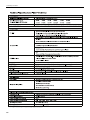
The IQAir control panel shows the timer status without the need to access the Timer related menus.
Timer Deactivated
Display’s Main Window
Timer LED
System on Standby: The first line shows the model
name and the second line shows the word
“Standby”. The Timer LED is red.
• System is on standby
• Timer is deactivated
System Running: The first line shows the fan
speed and the second line shows the airflow. The
Timer LED is off.
• System is running
• Timer is deactivated
red
off
Timer Activated
Display’s Main Window
System on Standby: The first line shows the
current day and time and the second line shows the
next time the system will turn on. The Timer LED is
green.
System Running: The first line shows the fan
speed and the second line shows the current Timer
ON period (start and stop times). The Timer LED is
green.
• System is on standby
• Timer activated to start on Thursday
• System is running
• Timer is activated
Timer LED
green
green
17